

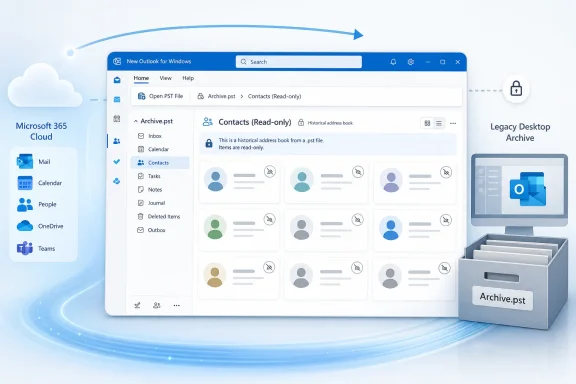
Microsoft has launched read-only access to contacts stored inside Outlook Data Files, or .pst files, in the new Outlook for Windows for Government Community Cloud users, with general availability dated September 2025 under Microsoft 365 Roadmap ID 485756 and the status now marked Launched. The feature lets users browse historical contact records without first importing or rewriting them, but it does not turn new Outlook into a full replacement for classic Outlook’s mature PST tooling. That distinction matters because a contact archive is useful only if users understand whether they are viewing a record, editing a working address book, or migrating data into a supported mailbox. Microsoft has closed one conspicuous compatibility gap, yet the larger PST transition remains unfinished.
A PST file is often described as an email archive, but that description understates what the format has accumulated over decades of Outlook use. An Outlook Data File can contain messages alongside contacts, calendar entries, tasks, notes, and other locally stored items, making it less like a folder of old mail and more like a portable database of a user’s working history.
That breadth is precisely why partial PST support has been such a persistent weakness in the new Outlook for Windows. Opening old messages is valuable, but it does not solve the problem for an executive assistant looking for a former supplier’s phone number, an investigator reviewing a departed employee’s contact records, or an administrator validating the contents of an archive before migration.
Roadmap ID 485756 addresses that missing layer by allowing users to browse and read contacts inside a PST. Microsoft calls the feature read-only, and that word should govern every deployment decision around it: the PST contact collection becomes visible, but it should not be treated as a normal, editable contacts folder.
The feature is therefore more meaningful than its narrow description suggests, but less transformative than the phrase “PST support” might imply. It improves access, not full data lifecycle management.
Microsoft’s approach has been incremental. Its support documentation describes different levels of PST functionality depending on the Outlook version, while its new Outlook release notes have separately documented improvements such as opening files, reading and searching archived email, managing messages and folders, moving messages between a mailbox and PST, and viewing contact details associated with archived messages.
The new contact-browsing capability fills a different gap. Viewing a sender’s contact card from an archived email is not the same as opening the PST’s contacts collection and browsing records directly. Roadmap ID 485756 is important because it treats contacts as stored items in their own right rather than as metadata attached to a message.
That difference will be obvious in archives containing contacts that never exchanged mail with the current user, records imported from older systems, shared business address books, or personal contacts preserved during a mailbox migration. Those entries can exist independently of any message that would otherwise expose their details.
This is Microsoft rebuilding a desktop data model inside a newer application architecture, one workload at a time. The result is progress, but also a growing matrix of operations that users and administrators must distinguish carefully.
A user who can see a contact may reasonably expect to correct its phone number, change an address, add a category, delete a duplicate, or use the PST folder as an actively maintained address book. Roadmap ID 485756 promises none of those operations. It says users can browse and read contacts, while future releases will expand PST capabilities.
That makes the feature suitable for reference and discovery. It does not make it suitable for ongoing contact management, archive cleanup, or any workflow that depends on writing changes back to the PST.
This boundary matters because local archives frequently become unofficial business systems. A small company may keep customer contacts in a PST created years earlier. A government employee may have received a handoff archive from a predecessor. A legal or records team may hold PST files from former personnel, preserving the contacts alongside the messages that establish context.
In each case, read-only access improves visibility while preserving a separation between the archive and the user’s active mailbox. That can be operationally desirable: a user cannot accidentally reorganize or overwrite the original contact records merely by browsing them in new Outlook.
Read-only access is not the same as evidentiary immutability, however. A PST remains a file on the endpoint, and the Outlook interface’s inability to edit its contacts does not by itself turn that file into a protected records repository. File-system access, copying, replacement, deletion, backup behavior, retention controls, and chain-of-custody requirements still sit outside the feature described by the roadmap.
Administrators should therefore resist two opposite mistakes. They should not dismiss the capability as cosmetic, because direct access to archived contact records can remove a genuine blocker. They also should not present it as complete PST support, because many familiar classic Outlook operations remain outside the scope of this launch.
The safest user-facing description is literal: “You can open the PST’s contacts and read their details, but you should continue using your supported mailbox or approved system to maintain working contacts.” That sentence establishes the mental model Microsoft’s product label alone may not communicate.
The table exposes the core deployment problem: “supported” is not a single condition. An application may support opening a PST, support mail operations inside it, support viewing selected contact information, and still not support the workflow an employee actually performs.
Classic Outlook developed its PST behavior over many years around a local Windows application model. The new Outlook for Windows is attempting to provide modern service integration and a more consistent interface while selectively restoring desktop capabilities that do not map neatly onto a web-oriented client.
PST files are one of the hardest parts of that transition because they represent the opposite of Microsoft’s cloud-first direction. They are local, stateful, potentially large, sometimes password-protected, commonly copied between machines, and capable of holding several Outlook item types in one file.
Microsoft cannot simply treat a PST as another Exchange mailbox. It needs file handling, item parsing, folder navigation, search, write controls, and compatibility behavior that remain dependable across files created by different Outlook generations. Each added operation expands the testing surface.
That helps explain why the new Outlook’s PST support has arrived as a sequence rather than a single compatibility milestone. Reading email is one problem. Managing mail folders is another. Moving data between a mailbox and PST is another. Exposing contacts as a browsable collection adds another set of item types, fields, views, and edge cases.
For users, the rollout can feel arbitrary: one item type appears while another operation remains absent. For Microsoft, this is controlled expansion around a file format capable of carrying decades of legacy behavior.
The practical consequence is that administrators cannot evaluate new Outlook readiness from a generic checklist saying “PST files supported.” They need to inventory actual operations: opening archives, searching mail, moving messages, replying from stored messages, browsing contacts, editing contacts, importing data, exporting data, and handling files on different device architectures.
A single unsupported operation can be enough to block a department’s migration. Conversely, a team that only needs occasional reference access may find the new Outlook increasingly adequate even while full parity remains distant.
Government organizations are unusually likely to encounter durable archives, long retention periods, employee-transition files, public-records obligations, investigations, and data collected from systems that cannot be assumed to remain online indefinitely. PST files persist in that world because they are portable, familiar, and often already embedded in records-handling procedures.
That does not make PST the ideal modern records format. It does make the ability to inspect all major categories of data inside one consequential.
Consider a personnel handoff archive. Its messages may document decisions, while its contact records identify external officials, contractors, witnesses, partner organizations, or institutional contacts. If new Outlook reveals the messages but hides the contacts folder, the archive is technically open yet operationally incomplete.
Read-only contact access closes part of that completeness gap without encouraging users to maintain new information inside the old file. For government tenants, that is a defensible compromise: improve retrieval while stopping short of presenting local PST storage as the future of collaboration.
The feature may also reduce unnecessary switching between clients. A user who has otherwise adopted new Outlook should not need to launch classic Outlook solely to retrieve a phone number or postal address from an old contact record. Even a small reduction in client switching can matter across managed fleets where help-desk documentation, application defaults, user training, and support ownership are being reorganized around the new client.
But the GCC label also raises a deployment discipline issue. Administrators should validate the feature in the tenant and update context they actually manage rather than relying on screenshots or reports from another Microsoft 365 cloud. A roadmap status of Launched indicates Microsoft considers the release delivered for the listed scope; it does not guarantee that every endpoint will present an identical experience regardless of application state, architecture, licensing, policy, or installation prerequisites.
The correct operational response is targeted validation, not an assumption of universal parity.
Microsoft’s support pages supply more detail, and that detail exposes the complexity underneath the launch. The company says opening PST files in new Outlook currently requires classic Outlook to be installed, with the two applications using matching 32-bit or 64-bit architectures. It also says PST support is unavailable in the ARM version of new Outlook and that the account used in new Outlook must have an appropriate Microsoft 365 subscription.
Those conditions matter far more to an administrator than the attractive simplicity of “browse and read contacts.” A feature may be present in the application’s interface yet unusable on a particular device because the underlying PST prerequisites have not been satisfied.
The continuing classic Outlook dependency is especially revealing. New Outlook can provide a modern interface for PST access while still depending on components associated with the older client. Until Microsoft removes that requirement, administrators cannot interpret every new PST capability as permission to uninstall classic Outlook.
Microsoft’s support material says it plans to remove the requirement that classic Outlook be installed for new Outlook to use PSTs. It also describes planned bulk importing of mail, calendar, and contacts from a PST into a mailbox. Those statements indicate the direction of travel, but Roadmap ID 485756 itself is narrower: contacts become browsable and readable.
The distinction between roadmap delivery and support-page completeness creates another problem. Microsoft’s import documentation has stated that calendar and contact items in PST files are not accessible in the described version of new Outlook, while the GCC roadmap now marks read-only contact access as Launched.
The most plausible explanation is scope or documentation timing rather than an actual contradiction in the product. A general support page can lag a cloud-specific release, describe a different version, or summarize the broad public experience without reflecting every staged capability.
Administrators should nevertheless treat the mismatch as a warning. When Microsoft’s roadmap, release notes, feature-comparison matrix, and procedural support pages describe overlapping functionality at different levels of precision, no single page is enough to authorize a migration.
A roadmap entry answers whether Microsoft planned and launched a capability. A support article answers how Microsoft currently documents its use. A feature matrix indicates relative parity. Endpoint testing determines whether the workflow actually succeeds in the organization’s environment.
This layered evidence is not bureaucratic overkill. It is the minimum required when the same phrase—PST support—can refer to read access, contact browsing, message management, import, export, file creation, or complete classic-client behavior.
Microsoft would make this transition easier by consolidating PST capabilities into an operation-level matrix maintained alongside new Outlook releases. Until then, IT departments will need to build their own.
When contacts appear in an application’s People experience, users may assume the records now belong to their Microsoft 365 mailbox. They may expect them to synchronize to another computer, appear in mobile Outlook, feed recipient suggestions, remain available after the PST is detached, or be governed like mailbox contacts.
Roadmap ID 485756 does not establish any of those outcomes. It establishes the ability to browse and read contacts within the PST file.
That location matters. If a contact remains inside the PST, its availability is still tied to the file and to Outlook’s ability to open it. Removing the file, moving to an unsupported device, changing the installation, or failing to copy the archive during a PC replacement can change what the user sees.
Administrators should distinguish three states in training and documentation. An archived contact is a record being read from a PST. A mailbox contact is an active item stored in the user’s service-backed contacts. A directory entry is an organizational identity resolved through the employer’s address system.
Those records may display similar names and fields, but they have different owners, synchronization behavior, retention implications, and editing models. New Outlook’s interface can make those boundaries visually less obvious even when they remain technically decisive.
This is particularly important when an old PST contains the only copy of a contact. Read-only access solves the immediate retrieval problem but not the continuity problem. If the contact is still needed for ongoing work, the organization needs an approved process for bringing the necessary information into a maintained system rather than leaving it indefinitely inside a personal archive.
That process should not be improvised by every employee. Depending on policy, organizations may require mailbox import, controlled migration, a customer relationship system, a departmental directory, or records review before information is reused.
Duplicate contacts are another likely source of confusion. A user may see one version in the PST, another in the mailbox, and a third in the organizational directory. Because the PST record is read-only, the user cannot resolve the discrepancy at its source from new Outlook.
The correct record may depend on context and date. An archived address can be historically accurate even if it is no longer operationally current. Replacing it would damage the archive’s value, while copying it blindly could contaminate the active address book.
Read-only access is therefore not merely an incomplete editing feature. It can serve as a useful preservation boundary—provided users understand which side of that boundary they are viewing.
September 2025 — The roadmap lists general availability for the GCC release.
July 10, 2026 — Microsoft last updated the roadmap entry, which is now marked Launched.
The progression from creation to general availability and then to a later status update does not mean the basic capability changed each time. It shows the difference between announcing a plan, assigning an availability period, and maintaining the roadmap record after delivery.
For IT teams, those stages should map to different activities. The planning stage is the time to inventory dependencies. The availability period is the time to test. A launched state is the time to verify production behavior and update support guidance—but not to assume every adjacent limitation has disappeared.
This is especially relevant to new Outlook because its readiness is cumulative. An organization may have rejected it earlier because PST contacts were invisible. Once that blocker is removed, the organization must reevaluate the remaining blockers rather than recycling the old decision or jumping directly to full deployment.
The feature should trigger a fresh workflow assessment, not an automatic verdict.
Organizations do not experience Outlook as one indivisible application. They experience hundreds of workflows: opening a shared mailbox, filing a message, running an add-in, searching an archive, editing a local contact, managing a delegate’s calendar, using a line-of-business integration, or exporting records during an employee departure.
New Outlook becomes viable for a user when the user’s required workflows are supported with acceptable reliability and governance. It does not become viable merely because Microsoft adds another item to a feature list.
Roadmap ID 485756 may be decisive for a records reviewer who only needs to inspect archived contacts. It may be irrelevant to a user who never opens PST files. It may be insufficient for an administrator who must edit contacts, repair archives, or perform broader migration operations.
That variability argues against organization-wide declarations that new Outlook is either “ready” or “not ready.” Readiness should be assigned by persona and dependency.
A cloud-first knowledge worker with no PST files may already be a straightforward candidate. A records team handling historical archives may benefit from the new contact reader while retaining classic Outlook for exceptional operations. A user whose business process treats a PST as an active local database remains a poor migration candidate until that process changes or the required capabilities arrive.
The contact feature also provides an opportunity to reduce PST dependence rather than perpetuate it. When users can finally see what is inside their archives from new Outlook, organizations can identify which contact collections still have business value, which are duplicates, and which should remain preserved but inactive.
That is a better outcome than simply making old behavior permanent. Microsoft’s stated promise that future releases will expand PST capabilities should not be interpreted as a strategic endorsement of PST-based work. It is compatibility work designed to make the transition less destructive.
The strongest migration plan will use new compatibility features to unlock data and then move active work toward managed, service-backed systems.
 Microsoft Is Restoring Access One Workload at a Time
A PST file is often described as an email archive, but that description understates what the format has accumulated over decades of Outlook use. An Outlook Data File can contain messages alongside contacts, calendar entries, tasks, notes, and other locally stored items, making it less like a folder of old mail and more like a portable database of a user’s working history.That breadth is precisely why partial PST support has been such a persistent weakness in the new Outlook for Windows. Opening old messages is valuable, but it does not solve the problem for an executive assistant looking for a former supplier’s phone number, an investigator reviewing a departed employee’s contact records, or an administrator validating the contents of an archive before migration.
Roadmap ID 485756 addresses that missing layer by allowing users to browse and read contacts inside a PST. Microsoft calls the feature read-only, and that word should govern every deployment decision around it: the PST contact collection becomes visible, but it should not be treated as a normal, editable contacts folder.
The feature is therefore more meaningful than its narrow description suggests, but less transformative than the phrase “PST support” might imply. It improves access, not full data lifecycle management.
Microsoft’s approach has been incremental. Its support documentation describes different levels of PST functionality depending on the Outlook version, while its new Outlook release notes have separately documented improvements such as opening files, reading and searching archived email, managing messages and folders, moving messages between a mailbox and PST, and viewing contact details associated with archived messages.
The new contact-browsing capability fills a different gap. Viewing a sender’s contact card from an archived email is not the same as opening the PST’s contacts collection and browsing records directly. Roadmap ID 485756 is important because it treats contacts as stored items in their own right rather than as metadata attached to a message.
That difference will be obvious in archives containing contacts that never exchanged mail with the current user, records imported from older systems, shared business address books, or personal contacts preserved during a mailbox migration. Those entries can exist independently of any message that would otherwise expose their details.
This is Microsoft rebuilding a desktop data model inside a newer application architecture, one workload at a time. The result is progress, but also a growing matrix of operations that users and administrators must distinguish carefully.
Read-Only Is a Compatibility Boundary, Not a Minor Limitation
The most important fact about the launch is not that contacts appear. It is that they appear without becoming writable Outlook data.A user who can see a contact may reasonably expect to correct its phone number, change an address, add a category, delete a duplicate, or use the PST folder as an actively maintained address book. Roadmap ID 485756 promises none of those operations. It says users can browse and read contacts, while future releases will expand PST capabilities.
That makes the feature suitable for reference and discovery. It does not make it suitable for ongoing contact management, archive cleanup, or any workflow that depends on writing changes back to the PST.
This boundary matters because local archives frequently become unofficial business systems. A small company may keep customer contacts in a PST created years earlier. A government employee may have received a handoff archive from a predecessor. A legal or records team may hold PST files from former personnel, preserving the contacts alongside the messages that establish context.
In each case, read-only access improves visibility while preserving a separation between the archive and the user’s active mailbox. That can be operationally desirable: a user cannot accidentally reorganize or overwrite the original contact records merely by browsing them in new Outlook.
Read-only access is not the same as evidentiary immutability, however. A PST remains a file on the endpoint, and the Outlook interface’s inability to edit its contacts does not by itself turn that file into a protected records repository. File-system access, copying, replacement, deletion, backup behavior, retention controls, and chain-of-custody requirements still sit outside the feature described by the roadmap.
Administrators should therefore resist two opposite mistakes. They should not dismiss the capability as cosmetic, because direct access to archived contact records can remove a genuine blocker. They also should not present it as complete PST support, because many familiar classic Outlook operations remain outside the scope of this launch.
The safest user-facing description is literal: “You can open the PST’s contacts and read their details, but you should continue using your supported mailbox or approved system to maintain working contacts.” That sentence establishes the mental model Microsoft’s product label alone may not communicate.
Classic Outlook Still Defines the Full PST Experience
Microsoft’s own feature comparison describes PST support in new Outlook as only partially available, while classic Outlook retains broader support. The contact launch reduces that difference, but it does not erase it.| PST contact workflow | Classic Outlook | New Outlook with Roadmap ID 485756 | Practical consequence |
|---|---|---|---|
| Browse contacts stored in a PST | Available | Available read-only | Archived contact details can be reviewed |
| Read individual contact records | Available | Available read-only | Users can retrieve names, addresses, and other stored details |
| Edit contacts inside the PST | Available | Not included in this launch | Corrections require another supported workflow |
| Use the PST as a working contact store | Supported by the mature desktop model | Not established by this launch | Organizations should not redesign contact management around the feature |
| Broader PST operations | Available across the classic client | Partially available and expanding | Classic Outlook may still be required for dependent workflows |
Classic Outlook developed its PST behavior over many years around a local Windows application model. The new Outlook for Windows is attempting to provide modern service integration and a more consistent interface while selectively restoring desktop capabilities that do not map neatly onto a web-oriented client.
PST files are one of the hardest parts of that transition because they represent the opposite of Microsoft’s cloud-first direction. They are local, stateful, potentially large, sometimes password-protected, commonly copied between machines, and capable of holding several Outlook item types in one file.
Microsoft cannot simply treat a PST as another Exchange mailbox. It needs file handling, item parsing, folder navigation, search, write controls, and compatibility behavior that remain dependable across files created by different Outlook generations. Each added operation expands the testing surface.
That helps explain why the new Outlook’s PST support has arrived as a sequence rather than a single compatibility milestone. Reading email is one problem. Managing mail folders is another. Moving data between a mailbox and PST is another. Exposing contacts as a browsable collection adds another set of item types, fields, views, and edge cases.
For users, the rollout can feel arbitrary: one item type appears while another operation remains absent. For Microsoft, this is controlled expansion around a file format capable of carrying decades of legacy behavior.
The practical consequence is that administrators cannot evaluate new Outlook readiness from a generic checklist saying “PST files supported.” They need to inventory actual operations: opening archives, searching mail, moving messages, replying from stored messages, browsing contacts, editing contacts, importing data, exporting data, and handling files on different device architectures.
A single unsupported operation can be enough to block a department’s migration. Conversely, a team that only needs occasional reference access may find the new Outlook increasingly adequate even while full parity remains distant.
GCC Gets a Narrow Feature With Outsized Records Value
The roadmap entry is specifically associated with GCC, Microsoft’s government cloud environment. That scope should not be flattened into a claim that every new Outlook user in every Microsoft 365 cloud has received precisely the same feature at the same time.Government organizations are unusually likely to encounter durable archives, long retention periods, employee-transition files, public-records obligations, investigations, and data collected from systems that cannot be assumed to remain online indefinitely. PST files persist in that world because they are portable, familiar, and often already embedded in records-handling procedures.
That does not make PST the ideal modern records format. It does make the ability to inspect all major categories of data inside one consequential.
Consider a personnel handoff archive. Its messages may document decisions, while its contact records identify external officials, contractors, witnesses, partner organizations, or institutional contacts. If new Outlook reveals the messages but hides the contacts folder, the archive is technically open yet operationally incomplete.
Read-only contact access closes part of that completeness gap without encouraging users to maintain new information inside the old file. For government tenants, that is a defensible compromise: improve retrieval while stopping short of presenting local PST storage as the future of collaboration.
The feature may also reduce unnecessary switching between clients. A user who has otherwise adopted new Outlook should not need to launch classic Outlook solely to retrieve a phone number or postal address from an old contact record. Even a small reduction in client switching can matter across managed fleets where help-desk documentation, application defaults, user training, and support ownership are being reorganized around the new client.
But the GCC label also raises a deployment discipline issue. Administrators should validate the feature in the tenant and update context they actually manage rather than relying on screenshots or reports from another Microsoft 365 cloud. A roadmap status of Launched indicates Microsoft considers the release delivered for the listed scope; it does not guarantee that every endpoint will present an identical experience regardless of application state, architecture, licensing, policy, or installation prerequisites.
The correct operational response is targeted validation, not an assumption of universal parity.
Microsoft’s Documentation Reveals the Cost of Incremental Delivery
Roadmap entries are concise by design. They announce scope, status, platform, cloud, and intended availability, but they rarely document every prerequisite or interaction with adjacent features.Microsoft’s support pages supply more detail, and that detail exposes the complexity underneath the launch. The company says opening PST files in new Outlook currently requires classic Outlook to be installed, with the two applications using matching 32-bit or 64-bit architectures. It also says PST support is unavailable in the ARM version of new Outlook and that the account used in new Outlook must have an appropriate Microsoft 365 subscription.
Those conditions matter far more to an administrator than the attractive simplicity of “browse and read contacts.” A feature may be present in the application’s interface yet unusable on a particular device because the underlying PST prerequisites have not been satisfied.
The continuing classic Outlook dependency is especially revealing. New Outlook can provide a modern interface for PST access while still depending on components associated with the older client. Until Microsoft removes that requirement, administrators cannot interpret every new PST capability as permission to uninstall classic Outlook.
Microsoft’s support material says it plans to remove the requirement that classic Outlook be installed for new Outlook to use PSTs. It also describes planned bulk importing of mail, calendar, and contacts from a PST into a mailbox. Those statements indicate the direction of travel, but Roadmap ID 485756 itself is narrower: contacts become browsable and readable.
The distinction between roadmap delivery and support-page completeness creates another problem. Microsoft’s import documentation has stated that calendar and contact items in PST files are not accessible in the described version of new Outlook, while the GCC roadmap now marks read-only contact access as Launched.
The most plausible explanation is scope or documentation timing rather than an actual contradiction in the product. A general support page can lag a cloud-specific release, describe a different version, or summarize the broad public experience without reflecting every staged capability.
Administrators should nevertheless treat the mismatch as a warning. When Microsoft’s roadmap, release notes, feature-comparison matrix, and procedural support pages describe overlapping functionality at different levels of precision, no single page is enough to authorize a migration.
A roadmap entry answers whether Microsoft planned and launched a capability. A support article answers how Microsoft currently documents its use. A feature matrix indicates relative parity. Endpoint testing determines whether the workflow actually succeeds in the organization’s environment.
This layered evidence is not bureaucratic overkill. It is the minimum required when the same phrase—PST support—can refer to read access, contact browsing, message management, import, export, file creation, or complete classic-client behavior.
Microsoft would make this transition easier by consolidating PST capabilities into an operation-level matrix maintained alongside new Outlook releases. Until then, IT departments will need to build their own.
Contact Visibility Does Not Equal Contact Migration
The feature’s greatest risk is not technical failure. It is users mistaking visibility for migration.When contacts appear in an application’s People experience, users may assume the records now belong to their Microsoft 365 mailbox. They may expect them to synchronize to another computer, appear in mobile Outlook, feed recipient suggestions, remain available after the PST is detached, or be governed like mailbox contacts.
Roadmap ID 485756 does not establish any of those outcomes. It establishes the ability to browse and read contacts within the PST file.
That location matters. If a contact remains inside the PST, its availability is still tied to the file and to Outlook’s ability to open it. Removing the file, moving to an unsupported device, changing the installation, or failing to copy the archive during a PC replacement can change what the user sees.
Administrators should distinguish three states in training and documentation. An archived contact is a record being read from a PST. A mailbox contact is an active item stored in the user’s service-backed contacts. A directory entry is an organizational identity resolved through the employer’s address system.
Those records may display similar names and fields, but they have different owners, synchronization behavior, retention implications, and editing models. New Outlook’s interface can make those boundaries visually less obvious even when they remain technically decisive.
This is particularly important when an old PST contains the only copy of a contact. Read-only access solves the immediate retrieval problem but not the continuity problem. If the contact is still needed for ongoing work, the organization needs an approved process for bringing the necessary information into a maintained system rather than leaving it indefinitely inside a personal archive.
That process should not be improvised by every employee. Depending on policy, organizations may require mailbox import, controlled migration, a customer relationship system, a departmental directory, or records review before information is reused.
Duplicate contacts are another likely source of confusion. A user may see one version in the PST, another in the mailbox, and a third in the organizational directory. Because the PST record is read-only, the user cannot resolve the discrepancy at its source from new Outlook.
The correct record may depend on context and date. An archived address can be historically accurate even if it is no longer operationally current. Replacing it would damage the archive’s value, while copying it blindly could contaminate the active address book.
Read-only access is therefore not merely an incomplete editing feature. It can serve as a useful preservation boundary—provided users understand which side of that boundary they are viewing.
The Rollout’s Dates Tell a Story of Long-Tail Compatibility
Roadmap ID 485756 was created well before its latest recorded update, illustrating how seemingly small compatibility features can move through Microsoft’s planning and delivery system over an extended period. The dates also show why reporting based on an early roadmap snapshot can quickly become misleading.Timeline
March 18, 2025 — Microsoft created Roadmap ID 485756 for read-only access to contacts within a PST file in new Outlook for Windows.September 2025 — The roadmap lists general availability for the GCC release.
July 10, 2026 — Microsoft last updated the roadmap entry, which is now marked Launched.
The progression from creation to general availability and then to a later status update does not mean the basic capability changed each time. It shows the difference between announcing a plan, assigning an availability period, and maintaining the roadmap record after delivery.
For IT teams, those stages should map to different activities. The planning stage is the time to inventory dependencies. The availability period is the time to test. A launched state is the time to verify production behavior and update support guidance—but not to assume every adjacent limitation has disappeared.
This is especially relevant to new Outlook because its readiness is cumulative. An organization may have rejected it earlier because PST contacts were invisible. Once that blocker is removed, the organization must reevaluate the remaining blockers rather than recycling the old decision or jumping directly to full deployment.
The feature should trigger a fresh workflow assessment, not an automatic verdict.
The Real Migration Unit Is the Workflow, Not the Application
Microsoft’s new Outlook strategy is frequently discussed as a contest between two clients: classic Outlook and new Outlook. That framing is convenient but operationally weak.Organizations do not experience Outlook as one indivisible application. They experience hundreds of workflows: opening a shared mailbox, filing a message, running an add-in, searching an archive, editing a local contact, managing a delegate’s calendar, using a line-of-business integration, or exporting records during an employee departure.
New Outlook becomes viable for a user when the user’s required workflows are supported with acceptable reliability and governance. It does not become viable merely because Microsoft adds another item to a feature list.
Roadmap ID 485756 may be decisive for a records reviewer who only needs to inspect archived contacts. It may be irrelevant to a user who never opens PST files. It may be insufficient for an administrator who must edit contacts, repair archives, or perform broader migration operations.
That variability argues against organization-wide declarations that new Outlook is either “ready” or “not ready.” Readiness should be assigned by persona and dependency.
A cloud-first knowledge worker with no PST files may already be a straightforward candidate. A records team handling historical archives may benefit from the new contact reader while retaining classic Outlook for exceptional operations. A user whose business process treats a PST as an active local database remains a poor migration candidate until that process changes or the required capabilities arrive.
The contact feature also provides an opportunity to reduce PST dependence rather than perpetuate it. When users can finally see what is inside their archives from new Outlook, organizations can identify which contact collections still have business value, which are duplicates, and which should remain preserved but inactive.
That is a better outcome than simply making old behavior permanent. Microsoft’s stated promise that future releases will expand PST capabilities should not be interpreted as a strategic endorsement of PST-based work. It is compatibility work designed to make the transition less destructive.
The strongest migration plan will use new compatibility features to unlock data and then move active work toward managed, service-backed systems.
Action Checklist for Admins
- Confirm that the affected users are in the GCC scope listed for Roadmap ID 485756.
- Verify the feature on representative production configurations before changing organization-wide guidance.
- Test browsing and reading PST contacts separately from viewing a contact card attached to an archived email.
- Keep classic Outlook available where broader PST operations or current new Outlook prerequisites still require it.
- Match the 32-bit or 64-bit architecture of classic Outlook and new Outlook when PST access depends on both clients.
- Do not plan PST workflows around the ARM version of new Outlook while Microsoft documents it as unsupported.
- Tell users explicitly that contact access is read-only and does not mean the records were imported into their mailbox.
- Preserve approved backup, retention, legal-hold, and chain-of-custody procedures; read-only UI access is not a records-control system.
- Inventory workflows that still require editing, migration, repair, or other operations beyond browsing.
- Update help-desk scripts to distinguish PST contacts, mailbox contacts, and organizational directory entries.
What This Launch Changes—and What It Deliberately Leaves Behind
Roadmap ID 485756 removes a real barrier, but its value comes from understanding its limits rather than inflating its scope. For GCC organizations considering broader use of new Outlook, the concrete conclusions are straightforward:- PST contact collections can now be browsed and read in the launched GCC scope.
- The contacts remain read-only under this feature.
- Visibility inside new Outlook does not mean contacts have been imported into a Microsoft 365 mailbox.
- New Outlook’s overall PST support remains partial compared with classic Outlook.
- Existing architecture, subscription, and classic Outlook prerequisites still need validation.
- Microsoft says future new Outlook releases will expand PST capabilities, but this launch should be assessed on what it supports now.
References
- Primary source: Microsoft 365 Roadmap
Published: 2026-07-10T21:58:35.1674832Z
Microsoft 365 Roadmap | Microsoft 365
The Microsoft 365 Roadmap lists updates that are currently planned for applicable subscribers. Check here for more information on the status of new features and updates.www.microsoft.com
- Official source: support.microsoft.com
Open and find items in an Outlook Data File (.pst) | Microsoft Support
Describes how to investigate items in an Outlook Data File (.pst) and troubleshoot search issues.support.microsoft.com - Official source: learn.microsoft.com
- Official source: cdn-dynmedia-1.microsoft.com