

Microsoft is now broadly rolling out offline attachment support for the new Outlook for Windows 11 after testing began in late 2025, but the feature still leaves Microsoft’s web-based mail client behind classic Outlook’s mature offline model. The update is real progress, not vaporware. It is also a revealing admission: Microsoft has spent years trying to replace a native workhorse with a WebView2 shell, and it is still rebuilding the old client’s table stakes one missing brick at a time.
The problem is not that web apps cannot work offline. The problem is that Outlook is not a casual inbox. It is the front door to corporate memory, compliance workflows, travel plans, legal holds, delegated mailboxes, calendar negotiations, PST archives, mail merge rituals, and the thousand small habits that keep office work from collapsing into chat-window chaos.
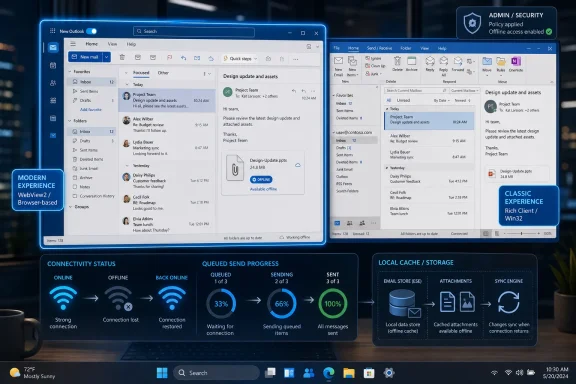
The new Outlook for Windows has always suffered from a naming problem. Microsoft calls it an Outlook app, Windows presents it as an Outlook app, and users encounter it as the successor to the old Mail and Calendar apps. But under the hood, the new Outlook is closer to Outlook on the web running inside Microsoft Edge WebView2 than it is to the Win32 Outlook client that has carried enterprises for decades.
That distinction matters because users do not judge email clients by launch strategy or architecture diagrams. They judge them by whether the inbox opens quickly, whether search works when the network flakes out, whether attachments behave predictably, and whether yesterday’s flight confirmation is still available when airport Wi-Fi decides to turn into performance art. Classic Outlook earned its place not because it was elegant, but because it was stubbornly local.
Microsoft’s bet is that Outlook should become a single service-shaped experience across Windows, Mac, web, and mobile. From Redmond’s perspective, that is rational. One codebase-adjacent experience is easier to ship, easier to secure, easier to integrate with Copilot, and easier to evolve than a sprawling set of native clients with decades of add-ins and local data assumptions.
From the user’s perspective, however, the move has often felt like a downgrade disguised as modernization. The new Outlook does not merely change the furniture. It changes the contract. Classic Outlook assumed the PC was a primary workplace; new Outlook often behaves as though the PC is a viewport for a cloud service.
In practical terms, the feature depends on local storage managed through the WebView2 app environment rather than classic Outlook’s long-familiar OST model. When offline support is enabled, the new Outlook stores cached mail data and attachment state locally so the app can queue work until the network comes back. Users who rely on it should expect greater disk usage, especially as Microsoft expands the amount of mail that can be retained offline.
That is the trade-off Microsoft cannot avoid. Offline is not magic; it is duplication. The old Outlook paid that cost openly through local mailbox files and cached Exchange mode. The new Outlook pays it through the browser-adjacent storage model of its WebView2 container, which is less visible to users but no less real on disk.
For individual users, the new setting is simple enough: Outlook’s offline options now include controls for file attachments. For administrators, the more important question is policy. If attachments can be cached locally, organizations need to decide whether that is acceptable for their risk model, especially on shared systems, lightly managed endpoints, or devices outside strong encryption and data-loss-prevention controls.
That history is why the complaints land so hard. A traveler on a train does not care whether WebView2 service workers have improved. A sysadmin dealing with executives in a boardroom does not want to explain that attachments now work offline, except when a particular account type, policy, cache state, or rollout ring says otherwise. A power user who has lived inside Outlook for twenty years does not see “modern architecture”; they see a client that takes longer to do the work the old one did instantly.
Microsoft can argue, fairly, that the new client is catching up. It has added offline mail and calendar pieces, attachment handling, PST-related improvements, signatures, folder actions, and a steady stream of quality-of-life updates. But the cadence also reinforces the criticism. The company is not merely innovating; it is reconstructing the baseline.
That is the danger of replacing a mature native application with a service-first app before parity is complete. Every new improvement becomes both a feature announcement and a reminder of what went missing.
The trouble is that email clients live or die on latency. If an app feels slower to open mail, slower to search, slower to switch accounts, or slower to render common views, users will blame the architecture whether or not the architecture is technically guilty in every case. Performance is a political fact in software adoption.
Classic Outlook is hardly a paragon of lightness. It can be bloated, cranky, profile-corrupting, add-in-haunted, and spectacularly weird under pressure. But it is native in the way that matters to its loyalists: it feels like it owns the machine it runs on. The new Outlook often feels like it is negotiating with the machine through a browser-shaped intermediary.
That perception becomes especially damaging when Microsoft removes or sidelines older Windows inbox apps. The retirement of Mail and Calendar pushed many casual users toward the new Outlook before the client had earned broad trust. The enterprise push has been more cautious, but even there Microsoft has had to slow its migration posture because large organizations are not willing to absorb missing features as a philosophical exercise.
But Outlook is not merely a Microsoft 365 endpoint. It is a dependency surface. Classic Outlook is tied into Word mail merge, COM add-ins, line-of-business workflows, shared mailbox habits, PST archives, local rules, third-party security tooling, and muscle memory so deep that changing a ribbon button can trigger help-desk tickets.
Microsoft’s own deployment guidance has effectively acknowledged the gap by recommending side-by-side availability for organizations that still depend on classic-only features. That is a reasonable mitigation, but it also weakens the sales pitch. If the safest way to deploy the new Outlook is to keep the old Outlook nearby, the replacement has not yet replaced anything.
The PST story is especially symbolic. Microsoft has been adding PST support in phases, including read-only and import-related capabilities, because enterprise history does not vanish just because cloud storage is the future. Old mail archives are ugly, risky, and administratively inconvenient. They are also real, and Outlook users expect Outlook to understand them.
But offline support is not a checkbox. It is a trust feature. Users need to know what is available before they disconnect, what will happen to a queued message, how conflicts are resolved, whether attachments are really present, and whether the app will behave the same way on Monday morning as it did in testing.
Classic Outlook built that trust through decades of repetition. The new Outlook must earn it under harsher conditions because users already suspect it is a web app wearing a desktop costume. Every partial rollout, missing toggle, delayed feature, or “coming soon” roadmap item feeds that suspicion.
For security-minded administrators, offline attachments also create a familiar policy dilemma in a new wrapper. More local cache means better resilience and worse exposure if a device is lost, compromised, or poorly managed. The decision is not simply “enable the feature because users want it.” It is “enable the feature where the device posture and data classification justify it.”
Yet the speed of feature delivery does not erase the psychology of forced migration. Users are more forgiving when they opt into a new app because it is better. They are less forgiving when an older app is deprecated, the replacement arrives incomplete, and the missing pieces return later as roadmap victories.
This is the same pattern Microsoft has repeated across Windows in different forms: a legacy component is messy, the modern replacement is cleaner, and then reality forces years of backfilling. Settings replacing Control Panel. Teams moving through multiple client generations. Edge becoming not just a browser but a runtime, a policy surface, and a strategic distribution channel. Sometimes the modern replacement wins. Sometimes it wins only after making users feel like unpaid QA.
Outlook is a tougher case because it is both personal and institutional. Everyone has an inbox, but enterprise Outlook usage is full of organization-specific rituals. Microsoft can standardize the app, but it cannot standardize the way every business has bent Outlook around its own processes.
That does not make the strategy illegitimate. Most users do live in connected environments most of the time, and Microsoft has genuine security, manageability, and development reasons to prefer web-backed experiences. A consistent Outlook across platforms may reduce training friction and allow features like Copilot-assisted summarization to appear faster.
But Windows users still expect Windows applications to respect the local machine. They expect fast launch, predictable storage, robust offline behavior, and OS-level integration that feels native rather than borrowed. The new Outlook asks users to accept a cloud app as the default Windows mail client before it has fully internalized what a Windows mail client is supposed to survive.
That is why the offline attachment update feels larger than its changelog entry. It is not just about sending a file from a plane. It is about whether Microsoft’s modern Windows strategy can preserve the practical virtues that made desktop software durable in the first place.
For businesses, the calculation is slower and more procedural. The new Outlook should be tested by role, not merely by license count. A frontline worker with a straightforward mailbox may be fine. A finance user with years of PST archives, shared mailboxes, templates, and mail merge dependencies may not be.
The offline attachment feature belongs in pilot plans, not victory laps. IT teams should verify how much data is cached, how policies apply, whether attachments behave across account types, and what happens when devices move between managed and unmanaged network conditions. They should also document the fallback path to classic Outlook while that fallback still exists.
Microsoft has delayed and softened parts of the enterprise transition before, and that is the right instinct. The company may want one Outlook, but it cannot wish away the operational debt embedded in classic Outlook deployments. Migration succeeds when users stop noticing the replacement. New Outlook is not there yet for too many people.
New Outlook is still too interesting. Its architecture is debated. Its missing features are tracked. Its performance is compared in seconds. Its offline support arrives in pieces. Its relationship to Edge and WebView2 becomes part of the user conversation, which is precisely the kind of implementation detail a successful productivity app should make invisible.
Microsoft’s challenge is therefore not just to add features. It is to make the new Outlook disappear into the work. The app needs to feel less like a strategic platform migration and more like a reliable inbox. That requires performance work, offline completeness, administrative clarity, and a much stronger sense that local Windows behavior is not an afterthought.
If Microsoft gets there, the web-based architecture will eventually matter less. Users do not care whether an email client is native, hybrid, or powered by a tiny committee of service workers if it behaves quickly and reliably. But until then, “it’s a web app” will remain the shorthand for every delay, glitch, missing command, and offline surprise.
The problem is not that web apps cannot work offline. The problem is that Outlook is not a casual inbox. It is the front door to corporate memory, compliance workflows, travel plans, legal holds, delegated mailboxes, calendar negotiations, PST archives, mail merge rituals, and the thousand small habits that keep office work from collapsing into chat-window chaos.
 Microsoft’s Outlook Problem Is Architectural, Not Cosmetic
The new Outlook for Windows has always suffered from a naming problem. Microsoft calls it an Outlook app, Windows presents it as an Outlook app, and users encounter it as the successor to the old Mail and Calendar apps. But under the hood, the new Outlook is closer to Outlook on the web running inside Microsoft Edge WebView2 than it is to the Win32 Outlook client that has carried enterprises for decades.That distinction matters because users do not judge email clients by launch strategy or architecture diagrams. They judge them by whether the inbox opens quickly, whether search works when the network flakes out, whether attachments behave predictably, and whether yesterday’s flight confirmation is still available when airport Wi-Fi decides to turn into performance art. Classic Outlook earned its place not because it was elegant, but because it was stubbornly local.
Microsoft’s bet is that Outlook should become a single service-shaped experience across Windows, Mac, web, and mobile. From Redmond’s perspective, that is rational. One codebase-adjacent experience is easier to ship, easier to secure, easier to integrate with Copilot, and easier to evolve than a sprawling set of native clients with decades of add-ins and local data assumptions.
From the user’s perspective, however, the move has often felt like a downgrade disguised as modernization. The new Outlook does not merely change the furniture. It changes the contract. Classic Outlook assumed the PC was a primary workplace; new Outlook often behaves as though the PC is a viewport for a cloud service.
Offline Attachments Are Progress With an Asterisk
The latest offline attachment improvement gives users the ability to compose mail, add local files while disconnected, and have the message send when connectivity returns. That is exactly the sort of everyday capability an email client should have, and it is good that Microsoft is adding it. It is also striking that this is still news in 2026.In practical terms, the feature depends on local storage managed through the WebView2 app environment rather than classic Outlook’s long-familiar OST model. When offline support is enabled, the new Outlook stores cached mail data and attachment state locally so the app can queue work until the network comes back. Users who rely on it should expect greater disk usage, especially as Microsoft expands the amount of mail that can be retained offline.
That is the trade-off Microsoft cannot avoid. Offline is not magic; it is duplication. The old Outlook paid that cost openly through local mailbox files and cached Exchange mode. The new Outlook pays it through the browser-adjacent storage model of its WebView2 container, which is less visible to users but no less real on disk.
For individual users, the new setting is simple enough: Outlook’s offline options now include controls for file attachments. For administrators, the more important question is policy. If attachments can be cached locally, organizations need to decide whether that is acceptable for their risk model, especially on shared systems, lightly managed endpoints, or devices outside strong encryption and data-loss-prevention controls.
Classic Outlook Still Wins Because It Was Built for Bad Networks
The deepest frustration with the new Outlook is not that Microsoft is adding features slowly. It is that many of these features were already solved in the product Microsoft wants people to leave behind. Classic Outlook’s offline behavior is not glamorous, but it is battle-tested.That history is why the complaints land so hard. A traveler on a train does not care whether WebView2 service workers have improved. A sysadmin dealing with executives in a boardroom does not want to explain that attachments now work offline, except when a particular account type, policy, cache state, or rollout ring says otherwise. A power user who has lived inside Outlook for twenty years does not see “modern architecture”; they see a client that takes longer to do the work the old one did instantly.
Microsoft can argue, fairly, that the new client is catching up. It has added offline mail and calendar pieces, attachment handling, PST-related improvements, signatures, folder actions, and a steady stream of quality-of-life updates. But the cadence also reinforces the criticism. The company is not merely innovating; it is reconstructing the baseline.
That is the danger of replacing a mature native application with a service-first app before parity is complete. Every new improvement becomes both a feature announcement and a reminder of what went missing.
The Browser Wrapper Insult Sticks Because Users Can Feel It
Calling the new Outlook “just a web wrapper” is an oversimplification, but it is an emotionally accurate one for many users. WebView2 apps can integrate deeply with Windows, and modern web platforms can support offline storage, notifications, background sync, and local caching. The technology is not inherently unserious.The trouble is that email clients live or die on latency. If an app feels slower to open mail, slower to search, slower to switch accounts, or slower to render common views, users will blame the architecture whether or not the architecture is technically guilty in every case. Performance is a political fact in software adoption.
Classic Outlook is hardly a paragon of lightness. It can be bloated, cranky, profile-corrupting, add-in-haunted, and spectacularly weird under pressure. But it is native in the way that matters to its loyalists: it feels like it owns the machine it runs on. The new Outlook often feels like it is negotiating with the machine through a browser-shaped intermediary.
That perception becomes especially damaging when Microsoft removes or sidelines older Windows inbox apps. The retirement of Mail and Calendar pushed many casual users toward the new Outlook before the client had earned broad trust. The enterprise push has been more cautious, but even there Microsoft has had to slow its migration posture because large organizations are not willing to absorb missing features as a philosophical exercise.
Microsoft Wants One Outlook, But Enterprises Still Need Two
The commercial logic behind the new Outlook is obvious. Microsoft wants one Outlook experience that can move faster, expose cloud features consistently, and reduce the maintenance drag of classic Windows code. That is the kind of platform simplification every large software vendor eventually attempts.But Outlook is not merely a Microsoft 365 endpoint. It is a dependency surface. Classic Outlook is tied into Word mail merge, COM add-ins, line-of-business workflows, shared mailbox habits, PST archives, local rules, third-party security tooling, and muscle memory so deep that changing a ribbon button can trigger help-desk tickets.
Microsoft’s own deployment guidance has effectively acknowledged the gap by recommending side-by-side availability for organizations that still depend on classic-only features. That is a reasonable mitigation, but it also weakens the sales pitch. If the safest way to deploy the new Outlook is to keep the old Outlook nearby, the replacement has not yet replaced anything.
The PST story is especially symbolic. Microsoft has been adding PST support in phases, including read-only and import-related capabilities, because enterprise history does not vanish just because cloud storage is the future. Old mail archives are ugly, risky, and administratively inconvenient. They are also real, and Outlook users expect Outlook to understand them.
Offline Mail Is a Trust Feature, Not a Convenience Feature
Microsoft’s incremental offline work should not be dismissed. Being able to browse more mail offline, use calendar functions, open or sync attachments, and queue messages with attached files all move the new Outlook toward credibility. If Microsoft extends offline retention to one or two years of mail, that will matter to users who spend time away from reliable connectivity.But offline support is not a checkbox. It is a trust feature. Users need to know what is available before they disconnect, what will happen to a queued message, how conflicts are resolved, whether attachments are really present, and whether the app will behave the same way on Monday morning as it did in testing.
Classic Outlook built that trust through decades of repetition. The new Outlook must earn it under harsher conditions because users already suspect it is a web app wearing a desktop costume. Every partial rollout, missing toggle, delayed feature, or “coming soon” roadmap item feeds that suspicion.
For security-minded administrators, offline attachments also create a familiar policy dilemma in a new wrapper. More local cache means better resilience and worse exposure if a device is lost, compromised, or poorly managed. The decision is not simply “enable the feature because users want it.” It is “enable the feature where the device posture and data classification justify it.”
The Feature Gap Is Narrowing, But the Confidence Gap Is Not
Microsoft has been shipping improvements at a meaningful pace. The new Outlook has gained capabilities that were conspicuously absent at launch, and the company appears to understand that offline mode, PST handling, unified inbox views, and mail merge-adjacent workflows are not edge cases. They are part of the Outlook identity.Yet the speed of feature delivery does not erase the psychology of forced migration. Users are more forgiving when they opt into a new app because it is better. They are less forgiving when an older app is deprecated, the replacement arrives incomplete, and the missing pieces return later as roadmap victories.
This is the same pattern Microsoft has repeated across Windows in different forms: a legacy component is messy, the modern replacement is cleaner, and then reality forces years of backfilling. Settings replacing Control Panel. Teams moving through multiple client generations. Edge becoming not just a browser but a runtime, a policy surface, and a strategic distribution channel. Sometimes the modern replacement wins. Sometimes it wins only after making users feel like unpaid QA.
Outlook is a tougher case because it is both personal and institutional. Everyone has an inbox, but enterprise Outlook usage is full of organization-specific rituals. Microsoft can standardize the app, but it cannot standardize the way every business has bent Outlook around its own processes.
Windows 11 Becomes the Delivery Vehicle for a Cloud Argument
Windows 11’s role in this story is not passive. The operating system has increasingly become the surface through which Microsoft delivers cloud-first defaults: account nudges, Edge integrations, OneDrive assumptions, Microsoft 365 entry points, and inbox apps that behave like service clients. New Outlook fits that pattern perfectly.That does not make the strategy illegitimate. Most users do live in connected environments most of the time, and Microsoft has genuine security, manageability, and development reasons to prefer web-backed experiences. A consistent Outlook across platforms may reduce training friction and allow features like Copilot-assisted summarization to appear faster.
But Windows users still expect Windows applications to respect the local machine. They expect fast launch, predictable storage, robust offline behavior, and OS-level integration that feels native rather than borrowed. The new Outlook asks users to accept a cloud app as the default Windows mail client before it has fully internalized what a Windows mail client is supposed to survive.
That is why the offline attachment update feels larger than its changelog entry. It is not just about sending a file from a plane. It is about whether Microsoft’s modern Windows strategy can preserve the practical virtues that made desktop software durable in the first place.
The Real Migration Plan Is Patience, Policy, and Skepticism
For home users, the calculation is simple: if the new Outlook now does enough, use it; if it feels slow or incomplete, classic Outlook remains the better tool where available. There is no moral victory in suffering through a mail client that makes ordinary work harder.For businesses, the calculation is slower and more procedural. The new Outlook should be tested by role, not merely by license count. A frontline worker with a straightforward mailbox may be fine. A finance user with years of PST archives, shared mailboxes, templates, and mail merge dependencies may not be.
The offline attachment feature belongs in pilot plans, not victory laps. IT teams should verify how much data is cached, how policies apply, whether attachments behave across account types, and what happens when devices move between managed and unmanaged network conditions. They should also document the fallback path to classic Outlook while that fallback still exists.
Microsoft has delayed and softened parts of the enterprise transition before, and that is the right instinct. The company may want one Outlook, but it cannot wish away the operational debt embedded in classic Outlook deployments. Migration succeeds when users stop noticing the replacement. New Outlook is not there yet for too many people.
The New Outlook Has to Prove It Can Be Boring
The best enterprise software is often boring. It opens, syncs, searches, prints, archives, attaches, delegates, and complains only when something truly unusual has happened. Classic Outlook became indispensable not because people loved it, but because they trusted it to be boring in exactly that way.New Outlook is still too interesting. Its architecture is debated. Its missing features are tracked. Its performance is compared in seconds. Its offline support arrives in pieces. Its relationship to Edge and WebView2 becomes part of the user conversation, which is precisely the kind of implementation detail a successful productivity app should make invisible.
Microsoft’s challenge is therefore not just to add features. It is to make the new Outlook disappear into the work. The app needs to feel less like a strategic platform migration and more like a reliable inbox. That requires performance work, offline completeness, administrative clarity, and a much stronger sense that local Windows behavior is not an afterthought.
If Microsoft gets there, the web-based architecture will eventually matter less. Users do not care whether an email client is native, hybrid, or powered by a tiny committee of service workers if it behaves quickly and reliably. But until then, “it’s a web app” will remain the shorthand for every delay, glitch, missing command, and offline surprise.
The Attachment Fix Moves the Needle, Not the Verdict
Microsoft’s latest update deserves a measured response because it is both useful and insufficient. Offline attachment support closes a real gap, but it does not close the broader trust deficit around the new Outlook for Windows.- Users can now attach files while offline in the new Outlook for Windows, with messages queued to send after connectivity returns.
- Offline support depends on local cached data, so broader offline use can increase disk consumption and administrative exposure.
- Classic Outlook still offers a more mature offline model and remains the safer choice for many power users and enterprise workflows.
- Organizations should pilot the new Outlook by user role instead of assuming feature parity across the business.
- Microsoft’s web-first strategy may pay off eventually, but the replacement will be judged by speed, reliability, and boring everyday competence.
References
- Primary source: Windows Latest
Published: Thu, 18 Jun 2026 00:28:03 GMT
Microsoft still can't make Windows 11's New Outlook work offline because it refuses to go native
After all these years of trying to kill Outlook Classic, Microsoft is still struggling to make the new Outlook work properly work. www.windowslatest.com
- Official source: microsoft.com
Microsoft 365 Roadmap | Microsoft 365
The Microsoft 365 Roadmap lists updates that are currently planned for applicable subscribers. Check here for more information on the status of new features and updates.www.microsoft.com
- Official source: support.microsoft.com
What's new in new Outlook for Windows | Microsoft Support
What's new in new Outlook for Windowssupport.microsoft.com - Official source: learn.microsoft.com
Release notes for Outlook for Windows (new) - Office release notes | Microsoft Learn
Provides IT Pros with release notes for Outlook for Windows (new).learn.microsoft.com - Related coverage: blog-en.topedia.com
Control file attachments in offline mode for the new Outlook for Windows | Topedia Blog
Exchange Online has a new OWAMailboxPolicy setting that lets administrators control whether file attachments are accessible when users work offline in the new Outlook for Windows.blog-en.topedia.com - Related coverage: windowscentral.com
Microsoft is shutting down Outlook Lite on Android and pushing users to the full Outlook app — a move that raises questions about Microsoft’s long‑term mobile strategy | Windows Central
Microsoft locks in an end date for Outlook Lite, after which time it will become useless.www.windowscentral.com
- Related coverage: techradar.com
Microsoft delays enterprise Outlook switchover to 2027, says move will 'ensure organizations have the time they need to prepare' | TechRadar
Microsoft pushes back new Outlook in Enterprisewww.techradar.com - Related coverage: nubis365.com
</rdf:Alt> </dc:title> <dc:description> <rdf:Alt> <rdf:li xml:lang="x-default"/> </rdf:Alt> </dc:description> <dc:creator> <rdf:Seq> <rdf:li>Mike Wi
</rdf:Alt> </dc:description> <dc:creator> <rdf:Seq> <rdf:li>Mike Windsornubis365.com
- Official source: adoption.microsoft.com
- Official source: cdn-dynmedia-1.microsoft.com
