

Nework is using World Telecommunication and Information Society Day 2026 to pitch its NewBoard P Series, a smart collaboration display that pairs Android 14 with an optional Windows 11 Pro OPS module for hybrid meetings, enterprise apps, classroom work, and AI-era workplace workflows. The announcement is less about one interactive panel than about a larger fight over where the modern office computer actually lives. Nework’s answer is that the conference-room wall, not the laptop dock, is becoming the shared operating surface of work. That is an ambitious claim, and it deserves both attention and skepticism.
World Telecommunication and Information Society Day is not normally where workplace display vendors make their most dramatic moves. The annual observance, marked on May 17, has typically been the terrain of governments, telecom bodies, development agencies, and infrastructure operators talking about access, connectivity, and disaster resilience. For 2026, the official theme, “Digital lifelines: Strengthening resilience in a connected world,” gives the industry a broader vocabulary: networks, systems, and digital services must keep functioning when ordinary conditions break.
Nework’s announcement borrows that language and drags it into the meeting room. The company argues that collaboration hardware has become part of the same continuity problem as broadband, cloud platforms, and mobile networks. If the room cannot connect, present, authenticate, cast, annotate, video conference, or run the applications a team depends on, then work itself becomes brittle.
That is marketing, of course, but not empty marketing. Since 2020, enterprises have learned that “collaboration” is not a feature category; it is an operational dependency. A room that works only for one app, one laptop type, one operating system, or one user profile is no longer a neutral space. It is a point of failure with furniture around it.
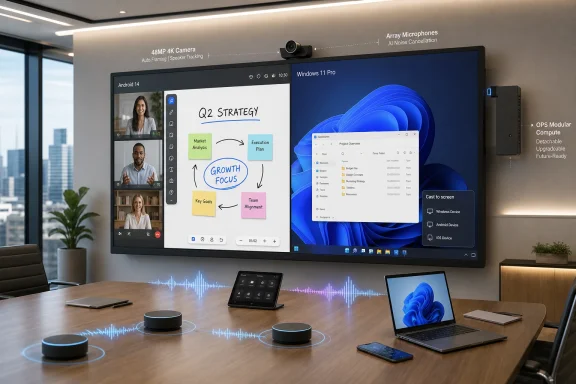
Nework’s bet is that the answer is a dual-personality smart board. Android 14 supplies the fast appliance-like layer: whiteboarding, casting, cloud apps, Google services, and lightweight meeting workflows. Windows 11 Pro, delivered through an OPS plug-in module, supplies the familiar enterprise desktop: Office, line-of-business software, browser-based admin portals, legacy apps, and Windows-native peripherals.
That matters because the meeting room has become a strangely contested computing environment. For years, the standard enterprise answer was simple: put a display on the wall, run an HDMI cable to the table, and let the presenter’s laptop be the brain. That model was cheap, universal, and miserable. It also assumed meetings were mostly one-way presentations.
The newer model is more complicated. Rooms now need cameras, microphones, speakers, wireless casting, digital whiteboarding, cloud sign-in, calendar integration, remote participants, in-room participants, security boundaries, device management, and sometimes persistent local computing. The “display” is no longer just a display. It is a shared endpoint.
Nework’s P Series fits into that transition. The company says the board includes Android 14, Google EDLA certification, secure access to Google Workspace and Google Play, support for collaboration tools such as Teams and Zoom, wireless casting, interactive whiteboarding, an integrated 48MP 4K conference camera, and AI-driven audio. Add the Windows 11 Pro OPS module, and the board becomes something closer to an all-in-one conference-room PC.
That does not make laptops irrelevant. It does make the laptop less central. In a well-designed room, users should not need to unpack a bag, find the right dongle, negotiate display scaling, switch audio devices, and hope corporate endpoint policy does not break screen sharing. The room should already be ready.
But OPS matters because it gives buyers a way to separate the lifespan of a large display from the lifespan of the computer attached to it. Displays often remain physically useful long after their compute modules feel old. Windows requirements change. CPUs age. Memory expectations rise. Security baselines move. A fixed all-in-one collaboration display can become e-waste long before the glass has failed.
Nework’s argument is that a Windows OPS plug-in protects the investment. Instead of hanging an external mini-PC behind the screen, routing extra cables, adding another power brick, and turning the room into a troubleshooting archaeology site, the Windows environment can live inside the board. When the Windows side needs to be upgraded, the module can be replaced.
That is a sensible pitch, especially for schools and enterprises that buy displays in fleets. A classroom or boardroom display may be expected to last five to seven years. A Windows endpoint may not age so gracefully, particularly as AI features, security requirements, and collaboration workloads become more demanding.
The catch is that modularity only helps if the vendor ecosystem remains healthy and the modules are realistically priced. Proprietary implementations, limited availability, underpowered configurations, and unclear support policies can turn “upgradeable” hardware into a theoretical benefit. OPS gives Nework a credible sustainability and lifecycle story, but IT buyers should still ask the unromantic procurement questions: CPU generation, RAM, storage, TPM support, warranty terms, BIOS updates, Windows licensing, and replacement-module availability.
Android is good at becoming an appliance. It boots into a touch-first environment, supports app-store distribution, handles casting and whiteboarding cleanly, and can make a large display feel more like a shared tablet than a PC. For education and lightweight collaboration, that can be exactly the right model. Users walk up, tap, write, join, cast, and leave.
Windows is good at being the messy reality of enterprise computing. It runs the applications organizations already depend on. It supports the browser behaviors, authentication flows, device drivers, admin tools, security agents, and legacy software that still define professional work. If the finance team needs an Excel model, the facilities team needs a Windows-only dashboard, or a presenter needs a locked-down corporate application, Android will not always be enough.
Nework’s P Series tries to avoid turning that tension into a purchase decision. Android 14 is the native collaboration layer; Windows 11 Pro is the desktop-grade fallback and, in some cases, the primary working environment. That is a practical design philosophy. It accepts that modern workplaces are heterogeneous rather than pretending one platform has won.
For WindowsForum readers, the Windows 11 Pro detail is not incidental. Windows 11 Pro brings the device into a familiar management and security universe. Depending on deployment choices, admins can think in terms of domain or Entra ID integration, group policy or MDM, BitLocker, Windows Update for Business, Microsoft Defender, remote management tools, and application compatibility. The press release does not spell out all those implementation details, but the presence of Windows 11 Pro is what makes the device more than an Android board with a browser.
This is where Nework’s pitch becomes more than Windows versus Android. The company is positioning the P Series as a bridge between Google-oriented cloud collaboration and Windows-oriented desktop productivity. In many real organizations, that overlap is not unusual. A company may use Microsoft 365 for identity and Office, Google Workspace in parts of the business, Zoom for meetings, Teams for internal communications, and a pile of browser apps for everything else.
The result is a collaboration room that has to be promiscuous by design. Locking the room to one vendor’s software stack can simplify management, but it can also make everyday work harder. Meeting-room technology is judged harshly because its failures are public. If a board cannot join the call, open the file, authenticate the user, or show the visiting team’s deck, nobody in the room cares that the architecture diagram looked clean.
Nework is therefore selling flexibility as resilience. That is a clever reframing. The resilient room is not merely the one with the best camera or the loudest speakers; it is the one least likely to collapse when the meeting’s workflow crosses platform boundaries.
But the AI story here is still mostly infrastructure. A smart board with a 48MP 4K camera and AI-driven audio can improve the raw material that meeting software receives. Better framing, clearer speech, less noise, and more legible shared content all matter if downstream AI tools are going to summarize, transcribe, identify action items, or make meetings searchable. Bad input produces bad automation.
That is why the physical device still matters in an age increasingly obsessed with cloud intelligence. AI does not remove the need for cameras, microphones, displays, speakers, touch layers, and local compute. It raises the stakes for them. A conference room that produces poor audio is not merely annoying; it corrupts the record of work.
The danger is that “AI-powered” becomes a fog machine. Nework mentions AI-driven audio, but the release does not offer detailed claims about on-device models, cloud processing, privacy controls, transcription features, or integration with specific AI assistants. Buyers should treat the AI language as a direction of travel rather than a complete product definition. The concrete value, at least from what Nework has disclosed, remains the board’s integrated hardware and dual-OS architecture.
Administrators will want to know how the Windows OPS module is provisioned. Is it treated as a standard corporate endpoint? Is it joined to Entra ID? Does it support the same EDR stack as laptops? Are users signing in with personal accounts, shared room accounts, or kiosk-style profiles? How are cached credentials handled? What happens when a meeting ends?
These questions are not nitpicking. Shared devices are risky precisely because they are shared. A personal laptop usually has a clear owner. A room device has a parade of users, visiting presenters, guest networks, USB devices, and unpredictable workflows. If the Windows side is poorly configured, the board can become a convenient place to leave files, tokens, browser sessions, and sensitive meeting artifacts.
The Android side has its own management questions. Google services, app installation, permissions, firmware updates, casting policies, and network segmentation all need attention. Dual OS does not mean half the work; it can mean two management planes. The best version of Nework’s pitch gives IT teams more flexibility. The worst version gives them another surface to chase.
That is why the real product story will depend on deployment tooling as much as hardware. If Nework can make the P Series straightforward to enroll, update, monitor, and lock down, the device becomes attractive to IT. If not, it risks becoming another “smart” room product that facilities loves, users tolerate, and admins quietly resent.
In education, interactive boards have long been framed around engagement: annotation, lesson delivery, student participation, and hybrid instruction. In business, similar hardware is framed around productivity: meetings, brainstorming, presentations, and remote collaboration. The underlying device category is increasingly the same.
That convergence is good for vendors because it expands the market. It is also good for buyers when it creates economies of scale and accelerates feature development. A camera that helps remote students follow a lesson can also help remote employees read the room. A whiteboarding tool useful for a math class can also support product planning.
But education and enterprise deployments have different tolerances for complexity. A school district may care deeply about Google Workspace, classroom durability, centralized updates, and teacher-friendly workflows. A business may care more about Teams or Zoom behavior, Windows compatibility, security baselines, and room scheduling. A single board can serve both markets only if it avoids becoming a lowest-common-denominator compromise.
Nework’s dual-OS approach is one way to navigate that. Android can serve the quick, touch-first, app-oriented scenarios that teachers and facilitators often need. Windows can serve the heavier professional scenarios where compatibility matters more than elegance. The board becomes a shared canvas with multiple operating assumptions behind it.
Cables are failure points. Dongles vanish. USB hubs behave differently after firmware updates. External mini-PCs get hidden behind displays and forgotten until something breaks. Camera bars, speakerphones, wireless presentation systems, and control panels can each have their own update cycles and management quirks. The room becomes a bundle of small dependencies pretending to be a system.
An integrated board can reduce that tax. Camera, audio, display, touch, casting, whiteboarding, and compute all living in one device is operationally appealing. It also gives support teams a clearer target when something fails. Instead of debugging a stack of components from five vendors, they can start with one platform.
The trade-off is concentration risk. If the integrated board fails, more of the room fails at once. If a vendor’s firmware update breaks a core function, the customer may have fewer workarounds. Integration is not automatically resilience; it is resilience only when the integrated product is reliable, serviceable, and well supported.
That is the tension Nework has to manage. The P Series promises fewer moving parts, but fewer moving parts make each remaining part more important. The board is not an accessory in this model. It is the room.
Still, sustainability claims in hardware deserve scrutiny. The greenest device is usually the one that stays useful, repairable, and supported for the longest period. That requires more than a modular slot. It requires spare parts, documentation, firmware maintenance, predictable module compatibility, and a vendor willing to support older units after the sales cycle has moved on.
For IT departments, the sustainability question is also a budgeting question. A board that can accept a new Windows OPS module in three years may be easier to justify than a sealed system with aging compute. But if the replacement module costs too much or is hard to obtain, the advantage fades.
This is where Nework’s business strategy will matter. The company describes itself as a California-headquartered audiovisual and collaborative solutions provider, with consumer-oriented portable lifestyle TVs under Nework.us and professional smart boards under Nework.ai. The split branding suggests Nework wants to cover both lifestyle electronics and workplace infrastructure. Enterprise buyers will care less about that ambition than about support maturity.
A smart board deployed into a classroom or conference room is not a gadget purchase. It is a facilities decision, an IT decision, a collaboration decision, and sometimes a security decision. Sustainability is welcome, but supportability is the proof.
That makes differentiation difficult. A spec sheet can get crowded quickly: panel size, touch points, brightness, glass treatment, camera resolution, microphone array, speaker wattage, Android version, EDLA certification, OPS support, Wi-Fi generation, USB-C power delivery, and collaboration app compatibility. Buyers can drown in sameness.
Nework’s attempt to stand out rests on packaging and positioning. The company is not merely saying “we have a smart board.” It is saying the board is a next-generation collaboration hub for an AI-powered digital workplace, aligned with resilience, dual-platform computing, and reduced meeting-room fragmentation. That is a broader story than hardware specs.
The risk is that the story outruns the product. Many organizations do not need a grand theory of digital lifelines to buy an interactive display. They need a board that turns on quickly, joins the right meeting, lets people share content, sounds good, looks good, and does not create help-desk tickets. The higher Nework raises the conceptual stakes, the more the everyday experience has to deliver.
That opens useful possibilities. A conference room could run a dedicated Windows environment for standardized presentations, dashboards, training sessions, browser apps, and Office workflows. A classroom could support Windows-only educational software without requiring a separate teacher workstation. A business could reduce the variability caused by each presenter bringing a differently configured laptop.
It also creates a new class of Windows endpoint to manage. The board is stationary but multi-user. It may sit on a different network segment than laptops. It may need access to meeting platforms, file repositories, printers, identity services, and security tools. It may be used by guests. It may be expected to work before anyone from IT is in the building.
That means Windows 11 Pro is both a selling point and a responsibility. The OPS module should not be treated as an invisible appliance. It should have an update policy, a recovery plan, a device name, an owner, a baseline configuration, and a retirement path. If the room depends on it, it belongs in the inventory.
We do not yet know enough about pricing, regional availability, management tooling, OPS specifications, warranty coverage, panel size options in this specific configuration, firmware support cadence, or integration with Microsoft and Google admin consoles. Those details will decide whether the P Series is merely an appealing board or a serious enterprise platform.
That distinction matters because the collaboration market is full of devices that demo beautifully and age poorly. A five-minute showroom experience can hide all the operational realities: update failures, app compatibility, login friction, sluggish touch response, weak microphones, confusing input switching, and unclear support ownership. The best collaboration hardware disappears into the work. The worst becomes the meeting before the meeting.
Nework has identified the right problem. The modern workplace is fragmented across devices, clouds, operating systems, and meeting cultures. A dual-OS board with integrated AV and modular Windows compute is a plausible answer. But plausibility is not proof.
 Nework Wraps a Product Launch in the Language of Resilience
World Telecommunication and Information Society Day is not normally where workplace display vendors make their most dramatic moves. The annual observance, marked on May 17, has typically been the terrain of governments, telecom bodies, development agencies, and infrastructure operators talking about access, connectivity, and disaster resilience. For 2026, the official theme, “Digital lifelines: Strengthening resilience in a connected world,” gives the industry a broader vocabulary: networks, systems, and digital services must keep functioning when ordinary conditions break.Nework’s announcement borrows that language and drags it into the meeting room. The company argues that collaboration hardware has become part of the same continuity problem as broadband, cloud platforms, and mobile networks. If the room cannot connect, present, authenticate, cast, annotate, video conference, or run the applications a team depends on, then work itself becomes brittle.
That is marketing, of course, but not empty marketing. Since 2020, enterprises have learned that “collaboration” is not a feature category; it is an operational dependency. A room that works only for one app, one laptop type, one operating system, or one user profile is no longer a neutral space. It is a point of failure with furniture around it.
Nework’s bet is that the answer is a dual-personality smart board. Android 14 supplies the fast appliance-like layer: whiteboarding, casting, cloud apps, Google services, and lightweight meeting workflows. Windows 11 Pro, delivered through an OPS plug-in module, supplies the familiar enterprise desktop: Office, line-of-business software, browser-based admin portals, legacy apps, and Windows-native peripherals.
The Smart Board Is Becoming the Room PC
The most important phrase in Nework’s announcement is not “AI-powered,” even though that is the phrase doing the promotional work. The more consequential phrase is dual OS. Nework is selling the NewBoard P Series as a device that can move between Android and Windows 11 Pro without forcing organizations to choose one computing model for every meeting-room use case.That matters because the meeting room has become a strangely contested computing environment. For years, the standard enterprise answer was simple: put a display on the wall, run an HDMI cable to the table, and let the presenter’s laptop be the brain. That model was cheap, universal, and miserable. It also assumed meetings were mostly one-way presentations.
The newer model is more complicated. Rooms now need cameras, microphones, speakers, wireless casting, digital whiteboarding, cloud sign-in, calendar integration, remote participants, in-room participants, security boundaries, device management, and sometimes persistent local computing. The “display” is no longer just a display. It is a shared endpoint.
Nework’s P Series fits into that transition. The company says the board includes Android 14, Google EDLA certification, secure access to Google Workspace and Google Play, support for collaboration tools such as Teams and Zoom, wireless casting, interactive whiteboarding, an integrated 48MP 4K conference camera, and AI-driven audio. Add the Windows 11 Pro OPS module, and the board becomes something closer to an all-in-one conference-room PC.
That does not make laptops irrelevant. It does make the laptop less central. In a well-designed room, users should not need to unpack a bag, find the right dongle, negotiate display scaling, switch audio devices, and hope corporate endpoint policy does not break screen sharing. The room should already be ready.
OPS Is the Unfashionable Slot That Keeps Coming Back
The OPS module is not glamorous technology. Open Pluggable Specification modules are essentially slot-in computers for large-format displays, commonly used in classrooms, conference rooms, digital signage, and interactive panels. They are not the kind of hardware that dominates keynote stages.But OPS matters because it gives buyers a way to separate the lifespan of a large display from the lifespan of the computer attached to it. Displays often remain physically useful long after their compute modules feel old. Windows requirements change. CPUs age. Memory expectations rise. Security baselines move. A fixed all-in-one collaboration display can become e-waste long before the glass has failed.
Nework’s argument is that a Windows OPS plug-in protects the investment. Instead of hanging an external mini-PC behind the screen, routing extra cables, adding another power brick, and turning the room into a troubleshooting archaeology site, the Windows environment can live inside the board. When the Windows side needs to be upgraded, the module can be replaced.
That is a sensible pitch, especially for schools and enterprises that buy displays in fleets. A classroom or boardroom display may be expected to last five to seven years. A Windows endpoint may not age so gracefully, particularly as AI features, security requirements, and collaboration workloads become more demanding.
The catch is that modularity only helps if the vendor ecosystem remains healthy and the modules are realistically priced. Proprietary implementations, limited availability, underpowered configurations, and unclear support policies can turn “upgradeable” hardware into a theoretical benefit. OPS gives Nework a credible sustainability and lifecycle story, but IT buyers should still ask the unromantic procurement questions: CPU generation, RAM, storage, TPM support, warranty terms, BIOS updates, Windows licensing, and replacement-module availability.
Android Handles the Room, Windows Handles the Enterprise
The reason dual-OS boards keep appearing is that neither Android nor Windows alone is a perfect meeting-room operating system.Android is good at becoming an appliance. It boots into a touch-first environment, supports app-store distribution, handles casting and whiteboarding cleanly, and can make a large display feel more like a shared tablet than a PC. For education and lightweight collaboration, that can be exactly the right model. Users walk up, tap, write, join, cast, and leave.
Windows is good at being the messy reality of enterprise computing. It runs the applications organizations already depend on. It supports the browser behaviors, authentication flows, device drivers, admin tools, security agents, and legacy software that still define professional work. If the finance team needs an Excel model, the facilities team needs a Windows-only dashboard, or a presenter needs a locked-down corporate application, Android will not always be enough.
Nework’s P Series tries to avoid turning that tension into a purchase decision. Android 14 is the native collaboration layer; Windows 11 Pro is the desktop-grade fallback and, in some cases, the primary working environment. That is a practical design philosophy. It accepts that modern workplaces are heterogeneous rather than pretending one platform has won.
For WindowsForum readers, the Windows 11 Pro detail is not incidental. Windows 11 Pro brings the device into a familiar management and security universe. Depending on deployment choices, admins can think in terms of domain or Entra ID integration, group policy or MDM, BitLocker, Windows Update for Business, Microsoft Defender, remote management tools, and application compatibility. The press release does not spell out all those implementation details, but the presence of Windows 11 Pro is what makes the device more than an Android board with a browser.
Google EDLA Certification Is a Quietly Important Enterprise Signal
Google EDLA certification may sound like alphabet soup, but it is one of the more meaningful claims in the announcement. EDLA-certified Android devices can provide licensed access to Google Mobile Services, including Google Play and Google Workspace experiences, in ways that generic Android-based panels often cannot. For schools and businesses already living in Google’s ecosystem, that can be the difference between a board that feels integrated and one that feels like a sideloaded compromise.This is where Nework’s pitch becomes more than Windows versus Android. The company is positioning the P Series as a bridge between Google-oriented cloud collaboration and Windows-oriented desktop productivity. In many real organizations, that overlap is not unusual. A company may use Microsoft 365 for identity and Office, Google Workspace in parts of the business, Zoom for meetings, Teams for internal communications, and a pile of browser apps for everything else.
The result is a collaboration room that has to be promiscuous by design. Locking the room to one vendor’s software stack can simplify management, but it can also make everyday work harder. Meeting-room technology is judged harshly because its failures are public. If a board cannot join the call, open the file, authenticate the user, or show the visiting team’s deck, nobody in the room cares that the architecture diagram looked clean.
Nework is therefore selling flexibility as resilience. That is a clever reframing. The resilient room is not merely the one with the best camera or the loudest speakers; it is the one least likely to collapse when the meeting’s workflow crosses platform boundaries.
The AI Workplace Still Needs Ordinary Reliability
The release repeatedly gestures toward the AI era, and that is unsurprising. Every collaboration vendor now has to explain how its hardware fits a world of intelligent assistants, automated transcripts, meeting summaries, noise suppression, image framing, real-time translation, and multimodal search. The meeting room is becoming an input device for AI systems.But the AI story here is still mostly infrastructure. A smart board with a 48MP 4K camera and AI-driven audio can improve the raw material that meeting software receives. Better framing, clearer speech, less noise, and more legible shared content all matter if downstream AI tools are going to summarize, transcribe, identify action items, or make meetings searchable. Bad input produces bad automation.
That is why the physical device still matters in an age increasingly obsessed with cloud intelligence. AI does not remove the need for cameras, microphones, displays, speakers, touch layers, and local compute. It raises the stakes for them. A conference room that produces poor audio is not merely annoying; it corrupts the record of work.
The danger is that “AI-powered” becomes a fog machine. Nework mentions AI-driven audio, but the release does not offer detailed claims about on-device models, cloud processing, privacy controls, transcription features, or integration with specific AI assistants. Buyers should treat the AI language as a direction of travel rather than a complete product definition. The concrete value, at least from what Nework has disclosed, remains the board’s integrated hardware and dual-OS architecture.
The Windows Side Raises the Real Admin Questions
Putting Windows 11 Pro inside a shared-room device solves some problems and creates others. Windows is familiar, but it is also a full endpoint that needs to be secured, patched, inventoried, and governed. A conference-room PC is not exempt from endpoint management just because it is bolted into a display.Administrators will want to know how the Windows OPS module is provisioned. Is it treated as a standard corporate endpoint? Is it joined to Entra ID? Does it support the same EDR stack as laptops? Are users signing in with personal accounts, shared room accounts, or kiosk-style profiles? How are cached credentials handled? What happens when a meeting ends?
These questions are not nitpicking. Shared devices are risky precisely because they are shared. A personal laptop usually has a clear owner. A room device has a parade of users, visiting presenters, guest networks, USB devices, and unpredictable workflows. If the Windows side is poorly configured, the board can become a convenient place to leave files, tokens, browser sessions, and sensitive meeting artifacts.
The Android side has its own management questions. Google services, app installation, permissions, firmware updates, casting policies, and network segmentation all need attention. Dual OS does not mean half the work; it can mean two management planes. The best version of Nework’s pitch gives IT teams more flexibility. The worst version gives them another surface to chase.
That is why the real product story will depend on deployment tooling as much as hardware. If Nework can make the P Series straightforward to enroll, update, monitor, and lock down, the device becomes attractive to IT. If not, it risks becoming another “smart” room product that facilities loves, users tolerate, and admins quietly resent.
The Classroom and the Boardroom Are Converging
Nework sells into education, business, and home environments, and the P Series announcement reflects an important convergence between classrooms and conference rooms. Both spaces now need interactive displays, video conferencing, wireless sharing, cloud access, and multi-user workflows. The difference is less about the hardware than the policy environment around it.In education, interactive boards have long been framed around engagement: annotation, lesson delivery, student participation, and hybrid instruction. In business, similar hardware is framed around productivity: meetings, brainstorming, presentations, and remote collaboration. The underlying device category is increasingly the same.
That convergence is good for vendors because it expands the market. It is also good for buyers when it creates economies of scale and accelerates feature development. A camera that helps remote students follow a lesson can also help remote employees read the room. A whiteboarding tool useful for a math class can also support product planning.
But education and enterprise deployments have different tolerances for complexity. A school district may care deeply about Google Workspace, classroom durability, centralized updates, and teacher-friendly workflows. A business may care more about Teams or Zoom behavior, Windows compatibility, security baselines, and room scheduling. A single board can serve both markets only if it avoids becoming a lowest-common-denominator compromise.
Nework’s dual-OS approach is one way to navigate that. Android can serve the quick, touch-first, app-oriented scenarios that teachers and facilitators often need. Windows can serve the heavier professional scenarios where compatibility matters more than elegance. The board becomes a shared canvas with multiple operating assumptions behind it.
Resilience Is Also About Reducing the Cable Tax
One of the more persuasive parts of Nework’s release is its attack on clutter. The company argues that the Windows OPS design reduces reliance on external PCs, dongles, and fragmented meeting-room gear. Anyone who has supported conference rooms knows this is not a cosmetic issue.Cables are failure points. Dongles vanish. USB hubs behave differently after firmware updates. External mini-PCs get hidden behind displays and forgotten until something breaks. Camera bars, speakerphones, wireless presentation systems, and control panels can each have their own update cycles and management quirks. The room becomes a bundle of small dependencies pretending to be a system.
An integrated board can reduce that tax. Camera, audio, display, touch, casting, whiteboarding, and compute all living in one device is operationally appealing. It also gives support teams a clearer target when something fails. Instead of debugging a stack of components from five vendors, they can start with one platform.
The trade-off is concentration risk. If the integrated board fails, more of the room fails at once. If a vendor’s firmware update breaks a core function, the customer may have fewer workarounds. Integration is not automatically resilience; it is resilience only when the integrated product is reliable, serviceable, and well supported.
That is the tension Nework has to manage. The P Series promises fewer moving parts, but fewer moving parts make each remaining part more important. The board is not an accessory in this model. It is the room.
The Sustainability Claim Depends on the Upgrade Path
Nework links the OPS module to long-term upgrade flexibility and sustainable infrastructure. That argument has merit. A modular compute slot can extend the useful life of a large display, reduce the need for external PCs, and let organizations refresh performance without replacing the entire board.Still, sustainability claims in hardware deserve scrutiny. The greenest device is usually the one that stays useful, repairable, and supported for the longest period. That requires more than a modular slot. It requires spare parts, documentation, firmware maintenance, predictable module compatibility, and a vendor willing to support older units after the sales cycle has moved on.
For IT departments, the sustainability question is also a budgeting question. A board that can accept a new Windows OPS module in three years may be easier to justify than a sealed system with aging compute. But if the replacement module costs too much or is hard to obtain, the advantage fades.
This is where Nework’s business strategy will matter. The company describes itself as a California-headquartered audiovisual and collaborative solutions provider, with consumer-oriented portable lifestyle TVs under Nework.us and professional smart boards under Nework.ai. The split branding suggests Nework wants to cover both lifestyle electronics and workplace infrastructure. Enterprise buyers will care less about that ambition than about support maturity.
A smart board deployed into a classroom or conference room is not a gadget purchase. It is a facilities decision, an IT decision, a collaboration decision, and sometimes a security decision. Sustainability is welcome, but supportability is the proof.
The Competitive Field Is Already Crowded
Nework is not entering an empty market. Interactive displays and smart collaboration boards are already sold by a long list of vendors targeting education, enterprise, government, and hybrid work. Many offer 4K panels, touch input, cameras, microphones, wireless casting, Android-based interfaces, Google service integration, and OPS expansion.That makes differentiation difficult. A spec sheet can get crowded quickly: panel size, touch points, brightness, glass treatment, camera resolution, microphone array, speaker wattage, Android version, EDLA certification, OPS support, Wi-Fi generation, USB-C power delivery, and collaboration app compatibility. Buyers can drown in sameness.
Nework’s attempt to stand out rests on packaging and positioning. The company is not merely saying “we have a smart board.” It is saying the board is a next-generation collaboration hub for an AI-powered digital workplace, aligned with resilience, dual-platform computing, and reduced meeting-room fragmentation. That is a broader story than hardware specs.
The risk is that the story outruns the product. Many organizations do not need a grand theory of digital lifelines to buy an interactive display. They need a board that turns on quickly, joins the right meeting, lets people share content, sounds good, looks good, and does not create help-desk tickets. The higher Nework raises the conceptual stakes, the more the everyday experience has to deliver.
Windows 11 Pro Makes the Board Interesting to This Audience
For Windows enthusiasts and administrators, the NewBoard P Series becomes notable because it treats Windows 11 Pro as a room-native capability rather than an afterthought. The Windows PC is not just something someone plugs in. It can be part of the display’s architecture.That opens useful possibilities. A conference room could run a dedicated Windows environment for standardized presentations, dashboards, training sessions, browser apps, and Office workflows. A classroom could support Windows-only educational software without requiring a separate teacher workstation. A business could reduce the variability caused by each presenter bringing a differently configured laptop.
It also creates a new class of Windows endpoint to manage. The board is stationary but multi-user. It may sit on a different network segment than laptops. It may need access to meeting platforms, file repositories, printers, identity services, and security tools. It may be used by guests. It may be expected to work before anyone from IT is in the building.
That means Windows 11 Pro is both a selling point and a responsibility. The OPS module should not be treated as an invisible appliance. It should have an update policy, a recovery plan, a device name, an owner, a baseline configuration, and a retirement path. If the room depends on it, it belongs in the inventory.
The Press Release Tells Us the Direction, Not the Verdict
Nework’s announcement is strong on positioning and lighter on the details that determine deployment success. We know the P Series combines Android 14 with an optional Windows 11 Pro OPS module. We know it claims Google EDLA certification, Google Workspace and Play access, support for common meeting platforms, a 48MP 4K camera, AI-driven audio, wireless casting, and interactive whiteboarding. We know the company sees the product as a response to fragmented collaboration infrastructure.We do not yet know enough about pricing, regional availability, management tooling, OPS specifications, warranty coverage, panel size options in this specific configuration, firmware support cadence, or integration with Microsoft and Google admin consoles. Those details will decide whether the P Series is merely an appealing board or a serious enterprise platform.
That distinction matters because the collaboration market is full of devices that demo beautifully and age poorly. A five-minute showroom experience can hide all the operational realities: update failures, app compatibility, login friction, sluggish touch response, weak microphones, confusing input switching, and unclear support ownership. The best collaboration hardware disappears into the work. The worst becomes the meeting before the meeting.
Nework has identified the right problem. The modern workplace is fragmented across devices, clouds, operating systems, and meeting cultures. A dual-OS board with integrated AV and modular Windows compute is a plausible answer. But plausibility is not proof.
The P Series Pitch Succeeds Where It Gets Specific
Nework’s launch is most convincing when it stops using industry weather words and talks about actual friction: switching between Android and Windows, reducing external hardware, supporting Google services, preserving Windows productivity, and making hybrid meetings less fragile.- The NewBoard P Series is best understood as a shared room computer, not simply as a large interactive display.
- The Android 14 and Windows 11 Pro pairing reflects the reality that many organizations live across mobile-style cloud workflows and traditional desktop software.
- The OPS module is important because it can extend the life of the display and simplify room hardware, but only if module availability and support remain strong.
- Google EDLA certification gives the Android side more credibility for schools and Workspace-heavy organizations than a generic Android panel would have.
- The AI claims are secondary to the more concrete value of better cameras, audio, casting, whiteboarding, and platform flexibility.
- IT teams should evaluate the board as a managed endpoint with security, identity, update, and lifecycle requirements, not as office furniture.
References
- Primary source: acrofan.com
Published: Tue, 19 May 2026 15:00:00 GMT
World Telecommunication Day 2026: Nework's NewBoard P Series a next-gen collaboration hub built for AI-powered digital workplace
POMONA, Calif., May 20, 2026 /PRNewswire/ -- On the occasion of World Telecommunication and Information Society Day, Nework, an audiovisual and collaborative solutions provider for education, business, and home, is doubling down on its mission: helping enterprises build more resilient... us.acrofan.com
- Related coverage: council.itu.int
- Related coverage: timeanddate.com
World Telecommunication and Information Society Day 2026
World Information Society Day is celebrated each year on 17 May to remind the world of the vision of the World Summit on the Information Society to build “a people-centered, inclusive and development-oriented information society” based on fundamental human rights.www.timeanddate.com - Related coverage: almashines.io
World Telecommunication and Information Society Day 2026 - AlmaShines
Celebrate World Telecommunication Day 2026- The evolution of connectivity and how AlmaShines is shaping a sustainable future. Join us!www.almashines.io - Related coverage: kpl.gov.la
Laos Marks World Telecommunication and Information Society Day
Laos joined the global celebration of the 161st anniversary of World Telecommunication and Information Society Day on May 17 under the theme “Digital Fibre for Life: Building Resilience in a Connected World,” selected by the International Telecommunication Union.kpl.gov.la
- Related coverage: bankersadda.com
World Telecommunication Day 2026, Theme, History & Significance
World Telecommunication Day 2026 will be observed on 17 May to highlight the importance of digital connectivity, telecommunications, internet access, and technological development.www.bankersadda.com
- Related coverage: telecom.economictimes.indiatimes.com
World Telecom Day 2026: The Strategic Necessity of Resilience in Digital Infrastructure, ETTelecom
Telecom Resilience: Explore the critical importance of resilience in digital communication systems for a connected world, especially on World Telecom Day 2026. Understand how connectivity encompasses economic stability, cybersecurity, and infrastructure sustainability.telecom.economictimes.indiatimes.com
- Related coverage: nework.ai
Nework Newboard P Series 4K Smart Board | All-in-One Business Meeting Solution
Run meetings faster and communicate more clearly with the Newboard P Series smart board for business. Featuring a 4K interactive display, professional conference camera, microphone array, and built-in speakers, it’s an all-in-one conference room solution for modern offices. Designed for hybrid... www.nework.ai
- Related coverage: technomag.co.zw
ITU Urges Governments and Industry to Safeguard Digital Lifelines Ahead Of The World Telecommunication and Information Society Day 2026 - TechnoMag
The International Telecommunication Union (ITU) has called on governments, industry leaders, and communities to strengthen the resilience of digital networks as the world marks World Telecommunication and Information Society Day (WTISD) on 17 May 2026. This year’s theme focuses on “digital...technomag.co.zw - Related coverage: newline-interactive.com
