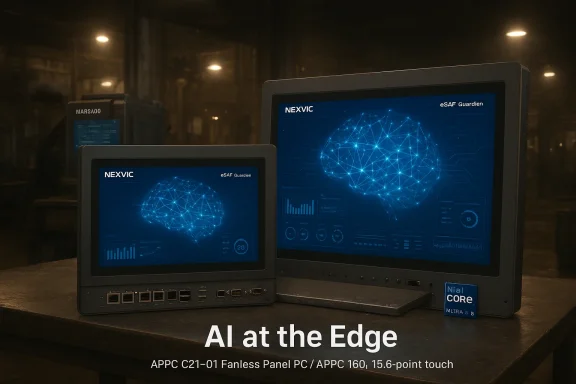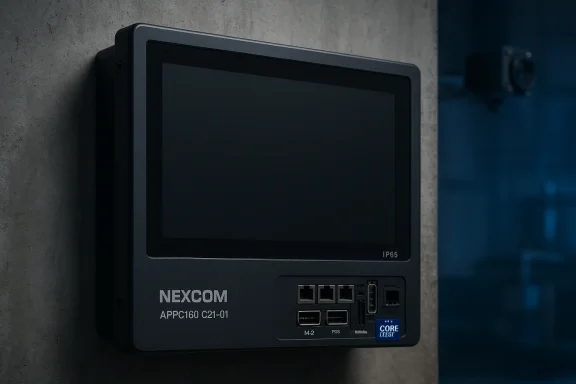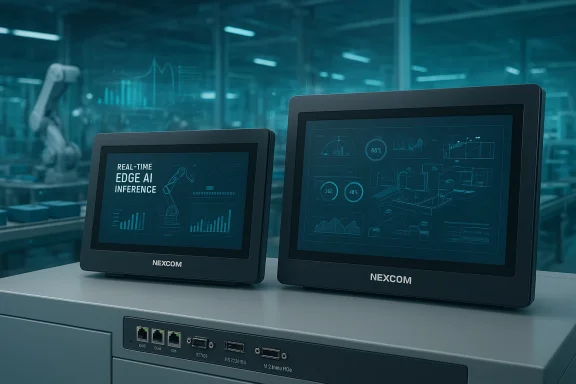
NEXCOM’s APPC C21-01 series steps into the ring as a purposeful, fanless bridge between shop‑floor automation and edge AI — delivering Meteor Lake‑class CPU power, multi‑port industrial I/O, and a slim, IP65 front panel designed for the realities of modern smart factories.
Background / Overview
The APPC C21‑01 family — offered as the APPC160 C21‑01 (15.6") and APPC210 C21‑01 (21.5") — is NEXCOM’s latest applied panel PC entry aimed squarely at AI‑enabled human‑machine interfaces (HMI), IIoT gateways, and edge analytics consoles. The product line pairs an Intel Core Ultra 5 125U (Meteor Lake‑U) CPU with a full‑HD, narrow‑bezel projected‑capacitive touchscreen and broad industrial connectivity, while supporting mainstream embedded OS choices.NEXCOM positions these units as multi‑purpose, long‑lifecycle machines that can act simultaneously as operator HMIs, protocol bridges to legacy PLCs, and local inference nodes for time‑sensitive analytics at the edge. The company also highlights integration with its NexVIC IIoT suite to enable remote hardware monitoring and low‑code automation workflows, creating a tighter pipeline between HMI, OT devices, and enterprise analytics.
In short: these are fanless HMIs built to be more than displays — they’re compute platforms for real‑time visualization + local AI inference + traditional industrial I/O.
What NEXCOM Announces: Key Hardware Facts
Form factor and displays
- Two sizes: 15.6‑inch (APPC160) and 21.5‑inch (APPC210).
- Panel: Full HD (1920×1080), 16:9 aspect ratio, narrow bezels.
- Touch: 10‑point projected capacitive (P‑Cap) touch; front glass rated IP65 (splash and dust protection at the front).
- Brightness/contrast: Product pages list factory display brightness targets (e.g., up to 400–500 nits depending on model) and a 1000:1 contrast ratio.
Processor and memory
- CPU: Intel Core Ultra 5 125U (Meteor Lake‑U family) — a hybrid x86 design combining performance and efficient cores.
- SKU details published by NEXCOM: the unit is described with a base frequency of ~1.3 GHz, 12 cores / 14 threads and a nominal TDP entry of 15 W in the APPC configuration.
- Memory: 1 × DDR5 SO‑DIMM socket; systems ship with 8 GB DDR5 and are configurable up to 32 GB (non‑ECC) in standard SKUs.
I/O and expansion
- Networking / USB:
- 4 × Intel Gigabit Ethernet (RJ‑45)
- Multiple USB 3.2 Gen1 ports (four listed on rear)
- Legacy / serial:
- 1 × DB‑9 COM supporting RS‑232 (default) and RS‑485 (jumper selectable), enabling PLC and sensor integration.
- Video / external display:
- 1 × HDMI 1.4 (additional display support).
- Storage & wireless expansion:
- 1 × M.2 Key M slot (2280, PCIe 4.0 x4) for NVMe SSD
- 1 × M.2 Key E (2230) for Wi‑Fi/BT modules
- 1 × mini‑PCIe (PCIe x1 + USB 2.0)
- Antenna holes and cutouts for wireless expansion
- Power: DC input with multi‑voltage support (12V / 19V / 24V via terminal block).
Security, OS and compliance
- TPM: Product specifications list TPM 2.0 hardware capability.
- Operating systems: NEXCOM lists support for Windows 11 IoT, Windows 10 IoT, and 64‑bit Ubuntu Linux in product specifications, while other communications around the launch reference Windows Enterprise SKUs — customers should confirm required image availability.
- Certifications: CE (EN 55032 / EN 55035) and FCC Class A; NEXCOM also advertises long‑lifecycle support.
What the Meteor Lake CPU means for the edge
The APPC C21‑01’s use of the Intel Core Ultra 5 125U (Meteor Lake‑U) is the single most consequential hardware choice. Meteor Lake ushers in chiplet packaging on new process nodes with integrated heterogeneous compute that combines CPU, Arc‑class GPU, and an on‑chip AI engine.- That combination gives the APPC series a practical advantage: local inference (lightweight vision models, anomaly detection, inferencing of small CNN/transformer models) can run on GPU or Intel’s AI accelerators rather than being fully dependent on remote servers.
- The 125U SKU in mobile/embedded modes is marketed with a low base power (15 W TDP), which makes fanless designs feasible — but power headroom and performance depend on platform power‑limit settings and the cooling/thermal envelope that NEXCOM engineers into the chassis.
- Important nuance: Meteor Lake parts have dynamic power behavior — brief turbo/PL2 windows significantly increase available performance under active cooling. In a fanless chassis, OEMs often constrain the CPU to PL1 levels, trading burst speed for steady thermal behavior. This makes it essential to validate target workloads on the OEM unit rather than assuming raw CPU max turbo figures.
Software and management: NexVIC & the low‑code promise
NEXCOM is presenting the APPC units as part of a broader software‑defined edge story. Two software angles matter:- NexVIC: NEXCOM’s web‑based IIoT asset management and orchestration suite. It’s presented as a way to remotely monitor hardware health, manage firmware/OS images, and build low‑code automation workflows with drag‑and‑drop logic. For shop floors looking to reduce onsite maintenance or coordinate many HMIs/edge machines, centralized asset control is a practical benefit.
- OS choices: Official product documents list Windows 11 IoT, Windows 10 IoT and Ubuntu 64‑bit. For AI workloads, support for Linux and common frameworks (OpenVINO, ONNX Runtime, etc.) will be decisive. Buyers should confirm that NEXCOM provides tested Linux images, up‑to‑date kernels, and vendor drivers for Meteor Lake graphics and AI subsystems.
Practical strengths: why this platform is compelling today
- Balanced edge compute: Meteor Lake’s heterogenous engine (CPU + GPU + NPU elements) lets customers run part of their AI pipeline at the HMI, reducing round‑trip latency for critical control loops.
- Industry‑focused connectivity: Four gigabit LAN ports plus RS‑232/485 COM and multiple USB make this a clear OT‑friendly appliance that can attach to PLCs, cameras, and enterprise networks without external gateways.
- Fanless and sealed front: IP65 front glass and a fanless chassis lower total cost of ownership in dirty or splash‑prone environments; no fans equals fewer moving parts to fail in industrial contexts.
- Flexible expansion: M.2/mini‑PCIe slots and antenna holes mean integrators can add cellular or Wi‑Fi/Bluetooth modules, specialized accelerators, or extra storage.
- Long‑lifecycle/product support: NEXCOM’s product strategy emphasizes longevity — valuable for industrial projects where service life extends 5–10 years.
Risks, trade‑offs and real‑world caveats
No product is perfect for every environment. The APPC C21‑01 brings notable trade‑offs you must assess before deployment.Thermal limits and sustained performance
The Intel Core Ultra 5 125U is capable of significantly higher transient power draw than the 15 W nominal TDP. A fanless chassis can force the CPU into conservative power caps that protect the hardware but reduce sustained throughput. For workloads that require continuous high CPU/GPU/NPU utilization (e.g., multi‑camera inference pipelines), expect thermal throttling unless you validate the unit under production load.Driver and Linux readiness
Meteor Lake‑class platforms are newer silicon; Linux kernel support and production‑grade drivers for integrated GPU and AI features can lag. If your stack relies on Linux and specific acceleration libraries, insist on:- Validated Linux images from NEXCOM, and
- Benchmarks for the exact models and workloads you plan to run.
Security and remote management
TPM 2.0 is listed in the specification set, which is positive for device identity and secure boot. However, secure provisioning, patching workflows, and remote management hardening must be part of any deployment blueprint. If you will use NexVIC for remote operations, evaluate:- Access controls and RBAC,
- Update signing and rollback handling,
- Network segmentation for OT/IT.
Environmental operating window
NEXCOM lists ambient operating temperature around 0 °C to 50 °C (with airflow) for normal operation; this is typical for indoor factory floors but may be insufficient for outdoor or high‑heat zones unless additional cooling or environmental enclosures are used.FCC Class A vs Class B
FCC Class A certification is for industrial/commercial equipment; Class A devices can produce higher electromagnetic emissions and may not be suitable for residential environments. Consider compliance and testing for installations in regulated spaces.Deployment checklist: how to validate an APPC C21‑01 for production
- Request a sample unit and run your actual workloads (not just synthetic tests) to observe sustained CPU/GPU/NPU utilization and throttling behavior.
- Validate OS images:
- Confirm Windows IoT or Enterprise image availability if your application is Windows‑centric.
- For Linux, validate kernel version, drivers (GPU/NPU), and availability of OpenVINO/ONNX runtime or equivalent.
- Test peripheral integration:
- Exercise RS‑232/485 connections with your PLCs and confirm signal selection and grounding.
- Test the four GbE ports for VLANs, PoE passthrough (if relevant), and throughput under expected traffic.
- Benchmark AI workloads:
- Measure inference latency and throughput when running on the configuration provided (CPU vs GPU vs NPU).
- Check model compatibility and quantization impacts for your models.
- Confirm TPM and secure boot workflows:
- Ensure provisioning and certificate lifecycle management meet your security posture.
- Plan for storage endurance:
- Select industrial NVMe SSDs with appropriate DWPD (drive writes per day) ratings for log and model read/write patterns.
- Verify long‑term support:
- Ask NEXCOM for expected availability windows, spare part commitments, and an upgrade path for OS/firmware.
Integration with NexVIC: practical gains and questions
Pairing a modern panel PC with a device management / low‑code tool is compelling: NexVIC promises faster rollouts, centralized monitoring, and low‑code automation for non‑software teams. Operational benefits include fewer truck rolls and consistent software rollouts across thousands of edge nodes.Key integration questions to ask:
- Does NexVIC support the specific OS images and kernel versions you intend to deploy?
- What telemetry is available out of the box (temperature, storage health, CPU throttling, network stats)?
- How are software updates staged, tested, and rolled back?
- What are the on‑prem vs cloud operational models for NexVIC, and how does that map to your security and data sovereignty demands?
How the APPC C21‑01 fits the competitive landscape
This class of product — fanless, touch‑enabled, Intel Meteor Lake based panel PCs — is increasingly common as vendors push AI functionality down to the HMI layer. NEXCOM’s differentiators are their industrial I/O mix (4 × GbE, COM port, multiple expansion sockets), IP65 front, and their software story (NexVIC).When comparing platforms, consider:
- Whether an alternate product offers wider temperature range or IP67 sealing if that’s required.
- If you need more sustained inference power, compare against small rack or box PCs that offer active cooling and higher PL2 headroom.
- If long‑term Linux support is critical, evaluate vendor track record on driver support and kernel backports for recent Intel chipsets.
Recommendations for systems integrators and plant IT
- Treat the APPC C21‑01 as a compute‑capable HMI rather than just a display. Plan deployment architecture to exploit local inference (latency‑sensitive tasks) while retaining cloud/enterprise analytics for heavier training and long‑term model management.
- Insist on real workload testing to understand real‑world thermal and performance curves. Fanless convenience is appealing — but if your application is compute heavy, plan for chokepoints.
- Verify the exact OS SKU and vendor image you need; NEXCOM materials list both IoT and Enterprise Windows variants as well as Ubuntu, but wording has varied between announcements and product pages. Confirm the shipping image, kernel version, and driver support in writing.
- Build a remote management and patching plan before rollout. TPM 2.0 and NexVIC give you tools, but operational procedures are what secure long deployments.
- Optimize models for edge inference: quantize where appropriate, limit concurrent camera inputs per device, and prefer batch sizes that match the APPC thermal envelope.
Final assessment: who should consider the APPC C21‑01?
The APPC C21‑01 series will be attractive to integrators and manufacturers who want an HMI that is more than a terminal — a unit that can run local analytics, participate in low‑latency control loops, and reduce data egress for privacy‑sensitive sites. Its strong I/O mix, TPM support, fanless design, and OS flexibility make it a strong candidate for mid‑to‑high complexity IIoT projects in controlled industrial environments.However, buyers must be pragmatic about sustained AI throughput in a fanless chassis and should verify Linux driver maturity and vendor software commitments for Meteor Lake platforms. Where continuous high‑performance inference is required, pairing the APPC as an HMI with a nearby active‑cooled inference node or GPU appliance may be the optimal architecture.
Conclusion
NEXCOM’s APPC C21‑01 family is a practical, well‑spec’d attempt to bring Meteor Lake class compute into the HMI space without compromising industrial connectivity. It epitomizes the current industry push to converge HMI + local AI + OT integration into a single, deployable appliance — a design pattern that can reduce latency, simplify wiring, and democratize automation logic through low‑code tooling.For adopters the message is straightforward: the APPC C21‑01 offers a modern, flexible foundation for smart‑factory HMI and edge AI, but prove the thermal and software story under your real workloads before you sign for volume. If your deployment requires continuous heavy inference, plan a hybrid architecture; if your priority is tidy edge inference combined with robust OT connectivity and centralized management, this platform is worth a close look.
Source: Embedded Computing Design embedded world Germany: NEXCOM Introduces APPC C21-01 Fanless Panel PCs to Bridge Industrial Automation and Edge AI - Embedded Computing Design