

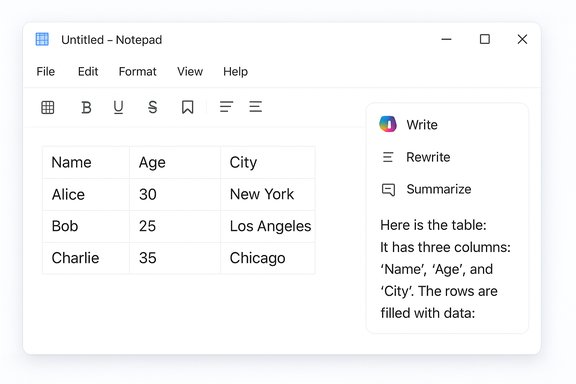
Microsoft’s humble Notepad just learned to hold rows and columns: a Windows Insider release has added native table creation and editable grids to Notepad, paired with streaming output for its built‑in AI actions — a small change with outsized product and privacy implications.
Notepad’s identity has been reshaped over the past year from a minimal plain‑text scratchpad into a lightweight, Markdown‑aware editor with formatting controls and AI features. The latest preview — delivered as Notepad version 11.2510.6.0 to Windows Insiders in the Canary and Dev channels — explicitly adds two headline capabilities: table insertion and editing, and streaming results for the AI actions Write, Rewrite, and Summarize. These exact details are documented in Microsoft’s Windows Insider announcement and reproduced by multiple outlets covering the rollout. The change is intentionally modest in scope: tables are a formatting convenience implemented on top of Notepad’s Markdown‑style formatting layer, not a spreadsheet engine. At the same time, streaming AI output aims to reduce perceived latency by showing partial text as it is generated rather than waiting for a completed block. Both features are currently preview features for Insiders and are being tested before any wider release.
The Markdown‑first implementation is a deliberate trade: it provides WYSIWYG convenience without giving up plain‑text portability. That design favors workflows where files are shared, versioned, or parsed by scripts — typical use cases for developers and power users who prefer readable diffs and lightweight tooling.
Streaming AI is similarly pragmatic. Latency is one of the biggest complaints with cloud AI: incremental display of content makes the interaction feel quicker and allows users to edit or interrupt midway. By enabling local streaming on Copilot+ devices, Microsoft can deliver lower‑latency, privacy‑friendly experiences to qualifying hardware while relying on cloud services for broader reach.
That said, maintaining parity between the formatted view and underlying Markdown can lead to surprising edge cases: toggling formatting off exposes raw markup, which could confuse non‑technical users. Copy/paste of tables into environments that expect CSV or native clipboard table formats may yield mismatched separators or require cleaning. These are known trade‑offs of Markdown‑rendered editors and are not specific to Notepad, but they do matter for workflows that cross tool boundaries frequently.
Source: PC Guide You can finally create tables in Notepad on Windows 11, following latest Insider update
 Background / Overview
Notepad’s identity has been reshaped over the past year from a minimal plain‑text scratchpad into a lightweight, Markdown‑aware editor with formatting controls and AI features. The latest preview — delivered as Notepad version 11.2510.6.0 to Windows Insiders in the Canary and Dev channels — explicitly adds two headline capabilities: table insertion and editing, and streaming results for the AI actions Write, Rewrite, and Summarize. These exact details are documented in Microsoft’s Windows Insider announcement and reproduced by multiple outlets covering the rollout. The change is intentionally modest in scope: tables are a formatting convenience implemented on top of Notepad’s Markdown‑style formatting layer, not a spreadsheet engine. At the same time, streaming AI output aims to reduce perceived latency by showing partial text as it is generated rather than waiting for a completed block. Both features are currently preview features for Insiders and are being tested before any wider release.What changed — the facts, verified
Notepad build, channels, and where to get it
- The feature set is packaged in Notepad 11.2510.6.0, rolling out to Windows Insiders in the Canary and Dev channels. This is the build number Microsoft named in its Insider blog post.
- The rollout is staged; general availability for Release Preview or mainstream Windows 11 users has not been scheduled publicly. Expect a phased deployment after Insider feedback.
Tables: insertion, editing, and Markdown persistence
- A Table control appears in the formatting toolbar when Notepad’s lightweight formatting (Markdown rendering) is enabled; it functions as a visual grid picker to insert an initial table.
- Notepad also recognizes Markdown table syntax (pipe-delimited rows with header separators). When the editor renders formatted Markdown, it will display that syntax as an editable table in the WYSIWYG formatted view.
- Table editing supports common layout operations: add/remove rows and columns via a toolbar or right‑click context menu. The underlying document remains plain Markdown if formatting is disabled, preserving portability for version control and plain‑text workflows.
- Not a spreadsheet: there are no formulas, sorting, pivoting, data validation, merged cells, or cell data types. Notepad’s tables are intended for small, human‑readable grids (notes, checklists, README snippets), not numerical analysis.
Streaming AI: Write, Rewrite, Summarize
- The AI actions Write, Rewrite, and Summarize now produce streaming responses — partial text appears token‑by‑token as it is generated instead of after the entire output is produced. The change improves perceived latency and makes AI interactions feel more interactive.
- Streaming behavior differs by execution context: Rewrite streaming is currently limited to results generated locally on Copilot+ certified PCs (machines with on‑device model capability). Write and Summarize may stream when cloud responses arrive incrementally, but network/server behavior influences that performance. All AI actions require signing in with a Microsoft account.
Why the changes matter (and why they’re deliberate)
Notepad’s evolution is a product‑design choice, not an accident. The additions answer a pragmatic question: how many small, structured tasks did Notepad users repeatedly move out of Notepad to handle in Word, Excel, or another note app? Tables let users keep quick two‑column comparisons, mini inventories, or README tables inside a tool they already open dozens of times a day — without forcing them to adopt a full document editor.The Markdown‑first implementation is a deliberate trade: it provides WYSIWYG convenience without giving up plain‑text portability. That design favors workflows where files are shared, versioned, or parsed by scripts — typical use cases for developers and power users who prefer readable diffs and lightweight tooling.
Streaming AI is similarly pragmatic. Latency is one of the biggest complaints with cloud AI: incremental display of content makes the interaction feel quicker and allows users to edit or interrupt midway. By enabling local streaming on Copilot+ devices, Microsoft can deliver lower‑latency, privacy‑friendly experiences to qualifying hardware while relying on cloud services for broader reach.
Practical strengths — what this gives users today
- Faster notes, fewer context switches. Simple tables for shopping lists, two‑column meeting notes, and configuration key/value pairs keep more work inside Notepad.
- Markdown portability. Files remain usable across other Markdown‑aware editors, and raw Markdown is still available when formatting is toggled off.
- Lightweight UI. The toolbar approach is low friction: click Table, choose dimensions, and edit. The element is designed to be quick and unobtrusive.
- Improved AI responsiveness. Streaming reduces perceived wait times for Write/Rewrite/Summarize flows, helping iterative editing.
- On‑device privacy option. Copilot+ hardware can run some AI locally, which keeps data off the cloud for supported tasks and can improve responsiveness.
Risks, limitations, and enterprise considerations
Not all changes are benign. The Notepad team intentionally limited capability, but several practical and policy risks remain.Feature creep and identity drift
Notepad’s simplicity was its virtue. Layering formatting and AI features inches it toward a hybrid: neither a minimal text editor nor a fully featured content suite. That shift risks confusing users who expect Notepad to be instantly available and offline by default. If Notepad becomes bloated, some will prefer third‑party minimal editors or revert to command‑line tools.Privacy and account requirements
- All AI features require a Microsoft account sign‑in; that introduces authentication flows and cloud dependency for some users. Administrators and privacy‑conscious users should be aware that using Write/Summarize/Rewrite may involve cloud processing or cloud telemetry unless the model runs locally on Copilot+ hardware.
- On‑device models mitigate some concerns but only apply to Copilot+ certified PCs. For most machines, AI calls still traverse Microsoft’s cloud services in some form. The exact telemetry and retention policies are governed by Microsoft’s broader Copilot and Windows telemetry documents, which should be reviewed by IT teams before broad adoption.
Not a spreadsheet — interoperability pain points
- Copy/paste behavior between Notepad tables and Excel or other spreadsheets may not be seamless. The Markdown persistence is excellent for portability, but users accustomed to direct cell interchange or formulas will find Notepad inadequate. Expect manual cleanup or conversion steps when moving larger tables to Excel. Early community testing shows basic copy/paste works for small tables, but behavior can vary with formatting toggles and clipboard formats.
- Large tables (tens or hundreds of rows) will be poorly served; performance, editing ergonomics, and rendering will degrade. Notepad isn’t optimized for heavy tabular data.
Discoverability, accessibility, and training
- Users who expect Notepad to be plain text may be surprised when saved files contain Markdown or formatted views. The toggleable formatting mitigates this, but there’s a usability learning curve.
- Screen reader and keyboard navigation support for the new Table UI must be validated. While Microsoft typically includes accessibility testing, organizations should perform their own checks to confirm compliance with internal accessibility standards.
Enterprise management and policy
- For managed environments, administrators need clarity on controls: can AI be disabled for Notepad via Group Policy or MDM, and can sign‑in prompts be suppressed? Microsoft’s documentation around Copilot and Windows inbox app management should be consulted; until then, administrators should pilot before a mass rollout. This is a policy area where specifics can change quickly and should be validated against Microsoft’s enterprise guidance. (Flagged: confirm enterprise controls against organization policy documentation before broad deployment.
How to try it, safely (step‑by‑step)
- Enroll a test device in the Windows Insider program (Canary or Dev channel). Use a non‑production machine for early previews.
- Update Windows and the Notepad app. Confirm Notepad’s version shows 11.2510.6.0 in the app’s About dialog.
- Enable Notepad’s lightweight formatting / Markdown in Notepad settings if you want formatted view.
- Insert a table:
- Click the Table icon in the formatting toolbar and choose the initial grid size.
- Or type a Markdown table (pipes and header separators); formatted view will render it as a table.
- Test AI features:
- Sign in with a Microsoft account to use Write/Rewrite/Summarize.
- On Copilot+ certified hardware, test Rewrite streaming and note latency differences versus cloud execution.
- Evaluate copy/paste behavior with Excel and other editors. Save test files both with .txt and .md extensions to see behavior differences.
- Provide feedback via Feedback Hub (WIN + F) under Apps > Notepad to help shape final release behavior.
Recommendations for individuals and IT admins
- Individuals who love Notepad’s simplicity but want occasional formatting can enable Markdown formatting selectively; toggle it off for simple plain‑text sessions.
- Power users who need spreadsheet capabilities should continue to use Excel, Google Sheets, or a dedicated Markdown editor that supports richer table manipulation.
- IT administrators should:
- Pilot Notepad’s AI features in a small group to measure telemetry, sign‑in behavior, and any compliance impact.
- Review Microsoft’s Copilot and Windows enterprise documentation for controls over Copilot/AI features and on‑device model usage.
- Prepare guidance for end users about when to use Notepad tables and when to use spreadsheets.
- Consider data‑handling policies that restrict cloud AI usage for sensitive content until you have firm controls in place.
UX and developer trade‑offs: a closer look
Microsoft’s Markdown‑first approach is pragmatic: storing table data as pipe‑delimited text preserves the human‑readable, versionable nature of plain text, which is essential for many developer workflows. This hybrid WYSIWYG/Markdown model is a notable design decision: you get the convenience of a visual table while preserving text portability for git diffs, automated parsing, and scripting.That said, maintaining parity between the formatted view and underlying Markdown can lead to surprising edge cases: toggling formatting off exposes raw markup, which could confuse non‑technical users. Copy/paste of tables into environments that expect CSV or native clipboard table formats may yield mismatched separators or require cleaning. These are known trade‑offs of Markdown‑rendered editors and are not specific to Notepad, but they do matter for workflows that cross tool boundaries frequently.
What’s not yet verifiable or remains uncertain
- Microsoft’s public notes do not include a firm timetable for when tables and streaming AI will reach the general Release Preview or retail channels. Any suggested dates are speculative until Microsoft publishes a schedule. (Flagged: timeline uncertain.
- The exact telemetry, retention, and processing details for AI calls vary by on‑device vs. cloud execution and are governed by broader Copilot/Windows policies. Administrators should consult Microsoft’s official enterprise documentation for precise, up‑to‑date controls. (Flagged: verify telemetry specifics with Microsoft docs.
- Behavioral differences when copying complex tables to Excel or importing large Markdown tables into other editors depend on how apps translate clipboard formats; early reports indicate basic functionality is present but not seamless for heavy-duty tasks. Further hands‑on testing in your environment is recommended.
Final assessment — useful evolution or unnecessary bloat?
The Notepad table feature is a pragmatic and well‑scoped enhancement: it solves a real, everyday friction (quick tables) while preserving Notepad’s plain‑text heritage through Markdown. The streaming AI change addresses a core interaction pain — wait time — and the Copilot+ local execution path offers a reasonable privacy/latency tradeoff for qualifying hardware. On balance, these are sensible steps toward making Notepad more useful for the short tasks many users perform dozens of times a day. However, the update is also a bellwether in a larger debate: when does adding convenience tip an app from useful to bloated? Notepad’s roadmap shows deliberate expansion rather than feature sprawl, but it will be judged by implementation quality and respect for choice. The ability to toggle formatting off, the Markdown persistence, and the staged Insider rollout provide guardrails. Still, administrators and privacy‑minded users should treat the AI parts as features to test and control, not as defaults to accept without review.Practical takeaways
- Notepad now supports native tables via a toolbar or Markdown syntax and renders them as editable grids when formatting is enabled.
- Notepad’s AI actions stream results incrementally; Rewrite streaming is currently limited to on‑device Copilot+ execution, and all AI actions require Microsoft account sign‑in.
- The feature is aimed at small, human‑oriented tables, not heavy tabular data or spreadsheet replacement. Expect continued iteration during the Insider preview.
- Pilot before broad rollout: test copy/paste, accessibility, sign‑in behavior, and telemetry implications in your environment.
Source: PC Guide You can finally create tables in Notepad on Windows 11, following latest Insider update
