

NTLite 2026.06.11200 was released on June 28, 2026, adding Secure Boot migration tooling, live host readiness checks, expanded command-line control, image-handling upgrades, unattended setup refinements, and a long list of fixes for Windows 11, Windows 10, and older supported Windows images. The headline is not that another deployment utility got a fresh coat of paint. The headline is that a niche tool beloved by Windows tinkerers has moved directly into one of Microsoft’s most consequential platform transitions of 2026: the migration from 2011-era Secure Boot certificates to the 2023 chain. For admins, image builders, and power users, this release is a reminder that Windows customization is no longer just about debloating and convenience; it is now entangled with firmware trust, revocation policy, and the survival of bootable media.
NTLite has always occupied a peculiar place in the Windows ecosystem. It is not a Microsoft deployment product, not a consumer cleaner, and not merely a GUI wrapper around DISM. Its appeal is that it lets users prepare Windows images with a level of granularity that Microsoft’s own mainstream tools often make laborious, opaque, or politically inconvenient.
That has made NTLite popular with enthusiasts who want a smaller Windows footprint, admins who need repeatable images, and consultants who have spent too many afternoons watching deployment shares accrete drivers, language packs, cumulative updates, and unattended-answer-file edits. The tool’s core promise remains straightforward: mount an image or work against a live installation, integrate what you need, remove what you do not, automate what you can, and reduce the amount of manual cleanup after installation.
Version 2026.06.11200 does not abandon that identity. It still speaks the language of WIMs, SWMs, components, presets, drivers, packages, unattended setup, and image export. But the center of gravity has shifted. The most important addition in this build is not a new removal category or a prettier filter box; it is Secure Boot migration support across image servicing, update integration, apply operations, and ISO creation.
That matters because Secure Boot is not an ordinary Windows feature. It sits below the operating system, in the uneasy territory where firmware, boot managers, certificates, and operating-system updates all have to agree. A mistake here does not produce a missing Start menu shortcut. It can produce a machine that refuses to boot, a USB installer that no longer works on a hardened device, or a deployment workflow that fails at the worst possible moment.
NTLite’s move into this space is therefore both useful and risky. Useful, because administrators need practical tooling that exposes the moving parts of Microsoft’s Secure Boot certificate migration. Risky, because a third-party tool that simplifies boot-chain changes must be treated less like a convenience app and more like infrastructure software.
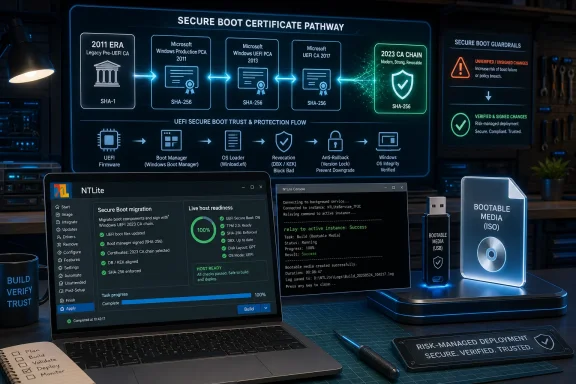
That is the backdrop for NTLite’s most important new feature. Version 2026.06.11200 adds Secure Boot migration support for verification, certificate staging, boot-manager and boot-sector updating, 2023 CA migration, optional 2011 revocation, anti-rollback handling, and boot-sector choice. The feature appears across several parts of the workflow rather than as a single isolated wizard, which is exactly where it belongs.
That design choice matters. Secure Boot migration is not just a checkbox at the end of deployment. It affects source media, mounted images, installed operating systems, update staging, ISO generation, and in some cases the host machine doing the servicing. If a tool claims to manage Windows images in 2026 but treats Secure Boot certificates as an afterthought, it is missing one of the defining deployment problems of the year.
For years, many Windows image shops could get away with a fairly stable playbook: start from a Microsoft ISO, inject updates, add drivers, apply a few registry preferences, maybe remove consumer apps, then ship the result into a lab, classroom, factory, kiosk fleet, or endpoint estate. Secure Boot certificate migration complicates that playbook because the boot path is no longer assumed to be universally compatible across old media, new firmware state, and future revocations.
The key word is state. One device may have received updated 2023 Secure Boot certificates through Windows Update. Another may be waiting for firmware support. Another may have the new certificates but not the old revocations. Another may be a virtual machine with its own template history. A deployment image that works flawlessly on one of those systems may behave differently on another.
NTLite is not solving the entire industry migration by adding a few menus. But it is acknowledging the operational truth that image servicing and Secure Boot readiness are now part of the same conversation. That is the right direction, and it is where third-party Windows deployment tools will increasingly be judged.
That chain is only as reliable as its most neglected link. A Windows image can be fully patched from the operating-system perspective while still being awkwardly positioned for Secure Boot changes. A USB installer can boot on older devices but fail on systems configured for newer certificate expectations. A PXE workflow can pass in a lab but stumble once revocation settings become stricter.
This is why the changelog’s mention of optional 2011 revocation and anti-rollback is more important than it looks. Revocation is the point where migration stops being merely additive. Adding the 2023 certificates increases compatibility with the new trust path; revoking old trust can deliberately break boot components signed under the old one. Anti-rollback protections, meanwhile, are designed to prevent systems from being downgraded into known-vulnerable boot states.
Those are security features, but they are also deployment hazards. The same measure that reduces exposure to bootkit-style abuse can invalidate stale recovery media, older bootloaders, outdated task-sequence assets, or a forgotten ISO stored on a network share. For a home enthusiast, that can mean an unpleasant weekend. For an enterprise admin, it can mean a failed rebuild during an incident.
NTLite’s new Secure Boot tooling should be read in that context. The value is not simply that it can stage certificates or update boot components. The value is that it brings these choices into the same workflow where users already make image decisions. If the tool can help operators see whether an image, ISO, or live host is aligned with the 2023 migration path before they commit changes, it becomes a guardrail rather than just another power feature.
That does not mean everyone should start revoking 2011-era trust on their own. In many environments, revocation policy should follow Microsoft guidance, OEM firmware support, and internal testing rather than enthusiasm. But surfacing the choice is better than pretending it does not exist.
For IT departments, the live system is often the hardest target to reason about. A mounted image is static. A live endpoint is a layered artifact of OEM firmware, Windows Update history, security baselines, user behavior, management policy, recovery partitions, and sometimes years of in-place upgrades. Secure Boot readiness on such a system is not answered by “is Windows patched?” alone.
The new monitor gives NTLite a role closer to an inspection console. It can help users look at the host’s Secure Boot migration state and manage servicing tasks, which is particularly relevant when Microsoft’s migration involves scheduled tasks, registry-controlled availability, staged files, and reboots. In a small environment, that may simply clarify what has happened. In a larger one, it can help validate assumptions before building or distributing media that depends on a newer boot trust chain.
This is where NTLite’s enthusiast roots may help rather than hurt. Many enterprise consoles hide complexity until they emit an error code. NTLite’s audience often wants to see the machinery. A live readiness view fits that culture: show the state, expose the operation, let the operator decide.
There is still a limit to what a workstation-side utility can responsibly promise. Firmware support remains vendor-specific. Enterprise policy may override local choices. Dual-boot systems, third-party encryption, anti-cheat drivers, Linux shims, and bespoke recovery environments can all make Secure Boot migration more complicated than a generic Windows image workflow suggests. But even with those caveats, having readiness checks inside a familiar image tool is a practical improvement.
The best way to think about this feature is not as a replacement for Microsoft’s official guidance. It is a practical lens on top of it. In the real world, admins rarely suffer from a lack of documentation; they suffer from the gap between documentation and the messy machine in front of them.
This is one of those changes that looks boring until you have tried to automate around a GUI-first tool. Windows deployment work is full of hybrid workflows. An admin may use a graphical interface to build a preset, then scripts to apply it. A consultant may batch-process images but still open the UI for inspection. A power user may keep NTLite running while testing different image variants.
Relay support reduces friction in that workflow. It makes the command line feel less like a bolt-on and more like a first-class control surface. More importantly, it avoids the common Windows utility problem where automation and interactivity fight each other for process ownership.
NTLite’s changelog says the command-line help has also been upgraded and now prints to the console or redirected output. That is a small but welcome concession to people who actually script tools. If help text can be redirected, captured, and version-compared, it becomes easier to document internal procedures and detect changes between releases.
The main caveat is licensing. The release notes identify some command-line operations as premium. That is not unusual for a commercial Windows utility, but it does mean admins should verify which parts of their intended automation are available under their license tier before building internal processes around them.
Still, the direction is sound. In 2026, any deployment utility that cannot participate in automation is stuck in the past. NTLite does not need to become Configuration Manager, Intune, or Windows Autopilot to be valuable, but it does need to behave predictably when called by scripts and repeatable workflows. This release moves it closer to that standard.
Editing an offline image is conceptually clean. Editing a live installed OS is more immediate and more dangerous. It invites experimentation because users can see the target system in front of them, but it also means component removals and configuration changes can affect a machine they actually rely on.
By opening more of that experience to free and test users, NTLite lowers the barrier to serious evaluation. That is good for adoption, especially among Windows enthusiasts and small-shop admins who need to prove value before buying. But it also increases the importance of compatibility protections, warnings, and clear reversal expectations.
NTLite has long emphasized guarded component removal, with compatibility safety mechanisms intended to keep users from cutting away something that another feature requires. The challenge is that Windows’ dependency graph is not static. Microsoft changes inbox apps, servicing stack behavior, language-pack relationships, feature dependencies, and security assumptions over time. A removal choice that was safe on one Windows build may be less safe on another.
This release includes fixes that illustrate the point. Component removal could break app deployment when containers were removed. Microsoft Account leftovers could remain when Easy Migrate was kept. Windows 11 26H1 live removal support has been improved. These are not embarrassing footnotes; they are evidence of how hard it is to surgically alter modern Windows without collateral damage.
Free access to more live editing will make NTLite more visible to casual users, but the tool is still not a toy. The best users will treat live editing as a testable operation, not a vibe. Snapshots, backups, spare machines, and reproducible presets remain the difference between customization and self-inflicted outage.
These sound like quality-of-life tweaks because they are. But quality-of-life tweaks matter disproportionately in imaging tools. The mental overhead of managing mounted images, stale paths, multiple editions, temporary folders, exports, and test variants is one of the reasons deployment work becomes brittle. Every small reduction in ambiguity helps prevent mistakes.
The new recompress option in the manual Remove Editions dialog is especially practical. Removing editions from a WIM does not automatically produce the smallest possible image unless the file is exported or recompressed in a way that discards unreferenced data. Letting users shrink the WIM in one session makes the cleanup step more discoverable and less annoying.
The SWM split-size change is similarly sensible. Split WIM files are still relevant when dealing with FAT32 constraints, USB media, or certain deployment pipelines. Moving part-size control inline on the Apply page and image dialogs removes a popup from the workflow and places the decision closer to the operation it affects.
Export-to-existing-WIM behavior has also been improved, with “Append” renamed to “Merge.” That naming change may seem trivial, but “merge” better reflects what many users think they are doing when consolidating or adding image contents. Deployment tools accumulate terminology over time; occasionally cleaning it up makes the tool less hostile to new users.
These image-handling changes do not carry the drama of Secure Boot migration, but they represent the other half of a mature utility: not just adding capability, but reducing the number of times an operator has to stop and ask, “What state am I in?”
This is a sensible UX adjustment because component lists are where many users first discover how much of Windows they do not understand. The old power-user instinct is to expose everything and let the operator cope. The better approach is to sequence risk: show the approachable categories first, preserve the advanced ones, and make compatibility context easier to reach.
The new hover description card on Components and Unattended pages fits that philosophy. It offers selectable text and quick access to compatibility options, which should reduce the need to bounce between documentation, forum posts, and trial-and-error. For a tool like NTLite, descriptions are not decorative. They are part of the safety model.
But a friendlier component tree does not make component removal inherently safe. Windows 11 in particular has blurred the line between “app,” “feature,” “dependency,” and “servicing expectation.” Removing a visible consumer experience can sometimes affect provisioning, OOBE behavior, updates, migration, or account flows. The tool can help, but it cannot turn every aggressive preset into a supported Windows configuration.
The fix for containers removal breaking app deployment is a perfect example. Containers may sound irrelevant to a desktop user who only wants a lean installation, but their removal had consequences for app deployment. That is the modern Windows dependency story in miniature: names do not always communicate blast radius.
The better NTLite gets at filtering and explaining components, the more tempting it becomes to remove more. That is the trap. The goal should not be maximum removal; it should be a measured, repeatable configuration whose tradeoffs are understood.
That may sound narrow, but localization is one of the places where deployment automation often becomes irritating. Language, region, keyboard layout, OOBE behavior, and WinPE environment settings overlap without being identical. A deployment that looks correct for one geography can produce awkward keyboard layouts or mismatched setup screens in another.
NTLite’s refinement here is really about reducing duplicate entry and broadening combinations that the previous interface did not easily allow. For organizations that deploy across multilingual offices, labs, or customer sites, that kind of change can prevent the small errors that make an otherwise polished deployment feel amateurish.
The larger point is that unattended setup remains relevant even as Microsoft pushes cloud-first provisioning models. Autopilot, Intune, and enrollment-driven setup are powerful, but they do not eliminate the need for customized base media, local installation workflows, lab images, offline rebuilds, or specialist environments. Not every Windows deployment begins with a pristine cloud-managed device and a reliable network.
In those contexts, the answer file still matters. So do language packs, driver integration, offline updates, and OOBE decisions. NTLite’s continued investment in unattended setup is a reminder that Windows deployment is not one market. It is a spectrum, from hobbyist ISO builders to enterprise administrators to small businesses that need practical repeatability without adopting Microsoft’s entire management stack.
This release improves that middle ground. It does not replace cloud provisioning, but it makes traditional image-based deployment less clumsy.
These are not glamorous changes, but they address real deployment annoyances. Duplicate updates waste time, confuse audit trails, and increase the chance that an operator misunderstands what an image already contains. Interrupted downloads are a mundane failure mode, but in image building mundane failures are often what break a schedule.
The update-locking behavior is particularly valuable because Windows servicing has become dense. A modern image may include cumulative updates, servicing stack changes, dynamic updates, .NET packages, inbox app updates, language resources, and architecture-specific payloads. The more the tool can identify what is already present, the less the user has to rely on memory or manual notes.
There is also a trust angle. When image builders use third-party tools, they need confidence that the tool is not blindly stacking packages or producing an image whose update state is difficult to explain later. Visibility into carried updates helps preserve that confidence.
The Secure Boot additions make update handling even more consequential. Boot-related updates are no longer just another package in the pile. They may influence whether media aligns with 2023 certificate expectations, whether revocation policy is safe, and whether a deployed system can continue receiving early-boot security improvements. NTLite’s update workflow therefore becomes part of a broader platform-readiness story.
That is the recurring theme of this release: the mundane and the security-critical are converging. The same utility page that integrates updates now has to care about boot trust. The same image apply workflow now has to care about certificate staging. Windows deployment has become less forgiving of sloppy boundaries.
This is the kind of changelog section that many readers skim. They should not. In a tool that can remove components, alter live systems, update boot managers, stage Secure Boot certificates, and generate deployment media, interface clarity is a safety feature.
Dismissible notes are a small example. Apply pages in advanced utilities can become warning graveyards, where every operation produces enough text that users eventually stop reading. Allowing individual notes to be hidden while preserving critical exclusions helps reduce warning fatigue. The trick is making sure dismissibility does not become invisibility for genuinely dangerous operations.
Preset deletion confirmations that list names are another modest but important improvement. Presets are institutional memory. They encode decisions about what to remove, what to keep, what to integrate, and how to automate setup. Deleting the wrong one may not break a machine immediately, but it can erase the reproducibility that makes imaging sane.
The improved filter behavior also matters because search is how users navigate complexity. Matching words in any order and partially makes it easier to find the component or setting a user thinks they want. That can reduce frustration, but it can also surface options whose consequences are not obvious. The hover cards and compatibility shortcuts are therefore the necessary companion to better search.
Good UI in a tool like NTLite is not about looking modern for screenshots. It is about lowering cognitive load while keeping risk visible. Version 2026.06.11200 appears to understand that distinction better than many utilities in this category.
For admins and power users, prompts can be irritating when they interrupt a known workflow. RDP files are often used internally, generated by management tools, stored in jump-box folders, or handed around between support staff. If a new warning appears after a security update, the immediate instinct in many shops is to suppress it.
NTLite adding a tweak for that suppression is unsurprising. Its users expect access to exactly these kinds of Windows behaviors. But this is also where a configuration tool must resist becoming a prompt-removal vending machine.
Unsigned RDP files are not a theoretical risk. Remote Desktop connection files can carry connection settings that influence where a user connects and how resources are redirected. A warning may be annoying, but it exists because users can be tricked into launching connection profiles they do not fully inspect. Suppressing that warning may be reasonable in a controlled environment with signed files, internal shares, and user training. It is much less reasonable as a blanket “make Windows shut up” tweak.
This is not an argument against NTLite exposing the option. Advanced tools should expose advanced choices. It is an argument for treating such tweaks as policy decisions rather than aesthetic preferences. If you disable a warning, you own the risk that the warning was trying to make visible.
That same logic applies across much of NTLite. The tool is powerful precisely because it lets users say no to Microsoft defaults. But saying no well requires understanding why the default exists.
The 26H1 note stands out because it reminds us how far ahead of mainstream deployment some NTLite users operate. Supporting current Windows releases is hard enough. Supporting preview-era or next-wave builds while preserving live removal behavior is a moving target.
That creates a tension for NTLite. Its most enthusiastic users often want support for the newest Windows builds as soon as they appear. Its most cautious users want stable behavior against production images. Those priorities are not identical. Insider and future-version support can uncover issues early, but it also means the tool is adapting to Microsoft changes that may still be in motion.
The visual-effects fixes are more prosaic but still revealing. Disabled animations returning after first logon on a new profile is exactly the sort of bug that irritates users because it makes a deployed image feel inconsistent. Live toggles for animations, dragging full windows, and font smoothing now applying correctly matters because user-experience settings are part of the polish of an image.
These are not core security fixes, but they are trust fixes. If a tool cannot reliably apply small preferences, users will hesitate before trusting it with larger operations. The cumulative effect of such fixes is confidence.
The same applies to the “X:\ not accessible” popup fix during image scanning. Spurious drive errors may not damage anything, but they make a tool feel less deterministic. In deployment work, deterministic behavior is the product.
That admin may support classrooms, labs, point-of-sale terminals, kiosks, industrial systems, offline networks, virtual desktop templates, repair media, or small-business fleets. They may use Microsoft tools for some tasks and NTLite for others. They may not have the budget, licensing, or organizational appetite to make every endpoint an Autopilot success story.
For that audience, NTLite’s value lies in compression of effort. It puts driver integration, update servicing, component choices, unattended setup, and ISO creation into a workflow that can be tested and repeated. Version 2026.06.11200 adds Secure Boot migration to that workflow at exactly the moment when boot trust is becoming a deployment concern rather than a firmware footnote.
The risk is that the same ease can encourage over-customization. A heavily modified Windows image may install quickly and feel lean, but it can also diverge from Microsoft’s tested assumptions. When future cumulative updates, feature upgrades, OOBE changes, or security migrations arrive, that divergence has to be paid for.
NTLite’s compatibility mechanisms help, but they do not make unsupported combinations supported. The tool can make Windows smaller and more tailored. It cannot guarantee that every removed component will remain irrelevant across future Windows releases.
The mature posture is not anti-customization. It is disciplined customization. Use presets. Document changes. Test on sacrificial hardware. Keep unmodified media available. Validate Secure Boot state before and after migration. Treat boot-chain options as security policy, not housekeeping.
That diffusion is predictable. Windows is too widely deployed, and Secure Boot is too foundational, for a certificate migration to remain neatly contained. Once the old and new trust chains coexist, every tool that touches bootable media has to decide whether to ignore the issue, document it, or build support for it. NTLite has chosen to build support.
That choice gives users more control, but it also transfers more responsibility to them. Microsoft can phase rollouts, publish guidance, and use Windows Update to move many machines. A third-party image builder operates closer to the edge cases: offline images, custom ISOs, edited live installations, stripped components, and nonstandard deployment flows. Those are exactly the places where assumptions break.
This makes NTLite 2026.06.11200 feel less like a routine maintenance release and more like a boundary marker. Before, its most controversial operations were largely about what parts of Windows users could remove or preconfigure. Now it is helping mediate a platform trust migration that can affect whether systems boot future media and receive future early-boot protections.
That is a more serious role. It raises the bar for testing, documentation, and caution. It also makes the tool more relevant than ever for the people who need to understand what their Windows images are actually becoming.
 NTLite Moves From Tweaker to Trust-Boundary Tool
NTLite has always occupied a peculiar place in the Windows ecosystem. It is not a Microsoft deployment product, not a consumer cleaner, and not merely a GUI wrapper around DISM. Its appeal is that it lets users prepare Windows images with a level of granularity that Microsoft’s own mainstream tools often make laborious, opaque, or politically inconvenient.That has made NTLite popular with enthusiasts who want a smaller Windows footprint, admins who need repeatable images, and consultants who have spent too many afternoons watching deployment shares accrete drivers, language packs, cumulative updates, and unattended-answer-file edits. The tool’s core promise remains straightforward: mount an image or work against a live installation, integrate what you need, remove what you do not, automate what you can, and reduce the amount of manual cleanup after installation.
Version 2026.06.11200 does not abandon that identity. It still speaks the language of WIMs, SWMs, components, presets, drivers, packages, unattended setup, and image export. But the center of gravity has shifted. The most important addition in this build is not a new removal category or a prettier filter box; it is Secure Boot migration support across image servicing, update integration, apply operations, and ISO creation.
That matters because Secure Boot is not an ordinary Windows feature. It sits below the operating system, in the uneasy territory where firmware, boot managers, certificates, and operating-system updates all have to agree. A mistake here does not produce a missing Start menu shortcut. It can produce a machine that refuses to boot, a USB installer that no longer works on a hardened device, or a deployment workflow that fails at the worst possible moment.
NTLite’s move into this space is therefore both useful and risky. Useful, because administrators need practical tooling that exposes the moving parts of Microsoft’s Secure Boot certificate migration. Risky, because a third-party tool that simplifies boot-chain changes must be treated less like a convenience app and more like infrastructure software.
The Secure Boot Clock Finally Reaches the Imaging Bench
The Secure Boot migration is not a surprise in the abstract. Microsoft’s original Secure Boot certificate authorities date back to the Windows 8 era, and the industry has been moving toward the newer 2023 certificate chain as the older trust infrastructure reaches the end of its useful life. In practical terms, Windows devices need updated Secure Boot databases and boot components so that future early-boot protections, revocation updates, and boot-manager changes continue to work cleanly.That is the backdrop for NTLite’s most important new feature. Version 2026.06.11200 adds Secure Boot migration support for verification, certificate staging, boot-manager and boot-sector updating, 2023 CA migration, optional 2011 revocation, anti-rollback handling, and boot-sector choice. The feature appears across several parts of the workflow rather than as a single isolated wizard, which is exactly where it belongs.
That design choice matters. Secure Boot migration is not just a checkbox at the end of deployment. It affects source media, mounted images, installed operating systems, update staging, ISO generation, and in some cases the host machine doing the servicing. If a tool claims to manage Windows images in 2026 but treats Secure Boot certificates as an afterthought, it is missing one of the defining deployment problems of the year.
For years, many Windows image shops could get away with a fairly stable playbook: start from a Microsoft ISO, inject updates, add drivers, apply a few registry preferences, maybe remove consumer apps, then ship the result into a lab, classroom, factory, kiosk fleet, or endpoint estate. Secure Boot certificate migration complicates that playbook because the boot path is no longer assumed to be universally compatible across old media, new firmware state, and future revocations.
The key word is state. One device may have received updated 2023 Secure Boot certificates through Windows Update. Another may be waiting for firmware support. Another may have the new certificates but not the old revocations. Another may be a virtual machine with its own template history. A deployment image that works flawlessly on one of those systems may behave differently on another.
NTLite is not solving the entire industry migration by adding a few menus. But it is acknowledging the operational truth that image servicing and Secure Boot readiness are now part of the same conversation. That is the right direction, and it is where third-party Windows deployment tools will increasingly be judged.
Microsoft’s Certificate Migration Turns Boot Media Into a Moving Target
The difficult part of the 2023 Secure Boot migration is not that Microsoft is rotating certificates. Certificate renewal is normal. The difficult part is that Secure Boot combines long-lived hardware, offline media, optional revocation stages, OEM firmware behavior, Windows Update servicing, and enterprise deployment tooling into one chain.That chain is only as reliable as its most neglected link. A Windows image can be fully patched from the operating-system perspective while still being awkwardly positioned for Secure Boot changes. A USB installer can boot on older devices but fail on systems configured for newer certificate expectations. A PXE workflow can pass in a lab but stumble once revocation settings become stricter.
This is why the changelog’s mention of optional 2011 revocation and anti-rollback is more important than it looks. Revocation is the point where migration stops being merely additive. Adding the 2023 certificates increases compatibility with the new trust path; revoking old trust can deliberately break boot components signed under the old one. Anti-rollback protections, meanwhile, are designed to prevent systems from being downgraded into known-vulnerable boot states.
Those are security features, but they are also deployment hazards. The same measure that reduces exposure to bootkit-style abuse can invalidate stale recovery media, older bootloaders, outdated task-sequence assets, or a forgotten ISO stored on a network share. For a home enthusiast, that can mean an unpleasant weekend. For an enterprise admin, it can mean a failed rebuild during an incident.
NTLite’s new Secure Boot tooling should be read in that context. The value is not simply that it can stage certificates or update boot components. The value is that it brings these choices into the same workflow where users already make image decisions. If the tool can help operators see whether an image, ISO, or live host is aligned with the 2023 migration path before they commit changes, it becomes a guardrail rather than just another power feature.
That does not mean everyone should start revoking 2011-era trust on their own. In many environments, revocation policy should follow Microsoft guidance, OEM firmware support, and internal testing rather than enthusiasm. But surfacing the choice is better than pretending it does not exist.
Live Host Readiness Is the Quiet Enterprise Feature
NTLite 2026.06.11200 also adds Secure Boot Host Readiness, described as a live host migration monitor and servicing-task control. This can be accessed from the Image page’s C:\Windows row or by loading the host as the target and navigating through Updates into Secure Boot. That sounds like a minor UI addition until you consider who actually gets paged when boot policy changes go wrong.For IT departments, the live system is often the hardest target to reason about. A mounted image is static. A live endpoint is a layered artifact of OEM firmware, Windows Update history, security baselines, user behavior, management policy, recovery partitions, and sometimes years of in-place upgrades. Secure Boot readiness on such a system is not answered by “is Windows patched?” alone.
The new monitor gives NTLite a role closer to an inspection console. It can help users look at the host’s Secure Boot migration state and manage servicing tasks, which is particularly relevant when Microsoft’s migration involves scheduled tasks, registry-controlled availability, staged files, and reboots. In a small environment, that may simply clarify what has happened. In a larger one, it can help validate assumptions before building or distributing media that depends on a newer boot trust chain.
This is where NTLite’s enthusiast roots may help rather than hurt. Many enterprise consoles hide complexity until they emit an error code. NTLite’s audience often wants to see the machinery. A live readiness view fits that culture: show the state, expose the operation, let the operator decide.
There is still a limit to what a workstation-side utility can responsibly promise. Firmware support remains vendor-specific. Enterprise policy may override local choices. Dual-boot systems, third-party encryption, anti-cheat drivers, Linux shims, and bespoke recovery environments can all make Secure Boot migration more complicated than a generic Windows image workflow suggests. But even with those caveats, having readiness checks inside a familiar image tool is a practical improvement.
The best way to think about this feature is not as a replacement for Microsoft’s official guidance. It is a practical lens on top of it. In the real world, admins rarely suffer from a lack of documentation; they suffer from the gap between documentation and the messy machine in front of them.
The Command Line Finally Catches Up With the Way Admins Work
Another notable change in this release is command-line relay into an already-running NTLite instance. Instead of forcing a second copy of the application or prompting awkwardly when an instance is already open, commands can now be passed to the active process. Users who need a separate instance can still launch one with/NewInstance, with premium licensing applying to CLI operations.This is one of those changes that looks boring until you have tried to automate around a GUI-first tool. Windows deployment work is full of hybrid workflows. An admin may use a graphical interface to build a preset, then scripts to apply it. A consultant may batch-process images but still open the UI for inspection. A power user may keep NTLite running while testing different image variants.
Relay support reduces friction in that workflow. It makes the command line feel less like a bolt-on and more like a first-class control surface. More importantly, it avoids the common Windows utility problem where automation and interactivity fight each other for process ownership.
NTLite’s changelog says the command-line help has also been upgraded and now prints to the console or redirected output. That is a small but welcome concession to people who actually script tools. If help text can be redirected, captured, and version-compared, it becomes easier to document internal procedures and detect changes between releases.
The main caveat is licensing. The release notes identify some command-line operations as premium. That is not unusual for a commercial Windows utility, but it does mean admins should verify which parts of their intended automation are available under their license tier before building internal processes around them.
Still, the direction is sound. In 2026, any deployment utility that cannot participate in automation is stuck in the past. NTLite does not need to become Configuration Manager, Intune, or Windows Autopilot to be valuable, but it does need to behave predictably when called by scripts and repeatable workflows. This release moves it closer to that standard.
Free Users Get More Power, and That Changes the On-Ramp
One of the more consequential licensing changes is easy to miss: live OS and deployed image editing are now unlocked on free and test licenses, using the same licensing model as images. That broadens the audience for a feature that used to sit behind a stronger paywall, and it changes how new users are likely to encounter NTLite.Editing an offline image is conceptually clean. Editing a live installed OS is more immediate and more dangerous. It invites experimentation because users can see the target system in front of them, but it also means component removals and configuration changes can affect a machine they actually rely on.
By opening more of that experience to free and test users, NTLite lowers the barrier to serious evaluation. That is good for adoption, especially among Windows enthusiasts and small-shop admins who need to prove value before buying. But it also increases the importance of compatibility protections, warnings, and clear reversal expectations.
NTLite has long emphasized guarded component removal, with compatibility safety mechanisms intended to keep users from cutting away something that another feature requires. The challenge is that Windows’ dependency graph is not static. Microsoft changes inbox apps, servicing stack behavior, language-pack relationships, feature dependencies, and security assumptions over time. A removal choice that was safe on one Windows build may be less safe on another.
This release includes fixes that illustrate the point. Component removal could break app deployment when containers were removed. Microsoft Account leftovers could remain when Easy Migrate was kept. Windows 11 26H1 live removal support has been improved. These are not embarrassing footnotes; they are evidence of how hard it is to surgically alter modern Windows without collateral damage.
Free access to more live editing will make NTLite more visible to casual users, but the tool is still not a toy. The best users will treat live editing as a testable operation, not a vibe. Snapshots, backups, spare machines, and reproducible presets remain the difference between customization and self-inflicted outage.
Image Handling Gets the Kind of Polish That Saves Hours
Beyond Secure Boot, NTLite 2026.06.11200 includes a cluster of image-management improvements that will matter to anyone who lives inside deployment files. The new “Sort mounted images first” option helps keep active work visible. Relative “Last change” dates and edition grouping by build time reduce visual noise. A “Forget - Missing” option can mass-drop edit-cache entries whose folders are gone.These sound like quality-of-life tweaks because they are. But quality-of-life tweaks matter disproportionately in imaging tools. The mental overhead of managing mounted images, stale paths, multiple editions, temporary folders, exports, and test variants is one of the reasons deployment work becomes brittle. Every small reduction in ambiguity helps prevent mistakes.
The new recompress option in the manual Remove Editions dialog is especially practical. Removing editions from a WIM does not automatically produce the smallest possible image unless the file is exported or recompressed in a way that discards unreferenced data. Letting users shrink the WIM in one session makes the cleanup step more discoverable and less annoying.
The SWM split-size change is similarly sensible. Split WIM files are still relevant when dealing with FAT32 constraints, USB media, or certain deployment pipelines. Moving part-size control inline on the Apply page and image dialogs removes a popup from the workflow and places the decision closer to the operation it affects.
Export-to-existing-WIM behavior has also been improved, with “Append” renamed to “Merge.” That naming change may seem trivial, but “merge” better reflects what many users think they are doing when consolidating or adding image contents. Deployment tools accumulate terminology over time; occasionally cleaning it up makes the tool less hostile to new users.
These image-handling changes do not carry the drama of Secure Boot migration, but they represent the other half of a mature utility: not just adding capability, but reducing the number of times an operator has to stop and ask, “What state am I in?”
The Component Tree Becomes More Human Without Becoming Harmless
NTLite’s component-removal interface has also been reorganized, with user-facing groups placed first and system or critical groups pushed later. Apps are now merged into groups, and filters can show components by template or app type. Search and filtering have been improved so words can match in any order and partially.This is a sensible UX adjustment because component lists are where many users first discover how much of Windows they do not understand. The old power-user instinct is to expose everything and let the operator cope. The better approach is to sequence risk: show the approachable categories first, preserve the advanced ones, and make compatibility context easier to reach.
The new hover description card on Components and Unattended pages fits that philosophy. It offers selectable text and quick access to compatibility options, which should reduce the need to bounce between documentation, forum posts, and trial-and-error. For a tool like NTLite, descriptions are not decorative. They are part of the safety model.
But a friendlier component tree does not make component removal inherently safe. Windows 11 in particular has blurred the line between “app,” “feature,” “dependency,” and “servicing expectation.” Removing a visible consumer experience can sometimes affect provisioning, OOBE behavior, updates, migration, or account flows. The tool can help, but it cannot turn every aggressive preset into a supported Windows configuration.
The fix for containers removal breaking app deployment is a perfect example. Containers may sound irrelevant to a desktop user who only wants a lean installation, but their removal had consequences for app deployment. That is the modern Windows dependency story in miniature: names do not always communicate blast radius.
The better NTLite gets at filtering and explaining components, the more tempting it becomes to remove more. That is the trap. The goal should not be maximum removal; it should be a measured, repeatable configuration whose tradeoffs are understood.
Unattended Setup Still Matters in the Age of Cloud Provisioning
The unattended setup improvements in this build are less flashy but still important. Input-locale language now derives from the user locale, while the keyboard picker remains independent. Users can override input-locale values, and OOBE WinPE localization can be copied through a new toggle so locale settings can be entered once for both stages.That may sound narrow, but localization is one of the places where deployment automation often becomes irritating. Language, region, keyboard layout, OOBE behavior, and WinPE environment settings overlap without being identical. A deployment that looks correct for one geography can produce awkward keyboard layouts or mismatched setup screens in another.
NTLite’s refinement here is really about reducing duplicate entry and broadening combinations that the previous interface did not easily allow. For organizations that deploy across multilingual offices, labs, or customer sites, that kind of change can prevent the small errors that make an otherwise polished deployment feel amateurish.
The larger point is that unattended setup remains relevant even as Microsoft pushes cloud-first provisioning models. Autopilot, Intune, and enrollment-driven setup are powerful, but they do not eliminate the need for customized base media, local installation workflows, lab images, offline rebuilds, or specialist environments. Not every Windows deployment begins with a pristine cloud-managed device and a reliable network.
In those contexts, the answer file still matters. So do language packs, driver integration, offline updates, and OOBE decisions. NTLite’s continued investment in unattended setup is a reminder that Windows deployment is not one market. It is a spectrum, from hobbyist ISO builders to enterprise administrators to small businesses that need practical repeatability without adopting Microsoft’s entire management stack.
This release improves that middle ground. It does not replace cloud provisioning, but it makes traditional image-based deployment less clumsy.
Update Integration Gets Closer to Real-World Failure Modes
NTLite’s update handling also gets practical improvements. The downloader now greys out and locks updates the image already carries, covering hotfixes and MSIX packages. Interrupted update downloads can now resume. Package integration still benefits from smart sorting, which applies updates in an order intended to preserve compatibility.These are not glamorous changes, but they address real deployment annoyances. Duplicate updates waste time, confuse audit trails, and increase the chance that an operator misunderstands what an image already contains. Interrupted downloads are a mundane failure mode, but in image building mundane failures are often what break a schedule.
The update-locking behavior is particularly valuable because Windows servicing has become dense. A modern image may include cumulative updates, servicing stack changes, dynamic updates, .NET packages, inbox app updates, language resources, and architecture-specific payloads. The more the tool can identify what is already present, the less the user has to rely on memory or manual notes.
There is also a trust angle. When image builders use third-party tools, they need confidence that the tool is not blindly stacking packages or producing an image whose update state is difficult to explain later. Visibility into carried updates helps preserve that confidence.
The Secure Boot additions make update handling even more consequential. Boot-related updates are no longer just another package in the pile. They may influence whether media aligns with 2023 certificate expectations, whether revocation policy is safe, and whether a deployed system can continue receiving early-boot security improvements. NTLite’s update workflow therefore becomes part of a broader platform-readiness story.
That is the recurring theme of this release: the mundane and the security-critical are converging. The same utility page that integrates updates now has to care about boot trust. The same image apply workflow now has to care about certificate staging. Windows deployment has become less forgiving of sloppy boundaries.
UI Polish Is Not Cosmetic When the Tool Can Break Boot
The release also continues a broader design update across the application. There are dismissible apply-page notes, hover cards, improved filtering, a main-menu option for launching a new instance, preset delete confirmations that list selected names, and better manual refresh behavior when presets are added or removed outside the app.This is the kind of changelog section that many readers skim. They should not. In a tool that can remove components, alter live systems, update boot managers, stage Secure Boot certificates, and generate deployment media, interface clarity is a safety feature.
Dismissible notes are a small example. Apply pages in advanced utilities can become warning graveyards, where every operation produces enough text that users eventually stop reading. Allowing individual notes to be hidden while preserving critical exclusions helps reduce warning fatigue. The trick is making sure dismissibility does not become invisibility for genuinely dangerous operations.
Preset deletion confirmations that list names are another modest but important improvement. Presets are institutional memory. They encode decisions about what to remove, what to keep, what to integrate, and how to automate setup. Deleting the wrong one may not break a machine immediately, but it can erase the reproducibility that makes imaging sane.
The improved filter behavior also matters because search is how users navigate complexity. Matching words in any order and partially makes it easier to find the component or setting a user thinks they want. That can reduce frustration, but it can also surface options whose consequences are not obvious. The hover cards and compatibility shortcuts are therefore the necessary companion to better search.
Good UI in a tool like NTLite is not about looking modern for screenshots. It is about lowering cognitive load while keeping risk visible. Version 2026.06.11200 appears to understand that distinction better than many utilities in this category.
The RDP Warning Tweak Is Small, Telling, and Slightly Dangerous
One new setting deserves special attention because it reflects the uneasy relationship between convenience and security: an “Unsigned RDP file launch warnings” tweak for the Remote Desktop client, intended to bypass the security-update prompt introduced with the April 2026 update behavior for RDP connections.For admins and power users, prompts can be irritating when they interrupt a known workflow. RDP files are often used internally, generated by management tools, stored in jump-box folders, or handed around between support staff. If a new warning appears after a security update, the immediate instinct in many shops is to suppress it.
NTLite adding a tweak for that suppression is unsurprising. Its users expect access to exactly these kinds of Windows behaviors. But this is also where a configuration tool must resist becoming a prompt-removal vending machine.
Unsigned RDP files are not a theoretical risk. Remote Desktop connection files can carry connection settings that influence where a user connects and how resources are redirected. A warning may be annoying, but it exists because users can be tricked into launching connection profiles they do not fully inspect. Suppressing that warning may be reasonable in a controlled environment with signed files, internal shares, and user training. It is much less reasonable as a blanket “make Windows shut up” tweak.
This is not an argument against NTLite exposing the option. Advanced tools should expose advanced choices. It is an argument for treating such tweaks as policy decisions rather than aesthetic preferences. If you disable a warning, you own the risk that the warning was trying to make visible.
That same logic applies across much of NTLite. The tool is powerful precisely because it lets users say no to Microsoft defaults. But saying no well requires understanding why the default exists.
Fixes Show the Cost of Chasing Windows Insider-Time
The fixes in this release include improved Windows 11 26H1 live removal support, better export behavior to existing WIMs, avoidance of certain drive-access popups during image scans, preset refresh improvements, and corrections to visual-effects tweaks that previously reverted or failed to apply correctly.The 26H1 note stands out because it reminds us how far ahead of mainstream deployment some NTLite users operate. Supporting current Windows releases is hard enough. Supporting preview-era or next-wave builds while preserving live removal behavior is a moving target.
That creates a tension for NTLite. Its most enthusiastic users often want support for the newest Windows builds as soon as they appear. Its most cautious users want stable behavior against production images. Those priorities are not identical. Insider and future-version support can uncover issues early, but it also means the tool is adapting to Microsoft changes that may still be in motion.
The visual-effects fixes are more prosaic but still revealing. Disabled animations returning after first logon on a new profile is exactly the sort of bug that irritates users because it makes a deployed image feel inconsistent. Live toggles for animations, dragging full windows, and font smoothing now applying correctly matters because user-experience settings are part of the polish of an image.
These are not core security fixes, but they are trust fixes. If a tool cannot reliably apply small preferences, users will hesitate before trusting it with larger operations. The cumulative effect of such fixes is confidence.
The same applies to the “X:\ not accessible” popup fix during image scanning. Spurious drive errors may not damage anything, but they make a tool feel less deterministic. In deployment work, deterministic behavior is the product.
The Real Audience Is the Admin Who Still Builds Images
It is tempting to frame NTLite as an enthusiast utility because many enthusiasts use it that way. But this release speaks strongly to a different audience: the admin who still builds Windows images because the real world has not been fully absorbed into cloud provisioning.That admin may support classrooms, labs, point-of-sale terminals, kiosks, industrial systems, offline networks, virtual desktop templates, repair media, or small-business fleets. They may use Microsoft tools for some tasks and NTLite for others. They may not have the budget, licensing, or organizational appetite to make every endpoint an Autopilot success story.
For that audience, NTLite’s value lies in compression of effort. It puts driver integration, update servicing, component choices, unattended setup, and ISO creation into a workflow that can be tested and repeated. Version 2026.06.11200 adds Secure Boot migration to that workflow at exactly the moment when boot trust is becoming a deployment concern rather than a firmware footnote.
The risk is that the same ease can encourage over-customization. A heavily modified Windows image may install quickly and feel lean, but it can also diverge from Microsoft’s tested assumptions. When future cumulative updates, feature upgrades, OOBE changes, or security migrations arrive, that divergence has to be paid for.
NTLite’s compatibility mechanisms help, but they do not make unsupported combinations supported. The tool can make Windows smaller and more tailored. It cannot guarantee that every removed component will remain irrelevant across future Windows releases.
The mature posture is not anti-customization. It is disciplined customization. Use presets. Document changes. Test on sacrificial hardware. Keep unmodified media available. Validate Secure Boot state before and after migration. Treat boot-chain options as security policy, not housekeeping.
Nuhi’s Tool Is Now Part of Microsoft’s Messy Trust Transition
The broader significance of this release is that it shows how Microsoft’s Secure Boot transition is spilling into the ecosystem around Windows. This is not only a Microsoft Update story. It affects OEM firmware, enterprise deployment servers, USB media, dual-boot environments, third-party bootloaders, recovery tooling, virtual machine templates, and utilities like NTLite.That diffusion is predictable. Windows is too widely deployed, and Secure Boot is too foundational, for a certificate migration to remain neatly contained. Once the old and new trust chains coexist, every tool that touches bootable media has to decide whether to ignore the issue, document it, or build support for it. NTLite has chosen to build support.
That choice gives users more control, but it also transfers more responsibility to them. Microsoft can phase rollouts, publish guidance, and use Windows Update to move many machines. A third-party image builder operates closer to the edge cases: offline images, custom ISOs, edited live installations, stripped components, and nonstandard deployment flows. Those are exactly the places where assumptions break.
This makes NTLite 2026.06.11200 feel less like a routine maintenance release and more like a boundary marker. Before, its most controversial operations were largely about what parts of Windows users could remove or preconfigure. Now it is helping mediate a platform trust migration that can affect whether systems boot future media and receive future early-boot protections.
That is a more serious role. It raises the bar for testing, documentation, and caution. It also makes the tool more relevant than ever for the people who need to understand what their Windows images are actually becoming.
The 2026.06.11200 Release Rewards Cautious Power Users
NTLite 2026.06.11200 is best understood as a release for people who want more control but are willing to accept that control now reaches into the boot chain. The practical advice is not to avoid the update; it is to treat it with the respect normally reserved for deployment infrastructure.- Secure Boot migration support is the defining addition, especially for anyone creating ISO media, servicing offline images, or preparing systems for the 2023 certificate chain.
- Live host readiness checks make the release more useful for administrators who need to inspect real machines rather than reason only from mounted images.
- Command-line relay into an existing instance makes NTLite more automation-friendly and less awkward in hybrid GUI-script workflows.
- Free and test license users now get broader access to live OS and deployed image editing, which improves evaluation but also increases the need for backups and disciplined testing.
- Image-management, update-download, unattended-setup, and UI improvements reduce friction in the daily work of building and maintaining Windows deployment media.
- Security-related tweaks, including RDP warning suppression and optional Secure Boot revocation choices, should be handled as policy decisions rather than casual convenience settings.
References
- Primary source: Neowin
Published: 2026-06-29T14:20:17.206996
NTLite 2026.06.11200 - Neowin
Integrate updates, drivers, automate Windows and application setup, speedup Windows deployment process and have it all set for the next time. www.neowin.net
- Related coverage: ntlite.com
Changelog | NTLite
NTLite release history - new features, fixes, and improvements across every version. Searchable by year.ntlite.com
- Related coverage: pcgamer.com
Secure Boot certificates used by anti-cheat software are set to expire in June but new ones are already in the mail | PC Gamer
You shouldn't have to worry about expired certificates if you keep your PC up-to-date.www.pcgamer.com
