

Microsoft’s Patch Tuesday Problem Is Really a Boot Trust Problem
KB5087420 arrives as a normal security cumulative update for Windows 11 23H2, but its most interesting detail sits in the known-issues section. Microsoft says devices with an “unrecommended” BitLocker Group Policy configuration may be required to enter the BitLocker recovery key after installing the update and rebooting. That phrasing is doing a lot of work.
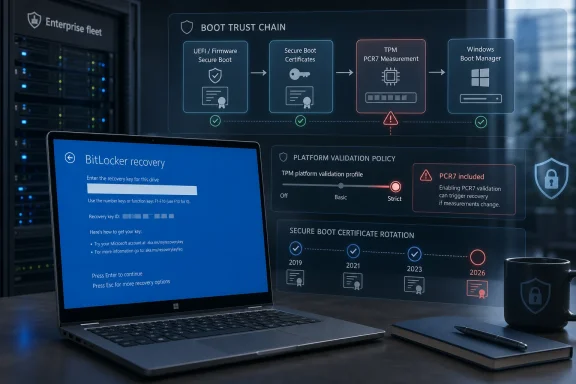
The issue is not that BitLocker is broken. It is that BitLocker is doing what it was told to do: watch the boot chain closely, compare it against expected measurements, and refuse to unlock automatically when those measurements change outside its accepted profile. In this case, the uncomfortable party is not malware but Microsoft’s own Secure Boot transition.
The trigger depends on a very specific stack of conditions. BitLocker must be enabled on the operating system drive. A Group Policy must explicitly configure the TPM platform validation profile for native UEFI systems and include PCR7. The machine must report PCR7 Binding as “Not Possible” in System Information. The Windows UEFI CA 2023 certificate must already be present in the Secure Boot database, making the machine eligible for the newer 2023-signed Windows Boot Manager. And the device must not already be running that newer boot manager.
That is why Microsoft can plausibly say the issue is unlikely on personal PCs not managed by IT. Home users generally do not configure custom BitLocker PCR profiles. Enterprises, however, do exactly this sort of thing: they turn knobs, freeze baselines, and keep old settings alive because they once solved a real audit or threat-model problem.
The 2023 Secure Boot Migration Has Reached the Awkward Phase
The timing matters. Secure Boot certificates used across much of the Windows ecosystem are approaching expiration beginning in June 2026, and Microsoft has been pushing organizations toward the newer 2023 certificate chain. KB5087420 includes additional device-targeting data intended to expand the population of systems eligible to receive updated Secure Boot certificates through Windows quality updates.
That is a cautious rollout strategy, not a casual one. Microsoft is trying to replace trust anchors and boot components without bricking machines or creating mass recovery events. The company’s language about “high confidence” targeting signals an engineering compromise: broaden coverage, but only when telemetry and device state suggest a machine is likely to survive the change.
The problem is that boot security is not just an operating system feature. It is a contract among firmware, Secure Boot databases, Windows Boot Manager, TPM measurements, BitLocker protectors, and the management policies layered on top. When Microsoft changes one piece of that contract, a managed PC may interpret the change as exactly the sort of suspicious event BitLocker was designed to catch.
That is the irony at the center of KB5087420. The update is part of Microsoft’s work to keep Secure Boot trustworthy after older certificates age out. But on a narrow set of machines, that trust refresh can look like boot-chain drift to BitLocker.
PCR7 Is Where Policy Meets Physics
PCR7 is not a familiar acronym for most Windows users, but administrators who manage encrypted fleets should treat it as the key to this episode. Platform Configuration Registers, or PCRs, are TPM registers that store measurements from the boot process. BitLocker can bind automatic unlocking to those measurements, effectively saying: release the disk key only if the system booted in the expected way.
PCR7 is associated with Secure Boot policy. If a device’s Secure Boot configuration or boot trust state changes, PCR7 can reflect that. That is useful when defending against bootkits or unauthorized pre-OS tampering, but it becomes fragile when a legitimate servicing operation changes the measured boot environment.
Microsoft’s warning singles out devices where administrators explicitly included PCR7 in the BitLocker validation profile even though the machine reports PCR7 Binding as “Not Possible.” That combination is the red flag. The policy is insisting on a measurement relationship that the platform cannot satisfy cleanly, and then a Secure Boot-related update comes along and changes the boot manager eligibility state.
In plain English: IT told BitLocker to watch a door that Windows now needs to replace, and the hardware is already saying that door’s alarm wiring is not quite right.
The Recovery Prompt Is a One-Time Event, but the Help Desk Will Not Care
Microsoft says affected devices should need the BitLocker recovery key only once. Subsequent restarts should not trigger the recovery screen as long as the Group Policy configuration remains unchanged. That distinction matters technically, but it will not matter much to the user staring at a blue recovery screen before the workday starts.
BitLocker recovery prompts are uniquely disruptive because they arrive before Windows is usable. Remote assistance may be limited. Network access may not exist. The user may not know where the recovery key is stored, and the administrator may have to retrieve it from Active Directory, Microsoft Entra ID, an endpoint management system, or whatever escrow process the organization uses.
A one-time event across ten test machines is a nuisance. A one-time event across a few thousand laptops after a staged deployment is an incident. Microsoft’s language suggests the affected pool is limited, but enterprises have learned the hard way that “limited” can still mean “concentrated in the exact department with the strictest policies and least tolerance for downtime.”
The real risk is not data loss. BitLocker is doing its job, and the recovery key should unlock the device. The risk is operational confidence: users see a scary recovery screen after a Microsoft update, administrators scramble to determine whether the event is expected, and security teams must explain why a security update temporarily made secure devices harder to use.
Microsoft’s Recommended Workaround Quietly Rewrites Old Hardening Advice
Microsoft’s recommended workaround is to remove the custom Group Policy configuration before installing the update. Administrators are told to set “Configure TPM platform validation profile for native UEFI firmware configurations” to “Not Configured,” force Group Policy refresh, suspend BitLocker protectors, and then re-enable them. That sequence updates BitLocker bindings to use the Windows-selected default PCR profile.
The important phrase is “Windows-selected default.” Microsoft is not merely telling admins to pause protection for a reboot. It is nudging them away from explicit PCR7 inclusion and toward the platform defaults that Windows now expects for modern Secure Boot servicing. That is a policy correction disguised as a workaround.
There is a reasonable security argument for Microsoft’s position. Default profiles can evolve with Windows, firmware behavior, and servicing realities. Hard-coded profiles age poorly, especially when they encode assumptions from a previous generation of Secure Boot certificates and boot managers. A setting that looked conservative in 2018 can become brittle in 2026.
But administrators will also see the trade-off. Explicit PCR selection gave them control and auditability. Moving back to Microsoft defaults requires trusting Redmond’s current judgment about the right balance between tamper resistance and serviceability. For many organizations, that is probably the correct call; for highly regulated environments, it still demands testing and documentation.
The Update’s Other Changes Show Microsoft Tightening the Windows Perimeter
The BitLocker warning will attract the most attention, but KB5087420 is not only about boot recovery. The update includes security fixes and carries forward quality improvements from the prior month’s release. It also adds Secure Boot targeting improvements, updates Country and Operator Settings Asset profiles for some mobile operators, supports Egypt’s 2023 daylight saving time change, expands Enterprise State Roaming management through Windows Backup for Organizations policies, and changes Microsoft Defender SmartScreen behavior in the shell.
The SmartScreen change is worth watching. Microsoft says the Windows shell can now send file hashes for unsigned files, allowing SmartScreen to use newer reputation models and improve application reputation checks. That is a security win in the broad sense, but it also fits a pattern: Windows is becoming more aggressive about reputation, identity, and trust at multiple layers, from downloaded executables to boot components.
There is also a Remote Desktop fix. Microsoft says the update addresses an issue where the Remote Desktop Connection security warning dialog could render incorrectly in multi-monitor setups with different scaling, a bug associated with the April 2026 security update. It is a small quality fix, but one that matters in real enterprise environments where RDP warnings are already easy for users to misread or ignore.
Taken together, the update reads like a serviceability release with a security spine. Microsoft is hardening early boot, improving app reputation checks, repairing an RDP warning UI regression, and continuing the long migration away from older Secure Boot trust material. The BitLocker issue is not an unrelated blemish; it is the cost of doing that work in an ecosystem with millions of policy combinations.
Enterprise IT Should Treat This as a Fleet Inventory Test
The practical question is not whether every Windows 11 23H2 device should panic. They should not. The practical question is whether an organization can identify the small population that matches Microsoft’s conditions before the update reaches production rings.
That means inventorying BitLocker policy, not merely BitLocker status. Many dashboards can tell administrators whether encryption is enabled. Fewer teams have clean, current visibility into whether the native UEFI TPM platform validation profile has been explicitly configured and whether PCR7 is included. Even fewer have that visibility tied to msinfo32’s PCR7 Binding state and Secure Boot certificate readiness.
The check is conceptually simple: find managed devices with OS-drive BitLocker, explicit PCR7 inclusion, PCR7 Binding reported as “Not Possible,” Windows UEFI CA 2023 present in the Secure Boot DB, and no 2023-signed Windows Boot Manager yet in use. In practice, that is a cross-domain query spanning policy, firmware state, TPM behavior, and boot component status.
This is where mature patch management earns its keep. Organizations that deploy KB5087420 through rings can audit pilot devices, test the workaround, and confirm recovery-key escrow before broad rollout. Organizations that treat Patch Tuesday as a blind automatic event may still be fine—but they are relying on Microsoft’s “limited number of systems” caveat rather than their own evidence.
The Personal PC Story Is Mostly Reassuring
For Windows enthusiasts running personal machines, the most likely takeaway is that nothing unusual will happen. Microsoft explicitly says the conditions are unlikely to be found on personal devices not managed by IT departments. A standard Windows 11 laptop with BitLocker or device encryption enabled, using default settings, is not the target scenario described in the known issue.
That does not mean personal users should ignore recovery keys. The broader Secure Boot certificate transition is real, and BitLocker recovery prompts can happen for many reasons: firmware updates, TPM changes, Secure Boot changes, motherboard repairs, or manual boot configuration edits. Anyone using encryption should know where the recovery key is stored before a problem occurs.
For Microsoft accounts, recovery keys are often backed up to the account online. For workplace devices, they are commonly escrowed by the organization. For local-only setups or manually managed systems, the answer depends on what the user chose when enabling BitLocker. The worst time to discover the difference is from the preboot recovery screen.
Still, KB5087420 is mainly an enterprise cautionary tale. If a home user sees this update and worries that Patch Tuesday will suddenly lock them out, the available evidence says that is not the expected outcome. The dangerous combination is not BitLocker alone; it is BitLocker plus a very specific managed PCR policy plus a particular Secure Boot migration state.
The Permanent Fix Is Still Somewhere Downstream
Microsoft says a permanent resolution is planned for a future Windows update. That leaves administrators in the familiar middle ground: the issue is documented, the workaround is available, but the final code-level correction has not landed yet. The company has not promised a specific release date for that fix.
That matters for change planning. Enterprises deciding whether to deploy KB5087420 immediately, stage it more slowly, or remediate policy first must weigh normal security-update urgency against the operational risk of recovery prompts. Because KB5087420 is a security update, indefinite deferral is not an attractive strategy. But neither is surprising users with a recovery-key event that could have been prevented by auditing policy.
The cleaner path is to treat the workaround as hygiene rather than exception handling. If Microsoft considers the explicit PCR7 configuration unrecommended in this context, organizations should ask why the setting remains deployed. If there is no current threat model requiring it, retiring it before the Secure Boot transition accelerates is probably the safer operational move.
The more complicated case is an organization that deliberately includes PCR7 and can justify doing so. Those teams should test carefully, document the expected one-time recovery behavior if they accept it, and make sure recovery keys are escrowed and accessible at scale. A security control that cannot survive routine servicing without chaos is not a control; it is deferred outage.
The Real Patch Is Better Assumption Management
Windows administration has always involved inherited assumptions. A Group Policy setting enabled by a predecessor becomes “the standard.” A BitLocker profile copied from a hardening guide becomes part of a gold image. A firmware quirk gets worked around once and then fossilizes into policy.
KB5087420 exposes the risk of that accumulation. Secure Boot’s certificate rollover is forcing Windows to revisit old trust material, and BitLocker is revealing where enterprises pinned themselves too tightly to an old boot measurement model. The machine is not being capricious; it is enforcing assumptions that may no longer match the platform’s direction.
Microsoft deserves some credit for documenting the affected conditions with unusual specificity. The known issue is narrow, actionable, and honest about the need for a future fix. But the wording also shifts responsibility toward administrators: this is an “unrecommended” configuration, and the recommended workaround is to stop using it.
That will not satisfy everyone. Some IT pros will see it as Microsoft changing the ground under carefully managed endpoints. Others will see it as overdue cleanup before Secure Boot certificate expiration becomes a larger crisis. Both readings can be true.
The KB5087420 Lesson Is Written in the Recovery Screen
The concrete lesson from this update is not that BitLocker should be weakened or that Secure Boot updates should be avoided. It is that boot-chain security must be managed as a living dependency, not a one-time baseline.
- KB5087420 applies to Windows 11 version 23H2 and brings systems to OS Build 22631.7079.
- The BitLocker recovery prompt is expected only on devices matching a narrow set of enterprise-style conditions involving explicit PCR7 inclusion and Secure Boot migration state.
- Microsoft says the recovery key should be required only once, provided the Group Policy configuration does not change afterward.
- The recommended workaround is to remove the custom TPM validation profile, refresh policy, suspend BitLocker protectors, and re-enable them so Windows can use its default PCR profile.
- The update also advances Microsoft’s Secure Boot certificate rollout work ahead of 2026 certificate expiration pressure.
- Organizations should verify recovery-key escrow and audit BitLocker PCR policy before broad deployment, rather than treating the issue as a generic Patch Tuesday warning.
KB5087420 is a reminder that the most consequential Windows updates are not always the ones with the loudest new features or the scariest vulnerability counts. Sometimes the important change is the quiet realignment of trust at boot, where firmware, certificates, TPM measurements, and enterprise policy all meet before Windows even loads. As Microsoft pushes the ecosystem through the 2023 Secure Boot certificate transition, the administrators who fare best will be the ones who know not just which devices are patched, but which old assumptions those devices are still enforcing.