

Microsoft’s Windows 11 AI backlash has found a new pressure valve in NTLite v2026.04.10936, a Windows customization tool that now lets users remove AI-related components from Windows 11 25H2 installation images before the operating system is installed. That matters because the fight over Copilot, Recall, semantic search, and other AI features is no longer just about toggles buried in Settings. It is about whether Windows remains a general-purpose operating system users configure after installation, or a Microsoft-shaped platform whose defaults must be surgically reversed before first boot. NTLite is not merely another “debloat” utility; it is a sign that a growing slice of the Windows audience wants control earlier in the lifecycle than Microsoft is comfortable giving it.
The interesting thing about NTLite’s new AI component controls is not that a third-party tool can remove unwanted Windows pieces. Windows enthusiasts have been slipstreaming drivers, trimming images, and building unattended installers since the XP era. The interesting thing is what now counts as “unwanted.”
For years, the familiar targets were games, consumer apps, trialware, telemetry-adjacent services, OneDrive prompts, Teams stubs, widgets, and whatever Microsoft decided belonged on the Start menu that month. AI has joined that list with unusual speed. Copilot is no longer just a web chatbot in a browser tab; it has become an operating-system presence. Recall is no longer just a product demo; it is a trust test. Click to Do, semantic indexing, AI-powered Settings help, and local models on Copilot+ PCs are now part of Microsoft’s argument that Windows should be an AI client.
That argument may be coherent from Redmond’s point of view. Microsoft sees an installed base of hundreds of millions of PCs, a developer platform, and a once-in-a-generation chance to make Windows feel strategically central again. If AI is the next interface layer, Windows cannot afford to be the dumb window manager underneath it.
But users do not experience strategy. They experience defaults, prompts, background services, disk consumption, privacy dialogs, and the creeping sense that their PC is becoming a venue for somebody else’s roadmap. NTLite’s update lands in that emotional gap.
That distinction matters. Removing an app after setup is a cleanup operation. Removing a component from the installation image is a statement of intent. It says the machine should never have been provisioned with that feature in the first place.
For home users, this is about annoyance and trust. For sysadmins, it is about baseline control. A carefully built image is easier to test, document, and redeploy than a pile of post-install PowerShell scripts and registry edits. It also reduces the risk that a future feature update or app provisioning step will quietly rehydrate something the organization thought it had removed.
NTLite’s pitch has always been control with guardrails. The tool analyzes dependencies and greys out components it considers unsafe to remove. That does not make it magic, and it certainly does not make a heavily modified Windows image supportable in the same way as a stock Microsoft build. But it does explain why the tool appeals to the careful end of the customization crowd: people who want less Windows, not broken Windows.
Those changes matter. They also did not erase the original damage. Recall compressed every modern anxiety about AI into one Windows feature: surveillance, consent, local data storage, credential exposure, enterprise risk, and the uneasy feeling that convenience was being used to normalize constant capture.
Microsoft’s defenders can fairly argue that the revised Recall architecture is far more conservative than the initial panic suggested. Snapshots are stored locally, access is tied to Windows Hello, encryption protections have been strengthened, and organizations have policy controls. Those are not trivial improvements.
But Microsoft’s critics are also right about the larger pattern. Windows users have repeatedly watched features move from optional add-ons to default experiences, from default experiences to integrated surfaces, and from integrated surfaces to things that require administrative effort to suppress. When trust is thin, “you can turn it off” is not the same as “we will not put it there unless you ask.”
That is why an image-level removal tool resonates. It answers the question Microsoft would rather users not ask: what if I do not merely want AI disabled, but absent?
This is the familiar Microsoft compromise: consumer-facing ambition paired with enterprise-facing manageability. It has worked before. Microsoft can push hard in retail Windows while allowing managed estates to tamp down the noise. Group Policy, MDM, AppLocker, provisioning packages, and Intune settings exist precisely because corporate Windows is not supposed to behave like a Best Buy demo machine.
The problem is that AI blurs the old boundaries. Copilot as an app is one thing. AI as search infrastructure, shell behavior, OCR plumbing, snapshot analysis, context menus, Settings assistance, and local model runtime is another. The former can be uninstalled. The latter becomes part of the operating system’s nervous system.
That is where NTLite’s update becomes politically interesting. It treats AI features as components in a Windows image, not as sacred parts of the user experience. Microsoft may see these capabilities as the future of the PC. NTLite users see them as packages, dependencies, and disk footprint.
The fight, then, is not about one button on the taskbar. It is about classification. Is AI a core Windows capability, like networking and storage? Or is it an optional feature layer, like media extras and bundled apps? Microsoft’s business incentives push toward the first answer. A visible portion of its user base is demanding the second.
What feels different in the Windows 11 era is the breadth of the dissatisfaction. The complaints are not confined to old-school minimalists who want a 700 MB install image and a black desktop. They now include users who object to ads in system surfaces, online account pressure during setup, Edge promotion, Start menu recommendations, Teams and OneDrive nudges, changing taskbar behavior, and now AI features arriving faster than trust can accumulate.
This creates an opening for tools like NTLite, Tiny11-style projects, unattended setup builders, debloat scripts, and policy packs. They are not all equally safe. Some are careful; some are crude; some are security liabilities wearing the costume of optimization. But their popularity is a signal Microsoft should not dismiss as fringe tinkering.
When users say Linux feels simpler than Windows, they are not usually making a technical claim about kernel design or package management. They are describing the emotional cost of using a machine that keeps asking to be reconfigured away from its maker’s preferences. A desktop OS can be powerful and still feel adversarial if the user must keep saying no.
Recall is a perfect example. Even with local processing and improved protections, an organization has to think about what screen snapshots could contain: customer records, source code, credentials accidentally displayed, legal documents, medical data, privileged admin sessions, and third-party confidential material. Microsoft can design safeguards, but the enterprise still owns the risk decision.
Copilot creates a different class of concern. Depending on the app, license, tenant configuration, identity context, and data boundary, “Copilot” can mean very different things. That branding ambiguity is a support problem. A user sees a sparkle icon and assumes a capability exists; an admin sees a policy matrix, licensing dependency, and audit question.
This is why image-level removal appeals even when official policy controls exist. A policy says a feature should not run. A removed component says the feature should not be there. In regulated environments, that difference can matter psychologically even when Microsoft’s supported configuration is the more sensible route.
Still, enterprise IT should be careful. NTLite is powerful, but customized Windows images can complicate servicing, support, and troubleshooting. A component removed today may become a dependency tomorrow. A cumulative update may behave differently on a modified image. A help desk cannot easily diagnose a fleet where each department has its own handcrafted operating system.
The professional answer is not “never customize.” It is “customize with discipline.” Test in virtual machines. Document every removal. Keep rollback images. Separate lab curiosity from production deployment. Treat a modified Windows image as a maintained artifact, not a one-time act of rebellion.
Those moves suggest Microsoft understands the mood has shifted. The company does not want Windows 11 to become a punchline among the very users who historically evangelized Windows, fixed relatives’ PCs, deployed fleets, and wrote the scripts that made the platform tolerable at scale. Enthusiasts and IT pros may not represent the average user, but they influence the average user’s ecosystem.
The trouble is that trust is not restored by sprinkling back old features while continuing to push the new strategic layer. A movable taskbar helps. Fewer Copilot intrusions help. Better communication helps. But none of those fully answer the fear that Windows is being optimized for Microsoft’s AI ambitions before it is being optimized for the person sitting at the keyboard.
Microsoft has been here before. Windows 8 tried to drag the desktop into a touch-first future faster than users wanted to go. Windows 10 turned servicing into a rolling negotiation over updates and telemetry. Windows 11 added hardware gates and a redesigned shell while slowly reintroducing features users expected from day one. The company often gets to a reasonable compromise, but only after spending user goodwill as if it were a renewable resource.
AI raises the stakes because it touches privacy, labor, attention, and identity. A bad Start menu is annoying. A bad AI integration feels invasive.
The real cost is confidence. Once you move from Settings toggles to component removal, you become partly responsible for the operating system’s shape. If something breaks, Microsoft support, OEM recovery tools, and generic troubleshooting guides may not map neatly onto your machine. That is acceptable for enthusiasts. It is dangerous for users who only want the AI button to go away.
This is the gap Microsoft should be trying to close. If enough ordinary users feel they need image surgery to get a clean Windows experience, the platform has failed a basic test. People should not have to become deployment engineers to decline a feature category.
There is a healthier version of this future. Microsoft could make AI components explicit during setup, offer edition-specific AI profiles, publish a plain-language map of what runs locally and what uses cloud services, and provide durable uninstall paths that survive feature updates. It could treat “no AI” as a legitimate configuration rather than a grudging enterprise exception.
That would not stop enthusiasts from using NTLite. But it would make NTLite feel like a power tool again, not a self-defense mechanism.
That is the practical warning. The strategic warning is aimed at Microsoft: the more casually AI is added across Windows, the more casually users will try to rip it out.
That is not good for the ecosystem. Unsupported removals create weird bugs. Weird bugs become forum lore. Forum lore becomes distrust. Distrust turns every new feature into a suspected payload. At that point, even genuinely useful work is received as hostile.
Microsoft has a strong argument for local AI on PCs. NPUs need workloads. Accessibility features can improve. Search can become less literal. Settings can become more discoverable. Creative tools can work offline. Developers can build against capabilities that do not require sending every prompt to a cloud service. A Windows PC that can do more on-device is, in theory, a more personal and private computer.
But that argument only works if users believe the platform respects refusal. The moment “AI” becomes a thing that must be hunted through images, policies, app packages, and scheduled tasks, Microsoft loses the benefit of the doubt.
Here is the practical shape of the issue:
Source: Windows Central https://www.windowscentral.com/micr...d-windows-11-without-copilot-or-any-other-ai/
 Microsoft Turned AI Into a Windows Default, and Users Learned to Edit the Install Media
The interesting thing about NTLite’s new AI component controls is not that a third-party tool can remove unwanted Windows pieces. Windows enthusiasts have been slipstreaming drivers, trimming images, and building unattended installers since the XP era. The interesting thing is what now counts as “unwanted.”For years, the familiar targets were games, consumer apps, trialware, telemetry-adjacent services, OneDrive prompts, Teams stubs, widgets, and whatever Microsoft decided belonged on the Start menu that month. AI has joined that list with unusual speed. Copilot is no longer just a web chatbot in a browser tab; it has become an operating-system presence. Recall is no longer just a product demo; it is a trust test. Click to Do, semantic indexing, AI-powered Settings help, and local models on Copilot+ PCs are now part of Microsoft’s argument that Windows should be an AI client.
That argument may be coherent from Redmond’s point of view. Microsoft sees an installed base of hundreds of millions of PCs, a developer platform, and a once-in-a-generation chance to make Windows feel strategically central again. If AI is the next interface layer, Windows cannot afford to be the dumb window manager underneath it.
But users do not experience strategy. They experience defaults, prompts, background services, disk consumption, privacy dialogs, and the creeping sense that their PC is becoming a venue for somebody else’s roadmap. NTLite’s update lands in that emotional gap.
NTLite Moves the Battle From Settings to the Image
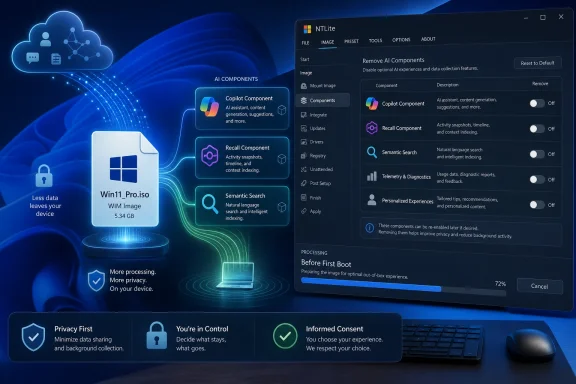
The Windows Central report focuses on NTLite v2026.04.10936, which adds faster multi-threaded extraction and an “AI Component Management” capability for Windows 11 25H2 images. In plain English, the tool can work on Windows image formats such as ISO, WIM, ESD, and SWM, allowing users to modify the operating system before it is deployed. It can also edit a live Windows installation, though image customization is the cleaner and more consequential use case.That distinction matters. Removing an app after setup is a cleanup operation. Removing a component from the installation image is a statement of intent. It says the machine should never have been provisioned with that feature in the first place.
For home users, this is about annoyance and trust. For sysadmins, it is about baseline control. A carefully built image is easier to test, document, and redeploy than a pile of post-install PowerShell scripts and registry edits. It also reduces the risk that a future feature update or app provisioning step will quietly rehydrate something the organization thought it had removed.
NTLite’s pitch has always been control with guardrails. The tool analyzes dependencies and greys out components it considers unsafe to remove. That does not make it magic, and it certainly does not make a heavily modified Windows image supportable in the same way as a stock Microsoft build. But it does explain why the tool appeals to the careful end of the customization crowd: people who want less Windows, not broken Windows.
Recall Made the Privacy Debate Concrete
The backlash against AI in Windows did not begin with Recall, but Recall gave it an icon. The original idea was simple and explosive: take periodic snapshots of what a user does on a Copilot+ PC, analyze them locally, and make that activity searchable in natural language. Microsoft later reworked the security model, emphasized local processing, added stronger authentication requirements, and made the feature opt-in. On managed commercial devices, Microsoft’s current documentation says Recall is disabled and removed by default.Those changes matter. They also did not erase the original damage. Recall compressed every modern anxiety about AI into one Windows feature: surveillance, consent, local data storage, credential exposure, enterprise risk, and the uneasy feeling that convenience was being used to normalize constant capture.
Microsoft’s defenders can fairly argue that the revised Recall architecture is far more conservative than the initial panic suggested. Snapshots are stored locally, access is tied to Windows Hello, encryption protections have been strengthened, and organizations have policy controls. Those are not trivial improvements.
But Microsoft’s critics are also right about the larger pattern. Windows users have repeatedly watched features move from optional add-ons to default experiences, from default experiences to integrated surfaces, and from integrated surfaces to things that require administrative effort to suppress. When trust is thin, “you can turn it off” is not the same as “we will not put it there unless you ask.”
That is why an image-level removal tool resonates. It answers the question Microsoft would rather users not ask: what if I do not merely want AI disabled, but absent?
Copilot Is Easier to Remove Than the Strategy Behind It
Microsoft has already made some concessions. The company has documented ways for enterprise users and administrators to remove or prevent installation of the Microsoft Copilot app. Windows policy has evolved, and some Copilot-related controls now exist where IT departments expect to find them.This is the familiar Microsoft compromise: consumer-facing ambition paired with enterprise-facing manageability. It has worked before. Microsoft can push hard in retail Windows while allowing managed estates to tamp down the noise. Group Policy, MDM, AppLocker, provisioning packages, and Intune settings exist precisely because corporate Windows is not supposed to behave like a Best Buy demo machine.
The problem is that AI blurs the old boundaries. Copilot as an app is one thing. AI as search infrastructure, shell behavior, OCR plumbing, snapshot analysis, context menus, Settings assistance, and local model runtime is another. The former can be uninstalled. The latter becomes part of the operating system’s nervous system.
That is where NTLite’s update becomes politically interesting. It treats AI features as components in a Windows image, not as sacred parts of the user experience. Microsoft may see these capabilities as the future of the PC. NTLite users see them as packages, dependencies, and disk footprint.
The fight, then, is not about one button on the taskbar. It is about classification. Is AI a core Windows capability, like networking and storage? Or is it an optional feature layer, like media extras and bundled apps? Microsoft’s business incentives push toward the first answer. A visible portion of its user base is demanding the second.
The Customization Scene Is Thriving Because Windows Feels Less Negotiable
The Windows enthusiast community has always had a contrarian streak. For every official Microsoft recommendation, there is a registry hack, a replacement shell, a trimmed image, a Start menu clone, or a script promising to restore sanity. That ecosystem is not new.What feels different in the Windows 11 era is the breadth of the dissatisfaction. The complaints are not confined to old-school minimalists who want a 700 MB install image and a black desktop. They now include users who object to ads in system surfaces, online account pressure during setup, Edge promotion, Start menu recommendations, Teams and OneDrive nudges, changing taskbar behavior, and now AI features arriving faster than trust can accumulate.
This creates an opening for tools like NTLite, Tiny11-style projects, unattended setup builders, debloat scripts, and policy packs. They are not all equally safe. Some are careful; some are crude; some are security liabilities wearing the costume of optimization. But their popularity is a signal Microsoft should not dismiss as fringe tinkering.
When users say Linux feels simpler than Windows, they are not usually making a technical claim about kernel design or package management. They are describing the emotional cost of using a machine that keeps asking to be reconfigured away from its maker’s preferences. A desktop OS can be powerful and still feel adversarial if the user must keep saying no.
Enterprise IT Wants Predictability More Than Purity
For administrators, the AI debate is less ideological and more operational. The question is not whether Copilot is good or bad in the abstract. It is whether a feature changes data flows, support expectations, endpoint baselines, compliance posture, or user behavior in ways that must be documented and controlled.Recall is a perfect example. Even with local processing and improved protections, an organization has to think about what screen snapshots could contain: customer records, source code, credentials accidentally displayed, legal documents, medical data, privileged admin sessions, and third-party confidential material. Microsoft can design safeguards, but the enterprise still owns the risk decision.
Copilot creates a different class of concern. Depending on the app, license, tenant configuration, identity context, and data boundary, “Copilot” can mean very different things. That branding ambiguity is a support problem. A user sees a sparkle icon and assumes a capability exists; an admin sees a policy matrix, licensing dependency, and audit question.
This is why image-level removal appeals even when official policy controls exist. A policy says a feature should not run. A removed component says the feature should not be there. In regulated environments, that difference can matter psychologically even when Microsoft’s supported configuration is the more sensible route.
Still, enterprise IT should be careful. NTLite is powerful, but customized Windows images can complicate servicing, support, and troubleshooting. A component removed today may become a dependency tomorrow. A cumulative update may behave differently on a modified image. A help desk cannot easily diagnose a fleet where each department has its own handcrafted operating system.
The professional answer is not “never customize.” It is “customize with discipline.” Test in virtual machines. Document every removal. Keep rollback images. Separate lab curiosity from production deployment. Treat a modified Windows image as a maintained artifact, not a one-time act of rebellion.
Microsoft’s K2 Moment Is Really a Trust Deficit
Windows Central’s report also points to Microsoft’s reported Windows K2 effort, described as an initiative to address pain points across Windows 11 based on customer feedback. Alongside that, Microsoft has revived Windows Insider meetups, returned or tested long-requested taskbar flexibility, and reportedly reduced some places where Copilot or AI integrations appear.Those moves suggest Microsoft understands the mood has shifted. The company does not want Windows 11 to become a punchline among the very users who historically evangelized Windows, fixed relatives’ PCs, deployed fleets, and wrote the scripts that made the platform tolerable at scale. Enthusiasts and IT pros may not represent the average user, but they influence the average user’s ecosystem.
The trouble is that trust is not restored by sprinkling back old features while continuing to push the new strategic layer. A movable taskbar helps. Fewer Copilot intrusions help. Better communication helps. But none of those fully answer the fear that Windows is being optimized for Microsoft’s AI ambitions before it is being optimized for the person sitting at the keyboard.
Microsoft has been here before. Windows 8 tried to drag the desktop into a touch-first future faster than users wanted to go. Windows 10 turned servicing into a rolling negotiation over updates and telemetry. Windows 11 added hardware gates and a redesigned shell while slowly reintroducing features users expected from day one. The company often gets to a reasonable compromise, but only after spending user goodwill as if it were a renewable resource.
AI raises the stakes because it touches privacy, labor, attention, and identity. A bad Start menu is annoying. A bad AI integration feels invasive.
The “Free Tool” Framing Misses the Real Cost
Calling NTLite a free tool that lets users rebuild Windows without AI is true enough, but it risks understating the complexity. The free version is useful, yet serious image customization often pushes users toward paid tiers, and the time cost is not trivial. Downloading an ISO, mounting an image, selecting components, integrating updates, exporting a bootable image, testing in a VM, and reinstalling Windows is not a casual afternoon task for most people.The real cost is confidence. Once you move from Settings toggles to component removal, you become partly responsible for the operating system’s shape. If something breaks, Microsoft support, OEM recovery tools, and generic troubleshooting guides may not map neatly onto your machine. That is acceptable for enthusiasts. It is dangerous for users who only want the AI button to go away.
This is the gap Microsoft should be trying to close. If enough ordinary users feel they need image surgery to get a clean Windows experience, the platform has failed a basic test. People should not have to become deployment engineers to decline a feature category.
There is a healthier version of this future. Microsoft could make AI components explicit during setup, offer edition-specific AI profiles, publish a plain-language map of what runs locally and what uses cloud services, and provide durable uninstall paths that survive feature updates. It could treat “no AI” as a legitimate configuration rather than a grudging enterprise exception.
That would not stop enthusiasts from using NTLite. But it would make NTLite feel like a power tool again, not a self-defense mechanism.
The Risk Is Not That Users Remove Too Much, but That Microsoft Adds Too Casually
NTLite’s own guardrails are important because removing Windows components is not the same as uninstalling Spotify. Windows is a web of servicing assumptions, shared libraries, optional capabilities, scheduled tasks, provisioned packages, and feature dependencies. Pull the wrong thread and the problem may not show up until the next cumulative update, driver install, language pack, or feature enablement package.That is the practical warning. The strategic warning is aimed at Microsoft: the more casually AI is added across Windows, the more casually users will try to rip it out.
That is not good for the ecosystem. Unsupported removals create weird bugs. Weird bugs become forum lore. Forum lore becomes distrust. Distrust turns every new feature into a suspected payload. At that point, even genuinely useful work is received as hostile.
Microsoft has a strong argument for local AI on PCs. NPUs need workloads. Accessibility features can improve. Search can become less literal. Settings can become more discoverable. Creative tools can work offline. Developers can build against capabilities that do not require sending every prompt to a cloud service. A Windows PC that can do more on-device is, in theory, a more personal and private computer.
But that argument only works if users believe the platform respects refusal. The moment “AI” becomes a thing that must be hunted through images, policies, app packages, and scheduled tasks, Microsoft loses the benefit of the doubt.
The AI-Free Windows Image Is a Protest Vote With a Deployment Wizard
The concrete lesson from NTLite’s update is not that everyone should immediately rebuild their Windows 11 media. Most users should not. The lesson is that AI has crossed from feature debate into platform governance. Users are no longer asking whether a feature is useful; they are asking who gets to decide what belongs in the base operating system.Here is the practical shape of the issue:
- NTLite v2026.04.10936 adds AI component management for Windows 11 25H2 images, making it possible to remove some AI-related features before deployment rather than cleaning them up afterward.
- The tool’s value is highest for enthusiasts, lab builders, and administrators who already understand Windows imaging and can test modified ISOs before using them on real hardware.
- Microsoft provides official controls for some AI experiences, especially in managed environments, but app-level removal is not the same as image-level exclusion.
- Recall remains the symbolic center of the backlash because it transformed abstract AI anxiety into a concrete question about screen history, consent, and local data.
- A customized Windows image can reduce clutter and unwanted components, but it can also create servicing and support risks if removals are not documented and tested.
- The popularity of AI-removal tools is a warning that Microsoft’s Windows AI push is outrunning user trust, even where the underlying technology may be defensible.
Source: Windows Central https://www.windowscentral.com/micr...d-windows-11-without-copilot-or-any-other-ai/
