

Afam Onyimadu stopped using Windows Task Scheduler for the Docker-hosted workloads on his home server after failed backups exposed a split architecture: the containers moved predictably between machines, while the jobs maintaining them remained bound to Windows accounts, paths, credentials, utilities, environment variables, and drive mappings. His replacement was not Docker alone, because Docker has no built-in scheduling engine, but a Docker-native scheduler called Ofelia running alongside containerized backup, cleanup, and certificate-management jobs. The lesson in his MUO account is less about choosing one scheduler over another than about deciding which infrastructure should own an automation. Once an application lives in a container stack, leaving its maintenance jobs on the Windows host creates a second deployment system that can fail independently.
Task Scheduler is easy to blame when an unattended job stops running, particularly because its failures often surface as a thicket of account permissions, working directories, command arguments, mapped drives, and execution-history entries. But Onyimadu’s experience points to a more consequential diagnosis: Task Scheduler was performing the job assigned to it, while the assignment itself no longer matched the architecture.
His applications had moved into Docker. Their service definitions, configuration, and dependencies were represented in a Compose stack, making them comparatively predictable to restore elsewhere. The scheduled jobs supporting those applications had not moved; they remained Windows objects with assumptions about the host.
That difference is easy to overlook while a server remains unchanged. A Python script can run successfully for months because the expected runtime, PATH, user profile, credentials, and storage mappings all happen to be present. The task looks self-contained from the Task Scheduler interface, but much of its real configuration is scattered across the operating system.
A rebuild exposes the hidden contract. Restoring the containers may require copying the Compose configuration, restoring persistent data, and starting the stack, while restoring the automation means reconstructing tasks, accounts, triggers, paths, permissions, and host-installed utilities. The application and the process maintaining it may both be called “portable,” but only one has actually been packaged for repeatable deployment.
This is the strongest part of Onyimadu’s argument. Automation belongs with the system it maintains, not automatically with whichever operating system happens to be hosting that system today.
A container image can package a runtime and supporting utilities, while the Compose configuration can describe how that image is started, what data it receives, which environment values it expects, and how it connects to other services. That does not make a container magically independent of every host concern, but it sharply reduces the number of undocumented assumptions.
Onyimadu’s backup container demonstrates the distinction. The job carries its required Python runtime, rclone configuration, environment variables, and supporting tools instead of borrowing them from whatever happens to be installed on Windows. A server migration therefore does not depend on reproducing the same Python installation or PATH layout before the backup can run again.
The practical value is not merely convenience. Dependency drift is one of the most common reasons an automation works during setup and fails months later. A host runtime gets upgraded, a utility is removed, a user profile changes, or a drive letter is no longer mounted in the security context used by the scheduled task.
Packaging dependencies with the job narrows that failure surface. The operator still has to protect data, provide credentials, validate storage mounts, and test network access, but the executable environment becomes an intentional artifact rather than a collection of historical accidents.
For Windows administrators, this is a familiar distinction between an installed system and a declared system. Task Scheduler can be scripted and exported, and Windows configuration can be automated, but many home servers accumulate tasks interactively. A Compose stack stored in a Git repository naturally pushes the operator toward a declarative record because the service cannot exist without its configuration.
That does not mean YAML is inherently safer than a graphical task definition. It means the container workflow makes configuration locality difficult to avoid, while Task Scheduler makes it relatively easy to forget that the task definition is only one part of the job.
This matters because restart policies are frequently mistaken for scheduling. Docker’s documentation describes policies such as
A container configured with
Onyimadu filled that gap with Ofelia. The project describes itself as a lightweight job scheduler for Docker environments, capable of executing a command inside a running container or starting a new container for a scheduled operation. It can take job configuration from a conventional configuration file or from Docker labels, allowing schedules to be represented alongside the services they support.
That distinction creates a clean division of responsibility. Docker runs and isolates the components. The restart policy keeps the scheduler available. Ofelia decides when a job should execute. The backup container supplies the runtime and tooling needed to perform the work.
Collapsing these roles into “Docker scheduling” is imprecise and can produce bad designs. An always-running backup container with a restart policy is not necessarily a scheduled backup system; it may simply be an idle process that reliably returns after a crash. Operators must verify that a scheduling engine exists, that it has loaded the expected schedule, and that the job itself exits with a meaningful result.
Ofelia’s documentation explains that label-based configuration requires access to the Docker socket. Its examples mount the socket into the scheduler container, including examples where that mount is marked read-only. That is operationally convenient because Ofelia can discover labeled workloads and invoke the Docker API directly.
The danger is that read-only filesystem syntax does not turn Docker API access into an insignificant permission. Docker’s own security guidance warns that control over the daemon can amount to control over the host, because the daemon can create privileged containers, mount host directories, and perform other highly sensitive operations.
In other words, the scheduler becomes part of the homelab’s control plane. If it is compromised, an attacker may gain more than access to a backup script. The exact exposure depends on the scheduler’s configuration and connection method, but administrators should treat access to the Docker daemon as a privileged capability rather than an ordinary bind mount.
Ofelia’s documentation acknowledges the concern by describing operation through a Docker socket proxy as well as connections to a separately configured Docker host. A proxy can restrict which API operations are exposed, although its effectiveness depends on what the scheduler genuinely needs and how carefully those permissions are set.
This is where a simple home-server migration begins to resemble production infrastructure. The old Task Scheduler job may have run with a powerful Windows account; the new scheduler may have powerful Docker access. Containerization changes the location and shape of privilege, but it does not eliminate privilege.
The correct conclusion is not that Ofelia is unsafe or that Task Scheduler is safer by definition. It is that portability must not be purchased with unexamined daemon access. The migration is complete only when the new trust boundary is understood, constrained, and documented.
That is a major improvement, but its deeper value lies in reducing configuration asymmetry. Under the old arrangement, restoring the applications and restoring their maintenance systems were separate projects. One could succeed while the other silently remained incomplete.
This is particularly dangerous for backups. A service can appear healthy after a migration because its interface loads and its data is present, even though the scheduled backup job never returned. The recovery has restored today’s state while quietly disabling the mechanism intended to protect tomorrow’s state.
Keeping the scheduler, job definition, runtime, and application stack together makes omissions more visible. If the Compose configuration defines both the service and its automation, rebuilding the stack is more likely to restore both. It does not prove that the backup destination is reachable or that the copied data is valid, but it places the responsibility in one deployment model.
Onyimadu’s examples include Vaultwarden, YouTrack, and other self-hosted services. The names matter less than their operational character: these are persistent systems whose value accumulates in data, configuration, and user activity. Their maintenance jobs are not optional accessories. They are part of the service.
Even an explicit example of only two services is enough to expose the split. Complexity is not solely a function of container count. A tiny server with one application and one database can still have backups, certificate work, cleanup, and integrity checks spread between the host and the container layer.
The homelab feels “complete” only when the recovery procedure describes the whole working system rather than the visible applications alone.
A schedule stored in deployable configuration can be compared with its previous state. An administrator can see that a trigger changed, that an environment variable was added, or that a job was moved to another container. A broken deployment can be investigated as a change to infrastructure rather than reconstructed from memory.
Task Scheduler is not incapable of scripted or exportable management. Microsoft provides PowerShell tooling for constructing task actions and triggers, including one-time, daily, weekly, startup, and logon triggers. An administrator willing to treat scheduled tasks as code can create a disciplined Windows deployment process.
The difference is cultural and structural rather than absolute. Docker Compose users already need a file describing the stack, so adding automation to that model is a relatively natural extension. Task Scheduler users can achieve similar repeatability, but the graphical workflow does not force them to preserve the entire surrounding environment.
Version control also has limits. A Git repository should not become a dumping ground for live credentials, backup secrets, or private keys. A versioned Compose file can document where sensitive values come from without embedding the values themselves.
The useful object to preserve is the reproducible definition: which job runs, which image or runtime it uses, which data it needs, what schedule invokes it, and how success or failure is reported. Secrets should be supplied through an appropriately protected mechanism and tested as part of recovery.
Git history is therefore not merely an audit trail for syntax. It is evidence that the automation has become a managed component of the system.
That is a cleaner operational path when the workload already lives in Docker. The application, scheduler, and maintenance job can expose output through the same container-oriented tooling instead of forcing the operator to correlate Windows events with container behavior.
Docker’s documentation notes, however, that
Containerization therefore does not automatically create observability. A useful job should produce clear output, return a meaningful exit status, identify what it attempted, and avoid leaking credentials into its logs. Backup tooling should report enough information to distinguish “nothing changed” from “the destination could not be reached.”
The same applies to retention. A log that was useful immediately after a failure may be gone or difficult to correlate later unless rotation and persistence are considered. Event Viewer has its frustrations, but it at least reminds Windows administrators that operational records need a retention policy.
Ofelia itself offers reporting options beyond an interactive log check, according to its project documentation. That reinforces a broader principle: unattended automation should notify an operator when it stops being unattended successfully.
A home-server owner may tolerate manually running
Microsoft’s task tooling is specifically designed for triggers tied to the operating system. It can start work at a scheduled time, during startup, or when a user logs on. Those events have direct meaning to Windows and may have no useful equivalent inside a Linux-oriented container.
AutoHotkey remains part of Onyimadu’s Windows-specific automation as well. A customized AutoHotkey script can interact with desktop workflows and user-interface behavior that should not be forced into a container simply for architectural uniformity.
The same reasoning applies in the other direction. On Linux, Onyimadu prefers native cron for lightweight recurring jobs when those jobs genuinely belong to the Linux host. Wrapping a simple host-maintenance command in a container can add image maintenance, networking, mounts, and permissions without improving recovery.
The correct boundary is workload ownership. If a PowerShell diagnostic examines the Windows host, Task Scheduler is a natural owner. If a backup job packages Python and rclone to protect a Docker-hosted service, keeping that automation in the Docker stack can be the cleaner design.
This prevents the migration from becoming ideology. Containers are useful because they make a certain class of application deployment more consistent. They are not a requirement that every clock, script, and system event be dragged into Docker.
The table captures the operational trade-off, but it should not be read as a universal scorecard. Task Scheduler’s “manual” migration reflects the workflow described by Onyimadu, not an impossibility of automating Windows task deployment. Likewise, “simple” container migration still depends on restoring data, mounts, secrets, network access, and compatible infrastructure.
What the comparison reveals is a difference in default alignment. Task Scheduler aligns naturally with Windows. A cron-style container aligns naturally with a Docker stack. Problems begin when either tool is made responsible for workloads whose lifecycle belongs elsewhere.
Administrators must identify the job’s runtime, files, credentials, destination access, environment variables, working directory, expected user identity, and failure behavior. Each dependency that used to come from Windows must either enter the container, become an explicit mount, or remain a documented external requirement.
Time handling deserves particular attention. Container images may not share the host’s assumed time-zone configuration, and a job that appears syntactically correct can run at an unexpected local hour. The migration test should verify the observed execution time, not merely inspect the schedule expression.
Concurrency is another hidden risk. A backup that takes longer than its scheduling interval can overlap with the next invocation, producing resource contention or inconsistent results. Ofelia documents an option for preventing overlapping executions, but the operator must decide whether skipping, delaying, or parallelizing work is appropriate for the job.
Jobs also need startup semantics. If the server is offline when an invocation was due, the administrator should know whether the scheduler will run the missed work later or simply wait for the next interval. Neither behavior is universally correct: a cleanup task can often wait, while a missed backup may warrant immediate attention.
Finally, the migration should not destroy the old task before the new job has demonstrated successful execution. Parallel operation can be dangerous for destructive or stateful work, so a safer approach is to disable the Windows trigger, invoke and validate the containerized job manually, confirm one controlled scheduled run, and only then remove the obsolete definition.
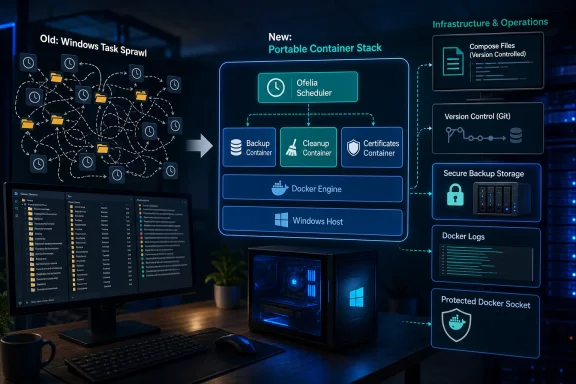 The Scheduler Wasn’t Broken; the Architecture Was Split
Task Scheduler is easy to blame when an unattended job stops running, particularly because its failures often surface as a thicket of account permissions, working directories, command arguments, mapped drives, and execution-history entries. But Onyimadu’s experience points to a more consequential diagnosis: Task Scheduler was performing the job assigned to it, while the assignment itself no longer matched the architecture.His applications had moved into Docker. Their service definitions, configuration, and dependencies were represented in a Compose stack, making them comparatively predictable to restore elsewhere. The scheduled jobs supporting those applications had not moved; they remained Windows objects with assumptions about the host.
That difference is easy to overlook while a server remains unchanged. A Python script can run successfully for months because the expected runtime, PATH, user profile, credentials, and storage mappings all happen to be present. The task looks self-contained from the Task Scheduler interface, but much of its real configuration is scattered across the operating system.
A rebuild exposes the hidden contract. Restoring the containers may require copying the Compose configuration, restoring persistent data, and starting the stack, while restoring the automation means reconstructing tasks, accounts, triggers, paths, permissions, and host-installed utilities. The application and the process maintaining it may both be called “portable,” but only one has actually been packaged for repeatable deployment.
This is the strongest part of Onyimadu’s argument. Automation belongs with the system it maintains, not automatically with whichever operating system happens to be hosting that system today.
Containers Made the Host’s Hidden Dependencies Visible
Containerization did not create the fragility in the scheduled jobs. It made that fragility easier to see by providing a more coherent alternative.A container image can package a runtime and supporting utilities, while the Compose configuration can describe how that image is started, what data it receives, which environment values it expects, and how it connects to other services. That does not make a container magically independent of every host concern, but it sharply reduces the number of undocumented assumptions.
Onyimadu’s backup container demonstrates the distinction. The job carries its required Python runtime, rclone configuration, environment variables, and supporting tools instead of borrowing them from whatever happens to be installed on Windows. A server migration therefore does not depend on reproducing the same Python installation or PATH layout before the backup can run again.
The practical value is not merely convenience. Dependency drift is one of the most common reasons an automation works during setup and fails months later. A host runtime gets upgraded, a utility is removed, a user profile changes, or a drive letter is no longer mounted in the security context used by the scheduled task.
Packaging dependencies with the job narrows that failure surface. The operator still has to protect data, provide credentials, validate storage mounts, and test network access, but the executable environment becomes an intentional artifact rather than a collection of historical accidents.
For Windows administrators, this is a familiar distinction between an installed system and a declared system. Task Scheduler can be scripted and exported, and Windows configuration can be automated, but many home servers accumulate tasks interactively. A Compose stack stored in a Git repository naturally pushes the operator toward a declarative record because the service cannot exist without its configuration.
That does not mean YAML is inherently safer than a graphical task definition. It means the container workflow makes configuration locality difficult to avoid, while Task Scheduler makes it relatively easy to forget that the task definition is only one part of the job.
Docker Still Needs a Clock
The most important technical correction in the MUO account is that Docker itself does not replace Task Scheduler. Docker can run the workload, but it does not provide a general built-in engine for triggering arbitrary jobs according to a recurring schedule.This matters because restart policies are frequently mistaken for scheduling. Docker’s documentation describes policies such as
unless-stopped as rules governing whether a container should return after it exits or after the Docker daemon restarts. They manage continuity, not calendars.A container configured with
unless-stopped can therefore bring a scheduler back online after a host reboot, but it cannot decide that a backup should begin at a particular time. It cannot independently trigger an image-pruning job or certificate-maintenance operation. The scheduler process still needs to calculate when the work is due and launch it.Onyimadu filled that gap with Ofelia. The project describes itself as a lightweight job scheduler for Docker environments, capable of executing a command inside a running container or starting a new container for a scheduled operation. It can take job configuration from a conventional configuration file or from Docker labels, allowing schedules to be represented alongside the services they support.
That distinction creates a clean division of responsibility. Docker runs and isolates the components. The restart policy keeps the scheduler available. Ofelia decides when a job should execute. The backup container supplies the runtime and tooling needed to perform the work.
Collapsing these roles into “Docker scheduling” is imprecise and can produce bad designs. An always-running backup container with a restart policy is not necessarily a scheduled backup system; it may simply be an idle process that reliably returns after a crash. Operators must verify that a scheduling engine exists, that it has loaded the expected schedule, and that the job itself exits with a meaningful result.
Ofelia Completes the Stack but Expands Its Trust Boundary
Moving scheduling into the Docker environment solves one architectural problem while introducing a security decision that should not be minimized. A Docker-aware scheduler needs a way to inspect containers and, depending on the job type, create containers or execute commands inside existing ones.Ofelia’s documentation explains that label-based configuration requires access to the Docker socket. Its examples mount the socket into the scheduler container, including examples where that mount is marked read-only. That is operationally convenient because Ofelia can discover labeled workloads and invoke the Docker API directly.
The danger is that read-only filesystem syntax does not turn Docker API access into an insignificant permission. Docker’s own security guidance warns that control over the daemon can amount to control over the host, because the daemon can create privileged containers, mount host directories, and perform other highly sensitive operations.
In other words, the scheduler becomes part of the homelab’s control plane. If it is compromised, an attacker may gain more than access to a backup script. The exact exposure depends on the scheduler’s configuration and connection method, but administrators should treat access to the Docker daemon as a privileged capability rather than an ordinary bind mount.
Ofelia’s documentation acknowledges the concern by describing operation through a Docker socket proxy as well as connections to a separately configured Docker host. A proxy can restrict which API operations are exposed, although its effectiveness depends on what the scheduler genuinely needs and how carefully those permissions are set.
This is where a simple home-server migration begins to resemble production infrastructure. The old Task Scheduler job may have run with a powerful Windows account; the new scheduler may have powerful Docker access. Containerization changes the location and shape of privilege, but it does not eliminate privilege.
The correct conclusion is not that Ofelia is unsafe or that Task Scheduler is safer by definition. It is that portability must not be purchased with unexamined daemon access. The migration is complete only when the new trust boundary is understood, constrained, and documented.
Recovery Becomes a Property of the Stack
The most tangible benefit of the migration appears during a rebuild. Onyimadu contrasts a Windows-centered recovery—installing the operating system, recreating scheduled tasks, repairing paths, and checking credentials—with a Docker-centered process built around installing Docker, copyingdocker-compose.yml, restoring data, and starting the services.That is a major improvement, but its deeper value lies in reducing configuration asymmetry. Under the old arrangement, restoring the applications and restoring their maintenance systems were separate projects. One could succeed while the other silently remained incomplete.
This is particularly dangerous for backups. A service can appear healthy after a migration because its interface loads and its data is present, even though the scheduled backup job never returned. The recovery has restored today’s state while quietly disabling the mechanism intended to protect tomorrow’s state.
Keeping the scheduler, job definition, runtime, and application stack together makes omissions more visible. If the Compose configuration defines both the service and its automation, rebuilding the stack is more likely to restore both. It does not prove that the backup destination is reachable or that the copied data is valid, but it places the responsibility in one deployment model.
Onyimadu’s examples include Vaultwarden, YouTrack, and other self-hosted services. The names matter less than their operational character: these are persistent systems whose value accumulates in data, configuration, and user activity. Their maintenance jobs are not optional accessories. They are part of the service.
Even an explicit example of only two services is enough to expose the split. Complexity is not solely a function of container count. A tiny server with one application and one database can still have backups, certificate work, cleanup, and integrity checks spread between the host and the container layer.
The homelab feels “complete” only when the recovery procedure describes the whole working system rather than the visible applications alone.
Version Control Turns Schedules Into Reviewable Infrastructure
Onyimadu keeps his Compose files in a separate Git repository. That provides a backup of the configuration, but the more important change is historical visibility.A schedule stored in deployable configuration can be compared with its previous state. An administrator can see that a trigger changed, that an environment variable was added, or that a job was moved to another container. A broken deployment can be investigated as a change to infrastructure rather than reconstructed from memory.
Task Scheduler is not incapable of scripted or exportable management. Microsoft provides PowerShell tooling for constructing task actions and triggers, including one-time, daily, weekly, startup, and logon triggers. An administrator willing to treat scheduled tasks as code can create a disciplined Windows deployment process.
The difference is cultural and structural rather than absolute. Docker Compose users already need a file describing the stack, so adding automation to that model is a relatively natural extension. Task Scheduler users can achieve similar repeatability, but the graphical workflow does not force them to preserve the entire surrounding environment.
Version control also has limits. A Git repository should not become a dumping ground for live credentials, backup secrets, or private keys. A versioned Compose file can document where sensitive values come from without embedding the values themselves.
The useful object to preserve is the reproducible definition: which job runs, which image or runtime it uses, which data it needs, what schedule invokes it, and how success or failure is reported. Secrets should be supplied through an appropriately protected mechanism and tested as part of recovery.
Git history is therefore not merely an audit trail for syntax. It is evidence that the automation has become a managed component of the system.
Docker Logs Improve Locality, Not Monitoring by Themselves
The troubleshooting experience also changes. Onyimadu no longer uses Event Viewer or Task Scheduler history for these container jobs; he checks Docker logs to see whether a backup ran, what it copied, and where it failed.That is a cleaner operational path when the workload already lives in Docker. The application, scheduler, and maintenance job can expose output through the same container-oriented tooling instead of forcing the operator to correlate Windows events with container behavior.
Docker’s documentation notes, however, that
docker logs primarily presents output written to standard output and standard error. If an application writes only to an internal file, uses a logging driver without local dual logging, or emits little diagnostic information, the command may not reveal what the administrator expects.Containerization therefore does not automatically create observability. A useful job should produce clear output, return a meaningful exit status, identify what it attempted, and avoid leaking credentials into its logs. Backup tooling should report enough information to distinguish “nothing changed” from “the destination could not be reached.”
The same applies to retention. A log that was useful immediately after a failure may be gone or difficult to correlate later unless rotation and persistence are considered. Event Viewer has its frustrations, but it at least reminds Windows administrators that operational records need a retention policy.
Ofelia itself offers reporting options beyond an interactive log check, according to its project documentation. That reinforces a broader principle: unattended automation should notify an operator when it stops being unattended successfully.
A home-server owner may tolerate manually running
docker logs after noticing something is wrong. An IT team should assume that silent failures will remain silent unless the job reports them somewhere people actually watch.Task Scheduler Still Owns the Windows Side of the Boundary
The migration is not a case for purging Task Scheduler from Windows. Onyimadu continues to use it for jobs that belong to the host, including launching desktop applications, running PowerShell diagnostics, starting work at user logon, and handling Windows maintenance.Microsoft’s task tooling is specifically designed for triggers tied to the operating system. It can start work at a scheduled time, during startup, or when a user logs on. Those events have direct meaning to Windows and may have no useful equivalent inside a Linux-oriented container.
AutoHotkey remains part of Onyimadu’s Windows-specific automation as well. A customized AutoHotkey script can interact with desktop workflows and user-interface behavior that should not be forced into a container simply for architectural uniformity.
The same reasoning applies in the other direction. On Linux, Onyimadu prefers native cron for lightweight recurring jobs when those jobs genuinely belong to the Linux host. Wrapping a simple host-maintenance command in a container can add image maintenance, networking, mounts, and permissions without improving recovery.
The correct boundary is workload ownership. If a PowerShell diagnostic examines the Windows host, Task Scheduler is a natural owner. If a backup job packages Python and rclone to protect a Docker-hosted service, keeping that automation in the Docker stack can be the cleaner design.
This prevents the migration from becoming ideology. Containers are useful because they make a certain class of application deployment more consistent. They are not a requirement that every clock, script, and system event be dragged into Docker.
| Capability | Task Scheduler | Cron container |
|---|---|---|
| Run Windows desktop apps | Yes | No |
| Schedule Docker maintenance | Yes | Yes |
| Move automation to another server | Manual | Simple |
| Keep jobs with your Compose stack | No | Yes |
| Version-control scheduled jobs | Limited | Easy |
What the comparison reveals is a difference in default alignment. Task Scheduler aligns naturally with Windows. A cron-style container aligns naturally with a Docker stack. Problems begin when either tool is made responsible for workloads whose lifecycle belongs elsewhere.
A Successful Migration Moves More Than the Trigger
Replacing a scheduled task with Ofelia is not complete when both systems display the same interval. A schedule is only the visible edge of an automation.Administrators must identify the job’s runtime, files, credentials, destination access, environment variables, working directory, expected user identity, and failure behavior. Each dependency that used to come from Windows must either enter the container, become an explicit mount, or remain a documented external requirement.
Time handling deserves particular attention. Container images may not share the host’s assumed time-zone configuration, and a job that appears syntactically correct can run at an unexpected local hour. The migration test should verify the observed execution time, not merely inspect the schedule expression.
Concurrency is another hidden risk. A backup that takes longer than its scheduling interval can overlap with the next invocation, producing resource contention or inconsistent results. Ofelia documents an option for preventing overlapping executions, but the operator must decide whether skipping, delaying, or parallelizing work is appropriate for the job.
Jobs also need startup semantics. If the server is offline when an invocation was due, the administrator should know whether the scheduler will run the missed work later or simply wait for the next interval. Neither behavior is universally correct: a cleanup task can often wait, while a missed backup may warrant immediate attention.
Finally, the migration should not destroy the old task before the new job has demonstrated successful execution. Parallel operation can be dangerous for destructive or stateful work, so a safer approach is to disable the Windows trigger, invoke and validate the containerized job manually, confirm one controlled scheduled run, and only then remove the obsolete definition.
Action checklist for admins
- Inventory every Task Scheduler job supporting a containerized service, including its account, triggers, arguments, working directory, environment dependencies, credentials, paths, and mapped storage.
- Decide whether each job belongs to Windows, the Linux host, or the Docker application stack; do not migrate host-native work merely for consistency.
- Package required runtimes and utilities, such as Python and rclone, with the job rather than assuming they exist on the host.
- Keep schedules and non-secret configuration with
docker-compose.ymlin a Git repository, while excluding credentials and private keys. - Validate time-zone behavior, exit codes, log output, failure notifications, restart behavior, and protection against overlapping runs.
- Review Ofelia’s Docker access as a privileged trust boundary, and restrict or proxy daemon access where the deployment permits it.
- Perform a recovery rehearsal that restores applications, persistent data, automation, and credentials on a clean system.
- Confirm that backups can be read and restored; a successful scheduler invocation is not proof of a usable backup.
The Real Upgrade Is One Recovery Model
Onyimadu’s migration offers a compact set of conclusions for anyone operating Docker on a Windows-backed home server or small IT system. The change is valuable not because Ofelia is universally superior to Task Scheduler, but because it brings container maintenance under the same deployment and recovery model as the containers themselves.- Docker does not contain a general-purpose scheduling engine; a scheduler such as Ofelia or native cron is still required.
- The
unless-stoppedpolicy keeps a container available but cannot trigger a backup, cleanup, or certificate job. - Containerizing a job can package Python, rclone, and other dependencies that otherwise drift with the host.
- Docker logs can simplify troubleshooting only when jobs write useful output and failures are retained or reported.
- Task Scheduler remains the better fit for Windows desktop actions, PowerShell host diagnostics, logon triggers, and Windows maintenance.
- Scheduler access to the Docker daemon is a security-sensitive capability that must be treated as part of the control plane.
References
- Primary source: MakeUseOf
Published: 2026-07-12T14:01:08.903279
I stopped using Task Scheduler after switching to Docker containers on my home server
The automation should live with the programs it manages. www.makeuseof.com
- Related coverage: docs.docker.com
docker compose restart | Docker Docs
 docs.docker.com
- Related coverage: vallarasuk.com
- Related coverage: softwareprocess.es
- Official source: github.com
IMAGE: A Deployment Framework for Creating Multimodal Experiences of Web Graphics
- Human-centered computing -> Accessibility systems and tools.Interactive systems and tools.- Software and its engineering -> Software libraries and repositories.github.com
