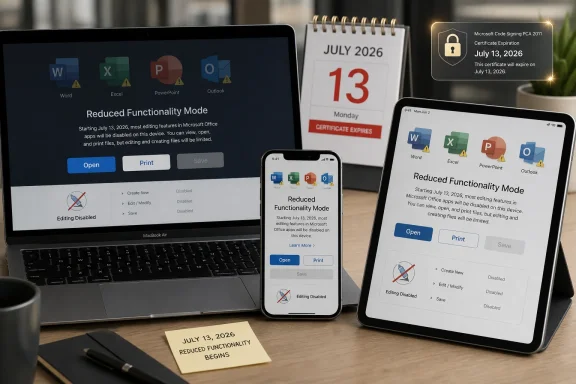
Starting July 13, 2026, Microsoft Office 2019 for Mac and older Microsoft 365 apps on unsupported macOS, iPhone, and iPad devices may enter reduced functionality mode, allowing users to open and print files but blocking editing, saving, and creating documents. The proximate cause is an expiring licensing certificate, but the larger story is about how much control modern productivity software still exerts after a customer thinks the transaction is over. For Microsoft, this is lifecycle hygiene. For many Mac and iPhone users, it will feel like a paid-for tool has been demoted to a document viewer by calendar event.
The facts are blunt enough to cut through the usual end-of-support fog. Office 2019 for Mac reached the end of Microsoft support on October 10, 2023, and the October 2023 release, version 16.78, was the last build to support Office 2019 license types. Microsoft is now warning that an expiring digital certificate used for license validation will create a hard functional break on Apple platforms after July 13, 2026.
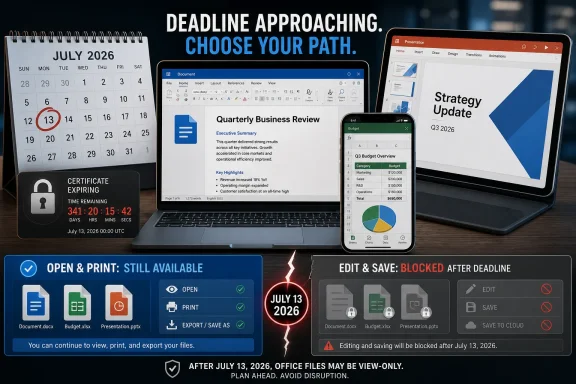
That break is not subtle. Word, Excel, PowerPoint, Outlook, and OneNote will still open existing files, and users should still be able to view or print them. But creating a new spreadsheet, saving edits to a contract, or updating a PowerPoint deck will no longer be available on affected installations.
Microsoft says this is not a security vulnerability and that no customer data is at risk. That distinction matters, but it does not end the debate. A license-validation certificate is infrastructure, and when infrastructure expires, the line between “unsupported” and “disabled” becomes uncomfortably thin.
The Windows version is not caught in this particular trap. Microsoft says the certificate issue is specific to macOS and iOS devices, with Windows and Android unaffected because they handle this validation path differently. That will be cold comfort to mixed-platform homes and businesses that standardized on perpetual Office for Mac precisely because they wanted something less dependent on the subscription treadmill.
Microsoft’s lifecycle language is straightforward. Office 2019 for Mac had a roughly five-year support lifecycle, during which it received feature updates, bug fixes, security fixes, and technical support. That window closed in 2023, and Microsoft has been pointing users toward Microsoft 365 or newer one-time-purchase Office releases since then.
The catch is that many users do not hear “support ended” as “core editing functionality may disappear later because license validation depends on an expiring certificate.” They hear it as “you are on your own if something breaks.” That is a very different proposition from software that stops saving files despite being otherwise intact.
This is where Microsoft’s defense is technically coherent and politically brittle. The company says Office 2019 cannot receive the renewed certificate because it has no update path as an out-of-support product. Critics answer that Microsoft designed the update path, the licensing architecture, and the support boundary, so the certificate deadline is not an act of nature.
Both statements can be true. Certificates expire for good reasons, and vendors should not casually extend old cryptographic trust anchors forever. But when a certificate is tied to license validation rather than a live security flaw, the vendor’s lifecycle policy becomes the mechanism that converts cryptographic hygiene into product obsolescence.
That means the problem is not only Office 2019 for Mac. Older Microsoft 365 installations on managed Macs, iPhones, and iPads can also be caught if they have not been updated to builds that include the renewed certificate. The difference is that supported Microsoft 365 and newer Office versions have a path forward; Office 2019 for Mac does not.
For managed fleets, the fix is administrative rather than philosophical. Inventory the Mac and iOS estate, find devices running old Office builds, push updates through Intune, Microsoft AutoUpdate, MDM, or another management tool, and verify compliance before the deadline. For unsupported devices that cannot run the required operating systems, the options narrow quickly: upgrade the OS, replace the hardware, move the user to the web apps, or migrate them to another productivity suite.
For home users, the story is messier. A Mac that runs Office 2019 perfectly well today may be old enough that it cannot move to macOS Monterey or later. An iPad stuck below iPadOS 17 may still be a fine reading, note-taking, or light editing device, but it will no longer be a reliable native Office device after the cutoff.
That is why this episode lands differently from a normal app update nag. It reaches into the long tail of older but functional Apple hardware and tells users that their local editor is now conditional on a licensing certificate embedded in an app Microsoft no longer wants to service.
Modern software has changed the bargain. Activation services, app-store entitlements, cloud-connected identity, telemetry, AI features, subscription checks, and compliance controls all mean the product can depend on live infrastructure even when the executable is local. When that infrastructure moves on, “unsupported” can become “limited” without the user changing a thing.
Office 2019 for Mac is a revealing case because it is not being disabled by a flashy new feature requirement. It is not that Copilot needs more RAM, or that a new file format requires a new parser, or that Apple has removed a framework the app relies on. The public explanation is license validation.
That makes the decision feel less like technical inevitability and more like product governance. Microsoft can say that no update path exists for an out-of-support product, but users can reasonably ask why a one-time purchase product was built in a way that later required a certificate refresh to preserve editing.
This is the quiet risk of “perpetual” software in the cloud era. The license may be perpetual, but the assumptions surrounding activation and validation may not be. A customer may own the right to run a version, while the vendor still controls whether that version can prove itself acceptable to the app’s own licensing machinery.
There is also a legitimate security argument for this model. Productivity software is a high-value target because it opens documents from everywhere: email attachments, shared drives, file-sync services, customer portals, and random downloads. Old Office builds are not just quaint; they can become a liability in environments where malicious documents remain one of the most durable attack paths in enterprise IT.
But Office is not only enterprise infrastructure. It is also a tool used by retirees maintaining household budgets, students opening archived coursework, small businesses issuing invoices, and writers who bought a version to avoid yet another monthly bill. For those users, being pushed from Office 2019 to Microsoft 365 can feel less like a security recommendation and more like a forced migration.
Microsoft still sells a one-time-purchase version, Office 2024 for Mac, and Office 2021 for Mac remains supported until October 13, 2026. That matters because the choice is not strictly subscription or nothing. But the direction of travel is obvious: the safest, most frequently updated, least-surprising version of Office is the one that keeps checking in.
The irony is that many Office 2019 holdouts are not necessarily avoiding progress because they fear change. Some are avoiding a productivity environment increasingly crowded with account prompts, cloud tie-ins, collaboration layers, and AI branding. They want Word to be Word, Excel to be Excel, and PowerPoint to stay out of the way until a deck needs polishing.
That edit may be legally prudent, but it is reputationally costly. Users remember the broad reassurance, not the lifecycle footnotes. If a vendor tells customers not to worry because the apps will continue to function, later redefining “function” to mean “open and print, but not edit or save” is a hard sell.
Microsoft’s narrower point is that Office 2019 is already out of support, and out-of-support products do not receive updates. That is the lifecycle contract. Yet this is precisely why the certificate issue is so potent: the thing required to keep the product functioning normally is itself an update.
The result is a circular answer that satisfies process but not trust. Office 2019 cannot get the renewed certificate because it is out of support; it will lose editing because it cannot get the renewed certificate. The policy explains the outcome, but it does not make customers feel the outcome is fair.
For WindowsForum readers, the lesson extends beyond Mac users. Microsoft’s entire ecosystem is built around lifecycle cliffs, from Windows versions to Office builds to Exchange Server to Visual Studio runtimes. The more product functionality depends on remotely governed trust, the more those cliffs can affect not just patches but day-to-day capability.
The most exposed environments are likely to be the ones with a mix of managed and unmanaged devices. A corporate Mac fleet enrolled in MDM and running current Microsoft 365 apps should be straightforward to remediate. A nonprofit with donated Macs, personally owned iPads, and a patchwork of Office 2019 installs will have a more painful month.
Help desks should prepare for symptoms that sound like account trouble but are really version trouble. Users may say Word has gone read-only, Excel will not save, or Office says the license is not valid. The fastest triage question after July 13 will be brutally simple: what device, what OS version, and what Office app version?
There is also a communication challenge. Telling users “update Office” is not enough if the underlying device cannot install a supported Office build. IT teams need to separate remediable outdated apps from hardware or OS dead ends. Otherwise, support queues will fill with repeated update attempts that never produce the required certificate-bearing version.
Microsoft’s suggested fallback is Microsoft 365 on the web. That is a credible bridge for many Word, Excel, and PowerPoint tasks, especially in organizations already using OneDrive or SharePoint. It is less satisfying for users who depend on local workflows, advanced desktop features, add-ins, mail profiles, offline work, or files living outside Microsoft’s cloud.
The issue is whether core paid functionality should depend on a vendor-maintained validation chain that can expire after the support window closes. That is a product design choice, not merely a support policy. It may be common, but common is not the same as customer-friendly.
Software companies have spent years teaching users that ownership is conditional. Movies can disappear from digital libraries, games can die when authentication servers shut down, smart-home devices can turn into e-waste when cloud services are retired, and now a desktop productivity suite can lose editing because a licensing certificate aged out. Each event is explainable on its own. Together, they change what people think “buy” means.
Microsoft has particular exposure here because Office is not entertainment software. It is the container for legal records, business plans, tax spreadsheets, family archives, academic work, and operational memory. When Office changes from tool to gatekeeper, the stakes feel higher than when a streaming app drops a show.
There is a reason LibreOffice, Apple’s iWork, Google Docs, and other alternatives come up whenever Microsoft tightens the screws on legacy Office. Not all of those alternatives are equal substitutes, especially in Excel-heavy businesses or Word environments with strict formatting requirements. But every lifecycle controversy gives users another reason to test whether Office compatibility is a dependency or just a habit.
The uncomfortable part is that this belongs in the same category as certificate expirations, domain renewals, firmware support, SaaS deprecations, and operating-system lifecycle dates. Office is not just an app sitting in Applications anymore. It is a licensing endpoint with a deadline.
Organizations should also treat this as a rehearsal for future productivity-suite transitions. Office 2021 for Mac reaches end of support in October 2026, and while Microsoft says supported versions will continue to work as expected after their lifecycle ends, this episode shows why administrators should read that sentence narrowly. “Continue to work” may depend on assumptions that are invisible until a certificate, OS requirement, or service dependency changes.
Small businesses should be especially careful. They are often too small for enterprise-grade lifecycle management but too dependent on Office to tolerate a surprise read-only Monday. If a firm still has Office 2019 for Mac in production, the sensible move is to decide now whether to buy Office 2024, subscribe to Microsoft 365, move to web apps, or migrate away.
Home users have a simpler checklist, though not necessarily an easier one. If the Mac can run a supported macOS version and a newer Office build, update before July 13. If it cannot, assume the local Office 2019 apps are living on borrowed editing time and export or test files in an alternative editor before the deadline.
 Microsoft Turns a Certificate Deadline Into a Product Boundary
The facts are blunt enough to cut through the usual end-of-support fog. Office 2019 for Mac reached the end of Microsoft support on October 10, 2023, and the October 2023 release, version 16.78, was the last build to support Office 2019 license types. Microsoft is now warning that an expiring digital certificate used for license validation will create a hard functional break on Apple platforms after July 13, 2026.That break is not subtle. Word, Excel, PowerPoint, Outlook, and OneNote will still open existing files, and users should still be able to view or print them. But creating a new spreadsheet, saving edits to a contract, or updating a PowerPoint deck will no longer be available on affected installations.
Microsoft says this is not a security vulnerability and that no customer data is at risk. That distinction matters, but it does not end the debate. A license-validation certificate is infrastructure, and when infrastructure expires, the line between “unsupported” and “disabled” becomes uncomfortably thin.
The Windows version is not caught in this particular trap. Microsoft says the certificate issue is specific to macOS and iOS devices, with Windows and Android unaffected because they handle this validation path differently. That will be cold comfort to mixed-platform homes and businesses that standardized on perpetual Office for Mac precisely because they wanted something less dependent on the subscription treadmill.
The Perpetual License Was Never as Perpetual as Users Thought
Office 2019 belongs to a fading era of Microsoft software: pay once, install locally, and expect the familiar suite to remain useful until the hardware, operating system, or file formats finally move on. That expectation was never the same as a promise of indefinite support, but it was a meaningful part of the bargain.Microsoft’s lifecycle language is straightforward. Office 2019 for Mac had a roughly five-year support lifecycle, during which it received feature updates, bug fixes, security fixes, and technical support. That window closed in 2023, and Microsoft has been pointing users toward Microsoft 365 or newer one-time-purchase Office releases since then.
The catch is that many users do not hear “support ended” as “core editing functionality may disappear later because license validation depends on an expiring certificate.” They hear it as “you are on your own if something breaks.” That is a very different proposition from software that stops saving files despite being otherwise intact.
This is where Microsoft’s defense is technically coherent and politically brittle. The company says Office 2019 cannot receive the renewed certificate because it has no update path as an out-of-support product. Critics answer that Microsoft designed the update path, the licensing architecture, and the support boundary, so the certificate deadline is not an act of nature.
Both statements can be true. Certificates expire for good reasons, and vendors should not casually extend old cryptographic trust anchors forever. But when a certificate is tied to license validation rather than a live security flaw, the vendor’s lifecycle policy becomes the mechanism that converts cryptographic hygiene into product obsolescence.
Apple Users Hit the Sharp Edge First
The affected matrix is narrow but consequential. For Microsoft 365 apps on macOS, Microsoft says devices need macOS 12 Monterey or later and app version 16.83 or later to keep functioning normally after July 13, 2026. On iPhone and iPad, the minimum is iOS or iPadOS 17.0 and app version 2.93.That means the problem is not only Office 2019 for Mac. Older Microsoft 365 installations on managed Macs, iPhones, and iPads can also be caught if they have not been updated to builds that include the renewed certificate. The difference is that supported Microsoft 365 and newer Office versions have a path forward; Office 2019 for Mac does not.
For managed fleets, the fix is administrative rather than philosophical. Inventory the Mac and iOS estate, find devices running old Office builds, push updates through Intune, Microsoft AutoUpdate, MDM, or another management tool, and verify compliance before the deadline. For unsupported devices that cannot run the required operating systems, the options narrow quickly: upgrade the OS, replace the hardware, move the user to the web apps, or migrate them to another productivity suite.
For home users, the story is messier. A Mac that runs Office 2019 perfectly well today may be old enough that it cannot move to macOS Monterey or later. An iPad stuck below iPadOS 17 may still be a fine reading, note-taking, or light editing device, but it will no longer be a reliable native Office device after the cutoff.
That is why this episode lands differently from a normal app update nag. It reaches into the long tail of older but functional Apple hardware and tells users that their local editor is now conditional on a licensing certificate embedded in an app Microsoft no longer wants to service.
End of Support Is Doing More Work Than It Used To
End-of-support used to be a maintenance boundary. The vendor stopped issuing patches, stopped answering support calls, and stopped promising compatibility with new operating systems. If the old software still launched, that was between the user and fate.Modern software has changed the bargain. Activation services, app-store entitlements, cloud-connected identity, telemetry, AI features, subscription checks, and compliance controls all mean the product can depend on live infrastructure even when the executable is local. When that infrastructure moves on, “unsupported” can become “limited” without the user changing a thing.
Office 2019 for Mac is a revealing case because it is not being disabled by a flashy new feature requirement. It is not that Copilot needs more RAM, or that a new file format requires a new parser, or that Apple has removed a framework the app relies on. The public explanation is license validation.
That makes the decision feel less like technical inevitability and more like product governance. Microsoft can say that no update path exists for an out-of-support product, but users can reasonably ask why a one-time purchase product was built in a way that later required a certificate refresh to preserve editing.
This is the quiet risk of “perpetual” software in the cloud era. The license may be perpetual, but the assumptions surrounding activation and validation may not be. A customer may own the right to run a version, while the vendor still controls whether that version can prove itself acceptable to the app’s own licensing machinery.
Microsoft’s Subscription Gravity Gets Stronger
Microsoft would prefer users move to Microsoft 365. That is not a conspiracy theory; it is the business model. The subscription version keeps Office current across devices, rolls in web access, storage, security improvements, and increasingly AI-powered features, and gives Microsoft recurring revenue rather than episodic upgrade spikes.There is also a legitimate security argument for this model. Productivity software is a high-value target because it opens documents from everywhere: email attachments, shared drives, file-sync services, customer portals, and random downloads. Old Office builds are not just quaint; they can become a liability in environments where malicious documents remain one of the most durable attack paths in enterprise IT.
But Office is not only enterprise infrastructure. It is also a tool used by retirees maintaining household budgets, students opening archived coursework, small businesses issuing invoices, and writers who bought a version to avoid yet another monthly bill. For those users, being pushed from Office 2019 to Microsoft 365 can feel less like a security recommendation and more like a forced migration.
Microsoft still sells a one-time-purchase version, Office 2024 for Mac, and Office 2021 for Mac remains supported until October 13, 2026. That matters because the choice is not strictly subscription or nothing. But the direction of travel is obvious: the safest, most frequently updated, least-surprising version of Office is the one that keeps checking in.
The irony is that many Office 2019 holdouts are not necessarily avoiding progress because they fear change. Some are avoiding a productivity environment increasingly crowded with account prompts, cloud tie-ins, collaboration layers, and AI branding. They want Word to be Word, Excel to be Excel, and PowerPoint to stay out of the way until a deck needs polishing.
The Missing Promise Is Why the Backlash Has Teeth
Part of the anger around this change comes from an older Microsoft support message that reportedly reassured Office 2019 for Mac users their apps would continue to function after support ended. Microsoft’s current wording is more careful: it emphasizes that users will not lose data and that their data can be accessed in a supported Microsoft 365 or Office product.That edit may be legally prudent, but it is reputationally costly. Users remember the broad reassurance, not the lifecycle footnotes. If a vendor tells customers not to worry because the apps will continue to function, later redefining “function” to mean “open and print, but not edit or save” is a hard sell.
Microsoft’s narrower point is that Office 2019 is already out of support, and out-of-support products do not receive updates. That is the lifecycle contract. Yet this is precisely why the certificate issue is so potent: the thing required to keep the product functioning normally is itself an update.
The result is a circular answer that satisfies process but not trust. Office 2019 cannot get the renewed certificate because it is out of support; it will lose editing because it cannot get the renewed certificate. The policy explains the outcome, but it does not make customers feel the outcome is fair.
For WindowsForum readers, the lesson extends beyond Mac users. Microsoft’s entire ecosystem is built around lifecycle cliffs, from Windows versions to Office builds to Exchange Server to Visual Studio runtimes. The more product functionality depends on remotely governed trust, the more those cliffs can affect not just patches but day-to-day capability.
IT Departments Get a Deadline, Not a Disaster
For administrators, this is not a mystery bug. Microsoft’s guidance is explicit enough to turn into a compliance project: identify old app versions, update them, verify, and communicate before July 13. The risk is not that files vanish; it is that users suddenly cannot save work on deadline.The most exposed environments are likely to be the ones with a mix of managed and unmanaged devices. A corporate Mac fleet enrolled in MDM and running current Microsoft 365 apps should be straightforward to remediate. A nonprofit with donated Macs, personally owned iPads, and a patchwork of Office 2019 installs will have a more painful month.
Help desks should prepare for symptoms that sound like account trouble but are really version trouble. Users may say Word has gone read-only, Excel will not save, or Office says the license is not valid. The fastest triage question after July 13 will be brutally simple: what device, what OS version, and what Office app version?
There is also a communication challenge. Telling users “update Office” is not enough if the underlying device cannot install a supported Office build. IT teams need to separate remediable outdated apps from hardware or OS dead ends. Otherwise, support queues will fill with repeated update attempts that never produce the required certificate-bearing version.
Microsoft’s suggested fallback is Microsoft 365 on the web. That is a credible bridge for many Word, Excel, and PowerPoint tasks, especially in organizations already using OneDrive or SharePoint. It is less satisfying for users who depend on local workflows, advanced desktop features, add-ins, mail profiles, offline work, or files living outside Microsoft’s cloud.
The Real Cost Is Trust in Local Software
The broader consumer issue is not whether Office 2019 should receive security patches forever. It should not. No vendor can maintain every old build indefinitely, and users running unsupported document editors should understand the security tradeoff.The issue is whether core paid functionality should depend on a vendor-maintained validation chain that can expire after the support window closes. That is a product design choice, not merely a support policy. It may be common, but common is not the same as customer-friendly.
Software companies have spent years teaching users that ownership is conditional. Movies can disappear from digital libraries, games can die when authentication servers shut down, smart-home devices can turn into e-waste when cloud services are retired, and now a desktop productivity suite can lose editing because a licensing certificate aged out. Each event is explainable on its own. Together, they change what people think “buy” means.
Microsoft has particular exposure here because Office is not entertainment software. It is the container for legal records, business plans, tax spreadsheets, family archives, academic work, and operational memory. When Office changes from tool to gatekeeper, the stakes feel higher than when a streaming app drops a show.
There is a reason LibreOffice, Apple’s iWork, Google Docs, and other alternatives come up whenever Microsoft tightens the screws on legacy Office. Not all of those alternatives are equal substitutes, especially in Excel-heavy businesses or Word environments with strict formatting requirements. But every lifecycle controversy gives users another reason to test whether Office compatibility is a dependency or just a habit.
The Calendar Now Belongs in the Asset Inventory
For sysadmins, the practical answer is not outrage. It is inventory discipline. The date is known, the version thresholds are known, and the failure mode is known.The uncomfortable part is that this belongs in the same category as certificate expirations, domain renewals, firmware support, SaaS deprecations, and operating-system lifecycle dates. Office is not just an app sitting in Applications anymore. It is a licensing endpoint with a deadline.
Organizations should also treat this as a rehearsal for future productivity-suite transitions. Office 2021 for Mac reaches end of support in October 2026, and while Microsoft says supported versions will continue to work as expected after their lifecycle ends, this episode shows why administrators should read that sentence narrowly. “Continue to work” may depend on assumptions that are invisible until a certificate, OS requirement, or service dependency changes.
Small businesses should be especially careful. They are often too small for enterprise-grade lifecycle management but too dependent on Office to tolerate a surprise read-only Monday. If a firm still has Office 2019 for Mac in production, the sensible move is to decide now whether to buy Office 2024, subscribe to Microsoft 365, move to web apps, or migrate away.
Home users have a simpler checklist, though not necessarily an easier one. If the Mac can run a supported macOS version and a newer Office build, update before July 13. If it cannot, assume the local Office 2019 apps are living on borrowed editing time and export or test files in an alternative editor before the deadline.
The July 13 Cutoff Is a Warning Shot for Every Office Holdout
The immediate drama is about Office 2019 for Mac, but the durable lesson is about dependency. A one-time purchase may still rely on licensing infrastructure, supported operating systems, update channels, and vendor choices that can change the software’s practical value years later.- Office 2019 for Mac reached end of support on October 10, 2023, and Microsoft is not providing it with the renewed licensing certificate needed for normal operation after July 13, 2026.
- Affected Office apps will still open and print files, but reduced functionality mode blocks creating, editing, saving, and saving-as operations.
- Current Microsoft 365 apps on Apple platforms need at least macOS 12 with app version 16.83, or iOS and iPadOS 17 with app version 2.93, to avoid the certificate problem.
- Windows and Android versions are not affected by this certificate issue, making this primarily a Mac, iPhone, and iPad lifecycle problem.
- Users who cannot update their devices or apps need to plan for Office 2024, Microsoft 365, Microsoft 365 on the web, or a non-Microsoft alternative before the cutoff.
References
- Primary source: CNET
Published: 2026-06-19T01:12:07.660866
Older Macs and iPhones Could Lose Major Office 365 Features in a Few Weeks
Still using Microsoft Office 2019 for MacOS and iOS? Your files may soon become read-only.www.cnet.com