

Windows users can check readiness for the June 2026 Secure Boot certificate expiration by running an elevated PowerShell command that looks for the Windows UEFI CA 2023 certificate, then using Windows Update, OEM firmware updates, or Microsoft’s documented registry-triggered update path if it is missing. That deceptively simple test is the front door into one of the largest trust-anchor rotations the Windows ecosystem has ever attempted. The uncomfortable truth is that Secure Boot has spent 15 years being treated as plumbing, and plumbing only becomes interesting when it starts leaking. This time, the leak is not panic-worthy for most PCs, but it is real enough that enthusiasts and IT teams should stop treating firmware as somebody else’s problem.
Secure Boot arrived with the Windows 8 generation as part of the industry’s move from legacy BIOS to UEFI firmware. Its job is straightforward in concept: before Windows loads, firmware checks whether the code trying to run has been signed by a trusted authority. If the bootloader, option ROM, or other early-boot component cannot prove its identity, Secure Boot is supposed to stop it before the operating system ever gets a chance to be compromised.
The certificates that make that trust model work were never immortal. Microsoft’s original 2011-era Secure Boot certificates are now approaching the end of their planned lifecycle, with the first major expirations beginning in June 2026 and additional pieces aging out later in the year. For years, that date looked safely theoretical. Now it sits close enough on the calendar that consumer tech sites are publishing how-tos, Microsoft is pushing guidance, OEMs are posting compatibility notes, and administrators are discovering that “firmware inventory” is often a nicer phrase for guesswork.
Digital Trends’ advice gets the first move right: check whether the updated certificate is already present before you start changing things. On a Windows PC with Secure Boot enabled, an elevated PowerShell session can query the UEFI Secure Boot database and look for the string
That binary result is useful, but it should not be mistaken for the whole story. Secure Boot is not one certificate in one place. It is a relationship among firmware variables, signing authorities, boot managers, revocation lists, OEM implementation choices, and Windows servicing logic. A home user may only need the simple test; an IT department needs to understand the machinery behind it.
That is why the rollout has been cautious and staged. Microsoft is not merely dropping a new file into
The 2023 certificate generation is meant to replace or supplement the older 2011 certificate authorities. The important consumer-facing name is
For new Windows 11 hardware, the answer is increasingly simple: OEMs are expected to ship modern Secure Boot configurations that already include the 2023-era trust material. For older machines, the answer is more awkward. Some will receive the update through Windows Update. Some will need BIOS or UEFI firmware updates from Dell, HP, Lenovo, ASUS, Microsoft, or another vendor. Some will be technically capable but operationally neglected. And some will sit in drawers, closets, server rooms, and warehouse shelves until after the deadline has passed.
This is why the expiration matters even if your PC does not instantly brick itself in June. Microsoft’s own guidance has been careful to say that affected devices may continue to boot and receive ordinary Windows updates. The risk is subtler and more corrosive: systems that miss the certificate transition may stop receiving future Secure Boot protections for early boot components. In other words, the PC may still turn on, but part of the security maintenance channel below Windows may be stuck in the past.
A
A
That distinction matters because Secure Boot updates are not just Windows updates with scarier names. The update process can involve firmware accepting new variables, Windows staging boot components, and the machine rebooting more than once. On some systems, BitLocker may notice boot-chain changes and ask for recovery verification. On badly maintained or unsupported firmware, the process may not complete cleanly.
For enthusiasts, the temptation will be to treat the
Firmware has to accept the update. OEMs may need to provide BIOS or UEFI updates that make certificate rotation reliable on older platforms. Some vendors have published model-specific guidance for systems in scope and out of scope for firmware updates. That does not necessarily mean every unsupported model will fail the certificate transition, but it does mean owners cannot assume that a six-year-old laptop sitting on an old BIOS is in the same position as a current Windows 11 machine receiving regular firmware capsules.
This is where Microsoft’s neat servicing model collides with the PC ecosystem’s sprawl. Windows Update can move quickly when it controls the whole stack. It controls less when firmware vendors, motherboard makers, silicon suppliers, and enterprise device-management policies all sit in the path. Secure Boot is an industry feature, but Microsoft has become the practical center of gravity because Windows boot trust depends on Microsoft-signed components.
For a home PC, the practical advice is boring because boring is correct. Go to Settings, run Windows Update, install everything offered, reboot, and run the PowerShell test again. Then check your manufacturer’s support utility or product page for BIOS and firmware updates. If the machine is a custom desktop, the motherboard vendor matters more than the badge on the case.
For IT departments, the boring advice becomes a project plan. Inventory firmware versions. Identify models without current OEM support. Pilot the certificate update on representative hardware. Watch for event log indicators and BitLocker prompts. Do not discover in late June that the fleet includes hundreds of Secure Boot-enabled systems that have not had firmware updates since the pandemic.
That path exists for a reason. It gives administrators and advanced users a way to request the certificate update when automatic rollout has not yet applied it. It can be useful on supported systems that have the necessary Windows servicing baseline and firmware behavior but have not received the update passively.
It is not, however, a universal workaround for abandoned hardware. If the firmware is buggy, locked down, missing prerequisites, or never updated to tolerate the new trust configuration, forcing the Windows-side trigger may not solve the problem. It may simply produce logs, reboots, and frustration. In worst-case scenarios, firmware and boot-chain changes can interact badly with BitLocker, measured boot, virtualization-based security, or third-party boot components.
That is why the order of operations matters. The manual registry route should come after normal Windows servicing and after checking firmware. It should also come after saving recovery keys and making sure the system has a current backup. Anyone who has ever watched a BIOS update stall at an unnerving percentage already knows the rule: do not experiment with boot infrastructure on a machine whose recovery path you have not tested.
For managed environments, the registry path should be treated as a deployment mechanism, not a troubleshooting ritual performed one machine at a time. If you are using Intune, Group Policy, configuration service providers, or another management platform, the goal is to create rings, observe results, and expand deliberately. The machines that fail are the ones that teach you what the rest of the fleet is hiding.
Unsupported Windows 10 systems should not be assumed to receive the Secure Boot certificate updates through ordinary servicing. If a Windows 10 machine is not enrolled in an Extended Security Updates path and is no longer receiving current monthly updates, it is outside the normal channel Microsoft is using to deliver this kind of platform maintenance. The PC may keep running, but “keeps running” is not the same as “keeps receiving boot-level security maintenance.”
That distinction will irritate users whose hardware works perfectly well but fails Windows 11’s requirements. It will also irritate administrators responsible for line-of-business systems that cannot be upgraded quickly. Yet from Microsoft’s perspective, this is the predictable consequence of tying platform security to supported servicing. Secure Boot may live in firmware, but the rotation is being orchestrated through the supported Windows ecosystem.
The result is a messy middle class of PCs. They are not ancient. They are not necessarily incapable. Some are Windows 11-ineligible because of CPU support lists, TPM requirements, or organizational inertia. Others are eligible but have not been upgraded. The certificate expiration does not make all of them useless, but it does make their security posture harder to defend.
For WindowsForum readers, the practical conclusion is blunt: if a Windows 10 PC matters, decide now whether it is moving to Windows 11, enrolling in ESU, being repurposed offline, or being retired. Waiting until June to learn what category it belongs in is not planning. It is hoping.
The Microsoft UEFI CA has historically been important beyond Windows because many third-party UEFI binaries, including some bootloaders used in Linux scenarios, have been signed in ways that allow them to work on Secure Boot-enabled PCs. As the ecosystem moves from 2011-era certificates to 2023-era certificates, the question is not merely whether Windows itself boots. It is whether the other things you expect to boot are signed, trusted, and compatible with the new trust configuration.
Most ordinary users will never encounter that edge. Enthusiasts are more likely to. The person with a Windows 11 and Fedora dual-boot setup, a rescue USB workflow, and a decade-old RAID card is living in the part of the map where general consumer guidance becomes incomplete. For that person, the PowerShell test is still useful, but it is only the beginning.
This is also why Microsoft and OEMs have been cautious about revocation. Adding new certificates is one thing; distrusting old boot components is another. Once revocations are applied, old vulnerable boot managers or incompatible components may stop working under Secure Boot. That is good for security when the ecosystem is ready and painful when it is not.
The sensible enthusiast approach is to test boot media before the deadline. Check your Linux distribution’s Secure Boot guidance. Update rescue tools. Update firmware. If your workflow depends on older bootable utilities, assume that the certificate transition and future revocation waves could expose assumptions those tools have carried for years.
For years, the industry sold this as invisible security. That was understandable. Nobody wants to explain UEFI signature databases to a family member buying a laptop for school. But invisibility has a cost. When the trust anchors age out, the user has no intuition for what changed, where it changed, or why Windows Update might need cooperation from firmware written by a motherboard vendor.
The Secure Boot certificate expiration is therefore less a freak event than a stress test. Can Microsoft rotate foundational security material at PC scale? Can OEMs support hardware long enough for security assumptions made at purchase to remain valid? Can enterprises see below the operating system in their asset inventories? Can enthusiasts distinguish a meaningful readiness check from cargo-cult command pasting?
The answer will be uneven. Large managed fleets with Autopatch, Intune, OEM relationships, and hardware refresh cycles will mostly turn this into a controlled maintenance event. Current consumer Windows 11 laptops will mostly update without drama. The pain will collect around old firmware, unsupported Windows 10 installs, neglected desktops, niche boot chains, and machines that are important enough to keep but not important enough to manage.
That is a familiar Windows story. The ecosystem’s strength is breadth. Its weakness is also breadth. Secure Boot has to work across polished ultrabooks, bargain desktops, gaming towers, industrial PCs, virtual machines, lab hardware, and forgotten spare laptops under beds. A certificate transition that looks elegant on a Microsoft diagram becomes messier when it meets that reality.
That matters because early boot remains a valuable target. Bootkits and Secure Boot bypasses are rare compared with browser malware, phishing, and commodity ransomware, but they are strategically important. If an attacker can compromise the boot path, they can undermine security before Windows and its defensive tools are fully in control. Secure Boot exists because the operating system cannot reliably defend a boot process that has already been subverted.
The 2023 certificate transition is also tied to Microsoft’s ability to service the boot chain going forward. New boot managers, new revocation lists, and future mitigations need a trust foundation that will remain valid. Systems stuck on the old chain may keep receiving ordinary patches while being excluded from some of the security evolution happening beneath the OS.
For enterprises, that creates compliance and audit questions. A device that appears patched in Windows Update may still be behind in Secure Boot posture. A dashboard that reports OS build numbers but not certificate state is not enough. If the security team cannot tell which machines have the 2023 certificates, it cannot honestly claim the boot layer is current.
For consumers, the risk is simpler. If the PowerShell test says
The machines that deserve immediate attention are the ones with stale firmware, interrupted servicing, or unclear ownership. A gaming desktop assembled from enthusiast parts may depend on the motherboard vendor’s UEFI updates. A corporate laptop imaged years ago may have missed firmware baselines because BIOS updates were excluded from patch policy. A Windows 10 machine kept alive for one accounting application may sit outside the updates that would otherwise deliver the new certificates.
Then there are devices in storage. Spares, loaners, lab machines, disaster-recovery laptops, and dusty workstations often miss time-sensitive platform updates precisely because they are turned off. If they come back online after the certificate deadline, they may still be recoverable, but they will create work at the worst possible moment. Turning them on now, updating them, and verifying Secure Boot state is cheaper than rediscovering them during an incident.
Virtual machines complicate the picture in their own way. Secure Boot inside a VM depends on the virtual firmware presented by the hypervisor platform. Older VM templates may carry older Secure Boot assumptions. Anyone running Windows Server, Azure Local, Hyper-V, VMware, or lab VMs should not assume that host patching automatically means every guest firmware profile has the new certificates.
The most important operational move is to stop thinking of this as a Windows-only patch. It is a Windows, firmware, OEM, and management-plane event. That makes it annoying. It also makes it exactly the kind of event that separates maintained systems from merely functioning ones.
Source: Digital Trends How to check if your Windows PC is ready for the secure boot certificate expiry in June 2026
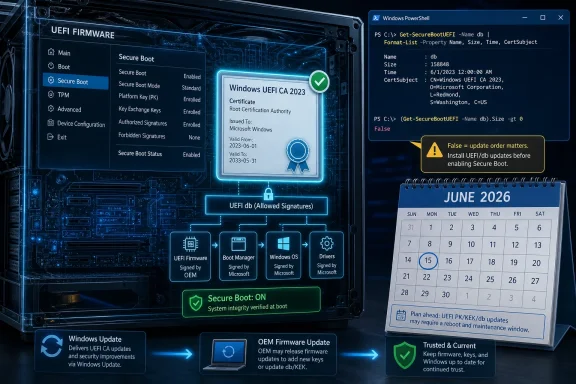 The Certificate Clock Has Finally Reached the BIOS
Secure Boot arrived with the Windows 8 generation as part of the industry’s move from legacy BIOS to UEFI firmware. Its job is straightforward in concept: before Windows loads, firmware checks whether the code trying to run has been signed by a trusted authority. If the bootloader, option ROM, or other early-boot component cannot prove its identity, Secure Boot is supposed to stop it before the operating system ever gets a chance to be compromised.The certificates that make that trust model work were never immortal. Microsoft’s original 2011-era Secure Boot certificates are now approaching the end of their planned lifecycle, with the first major expirations beginning in June 2026 and additional pieces aging out later in the year. For years, that date looked safely theoretical. Now it sits close enough on the calendar that consumer tech sites are publishing how-tos, Microsoft is pushing guidance, OEMs are posting compatibility notes, and administrators are discovering that “firmware inventory” is often a nicer phrase for guesswork.
Digital Trends’ advice gets the first move right: check whether the updated certificate is already present before you start changing things. On a Windows PC with Secure Boot enabled, an elevated PowerShell session can query the UEFI Secure Boot database and look for the string
Windows UEFI CA 2023. If the command returns True, the machine already has at least the key Windows certificate required for the new trust chain. If it returns False, the PC may still be relying on the 2011-era material that Microsoft is trying to retire.That binary result is useful, but it should not be mistaken for the whole story. Secure Boot is not one certificate in one place. It is a relationship among firmware variables, signing authorities, boot managers, revocation lists, OEM implementation choices, and Windows servicing logic. A home user may only need the simple test; an IT department needs to understand the machinery behind it.
Microsoft Is Trying to Rotate the Foundation Without Moving the House
The most remarkable part of this transition is not that certificates expire. Certificates are supposed to expire. The remarkable part is that the Windows ecosystem has to rotate trust anchors across hundreds of millions of devices without making those devices unbootable, without breaking BitLocker recovery assumptions, and without stranding third-party boot components that depend on Microsoft’s UEFI signing infrastructure.That is why the rollout has been cautious and staged. Microsoft is not merely dropping a new file into
C:\Windows and calling it a day. Secure Boot certificates live in UEFI firmware variables such as the allowed signature database, commonly called db, and the key exchange key database, commonly called KEK. Those are below Windows in the stack. They belong to the firmware world, where a bad update can mean a machine that does not boot far enough to show you a useful error message.The 2023 certificate generation is meant to replace or supplement the older 2011 certificate authorities. The important consumer-facing name is
Windows UEFI CA 2023, which allows Windows boot components signed under the newer chain to be trusted. There are also related Microsoft 2023 certificates for UEFI and option ROM scenarios, especially where third-party bootloaders, hardware components, or non-Windows environments are involved.For new Windows 11 hardware, the answer is increasingly simple: OEMs are expected to ship modern Secure Boot configurations that already include the 2023-era trust material. For older machines, the answer is more awkward. Some will receive the update through Windows Update. Some will need BIOS or UEFI firmware updates from Dell, HP, Lenovo, ASUS, Microsoft, or another vendor. Some will be technically capable but operationally neglected. And some will sit in drawers, closets, server rooms, and warehouse shelves until after the deadline has passed.
This is why the expiration matters even if your PC does not instantly brick itself in June. Microsoft’s own guidance has been careful to say that affected devices may continue to boot and receive ordinary Windows updates. The risk is subtler and more corrosive: systems that miss the certificate transition may stop receiving future Secure Boot protections for early boot components. In other words, the PC may still turn on, but part of the security maintenance channel below Windows may be stuck in the past.
The PowerShell Test Is a Flashlight, Not a Repair Tool
The Digital Trends command works because it asks firmware what is inside the Secure Bootdb variable and searches the returned bytes for a human-readable certificate name. Run PowerShell as administrator and execute:([System.Text.Encoding]::ASCII.GetString((Get-SecureBootUEFI db).bytes) -match 'Windows UEFI CA 2023')A
True result is reassuring. It means the Windows UEFI CA 2023 certificate is present in the allowed database. For most consumers, that is the main green light they wanted.A
False result is not a verdict that the PC is doomed. It is a signal to proceed in the right order. First, install current Windows updates. Then check the OEM’s support page for firmware updates specific to the machine model. Only after that should users consider the registry-triggered update path Microsoft has documented for supported systems.That distinction matters because Secure Boot updates are not just Windows updates with scarier names. The update process can involve firmware accepting new variables, Windows staging boot components, and the machine rebooting more than once. On some systems, BitLocker may notice boot-chain changes and ask for recovery verification. On badly maintained or unsupported firmware, the process may not complete cleanly.
For enthusiasts, the temptation will be to treat the
False result as a challenge and immediately force the update path. That is the wrong instinct. Firmware is the part of the PC where patience is a feature. Update Windows, update the BIOS or UEFI firmware, back up your BitLocker recovery key if encryption is enabled, and only then move on to manual remediation.Windows Update Carries the Fix, but OEM Firmware Still Owns the Gate
The comforting version of the story says Microsoft is already pushing the new certificates automatically. That is broadly true for many supported Windows 11 PCs and for managed environments using modern servicing channels. But “delivered by Windows Update” does not mean “independent of firmware reality.”Firmware has to accept the update. OEMs may need to provide BIOS or UEFI updates that make certificate rotation reliable on older platforms. Some vendors have published model-specific guidance for systems in scope and out of scope for firmware updates. That does not necessarily mean every unsupported model will fail the certificate transition, but it does mean owners cannot assume that a six-year-old laptop sitting on an old BIOS is in the same position as a current Windows 11 machine receiving regular firmware capsules.
This is where Microsoft’s neat servicing model collides with the PC ecosystem’s sprawl. Windows Update can move quickly when it controls the whole stack. It controls less when firmware vendors, motherboard makers, silicon suppliers, and enterprise device-management policies all sit in the path. Secure Boot is an industry feature, but Microsoft has become the practical center of gravity because Windows boot trust depends on Microsoft-signed components.
For a home PC, the practical advice is boring because boring is correct. Go to Settings, run Windows Update, install everything offered, reboot, and run the PowerShell test again. Then check your manufacturer’s support utility or product page for BIOS and firmware updates. If the machine is a custom desktop, the motherboard vendor matters more than the badge on the case.
For IT departments, the boring advice becomes a project plan. Inventory firmware versions. Identify models without current OEM support. Pilot the certificate update on representative hardware. Watch for event log indicators and BitLocker prompts. Do not discover in late June that the fleet includes hundreds of Secure Boot-enabled systems that have not had firmware updates since the pandemic.
The Manual Registry Path Is a Lever for Supported Machines, Not a Magic Spell
The Digital Trends article points to a manual method using theAvailableUpdates registry value under the Secure Boot control path, followed by the scheduled task that applies the update. The commonly referenced command sets the value to 0x40 and then starts the Secure Boot update task under Microsoft’s Platform Integrity task folder.That path exists for a reason. It gives administrators and advanced users a way to request the certificate update when automatic rollout has not yet applied it. It can be useful on supported systems that have the necessary Windows servicing baseline and firmware behavior but have not received the update passively.
It is not, however, a universal workaround for abandoned hardware. If the firmware is buggy, locked down, missing prerequisites, or never updated to tolerate the new trust configuration, forcing the Windows-side trigger may not solve the problem. It may simply produce logs, reboots, and frustration. In worst-case scenarios, firmware and boot-chain changes can interact badly with BitLocker, measured boot, virtualization-based security, or third-party boot components.
That is why the order of operations matters. The manual registry route should come after normal Windows servicing and after checking firmware. It should also come after saving recovery keys and making sure the system has a current backup. Anyone who has ever watched a BIOS update stall at an unnerving percentage already knows the rule: do not experiment with boot infrastructure on a machine whose recovery path you have not tested.
For managed environments, the registry path should be treated as a deployment mechanism, not a troubleshooting ritual performed one machine at a time. If you are using Intune, Group Policy, configuration service providers, or another management platform, the goal is to create rings, observe results, and expand deliberately. The machines that fail are the ones that teach you what the rest of the fleet is hiding.
Windows 10 Turns This From Maintenance Into a Deadline
The most politically awkward part of the Secure Boot certificate story is Windows 10. Microsoft ended mainstream consumer support for Windows 10 on October 14, 2025, while offering Extended Security Updates for users and organizations that need more time. That timing makes the Secure Boot transition more than a firmware chore. It becomes another pressure point pushing holdouts toward Windows 11, paid extension programs, or unsupported risk.Unsupported Windows 10 systems should not be assumed to receive the Secure Boot certificate updates through ordinary servicing. If a Windows 10 machine is not enrolled in an Extended Security Updates path and is no longer receiving current monthly updates, it is outside the normal channel Microsoft is using to deliver this kind of platform maintenance. The PC may keep running, but “keeps running” is not the same as “keeps receiving boot-level security maintenance.”
That distinction will irritate users whose hardware works perfectly well but fails Windows 11’s requirements. It will also irritate administrators responsible for line-of-business systems that cannot be upgraded quickly. Yet from Microsoft’s perspective, this is the predictable consequence of tying platform security to supported servicing. Secure Boot may live in firmware, but the rotation is being orchestrated through the supported Windows ecosystem.
The result is a messy middle class of PCs. They are not ancient. They are not necessarily incapable. Some are Windows 11-ineligible because of CPU support lists, TPM requirements, or organizational inertia. Others are eligible but have not been upgraded. The certificate expiration does not make all of them useless, but it does make their security posture harder to defend.
For WindowsForum readers, the practical conclusion is blunt: if a Windows 10 PC matters, decide now whether it is moving to Windows 11, enrolling in ESU, being repurposed offline, or being retired. Waiting until June to learn what category it belongs in is not planning. It is hoping.
Linux, Dual-Boot Systems, and Option ROMs Make the Simple Story Less Simple
Secure Boot has always been more complicated for users who do not run a plain Windows-only configuration. Dual-boot systems, Linux distributions, hypervisors, expansion cards, storage controllers, GPUs with UEFI option ROMs, and specialized boot media can all depend on trust paths that are adjacent to Microsoft’s Windows boot chain rather than identical to it.The Microsoft UEFI CA has historically been important beyond Windows because many third-party UEFI binaries, including some bootloaders used in Linux scenarios, have been signed in ways that allow them to work on Secure Boot-enabled PCs. As the ecosystem moves from 2011-era certificates to 2023-era certificates, the question is not merely whether Windows itself boots. It is whether the other things you expect to boot are signed, trusted, and compatible with the new trust configuration.
Most ordinary users will never encounter that edge. Enthusiasts are more likely to. The person with a Windows 11 and Fedora dual-boot setup, a rescue USB workflow, and a decade-old RAID card is living in the part of the map where general consumer guidance becomes incomplete. For that person, the PowerShell test is still useful, but it is only the beginning.
This is also why Microsoft and OEMs have been cautious about revocation. Adding new certificates is one thing; distrusting old boot components is another. Once revocations are applied, old vulnerable boot managers or incompatible components may stop working under Secure Boot. That is good for security when the ecosystem is ready and painful when it is not.
The sensible enthusiast approach is to test boot media before the deadline. Check your Linux distribution’s Secure Boot guidance. Update rescue tools. Update firmware. If your workflow depends on older bootable utilities, assume that the certificate transition and future revocation waves could expose assumptions those tools have carried for years.
Secure Boot’s Real Problem Is Trust Nobody Inventoried
There is a broader lesson here that goes beyond one certificate date. Modern PCs are full of trust decisions that users cannot see and IT teams often cannot easily inventory. Secure Boot certificates, TPM measurements, BitLocker protectors, firmware capsules, revocation databases, boot managers, kernel-mode signing, virtualization-based security: each layer exists to make compromise harder, and each layer adds state that must be maintained.For years, the industry sold this as invisible security. That was understandable. Nobody wants to explain UEFI signature databases to a family member buying a laptop for school. But invisibility has a cost. When the trust anchors age out, the user has no intuition for what changed, where it changed, or why Windows Update might need cooperation from firmware written by a motherboard vendor.
The Secure Boot certificate expiration is therefore less a freak event than a stress test. Can Microsoft rotate foundational security material at PC scale? Can OEMs support hardware long enough for security assumptions made at purchase to remain valid? Can enterprises see below the operating system in their asset inventories? Can enthusiasts distinguish a meaningful readiness check from cargo-cult command pasting?
The answer will be uneven. Large managed fleets with Autopatch, Intune, OEM relationships, and hardware refresh cycles will mostly turn this into a controlled maintenance event. Current consumer Windows 11 laptops will mostly update without drama. The pain will collect around old firmware, unsupported Windows 10 installs, neglected desktops, niche boot chains, and machines that are important enough to keep but not important enough to manage.
That is a familiar Windows story. The ecosystem’s strength is breadth. Its weakness is also breadth. Secure Boot has to work across polished ultrabooks, bargain desktops, gaming towers, industrial PCs, virtual machines, lab hardware, and forgotten spare laptops under beds. A certificate transition that looks elegant on a Microsoft diagram becomes messier when it meets that reality.
Where the Real Risk Lives After the June Date
The scariest version of this story says millions of PCs will suddenly fail to boot in June 2026. That is not the most likely outcome. The more credible risk is a long tail of systems that continue operating while quietly losing access to future boot-layer protections.That matters because early boot remains a valuable target. Bootkits and Secure Boot bypasses are rare compared with browser malware, phishing, and commodity ransomware, but they are strategically important. If an attacker can compromise the boot path, they can undermine security before Windows and its defensive tools are fully in control. Secure Boot exists because the operating system cannot reliably defend a boot process that has already been subverted.
The 2023 certificate transition is also tied to Microsoft’s ability to service the boot chain going forward. New boot managers, new revocation lists, and future mitigations need a trust foundation that will remain valid. Systems stuck on the old chain may keep receiving ordinary patches while being excluded from some of the security evolution happening beneath the OS.
For enterprises, that creates compliance and audit questions. A device that appears patched in Windows Update may still be behind in Secure Boot posture. A dashboard that reports OS build numbers but not certificate state is not enough. If the security team cannot tell which machines have the 2023 certificates, it cannot honestly claim the boot layer is current.
For consumers, the risk is simpler. If the PowerShell test says
False, do not ignore it. This is not a reason to throw away a working PC tomorrow, but it is a reason to update it now, check firmware, and understand whether the machine is still inside a supported servicing path.The PCs That Deserve Attention Before Everyone Else
The easiest machines are the newest ones. A recently purchased Windows 11 PC that has been receiving updates, especially one built for Windows 11 version 25H2 and later expectations, is unlikely to become the poster child for this problem. Still, checking takes seconds, and certainty beats vibes.The machines that deserve immediate attention are the ones with stale firmware, interrupted servicing, or unclear ownership. A gaming desktop assembled from enthusiast parts may depend on the motherboard vendor’s UEFI updates. A corporate laptop imaged years ago may have missed firmware baselines because BIOS updates were excluded from patch policy. A Windows 10 machine kept alive for one accounting application may sit outside the updates that would otherwise deliver the new certificates.
Then there are devices in storage. Spares, loaners, lab machines, disaster-recovery laptops, and dusty workstations often miss time-sensitive platform updates precisely because they are turned off. If they come back online after the certificate deadline, they may still be recoverable, but they will create work at the worst possible moment. Turning them on now, updating them, and verifying Secure Boot state is cheaper than rediscovering them during an incident.
Virtual machines complicate the picture in their own way. Secure Boot inside a VM depends on the virtual firmware presented by the hypervisor platform. Older VM templates may carry older Secure Boot assumptions. Anyone running Windows Server, Azure Local, Hyper-V, VMware, or lab VMs should not assume that host patching automatically means every guest firmware profile has the new certificates.
The most important operational move is to stop thinking of this as a Windows-only patch. It is a Windows, firmware, OEM, and management-plane event. That makes it annoying. It also makes it exactly the kind of event that separates maintained systems from merely functioning ones.
The June Deadline Rewards the People Who Check Early
The good news is that the readiness test is simple enough for power users and scriptable enough for administrators. The bad news is that a failed test can point into firmware, support lifecycle, or device-management territory where fixes take time. That is why the right response is early verification, not late drama.- Run the elevated PowerShell check for
Windows UEFI CA 2023and treatTrueas a strong sign that the Windows boot certificate transition is already in place. - If the check returns
False, install all available Windows updates before attempting manual remediation. - Check your PC or motherboard vendor’s support site for BIOS or UEFI firmware updates, especially on older systems.
- Save BitLocker recovery keys and confirm backups before applying firmware or Secure Boot changes.
- Unsupported Windows 10 systems should be upgraded, enrolled in Extended Security Updates, isolated, or retired rather than assumed to receive platform security maintenance.
- Dual-boot users and administrators with specialized boot media should test those boot paths before the old certificates expire.
Source: Digital Trends How to check if your Windows PC is ready for the secure boot certificate expiry in June 2026
