

Microsoft Office 2019 for Mac entered reduced functionality mode on July 13, 2026, preventing affected copies of Word, Excel, PowerPoint, Outlook, and OneNote from creating, editing, or saving files. The applications have not been removed, and Microsoft has not shut down Office across all Mac devices, despite a sweeping headline published by The Sun.
Microsoft’s support guidance confirms that the change is tied to an expiring digital certificate used to validate Office licenses on Apple platforms. Office installations containing the renewed certificate continue to operate normally, while unsupported or outdated versions become effectively read-only.
For Office 2019 for Mac, however, there is no certificate update. The perpetual-license suite received its final supported build, version 16.78, in October 2023 and cannot be upgraded to the required Office version 16.83.
Users can still open, view, and print documents in an affected Office 2019 installation. They cannot create new documents, edit existing ones, use Save or Save As, or access other features that require the license to be successfully validated.
The files themselves are not being deleted or converted. Microsoft says the certificate expiration poses no security risk to customer data, although Office 2019 has already gone nearly three years without security fixes and remains a poor choice for handling untrusted documents.
The critical distinction is that this is more than Office 2019 merely reaching the end of technical support. Support officially ended on October 10, 2023, but the applications continued working afterward. The July 13, 2026 certificate expiration now removes core editing capabilities because build 16.78 cannot receive the replacement certificate.
That makes the consequences unusually severe for a perpetual product. Customers who purchased Office 2019 outright did not buy an ongoing Microsoft 365 subscription, yet their installed software now depends on a licensing certificate whose expiration cannot be corrected within the version they own.
Microsoft’s own documentation previously told customers that they would “still be able to use Office 2019 for Mac” after support ended, albeit without security updates or bug fixes. Its newer guidance makes clear that full use is no longer possible after the certificate deadline.
On macOS, Microsoft requires at least:
The certificate change also affects outdated Microsoft 365 applications on iPhones and iPads. Those devices require iOS or iPadOS 17 and Office app version 2.93 or later. It does not affect Windows or Android, which Microsoft says use different license-validation mechanisms.
Nor is Office a single application being discontinued. The restriction applies to several Office applications sharing Microsoft’s licensing components. Current releases of Word, Excel, PowerPoint, Outlook, and OneNote remain available for supported Macs.
Macs unable to run macOS 12 present a separate problem. Even a Microsoft 365 subscriber with an active account cannot install the minimum Office build on such hardware. Microsoft recommends using the browser-based Microsoft 365 applications, moving the Office installation to another supported computer, upgrading macOS where possible, or replacing the device.
Office 2024 is Microsoft’s current one-time-purchase release for customers who do not want a subscription. Microsoft 365 provides continuously updated desktop applications and permits installations across multiple devices, depending on the plan, but it replaces the perpetual purchase with recurring payments.
Users upgrading from Office 2019 do not necessarily need to remove and reinstall every application. Microsoft advises running its License Removal Tool, activating the new Office 2024 or Microsoft 365 entitlement, and then updating the installed applications. Backing up important files and confirming that they open correctly in another editor would nevertheless be sensible before altering the installation.
Administrators have a broader inventory problem. Managed Macs running Microsoft 365 builds older than 16.83 should be identified through Microsoft Intune, software inventory tools, or Microsoft AutoUpdate reporting. Microsoft recommends deploying updates centrally and using the
IT teams should also separate three groups that may report the same read-only symptom:
For customers, the practical result is harder to soften. A paid, perpetual copy of Office 2019 for Mac can no longer perform the central tasks for which it was purchased. “End of support” traditionally means no more patches or assistance; in this case, an embedded license-validation dependency has subsequently disabled editing as well.
The backlash reported by The Sun and visible in online discussions reflects that gap between Microsoft’s lifecycle terminology and the experience of buyers. Calling the event an all-Mac shutdown exaggerates its reach, but calling it an ordinary end-of-support milestone understates what happened to Office 2019.
As of July 14, 2026, affected users should first open Word and select Word > About Word to identify both the license and application version. Microsoft 365 and Office 2021 users should update macOS and Office immediately; anyone shown as running Office 2019 must now choose between web apps, another productivity suite, Office 2024, or a Microsoft 365 subscription.
Microsoft’s support guidance confirms that the change is tied to an expiring digital certificate used to validate Office licenses on Apple platforms. Office installations containing the renewed certificate continue to operate normally, while unsupported or outdated versions become effectively read-only.
For Office 2019 for Mac, however, there is no certificate update. The perpetual-license suite received its final supported build, version 16.78, in October 2023 and cannot be upgraded to the required Office version 16.83.
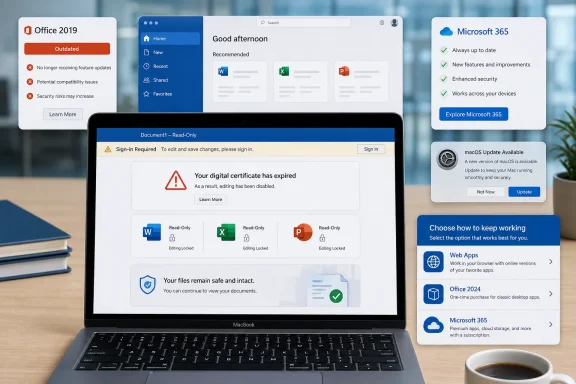 Office 2019 Hits a Licensing Wall
Users can still open, view, and print documents in an affected Office 2019 installation. They cannot create new documents, edit existing ones, use Save or Save As, or access other features that require the license to be successfully validated.The files themselves are not being deleted or converted. Microsoft says the certificate expiration poses no security risk to customer data, although Office 2019 has already gone nearly three years without security fixes and remains a poor choice for handling untrusted documents.
The critical distinction is that this is more than Office 2019 merely reaching the end of technical support. Support officially ended on October 10, 2023, but the applications continued working afterward. The July 13, 2026 certificate expiration now removes core editing capabilities because build 16.78 cannot receive the replacement certificate.
That makes the consequences unusually severe for a perpetual product. Customers who purchased Office 2019 outright did not buy an ongoing Microsoft 365 subscription, yet their installed software now depends on a licensing certificate whose expiration cannot be corrected within the version they own.
Microsoft’s own documentation previously told customers that they would “still be able to use Office 2019 for Mac” after support ended, albeit without security updates or bug fixes. Its newer guidance makes clear that full use is no longer possible after the certificate deadline.
This Is Not an All-Mac Office Shutdown
The claim that Microsoft has shut down a major app on “all Mac devices” is inaccurate. Current Microsoft 365 and supported Office installations continue working when the operating system and applications have been updated.On macOS, Microsoft requires at least:
- The Mac must run macOS 12 Monterey or later.
- Microsoft 365 or Office 2021 applications must be updated to version 16.83 or later.
- Users who remain in read-only mode after updating should quit the application completely, reopen it, and sign out and back into their Microsoft account.
The certificate change also affects outdated Microsoft 365 applications on iPhones and iPads. Those devices require iOS or iPadOS 17 and Office app version 2.93 or later. It does not affect Windows or Android, which Microsoft says use different license-validation mechanisms.
Nor is Office a single application being discontinued. The restriction applies to several Office applications sharing Microsoft’s licensing components. Current releases of Word, Excel, PowerPoint, Outlook, and OneNote remain available for supported Macs.
Macs unable to run macOS 12 present a separate problem. Even a Microsoft 365 subscriber with an active account cannot install the minimum Office build on such hardware. Microsoft recommends using the browser-based Microsoft 365 applications, moving the Office installation to another supported computer, upgrading macOS where possible, or replacing the device.
Perpetual Buyers Face a Forced Decision
Office 2019 customers have three practical routes: use Microsoft 365 on the web, purchase Office 2024 for Mac, or subscribe to Microsoft 365. Alternative productivity suites may also open common Word, Excel, and PowerPoint formats, although complex formatting, macros, fonts, and advanced spreadsheet features may not transfer cleanly.Office 2024 is Microsoft’s current one-time-purchase release for customers who do not want a subscription. Microsoft 365 provides continuously updated desktop applications and permits installations across multiple devices, depending on the plan, but it replaces the perpetual purchase with recurring payments.
Users upgrading from Office 2019 do not necessarily need to remove and reinstall every application. Microsoft advises running its License Removal Tool, activating the new Office 2024 or Microsoft 365 entitlement, and then updating the installed applications. Backing up important files and confirming that they open correctly in another editor would nevertheless be sensible before altering the installation.
Administrators have a broader inventory problem. Managed Macs running Microsoft 365 builds older than 16.83 should be identified through Microsoft Intune, software inventory tools, or Microsoft AutoUpdate reporting. Microsoft recommends deploying updates centrally and using the
msupdate command-line utility where appropriate.IT teams should also separate three groups that may report the same read-only symptom:
- Office 2019 for Mac installations cannot receive a compatible fix and require migration.
- Office 2021 or Microsoft 365 installations on supported Macs need an application update.
- Macs running operating systems older than macOS 12 may require an OS upgrade, browser access, or hardware replacement.
The Date Was Known, but the Impact Remains Contentious
Microsoft characterizes the event as a licensing update rather than a product shutdown. Technically, that description is correct: supported releases containing the renewed certificate are unaffected, files remain intact, and the Office 2019 applications still open.For customers, the practical result is harder to soften. A paid, perpetual copy of Office 2019 for Mac can no longer perform the central tasks for which it was purchased. “End of support” traditionally means no more patches or assistance; in this case, an embedded license-validation dependency has subsequently disabled editing as well.
The backlash reported by The Sun and visible in online discussions reflects that gap between Microsoft’s lifecycle terminology and the experience of buyers. Calling the event an all-Mac shutdown exaggerates its reach, but calling it an ordinary end-of-support milestone understates what happened to Office 2019.
As of July 14, 2026, affected users should first open Word and select Word > About Word to identify both the license and application version. Microsoft 365 and Office 2021 users should update macOS and Office immediately; anyone shown as running Office 2019 must now choose between web apps, another productivity suite, Office 2024, or a Microsoft 365 subscription.
References
- Primary source: The Sun
Published: 2026-07-13T15:09:45+00:00
