

Microsoft Office 2024 Home and Business for Mac or PC was being sold through Mashable’s StackSocial-powered deals channel for $129.97 through May 31, 2026, positioning a perpetual Word, Excel, PowerPoint, Outlook, and OneNote license below roughly two years of Microsoft 365 Family at $99.99 annually. The arithmetic is tidy, but the story is messier. “Own Office for life” is the kind of pitch that lands precisely because Microsoft has spent the last decade training users to rent productivity software, storage, AI features, and support as a bundle. The discount is real enough; the word lifetime is where buyers need to slow down.
The Mashable offer is not selling a strange clone of Office or a bargain-bin productivity suite with a familiar logo. It is pitching Office Home and Business 2024, the retail perpetual edition aimed at families and small businesses that still want the classic desktop apps without a Microsoft 365 subscription.
That distinction matters because there are two different Microsoft stories colliding here. Microsoft’s strategic center of gravity is Microsoft 365: recurring revenue, OneDrive storage, cloud services, Teams-adjacent workflows, Copilot, and a steady drip of feature updates. Office 2024 is the concession that not everyone wants that bargain.
For a large number of Windows users, that concession is enough. Word still opens documents, Excel still runs workbooks, PowerPoint still builds decks, Outlook still handles mail, and OneNote still captures notes. If your software life is mostly local files, email, PDF exports, spreadsheets, and the occasional presentation, the subscription pitch can feel less like modernization and more like a utility bill for habits that did not change.
That is why the less-than-two-years comparison is powerful. At $129.97, the deal clears the psychological hurdle that Microsoft 365 creates: if you can live without the subscription extras, the one-time license starts paying for itself quickly. But “quickly” is not the same as “forever,” and the gap between those two words is where the real buying decision lives.
Microsoft is explicit about this model: one-time Office purchases do not include the services that come with Microsoft 365, and they do not include an upgrade path to the next major version. If you want the next major perpetual release later, you should expect to buy it again.
That does not make the Mashable deal bad. It makes it more like buying Windows used to feel: you pay once, you use the thing for years, and eventually the support calendar or your hardware pushes you forward. The license may keep working after Microsoft’s formal support window ends, but “still launches” and “still supported” are different conditions.
This is where the lifetime wording deserves scrutiny. In deal-site language, lifetime usually means “for the life of the product license,” not “for the life of the buyer” and certainly not “for the life of the Office brand.” That nuance is easy to miss when the comparison is framed against a subscription that “never stops.”
The right mental model is not “Microsoft 365 versus eternity.” It is “Microsoft 365 versus several years of fixed Office functionality.” For many people, that is still an excellent trade. For others, especially anyone who lives inside Microsoft’s cloud, it will feel cramped almost immediately.
Office 2024 exists because the market still demands an offline-capable, non-subscription option. Small businesses have machines that are not constantly refreshed. Home users have budgets. Some environments dislike cloud dependencies. Some people simply do not want their basic productivity suite bundled into a broader services relationship.
The irony is that Microsoft’s push toward subscriptions makes every credible one-time Office discount look more attractive. A perpetual Office license now has a kind of countercultural appeal among mainstream users: it is familiar software without yet another monthly or annual renewal.
That emotional appeal should not be dismissed. Software subscriptions have moved from novelty to background noise to irritation. Users are asked to subscribe to password managers, note apps, VPNs, streaming services, photo storage, tax software, AI assistants, and productivity tools. A one-time Office license cuts against that trend in a way that feels refreshingly old-fashioned.
But Microsoft also knows exactly what it is withholding. The subscription is not merely a payment plan for the same thing. It is the live branch of Microsoft’s productivity ecosystem.
Microsoft 365 Family, for example, has historically been compelling because it spreads Office apps and OneDrive storage across multiple people. A household with several users can make the subscription look far less expensive on a per-person basis than a single Office 2024 license tied to one user and one platform choice.
That is the key comparison the deal headline compresses. If you are one person who wants desktop Office on one Mac or one PC, $129.97 is easy to defend. If you are a family of five using OneDrive, web Office, mobile apps, and shared storage, the math becomes less obvious.
Small businesses face a different version of the same question. A one-time Office license can make sense for a front-desk PC, a lightly used workstation, or an owner who refuses subscriptions. It makes less sense for an organization that depends on Exchange Online, shared mailboxes, Teams, compliance controls, device management, and predictable user provisioning.
The perpetual version is best understood as the local-first edition. That is not a weakness if local-first is what you want. It is a weakness if you are buying it because the headline said “Office for life” and you assume the rest of Microsoft 365 comes along for the ride.
The catch is cadence. Microsoft 365 is where Microsoft’s newest productivity ideas arrive first and most aggressively. That increasingly means AI-assisted work, cloud-connected search, richer collaboration, and features that assume your documents are part of a service fabric rather than files sitting on a drive.
That distinction will only get sharper. Microsoft’s productivity roadmap is now inseparable from Copilot, and Copilot is fundamentally a cloud service. A static Office release can gain security fixes and some updates, but it is not where Microsoft will stage its most ambitious AI and collaboration changes.
For some buyers, this is a feature, not a limitation. They do not want Word rewriting paragraphs in the background. They do not want Excel nudging them toward cloud analysis. They do not want every interface surface to become a prompt box. They want the Office they know, stabilized for several years.
That is the strongest case for Office 2024: not that it is more advanced than Microsoft 365, but that it is less needy. It asks for less ongoing commitment. It changes less dramatically. It does not try to convert every productivity task into a cloud workflow.
This matters more than it used to because Office is not just a word processor and spreadsheet. It is a major attack surface. Office documents remain a common delivery mechanism for phishing, macro abuse, malicious attachments, and social-engineering campaigns. Running unsupported Office is not the same category of risk as running an unsupported calculator.
There is also a Windows 10 wrinkle. Microsoft ended mainstream support for Windows 10 on October 14, 2025, and while Office 2024 may continue to run on Windows 10 machines, support alignment becomes less comfortable once the operating system itself is outside normal support. A perpetual Office deal should not be used to rationalize keeping an unsupported Windows estate alive.
For WindowsForum readers, this is the administrative red flag. The purchase price is attractive, but deployment context matters. If the target PC is a Windows 11 machine with a user who needs classic Office for local work, the deal is straightforward. If the target is an aging Windows 10 box being kept around because subscriptions are annoying, the bargain may be masking a larger lifecycle problem.
Security-minded buyers should also be cautious about gray-market license deals in general. Mashable’s offer is presented through a mainstream publisher and a known deals platform, but discounted software marketplaces have long trained users to blur the line between authorized retail, surplus keys, region-specific licenses, and offers that sound too good to interrogate. The safest path is always to verify exactly what account, platform, activation method, and transfer rights the seller provides before treating the license as a durable asset.
That matters in mixed households. A user with a Windows desktop and a MacBook may assume “Office” means both. A Microsoft 365 subscription often indulges that assumption. A perpetual license usually does not.
It also matters when hardware changes. If your laptop dies, if you switch from Windows to macOS, or if you rebuild your setup around a new device, the transfer and reactivation terms become more important than the sale price. Deal pages tend to sell the romance of ownership; license agreements define its boundaries.
This is not a reason to avoid the deal. It is a reason to buy it like an IT pro rather than a bargain hunter. Confirm the edition, the platform, the number of devices, the account binding, and the activation process before assuming the purchase will behave like a subscription.
The people most likely to be happy with Office 2024 are the ones who can describe their use case in one sentence: “I need Office on this machine.” The people most likely to be disappointed are the ones whose real need is “I want Microsoft’s whole productivity ecosystem, but cheaper.”
The “through May 31” deadline is a classic conversion tool. It may be a real promotional cutoff. It may also be followed by a similar deal later, a different price, or another partner post with a new expiration date. Deal pricing is volatile by design.
There is a broader media story here. Tech publications increasingly contain two products under one brand: journalism and commerce. The journalism side explains markets, products, and consequences. The commerce side monetizes purchase intent. Readers need to know which mode they are in.
For Windows users, the practical response is not cynicism for its own sake. It is calibration. A partner deal can be useful, and this one may be genuinely attractive. But the purchase decision should rest on Microsoft’s licensing realities, not the emotional force of an affiliate headline.
The most misleading part of the pitch is not the price. It is the implication that Microsoft 365’s recurring bill and Office 2024’s one-time license are interchangeable except for payment structure. They are not. They overlap heavily in the core apps, then diverge sharply around cloud storage, multi-device flexibility, AI, support expectations, and future features.
That could be a freelancer who sends invoices and edits contracts. It could be a student who needs local Office compatibility but already uses another cloud storage provider. It could be a retiree who wants Word and Excel without a subscription dashboard. It could be a small office with a handful of PCs where Microsoft 365’s broader management layer is unnecessary.
The common thread is self-containment. These buyers do not need six users, six terabytes of pooled storage, Copilot hooks, web-first collaboration, or constant feature churn. They need the Office file formats, the desktop apps, and enough support runway to feel comfortable.
Microsoft 365 is better for people who live across devices and accounts. It is better for families who can exploit the multi-user economics. It is better for businesses that need identity, storage, email, compliance, and collaboration under one roof. It is also where Microsoft will keep making the most visible product investments.
That leaves Office 2024 in a narrower but still meaningful lane. It is the choice for users who want productivity software to be an appliance. Turn it on, open the file, do the work, close the lid. In 2026, that simplicity is no longer the default Office experience; it is the alternative.
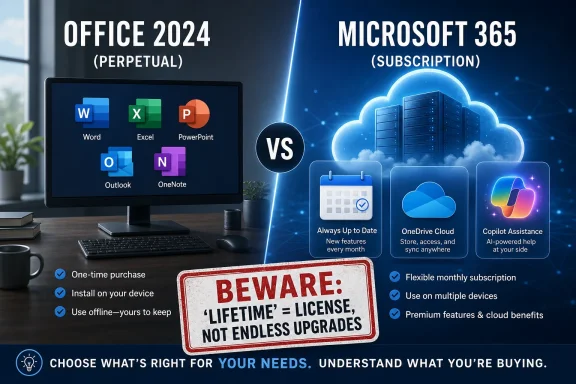 The Deal Works Because Subscription Fatigue Is Real
The Mashable offer is not selling a strange clone of Office or a bargain-bin productivity suite with a familiar logo. It is pitching Office Home and Business 2024, the retail perpetual edition aimed at families and small businesses that still want the classic desktop apps without a Microsoft 365 subscription.That distinction matters because there are two different Microsoft stories colliding here. Microsoft’s strategic center of gravity is Microsoft 365: recurring revenue, OneDrive storage, cloud services, Teams-adjacent workflows, Copilot, and a steady drip of feature updates. Office 2024 is the concession that not everyone wants that bargain.
For a large number of Windows users, that concession is enough. Word still opens documents, Excel still runs workbooks, PowerPoint still builds decks, Outlook still handles mail, and OneNote still captures notes. If your software life is mostly local files, email, PDF exports, spreadsheets, and the occasional presentation, the subscription pitch can feel less like modernization and more like a utility bill for habits that did not change.
That is why the less-than-two-years comparison is powerful. At $129.97, the deal clears the psychological hurdle that Microsoft 365 creates: if you can live without the subscription extras, the one-time license starts paying for itself quickly. But “quickly” is not the same as “forever,” and the gap between those two words is where the real buying decision lives.
Perpetual Office Is a Product, Not a Time Machine
The most important thing to understand about Office 2024 is that it is a perpetual license for a specific version of Office, not a lifetime entitlement to every future Office feature Microsoft invents. You buy the 2024 generation. You do not buy Office 2027, Office 2029, or whatever Microsoft decides to call the next boxed-but-not-boxed release.Microsoft is explicit about this model: one-time Office purchases do not include the services that come with Microsoft 365, and they do not include an upgrade path to the next major version. If you want the next major perpetual release later, you should expect to buy it again.
That does not make the Mashable deal bad. It makes it more like buying Windows used to feel: you pay once, you use the thing for years, and eventually the support calendar or your hardware pushes you forward. The license may keep working after Microsoft’s formal support window ends, but “still launches” and “still supported” are different conditions.
This is where the lifetime wording deserves scrutiny. In deal-site language, lifetime usually means “for the life of the product license,” not “for the life of the buyer” and certainly not “for the life of the Office brand.” That nuance is easy to miss when the comparison is framed against a subscription that “never stops.”
The right mental model is not “Microsoft 365 versus eternity.” It is “Microsoft 365 versus several years of fixed Office functionality.” For many people, that is still an excellent trade. For others, especially anyone who lives inside Microsoft’s cloud, it will feel cramped almost immediately.
Microsoft’s Own Strategy Makes the Discount More Tempting
Microsoft has spent years making the subscription version of Office feel like the default and the perpetual version feel like the exception. That strategy is not accidental. The company wants Microsoft 365 to be the place where it ships new features first, attaches OneDrive storage, layers in security services, and now folds in AI.Office 2024 exists because the market still demands an offline-capable, non-subscription option. Small businesses have machines that are not constantly refreshed. Home users have budgets. Some environments dislike cloud dependencies. Some people simply do not want their basic productivity suite bundled into a broader services relationship.
The irony is that Microsoft’s push toward subscriptions makes every credible one-time Office discount look more attractive. A perpetual Office license now has a kind of countercultural appeal among mainstream users: it is familiar software without yet another monthly or annual renewal.
That emotional appeal should not be dismissed. Software subscriptions have moved from novelty to background noise to irritation. Users are asked to subscribe to password managers, note apps, VPNs, streaming services, photo storage, tax software, AI assistants, and productivity tools. A one-time Office license cuts against that trend in a way that feels refreshingly old-fashioned.
But Microsoft also knows exactly what it is withholding. The subscription is not merely a payment plan for the same thing. It is the live branch of Microsoft’s productivity ecosystem.
The Missing Cloud Is Either a Footnote or the Whole Plot
The Mashable copy downplays the lack of cloud storage by noting that cloud storage is common and affordable. That is partly true and partly beside the point. The value of Microsoft 365 is not just that it includes storage; it is that OneDrive storage, Office apps, file history, web access, mobile access, and sharing workflows are designed to operate as one system.Microsoft 365 Family, for example, has historically been compelling because it spreads Office apps and OneDrive storage across multiple people. A household with several users can make the subscription look far less expensive on a per-person basis than a single Office 2024 license tied to one user and one platform choice.
That is the key comparison the deal headline compresses. If you are one person who wants desktop Office on one Mac or one PC, $129.97 is easy to defend. If you are a family of five using OneDrive, web Office, mobile apps, and shared storage, the math becomes less obvious.
Small businesses face a different version of the same question. A one-time Office license can make sense for a front-desk PC, a lightly used workstation, or an owner who refuses subscriptions. It makes less sense for an organization that depends on Exchange Online, shared mailboxes, Teams, compliance controls, device management, and predictable user provisioning.
The perpetual version is best understood as the local-first edition. That is not a weakness if local-first is what you want. It is a weakness if you are buying it because the headline said “Office for life” and you assume the rest of Microsoft 365 comes along for the ride.
Office 2024 Is Modern Enough, But Not the Fast Lane
Office 2024 is not a fossil. It includes many improvements that accumulated across the Microsoft 365 era, and for users coming from Office 2016, Office 2019, or even Office 2021, the upgrade can feel substantial. Excel, PowerPoint, Word, Outlook, and OneNote have all benefited from years of interface refinement, accessibility improvements, file-format stability, and performance work.The catch is cadence. Microsoft 365 is where Microsoft’s newest productivity ideas arrive first and most aggressively. That increasingly means AI-assisted work, cloud-connected search, richer collaboration, and features that assume your documents are part of a service fabric rather than files sitting on a drive.
That distinction will only get sharper. Microsoft’s productivity roadmap is now inseparable from Copilot, and Copilot is fundamentally a cloud service. A static Office release can gain security fixes and some updates, but it is not where Microsoft will stage its most ambitious AI and collaboration changes.
For some buyers, this is a feature, not a limitation. They do not want Word rewriting paragraphs in the background. They do not want Excel nudging them toward cloud analysis. They do not want every interface surface to become a prompt box. They want the Office they know, stabilized for several years.
That is the strongest case for Office 2024: not that it is more advanced than Microsoft 365, but that it is less needy. It asks for less ongoing commitment. It changes less dramatically. It does not try to convert every productivity task into a cloud workflow.
The Support Calendar Is the Fine Print That Actually Matters
Perpetual software still lives under a support policy. Office LTSC 2024, the volume-licensed commercial sibling of Office 2024, follows a five-year fixed lifecycle ending in October 2029. Consumer Office 2024 is not identical in licensing terms, but the broader point remains: Microsoft’s non-subscription Office releases are not indefinite support promises.This matters more than it used to because Office is not just a word processor and spreadsheet. It is a major attack surface. Office documents remain a common delivery mechanism for phishing, macro abuse, malicious attachments, and social-engineering campaigns. Running unsupported Office is not the same category of risk as running an unsupported calculator.
There is also a Windows 10 wrinkle. Microsoft ended mainstream support for Windows 10 on October 14, 2025, and while Office 2024 may continue to run on Windows 10 machines, support alignment becomes less comfortable once the operating system itself is outside normal support. A perpetual Office deal should not be used to rationalize keeping an unsupported Windows estate alive.
For WindowsForum readers, this is the administrative red flag. The purchase price is attractive, but deployment context matters. If the target PC is a Windows 11 machine with a user who needs classic Office for local work, the deal is straightforward. If the target is an aging Windows 10 box being kept around because subscriptions are annoying, the bargain may be masking a larger lifecycle problem.
Security-minded buyers should also be cautious about gray-market license deals in general. Mashable’s offer is presented through a mainstream publisher and a known deals platform, but discounted software marketplaces have long trained users to blur the line between authorized retail, surplus keys, region-specific licenses, and offers that sound too good to interrogate. The safest path is always to verify exactly what account, platform, activation method, and transfer rights the seller provides before treating the license as a durable asset.
The Mac-or-PC Choice Is Not a Minor Detail
The Mashable copy says the license is for Mac or PC, and buyers should read that carefully before clicking. Perpetual Office licenses are usually not the same as a Microsoft 365 entitlement that lets you install apps across multiple devices and platforms under one subscription. The practical question is whether you are buying the Windows version, the Mac version, or a license that must be selected at redemption.That matters in mixed households. A user with a Windows desktop and a MacBook may assume “Office” means both. A Microsoft 365 subscription often indulges that assumption. A perpetual license usually does not.
It also matters when hardware changes. If your laptop dies, if you switch from Windows to macOS, or if you rebuild your setup around a new device, the transfer and reactivation terms become more important than the sale price. Deal pages tend to sell the romance of ownership; license agreements define its boundaries.
This is not a reason to avoid the deal. It is a reason to buy it like an IT pro rather than a bargain hunter. Confirm the edition, the platform, the number of devices, the account binding, and the activation process before assuming the purchase will behave like a subscription.
The people most likely to be happy with Office 2024 are the ones who can describe their use case in one sentence: “I need Office on this machine.” The people most likely to be disappointed are the ones whose real need is “I want Microsoft’s whole productivity ecosystem, but cheaper.”
The Affiliate Frame Deserves More Skepticism Than the Price
Mashable labels the post as partner content and discloses that it may earn compensation. That does not make the offer invalid, but it changes how readers should interpret the enthusiasm. Affiliate commerce is built to collapse nuance into urgency: the price is low, the clock is ticking, and the comparison is chosen to make inaction feel irrational.The “through May 31” deadline is a classic conversion tool. It may be a real promotional cutoff. It may also be followed by a similar deal later, a different price, or another partner post with a new expiration date. Deal pricing is volatile by design.
There is a broader media story here. Tech publications increasingly contain two products under one brand: journalism and commerce. The journalism side explains markets, products, and consequences. The commerce side monetizes purchase intent. Readers need to know which mode they are in.
For Windows users, the practical response is not cynicism for its own sake. It is calibration. A partner deal can be useful, and this one may be genuinely attractive. But the purchase decision should rest on Microsoft’s licensing realities, not the emotional force of an affiliate headline.
The most misleading part of the pitch is not the price. It is the implication that Microsoft 365’s recurring bill and Office 2024’s one-time license are interchangeable except for payment structure. They are not. They overlap heavily in the core apps, then diverge sharply around cloud storage, multi-device flexibility, AI, support expectations, and future features.
The Best Buyer Is the User Microsoft No Longer Designs Around
The ideal Office 2024 buyer is not a power user chasing every new Microsoft feature. It is the person or business that wants a stable productivity baseline and does not want their software budget tied to a recurring service.That could be a freelancer who sends invoices and edits contracts. It could be a student who needs local Office compatibility but already uses another cloud storage provider. It could be a retiree who wants Word and Excel without a subscription dashboard. It could be a small office with a handful of PCs where Microsoft 365’s broader management layer is unnecessary.
The common thread is self-containment. These buyers do not need six users, six terabytes of pooled storage, Copilot hooks, web-first collaboration, or constant feature churn. They need the Office file formats, the desktop apps, and enough support runway to feel comfortable.
Microsoft 365 is better for people who live across devices and accounts. It is better for families who can exploit the multi-user economics. It is better for businesses that need identity, storage, email, compliance, and collaboration under one roof. It is also where Microsoft will keep making the most visible product investments.
That leaves Office 2024 in a narrower but still meaningful lane. It is the choice for users who want productivity software to be an appliance. Turn it on, open the file, do the work, close the lid. In 2026, that simplicity is no longer the default Office experience; it is the alternative.
The $129 Question Is Really About How Much Microsoft You Want
The deal’s headline comparison is mathematically persuasive but strategically incomplete. Less than two years of Microsoft 365 can buy you a long stretch of desktop Office, but it cannot buy you the subscription’s cloud services, multi-user economics, or future-facing feature stream. The right answer depends less on the discount than on whether your workflow is local-first or service-first.- Office 2024 Home and Business is a strong buy for one user who wants the classic desktop apps on a specific Mac or PC without annual billing.
- Microsoft 365 remains the better value for households that use multiple accounts, multiple devices, and OneDrive storage heavily.
- The word “lifetime” should be read as a perpetual license for this Office generation, not as lifetime support or free future upgrades.
- Windows 10 holdouts should not treat a cheap Office license as a substitute for solving the operating system’s support problem.
- Buyers should verify platform, activation, transfer, and seller terms before assuming a discounted license behaves like a Microsoft 365 subscription.
References
- Primary source: Mashable
Published: Sat, 30 May 2026 09:13:41 GMT
A lifetime license for Word, Excel, PowerPoint, and more now costs less than 2 years of Microsoft 365 | Mashable
Microsoft Office 2024 comes with Word, Excel, PowerPoint, and more, and a lifetime license is only $130mashable.com - Official source: learn.microsoft.com
Office LTSC 2024 - Microsoft Lifecycle | Microsoft Learn
Office LTSC 2024 follows the Fixed Lifecycle Policy.learn.microsoft.com - Official source: microsoft.com
Compare Microsoft 365 Plans & Pricing (Formerly Office 365) - Microsoft Store
Compare Microsoft 365 subscription plans and pricing (formerly Office 365). Choose from Personal, Family and Premium subscriptions with Copilot AI, Word, Excel, PowerPoint, Outlook, and OneDrive. Works on PC, Mac, iPhone, iPad and Android. Find the right plan for your needs.www.microsoft.com
- Related coverage: windowslatest.com
Microsoft says Office 2024 LTSC support for Windows ends on October 9th, 2029
According to a new support document spotted by Windows Latest, Office 2024 LTSC support ends on October 9th, 2029. www.windowslatest.com
- Related coverage: eosl.date
Microsoft Office End of Life (EOL) Dates and End of Support (EOS) Dates | 2024 - October 2024 Release
Microsoft Office end of life dates across 10 release cycles. Microsoft Office 2024 is the latest supported version (October 2024). 2019 reached EOL on 2025-10-14. Covers EOL, EOS and EOSL dates.eosl.date
- Related coverage: dir.md
Office 2024 vs Office LTSC 2024 FAQ: Activation, Support Timeline, Windows 10 Limits & Real-World Deployment Fixes
Confused about Office 2024 or Office LTSC 2024? Learn the key differences, Windows 10 support deadlines, activation issues, offline deployment limits, Mac compatibility, and practical fixes used by IT admins and advanced users. dir.md
- Official source: support.microsoft.com
Office 2024 and Office LTSC 2024 FAQ | Microsoft Support
Office 2024 and Office LTSC 2024 FAQsupport.microsoft.com - Official source: cdn-dynmedia-1.microsoft.com
- Related coverage: windowscentral.com
Windows 10 LTSB (LTSC) will get Extended Security Updates | Windows Central
Windows 10 2016 LTSB support ends in 2026. Microsoft details ESU costs, deadlines, and upgrade paths to LTSC and Server 2025.www.windowscentral.com - Official source: techcommunity.microsoft.com
Preparing for key End of Support milestones coming in 2025
Microsoft Buildtechcommunity.microsoft.com
- Official source: download.microsoft.com
