

Windows 11’s search experience has long been a study in frustration: sometimes it feels fast, other times it seems to ignore the very files you know are there. OmniSearch is interesting because it doesn’t just promise speed; it tries to turn search into a more complete workflow, combining local indexing, previews, duplicate finding, and file actions in one app. That makes it less of a pure “find my file” utility and more of a quiet indictment of how incomplete Windows Search still feels for power users. The article’s core argument is simple: if you care about speed, control, and privacy, OmniSearch makes Windows 11 search feel more modern without sending your data elsewhere
Windows search has always lived in the shadow of user expectation. People don’t want a search system that is merely technically present; they want one that is reliable enough to become muscle memory. The problem is that Microsoft’s built-in search has often felt fragmented across Start, Taskbar, File Explorer, and Settings, with results that can be inconsistent, slow, or overly broad. That inconsistency is exactly the kind of thing that pushes users toward third-party tools, especially when the OS itself keeps promising a smarter, more unified experience but doesn’t fully deliver it
OmniSearch arrives into that gap with a very Windows-specific pitch: use NTFS metadata indexing to make local file search feel near-instant. The article notes that the app leans on the USN Journal and MFT for performance, which is the right kind of technical foundation for a search utility that wants to feel instant rather than merely responsive. That matters because it frames OmniSearch as a local-first system tool, not a cloud-dependent assistant or an indexer that needs to constantly negotiate with online services
There’s also a broader software-design story here. Windows 11 has become increasingly full of search entry points, but those entry points do not always feel like they share the same underlying logic. When users search for an app, a setting, a document, or a filename, they are often navigating different subsystems that merely look related on the surface. OmniSearch’s appeal is that it collapses much of that ambiguity into a single interface that feels predictable once indexed
The article also positions OmniSearch against Everything, which remains the benchmark for pure filename search performance on Windows. That comparison is revealing, because it acknowledges that OmniSearch is not trying to win the same race. Instead, it is trying to make the rest of the file-finding experience better: previews, duplicate detection, keyboard behavior, filtering, and file operations all become part of the product’s value proposition. In other words, OmniSearch is not just about speed; it is about reducing the number of times you have to leave the search tool at all
Another important historical point is that Windows users have long tolerated search tools that solve only one part of the problem. Old-school utilities could be fast but barebones. Built-in Windows search could be more integrated but less dependable. OmniSearch sits in the middle and argues that the modern expectation is not just “find the file,” but “find it, inspect it, act on it, and move on.” That’s a subtle but meaningful shift in how desktop software is judged.
That change is partly about speed, but not only speed. It is also about consistency. Windows Search can return useful results, but it can also generate the kind of blank or noisy search moments that make you question whether the machine is helping or merely guessing. OmniSearch’s fast local indexing and clean interface reduce that uncertainty, which is often more valuable than a small raw performance gain.
The app’s cleaner interface also matters more than it might seem. Search tools accumulate tiny failures: unclear filters, hidden settings, awkward keyboard navigation, and dead-end result lists. OmniSearch tries to expose those controls upfront, which means the user does less guessing. In practice, that can be the difference between a utility that feels “nice to have” and one that becomes part of the daily desktop routine.
This matters because local search performance is often constrained less by CPU and more by how intelligently the search index is built. If a tool can interrogate NTFS metadata directly, it can often respond far faster than a generic scan of the entire file tree. That is also why the article emphasizes that OmniSearch runs fully locally, keeping metadata on-device and not sending it to external servers.
The article does note one important caveat: low-level indexing may require administrator privileges on some systems. That is a reminder that technical advantage sometimes comes with administrative friction. Still, for the audience most likely to care about file search seriously, that trade-off is usually acceptable.
That design choice is smart because it avoids slowing down ordinary searches. Content indexing can be expensive, especially across large file sets. By making content search explicit, OmniSearch keeps the fast path fast and the deeper path available when needed. That is a classic productivity compromise, and it’s the right one.
This is where the product starts to feel more like a serious desktop utility than a simplified consumer app. Users who know exactly what they are looking for can be precise. Users who do not can still rely on the default index. That dual-mode design is one reason advanced tools often outlast trendier but simpler ones.
This is a meaningful addition because file duplication is one of the most common forms of silent clutter on Windows systems. Screenshots, downloads, exported media, and backup copies accumulate quickly, and users rarely notice the buildup until storage starts to feel tight. A search tool that can also help identify redundancy creates a much stronger reason to stay open.
The article does point out one limitation: duplicate scanning appears to search the entire computer, without a fine-grained way to narrow it to a file type or location. That matters because duplicate cleanup can be safer when it is targeted. A broad scan is useful, but it can also create unnecessary review work if the user only cares about one folder or one category of files.
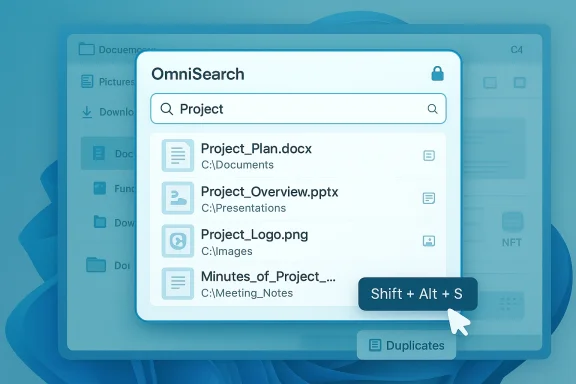
That matters because search tools get used under pressure. The faster they can disappear into muscle memory, the better. A global shortcut like Shift + Alt + S is useful precisely because it reduces the number of decisions between wanting the file and getting to it.
The cleaner UI is important for another reason: it encourages adoption. Search tools can become intimidating when they look like databases or developer utilities. OmniSearch seems to avoid that trap by keeping the UI modern and readable while still surfacing advanced options. That balance is not easy to get right.
The article also notes that the app is compiled for x64 but was tested on an ARM laptop without immediate issues or performance degradation. That is a useful detail because Windows on ARM continues to matter to the broader Windows ecosystem, especially as more laptops ship with battery-efficient chips. An app that behaves acceptably across architectures gains a practical advantage, even if it is not formally optimized for every scenario.
That said, the installation route is also a reminder that low-level file indexers can carry more privileges and system interaction than ordinary apps. That is not a flaw by itself, but it does reinforce the need for transparency. Users need to know what is indexed, where, and how often.
That positioning is clever because it doesn’t overpromise. The article explicitly says OmniSearch is not trying to beat Everything at pure filename speed. Instead, it is trying to be the more complete package for users who want search plus management features in one place. That honesty makes the product story stronger.
The article’s criticisms of Windows Search also feel familiar in a way that will resonate with long-time Windows users. Search should not be a gamble. It should be a stable part of navigation, not a mystery box. If a third-party utility can deliver that confidence, it earns its place even if it doesn’t replace every built-in path.
Another thing to watch is whether the app expands its search scope without compromising its local-first identity. The article notes that it does not currently unify app-level search from services like Outlook or Teams, and that omission is meaningful. Windows users increasingly live across both local and cloud layers, so a future version that can respect privacy while broadening discovery would be a major step forward
OmniSearch is not the final answer to Windows file search, but it is a strong reminder that users will always gravitate toward tools that respect their time. The best thing about it is not just that it can find files fast; it is that it makes finding files feel dependable again. On Windows 11, that alone is a meaningful upgrade.
Source: Windows Central https://www.windowscentral.com/micr...rch-changed-how-i-search-files-on-windows-11/
 Background
Windows search has always lived in the shadow of user expectation. People don’t want a search system that is merely technically present; they want one that is reliable enough to become muscle memory. The problem is that Microsoft’s built-in search has often felt fragmented across Start, Taskbar, File Explorer, and Settings, with results that can be inconsistent, slow, or overly broad. That inconsistency is exactly the kind of thing that pushes users toward third-party tools, especially when the OS itself keeps promising a smarter, more unified experience but doesn’t fully deliver itOmniSearch arrives into that gap with a very Windows-specific pitch: use NTFS metadata indexing to make local file search feel near-instant. The article notes that the app leans on the USN Journal and MFT for performance, which is the right kind of technical foundation for a search utility that wants to feel instant rather than merely responsive. That matters because it frames OmniSearch as a local-first system tool, not a cloud-dependent assistant or an indexer that needs to constantly negotiate with online services
There’s also a broader software-design story here. Windows 11 has become increasingly full of search entry points, but those entry points do not always feel like they share the same underlying logic. When users search for an app, a setting, a document, or a filename, they are often navigating different subsystems that merely look related on the surface. OmniSearch’s appeal is that it collapses much of that ambiguity into a single interface that feels predictable once indexed
The article also positions OmniSearch against Everything, which remains the benchmark for pure filename search performance on Windows. That comparison is revealing, because it acknowledges that OmniSearch is not trying to win the same race. Instead, it is trying to make the rest of the file-finding experience better: previews, duplicate detection, keyboard behavior, filtering, and file operations all become part of the product’s value proposition. In other words, OmniSearch is not just about speed; it is about reducing the number of times you have to leave the search tool at all
Another important historical point is that Windows users have long tolerated search tools that solve only one part of the problem. Old-school utilities could be fast but barebones. Built-in Windows search could be more integrated but less dependable. OmniSearch sits in the middle and argues that the modern expectation is not just “find the file,” but “find it, inspect it, act on it, and move on.” That’s a subtle but meaningful shift in how desktop software is judged.
What OmniSearch Actually Changes
The biggest immediate change OmniSearch makes is psychological. Once the index is built, the app appears to reduce the friction between intention and result. The article’s author says they stopped opening Start search out of habit and stopped digging through folders, which is exactly the kind of behavioral change that defines a successful utility. When software earns trust, users stop planning around it and start relying on itThat change is partly about speed, but not only speed. It is also about consistency. Windows Search can return useful results, but it can also generate the kind of blank or noisy search moments that make you question whether the machine is helping or merely guessing. OmniSearch’s fast local indexing and clean interface reduce that uncertainty, which is often more valuable than a small raw performance gain.
Why predictability matters more than a benchmark win
For most users, the real competition is not a synthetic test. It is the daily experience of searching for something under time pressure. A utility that produces dependable results in a fraction of a second can feel faster than a technically faster one that forces you to wait, rethink the query, or jump between entry points. That is why the article makes a point of separating OmniSearch from Everything’s raw filename dominance while still praising the new workflow advantagesThe app’s cleaner interface also matters more than it might seem. Search tools accumulate tiny failures: unclear filters, hidden settings, awkward keyboard navigation, and dead-end result lists. OmniSearch tries to expose those controls upfront, which means the user does less guessing. In practice, that can be the difference between a utility that feels “nice to have” and one that becomes part of the daily desktop routine.
- Faster results reduce context switching.
- Cleaner layout lowers the learning curve over time.
- Predictable behavior makes repeated searches less annoying.
- Local indexing improves privacy confidence.
- Fewer blank-result moments improve trust.
Local Indexing and the NTFS Advantage
One of OmniSearch’s most compelling claims is that it uses low-level NTFS data structures to build speed. The article specifically says it indexes via the USN Journal and MFT, which are both native to the Windows file system and especially well-suited to local file discovery. That means the app is leaning on the operating system’s own bookkeeping rather than trying to infer file locations through slower, broader scanning methodsThis matters because local search performance is often constrained less by CPU and more by how intelligently the search index is built. If a tool can interrogate NTFS metadata directly, it can often respond far faster than a generic scan of the entire file tree. That is also why the article emphasizes that OmniSearch runs fully locally, keeping metadata on-device and not sending it to external servers.
Privacy is a feature, not just a policy
The privacy angle is easy to underestimate. File search is one of those activities that quietly exposes a lot about a person’s work, habits, and personal life. A local-only tool gives users an important sense of ownership, especially on a machine that contains documents, media, downloads, and archives they may not want tied to a cloud account. That local-first posture is not just technically neat; it is strategically attractive to users who distrust cloud indexing.The article does note one important caveat: low-level indexing may require administrator privileges on some systems. That is a reminder that technical advantage sometimes comes with administrative friction. Still, for the audience most likely to care about file search seriously, that trade-off is usually acceptable.
- USN Journal access can accelerate incremental indexing.
- MFT-based discovery improves filesystem awareness.
- Local-only operation preserves privacy boundaries.
- Admin privileges may be needed on some setups.
- Performance depends on how much of the system is indexed.
Search Syntax and Power-User Control
The article’s discussion of search syntax is where OmniSearch starts to separate itself from simpler file tools. By default, the app searches filenames and metadata, but not file contents. To search inside files, users need to invoke syntax such as content:, ansicontent:, utf8content:, utf16content:, and utf16becontent:. That sounds technical, but it is also a sign that the app is built for people who are willing to trade a little complexity for much better controlThat design choice is smart because it avoids slowing down ordinary searches. Content indexing can be expensive, especially across large file sets. By making content search explicit, OmniSearch keeps the fast path fast and the deeper path available when needed. That is a classic productivity compromise, and it’s the right one.
How syntax changes the search model
The syntax system also gives users a way to narrow their results intelligently. The article notes that combining an extension filter with a content clause can make searches faster and more targeted, such as searching text files for a phrase instead of querying every file type on the drive. That turns the search bar into a structured query tool, not just a text box.This is where the product starts to feel more like a serious desktop utility than a simplified consumer app. Users who know exactly what they are looking for can be precise. Users who do not can still rely on the default index. That dual-mode design is one reason advanced tools often outlast trendier but simpler ones.
- Content search is explicit, not automatic.
- Extension filters can reduce search time.
- Quotation marks matter for multi-word phrases.
- Searches are case-sensitive when using syntax.
- Folders are excluded from content search.
Duplicate Detection and File Cleanup
OmniSearch is not just a search engine; it also includes duplicate-file detection. That makes it more useful than a traditional indexer because it moves from discovery into cleanup. The article describes opening a Duplicates tab, setting a minimum file size, and launching a scan to identify files that can be compared and removedThis is a meaningful addition because file duplication is one of the most common forms of silent clutter on Windows systems. Screenshots, downloads, exported media, and backup copies accumulate quickly, and users rarely notice the buildup until storage starts to feel tight. A search tool that can also help identify redundancy creates a much stronger reason to stay open.
Where the feature helps most
For home users, duplicate detection can be a quick way to recover storage without installing a separate cleanup tool. For more organized users, it becomes part of routine maintenance: find, compare, decide, and delete. That’s a small but powerful workflow loop.The article does point out one limitation: duplicate scanning appears to search the entire computer, without a fine-grained way to narrow it to a file type or location. That matters because duplicate cleanup can be safer when it is targeted. A broad scan is useful, but it can also create unnecessary review work if the user only cares about one folder or one category of files.
- Useful for reclaiming disk space.
- Helpful for screenshots, media, and downloads.
- Eliminates the need for a separate cleanup app in some cases.
- Entire-system scanning may feel too broad for some users.
- Manual review is still necessary before deletion.
Interface, Keyboard Flow, and Everyday Usability
A lot of search tools fail not because they are slow, but because they are awkward. OmniSearch appears to address this by paying attention to the little things: keyboard shortcuts, result-page sizing, theming, and window behavior. The article says the settings allow users to change the global shortcut, remember window size and position, and adjust the number of results per page. Those are the kinds of options that make a tool feel native to a person’s habits rather than imposed on themThat matters because search tools get used under pressure. The faster they can disappear into muscle memory, the better. A global shortcut like Shift + Alt + S is useful precisely because it reduces the number of decisions between wanting the file and getting to it.
Why the interface matters as much as search speed
The article also mentions the ability to preview files inline without opening them in a separate application. That is a subtle quality-of-life improvement, but one that can save a surprising amount of time. Preview-first workflows are especially valuable when you are sorting between similar filenames, deciding whether a document is the one you want, or checking media before opening it elsewhere.The cleaner UI is important for another reason: it encourages adoption. Search tools can become intimidating when they look like databases or developer utilities. OmniSearch seems to avoid that trap by keeping the UI modern and readable while still surfacing advanced options. That balance is not easy to get right.
- Global shortcut support speeds up access.
- Window memory helps multi-monitor and repeat workflows.
- Result count controls can reduce clutter.
- Inline previews prevent unnecessary app launches.
- Clear filters make search feel more deliberate.
Installation, Distribution, and Cross-Device Behavior
Another part of OmniSearch’s appeal is that it seems easy to get. The article says installation is straightforward via a typical MSI or EXE wizard, and that the app also appears in the Microsoft Store for easier installation. That gives it a relatively low barrier to entry, which matters for a utility trying to reach users who are already frustrated with file search and may not want to wrestle with a complicated setup processThe article also notes that the app is compiled for x64 but was tested on an ARM laptop without immediate issues or performance degradation. That is a useful detail because Windows on ARM continues to matter to the broader Windows ecosystem, especially as more laptops ship with battery-efficient chips. An app that behaves acceptably across architectures gains a practical advantage, even if it is not formally optimized for every scenario.
Why broad installability improves trust
There is a lot to be said for not overcomplicating first launch. A utility that works right away inspires confidence faster than one that requires a long manual setup. OmniSearch seems to benefit from that simplicity. Once installed, it can live in the tray and stay ready without forcing the user to think about it constantly.That said, the installation route is also a reminder that low-level file indexers can carry more privileges and system interaction than ordinary apps. That is not a flaw by itself, but it does reinforce the need for transparency. Users need to know what is indexed, where, and how often.
- Store distribution lowers friction.
- Traditional installer support helps power users.
- Tray presence makes the app easy to return to.
- ARM compatibility widens device support.
- Indexing scope should remain transparent.
How It Compares to Windows Search and Everything
This comparison is really the center of the entire story. Windows Search is built into the operating system, which gives it enormous reach but not necessarily the best performance or consistency. Everything is famously fast for filename lookups, which gives it a high bar to clear in raw speed. OmniSearch tries to split the difference by offering a broader, more integrated workflow than Everything while remaining much more capable and responsive than the built-in search experienceThat positioning is clever because it doesn’t overpromise. The article explicitly says OmniSearch is not trying to beat Everything at pure filename speed. Instead, it is trying to be the more complete package for users who want search plus management features in one place. That honesty makes the product story stronger.
The value of not pretending to be Everything
A lot of software fails by claiming to be the best at everything and then disappointing users at the one thing they care about most. OmniSearch avoids that mistake. It admits the benchmark, respects it, and then differentiates on workflow. That is often how mature desktop tools win: not through one dramatic superpower, but through a set of small advantages that add up.The article’s criticisms of Windows Search also feel familiar in a way that will resonate with long-time Windows users. Search should not be a gamble. It should be a stable part of navigation, not a mystery box. If a third-party utility can deliver that confidence, it earns its place even if it doesn’t replace every built-in path.
- Windows Search offers integration but uneven reliability.
- Everything offers raw speed but narrower scope.
- OmniSearch adds previews, filters, and actions.
- OmniSearch is not trying to win on filename speed alone.
- Workflow completeness is its main differentiator.
Strengths and Opportunities
OmniSearch’s strongest advantage is that it solves more than one problem at once. It is fast, local, visually clean, and practical in ways that users can feel immediately, especially after the index is built. The opportunity is obvious: if the developer keeps refining the search grammar, filtering, and duplicate workflow, this could become one of those quietly indispensable Windows utilities that power users recommend to everyone they know.- Near-instant local search gives it immediate usability.
- Privacy-first design makes it appealing for sensitive file collections.
- Built-in file actions reduce app switching.
- Inline previews make result inspection faster.
- Duplicate detection adds cleanup value beyond search.
- Keyboard-friendly navigation supports repeat use.
- Modern interface design lowers the intimidation factor.
Risks and Concerns
The biggest risk is that OmniSearch’s broader ambitions may make it feel more complex than users want from a search utility. Content search syntax, duplicate scanning scope, and indexing privileges all add power, but they also add mental overhead. The more the app does, the more likely it is that some users will underuse it or use only the simplest features.- Content search syntax can confuse casual users.
- Administrator privileges may create friction on some systems.
- Whole-system duplicate scans may be broader than users want.
- Content indexing can slow deeper queries.
- Feature density may intimidate first-time users.
- Search scope choices need clearer guidance.
- Enterprise integration is not yet a major selling point.
What to Watch Next
The most important question is whether OmniSearch can continue tightening the balance between power and simplicity. If it becomes too technical, it may remain beloved by enthusiasts but invisible to the broader Windows audience. If it becomes too simple, it risks losing the very depth that makes it interesting in the first place.Another thing to watch is whether the app expands its search scope without compromising its local-first identity. The article notes that it does not currently unify app-level search from services like Outlook or Teams, and that omission is meaningful. Windows users increasingly live across both local and cloud layers, so a future version that can respect privacy while broadening discovery would be a major step forward
Key developments to watch
- Better scope controls for duplicate scans.
- More intuitive content-search guidance.
- Stronger integration with Windows file workflows.
- Possible expansion beyond pure local metadata.
- Improved handling of cloud-connected content without losing privacy.
- Continued refinement of keyboard navigation and previews.
- More polished onboarding for first-time users.
OmniSearch is not the final answer to Windows file search, but it is a strong reminder that users will always gravitate toward tools that respect their time. The best thing about it is not just that it can find files fast; it is that it makes finding files feel dependable again. On Windows 11, that alone is a meaningful upgrade.
Source: Windows Central https://www.windowscentral.com/micr...rch-changed-how-i-search-files-on-windows-11/
Last edited:
