

Microsoft’s OneDrive has quietly flipped a switch on how teams find and act on the documents that drive everyday decisions: as of February 3, 2026, Agents in OneDrive are generally available for commercial customers, enabling Copilot-powered assistants that can reason across a bounded set of files, surface decisions, extract owners and deadlines, and keep a persistent project context—without opening every file manually.
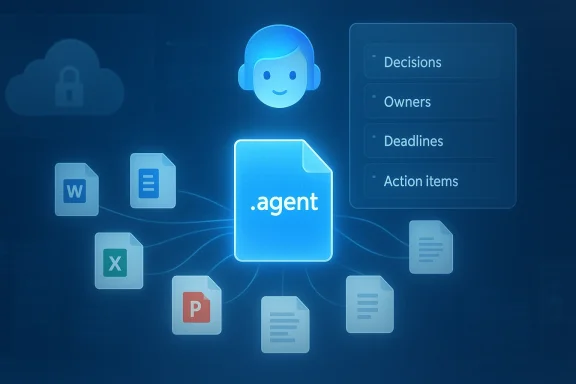
Microsoft’s Copilot strategy has steadily evolved from single-session, file-focused chat helpers into a platform of persistent, identity-aware assistants. Agents in OneDrive are a practical expression of that strategy: instead of asking Copilot isolated questions about a single file, you can now create a lightweight, project‑scoped agent that understands a curated collection of documents and lives in OneDrive as a native file type. Microsoft saves these agents as .agent files; opening one launches a full-screen Copilot experience grounded in the files you selected.
This launch moves OneDrive from a passive storage surface into an active productivity hub: agents act as portable, permission‑aware assistants that can answer composite questions like “What decisions have we made so far?” or “Which action items are overdue?”—all while respecting the same file permissions you already rely on.
Microsoft’s broader moves—Copilot Studio, Agent 365, multi‑model routing, and the introduction of subprocessors such as Anthropic under the DPA—show that the company is building the governance and plumbing needed at enterprise scale. Nevertheless, tenant administrators should not assume out‑of‑the‑box safety: verify model routing, audit logs, and retention behavior in your tenant before authorizing agent use over regulated data.
In short: adopt with discipline. Pilot deliberately, govern early, and require human verification for consequential outputs. If you build that scaffolding, OneDrive agents can reduce busywork, accelerate decisions, and make project knowledge more discoverable—without giving your organization new, unmanaged blind spots.
Conclusion
Microsoft’s OneDrive agents turn a familiar storage surface into an active, shareable Copilot assistant that reasons across up to twenty files, saves as .agent files, and is available to commercial customers with Microsoft 365 Copilot starting February 3, 2026. The feature is powerful and pragmatic, but it requires the same operational discipline that any new platform brings: inventory, policy, logging, and careful model‑choice governance. For organizations willing to invest in that work, agents can deliver meaningful productivity improvements. For organizations that skip it, agents may become the next source of unexpected compliance, cost, and security headaches.
Source: WinBuzzer Microsoft Launches AI Agents in OneDrive for Commercial Users
 Background / Overview
Microsoft’s Copilot strategy has steadily evolved from single-session, file-focused chat helpers into a platform of persistent, identity-aware assistants. Agents in OneDrive are a practical expression of that strategy: instead of asking Copilot isolated questions about a single file, you can now create a lightweight, project‑scoped agent that understands a curated collection of documents and lives in OneDrive as a native file type. Microsoft saves these agents as .agent files; opening one launches a full-screen Copilot experience grounded in the files you selected. This launch moves OneDrive from a passive storage surface into an active productivity hub: agents act as portable, permission‑aware assistants that can answer composite questions like “What decisions have we made so far?” or “Which action items are overdue?”—all while respecting the same file permissions you already rely on.
What OneDrive Agents do — the capability in practical terms
At launch, the feature set is deliberate and focused on common project workflows. Key capabilities include:- Cross‑document analysis — Agents can analyze up to 20 files at a time (including Word, Excel, PowerPoint, PDF and several plain-text formats) and synthesize answers from that set instead of a single document.
- Persistent context — The agent maintains context across the selected files and throughout a session, so follow-up questions retain the conversation’s scope.
- Summaries and extraction — Agents surface decisions, deadlines, owners, action items, and recurring risks drawn from the combined content.
- Shareability — Agents are saved as searchable OneDrive files (the .agent extension) and can be shared like any other file; recipients only receive grounded answers if they also have permissions to the source documents.
- Custom instructions — Creators can add instructions such as tone or output format (“Always answer in bullet points” or “Focus on financial metrics”) and update the file set as projects evolve.
How to create and use an agent (end-user workflow)
Microsoft designed the creation flow to be familiar and low friction:- Sign in to OneDrive on the web (agents are web‑first at launch).
- From the file list, choose + Create → Create an agent, or select multiple files and use the toolbar/right‑click Create an agent option.
- Pick up to 20 files (or a folder containing no more than 20 files) and name the agent. Add optional instructions to constrain behavior.
- Save — the agent is stored as a .agent file in your OneDrive folder and opens into a full‑screen Copilot UI when launched.
Permissions, sharing, and security model
Microsoft built agents to be permission-aware by default:- The agent’s outputs are grounded only in the documents it has access to and the viewer’s file permissions. If a colleague doesn’t have permission to a source file, the agent won’t expose its contents to them.
- Shared .agent files travel like normal OneDrive files: you can give colleagues the .agent file, but meaningful responses require they also have access to the referenced documents.
- Agents are indexed and filterable in OneDrive, so administrators and owners can locate and manage them through familiar tooling.
Licensing and availability — who can create agents today
Important gating factors:- Copilot license required to create an agent. Agent creation is restricted to work or school accounts that have a valid Microsoft 365 Copilot license; consumers and pay‑as‑you‑go billing customers are excluded at launch. Viewing or interacting with a shared agent is possible for anyone with appropriate file permissions, but creating agents requires the Copilot entitlement.
- Web‑only interaction (at launch). While agent files appear in desktop sync clients and can be moved like other files, the interactive Copilot experience remains web‑based initially.
- Global GA for commercial customers. Microsoft marked agents as generally available for OneDrive on the web on February 3, 2026.
How this fits into Microsoft’s broader agent and Copilot strategy
OneDrive agents are one piece in a broader platform strategy that includes:- Copilot Studio and low‑code authoring surfaces for richer agents and custom behaviors.
- Agent governance planes (Agent 365) for discovery, access control, and lifecycle management.
- and vendor integrations**, where Microsoft has been onboarding additional model providers as subprocessors under enterprise agreements.
Privacy, compliance, and operational risks — what administrators should know
The capability delivers clear productivity gains, but it also raises several non‑trivial governance questions:- Where and how is data processed? Microsoft’s public materials emphasize that agents reference files you select and that tenant boundaries and permissions are respected. However, several independent reports and community threads indicate that administrators are still seeking granular public detail about backend processing, telemetry retention, and whether tenant content is used to improve models or routed to third‑party processors under Microsoft’s DPA. Microsoft’s documentation does state that Copilot features operate within enterprise data protections and that some model providers (e.g., Anthropic) have been onboarded as subprocessors under Microsoft’s contractual framework—yet regional and boundary exclusions exist. Administrators should verify tenant settings and model routing behavior.])
- Third‑party model routing (subprocessors). Microsoft ha as a subprocessor for some Copilot experiences, and that shift changes regional guarantees like the EU Data Boundary for features using those models. Custd government clouds have different default settings for Anthropic models. These distinctions matter for regulated data and cross‑border transfer risk.
- Shadow agents and sprawl. Because agent creation is designed to be low‑friction, organiztion of unmanaged .agent files that touch sensitive content. Each .agent is a potential surface for DLP exposure, prompt‑injection attacks, or unexpected Copilot consumption charges. Community guidance stresses treating agents as first‑class IT assets requiring inventory and policy enforcement.
- Auditability and provenance. For compliance or eDiscovery scenarios, IT needs clarity on whether agent queries and model provenance (which model processed a request, what tenant content was included in a request) are recorded and discoverable through tenant logs or SIEM. Microsoft documents governance primitives like Agent 365 and managed agent identities, but customers should confirm logging, retention, and lines of responsibility in their tenant.
- Regulated industries caution. Where legal, health, or financial standards require strict control over data flows, the default Copilot/agent behavior may be insufficient without explicit admin configuration, model‑choice restrictions, and contractual assurances. Several independent commentators flagged that Microsoft did not immediately answer detailed privacy queries from press outlets, which increases the need for admins to validate behavior inside their tenant.
- Inventory current Copilot entitlement and identify who can create agents. Confirm how many Copilot seats exist and who holds them.
- Review and configure Copilot admin settings for AI providers / subprocessors (Anthropic toggle, model routing). Decide default model policies for your tenant and region.
- Add .agent files to your asset inventory and track owners; integrate into change‑management workflows so agent creation and modification is auditable.
- Extend DLP and Purview sensitivity labels to cover agent usage and ensure agents respect sensitivity labels on source files. Test in a pilot group first.
- Implement logging and SIEM integration for agent activity; validate whether model provenance and per‑reqilable for eDiscovery.
- Run adversarial tests (prompt injection) on agents that will read user‑generated content or external documents. Require human‑in‑the‑loop review for high‑impact outputs.
- Establish an agent governance policy: who can create agents, acceptable use cases, storage/retention rules, cost controls, and a process to retire stale agents.
Strengths and limitations — a candid assessment
Strengths- **Fast cross‑document synthesipetitive manual consolidation and can speed on‑boarding, contract review summaries, and release readiness checks.
- Native permission model. Reusing OneDrive/SharePoint permissions is a pragmatic way to limit accidental disclosure.
- Familiar lifecycle. Storing agents as .agent files means they slot into existing workflows (search, share, move, archive).
- Creator gating (Copilot license). Many users will be consumers of agents but unable to create them without Copilot seats; this can centralize creation and create bottlenecks.
- Web‑only interaction (initially). Desktop experiences are limited; interactive sessions happen on the web, which may restrict some workflows.
- Operational blind spots. Low‑friction creation invites sprawl; without governance, agents can become unmanaged knowledge silos with unclear audit trails.
- Unresolved transparency questions. Where Microsoft is explicit, customers should treat documentation as authoritative. Where Microsoft is silent on telemetry, logging, or third‑party processing, treat those areas as requiring tenant‑level verification before broad deployment.
Recommended pilot plan (30–90 days)
- Start small: pick non‑sensitive projects (marketing decks, onboarding packs) to pilot agent creation and consumption.
- Validate outputs: require a human owner for each agent who reviews the agent’s summaries for accuracy before sharing wider.
- Tune instructions: test instruction templates (“Always produce bullet summaries”, “Flag unresolved risks”) to see how they affect quality and hallucination rates.
- Measure cost: track Copilot consumption and any billing impacts from agent queries; apply quotas if your tenant uses consumption billing.
- Integrate governance: add agent creation to change management and inventory processes; tie alerts for unusual agent creation patterns to SOC workflows.
Outlook — strategic implications for enterprises
OneDrive agents concretely advance Microsoft’s ambition to make Copilot the contextual layer for knowledge work. By embedding agents where files live, Microsoft reduces friction for common tasks and accelerates cross‑document reasoning inside the corporate boundary. For organizations that treat agents as a managed platform (inventory, DLP, logging, human verification), the productivity gains should be real and measurable. For those that do not, agents risk becoming another unsupervised automation surface with compliance and cost exposures.Microsoft’s broader moves—Copilot Studio, Agent 365, multi‑model routing, and the introduction of subprocessors such as Anthropic under the DPA—show that the company is building the governance and plumbing needed at enterprise scale. Nevertheless, tenant administrators should not assume out‑of‑the‑box safety: verify model routing, audit logs, and retention behavior in your tenant before authorizing agent use over regulated data.
Final analysis and verdict
Agents in OneDrive are a smart, incremental product decision: they bring agentic AI into the heart of content workflows using familiar file metaphors, simple UX, and the OneDrive permission model. For knowledge workers frustrated with manual document triage, this will feel transformative. For IT and security teams, the feature is both an opportunity and a call to action: agents expand the attack surface and compliance perimeter, but they also establish a repeatable pattern for bringing agentic AI into production if paired with policy and operational controls.In short: adopt with discipline. Pilot deliberately, govern early, and require human verification for consequential outputs. If you build that scaffolding, OneDrive agents can reduce busywork, accelerate decisions, and make project knowledge more discoverable—without giving your organization new, unmanaged blind spots.
Conclusion
Microsoft’s OneDrive agents turn a familiar storage surface into an active, shareable Copilot assistant that reasons across up to twenty files, saves as .agent files, and is available to commercial customers with Microsoft 365 Copilot starting February 3, 2026. The feature is powerful and pragmatic, but it requires the same operational discipline that any new platform brings: inventory, policy, logging, and careful model‑choice governance. For organizations willing to invest in that work, agents can deliver meaningful productivity improvements. For organizations that skip it, agents may become the next source of unexpected compliance, cost, and security headaches.
Source: WinBuzzer Microsoft Launches AI Agents in OneDrive for Commercial Users
