

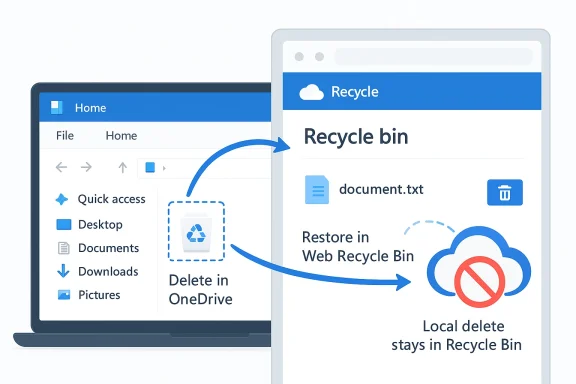
Microsoft’s coming OneDrive change is small on the surface and potentially disruptive in practice: files deleted from the cloud will no longer be handed off to a PC’s local Recycle Bin or a Mac’s Trash when that file also exists locally. Instead, recovery will live in the OneDrive or SharePoint web recycle bin, making the cloud copy the single source of truth for those delete events. That may sound like a housekeeping tweak, but it changes long-standing user expectations about where deleted files “go,” how fast they can be restored, and which recovery habit people have to trust in a panic.
For casual users, the adjustment could be confusing the first time it bites. For IT teams, it is the kind of change that looks like a sync optimization but behaves like a policy shift, especially because Microsoft says admins cannot opt out. In enterprise environments, that combination matters: it affects help desk scripts, user training, documentation, and the very assumption that a locally available file deleted in the cloud still has a local safety net.
Microsoft’s rationale is straightforward enough: fewer cross-channel delete events should improve sync behavior, reduce ambiguity, and make restores more predictable. The company is framing the update as a performance and reliability improvement, not a feature removal. In Microsoft’s logic, a file deleted in the cloud should be restored in the cloud, and a file deleted locally should still behave the way local users expect.
That distinction matters because OneDrive has long blurred the line between local and cloud storage. The sync client lets files appear in File Explorer or Finder as if they are on the machine, even when the real authoritative copy lives in Microsoft’s cloud. When deletion logic crosses both environments, users often assume the local Recycle Bin is an always-available fallback. Microsoft is now saying that assumption no longer holds for cloud-originated deletions.
The new behavior is also another signal that Microsoft is tightening the relationship between the desktop sync layer and the cloud service itself. In practical terms, that means the web-based recovery flow becomes the primary path for cloud deletions. It also means help desks will need to explain why a file that “was on my desktop” might not show up in the Recycle Bin after being deleted from OneDrive online.
For business customers, the timing is notable. Microsoft says the rollout begins in early May for Worldwide, GCC, GCC High, and DoD tenants, with completion by late May. That kind of broad, near-term deployment means organizations have a short runway to update internal guides and user expectations before behavior changes under their feet.
That makes the cloud recycle bin the authoritative recovery location for cloud-originated deletes. Microsoft is effectively collapsing two possible recovery paths into one for this specific case. The result should be less confusion over where the “real” deleted item lives, but it also removes a familiar safety net for users who instinctively check the local trash first.
That is an important distinction from local deletion. Microsoft says the change does not affect local deletes, so if a file is deleted from the local file system in the usual way, it should continue to behave according to normal Windows or macOS conventions. The change is specifically about cloud-deleted files that also exist locally.
Large, heavily synchronized libraries are exactly where these edge cases matter most. The more files you have, the more likely it is that some are online-only, some are locally cached, and some are in a half-synced state during a delete. Eliminating the local Recycle Bin handoff for cloud deletions removes one more decision point from that chain.
That could make the OneDrive experience more consistent over time. If Microsoft can ensure that a cloud delete always behaves the same way regardless of whether the file is also cached locally, then support cases may become easier to reason about. But consistency for support teams is not the same as convenience for users.
That distinction is not academic. In many organizations, users barely differentiate between OneDrive and SharePoint because files appear inside a single synced folder tree on the desktop. Microsoft, by contrast, treats the origin of the delete as a meaningful part of the lifecycle. That means the recovery path depends on the service that owned the content in the first place.
A practical recovery flow will probably look like this:
Microsoft is recommending that admins inform users about the new recovery behavior and update any internal documentation that says cloud-deleted files can be retrieved from the local recycle bin. That recommendation is not optional in spirit, even if it is phrased as guidance. Once the rollout begins, every stale support article becomes a potential source of avoidable confusion.
The administrative implications also extend beyond support scripts. Training materials, onboarding checklists, and internal knowledge bases will all need revision. In larger organizations, even the IT policy around file recovery may need to be rewritten to reflect the fact that cloud deletions no longer generate local trash artifacts.
The change also exposes how invisible cloud sync has become. Many consumers do not think in terms of local versus cloud copies anymore. They simply see a file in File Explorer and expect all recovery behavior to follow desktop rules. Microsoft is breaking that expectation in favor of a cloud-centric design.
Users who work across multiple devices may experience the biggest adjustment. A file deleted on one machine may never have touched another device’s local trash at all, even if it is visible elsewhere via sync. The browser-based recycle bin becomes the only reliable common denominator.
This aligns with a long-running trend in Microsoft 365 where services like SharePoint, OneDrive, Teams, and the Office apps increasingly behave as a connected content platform rather than separate silos. When users delete a file from a synced library, the decisive state change belongs to the service that owns the content. The desktop simply reflects it.
That model has obvious advantages. It simplifies audit trails, support paths, and recovery expectations. It also reduces the chance that users think a file exists in two recoverable places when, under the hood, only one should matter.
But there is a tradeoff. The more Microsoft centralizes state in the cloud, the more the local device becomes a thin client for file life-cycle events. That can be a good thing for enterprise control, yet it can frustrate users who still think of the desktop as the home of their files.
The current change fits neatly into that trajectory. It is not a dramatic reinvention, but it is a meaningful cleanup of a behavior that could easily confuse users and complicate support. Microsoft appears to be accepting that the desktop and cloud no longer need parallel recovery semantics for the same file.
Microsoft is also making the point that recovery should be predictable, not merely familiar. Familiarity can mislead users into believing they have a fallback when the actual restore path lives somewhere else. Predictability, in this case, is the more modern value.
It also opens the door to better support experiences and fewer inconsistent edge cases. If the local Recycle Bin is no longer part of cloud-delete recovery, there is less room for “it works on one PC but not another” troubleshooting. More centralized behavior often means fewer strange surprises.
There is also a training and documentation risk. Enterprises that do not update internal guides quickly may end up reinforcing the wrong recovery steps. That can turn a technical improvement into a help desk nuisance for weeks or months.
The broader question is whether this is the shape of future Microsoft sync changes. The answer is probably yes. As OneDrive and SharePoint continue to mature, Microsoft will likely keep favoring cloud-authoritative behavior over duplicate local semantics. That makes the platform cleaner, but it also means users need to think a little less like desktop file managers and a little more like cloud tenants.
For Windows and macOS users alike, the important takeaway is simple: once Microsoft flips this switch, the browser is where cloud-deleted files will live or die. The local Recycle Bin will still matter for local deletions, but it will no longer be the universal fallback people assume it is. In the modern Microsoft 365 world, that distinction is not just technical — it is operational, educational, and increasingly essential.
Source: Neowin Microsoft to stop sending cloud-deleted OneDrive files to local Recycle Bin
For casual users, the adjustment could be confusing the first time it bites. For IT teams, it is the kind of change that looks like a sync optimization but behaves like a policy shift, especially because Microsoft says admins cannot opt out. In enterprise environments, that combination matters: it affects help desk scripts, user training, documentation, and the very assumption that a locally available file deleted in the cloud still has a local safety net.
 Overview
Microsoft’s rationale is straightforward enough: fewer cross-channel delete events should improve sync behavior, reduce ambiguity, and make restores more predictable. The company is framing the update as a performance and reliability improvement, not a feature removal. In Microsoft’s logic, a file deleted in the cloud should be restored in the cloud, and a file deleted locally should still behave the way local users expect.That distinction matters because OneDrive has long blurred the line between local and cloud storage. The sync client lets files appear in File Explorer or Finder as if they are on the machine, even when the real authoritative copy lives in Microsoft’s cloud. When deletion logic crosses both environments, users often assume the local Recycle Bin is an always-available fallback. Microsoft is now saying that assumption no longer holds for cloud-originated deletions.
The new behavior is also another signal that Microsoft is tightening the relationship between the desktop sync layer and the cloud service itself. In practical terms, that means the web-based recovery flow becomes the primary path for cloud deletions. It also means help desks will need to explain why a file that “was on my desktop” might not show up in the Recycle Bin after being deleted from OneDrive online.
For business customers, the timing is notable. Microsoft says the rollout begins in early May for Worldwide, GCC, GCC High, and DoD tenants, with completion by late May. That kind of broad, near-term deployment means organizations have a short runway to update internal guides and user expectations before behavior changes under their feet.
What Microsoft Is Changing
At the heart of the update is a simple rule: if a file is available locally because it is synced from OneDrive or SharePoint, and it is deleted from the cloud interface, it will no longer appear in the local Recycle Bin on Windows or Trash on macOS. The local copy will simply disappear as part of the sync delete, while the recoverable version remains in the cloud recycle bin.That makes the cloud recycle bin the authoritative recovery location for cloud-originated deletes. Microsoft is effectively collapsing two possible recovery paths into one for this specific case. The result should be less confusion over where the “real” deleted item lives, but it also removes a familiar safety net for users who instinctively check the local trash first.
The practical effect
The user-facing consequence is easy to describe and harder to absorb. If you delete a synced file through OneDrive on the web, you should not expect to rescue it from the desktop trash afterward. Instead, you need to visit the OneDrive or SharePoint recycle bin in the browser and restore it there.That is an important distinction from local deletion. Microsoft says the change does not affect local deletes, so if a file is deleted from the local file system in the usual way, it should continue to behave according to normal Windows or macOS conventions. The change is specifically about cloud-deleted files that also exist locally.
- Cloud-deleted synced files will no longer land in local Recycle Bin or Trash.
- Local deletions are not being changed.
- Recovery shifts to OneDrive or SharePoint web recycle bins.
- The cloud becomes the authoritative restore location for those events.
Why Microsoft Says It Helps Sync
Microsoft’s stated reason is performance. It says the change should improve sync speed for users with large libraries, reduce delete-operation overhead, and make restoration more predictable by relying on a single authoritative copy in the appropriate web recycle bin. In cloud terms, that is a sensible argument: every extra local handoff is another step that can slow the sync loop or create mismatched states.Large, heavily synchronized libraries are exactly where these edge cases matter most. The more files you have, the more likely it is that some are online-only, some are locally cached, and some are in a half-synced state during a delete. Eliminating the local Recycle Bin handoff for cloud deletions removes one more decision point from that chain.
Faster deletes, fewer ambiguities
The performance story is not just about raw speed. It is also about reducing ambiguity in what counts as deleted, what counts as recoverable, and where the system should look next. The fewer places a deletion needs to propagate, the fewer chances there are for the sync engine to leave users in a confusing middle state.That could make the OneDrive experience more consistent over time. If Microsoft can ensure that a cloud delete always behaves the same way regardless of whether the file is also cached locally, then support cases may become easier to reason about. But consistency for support teams is not the same as convenience for users.
- Fewer cross-device delete transitions.
- Less reliance on local shell recycle behavior.
- Reduced chance of conflicting recovery states.
- More predictable support outcomes.
- Better scaling for very large synchronized libraries.
How Recovery Will Work Going Forward
The new workflow is simple in theory: if a file was deleted from the cloud and you need it back, use the OneDrive or SharePoint web recycle bin. In practice, this means users must remember whether the file lived in personal OneDrive, a business OneDrive, or a SharePoint-backed library, because recovery flows can differ depending on where the content was stored.That distinction is not academic. In many organizations, users barely differentiate between OneDrive and SharePoint because files appear inside a single synced folder tree on the desktop. Microsoft, by contrast, treats the origin of the delete as a meaningful part of the lifecycle. That means the recovery path depends on the service that owned the content in the first place.
The new support habit
Help desks will likely need a new triage script. The first question is no longer just “Was it deleted?” but “Where was it deleted from, and was it cloud or local?” That may sound subtle, but it determines whether local recovery is even worth checking.A practical recovery flow will probably look like this:
- Confirm whether the delete happened in the cloud or on the local device.
- Check the relevant web recycle bin in OneDrive or SharePoint.
- Restore the file from the browser if it is still retained.
- If the file was deleted locally, then check Windows Recycle Bin or macOS Trash.
- Escalate to broader restore options only if the normal bins are empty.
Enterprise Impact and Admin Reality
For business and government tenants, Microsoft says the change will roll out automatically and admins cannot opt out. That detail is critical because it means organizations cannot delay the switch while they rewrite their policies or test a fallback workflow. The change arrives on Microsoft’s schedule, not the customer’s.Microsoft is recommending that admins inform users about the new recovery behavior and update any internal documentation that says cloud-deleted files can be retrieved from the local recycle bin. That recommendation is not optional in spirit, even if it is phrased as guidance. Once the rollout begins, every stale support article becomes a potential source of avoidable confusion.
Why admins should care
Enterprise help desks tend to rely on repeatable instructions. If those instructions say “check the local Recycle Bin first,” and Microsoft has changed the behavior underneath them, support calls get longer and more frustrating. A small wording error can become a service-desk tax across hundreds or thousands of users.The administrative implications also extend beyond support scripts. Training materials, onboarding checklists, and internal knowledge bases will all need revision. In larger organizations, even the IT policy around file recovery may need to be rewritten to reflect the fact that cloud deletions no longer generate local trash artifacts.
- Update help desk playbooks.
- Rewrite internal recovery documentation.
- Brief users before rollout reaches the tenant.
- Review SharePoint and OneDrive training content.
- Reassess incident response steps for accidental deletions.
Consumer Impact and Daily Workflow
Consumer users may feel the change most sharply because the local Recycle Bin is such a familiar habit. People are used to deleting a file and then feeling reassured that it can be rescued from the trash. When a synced OneDrive file bypasses that instinctive safety net, the emotional experience is “I lost it,” even if a recovery path still exists.The change also exposes how invisible cloud sync has become. Many consumers do not think in terms of local versus cloud copies anymore. They simply see a file in File Explorer and expect all recovery behavior to follow desktop rules. Microsoft is breaking that expectation in favor of a cloud-centric design.
What everyday users should understand
If the file was deleted from OneDrive on the web, the browser is now the place to look. If it was deleted locally, the local trash remains relevant. That difference sounds simple, but it is easy to forget when files appear in both places at once.Users who work across multiple devices may experience the biggest adjustment. A file deleted on one machine may never have touched another device’s local trash at all, even if it is visible elsewhere via sync. The browser-based recycle bin becomes the only reliable common denominator.
- Synced cloud deletions will be restored online.
- Local deletions still use the device’s trash or Recycle Bin.
- Users should not assume a local fallback exists for every delete.
- Multi-device workflows will feel more cloud-dependent.
- Recovery instructions will need to be more explicit.
SharePoint, OneDrive, and the Bigger Microsoft 365 Model
Microsoft’s mention of both OneDrive and SharePoint matters because it reinforces a broader Microsoft 365 design pattern: files live in services first, devices second. The local sync client is there to mirror content, not to act as an independent file authority. By steering recovery to web recycle bins, Microsoft is underscoring that architecture.This aligns with a long-running trend in Microsoft 365 where services like SharePoint, OneDrive, Teams, and the Office apps increasingly behave as a connected content platform rather than separate silos. When users delete a file from a synced library, the decisive state change belongs to the service that owns the content. The desktop simply reflects it.
Single source of truth, finally
The phrase Microsoft uses — a single authoritative copy — is revealing. It suggests that the company views local deletion artifacts as a source of inconsistency, not a feature. In that sense, the change is not just about deleting a local Recycle Bin entry; it is about enforcing a cleaner data model.That model has obvious advantages. It simplifies audit trails, support paths, and recovery expectations. It also reduces the chance that users think a file exists in two recoverable places when, under the hood, only one should matter.
But there is a tradeoff. The more Microsoft centralizes state in the cloud, the more the local device becomes a thin client for file life-cycle events. That can be a good thing for enterprise control, yet it can frustrate users who still think of the desktop as the home of their files.
Historical Context: Why This Matters Now
This announcement lands at a time when Microsoft has been steadily refining OneDrive into a more opinionated service. Over the years, the company has pushed harder on cloud-first storage, Files On-Demand, and tighter integration between Windows and Microsoft 365. Those moves all reduce the importance of local-only file states and increase the relevance of online recovery and policy.The current change fits neatly into that trajectory. It is not a dramatic reinvention, but it is a meaningful cleanup of a behavior that could easily confuse users and complicate support. Microsoft appears to be accepting that the desktop and cloud no longer need parallel recovery semantics for the same file.
Why this is a turning point
The old model tried to preserve a familiar Windows feeling even when the file actually belonged to the cloud. That kind of compromise can be useful during transition, but it also creates edge cases that become more painful as more customers move to cloud-first storage. Once most files are synced and multi-device, the old dual-path recovery logic starts to look like legacy baggage.Microsoft is also making the point that recovery should be predictable, not merely familiar. Familiarity can mislead users into believing they have a fallback when the actual restore path lives somewhere else. Predictability, in this case, is the more modern value.
- The cloud now governs recovery for cloud-originated deletes.
- Desktop behavior is being simplified to reduce inconsistency.
- Files On-Demand and sync-first workflows make local assumptions weaker.
- Support documentation will need to reflect the new rule.
- The change is part of a broader cloud-first file model.
Strengths and Opportunities
The strongest argument for Microsoft’s change is that it should reduce confusion and make recovery more deterministic. Users and admins gain a clearer rule: cloud deletes are restored in the cloud, while local deletes stay local. That clarity is worth something in an ecosystem where sync behavior often feels magical until it goes wrong.It also opens the door to better support experiences and fewer inconsistent edge cases. If the local Recycle Bin is no longer part of cloud-delete recovery, there is less room for “it works on one PC but not another” troubleshooting. More centralized behavior often means fewer strange surprises.
- Cleaner recovery model for cloud-originated deletions.
- Faster sync operations for large file libraries.
- More predictable restore behavior across devices.
- Less ambiguity between local and cloud states.
- Better supportability for Microsoft 365 admins.
- Improved documentation consistency once organizations update their guides.
- Stronger cloud-first alignment with the rest of Microsoft 365.
Risks and Concerns
The biggest risk is user confusion during the transition. Many people will still check the local Recycle Bin or Trash first, especially if they deleted a file while looking at it in File Explorer or Finder. That will create the impression that the file is gone for good, even when a browser restore remains available.There is also a training and documentation risk. Enterprises that do not update internal guides quickly may end up reinforcing the wrong recovery steps. That can turn a technical improvement into a help desk nuisance for weeks or months.
- Confusing first experience for users who expect local trash recovery.
- Outdated internal documentation causing bad support guidance.
- Reduced sense of safety for users accustomed to local recovery.
- Potential frustration when browser recovery is not obvious.
- Extra admin communication burden during rollout.
- Edge-case support complexity for mixed local/cloud workflows.
- Reliance on web access in situations where users expected offline-style recovery.
Looking Ahead
The next few weeks will tell us whether this becomes a minor footnote or a recurring support headache. If Microsoft’s messaging lands well, most users will adjust, and the new model may quietly disappear into the background. If the guidance is not well communicated, however, the local Recycle Bin will become a false hope that keeps generating help tickets.The broader question is whether this is the shape of future Microsoft sync changes. The answer is probably yes. As OneDrive and SharePoint continue to mature, Microsoft will likely keep favoring cloud-authoritative behavior over duplicate local semantics. That makes the platform cleaner, but it also means users need to think a little less like desktop file managers and a little more like cloud tenants.
What to watch next
- Whether Microsoft publishes clearer user-facing guidance in the admin center.
- How quickly enterprises update training and support material.
- Whether support volumes spike after early May rollout.
- If Microsoft applies similar cloud-first logic to other sync behaviors.
- Whether users report confusion around multi-device delete and restore scenarios.
For Windows and macOS users alike, the important takeaway is simple: once Microsoft flips this switch, the browser is where cloud-deleted files will live or die. The local Recycle Bin will still matter for local deletions, but it will no longer be the universal fallback people assume it is. In the modern Microsoft 365 world, that distinction is not just technical — it is operational, educational, and increasingly essential.
Source: Neowin Microsoft to stop sending cloud-deleted OneDrive files to local Recycle Bin
