

OneDrive folder exclusions are in development for Windows and Mac, with general availability planned for August 2026. There is no published setup path, policy name, or configuration syntax yet, so users and administrators cannot currently rely on a documented way to enable the feature.
Microsoft lists the capability under Microsoft 365 Roadmap ID 567470 for the Worldwide Standard Multi-Tenant cloud. The roadmap names Windows desktop and Mac, includes Targeted Release and General Availability release rings, gives PowerShell modules, Visual Studio configuration, and node modules as examples, and says administrators will be able to define exclusion rules for their organizations.
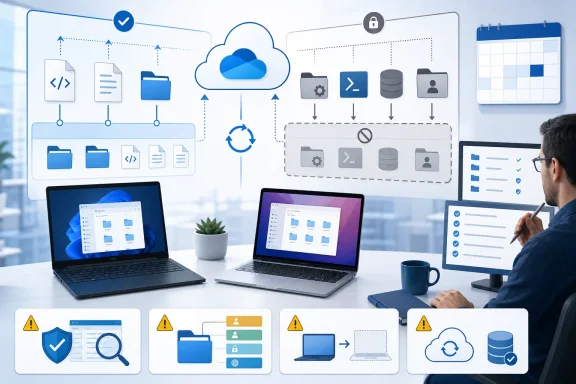
The planned feature addresses a straightforward requirement: a folder may sit inside a broader OneDrive-synchronized location without necessarily belonging in the cloud.
That distinction can matter in development environments. A workspace may contain authored source files and documentation alongside generated dependencies, downloaded components, machine-specific settings, caches, or other tool-created state. Some of those folders may be easy to reconstruct and unnecessary to copy between devices.
Microsoft’s examples point directly at this use case. PowerShell modules, Visual Studio configuration, and node modules can all involve content associated with a particular toolchain or device. The examples do not establish that every folder carrying one of those names is disposable, nor do they define exact paths that Microsoft intends customers to use. They illustrate the kinds of folders the planned capability may address.
At folder level, the concept is more understandable than trying to reason about every file within a large generated directory. An administrator or user could identify a boundary that should remain local while allowing surrounding material to continue participating in OneDrive synchronization.
That is the confirmed product direction. The roadmap does not yet describe how someone will select a folder, how an administrator will express a rule, or what happens when the folder already has a cloud copy.
The roadmap entry does not provide an administrative configuration method or an end-user click path. It does not identify a settings page, management-console location, policy object, administrative template, preference key, configuration service provider, command-line option, or rule format.
Readers therefore should not infer that folder exclusions can be configured now. They also should not substitute an existing OneDrive control and assume it represents the planned folder-exclusion feature.
A dependency folder may be rebuilt from project definitions. A tool may reinstall modules from an approved source. An application may regenerate a cache or local configuration directory. When that recovery path is tested and dependable, synchronizing the expanded local state may provide little value.
The critical qualification is when the recovery path is dependable. Folder names alone do not prove recoverability.
A directory called
The proposed feature should therefore be evaluated as a data-classification control, not merely a performance tweak. The right question is not only, “Would excluding this reduce synchronization activity?” It is also, “Who can restore this folder, from what source, within what time, after this device disappears?”
Excluding a reproducible directory may simplify a workspace. Excluding the only copy of a script, configuration, certificate-related file, private package, local database, or customer deliverable could create a serious recovery failure.
Keeping unnecessary local state out of a cloud synchronization path may be desirable, but “local-only” is not the same as “protected.” The endpoint, a separate backup process, a package source, source control, device management, or another documented system must carry recovery responsibility.
Folder exclusions also should not be treated as a substitute for source control, software distribution, endpoint protection, data-loss prevention, retention governance, or a proper backup strategy. The roadmap describes a synchronization boundary, not a complete data-management system.
Beyond that high-level statement, the implementation remains unknown.
Microsoft has not published whether rules will be based on full paths, relative paths, folder names, patterns, variables, managed application locations, or another model. It has not documented case handling, nested folders, renamed folders, links, alternate path separators, or platform-specific expressions.
The roadmap also does not establish:
Administrators should resist designing permanent naming conventions, scripts, support procedures, or compliance assertions around guessed syntax. A roadmap statement that organizational rules will exist does not reveal how those rules will be delivered or evaluated.
The most important unresolved case involves a folder that already has content in OneDrive. If an organization later applies an exclusion to the corresponding local folder, the roadmap does not say what happens to the existing cloud copy.
Possible outcomes can be imagined, but none should be presented as Microsoft’s chosen behavior. The cloud copy might remain, the client might prompt the user, the local and cloud locations might become disconnected, or Microsoft might define another transition process. Until documentation appears, administrators must treat all of those as open possibilities.
The reverse transition is equally important. If an exclusion is removed, Microsoft has not said whether local content will begin uploading automatically, whether an older cloud copy will be compared with it, or whether the user will have to resolve the state. The roadmap also does not describe what happens if a rule is removed and then re-enabled.
Device replacement creates another open question. A folder intentionally kept off OneDrive should not be assumed to arrive on a replacement device, but the roadmap does not yet provide recovery guidance or messaging for that scenario. Organizations must decide whether the folder is meant to be rebuilt, restored from another system, or manually recreated.
This is why pre-release preparation should focus on ownership. Every candidate folder needs an answer to four questions:
Those comparisons are omitted here because the supplied roadmap facts do not document them. Existing OneDrive capabilities may have their own Microsoft documentation, platform differences, licensing requirements, and behavioral qualifications, but they should not be used to fill gaps in Roadmap ID 567470.
In particular, the roadmap facts do not establish that the planned feature will reuse any existing interface or policy mechanism. Similar terminology does not prove shared syntax, precedence, reporting, visual indicators, or transition behavior.
The roadmap also does not confirm personal-account availability. Its reference to organizational administrators and the Worldwide Standard Multi-Tenant cloud supports an enterprise-focused reading, but it is not enough to state how or whether the capability will appear for every type of OneDrive account.
Keeping those boundaries clear prevents a planned feature from being mistaken for an immediately available configuration.
That wording matters. A planned date can change, and a general-availability target does not by itself define the exact day on which every eligible tenant and endpoint will receive a feature. The supplied facts also do not document a rollout sequence within Targeted Release or General Availability.
Organizations can use the planned window to schedule preparation, but they should avoid committing production changes to a date that Microsoft has not presented as a guaranteed completion point.
A sensible planning sequence is:
The following is a proposed WindowsForum test checklist, not Microsoft-documented behavior:
This matrix is a proposed test plan. It does not describe behavior Microsoft has promised.
The pre-existing-cloud-copy scenario should be mandatory. A clean test involving a brand-new folder may not expose the ambiguity that matters most to long-running OneDrive environments.
The device-replacement scenario should also be treated as a release gate. If a folder is classified as reproducible but the responsible team cannot actually reproduce it on replacement hardware, the classification is wrong or the recovery process is incomplete.
Re-enabling a rule deserves a separate test rather than being folded into simple policy removal. Administrators need to understand whether repeated changes produce a state that users and support staff can interpret. The expected result must come from Microsoft’s eventual documentation and pilot observations, not speculation.
Finally, recovery ownership must be attached to a team or role, not left with “the user.” Organizational exclusions create organizational responsibility. If IT makes a folder local-only through policy, IT and the relevant application owner need a documented answer when that device is lost.
For developers, it could provide a cleaner boundary between durable work and reproducible machine state. For administrators, it could offer a consistent way to keep selected folders local across managed Windows and Mac environments. For support teams, it will introduce a new condition that must be visible, explainable, and recoverable.
The confirmed facts remain limited: the feature is in development, it targets Windows and Mac, it is listed for Targeted Release and General Availability in the Worldwide Standard Multi-Tenant cloud, administrators will be able to define rules, and general availability is planned for August 2026. Microsoft has not yet published the setup path, policy name, syntax, transition behavior, reporting model, or recovery guidance.
That makes the correct next step preparation rather than configuration. Inventory candidate folders, distinguish reproducible state from irreplaceable data, assign recovery ownership, and build a pilot around pre-existing cloud copies and device replacement.
If Microsoft supplies clear lifecycle documentation and manageable organizational controls, folder exclusions could resolve a real tension inside OneDrive-backed workspaces. Until then, the safest policy is equally clear: do not make valuable data local-only based on a roadmap promise or an assumed implementation.
Microsoft lists the capability under Microsoft 365 Roadmap ID 567470 for the Worldwide Standard Multi-Tenant cloud. The roadmap names Windows desktop and Mac, includes Targeted Release and General Availability release rings, gives PowerShell modules, Visual Studio configuration, and node modules as examples, and says administrators will be able to define exclusion rules for their organizations.
What to do now
- Inventory folders located beneath OneDrive-backed Desktop and Documents locations, especially folders created or maintained by developer tools.
- Classify each candidate folder as either recoverable/reproducible or business-critical/irreplaceable.
- Document how every proposed local-only folder would be rebuilt or recovered after device loss, reimaging, storage failure, or replacement.
- Do not exclude irreplaceable data until Microsoft publishes the feature’s behavior, transition rules, configuration method, and recovery documentation.
- Treat August 2026 as a planned general-availability target, not a guaranteed shipping date.
 OneDrive Is Preparing to Recognize Local-Only Folders
The planned feature addresses a straightforward requirement: a folder may sit inside a broader OneDrive-synchronized location without necessarily belonging in the cloud.That distinction can matter in development environments. A workspace may contain authored source files and documentation alongside generated dependencies, downloaded components, machine-specific settings, caches, or other tool-created state. Some of those folders may be easy to reconstruct and unnecessary to copy between devices.
Microsoft’s examples point directly at this use case. PowerShell modules, Visual Studio configuration, and node modules can all involve content associated with a particular toolchain or device. The examples do not establish that every folder carrying one of those names is disposable, nor do they define exact paths that Microsoft intends customers to use. They illustrate the kinds of folders the planned capability may address.
At folder level, the concept is more understandable than trying to reason about every file within a large generated directory. An administrator or user could identify a boundary that should remain local while allowing surrounding material to continue participating in OneDrive synchronization.
That is the confirmed product direction. The roadmap does not yet describe how someone will select a folder, how an administrator will express a rule, or what happens when the folder already has a cloud copy.
The Confirmed Facts Are Narrow but Significant
Microsoft has published a limited set of roadmap details. Those details are enough to begin discovery and risk classification, but not enough to build deployment scripts or tell users where to click.| Roadmap field | Confirmed information |
|---|---|
| Platforms | Windows desktop and Mac |
| Status | In development |
| Release rings | Targeted Release and General Availability |
| Cloud instance | Worldwide Standard Multi-Tenant |
| Planned general availability | August 2026 |
| Examples named by Microsoft | PowerShell modules, Visual Studio configuration, and node modules |
| Administrator capability | Administrators will be able to define folder exclusion rules for their organizations |
| Published setup method | None provided in the roadmap entry |
| Published policy name or syntax | None provided in the roadmap entry |
Readers therefore should not infer that folder exclusions can be configured now. They also should not substitute an existing OneDrive control and assume it represents the planned folder-exclusion feature.
Developer Folders Explain the Intended Value
The shortest explanation for the developer angle is that some directories are outputs of an environment rather than durable user-authored records.A dependency folder may be rebuilt from project definitions. A tool may reinstall modules from an approved source. An application may regenerate a cache or local configuration directory. When that recovery path is tested and dependable, synchronizing the expanded local state may provide little value.
The critical qualification is when the recovery path is dependable. Folder names alone do not prove recoverability.
A directory called
node_modules is commonly associated with downloaded dependencies, but an organization still needs to verify that the project retains the manifests, lock information, package access, build instructions, and any private dependencies required to reproduce it. A PowerShell modules directory might contain packages that can be reinstalled, or it might contain locally written modules that exist nowhere else. Visual Studio-related folders may contain disposable state, valuable customization, or a mixture of both.The proposed feature should therefore be evaluated as a data-classification control, not merely a performance tweak. The right question is not only, “Would excluding this reduce synchronization activity?” It is also, “Who can restore this folder, from what source, within what time, after this device disappears?”
Excluding a reproducible directory may simplify a workspace. Excluding the only copy of a script, configuration, certificate-related file, private package, local database, or customer deliverable could create a serious recovery failure.
One Concise Rule for Local State
The operational principle is simple:That principle covers the recurring concerns around generated dependencies, machine-specific state, data security, lifecycle management, and policy risk without assuming undocumented product behavior.Exclude a folder only when its contents are intentionally local and the organization has a tested recovery or reconstruction method that does not depend on OneDrive.
Keeping unnecessary local state out of a cloud synchronization path may be desirable, but “local-only” is not the same as “protected.” The endpoint, a separate backup process, a package source, source control, device management, or another documented system must carry recovery responsibility.
Folder exclusions also should not be treated as a substitute for source control, software distribution, endpoint protection, data-loss prevention, retention governance, or a proper backup strategy. The roadmap describes a synchronization boundary, not a complete data-management system.
The Administrative Capability Is Confirmed; Its Design Is Not
Microsoft says administrators will be able to define exclusion rules for their organizations. That is potentially the most important part of the roadmap item because it suggests organizations will not have to depend entirely on each user making the same decision manually.Beyond that high-level statement, the implementation remains unknown.
Microsoft has not published whether rules will be based on full paths, relative paths, folder names, patterns, variables, managed application locations, or another model. It has not documented case handling, nested folders, renamed folders, links, alternate path separators, or platform-specific expressions.
The roadmap also does not establish:
- How rules will be assigned to users, groups, devices, or platforms.
- Whether user-defined exclusions and administrator-defined exclusions will coexist.
- How conflicting rules will be resolved.
- Whether administrators can prevent users from creating exclusions.
- How an endpoint will confirm that it has received and applied a rule.
- What auditing, inventory, or compliance reporting will be available.
- How users or support staff will identify an excluded folder.
- Whether an administrator can apply equivalent rules across Windows and Mac with one expression.
- What happens when a folder is renamed or moved.
- What happens when an exclusion rule is disabled and later re-enabled.
Administrators should resist designing permanent naming conventions, scripts, support procedures, or compliance assertions around guessed syntax. A roadmap statement that organizational rules will exist does not reveal how those rules will be delivered or evaluated.
A Local-Only Folder Needs a Defined Lifecycle
The steady-state concept is clear: an excluded folder remains on the device rather than being uploaded through OneDrive. The transitions into and out of that state are not documented in the supplied roadmap facts.The most important unresolved case involves a folder that already has content in OneDrive. If an organization later applies an exclusion to the corresponding local folder, the roadmap does not say what happens to the existing cloud copy.
Possible outcomes can be imagined, but none should be presented as Microsoft’s chosen behavior. The cloud copy might remain, the client might prompt the user, the local and cloud locations might become disconnected, or Microsoft might define another transition process. Until documentation appears, administrators must treat all of those as open possibilities.
The reverse transition is equally important. If an exclusion is removed, Microsoft has not said whether local content will begin uploading automatically, whether an older cloud copy will be compared with it, or whether the user will have to resolve the state. The roadmap also does not describe what happens if a rule is removed and then re-enabled.
Device replacement creates another open question. A folder intentionally kept off OneDrive should not be assumed to arrive on a replacement device, but the roadmap does not yet provide recovery guidance or messaging for that scenario. Organizations must decide whether the folder is meant to be rebuilt, restored from another system, or manually recreated.
This is why pre-release preparation should focus on ownership. Every candidate folder needs an answer to four questions:
- What creates the folder?
- Is every important item inside it reproducible?
- What approved source can restore it?
- Which team owns recovery when the endpoint is unavailable?
Current OneDrive Comparisons Are Outside the Confirmed Roadmap Facts
It may be tempting to compare the planned feature with current folder-selection experiences, file-oriented exclusion controls, known-folder protection, shell status indicators, administrative policy surfaces, or cloud recovery behavior.Those comparisons are omitted here because the supplied roadmap facts do not document them. Existing OneDrive capabilities may have their own Microsoft documentation, platform differences, licensing requirements, and behavioral qualifications, but they should not be used to fill gaps in Roadmap ID 567470.
In particular, the roadmap facts do not establish that the planned feature will reuse any existing interface or policy mechanism. Similar terminology does not prove shared syntax, precedence, reporting, visual indicators, or transition behavior.
The roadmap also does not confirm personal-account availability. Its reference to organizational administrators and the Worldwide Standard Multi-Tenant cloud supports an enterprise-focused reading, but it is not enough to state how or whether the capability will appear for every type of OneDrive account.
Keeping those boundaries clear prevents a planned feature from being mistaken for an immediately available configuration.
August 2026 Is a Plan, Not a Settled Outcome
Roadmap ID 567470 remains marked In development, with general availability planned for August 2026.That wording matters. A planned date can change, and a general-availability target does not by itself define the exact day on which every eligible tenant and endpoint will receive a feature. The supplied facts also do not document a rollout sequence within Targeted Release or General Availability.
Organizations can use the planned window to schedule preparation, but they should avoid committing production changes to a date that Microsoft has not presented as a guaranteed completion point.
A sensible planning sequence is:
- Complete folder inventory and classification before the planned release window.
- Identify a small pilot population with recoverable developer data.
- Wait for Microsoft to publish setup, behavior, and recovery documentation.
- Review the documented management method and platform requirements.
- Validate transition behavior in a non-production test environment.
- Expand only after recovery tests succeed.
What Microsoft Still Needs to Document
Before organizations can safely deploy folder exclusions, Microsoft’s product documentation should answer several practical questions.Configuration and scope
- Where does an end user configure an exclusion?
- Where does an administrator define an organizational rule?
- What policy name, management surface, and syntax are used?
- Can rules target users, groups, devices, platforms, or account types?
- Can administrators allow, restrict, or override user choices?
Matching behavior
- Are rules based on complete paths, relative paths, names, or patterns?
- How are Windows and Mac paths represented?
- How are nested folders, renamed folders, links, and case differences handled?
- What happens when multiple rules overlap?
Existing data and transitions
- What happens if the folder has already synchronized?
- What happens to an existing online copy?
- What happens on other devices that previously received the folder?
- What occurs when a rule is removed?
- What occurs when the same rule is re-enabled?
- How are conflicts or stale cloud copies presented?
Visibility and support
- How can a user tell that a folder is intentionally local-only?
- How can a help-desk technician verify the active rule?
- Will administrators receive deployment or compliance reporting?
- Will the client record useful diagnostic events?
- What support information will be available on both Windows and Mac?
Recovery and device lifecycle
- What warning appears before irreplaceable content is excluded?
- What happens during device replacement or OneDrive reconfiguration?
- How should organizations recover local-only content?
- What happens during employee departure, device wipe, or account removal?
IT Should Test for Data Loss, Not Just Reduced Sync Activity
A basic pilot could confirm that a test folder remains local, but that would be only the beginning. The operational risk lies in transitions, existing copies, replacement devices, and unclear recovery ownership.The following is a proposed WindowsForum test checklist, not Microsoft-documented behavior:
- Begin with test data that can be destroyed without business impact.
- Record the folder’s local and online state before applying any rule.
- Include a scenario in which a same-named folder or older copy already exists online.
- Confirm which files remain available on each test device after the exclusion is applied.
- Replace or reimage a test device and document exactly what returns automatically.
- Remove the exclusion and observe the result without assuming that local content will upload in a particular way.
- Re-enable the same exclusion and verify whether the resulting state is understandable.
- Rename the folder and move test content across the proposed boundary.
- Test Windows and Mac independently rather than assuming identical behavior.
- Record who owns reconstruction or recovery for every excluded folder.
- Require a successful recovery exercise before approving a broader deployment.
- Stop the pilot if any participant cannot distinguish cloud-protected data from local-only data.
A WindowsForum Pilot Matrix for Developer Devices
WindowsForum administrators and technical readers can prepare a concrete matrix now, then fill in the observed results only after Microsoft releases documentation and a testable implementation.This matrix is a proposed test plan. It does not describe behavior Microsoft has promised.
| Pilot scenario | Test setup | Question to answer | Required evidence | Recovery owner |
|---|---|---|---|---|
| Developer folder with no pre-existing cloud copy | Create a reproducible tool-generated folder beneath OneDrive-backed Documents on a test device | Does the documented exclusion prevent that folder from entering OneDrive while surrounding test files behave as documented? | Local inventory, online inventory, client diagnostics, and screenshots where available | Developer tooling team |
| Developer folder with a pre-existing cloud copy | Place harmless test content locally and online before applying the documented rule | How does the released feature handle content that already exists in both locations? | Before-and-after file lists from the endpoint, online view, and a second test device | OneDrive service owner |
| Device replacement | Apply the documented exclusion, then replace or reimage the pilot device | Which content returns, which content must be rebuilt, and what instructions does the user receive? | Replacement-device inventory and a timed reconstruction record | Endpoint engineering |
| Rule removed | Disable the documented exclusion in a controlled test | What happens to the local folder and any older cloud copy? | Local and online inventories captured before and after the change | OneDrive service owner |
| Rule re-enabled | Reapply the same documented exclusion after testing removal | Is the resulting state predictable, supportable, and visible to the user? | Configuration record, endpoint result, and help-desk verification steps | Endpoint engineering |
| OneDrive-backed Documents | Use a developer device whose Documents location is backed by OneDrive | Can support staff clearly distinguish protected documents from excluded developer state? | User-facing observations and support runbook validation | Service desk |
| Recovery ownership | Simulate loss of the only pilot endpoint containing the excluded folder | Can the assigned team rebuild or recover the folder without using an assumed OneDrive copy? | Completed recovery exercise with source, duration, and responsible team recorded | Named application or data owner |
The device-replacement scenario should also be treated as a release gate. If a folder is classified as reproducible but the responsible team cannot actually reproduce it on replacement hardware, the classification is wrong or the recovery process is incomplete.
Re-enabling a rule deserves a separate test rather than being folded into simple policy removal. Administrators need to understand whether repeated changes produce a state that users and support staff can interpret. The expected result must come from Microsoft’s eventual documentation and pilot observations, not speculation.
Finally, recovery ownership must be attached to a team or role, not left with “the user.” Organizational exclusions create organizational responsibility. If IT makes a folder local-only through policy, IT and the relevant application owner need a documented answer when that device is lost.
Administrator Readiness Checklist
Administrators do not need a policy name to begin the safe parts of preparation.Discovery
- Inventory developer and application-created folders beneath OneDrive-backed Desktop and Documents.
- Identify folders with high file counts, frequent regeneration, or machine-specific content.
- Interview developers and application owners instead of classifying directories by name alone.
- Record whether each candidate exists on one device, multiple devices, or already in the cloud.
Classification
- Mark each folder as reproducible, recoverable from another managed system, business-critical, or unknown.
- Reject exclusions for folders classified as unknown.
- Identify mixed-content directories that contain both generated and authored files.
- Separate convenience arguments from genuine data-lifecycle requirements.
Recovery preparation
- Document the source used to reconstruct each proposed exclusion.
- Validate access to private repositories, package sources, installation media, scripts, and configuration records.
- Assign a recovery owner and escalation route.
- Measure whether restoration can meet the organization’s operational needs.
Pilot controls
- Use disposable test accounts, devices, and data.
- Include both clean folders and folders with pre-existing cloud copies.
- Test device replacement, rule removal, and rule re-enablement.
- Capture evidence from Windows and Mac separately.
- Do not expand the pilot until Microsoft’s documentation resolves critical ambiguities.
User communication
- Explain that a local-only folder may not be available from another device.
- Avoid language suggesting that an excluded folder is backed up by its parent location.
- Tell users where recovery responsibility sits.
- Update onboarding, device-replacement, and offboarding procedures before production rollout.
The Feature Could Be Small in Interface and Large in Consequence
Folder exclusion may eventually appear as a simple choice or administrative rule, but its significance comes from defining where organizational data does not go.For developers, it could provide a cleaner boundary between durable work and reproducible machine state. For administrators, it could offer a consistent way to keep selected folders local across managed Windows and Mac environments. For support teams, it will introduce a new condition that must be visible, explainable, and recoverable.
The confirmed facts remain limited: the feature is in development, it targets Windows and Mac, it is listed for Targeted Release and General Availability in the Worldwide Standard Multi-Tenant cloud, administrators will be able to define rules, and general availability is planned for August 2026. Microsoft has not yet published the setup path, policy name, syntax, transition behavior, reporting model, or recovery guidance.
That makes the correct next step preparation rather than configuration. Inventory candidate folders, distinguish reproducible state from irreplaceable data, assign recovery ownership, and build a pilot around pre-existing cloud copies and device replacement.
If Microsoft supplies clear lifecycle documentation and manageable organizational controls, folder exclusions could resolve a real tension inside OneDrive-backed workspaces. Until then, the safest policy is equally clear: do not make valuable data local-only based on a roadmap promise or an assumed implementation.
References
- Primary source: Microsoft 365 Roadmap
Published: 2026-07-09T23:00:39.7653153Z
Loading…
www.microsoft.com - Official source: support.microsoft.com
Loading…
support.microsoft.com - Official source: learn.microsoft.com
Loading…
learn.microsoft.com - Related coverage: publicnotes.io
Loading…
publicnotes.io - Official source: github.com
Loading…
github.com - Official source: adoption.microsoft.com
Loading…
adoption.microsoft.com