

Microsoft plans to bring multimodal Capture for Copilot Notebooks to OneNote on Windows in July 2026, giving Microsoft 365 Copilot users a desktop workflow for recording audio, images, and typed notes into a selected Copilot Notebook. The feature, listed as Microsoft 365 Roadmap ID 566322, is still marked “in development” as of its June 29 update. Its arrival matters because Microsoft is no longer treating OneNote as merely a digital binder; it is turning the app into an ingestion point for workplace memory. The wager is that meetings, hallway ideas, whiteboards, screenshots, and rough notes become more valuable when Copilot can structure them immediately.
OneNote has always been a strange survivor in Microsoft’s productivity stack. It is beloved by students, consultants, teachers, engineers, and anyone who thinks in tabs, pages, clippings, ink, and half-finished thoughts. It is also a product Microsoft has repeatedly struggled to explain in the modern Office story, especially after Teams became the daily workspace and Loop became the company’s new canvas for collaborative components.
Copilot Notebooks changes that framing. Instead of asking OneNote to compete with Teams chat, Outlook mail, Word documents, or Loop pages, Microsoft is positioning it as a curated workspace where AI can reason over a bounded collection of material. That boundary is important. In an enterprise world already anxious about AI reaching too far across mailboxes, file shares, and meeting archives, a notebook is a more understandable permission container than “everything you have access to.”
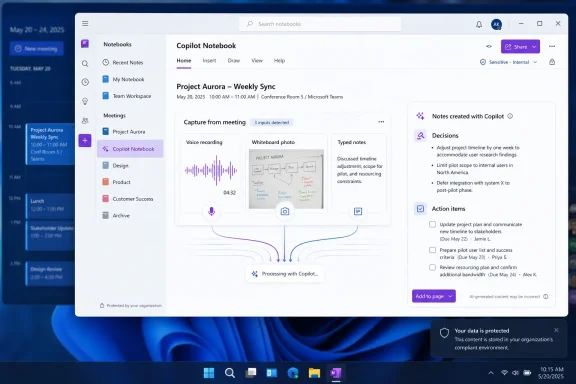
The new Capture experience on Windows pushes that strategy further. It makes OneNote less about after-the-fact organization and more about the first mile of knowledge work: catching the raw material before it disappears. A meeting recording, a photo of a whiteboard, and a few typed fragments are not separate artifacts anymore. They are inputs into a Copilot Notebook that can produce structured notes, key insights, decisions, and action items.
That sounds mundane until you consider how much enterprise work leaks through the cracks between tools. Teams may own the scheduled meeting. Outlook may own the invite. SharePoint may own the files. OneNote has historically owned the messy residue of thinking. Microsoft now wants Copilot to turn that residue into something queryable, reusable, and automatable.
The harder problem is everything else. People brainstorm in rooms where a Teams transcript was never started. They sketch diagrams on whiteboards. They talk through decisions after the meeting formally ends. They take photos of sticky notes, annotate screenshots, and record quick voice memos because typing would break the flow. Those fragments often become the actual source of truth, even when the official meeting recap says otherwise.
Desktop Capture gives Microsoft a bridge into that messier territory. The Windows machine remains the primary work surface for many knowledge workers, especially in regulated, technical, and administrative environments. If the Capture flow is fast enough, it could become the place where a user bundles the unstructured evidence of work before Copilot shapes it into something more durable.
That is the practical difference between “AI summarization” and “AI capture.” Summarization is downstream. It assumes the content already exists in a usable form. Capture is upstream. It asks users to feed the system while the work is still alive, before context evaporates.
Copilot Notebooks are Microsoft’s compromise. They create a container where users can collect references, notes, pages, and now captured multimodal material, then ask Copilot to reason over that bounded set. In theory, that gives the AI enough material to be useful without inviting it to rummage through every file the user can technically access.
The Windows Capture feature strengthens that model because it makes the notebook not just a destination but a living workspace. Instead of adding polished documents only after the fact, users can add raw audio, visual context, and notes while the work unfolds. Copilot can then transform that material into structured notes, decisions, and tasks, which are the artifacts managers and teams actually need.
There is a subtle but important shift here. Microsoft is not merely adding AI to OneNote. It is turning OneNote into a kind of context engine for Microsoft 365 Copilot. That is a much bigger product ambition, and it explains why the feature spans OneNote and Microsoft Copilot rather than sitting neatly inside the old note-taking category.
A whiteboard diagram can contain more meaning than 20 minutes of discussion about it. A photo of a prototype, a handwritten equation, a room layout, or a customer’s annotated printout may be the thing everyone needs later. Audio captures tone, hesitation, disagreement, and sequence in a way that typed notes often flatten. Typed notes capture the human judgment of what mattered in the moment.
The value of multimodal Capture is that it lets those signals coexist. If Microsoft executes well, the user will not have to decide whether a conversation belongs in a transcript, a camera roll, or a notebook page. The Capture session becomes a bundle, and Copilot’s job is to convert the bundle into an intelligible record.
That also makes the feature more ambitious than a simple recorder. Microsoft is promising a workflow that turns captured material into structured notes with insights, decisions, and action items in a chosen Copilot Notebook. The quality of that transformation will determine whether users see this as a serious productivity tool or just another AI button attached to an old app.
Still, Microsoft 365 roadmap dates should be read as intent, not a delivery guarantee. Features can slip, roll out gradually, land in some tenants before others, or arrive behind licensing and policy gates that make “general availability” feel less general than the phrase implies. Admins know this rhythm well: the feature appears in a roadmap, then in Message Center, then in targeted release, then in documentation, then in the tenant — often not in the order users expect.
There is also a preview wrinkle. Microsoft’s support material indicates that Capture on Windows for offline and third-party meetings has been available to Office Insiders Beta customers. That matters because the July roadmap entry is not the first sign of the capability; it is the planned mainstreaming of a workflow Microsoft has already been testing with insiders.
For IT departments, the timing creates a familiar planning problem. July 2026 is close enough that help desks may soon get questions from users who see new Capture options in OneNote. It is also soon enough that tenant administrators should be checking Copilot licensing, OneNote deployment channels, data governance policies, and recording guidance before the feature lights up broadly.
This is especially sensitive because Capture is not limited to formal Teams meetings. Offline conversations and third-party meeting scenarios are precisely where policy can get murky. A Teams meeting has familiar recording prompts, tenant controls, and compliance expectations. A quick Capture session on a Windows laptop in a conference room may feel less governed, even if the backend storage and compliance model is still Microsoft 365.
Organizations will need to decide what counts as acceptable use. Can employees capture audio in internal meetings without explicit consent? What about customer calls on third-party platforms? Are whiteboard photos allowed if they contain confidential diagrams? Who can access the resulting Copilot Notebook, and what happens when captured content is summarized into a page that later gets shared?
The AI layer adds another complication. Users may understand that a recording exists, but not that Copilot can extract action items, infer decisions, and generate derivative artifacts from it. Those outputs may be more portable than the original capture. A summary can be copied into email, a task list can be redistributed, and a decision log can become a record even if the underlying audio is later forgotten.
Microsoft’s opportunity is to make the workflow feel explicit rather than sneaky. A capture tool can be trusted if it clearly shows what is being recorded, where it will be saved, who can access it, and how Copilot will use it. If it feels like another ambient AI layer quietly absorbing work, it will inherit the skepticism surrounding every recent attempt to make Windows and Microsoft 365 more continuously aware.
That does not mean the feature will succeed. The experience must be fast, reliable, and unobtrusive. If users have to navigate too many menus, wait for sluggish processing, or clean up weak summaries, they will revert to their existing habits. People tolerate friction in systems of record; they do not tolerate friction in capture tools, because capture happens under time pressure.
The best version of this feature would feel almost boring. Start Capture, gather audio, images, and notes, choose the Copilot Notebook, and receive a coherent page that preserves source material while surfacing the useful structure. The worst version would be another Copilot panel that produces plausible meeting prose while losing the visual and conversational details that made the session worth capturing.
The distinction matters because Windows users have become sensitive to AI features that arrive before they are needed. A capture workflow tied to OneNote has a stronger claim than a generic chatbot shortcut. It is attached to a real behavior users already perform: taking notes when work is messy.
The first practical question is licensing. The roadmap names OneNote and Microsoft Copilot for Microsoft 365, which means the experience will not be a universal OneNote feature for every Windows user. Organizations with mixed licensing will need to understand who can use Capture, who can open Copilot Notebooks, and whether users without Copilot licenses can still access generated pages or referenced content.
The second question is storage and boundaries. Copilot Notebooks may feel like personal workspaces, but they exist inside the Microsoft 365 compliance universe. Admins will want clarity on where captured audio and images are stored, how long they persist, whether generated summaries inherit sensitivity labels, and how sharing permissions apply when notebooks include captured media.
The third question is policy. Many organizations already have meeting recording policies, but fewer have clear rules for AI-assisted capture of informal work. Windows Capture may force that conversation. If a user can record a hallway discussion, photograph a whiteboard, and have Copilot extract decisions into a notebook, then the organization needs norms before the first dispute arises.
There is also a support burden hiding in the feature. Users will ask why Capture is available on one machine but not another, why it appears for one account but not a colleague’s, why a notebook is missing, why Copilot cannot process a file, or why a generated summary omitted something important. Help desks should expect the usual Copilot-era blend of licensing, identity, sync, permissions, and expectation management.
The competitive question is not whether OneNote has the cleanest interface. It is whether Microsoft can make its capture-to-Copilot loop more convenient than the collection of point solutions employees already use. Many workers already have a patchwork: a phone voice memo app, a screenshot tool, a Teams transcript, a whiteboard photo, a personal notes app, and a task manager. Microsoft is trying to collapse that sprawl into a governed workflow.
That is strategically powerful. If Copilot Notebooks becomes the place where raw work is captured and structured, Microsoft gains a tighter feedback loop between user intent and AI output. Every captured session becomes more context for future documents, presentations, summaries, plans, and decisions. The notebook becomes both memory and prompt.
But that strategy carries a risk. Users may resist if the workflow feels too Microsoft-centric or too locked behind premium Copilot licensing. The more valuable the notebook becomes, the more painful it is if access depends on a SKU, a tenant policy, or an app version. Microsoft’s enterprise strength is integration; its recurring weakness is turning integration into entitlement complexity.
That balance will be delicate on Windows. The desktop version of OneNote is used by people with years of accumulated notebooks, templates, class materials, project archives, meeting notes, and personal systems. If Copilot features feel bolted on, intrusive, or inconsistent with the notebook metaphor, they may annoy the very users most likely to benefit from them.
The better path is coexistence. Traditional OneNote pages should remain excellent for human-authored notes. Copilot Notebooks should serve as AI-aware workspaces where selected content is gathered for reasoning and generation. Capture belongs in the second category, but it must not make the first feel deprecated.
Microsoft’s messaging should be honest about that distinction. A OneNote notebook and a Copilot Notebook are not the same emotional object for many users. One is a familiar personal or team binder. The other is a scoped AI workspace. The product will be easier to trust if Microsoft does not blur those boundaries just to simplify the marketing.
That ambition fits the broader Copilot Notebooks arc. Microsoft has been adding richer sources and output types to the experience, from notebook-grounded answers to generated artifacts such as audio overviews and visual structures. Capture is the ingestion side of that loop. Without good ingestion, every AI workspace becomes a manually curated scrapbook. With good ingestion, it becomes a living project memory.
The feature also suggests Microsoft has learned something from the backlash around more ambient AI concepts. Users are more likely to accept AI capture when they initiate it, aim it at a specific notebook, and understand the intended output. The act of choosing a Copilot Notebook matters. It gives the experience a boundary.
That boundary will not solve every privacy or compliance concern, but it gives Microsoft a stronger argument than “the assistant is everywhere.” In a market tired of vague AI promises, a narrowly scoped capture workflow may be exactly the kind of practical Copilot feature that wins trust one team at a time.
The concrete things to watch are straightforward:
 Microsoft Is Moving OneNote From Storage Cabinet to Capture Layer
OneNote has always been a strange survivor in Microsoft’s productivity stack. It is beloved by students, consultants, teachers, engineers, and anyone who thinks in tabs, pages, clippings, ink, and half-finished thoughts. It is also a product Microsoft has repeatedly struggled to explain in the modern Office story, especially after Teams became the daily workspace and Loop became the company’s new canvas for collaborative components.Copilot Notebooks changes that framing. Instead of asking OneNote to compete with Teams chat, Outlook mail, Word documents, or Loop pages, Microsoft is positioning it as a curated workspace where AI can reason over a bounded collection of material. That boundary is important. In an enterprise world already anxious about AI reaching too far across mailboxes, file shares, and meeting archives, a notebook is a more understandable permission container than “everything you have access to.”
The new Capture experience on Windows pushes that strategy further. It makes OneNote less about after-the-fact organization and more about the first mile of knowledge work: catching the raw material before it disappears. A meeting recording, a photo of a whiteboard, and a few typed fragments are not separate artifacts anymore. They are inputs into a Copilot Notebook that can produce structured notes, key insights, decisions, and action items.
That sounds mundane until you consider how much enterprise work leaks through the cracks between tools. Teams may own the scheduled meeting. Outlook may own the invite. SharePoint may own the files. OneNote has historically owned the messy residue of thinking. Microsoft now wants Copilot to turn that residue into something queryable, reusable, and automatable.
The Desktop Matters Because Work Still Happens Outside the Perfect Meeting
Microsoft’s roadmap language is careful: Capture on Windows is about bringing “conversations and ideas from meetings, brainstorming sessions, and everyday work” into Copilot Notebooks. That phrasing is not accidental. It reaches beyond the tidy world of scheduled Teams meetings, where transcription and recap features already have an obvious home.The harder problem is everything else. People brainstorm in rooms where a Teams transcript was never started. They sketch diagrams on whiteboards. They talk through decisions after the meeting formally ends. They take photos of sticky notes, annotate screenshots, and record quick voice memos because typing would break the flow. Those fragments often become the actual source of truth, even when the official meeting recap says otherwise.
Desktop Capture gives Microsoft a bridge into that messier territory. The Windows machine remains the primary work surface for many knowledge workers, especially in regulated, technical, and administrative environments. If the Capture flow is fast enough, it could become the place where a user bundles the unstructured evidence of work before Copilot shapes it into something more durable.
That is the practical difference between “AI summarization” and “AI capture.” Summarization is downstream. It assumes the content already exists in a usable form. Capture is upstream. It asks users to feed the system while the work is still alive, before context evaporates.
Copilot Notebooks Are Becoming Microsoft’s Answer to Context Collapse
The biggest weakness of workplace AI is not that it cannot write a decent paragraph. It is that it often lacks the right context, or it has too much of the wrong context. Give an AI assistant the entire Microsoft 365 graph and users worry about oversharing, hallucinated relevance, and accidental disclosure. Give it a single pasted paragraph and the output is shallow.Copilot Notebooks are Microsoft’s compromise. They create a container where users can collect references, notes, pages, and now captured multimodal material, then ask Copilot to reason over that bounded set. In theory, that gives the AI enough material to be useful without inviting it to rummage through every file the user can technically access.
The Windows Capture feature strengthens that model because it makes the notebook not just a destination but a living workspace. Instead of adding polished documents only after the fact, users can add raw audio, visual context, and notes while the work unfolds. Copilot can then transform that material into structured notes, decisions, and tasks, which are the artifacts managers and teams actually need.
There is a subtle but important shift here. Microsoft is not merely adding AI to OneNote. It is turning OneNote into a kind of context engine for Microsoft 365 Copilot. That is a much bigger product ambition, and it explains why the feature spans OneNote and Microsoft Copilot rather than sitting neatly inside the old note-taking category.
Multimodal Capture Is Useful Because Meetings Are Not Text
For years, productivity software treated meetings as text waiting to happen. The calendar entry became an agenda. The transcript became a record. The follow-up email became the action log. That model works tolerably well for status updates, but it breaks down when the important information is visual, spatial, or improvised.A whiteboard diagram can contain more meaning than 20 minutes of discussion about it. A photo of a prototype, a handwritten equation, a room layout, or a customer’s annotated printout may be the thing everyone needs later. Audio captures tone, hesitation, disagreement, and sequence in a way that typed notes often flatten. Typed notes capture the human judgment of what mattered in the moment.
The value of multimodal Capture is that it lets those signals coexist. If Microsoft executes well, the user will not have to decide whether a conversation belongs in a transcript, a camera roll, or a notebook page. The Capture session becomes a bundle, and Copilot’s job is to convert the bundle into an intelligible record.
That also makes the feature more ambitious than a simple recorder. Microsoft is promising a workflow that turns captured material into structured notes with insights, decisions, and action items in a chosen Copilot Notebook. The quality of that transformation will determine whether users see this as a serious productivity tool or just another AI button attached to an old app.
The Roadmap Date Is Close, but the Enterprise Clock Moves Differently
The roadmap entry lists general availability for July 2026, worldwide standard multi-tenant cloud, desktop platform, and general availability release ring. That is a relatively near-term target, not a distant concept video. It was created on June 18, 2026, and updated on June 29, suggesting Microsoft is actively preparing the feature for release rather than quietly parking it.Still, Microsoft 365 roadmap dates should be read as intent, not a delivery guarantee. Features can slip, roll out gradually, land in some tenants before others, or arrive behind licensing and policy gates that make “general availability” feel less general than the phrase implies. Admins know this rhythm well: the feature appears in a roadmap, then in Message Center, then in targeted release, then in documentation, then in the tenant — often not in the order users expect.
There is also a preview wrinkle. Microsoft’s support material indicates that Capture on Windows for offline and third-party meetings has been available to Office Insiders Beta customers. That matters because the July roadmap entry is not the first sign of the capability; it is the planned mainstreaming of a workflow Microsoft has already been testing with insiders.
For IT departments, the timing creates a familiar planning problem. July 2026 is close enough that help desks may soon get questions from users who see new Capture options in OneNote. It is also soon enough that tenant administrators should be checking Copilot licensing, OneNote deployment channels, data governance policies, and recording guidance before the feature lights up broadly.
The Privacy Story Will Decide Whether Users Trust the Button
Any tool that records audio, captures images, and feeds notes into an AI system walks straight into privacy and compliance territory. Microsoft can describe the experience as productivity capture, but employees may experience it as a workplace memory machine. The difference depends on consent, visibility, retention, admin controls, and how clearly Microsoft communicates what is being captured and where it goes.This is especially sensitive because Capture is not limited to formal Teams meetings. Offline conversations and third-party meeting scenarios are precisely where policy can get murky. A Teams meeting has familiar recording prompts, tenant controls, and compliance expectations. A quick Capture session on a Windows laptop in a conference room may feel less governed, even if the backend storage and compliance model is still Microsoft 365.
Organizations will need to decide what counts as acceptable use. Can employees capture audio in internal meetings without explicit consent? What about customer calls on third-party platforms? Are whiteboard photos allowed if they contain confidential diagrams? Who can access the resulting Copilot Notebook, and what happens when captured content is summarized into a page that later gets shared?
The AI layer adds another complication. Users may understand that a recording exists, but not that Copilot can extract action items, infer decisions, and generate derivative artifacts from it. Those outputs may be more portable than the original capture. A summary can be copied into email, a task list can be redistributed, and a decision log can become a record even if the underlying audio is later forgotten.
Microsoft’s opportunity is to make the workflow feel explicit rather than sneaky. A capture tool can be trusted if it clearly shows what is being recorded, where it will be saved, who can access it, and how Copilot will use it. If it feels like another ambient AI layer quietly absorbing work, it will inherit the skepticism surrounding every recent attempt to make Windows and Microsoft 365 more continuously aware.
Windows Gets Another Copilot Surface, but This One Has a Clearer Job
Microsoft has spent the past few years putting Copilot into nearly every visible corner of its software estate. Some of those integrations have felt inevitable. Others have felt like branding exercises in search of a workflow. OneNote Capture on Windows is more interesting because it solves a recognizable problem: turning messy work into usable notes without requiring users to manually assemble the evidence afterward.That does not mean the feature will succeed. The experience must be fast, reliable, and unobtrusive. If users have to navigate too many menus, wait for sluggish processing, or clean up weak summaries, they will revert to their existing habits. People tolerate friction in systems of record; they do not tolerate friction in capture tools, because capture happens under time pressure.
The best version of this feature would feel almost boring. Start Capture, gather audio, images, and notes, choose the Copilot Notebook, and receive a coherent page that preserves source material while surfacing the useful structure. The worst version would be another Copilot panel that produces plausible meeting prose while losing the visual and conversational details that made the session worth capturing.
The distinction matters because Windows users have become sensitive to AI features that arrive before they are needed. A capture workflow tied to OneNote has a stronger claim than a generic chatbot shortcut. It is attached to a real behavior users already perform: taking notes when work is messy.
Admins Should Treat This as an Information Governance Change
For administrators, the arrival of multimodal Capture should not be filed under “OneNote feature update” and forgotten. It is a new path by which audio, images, and informal notes can enter Microsoft 365 and become AI-processed knowledge objects. That has implications for retention, eDiscovery, sensitivity labels, data loss prevention, audit expectations, and user training.The first practical question is licensing. The roadmap names OneNote and Microsoft Copilot for Microsoft 365, which means the experience will not be a universal OneNote feature for every Windows user. Organizations with mixed licensing will need to understand who can use Capture, who can open Copilot Notebooks, and whether users without Copilot licenses can still access generated pages or referenced content.
The second question is storage and boundaries. Copilot Notebooks may feel like personal workspaces, but they exist inside the Microsoft 365 compliance universe. Admins will want clarity on where captured audio and images are stored, how long they persist, whether generated summaries inherit sensitivity labels, and how sharing permissions apply when notebooks include captured media.
The third question is policy. Many organizations already have meeting recording policies, but fewer have clear rules for AI-assisted capture of informal work. Windows Capture may force that conversation. If a user can record a hallway discussion, photograph a whiteboard, and have Copilot extract decisions into a notebook, then the organization needs norms before the first dispute arises.
There is also a support burden hiding in the feature. Users will ask why Capture is available on one machine but not another, why it appears for one account but not a colleague’s, why a notebook is missing, why Copilot cannot process a file, or why a generated summary omitted something important. Help desks should expect the usual Copilot-era blend of licensing, identity, sync, permissions, and expectation management.
The Real Competition Is Not Another Notes App
It is tempting to compare Copilot Notebooks with Notion, Evernote, Google NotebookLM, or the growing field of AI meeting-note startups. Those comparisons are useful, but they miss Microsoft’s biggest advantage. Microsoft does not need OneNote to be the trendiest note app. It needs OneNote to be the place where enterprise users can safely collect work context that already lives in Microsoft 365.The competitive question is not whether OneNote has the cleanest interface. It is whether Microsoft can make its capture-to-Copilot loop more convenient than the collection of point solutions employees already use. Many workers already have a patchwork: a phone voice memo app, a screenshot tool, a Teams transcript, a whiteboard photo, a personal notes app, and a task manager. Microsoft is trying to collapse that sprawl into a governed workflow.
That is strategically powerful. If Copilot Notebooks becomes the place where raw work is captured and structured, Microsoft gains a tighter feedback loop between user intent and AI output. Every captured session becomes more context for future documents, presentations, summaries, plans, and decisions. The notebook becomes both memory and prompt.
But that strategy carries a risk. Users may resist if the workflow feels too Microsoft-centric or too locked behind premium Copilot licensing. The more valuable the notebook becomes, the more painful it is if access depends on a SKU, a tenant policy, or an app version. Microsoft’s enterprise strength is integration; its recurring weakness is turning integration into entitlement complexity.
The Old OneNote Still Has to Survive the New One
OneNote’s loyalists do not necessarily want the app reinvented around AI. They want fast sync, reliable ink, clean organization, offline resilience, and a place to put information without fighting the interface. Microsoft has to add Copilot Notebooks without making classic OneNote feel like a legacy mode inside its own house.That balance will be delicate on Windows. The desktop version of OneNote is used by people with years of accumulated notebooks, templates, class materials, project archives, meeting notes, and personal systems. If Copilot features feel bolted on, intrusive, or inconsistent with the notebook metaphor, they may annoy the very users most likely to benefit from them.
The better path is coexistence. Traditional OneNote pages should remain excellent for human-authored notes. Copilot Notebooks should serve as AI-aware workspaces where selected content is gathered for reasoning and generation. Capture belongs in the second category, but it must not make the first feel deprecated.
Microsoft’s messaging should be honest about that distinction. A OneNote notebook and a Copilot Notebook are not the same emotional object for many users. One is a familiar personal or team binder. The other is a scoped AI workspace. The product will be easier to trust if Microsoft does not blur those boundaries just to simplify the marketing.
The July Feature Is Small, but the Direction Is Not
On paper, Roadmap ID 566322 is just one entry: multimodal capture in Copilot Notebooks on Windows, in development, general availability planned for July 2026. In practice, it is a signpost for how Microsoft thinks productivity software will evolve. The next frontier is not merely generating text; it is capturing the messy inputs of work and turning them into structured organizational memory.That ambition fits the broader Copilot Notebooks arc. Microsoft has been adding richer sources and output types to the experience, from notebook-grounded answers to generated artifacts such as audio overviews and visual structures. Capture is the ingestion side of that loop. Without good ingestion, every AI workspace becomes a manually curated scrapbook. With good ingestion, it becomes a living project memory.
The feature also suggests Microsoft has learned something from the backlash around more ambient AI concepts. Users are more likely to accept AI capture when they initiate it, aim it at a specific notebook, and understand the intended output. The act of choosing a Copilot Notebook matters. It gives the experience a boundary.
That boundary will not solve every privacy or compliance concern, but it gives Microsoft a stronger argument than “the assistant is everywhere.” In a market tired of vague AI promises, a narrowly scoped capture workflow may be exactly the kind of practical Copilot feature that wins trust one team at a time.
The Windows Capture Rollout Will Test Microsoft’s AI Discipline
This release is worth watching not because it is flashy, but because it reveals whether Microsoft can ship Copilot features that respect workflow, governance, and user intent. The company has the platform advantage. It owns the desktop app, the productivity suite, the identity layer, the compliance stack, and the AI assistant. The hard part is not connecting those pieces; it is connecting them without making users feel captured by the system themselves.The concrete things to watch are straightforward:
- Microsoft lists multimodal Capture for Copilot Notebooks on Windows as in development, with general availability planned for July 2026.
- The feature is designed to capture audio, images, and notes into a user-selected Copilot Notebook.
- Copilot is expected to turn captured material into structured notes that include insights, decisions, and action items.
- The roadmap targets desktop users in worldwide standard multi-tenant Microsoft 365 environments.
- Organizations should review Copilot licensing, recording policies, retention rules, and user guidance before broad rollout.
- The feature’s success will depend less on AI novelty than on speed, transparency, and trust.
References
- Primary source: Microsoft 365 Roadmap
Published: 2026-06-29T23:02:39.0286478Z
Microsoft 365 Roadmap | Microsoft 365
The Microsoft 365 Roadmap lists updates that are currently planned for applicable subscribers. Check here for more information on the status of new features and updates.www.microsoft.com
- Official source: support.microsoft.com
Capture conversations and ideas on the go in Microsoft 365 Copilot Notebooks | Microsoft Support
Capture in Copilot Notebooks turns in-person meetings, whiteboards, and voice notes into transcripts, photos, and AI-ready content in OneNote on iPhone. AI Notebooks. Copilot.support.microsoft.com - Official source: techcommunity.microsoft.com
- Related coverage: windowscentral.com
Microsoft Copilot is getting a dedicated screenshot feature | Windows Central
Microsoft is developing a screenshot tool for Copilot to help users "communicate visual context more easily and receive more accurate, actionable assistance."www.windowscentral.com - Official source: news.microsoft.com
