

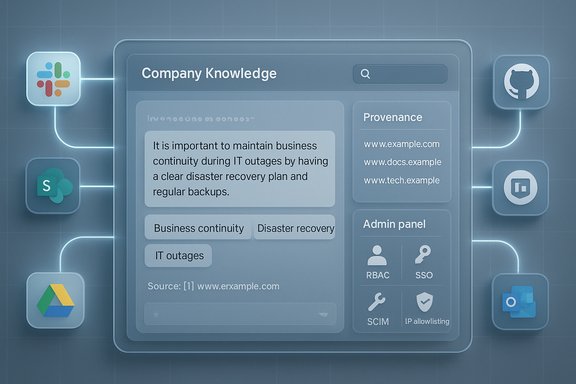
OpenAI’s new Company Knowledge for ChatGPT promises to turn the chat window into a single-pane, evidence-anchored internal search and synthesis tool that can pull from Slack, SharePoint, Google Drive, GitHub and a growing roster of enterprise systems—available now to ChatGPT Business, Enterprise and Edu workspaces.
Background / Overview
Company Knowledge is OpenAI’s latest enterprise push: a workspace-level capability that lets ChatGPT query connected corporate applications, synthesize multi-source context, and return answers with clickable citations back to the original artifacts. The feature is explicitly targeted at paid business tiers—ChatGPT Business, Enterprise and Edu—and is intended to reduce the “app-hopping” and manual stitching that drains knowledge-worker productivity. OpenAI positions Company Knowledge as powered by a version of GPT‑5 tuned to reason across multiple sources, with safeguards and admin controls designed for enterprise deployment. Where OpenAI makes specific technical claims (model family, context-handling modes), those are documented on the company blog; however, some low‑level architecture and training details remain vendor-declared rather than independently audited. Treat model-internal claims with cautious confidence until third-party technical audits appear.How Company Knowledge works
The user experience
- Admins enable connectors at the workspace level; end users (or admins, depending on provisioning) connect apps via OAuth.
- To invoke it, a user selects Company Knowledge in the message composer for a new conversation; ChatGPT then searches configured connectors for relevant items and synthesizes an answer that includes inline citations and links to sources.
Retrieval + reasoning flow
Company Knowledge combines classic retrieval patterns (indexing and search across connectors) with OpenAI’s retrieval-augmented generation (RAG) approach and a GPT-5 reasoning path that attempts to:- gather candidate documents/messages/PRs,
- apply date and quality filters,
- resolve conflicting evidence across sources,
- synthesize a concise, evidence-anchored answer and show the provenance sidebar.
What it can (and cannot) do, initially
- It can synthesize meeting briefs, triage release plans (cross-checking GitHub, Linear, Slack notes), and surface performance updates from disparate sources.
- While enabled, Company Knowledge disables web searching and image/chart generation in that conversation to reduce leakage and keep outputs strictly grounded in internal sources; OpenAI plans to relax and expand these interactions over time.
Supported connectors and admin controls
Out-of-the-box connectors
At launch and in immediate follow-ups, OpenAI lists a broad connector roster including Slack, SharePoint, Google Drive, GitHub, Gmail/Outlook, HubSpot, Asana, Dropbox, Box, Confluence, Zendesk, Linear, GitLab Issues, ClickUp and more. Admins choose which connectors a workspace may enable.Enterprise governance primitives
- Role-Based Access Control (RBAC): workspace admins can limit which groups can enable or use connectors.
- SSO & SCIM: identity and provisioning integrate with enterprise directory systems.
- IP allowlisting, encryption in transit/at rest, audit logs / Enterprise Compliance API: designed for regulatory and eDiscovery needs.
Verified technical and commercial claims
Below are the vendor claims we validated, followed by the supporting evidence.- Company Knowledge availability: Released for ChatGPT Business, Enterprise and Edu — confirmed on OpenAI’s product announcement.
- Core connectors (Slack, SharePoint, Google Drive, GitHub and more): Documented in OpenAI help pages and the announcement.
- Model family: OpenAI states Company Knowledge is powered by a GPT‑5 family model tuned for cross-source reasoning; that wording appears in the product post. Note: exact variant and training recipe are vendor claims.
- Pricing for ChatGPT Business: $25/user/month (annual) or $30/user/month (monthly billing) — confirmed in OpenAI Help Center pricing pages. This is the published Business-plan price for teams (minimum 2 users).
- UI behavior limitation: Company Knowledge must be manually enabled per conversation and disables web browsing/image/chart generation while active — documented in OpenAI’s announcement and help pages.
Why this matters for Windows-centric IT teams
Windows and Microsoft 365 remain dominant in many enterprises. Company Knowledge’s connector set explicitly includes Microsoft-first services (SharePoint, Outlook/Exchange, Teams in earlier connector rollouts) and GitHub, which align well to typical Windows-shop workflows for documentation, ticketing and DevOps. That means practical wins for:- faster meeting prep using SharePoint/OneDrive notes and Teams channels;
- incident triage that pulls from Outlook, SharePoint incident reports and GitHub issues;
- release planning that cross-references repos and Slack/Teams discussions.
Practical trade-offs: power versus guardrails
Company Knowledge introduces a major productivity lever, but it comes with trade-offs IT teams must manage.Strengths
- Real efficiency gains: one interface that synthesizes Slack threads, Docs/Sheets, tickets and code can dramatically shorten the research-to-action loop.
- Citations and links: every answer includes links back to original artifacts, improving traceability and auditability.
- Enterprise controls: RBAC, SSO/SCIM, IP allowlisting and compliance logs provide the primitives many security teams require for cautious pilots.
- Expanded attack surface: any connector that exposes email, docs or code introduces potential routes for compromise; a compromised admin account or OAuth token is high impact.
- Hallucinations + provenance complexity: citations help, but synthesis errors are still possible; a mis-synthesized executive summary with incorrect numeric claims can be dangerous in high-stakes decisions. Human verification remains mandatory.
- Operational and legal nuance: regional connector restrictions, data residency needs, and retention/forensics windows vary by connector—these require contract negotiation and validation.
Competitor landscape and strategic context
OpenAI’s strategic pitch is cross-platform agnosticism: become the neutral “conversational search engine” that pulls together mixed-tool stacks (a majority of enterprises use multi-vendor SaaS setups). Microsoft, Google and Amazon are building competing copilots tightly integrated into their clouds and productivity suites, creating different trade-offs:- Microsoft Copilot: deep integration with Microsoft 365 and Azure—stronger native tenant-control story for Windows-first shops, but less cross-platform neutrality.
- Google Gemini (Workspace): strong for Google Workspace-centric customers; again tightly coupled to a single vendor ecosystem.
- OpenAI Company Knowledge: cross-vendor connectors may be the winning play for organizations with mixed stacks—but the reliance on multi-party OAuth and cross-connector mapping increases the governance workload.
Deployment playbook for Windows admins (practical checklist)
Start small, validate thoroughly, expand methodically.- Pilot design
- Pick a constrained pilot group (2–20 users) and a narrow set of connectors (Slack + Google Drive/SharePoint + GitHub recommended).
- Define success metrics: search time saved, citation verification rate, hallucination incidents per 100 queries.
- Governance and configuration
- Enforce RBAC: only pilot project owners and a small set of reviewers can enable connectors.
- Enable SSO/SCIM and IP allowlisting for pilot admin accounts.
- Logging and legal
- Validate Enterprise Compliance API logs: confirm what fields are exported, retention windows, and eDiscovery format.
- Negotiate contractual clauses for data deletion, non-training guarantees and breach notification SLAs where required.
- Operational testing
- Run realistic queries that mirror real work: meeting briefs, release triage, contract summaries.
- Measure the rate of verifiable citations and log any instances where the assistant misattributes or omits source evidence.
- Scale plan
- Expand connectors and user groups in stages, re-evaluating controls after each expansion.
- Automate connector health checks and permission audits to detect drift or over-broad scopes.
Technical caveats and verifiability notes
- GPT‑5 powering claim: OpenAI’s announcement explicitly cites a GPT‑5 family variant for Company Knowledge and independent outlets repeat that phrasing. This is a vendor statement corroborated by reporting, not an independent, low-level audit of weights, training data, or hidden behaviors. Treat it as documented vendor architecture rather than independently verified engineering detail.
- Context windows and throughput: OpenAI and some cloud partners publish high-level token/context numbers for GPT‑5 variants in product documentation, but those figures differ by surface (ChatGPT web vs API vs cloud foundry). Organizations should run their own load and context tests under realistic workloads rather than rely on a single published number.
- 20% productivity stat (time spent searching): widely cited industry references estimate knowledge workers spend roughly 1.8 hours per day—about 20% of their week—searching/gathering information. Multiple research summaries (McKinsey, IDC quotes in secondary sources) support this as a broadly accepted benchmark, but methodologies vary and figures should be treated as indicative rather than exact. Use the stat to justify pilots, not to promise precise ROI.
Security & compliance deep dive
Permission inheritance vs least privilege
Company Knowledge’s permission-respecting model is a strong baseline: ChatGPT only accesses what the authenticated user already can access in each connector. That reduces surprise exposures, but it does not absolve administrators from ensuring least privilege is enforced across SharePoint sites, GitHub repos and ticketing systems. OAuth token misuse, stale group memberships, or overly permissive app registrations remain typical failure modes.Data residency and training
OpenAI’s published policy states enterprise workspace data is not used to train the company’s models by default. That contractual guarantee is a significant enterprise control; confirm the contractual language and verify data residency options for your region if regulatory requirements demand it. Also validate any per-connector residency nuances (some SaaS vendors store content in regional data centers).Auditability and incident response
- Confirm that logs exported by the Enterprise Compliance API include per-conversation connector access lists, timestamps and the exact source URIs used for each citation.
- Ensure your incident runbook includes steps to revoke connector tokens, disable Company Knowledge at workspace level, and request vendor logs for forensic analysis.
Real-world implications: what to expect in the first 6–12 months
- Short-term: significant productivity improvements for meeting prep, release triage and cross-team summarization when connectors are scoped correctly. Early adopters report noticeable time savings for routine synthesis tasks.
- Medium-term: OpenAI plans to expand persistence (multi-turn memory persistence for Company Knowledge), hybrid web/internal queries and richer visualizations—these will create new governance questions as internal and external sources are mixed.
- Long-term: vendors will compete on governance, contract terms and ecosystem fit rather than raw model headline claims. Firms should design for portability: canonical exports of logs and searchable provenance will be bargaining chips in vendor negotiations.
Conclusion: practical verdict for WindowsForum readers
Company Knowledge is a pragmatic, well-scoped step toward embedding LLMs into everyday knowledge work. For Windows-centric organizations, the immediate upside is clear: shorter prep cycles, faster triage, and a unified way to query SharePoint, Teams/Slack, GitHub and other systems from a single conversational surface. OpenAI’s emphasis on citations, workspace-level governance and non-training assurances are important enablers for pilots. This is not a turnkey panacea: it increases your integration surface area and shifts governance responsibilities to IT, security and procurement. The safe path is disciplined: pilot with a small group and minimal connectors, validate audit logs and retention, require human signoff for high-stakes outputs, and negotiate contractual guarantees for deletion and non-training. If you follow that path, Company Knowledge can be the productivity multiplier it promises; without discipline, it’s a risky shortcut.Every organization will have to answer the same three pragmatic questions before broad adoption: (1) Who can enable which connectors? (2) How will we validate and audit the provenance of synthesized answers? (3) What contractual and technical protections do we need to meet our compliance bar? Answer those first, and the rest becomes execution.
Source: Quasa OpenAI's ChatGPT Gains 'Company Knowledge' Feature: A Game-Changer for Enterprise Search
