

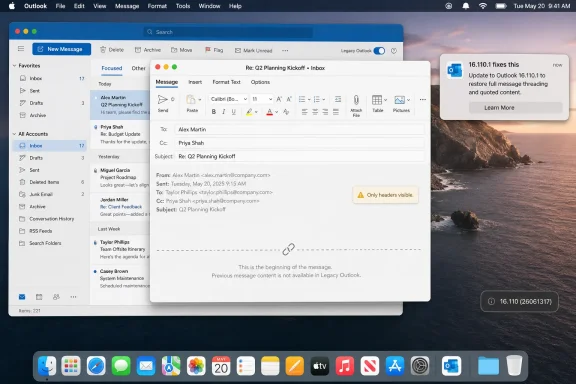
Microsoft’s Outlook for Mac version 16.110, build 26061317, released in mid-June 2026, introduced a bug in legacy Outlook that leaves the original message body blank when users reply to or forward email, showing only headers instead of the prior conversation. The failure is small in code terms and large in human terms: it breaks the implicit contract that email preserves context. Microsoft has acknowledged the issue, pointed users toward the newer Outlook for Mac, and later indicated that version 16.110.1 on the Current Channel fixes the problem for at least some affected users. But the more interesting story is not that Outlook shipped a bad build; it is that Microsoft keeps treating “legacy” as both supported and expendable.
Email threading is not glamorous infrastructure. It is not Copilot, not a redesigned ribbon, not a cloud migration milestone, not a security feature that can be sold in a keynote. It is simply the quiet assumption that when you hit Reply, the conversation comes with you.
That assumption is why this Outlook bug lands harder than its technical description suggests. The affected users are not reporting a cosmetic glitch or a preference reset. They are saying that replies and forwards in legacy Outlook for Mac no longer include the original message body, leaving recipients without the chain of reasoning, approvals, attachments context, or prior commitments that made the message meaningful in the first place.
Microsoft’s support note describes the issue plainly: in legacy Outlook for Mac, replying to or forwarding an email can leave the original email content or previous conversation blank, with only headers visible. That is corporate-language minimalism for a bug that can turn an ordinary workday into a series of “see below” messages with nothing below.
The failure appears tied to legacy Outlook for Mac rather than the newer Outlook experience. Microsoft’s official workaround is therefore not especially subtle: switch out of legacy Outlook. For users already planning that migration, this is annoying. For users who remain on legacy Outlook because of local mail archives, workflow dependencies, account support, or muscle memory, it feels like being pushed across a bridge while the bridge is still under construction.
But “legacy” does not mean “irrelevant.” It means the product is older, less strategic, and living on borrowed time. It does not mean Microsoft can break a core workflow in a regular update and expect users to treat the result as an acceptable nudge toward modernization.
That distinction matters because legacy products often survive inside organizations precisely where change is hardest. The people still using them are not always stubborn hobbyists resisting progress. They are legal teams with mail archives, small businesses with years of locally stored correspondence, consultants with complex IMAP setups, and administrators who cannot flip an estate from one Outlook architecture to another because Microsoft would prefer cleaner telemetry.
In one Microsoft Q&A exchange, an affected user noted that switching to the new Outlook was not straightforward because of local mail stored in different folders. That is the kind of mundane detail that rarely appears in migration marketing but dominates real deployments. A modern client may be the future; it still has to account for the past.
The bug therefore exposes a familiar Microsoft tension. The company wants the authority of enterprise continuity and the velocity of cloud software. Customers, meanwhile, experience those ambitions as a patch that removes the body from a reply.
A workaround should restore the interrupted behavior with minimal disruption. “Use the other Outlook” asks users to change clients, accept a different feature surface, and potentially confront account or archive limitations at the same time they are trying to send a reply. That is not a repair so much as an acceleration of Microsoft’s roadmap.
The other practical workaround circulating in Microsoft’s own forums was to roll back to Outlook for Mac 16.109.3 and disable automatic updates temporarily. For an individual Mac user, that is unpleasant but manageable: quit Office apps, remove Outlook, reinstall the older package, and make sure AutoUpdate does not immediately return the machine to the bad build. For enterprise IT, it is messier.
Managed Mac fleets do not live in a world where users casually downgrade productivity apps. They live inside Jamf policies, Intune configurations, package validation, help-desk queues, security baselines, and change windows. A broken Outlook release becomes an administrative event, not merely a user inconvenience.
The arrival of version 16.110.1 complicates the story in a better direction. Microsoft forum moderators and users have indicated that updating to 16.110.1 resolves the issue, and at least one user reported that the latest version restored normal behavior. That is encouraging. It also underscores the central frustration: this is the kind of regression that should have been caught before it reached ordinary mailboxes.
The uncomfortable answer is that modern QA often measures breadth better than depth. Automated test suites can verify that buttons exist, that windows open, that services authenticate, and that messages send. They may not always catch the semantic failure: yes, the reply window appears, but the content that makes the reply useful is missing.
That distinction matters in productivity software. A mail client is not just a transmission tool; it is a memory system. The quoted thread is often the record of a decision, the evidence of consent, or the only place where distributed participants can reconstruct what happened.
When that context disappears, users do not merely lose convenience. They lose confidence that the software is preserving the shape of the conversation. That is why this bug feels disproportionate to its scope. It violates a basic expectation that users do not normally articulate because they have never had to.
Microsoft is hardly alone in shipping regressions. Apple, Google, Mozilla, Adobe, Slack, Zoom, and every other vendor with a fast-moving client has pushed builds that broke obvious things. The difference is that Outlook sits at the center of work. A bad Outlook release travels through organizations as friction, and friction compounds quickly.
Now add an Outlook update that breaks reply context in the supported Microsoft 365-era client, albeit in legacy mode. One story is about a retired perpetual suite. The other is about a current subscription application. Together, they reinforce a perception that Mac users are being squeezed between old software that is expiring and new software that is not always ready for their workflows.
That perception may be harsher than the full reality. Microsoft’s new Outlook for Mac is not the same creature as the controversial new Outlook for Windows, which has drawn criticism for its web-app direction and feature gaps. On macOS, the newer client has matured, and Microsoft says most Microsoft 365 users have already moved to it.
But perceptions are built from incidents, not architecture diagrams. If your Office 2019 apps are headed for reduced functionality in July and your legacy Outlook replies went blank in June, the pattern is not “Microsoft is modernizing responsibly.” The pattern is “Microsoft keeps changing the ground under my desk.”
For WindowsForum readers, this is familiar territory even when the platform is Mac. Windows users have lived through feature removals, forced migrations, control panel deprecations, account nudges, advertising experiments, and update regressions. The Outlook for Mac bug is a Mac story with a very Windows-shaped moral.
Each option has a cost. Switching to new Outlook may solve the immediate bug but expose workflow differences. Rolling back may restore legacy behavior but creates a patch-level exception that must later be unwound. Updating to 16.110.1 is the cleanest answer if it is available to the relevant channel, but organizations have to validate it before deployment.
The support burden also falls unevenly. Users will describe the bug in human terms: “Outlook deleted the thread,” “my replies are blank,” “clients cannot see the old email,” or “forwarding no longer works.” Help desks then have to map those complaints to a specific Outlook version, a specific mode, and a changing set of Microsoft guidance.
That is why update trust is so valuable. When administrators trust a vendor’s update cadence, they can keep fleets current without turning every release into an incident-response exercise. When trust erodes, even routine updates require staged rings, rollback packages, known-issue monitoring, and user communications.
Microsoft understands this in Windows. It has spent years building deployment rings, safeguard holds, known-issue rollback, release health dashboards, and enterprise controls because Windows update failures can become visible at enormous scale. Office updates deserve the same cultural seriousness. Outlook is not a peripheral app; it is operational infrastructure.
Microsoft 365 changed that relationship. The apps are now living software, continuously patched and constantly aligned with cloud services. That model is better for security and often better for feature delivery. It also means regressions arrive through the same automatic machinery that delivers fixes.
The Outlook bug is a reminder that automatic updates transfer risk from the vendor’s release process to the user’s workday. The user did not choose to experiment with reply behavior. They accepted the normal update stream and discovered that an ordinary email action had changed.
This is especially tricky for communication tools because users cannot always see the failure before it matters. If a reply omits the original body, the sender might notice in the compose window. Or they might not, especially when moving quickly. The recipient then receives a message stripped of context, and the thread becomes a repair job.
There is a broader lesson here for Microsoft’s AI-era ambitions as well. The company is asking users to trust Copilot with summarization, drafting, retrieval, and workflow automation. That trust rests on the boring foundations: message bodies render, histories persist, attachments attach, calendars sync, identities resolve. If the foundations wobble, the futuristic layer looks less persuasive.
Transitions are not inherently bad. In fact, many are necessary. Old clients accumulate security risks, unmaintainable code paths, and compatibility problems that slow down the entire ecosystem. Enterprise software cannot be a museum.
But transitions become corrosive when the old product is still supported enough to receive updates but not loved enough to receive adequate regression protection. That is the danger zone legacy Outlook for Mac appears to occupy. It is not dead. It is not the future. It is alive enough to break.
Microsoft’s best argument is that the new Outlook is the destination and that users should move. That may be true. But a destination is not a defense against breaking the road people are still driving on.
A more disciplined approach would treat late-life products as stability-first surfaces. If a client is approaching retirement, its updates should be boring, conservative, and regression-tested around the workflows most likely to keep users there. Reply, forward, archive, local folders, account compatibility, search, and calendar basics should be guarded with almost paranoid care.
But the signal is worth hearing. Microsoft’s customers are not just reacting to a single bug; they are reacting to accumulated uncertainty. Will the old Office still edit files? Will the legacy client still work with Exchange Online? Will the update channel break a core workflow? Will the new client support the local data that kept users on the old one?
That uncertainty changes behavior. Power users turn off automatic updates. Administrators slow deployment rings. Small businesses delay migrations until forced. Users become suspicious of every toggle labeled “new.” The result is the opposite of what Microsoft wants: modernization becomes harder because trust has been spent.
The company can still recover trust in this specific case by making the fix broadly available, clearly updating its support documentation, and explaining which builds are safe. But the deeper repair is procedural. Microsoft needs to prove that the path from legacy to modern is not paved with avoidable breakage.
That means communicating early, testing the workflows that real holdouts depend on, and resisting the urge to make migration the answer to every support problem. Users will accept change more readily when they believe the vendor is protecting them during the transition.
 Microsoft Broke the Part of Email Nobody Thinks About Until It Vanishes
Email threading is not glamorous infrastructure. It is not Copilot, not a redesigned ribbon, not a cloud migration milestone, not a security feature that can be sold in a keynote. It is simply the quiet assumption that when you hit Reply, the conversation comes with you.That assumption is why this Outlook bug lands harder than its technical description suggests. The affected users are not reporting a cosmetic glitch or a preference reset. They are saying that replies and forwards in legacy Outlook for Mac no longer include the original message body, leaving recipients without the chain of reasoning, approvals, attachments context, or prior commitments that made the message meaningful in the first place.
Microsoft’s support note describes the issue plainly: in legacy Outlook for Mac, replying to or forwarding an email can leave the original email content or previous conversation blank, with only headers visible. That is corporate-language minimalism for a bug that can turn an ordinary workday into a series of “see below” messages with nothing below.
The failure appears tied to legacy Outlook for Mac rather than the newer Outlook experience. Microsoft’s official workaround is therefore not especially subtle: switch out of legacy Outlook. For users already planning that migration, this is annoying. For users who remain on legacy Outlook because of local mail archives, workflow dependencies, account support, or muscle memory, it feels like being pushed across a bridge while the bridge is still under construction.
The Word “Legacy” Is Doing Too Much Work
Microsoft has every reason to want users off legacy Outlook for Mac. The company has already put the client on a countdown, with legacy Outlook for Mac set to stop working with Exchange Online mailboxes starting in October 2026. In product-management terms, the direction of travel is settled.But “legacy” does not mean “irrelevant.” It means the product is older, less strategic, and living on borrowed time. It does not mean Microsoft can break a core workflow in a regular update and expect users to treat the result as an acceptable nudge toward modernization.
That distinction matters because legacy products often survive inside organizations precisely where change is hardest. The people still using them are not always stubborn hobbyists resisting progress. They are legal teams with mail archives, small businesses with years of locally stored correspondence, consultants with complex IMAP setups, and administrators who cannot flip an estate from one Outlook architecture to another because Microsoft would prefer cleaner telemetry.
In one Microsoft Q&A exchange, an affected user noted that switching to the new Outlook was not straightforward because of local mail stored in different folders. That is the kind of mundane detail that rarely appears in migration marketing but dominates real deployments. A modern client may be the future; it still has to account for the past.
The bug therefore exposes a familiar Microsoft tension. The company wants the authority of enterprise continuity and the velocity of cloud software. Customers, meanwhile, experience those ambitions as a patch that removes the body from a reply.
The Workaround Is a Migration Strategy Wearing a Bandage
Microsoft’s first-line workaround is to switch from legacy Outlook to the newer Outlook for Mac by disabling the legacy mode toggle. That may be the cleanest path for many users, and it is almost certainly the path Microsoft wants them to take. But it is not a neutral workaround.A workaround should restore the interrupted behavior with minimal disruption. “Use the other Outlook” asks users to change clients, accept a different feature surface, and potentially confront account or archive limitations at the same time they are trying to send a reply. That is not a repair so much as an acceleration of Microsoft’s roadmap.
The other practical workaround circulating in Microsoft’s own forums was to roll back to Outlook for Mac 16.109.3 and disable automatic updates temporarily. For an individual Mac user, that is unpleasant but manageable: quit Office apps, remove Outlook, reinstall the older package, and make sure AutoUpdate does not immediately return the machine to the bad build. For enterprise IT, it is messier.
Managed Mac fleets do not live in a world where users casually downgrade productivity apps. They live inside Jamf policies, Intune configurations, package validation, help-desk queues, security baselines, and change windows. A broken Outlook release becomes an administrative event, not merely a user inconvenience.
The arrival of version 16.110.1 complicates the story in a better direction. Microsoft forum moderators and users have indicated that updating to 16.110.1 resolves the issue, and at least one user reported that the latest version restored normal behavior. That is encouraging. It also underscores the central frustration: this is the kind of regression that should have been caught before it reached ordinary mailboxes.
Quality Assurance Looks Different When the Broken Feature Is Boring
There is an obvious question here, and users asked it bluntly: how does a reply-and-forward regression get through testing in a mail client? This is not an edge animation, an obscure import dialog, or a narrow compatibility path involving a defunct protocol. Replying to email is the heartbeat of Outlook.The uncomfortable answer is that modern QA often measures breadth better than depth. Automated test suites can verify that buttons exist, that windows open, that services authenticate, and that messages send. They may not always catch the semantic failure: yes, the reply window appears, but the content that makes the reply useful is missing.
That distinction matters in productivity software. A mail client is not just a transmission tool; it is a memory system. The quoted thread is often the record of a decision, the evidence of consent, or the only place where distributed participants can reconstruct what happened.
When that context disappears, users do not merely lose convenience. They lose confidence that the software is preserving the shape of the conversation. That is why this bug feels disproportionate to its scope. It violates a basic expectation that users do not normally articulate because they have never had to.
Microsoft is hardly alone in shipping regressions. Apple, Google, Mozilla, Adobe, Slack, Zoom, and every other vendor with a fast-moving client has pushed builds that broke obvious things. The difference is that Outlook sits at the center of work. A bad Outlook release travels through organizations as friction, and friction compounds quickly.
Mac Users Are Getting a Compressed Lesson in Microsoft’s Priorities
The timing makes the incident more combustible for Mac users. Microsoft has also told Office 2019 for Mac users that, beginning July 13, 2026, some Office apps may enter reduced functionality mode, allowing users to open and print files but not edit, save, or create new ones. Microsoft attributes that situation to certificate expiration and the end of support, but the effect for users is simple: software that once felt permanent is becoming conditional.Now add an Outlook update that breaks reply context in the supported Microsoft 365-era client, albeit in legacy mode. One story is about a retired perpetual suite. The other is about a current subscription application. Together, they reinforce a perception that Mac users are being squeezed between old software that is expiring and new software that is not always ready for their workflows.
That perception may be harsher than the full reality. Microsoft’s new Outlook for Mac is not the same creature as the controversial new Outlook for Windows, which has drawn criticism for its web-app direction and feature gaps. On macOS, the newer client has matured, and Microsoft says most Microsoft 365 users have already moved to it.
But perceptions are built from incidents, not architecture diagrams. If your Office 2019 apps are headed for reduced functionality in July and your legacy Outlook replies went blank in June, the pattern is not “Microsoft is modernizing responsibly.” The pattern is “Microsoft keeps changing the ground under my desk.”
For WindowsForum readers, this is familiar territory even when the platform is Mac. Windows users have lived through feature removals, forced migrations, control panel deprecations, account nudges, advertising experiments, and update regressions. The Outlook for Mac bug is a Mac story with a very Windows-shaped moral.
Enterprise IT Gets the Worst Version of the Fix
The most exposed users are not necessarily the loudest ones in public forums. They are the administrators who must translate Microsoft’s workaround into a policy that will not make the situation worse. Should they tell users to switch to new Outlook? Should they push 16.110.1? Should they roll back to 16.109.3? Should they disable AutoUpdate? Should they wait?Each option has a cost. Switching to new Outlook may solve the immediate bug but expose workflow differences. Rolling back may restore legacy behavior but creates a patch-level exception that must later be unwound. Updating to 16.110.1 is the cleanest answer if it is available to the relevant channel, but organizations have to validate it before deployment.
The support burden also falls unevenly. Users will describe the bug in human terms: “Outlook deleted the thread,” “my replies are blank,” “clients cannot see the old email,” or “forwarding no longer works.” Help desks then have to map those complaints to a specific Outlook version, a specific mode, and a changing set of Microsoft guidance.
That is why update trust is so valuable. When administrators trust a vendor’s update cadence, they can keep fleets current without turning every release into an incident-response exercise. When trust erodes, even routine updates require staged rings, rollback packages, known-issue monitoring, and user communications.
Microsoft understands this in Windows. It has spent years building deployment rings, safeguard holds, known-issue rollback, release health dashboards, and enterprise controls because Windows update failures can become visible at enormous scale. Office updates deserve the same cultural seriousness. Outlook is not a peripheral app; it is operational infrastructure.
The Cloud Cadence Has Made Desktop Apps Feel Less Solid
A generation ago, desktop productivity software shipped in big, slow, named releases. That model had its own problems: bugs lingered, features arrived slowly, and compatibility debt grew like mold. But users understood the bargain. If a tool worked yesterday, it was likely to work tomorrow unless they deliberately installed something new.Microsoft 365 changed that relationship. The apps are now living software, continuously patched and constantly aligned with cloud services. That model is better for security and often better for feature delivery. It also means regressions arrive through the same automatic machinery that delivers fixes.
The Outlook bug is a reminder that automatic updates transfer risk from the vendor’s release process to the user’s workday. The user did not choose to experiment with reply behavior. They accepted the normal update stream and discovered that an ordinary email action had changed.
This is especially tricky for communication tools because users cannot always see the failure before it matters. If a reply omits the original body, the sender might notice in the compose window. Or they might not, especially when moving quickly. The recipient then receives a message stripped of context, and the thread becomes a repair job.
There is a broader lesson here for Microsoft’s AI-era ambitions as well. The company is asking users to trust Copilot with summarization, drafting, retrieval, and workflow automation. That trust rests on the boring foundations: message bodies render, histories persist, attachments attach, calendars sync, identities resolve. If the foundations wobble, the futuristic layer looks less persuasive.
This Is Not Just a Mac Bug, It Is a Support Philosophy
The phrase “legacy Outlook” can make this incident sound contained. It is contained technically, but philosophically it is not. Microsoft’s portfolio is full of transition states: classic Teams to new Teams, Mail and Calendar to Outlook, Control Panel to Settings, Office perpetual licenses to Microsoft 365, on-prem Exchange integrations to Graph, older Outlook clients to newer ones.Transitions are not inherently bad. In fact, many are necessary. Old clients accumulate security risks, unmaintainable code paths, and compatibility problems that slow down the entire ecosystem. Enterprise software cannot be a museum.
But transitions become corrosive when the old product is still supported enough to receive updates but not loved enough to receive adequate regression protection. That is the danger zone legacy Outlook for Mac appears to occupy. It is not dead. It is not the future. It is alive enough to break.
Microsoft’s best argument is that the new Outlook is the destination and that users should move. That may be true. But a destination is not a defense against breaking the road people are still driving on.
A more disciplined approach would treat late-life products as stability-first surfaces. If a client is approaching retirement, its updates should be boring, conservative, and regression-tested around the workflows most likely to keep users there. Reply, forward, archive, local folders, account compatibility, search, and calendar basics should be guarded with almost paranoid care.
The Signal Hidden Inside the Blank Reply
There is a temptation to treat this story as another entry in the endless ledger of Microsoft update mishaps. Bad build ships, users complain, moderator suggests workaround, fixed build follows. The cycle is familiar enough to be numbing.But the signal is worth hearing. Microsoft’s customers are not just reacting to a single bug; they are reacting to accumulated uncertainty. Will the old Office still edit files? Will the legacy client still work with Exchange Online? Will the update channel break a core workflow? Will the new client support the local data that kept users on the old one?
That uncertainty changes behavior. Power users turn off automatic updates. Administrators slow deployment rings. Small businesses delay migrations until forced. Users become suspicious of every toggle labeled “new.” The result is the opposite of what Microsoft wants: modernization becomes harder because trust has been spent.
The company can still recover trust in this specific case by making the fix broadly available, clearly updating its support documentation, and explaining which builds are safe. But the deeper repair is procedural. Microsoft needs to prove that the path from legacy to modern is not paved with avoidable breakage.
That means communicating early, testing the workflows that real holdouts depend on, and resisting the urge to make migration the answer to every support problem. Users will accept change more readily when they believe the vendor is protecting them during the transition.
The Practical Reading of Microsoft’s Blank-Thread Week
For affected users and administrators, the immediate story is now less mysterious than it was when the first complaints appeared. The bug is specific, the affected mode is identifiable, and a newer build appears to be the preferred exit. The larger judgment is still forming.- Outlook for Mac 16.110, build 26061317, broke reply and forward behavior for some legacy Outlook users by omitting the original message body.
- The issue affects legacy Outlook for Mac, while Microsoft’s official workaround points users toward the newer Outlook for Mac experience.
- Rolling back to 16.109.3 and disabling automatic updates was a practical temporary fix, but it is awkward for managed Mac environments.
- Microsoft forum activity indicates that version 16.110.1 on the Current Channel resolves the problem for users who can receive it.
- The incident matters because it hits a basic communication workflow at the same time Microsoft is pushing Mac customers away from older Office and Outlook products.
- The safest enterprise response is to verify installed Outlook versions, test 16.110.1 against real workflows, and avoid treating a client migration as a casual help-desk workaround.
References
- Primary source: Research Snipers
Published: 2026-06-29T08:42:06.950014
Microsoft adds a bug to the Outlook update: the reply email is suddenly empty – Research Snipers
Microsoft is causing trouble for numerous users with a faulty update for Outlook. Since last...researchsnipers.com - Related coverage: windowscentral.com
Microsoft confirms an Outlook bug could wreck your replies by dropping the original message | Windows Central
A bizarre bug in the legacy version of Outlook for Mac strips out the original message text when replying or forwarding emails.www.windowscentral.com - Official source: learn.microsoft.com
Outlook 16.110 for mac can't forward or reply to emails and include body of text - Microsoft Q&A
I can't forward or reply to emails in outlook for mac. How do I fix that? Running version 16.110learn.microsoft.com - Official source: techcommunity.microsoft.com
- Related coverage: techradar.com
Can't load Outlook replies? Latest update breaks email threading | TechRadar
An Outlook update has broken email replieswww.techradar.com - Related coverage: tech.yahoo.com
Whoops! Microsoft Outlook Mac Update Removes Email Conversation History
While there's no official fix from Microsoft, there is a workaround.tech.yahoo.com
- Related coverage: news.lavx.hu
Microsoft breaks Outlook replies on macOS | LavX News
Outlook for Mac version 16.110 drops prior messages from replies, forcing admins to roll back builds or absorb helpdesk pain. news.lavx.hu
- Related coverage: carmona.mx
Problemas con las respuestas en Outlook para Mac: qué saber y cómo paliarlos | Pacosite's Blog
Un reciente caso de actualización de Microsoft Outlook para Mac ha provocado la desaparición de las respuestas anteriores, dejando a muchos usuarios sin poder responder o reenviar cadenas de correo…carmona.mx - Related coverage: ilsoftware.it
Outlook per Mac, un aggiornamento cancella la cronologia delle email
Un bug di Outlook per Mac elimina la cronologia nei messaggi di risposta e costringe molti utenti al ripristino della versione precedente. www.ilsoftware.it
- Related coverage: newsbytesapp.com
Microsoft update breaks Outlook email threads on Mac
Microsoft's latest update to Outlook for Mac, version 16.110, has removed the ability to include previous emails in replies, leaving users frustrated with broken email threads.www.newsbytesapp.com - Related coverage: inkl.com
Struggling to load Outlook email replies? You’re not…
Email replies aren't showing on Outlook for Mac, and a previous update is to blame.www.inkl.com - Related coverage: computerbild.de
Outlook-Update für Mac lässt Verläufe verschwinden - COMPUTER BILD
User von Outlook unter MacOS melden ärgerliche Probleme mit dem E-Mail-Programm. Verläufe verschwinden aus der Korrespondenz. Es gibt eine Lösung.www.computerbild.de - Official source: support.microsoft.com
- Related coverage: techspot.com
Microsoft Office 2019 for Mac will no longer edit documents after July 13 | TechSpot
Microsoft recently warned Office users on Apple devices that older versions of the company's productivity apps running on outdated operating systems will lose the ability to edit...www.techspot.com - Related coverage: macrumors.com
Microsoft Office 2019 for Mac Will Soon Stop Letting You Edit Documents
Microsoft will prevent Office 2019 for Mac owners from editing their documents from July 13, a restriction the company is attributing to the productivity suite's expiring digital certificate. The Office 2019 apps affected include Word, Excel, PowerPoint, Outlook, and OneNote. Once the...www.macrumors.com - Related coverage: office-watch.com
Microsoft Kills Office 2019 for Mac: Apps Stop Working July 13, 2026
If you bought Office 2019 for Mac outright, circle July 13, 2026 on your calendar. On that date Microsoft flips your paid apps into "reduced functionality mode,office-watch.com
- Related coverage: techedt.com
- Related coverage: macgadget.de
Auslaufendes Sicherheitszertifikat: Microsoft beschneidet Funktionsumfang von Office 2019 | MacGadget
MacGadget liefert Nachrichten, Tipps und Hintergründe zu Apple, Mac, macOS, iPhone, iOS und iPadwww.macgadget.de
- Official source: microsoft.com

