

Microsoft’s decision to retire Outlook Lite for Android is a small product move with an outsized meaning: it shows just how aggressively the company is narrowing its mobile mail strategy around a single flagship experience. For users who never even noticed Outlook Lite existed, that may sound inconsequential. For Microsoft, though, it is another signal that the era of multiple overlapping Outlook clients is giving way to consolidation, simplification, and, inevitably, a little collateral damage. The retirement begins October 6, 2025, with full mailbox shutdown behavior following on May 25, 2026, according to Microsoft’s own support guidance.
Microsoft has spent years trying to untangle its mail and productivity portfolio, and that process has accelerated sharply over the last 18 months. On one side, there is the classic desktop Outlook lineage, which continues to matter deeply to enterprises and power users. On the other, there is the mobile Outlook family, which increasingly needs to be easier to support, easier to secure, and easier to explain. Outlook Lite sat awkwardly between those worlds as a lightweight Android option built for low-memory devices and spotty networks.
That was the whole point of the app. Microsoft positioned Outlook Lite as a tiny, fast email client for users on 1GB RAM phones, older hardware, and 2G or 3G connections. It was meant to be the bare essentials version of Outlook, with a much smaller footprint than the full mobile app. The trade-off was obvious: less storage, fewer features, and a narrower support story. In a mobile ecosystem where app size and device compatibility still matter, that was a genuinely useful niche.
But niche products have a way of becoming support liabilities. Each separate app means separate code paths, separate troubleshooting, separate documentation, separate privacy review, and separate expectations from users and IT admins. Microsoft has been trimming that complexity across multiple product lines, not just in Android mail but across desktop Office, old mobile apps, and legacy services. The company’s broader retirement pattern suggests an organization trying to spend less time maintaining side doors and more time polishing the main entrance.
The retirement also fits a much larger industry trend. Software vendors increasingly want one modern app, one update pipeline, one identity system, and one support model. That sounds efficient in a slide deck. In practice, it often means reducing choice for users who relied on the simpler, lighter, or older experience that no longer fits the company’s platform strategy. Outlook Lite is the latest reminder that “streamlining” is rarely neutral.
That wording matters. This is not a casual “bug fix ends here” event. Microsoft is describing a product-level sunset in which the app can still open, but the mailbox experience is removed. In other words, the shell may remain, but the core use case will not. That is a harsher endpoint than many users expect when they hear the word “retirement.”
The app also made sense in regions where mobile data is expensive or network speeds are unreliable. A lightweight client can be the difference between consistent access to email and no access at all. That is why Outlook Lite initially looked less like a duplicate and more like a bridge between Microsoft’s cloud services and older Android hardware. It was a concession to the reality of mobile computing outside premium-device markets.
Yet exactly those constraints make such products hard to sustain. If the app is simple enough, users ask why it exists separately. If it grows more capable, it starts to overlap with the main app and the original rationale becomes weaker. Microsoft appears to have concluded that Outlook Lite had crossed from useful specialization into unnecessary duplication.
This staged approach is a familiar Microsoft pattern. First comes the warning, then the blocked install, then the final functional cutoff. The strategy minimizes immediate disruption while maximizing the odds that users migrate voluntarily rather than being forced into a sudden dead-end. For administrators, that is preferable to a hard kill switch. For users, it still means the clock is ticking.
That distinction also affects the user experience. Someone who installed Outlook Lite before the cutoff could keep using it for a while, but only in a limited, shrinking way. Microsoft’s own wording suggests the app will increasingly become a hollow shell. That is not a graceful fade; it is a controlled decompression.
There is also a security angle. Fewer apps means fewer codebases to secure, fewer account flows to validate, and fewer edge cases to support. In a world where phishing, token leakage, and sync issues remain persistent threats, consolidating users into a single controlled environment can reduce operational risk. That is especially appealing when Microsoft’s broader ecosystem is already leaning heavily on unified identity and cloud services.
There is a commercial logic here as well. The main Outlook mobile app is where Microsoft wants users to live, because that is where the company can push consistent UX, broader feature coverage, and tighter alignment with Microsoft 365 services. One mobile mail app is easier to message, easier to improve, and easier to integrate with adjacent services. It also makes Microsoft’s support story much tidier.
That matters because app performance is not a vanity issue on low-end phones. Extra megabytes, background activity, and feature bloat can translate into slower launches, poorer battery life, and more frustration. A “better” app on paper is not always a better app in practice for someone using older hardware. The retirement therefore affects not only preference but usability.
There is also a psychological element. Users who intentionally choose a lightweight app are often trying to reduce clutter and preserve control over their device. For them, being pushed into the full Outlook app can feel like losing a carefully chosen compromise. That kind of friction can create lasting annoyance even when the migration is technically straightforward.
But mobile fleets in the real world are rarely perfectly standardized. Some organizations still have frontline staff, contractors, or temporary workers using older Android devices. If Outlook Lite was the only app that felt workable on those devices, the retirement could force awkward upgrades, replacement purchases, or new support exceptions. That is exactly the sort of practical detail that turns a product sunset into an IT project.
Still, the transition may expose a familiar enterprise tension: the gap between standardization and device reality. The central office may assume Outlook Mobile is a suitable replacement, while the field discovers that the replacement performs differently on lower-end hardware. That mismatch is often where the most visible friction appears. The policy is cleaner than the deployment.
That has already been visible in multiple retirement and deprecation announcements, including moves that nudge users away from older mail experiences and into newer clients. Microsoft’s platform strategy has become less tolerant of parallel paths, especially when those paths create support ambiguity. In effect, the company is betting that users will adapt to a smaller set of sanctioned workflows.
There is an upside to that philosophy. Users get clearer guidance, fewer fragmented experiences, and better chances of receiving feature updates in one place. The downside is just as clear: Microsoft’s tolerance for user preference narrows, and older or lighter workflows become disposable. That is a trade-off, not a free upgrade.
The opportunity is not just technical; it is strategic. By concentrating effort on the primary Outlook app, Microsoft can invest more consistently in performance, security, and feature parity across Android and iOS. If the company follows through, the payoff should be a stronger default mail client and less fragmentation in future releases.
There is also a trust issue. Users who see Microsoft repeatedly retiring or replacing apps may start to assume that every convenience is temporary. That can make them hesitant to build habits around the company’s mobile products, especially if they have already experienced previous transitions elsewhere in the Microsoft ecosystem.
The broader question is whether this is a one-off cleanup or part of a continuing reduction in mobile app diversity. Given Microsoft’s recent behavior across its product lines, the safer bet is that more consolidation is coming. The company appears committed to tightening its portfolio, even when that means letting smaller, narrower tools disappear.
Source: XDA Microsoft is finally scrapping an Android app I didn't even know existed
 Background
Microsoft has spent years trying to untangle its mail and productivity portfolio, and that process has accelerated sharply over the last 18 months. On one side, there is the classic desktop Outlook lineage, which continues to matter deeply to enterprises and power users. On the other, there is the mobile Outlook family, which increasingly needs to be easier to support, easier to secure, and easier to explain. Outlook Lite sat awkwardly between those worlds as a lightweight Android option built for low-memory devices and spotty networks.That was the whole point of the app. Microsoft positioned Outlook Lite as a tiny, fast email client for users on 1GB RAM phones, older hardware, and 2G or 3G connections. It was meant to be the bare essentials version of Outlook, with a much smaller footprint than the full mobile app. The trade-off was obvious: less storage, fewer features, and a narrower support story. In a mobile ecosystem where app size and device compatibility still matter, that was a genuinely useful niche.
But niche products have a way of becoming support liabilities. Each separate app means separate code paths, separate troubleshooting, separate documentation, separate privacy review, and separate expectations from users and IT admins. Microsoft has been trimming that complexity across multiple product lines, not just in Android mail but across desktop Office, old mobile apps, and legacy services. The company’s broader retirement pattern suggests an organization trying to spend less time maintaining side doors and more time polishing the main entrance.
The retirement also fits a much larger industry trend. Software vendors increasingly want one modern app, one update pipeline, one identity system, and one support model. That sounds efficient in a slide deck. In practice, it often means reducing choice for users who relied on the simpler, lighter, or older experience that no longer fits the company’s platform strategy. Outlook Lite is the latest reminder that “streamlining” is rarely neutral.
What Microsoft says is changing
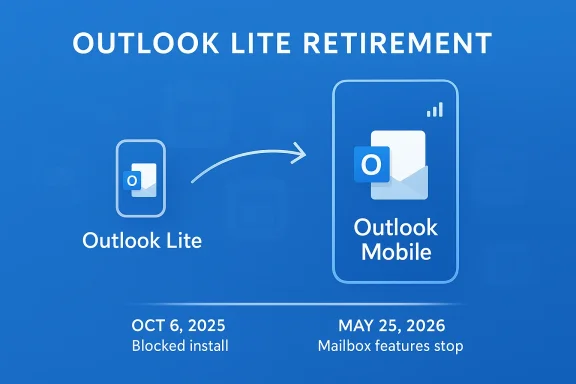
Microsoft’s support page is explicit: Outlook Lite will be retired starting October 6, 2025, and existing users can keep using it only for a limited time before full retirement. By May 25, 2026, the app will no longer provide functional access to mailbox features. Microsoft also recommends switching to Outlook Mobile as the primary replacement.That wording matters. This is not a casual “bug fix ends here” event. Microsoft is describing a product-level sunset in which the app can still open, but the mailbox experience is removed. In other words, the shell may remain, but the core use case will not. That is a harsher endpoint than many users expect when they hear the word “retirement.”
Why Outlook Lite Existed at All
Outlook Lite was built for a real world that mainstream tech discussions sometimes ignore. Not every Android device is new, fast, or generously equipped with storage and RAM. In many markets, and for many budget-conscious users, a 5MB mail app with modest requirements is not a toy; it is a practical tool. Microsoft clearly understood that the full Outlook app was not always the right fit.The app also made sense in regions where mobile data is expensive or network speeds are unreliable. A lightweight client can be the difference between consistent access to email and no access at all. That is why Outlook Lite initially looked less like a duplicate and more like a bridge between Microsoft’s cloud services and older Android hardware. It was a concession to the reality of mobile computing outside premium-device markets.
A product built for constraints
Outlook Lite’s appeal was not elegance; it was restraint. Microsoft stripped it down to what mattered most for basic mail use, making it useful for users who just wanted to sign in, read messages, and send mail without carrying the overhead of a feature-rich client. The app’s value proposition was simple: small, fast, and accessible.Yet exactly those constraints make such products hard to sustain. If the app is simple enough, users ask why it exists separately. If it grows more capable, it starts to overlap with the main app and the original rationale becomes weaker. Microsoft appears to have concluded that Outlook Lite had crossed from useful specialization into unnecessary duplication.
- Designed for low-spec Android phones
- Optimized for older or slower networks
- Much smaller than the main Outlook app
- Missing some advanced Outlook features
- Useful in markets where device costs and data limits matter
The Retirement Timeline Matters
The timeline Microsoft has chosen is structured rather than abrupt. New downloads were already blocked beginning October 6, 2025, which means the app has effectively been in a winding-down phase for months before full functionality disappears in May 2026. That gives users time to migrate, but it also signals that Microsoft has already mentally moved on from the product.This staged approach is a familiar Microsoft pattern. First comes the warning, then the blocked install, then the final functional cutoff. The strategy minimizes immediate disruption while maximizing the odds that users migrate voluntarily rather than being forced into a sudden dead-end. For administrators, that is preferable to a hard kill switch. For users, it still means the clock is ticking.
October 6, 2025 versus May 25, 2026
It is easy to blur these dates together, but they represent two different phases. October 6, 2025, is the point at which Microsoft stopped new installations. May 25, 2026, is when mailbox access will be removed for the remaining users. The difference is important because it tells us Microsoft is managing both acquisition and retention separately.That distinction also affects the user experience. Someone who installed Outlook Lite before the cutoff could keep using it for a while, but only in a limited, shrinking way. Microsoft’s own wording suggests the app will increasingly become a hollow shell. That is not a graceful fade; it is a controlled decompression.
- October 6, 2025: new installations blocked
- May 25, 2026: mailbox features stop working
- After retirement: accounts and emails are not erased, but Outlook Mobile is required to view them
What Microsoft Gains by Killing the App
The cleanest interpretation is the simplest: Microsoft wants to reduce overlap and focus development on its primary mobile email client. That is exactly how the company framed the move in the message cited by coverage of the retirement. When one app can do most of the same work, maintaining a second one becomes harder to justify.There is also a security angle. Fewer apps means fewer codebases to secure, fewer account flows to validate, and fewer edge cases to support. In a world where phishing, token leakage, and sync issues remain persistent threats, consolidating users into a single controlled environment can reduce operational risk. That is especially appealing when Microsoft’s broader ecosystem is already leaning heavily on unified identity and cloud services.
Simplification as strategy
Microsoft’s official rationale is overlap reduction, but the deeper strategy is platform discipline. A company this large does not trim an app simply because it can; it trims because the cost of keeping the app alive has begun to exceed the business value of preserving a separate entry point. Outlook Lite was never meant to be a headline product. That makes it easier to cut, but also easier to miss.There is a commercial logic here as well. The main Outlook mobile app is where Microsoft wants users to live, because that is where the company can push consistent UX, broader feature coverage, and tighter alignment with Microsoft 365 services. One mobile mail app is easier to message, easier to improve, and easier to integrate with adjacent services. It also makes Microsoft’s support story much tidier.
- Lower maintenance overhead
- Fewer security surfaces to defend
- Cleaner support documentation
- More consistent user onboarding
- Better alignment with Microsoft 365 mobile strategy
Consumer Impact: Who Actually Notices?
For most mainstream users, probably not much. If you already use the standard Outlook app on Android, this retirement mostly registers as one more Microsoft cleanup item. But for the small subset of users who chose Outlook Lite specifically because their device was old or underpowered, the impact is real. They now have to move to a heavier app or find another email client entirely.That matters because app performance is not a vanity issue on low-end phones. Extra megabytes, background activity, and feature bloat can translate into slower launches, poorer battery life, and more frustration. A “better” app on paper is not always a better app in practice for someone using older hardware. The retirement therefore affects not only preference but usability.
The hidden audience Microsoft may lose
It is tempting to dismiss Outlook Lite users as too few to matter. But lightweight apps often serve audiences that are easy to overlook: students with older phones, people in emerging markets, workers using hand-me-down devices, and users who simply prefer minimal software. In those contexts, Outlook Lite was less a novelty and more a practical concession.There is also a psychological element. Users who intentionally choose a lightweight app are often trying to reduce clutter and preserve control over their device. For them, being pushed into the full Outlook app can feel like losing a carefully chosen compromise. That kind of friction can create lasting annoyance even when the migration is technically straightforward.
- Low-end phone owners may feel the change most
- Users on slow or unstable networks may notice heavier sync behavior
- Storage-conscious users will lose a compact mail option
- People with simple email needs may now get more app than they want
- Some users may switch to a non-Microsoft client instead
Enterprise and Admin Implications
For enterprise customers, the retirement is less about one Android app and more about endpoint standardization. IT departments generally prefer fewer mobile mail clients because fewer clients mean fewer policies, fewer support tickets, and fewer identity compatibility questions. From that perspective, Microsoft’s decision is tidy and defensible.But mobile fleets in the real world are rarely perfectly standardized. Some organizations still have frontline staff, contractors, or temporary workers using older Android devices. If Outlook Lite was the only app that felt workable on those devices, the retirement could force awkward upgrades, replacement purchases, or new support exceptions. That is exactly the sort of practical detail that turns a product sunset into an IT project.
Why IT teams may actually welcome this
From a management standpoint, Microsoft’s message is hard to argue with. One primary Outlook mobile experience is easier to secure and easier to document than two overlapping mobile clients with different strengths and weaknesses. Security teams like fewer sign-in surfaces, and help desks like fewer “which app should I use?” conversations.Still, the transition may expose a familiar enterprise tension: the gap between standardization and device reality. The central office may assume Outlook Mobile is a suitable replacement, while the field discovers that the replacement performs differently on lower-end hardware. That mismatch is often where the most visible friction appears. The policy is cleaner than the deployment.
- Audit which users still rely on Outlook Lite
- Test Outlook Mobile on older Android hardware
- Confirm account access and mailbox behavior after migration
- Update internal guidance and help desk scripts
- Watch for users who silently switch to third-party mail apps
Microsoft’s Broader App Cull
Outlook Lite is not happening in isolation. Microsoft has been pruning apps and experiences across its ecosystem, and that broader pattern matters because it reveals what the company values most right now. Instead of keeping many specialized tools alive, Microsoft seems increasingly intent on converging users into fewer, more heavily managed products.That has already been visible in multiple retirement and deprecation announcements, including moves that nudge users away from older mail experiences and into newer clients. Microsoft’s platform strategy has become less tolerant of parallel paths, especially when those paths create support ambiguity. In effect, the company is betting that users will adapt to a smaller set of sanctioned workflows.
A pattern of consolidation
This is why Outlook Lite feels familiar rather than surprising. The app was always vulnerable to the same logic that has shaped other Microsoft retirements: if there is a modern primary experience, auxiliary ones become candidates for removal. The company has been saying, in different ways, that it wants users on the newest supported path.There is an upside to that philosophy. Users get clearer guidance, fewer fragmented experiences, and better chances of receiving feature updates in one place. The downside is just as clear: Microsoft’s tolerance for user preference narrows, and older or lighter workflows become disposable. That is a trade-off, not a free upgrade.
- Fewer duplicated apps to maintain
- More consistent branding across platforms
- Easier rollout of security improvements
- Reduced ambiguity for support teams
- Higher pressure on users to conform to one workflow
Strengths and Opportunities
Microsoft’s move is easier to justify than to celebrate, but it does come with real advantages for the company and, potentially, for users who prefer a single modern app. The best-case scenario is a cleaner Outlook mobile experience with better support, fewer bugs, and less confusion over which app to install. That kind of clarity is especially valuable in an ecosystem as sprawling as Microsoft’s.The opportunity is not just technical; it is strategic. By concentrating effort on the primary Outlook app, Microsoft can invest more consistently in performance, security, and feature parity across Android and iOS. If the company follows through, the payoff should be a stronger default mail client and less fragmentation in future releases.
- One mobile Outlook experience to support
- Less documentation fragmentation
- Better security consistency across users
- Simplified onboarding for new customers
- More focused engineering investment
- Lower support overhead for Microsoft and IT teams
- Reduced confusion between similar-sounding apps
Risks and Concerns
The strongest objection to this retirement is that Microsoft is removing a genuinely useful lightweight option for users who need one. On older phones, the full Outlook app may simply be a worse fit, even if it is richer in features. Retiring a small app is efficient, but it can also feel like a company ignoring the realities of lower-end hardware and bandwidth constraints.There is also a trust issue. Users who see Microsoft repeatedly retiring or replacing apps may start to assume that every convenience is temporary. That can make them hesitant to build habits around the company’s mobile products, especially if they have already experienced previous transitions elsewhere in the Microsoft ecosystem.
- Loss of a lightweight option for older devices
- Possible performance issues on low-end Android phones
- Frustration from users who preferred simplicity
- Extra migration work for organizations with mixed devices
- Risk that some users move to non-Microsoft mail apps
- Perception that Microsoft is reducing choice too aggressively
- Potential trust erosion from repeated app retirements
Looking Ahead
The immediate question is whether Microsoft will make the main Outlook mobile app feel light enough to absorb former Outlook Lite users without friction. If it can keep the replacement fast, stable, and reasonably modest on older phones, the retirement may end up feeling like a quiet consolidation. If not, the company may discover that users value the “Lite” part more than it expected.The broader question is whether this is a one-off cleanup or part of a continuing reduction in mobile app diversity. Given Microsoft’s recent behavior across its product lines, the safer bet is that more consolidation is coming. The company appears committed to tightening its portfolio, even when that means letting smaller, narrower tools disappear.
- Watch for migration guidance in Microsoft support channels
- Monitor whether Outlook Mobile gains any “lite-like” optimizations
- Expect enterprise admins to update internal mobile app policies
- Look for user feedback from regions with slower networks
- Track whether other niche Microsoft mobile apps face similar treatment
Source: XDA Microsoft is finally scrapping an Android app I didn't even know existed
Last edited:
