

Outlook Lite users should move before May 25, 2026, with most Microsoft 365, Outlook.com, Hotmail, Live, MSN, Exchange Online, and Google account users starting with Outlook Mobile, while older-device users and mixed-account households should test web access or alternate workflows before the cutoff. After that date, Outlook Lite will no longer provide mailbox functionality, so this is not a cosmetic app retirement. It is a deadline for anyone who still treats a lightweight Android mail client as a dependable part of daily work.
The useful question is no longer whether Outlook Lite is going away. It is which replacement makes the least disruptive sense for the person holding the phone, the admin supporting that phone, and the account mix sitting behind it. Microsoft’s official answer is Outlook Mobile, but the practical answer for WindowsForum readers is more conditional: migrate the default user to Outlook Mobile, steer fragile devices toward browser-based access where appropriate, and treat mixed Microsoft-and-Google users as a separate planning category rather than an afterthought.
Outlook Lite was never the center of Microsoft’s mail strategy, but its retirement matters because it served a very specific audience. It was the app for people who wanted Outlook access without the heavier footprint and broader feature set of the full mobile client. That audience tends to include older Android phones, constrained storage, slower networks, and users who just want mail to work without turning a handset into a full Microsoft 365 endpoint.
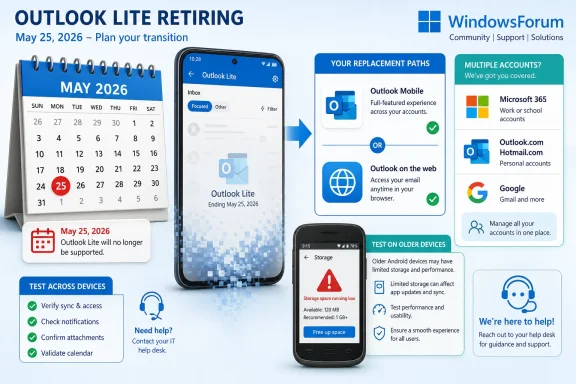
The clock now has two parts. The first already changed the shape of the migration: the October 6, 2025 block on new installs means Outlook Lite should no longer be treated as a valid deployment choice for fresh devices, rebuilds, replacements, or newly enrolled users. The second date is the one that will break routines: after May 25, 2026, Outlook Lite will no longer provide mailbox functionality.
That distinction matters for IT. A blocked new install is an operational warning; loss of mailbox functionality is a service interruption. If an organization waits until late May 2026 to identify holdouts, it is not planning a migration. It is scheduling a help desk event.
For enthusiasts and family tech support, the same logic applies at smaller scale. If a parent, contractor, field worker, or spare Android handset still depends on Outlook Lite, the app may look normal right up until the experience stops being useful. The replacement decision should be made while there is time to test sign-in, notifications, storage behavior, and account coverage.
That does not mean Outlook Mobile is automatically the right fit for every Outlook Lite user. The very existence of Outlook Lite tells us something about the user base: some people chose or received the lightweight client because the full app was not the desired experience. A good migration plan begins by asking why Outlook Lite was there in the first place.
For a modern Android phone with adequate storage and a user who already lives in Microsoft 365, Outlook Mobile is the cleanest migration path. It is the least surprising answer for corporate Microsoft accounts, Outlook.com users, and anyone who wants email tied closely to calendar and account management. If the user’s problem is simply that Outlook Lite is ending, Outlook Mobile solves the problem directly.
For an aging phone, the choice is less obvious. The right answer may still be Outlook Mobile, but only after testing. If the device struggles, webmail may be a better fallback for occasional access, especially where the user does not rely on push notifications or rapid triage.
This is where many organizations make a classic endpoint mistake. They treat mail migration as an account issue when it is also a device issue. The mailbox may be ready for Outlook Mobile, but the phone may not be ready for another full-featured client, especially if the device is already marginal.
For sysadmins, that means Outlook Lite holdouts should be inventoried by device condition, not merely by account type. The question is not just “Who is using Outlook Lite?” It is “Which Outlook Lite users are doing so because their device, network, or storage situation made the Lite app attractive?”
For home users, the same test is simpler. Install Outlook Mobile early, add the same account, and watch the basics for a few days. If the phone becomes sluggish, storage warnings appear, or notifications become unreliable, the answer may not be to keep forcing the app; it may be to change the workflow or replace the device.
That account mix changes the decision. Outlook Mobile may still be the best consolidated inbox, but users should verify every account they depend on before removing Outlook Lite from their routine. A migration that preserves the work mailbox but strands the personal account is not a success; it is just a quieter failure.
This is also where admins need to be careful about boundaries. A company can direct employees toward Outlook Mobile for work mail, but personal Google accounts on the same device may fall outside support policy. If users previously relied on Outlook Lite as a convenient bridge, the end of the app can expose assumptions nobody wrote down.
For power users, the choice comes down to whether consolidation is worth the complexity. Keeping everything in Outlook Mobile may be convenient, but separating work mail into Outlook Mobile and personal mail into another app or web session can reduce confusion. The retirement of Outlook Lite is a chance to reconsider whether one inbox should really be carrying every identity.
This is not an argument that web access should replace Outlook Mobile for everyone. Push notifications, offline behavior, attachment handling, and account switching all tend to matter more on a primary device. But for secondary devices and low-frequency users, web access can be the difference between a manageable retirement and an unnecessary hardware upgrade.
The web option is especially useful during transition. Users can test Outlook Mobile while keeping browser access as a fallback. That reduces the emotional pressure of the migration: the user is not being told, “Trust this new app immediately,” but rather, “Here are two working paths, and we will decide which one fits.”
In enterprise settings, the browser route also helps identify policy gaps. If users can reach mail through the web but not through the mobile app, the issue may be app configuration, device compliance, authentication, or support policy. That diagnostic value matters when the retirement deadline is fixed and the user population is messy.
That means organizations should not wait for a dramatic failure in 2026. The remediation window began when Outlook Lite stopped being a clean installation target. Any device that still has it installed is running on borrowed time, and any support documentation that still recommends it is stale.
For WindowsForum’s IT audience, this is a familiar Microsoft pattern. The company often gives admins a long runway, but the runway is only useful if someone actually inventories the dependency. The danger is not that Microsoft failed to provide a date; it is that Outlook Lite is small enough to be missed until a user complains.
The fix is mundane but important. Search device management records if available, ask regional support teams, update onboarding instructions, and remove Outlook Lite from any internal “approved apps” guidance. A retirement that affects a lightweight Android app can still become a visible support problem if it lands on frontline workers, shared phones, or users outside the normal corporate refresh cycle.
For a Google-heavy user who happened to use Outlook Lite as a convenient client, the decision deserves more thought. Outlook Mobile can still be appropriate, but the user should compare it with whatever Google-native or browser-based workflow they already understand. The goal is continuity, not brand loyalty.
For an older-device user, the first replacement to test should be the least disruptive one that actually works. That may be Outlook Mobile if the phone handles it well. It may be web access if the phone does not. If neither is acceptable, the retirement becomes part of a device replacement discussion rather than an app migration discussion.
For an organization, the best answer is often layered. Standard users move to Outlook Mobile. Edge cases get a documented browser fallback. Unsupported personal-account scenarios are clearly marked as user-managed. That sounds less tidy than a single mandate, but it is how migrations succeed in real environments.
That does not make every replacement painless. Users often experience consolidation as disruption, especially when the older tool was faster, simpler, or better matched to a narrow use case. Outlook Lite’s retirement is small compared with platform-wide changes, but it hits the same nerve: Microsoft’s preferred client is not always the client a specific user would have chosen.
The WindowsForum angle is that enthusiasts and admins tend to see both sides. Consolidation can improve security posture, supportability, and feature consistency. It can also strand users whose needs were modest and whose hardware was never meant to carry the full weight of a modern productivity stack.
That is why this story should not be covered as a mere app shutdown. It is a decision point. The question is how to preserve access without pretending every Outlook Lite user has the same device, account mix, or tolerance for change.
The remediation plan should begin with identification. If mobile device management data can show installed apps, find Outlook Lite directly. If not, support teams may need to ask users during routine tickets, audit setup guides, or check procurement and onboarding documents for references to the app.
The next step is classification. Users with supported Microsoft work accounts and capable devices should be moved to Outlook Mobile. Users with older phones should be tested rather than assumed. Users with mixed personal and work account setups should receive clear guidance on what the organization supports and what it does not.
Finally, support teams should rehearse the failure mode. After May 25, 2026, the issue is not a password reset, not a random sync glitch, and not a reason to reinstall Outlook Lite. The app will no longer provide mailbox functionality. A help desk script that says this plainly will save time when the first late holdouts arrive.
The best consumer playbook is simple: find the phone, check whether Outlook Lite is installed, identify the accounts in use, and test the replacement before May 25, 2026. If Outlook Mobile works well, move the user and be done. If it does not, create a browser bookmark or another clear path that the user can remember.
The mixed-account issue is again the trap. A user may say they use Outlook, but what they mean is that they open one app to read several accounts. Do not assume every address in that app is a Microsoft mailbox. Confirm the accounts before declaring the migration complete.
This is also a good moment to clean up old habits. If a phone carries accounts the user no longer needs, remove them during the migration. If recovery information is outdated, fix it. A forced app change is irritating, but it is also a rare moment when users will tolerate a little account hygiene because something already has to change.
Early testing beats elaborate planning because the unknowns are local. Does this specific phone run Outlook Mobile acceptably? Does this user understand account switching? Does the Google account they rely on still fit the chosen workflow? Does the organization support the resulting setup? None of those questions can be answered by reading the retirement notice alone.
This is where IT pros should resist the urge to over-document before touching devices. A small pilot across the actual user categories will reveal more than a perfect migration memo. Test a modern Android phone, an older handset, a mixed Microsoft-and-Google user, and a low-frequency mailbox user. The pattern will appear quickly.
The deadline also gives admins permission to be firm. Outlook Lite should not remain in support documentation as an exception, a workaround, or a “temporary” answer. Temporary answers have a way of surviving until the vendor turns them off.
Outlook Lite’s retirement will not be remembered as one of Microsoft’s great platform shifts, but it is exactly the kind of small deadline that exposes whether an organization understands its endpoints. The safest path is to move most users to Outlook Mobile, give older devices a tested web fallback, and treat mixed-account users as real migration cases rather than statistical noise. By May 25, 2026, the question should no longer be whether Outlook Lite is ending; it should be why anyone was still depending on it.
The useful question is no longer whether Outlook Lite is going away. It is which replacement makes the least disruptive sense for the person holding the phone, the admin supporting that phone, and the account mix sitting behind it. Microsoft’s official answer is Outlook Mobile, but the practical answer for WindowsForum readers is more conditional: migrate the default user to Outlook Mobile, steer fragile devices toward browser-based access where appropriate, and treat mixed Microsoft-and-Google users as a separate planning category rather than an afterthought.
 Microsoft Has Turned a Small Android App Into a Real Migration Deadline
Outlook Lite was never the center of Microsoft’s mail strategy, but its retirement matters because it served a very specific audience. It was the app for people who wanted Outlook access without the heavier footprint and broader feature set of the full mobile client. That audience tends to include older Android phones, constrained storage, slower networks, and users who just want mail to work without turning a handset into a full Microsoft 365 endpoint.The clock now has two parts. The first already changed the shape of the migration: the October 6, 2025 block on new installs means Outlook Lite should no longer be treated as a valid deployment choice for fresh devices, rebuilds, replacements, or newly enrolled users. The second date is the one that will break routines: after May 25, 2026, Outlook Lite will no longer provide mailbox functionality.
That distinction matters for IT. A blocked new install is an operational warning; loss of mailbox functionality is a service interruption. If an organization waits until late May 2026 to identify holdouts, it is not planning a migration. It is scheduling a help desk event.
For enthusiasts and family tech support, the same logic applies at smaller scale. If a parent, contractor, field worker, or spare Android handset still depends on Outlook Lite, the app may look normal right up until the experience stops being useful. The replacement decision should be made while there is time to test sign-in, notifications, storage behavior, and account coverage.
Outlook Mobile Is the Default Answer, Not the Only Answer
Microsoft’s official guidance is straightforward: switch to Outlook Mobile for continued email access. For many users, that is the correct answer. It keeps the user inside Microsoft’s supported mail client, preserves the Outlook brand experience, and reduces the chance that account behavior will diverge from the service Microsoft is actively maintaining.That does not mean Outlook Mobile is automatically the right fit for every Outlook Lite user. The very existence of Outlook Lite tells us something about the user base: some people chose or received the lightweight client because the full app was not the desired experience. A good migration plan begins by asking why Outlook Lite was there in the first place.
For a modern Android phone with adequate storage and a user who already lives in Microsoft 365, Outlook Mobile is the cleanest migration path. It is the least surprising answer for corporate Microsoft accounts, Outlook.com users, and anyone who wants email tied closely to calendar and account management. If the user’s problem is simply that Outlook Lite is ending, Outlook Mobile solves the problem directly.
For an aging phone, the choice is less obvious. The right answer may still be Outlook Mobile, but only after testing. If the device struggles, webmail may be a better fallback for occasional access, especially where the user does not rely on push notifications or rapid triage.
Device Age Is the First Sorting Hat
The most important practical split is not consumer versus business. It is whether the Android device can comfortably run the replacement workflow. A user on a current or reasonably capable phone should test Outlook Mobile first; a user on an old or storage-constrained device needs a more cautious plan.This is where many organizations make a classic endpoint mistake. They treat mail migration as an account issue when it is also a device issue. The mailbox may be ready for Outlook Mobile, but the phone may not be ready for another full-featured client, especially if the device is already marginal.
For sysadmins, that means Outlook Lite holdouts should be inventoried by device condition, not merely by account type. The question is not just “Who is using Outlook Lite?” It is “Which Outlook Lite users are doing so because their device, network, or storage situation made the Lite app attractive?”
For home users, the same test is simpler. Install Outlook Mobile early, add the same account, and watch the basics for a few days. If the phone becomes sluggish, storage warnings appear, or notifications become unreliable, the answer may not be to keep forcing the app; it may be to change the workflow or replace the device.
Mixed Microsoft and Google Accounts Need Their Own Plan
Outlook Lite supports consumer and work accounts from Microsoft and Google, which makes the migration more complicated than a simple Microsoft-to-Microsoft handoff. Many real-world users do not separate their identities cleanly. A single phone may carry a Microsoft 365 work mailbox, an Outlook.com personal account, and a Google account used for school, family, or small-business mail.That account mix changes the decision. Outlook Mobile may still be the best consolidated inbox, but users should verify every account they depend on before removing Outlook Lite from their routine. A migration that preserves the work mailbox but strands the personal account is not a success; it is just a quieter failure.
This is also where admins need to be careful about boundaries. A company can direct employees toward Outlook Mobile for work mail, but personal Google accounts on the same device may fall outside support policy. If users previously relied on Outlook Lite as a convenient bridge, the end of the app can expose assumptions nobody wrote down.
For power users, the choice comes down to whether consolidation is worth the complexity. Keeping everything in Outlook Mobile may be convenient, but separating work mail into Outlook Mobile and personal mail into another app or web session can reduce confusion. The retirement of Outlook Lite is a chance to reconsider whether one inbox should really be carrying every identity.
Web Access Is the Underestimated Escape Hatch
Webmail is not glamorous, and that is exactly why it is useful. For users who only occasionally check a mailbox from an older Android device, browser-based access may be enough. It avoids betting the whole workflow on a heavier app experience, and it gives users a supported way to reach mail when app installation, storage, or policy becomes a problem.This is not an argument that web access should replace Outlook Mobile for everyone. Push notifications, offline behavior, attachment handling, and account switching all tend to matter more on a primary device. But for secondary devices and low-frequency users, web access can be the difference between a manageable retirement and an unnecessary hardware upgrade.
The web option is especially useful during transition. Users can test Outlook Mobile while keeping browser access as a fallback. That reduces the emotional pressure of the migration: the user is not being told, “Trust this new app immediately,” but rather, “Here are two working paths, and we will decide which one fits.”
In enterprise settings, the browser route also helps identify policy gaps. If users can reach mail through the web but not through the mobile app, the issue may be app configuration, device compliance, authentication, or support policy. That diagnostic value matters when the retirement deadline is fixed and the user population is messy.
The October 2025 Install Block Was the Real Warning Shot
The May 25, 2026 mailbox cutoff is the headline date, but the October 6, 2025 block on new installs is the date that should have changed operational behavior. Once new installs are blocked, Outlook Lite stops being a viable answer to any new support request. Every replacement phone, factory reset, or new Android enrollment becomes a migration event.That means organizations should not wait for a dramatic failure in 2026. The remediation window began when Outlook Lite stopped being a clean installation target. Any device that still has it installed is running on borrowed time, and any support documentation that still recommends it is stale.
For WindowsForum’s IT audience, this is a familiar Microsoft pattern. The company often gives admins a long runway, but the runway is only useful if someone actually inventories the dependency. The danger is not that Microsoft failed to provide a date; it is that Outlook Lite is small enough to be missed until a user complains.
The fix is mundane but important. Search device management records if available, ask regional support teams, update onboarding instructions, and remove Outlook Lite from any internal “approved apps” guidance. A retirement that affects a lightweight Android app can still become a visible support problem if it lands on frontline workers, shared phones, or users outside the normal corporate refresh cycle.
The Right Replacement Depends on the User, Not the Brand
For the typical Microsoft account user on a capable phone, Outlook Mobile is the correct recommendation. It is the supported path Microsoft wants users to take, and it keeps the experience aligned with the broader Outlook ecosystem. That includes personal Microsoft accounts and work accounts where the organization already supports the mobile client.For a Google-heavy user who happened to use Outlook Lite as a convenient client, the decision deserves more thought. Outlook Mobile can still be appropriate, but the user should compare it with whatever Google-native or browser-based workflow they already understand. The goal is continuity, not brand loyalty.
For an older-device user, the first replacement to test should be the least disruptive one that actually works. That may be Outlook Mobile if the phone handles it well. It may be web access if the phone does not. If neither is acceptable, the retirement becomes part of a device replacement discussion rather than an app migration discussion.
For an organization, the best answer is often layered. Standard users move to Outlook Mobile. Edge cases get a documented browser fallback. Unsupported personal-account scenarios are clearly marked as user-managed. That sounds less tidy than a single mandate, but it is how migrations succeed in real environments.
Windows Mail’s Exit Made This Pattern Easier to Recognize
Outlook Lite’s retirement also fits a broader Microsoft direction that WindowsForum readers have been watching for years: fewer mail clients, more consolidation around the Outlook name, and a gradual narrowing of legacy paths. The details differ across Windows, Android, consumer accounts, and Microsoft 365, but the strategic shape is familiar. Microsoft does not want to maintain every historic mail experience forever.That does not make every replacement painless. Users often experience consolidation as disruption, especially when the older tool was faster, simpler, or better matched to a narrow use case. Outlook Lite’s retirement is small compared with platform-wide changes, but it hits the same nerve: Microsoft’s preferred client is not always the client a specific user would have chosen.
The WindowsForum angle is that enthusiasts and admins tend to see both sides. Consolidation can improve security posture, supportability, and feature consistency. It can also strand users whose needs were modest and whose hardware was never meant to carry the full weight of a modern productivity stack.
That is why this story should not be covered as a mere app shutdown. It is a decision point. The question is how to preserve access without pretending every Outlook Lite user has the same device, account mix, or tolerance for change.
Admins Should Treat Holdouts as a Support Population
In a managed environment, the riskiest Outlook Lite users are not necessarily executives or heavy Microsoft 365 users. They may be field staff, part-time workers, contractors, regional teams, or anyone using an older Android phone outside the main refresh spotlight. Those are precisely the users least likely to read a retirement notice and most likely to call when mail stops working.The remediation plan should begin with identification. If mobile device management data can show installed apps, find Outlook Lite directly. If not, support teams may need to ask users during routine tickets, audit setup guides, or check procurement and onboarding documents for references to the app.
The next step is classification. Users with supported Microsoft work accounts and capable devices should be moved to Outlook Mobile. Users with older phones should be tested rather than assumed. Users with mixed personal and work account setups should receive clear guidance on what the organization supports and what it does not.
Finally, support teams should rehearse the failure mode. After May 25, 2026, the issue is not a password reset, not a random sync glitch, and not a reason to reinstall Outlook Lite. The app will no longer provide mailbox functionality. A help desk script that says this plainly will save time when the first late holdouts arrive.
Enthusiasts Should Migrate the People They Support Before the Deadline Finds Them
For WindowsForum readers who serve as unofficial IT departments for families and small businesses, Outlook Lite’s retirement is exactly the kind of change that becomes annoying because it looks too small to matter. Nobody schedules a weekend around replacing a lightweight Android mail app. Then a mailbox stops working, and the person who “knows computers” gets the call.The best consumer playbook is simple: find the phone, check whether Outlook Lite is installed, identify the accounts in use, and test the replacement before May 25, 2026. If Outlook Mobile works well, move the user and be done. If it does not, create a browser bookmark or another clear path that the user can remember.
The mixed-account issue is again the trap. A user may say they use Outlook, but what they mean is that they open one app to read several accounts. Do not assume every address in that app is a Microsoft mailbox. Confirm the accounts before declaring the migration complete.
This is also a good moment to clean up old habits. If a phone carries accounts the user no longer needs, remove them during the migration. If recovery information is outdated, fix it. A forced app change is irritating, but it is also a rare moment when users will tolerate a little account hygiene because something already has to change.
The May Deadline Rewards Early Testing Over Perfect Planning
The facts here are thin but sufficient. Outlook Lite will stop providing mailbox functionality after May 25, 2026. Microsoft recommends Outlook Mobile. The app has supported Microsoft and Google account types. New installs were blocked on October 6, 2025. From those facts, the operational conclusion is obvious: do not wait.Early testing beats elaborate planning because the unknowns are local. Does this specific phone run Outlook Mobile acceptably? Does this user understand account switching? Does the Google account they rely on still fit the chosen workflow? Does the organization support the resulting setup? None of those questions can be answered by reading the retirement notice alone.
This is where IT pros should resist the urge to over-document before touching devices. A small pilot across the actual user categories will reveal more than a perfect migration memo. Test a modern Android phone, an older handset, a mixed Microsoft-and-Google user, and a low-frequency mailbox user. The pattern will appear quickly.
The deadline also gives admins permission to be firm. Outlook Lite should not remain in support documentation as an exception, a workaround, or a “temporary” answer. Temporary answers have a way of surviving until the vendor turns them off.
The Replacement Matrix Outlook Lite Users Actually Need
By this point, the retirement story is less about Microsoft’s announcement and more about matching users to the least risky replacement. The correct answer depends on how heavily the user relies on mobile mail, what kind of phone they have, and whether Outlook Lite was quietly handling more than one account identity.- Users with capable Android phones and Microsoft 365, Exchange Online, Outlook.com, Hotmail, Live, or MSN accounts should test Outlook Mobile first and make it the primary replacement if sign-in, notifications, and daily performance are acceptable.
- Users with older or storage-constrained Android phones should test Outlook Mobile early but keep browser-based mail access ready if the full app is too heavy for the device.
- Users with both Microsoft and Google accounts should verify every account in the replacement workflow before uninstalling or abandoning Outlook Lite.
- Organizations should treat the October 6, 2025 new-install block as the point where Outlook Lite stopped being an acceptable support recommendation.
- Help desks should prepare users for the specific May 25, 2026 impact: Outlook Lite will no longer provide mailbox functionality, even if a user still has the app on a phone.
Outlook Lite’s retirement will not be remembered as one of Microsoft’s great platform shifts, but it is exactly the kind of small deadline that exposes whether an organization understands its endpoints. The safest path is to move most users to Outlook Mobile, give older devices a tested web fallback, and treat mixed-account users as real migration cases rather than statistical noise. By May 25, 2026, the question should no longer be whether Outlook Lite is ending; it should be why anyone was still depending on it.
References
- Primary source: support.microsoft.com
Get help with Outlook Lite for Android | Microsoft Support
Get help with Outlook Lite for Androidsupport.microsoft.com - Independent coverage: windowscentral.com
Microsoft is shutting down Outlook Lite on Android and pushing users to the full Outlook app — a move that raises questions about Microsoft’s long‑term mobile strategy | Windows Central
Microsoft locks in an end date for Outlook Lite, after which time it will become useless.www.windowscentral.com - Independent coverage: afterdawn.com
Microsoft discontinues Outlook Lite email app - AfterDawn
Microsoft has announced the phase-out of the Outlook Lite app for Android, which will end on May 25, 2026. Users must switch to the full Outlook app, which offers more features.www.afterdawn.com
- Independent coverage: techrepublic.com
Microsoft to Retire Outlook Lite, Impacting Millions of Android Users
Microsoft will soon shut down Outlook Lite, forcing Android users to switch to Outlook Mobile after months of phased shutdowns.www.techrepublic.com
- Independent coverage: business-standard.com
Microsoft to retire Outlook Lite app next month: What it means for users | Tech News - Business Standard
Microsoft Outlook Lite App Shutdown: Microsoft will shut down Outlook Lite on May 25, 2026. After that date, the app will no longer work, pushing users to switch to Outlook Mobile for full features and continued accesswww.business-standard.com
- Independent coverage: windowslatest.com
Microsoft is removing 17mb Outlook Lite for Android, as it just wants to maintain one codebase
Microsoft confirmed it'll no longer be possible to download Outlook Lite on Android starting October 6, 2025. www.windowslatest.com
- Independent coverage: thurrott.com
Microsoft's Outlook Lite Android App Will Stop Working on May 25
Microsoft’s Outlook Lite Android app will be fully retired on May 25, 2026, and the company is inviting users to upgrade to its main Outlook Mobile app.www.thurrott.com - Independent coverage: office-watch.com
Outlook Lite for Android ends on May 25: What to Do Before It Stops Working
Microsoft is pulling the plug on Outlook Lite for Android on May 25, 2026. After that date, the app will open but it will not connect to any mailbox, meaning emoffice-watch.com
- Independent coverage: gigazine.net
Outlook Lite will officially be discontinued in May 2026. - GIGAZINE
It has been announced that Outlook Lite, the lightweight email app for Android, which had been previously discontinued, will be completely discontinued on May 25, 2026. MC1276508 - Complete retirement of the Outlook Lite app | Microsoft 365 Message Center Archive...gigazine.net - Independent coverage: windowsreport.com

Outlook Lite Shutdown Confirmed as Microsoft Pushes Users to Outlook Mobile
Microsoft will retire Outlook Lite on May 25, 2026, disabling mailbox access and pushing users to Outlook Mobile.
windowsreport.com
