

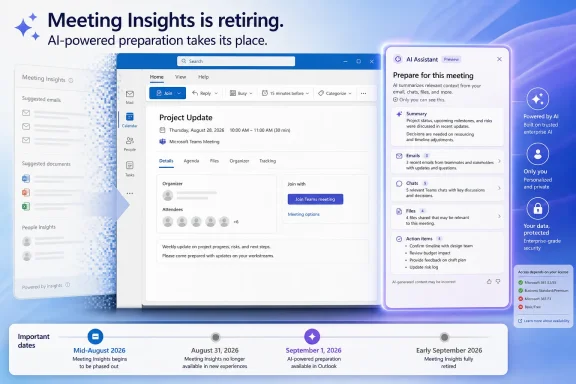
Microsoft will retire Outlook Meeting Insights beginning in mid-August 2026, with removal expected to finish by early September, replacing the old file-and-email suggestion panel with Copilot’s “Prepare for this meeting” experience for Microsoft 365 Copilot license holders. The immediate consequence is simple: organizations that relied on the existing, non-generative feature but do not assign Copilot licenses will lose meeting-preparation insights altogether.
The change, detailed in Microsoft 365 Message Center post MC1430531 and first reported by Windows Latest, reaches Outlook on the web, new Outlook for Windows, Outlook for Mac, Outlook Mobile and Teams. Microsoft’s stated rationale is that Copilot can deliver a more context-aware preparation experience by summarizing material, tasks and documents a user can access.
That wording matters. Meeting Insights was a familiar, if often misunderstood, utility; Copilot’s replacement is a paid AI feature with different outputs, limitations and support considerations.
Meeting Insights surfaced emails and files it believed were relevant to a scheduled meeting directly inside the meeting’s details. The items were not automatically attached to the invitation or sent to attendees, but the placement made that distinction easy to miss—particularly when a meeting involved external guests or sensitive internal material.
As Windows Latest noted, the visual design generated more than a few moments of panic for users who saw confidential-looking documents listed alongside an appointment and briefly assumed Outlook had disclosed them. The feature’s purpose was benign: bring relevant material together before a meeting. Its presentation, however, frequently forced users to stop and verify whether an apparent attachment was merely a private suggestion.
Microsoft’s retirement notice confirms the essential behavior that will disappear: users will no longer see relevant files and emails surfaced by Meeting Insights in the meeting event. This is not a migration where the existing panel gets a new Copilot icon. It is a removal of the old experience.
For help desks, that distinction may be the most valuable part of the rollout. A confusing calendar surface that could resemble a sharing event is going away, and support documentation should say so plainly.
But the replacement is gated by a Microsoft 365 Copilot license. That produces a sharp split after the rollout completes: licensed workers receive the new AI-powered meeting preparation option, while unlicensed workers lose Meeting Insights and do not receive a comparable built-in alternative.
Microsoft’s own documentation also describes material limits that IT departments should not bury in a Copilot rollout deck. Copilot in Outlook is generally tied to the user’s primary mailbox, not archive, group, shared or delegate mailboxes. It cannot access S/MIME or Double Key Encryption-protected email, and its output can be thin or generic when there is little related content available for the meeting.
The company also reminds users to review and verify generated results. That warning is routine for generative AI, but it matters more here because the feature may summarize the same work communications that Meeting Insights merely displayed. A list of source items lets a user inspect each item; a generated summary adds an interpretation layer between the material and the employee.
That should be reassuring, but it does not eliminate governance work. Permission trimming protects the access boundary; it does not guarantee a useful or accurate summary, nor does it solve oversharing that already exists in SharePoint, OneDrive, Teams or Exchange.
The old feature’s biggest problem was often perceived disclosure. The new feature shifts the attention to generated interpretation and licensing. That is a different risk profile, not the absence of one.
For security and compliance teams, the sensible response is to review the Copilot configuration and information-governance posture already in place. Organizations should confirm which users have Microsoft 365 Copilot licenses, how sensitivity labels and encryption affect supported content, and whether employees understand that Copilot summaries are not authoritative meeting records.
Microsoft lists no specific compliance action for MC1430531. Still, a change involving email, Teams chats, documents and AI-generated summaries deserves more than a passive “no action required” reading in regulated or tightly controlled environments.
Microsoft does not list classic Outlook for Windows among the named platforms affected by the replacement announcement. Administrators with mixed Outlook estates should therefore validate the actual behavior in their tenant rather than assume parity between classic Outlook, new Outlook and Outlook on the web. Microsoft’s recent Copilot support work has not always reached every Outlook client at the same time or with the same license conditions.
The operational checklist is modest, but it should happen before mid-August:
For Windows users, the immediate UI change lands most visibly in new Outlook for Windows and Outlook on the web. For administrators, however, it is another reminder that Microsoft 365 feature parity increasingly follows licensing and service rollout decisions rather than a fixed client-version model.
Meeting Insights had a real design flaw: it could make private suggestions look alarmingly like public attachments. Its retirement removes that particular source of confusion. By early September, the question will be whether Copilot’s generated preparation briefs prove useful enough to justify the license divide—or whether many users simply find that their meeting invite has become quieter, with no replacement at all.
The change, detailed in Microsoft 365 Message Center post MC1430531 and first reported by Windows Latest, reaches Outlook on the web, new Outlook for Windows, Outlook for Mac, Outlook Mobile and Teams. Microsoft’s stated rationale is that Copilot can deliver a more context-aware preparation experience by summarizing material, tasks and documents a user can access.
That wording matters. Meeting Insights was a familiar, if often misunderstood, utility; Copilot’s replacement is a paid AI feature with different outputs, limitations and support considerations.
 A Confusing Outlook Panel Finally Leaves the Calendar
Meeting Insights surfaced emails and files it believed were relevant to a scheduled meeting directly inside the meeting’s details. The items were not automatically attached to the invitation or sent to attendees, but the placement made that distinction easy to miss—particularly when a meeting involved external guests or sensitive internal material.As Windows Latest noted, the visual design generated more than a few moments of panic for users who saw confidential-looking documents listed alongside an appointment and briefly assumed Outlook had disclosed them. The feature’s purpose was benign: bring relevant material together before a meeting. Its presentation, however, frequently forced users to stop and verify whether an apparent attachment was merely a private suggestion.
Microsoft’s retirement notice confirms the essential behavior that will disappear: users will no longer see relevant files and emails surfaced by Meeting Insights in the meeting event. This is not a migration where the existing panel gets a new Copilot icon. It is a removal of the old experience.
For help desks, that distinction may be the most valuable part of the rollout. A confusing calendar surface that could resemble a sharing event is going away, and support documentation should say so plainly.
Copilot Is Not a Like-for-Like Replacement
Microsoft is positioning “Prepare for this meeting” as an upgrade rather than a direct substitute. Instead of simply listing related material, Copilot can gather and summarize meeting context, identify action items, and condense pre-reads plus related email and chat activity. Microsoft’s Outlook support documentation describes it as an LLM-backed feature intended to help a participant arrive prepared rather than manually assemble context.But the replacement is gated by a Microsoft 365 Copilot license. That produces a sharp split after the rollout completes: licensed workers receive the new AI-powered meeting preparation option, while unlicensed workers lose Meeting Insights and do not receive a comparable built-in alternative.
Microsoft’s own documentation also describes material limits that IT departments should not bury in a Copilot rollout deck. Copilot in Outlook is generally tied to the user’s primary mailbox, not archive, group, shared or delegate mailboxes. It cannot access S/MIME or Double Key Encryption-protected email, and its output can be thin or generic when there is little related content available for the meeting.
The company also reminds users to review and verify generated results. That warning is routine for generative AI, but it matters more here because the feature may summarize the same work communications that Meeting Insights merely displayed. A list of source items lets a user inspect each item; a generated summary adds an interpretation layer between the material and the employee.
The Permission Boundary Remains, but the Workflow Changes
Microsoft says the Copilot preparation experience remains permission-trimmed: it can only use content to which the individual user already has access. In practical terms, the retirement does not create a new sharing mechanism or grant attendees access to documents simply because those documents are relevant to a meeting.That should be reassuring, but it does not eliminate governance work. Permission trimming protects the access boundary; it does not guarantee a useful or accurate summary, nor does it solve oversharing that already exists in SharePoint, OneDrive, Teams or Exchange.
The old feature’s biggest problem was often perceived disclosure. The new feature shifts the attention to generated interpretation and licensing. That is a different risk profile, not the absence of one.
For security and compliance teams, the sensible response is to review the Copilot configuration and information-governance posture already in place. Organizations should confirm which users have Microsoft 365 Copilot licenses, how sensitivity labels and encryption affect supported content, and whether employees understand that Copilot summaries are not authoritative meeting records.
Microsoft lists no specific compliance action for MC1430531. Still, a change involving email, Teams chats, documents and AI-generated summaries deserves more than a passive “no action required” reading in regulated or tightly controlled environments.
The Rollout Window Is Short Enough to Catch Users Off Guard
The retirement starts in mid-August 2026 and is expected to complete by early September across worldwide, GCC and GCC High environments. That is a notably short runway for a feature that may be visible in day-to-day calendar workflows, even if it was not universally popular.Microsoft does not list classic Outlook for Windows among the named platforms affected by the replacement announcement. Administrators with mixed Outlook estates should therefore validate the actual behavior in their tenant rather than assume parity between classic Outlook, new Outlook and Outlook on the web. Microsoft’s recent Copilot support work has not always reached every Outlook client at the same time or with the same license conditions.
The operational checklist is modest, but it should happen before mid-August:
- Help desk teams should be told that the old Meeting Insights panel will disappear and that its removal does not mean files have been deleted or shared.
- Internal Outlook documentation should be updated to remove screenshots and instructions referring to Meeting Insights.
- Copilot license owners should be shown where “Prepare for this meeting” appears in a calendar item and what it can—and cannot—summarize.
- Organizations without Microsoft 365 Copilot licenses should prepare employees for the loss of the previous insight surface rather than describe Copilot as an available replacement.
Outlook’s AI Strategy Keeps Replacing Discrete Tools
The change fits a broader Microsoft pattern: retire narrower productivity features and move their purpose into Copilot. Outlook already offers Copilot tools for email summaries, drafting, coaching, inbox prioritization, rule creation and calendar-related tasks. Meeting preparation extends that strategy into the calendar, where the most useful context typically lives across Exchange, Teams and Microsoft 365 files.For Windows users, the immediate UI change lands most visibly in new Outlook for Windows and Outlook on the web. For administrators, however, it is another reminder that Microsoft 365 feature parity increasingly follows licensing and service rollout decisions rather than a fixed client-version model.
Meeting Insights had a real design flaw: it could make private suggestions look alarmingly like public attachments. Its retirement removes that particular source of confusion. By early September, the question will be whether Copilot’s generated preparation briefs prove useful enough to justify the license divide—or whether many users simply find that their meeting invite has become quieter, with no replacement at all.
References
- Primary source: Windows Latest
Published: 2026-07-17T23:23:27+00:00
Microsoft is replacing Outlook's Meeting Insights with Copilot
Microsoft has confirmed that it is retiring Outlook's Meeting Insights feature and replacing it with Microsoft 365 Copilot. www.windowslatest.com
- Official source: support.microsoft.com
Copilot buttons are missing in classic Outlook for Windows | Microsoft Support
This article describes the issue regarding Copilit buttons missing in classic Outlook for Windowssupport.microsoft.com - Related coverage: neowin.net
Microsoft is killing an Outlook feature and replacing it with Copilot - Neowin
Another familiar Outlook feature is disappearing soon, but its replacement comes with a catch that not every Microsoft 365 user may like. www.neowin.net
- Official source: learn.microsoft.com
- Official source: microsoft.com
</rdf:Alt> </dc:title> <dc:description> <rdf:Alt> <rdf:li xml:lang="x-default"/> </rdf:Alt> </dc:description> <dc:creator> <rdf:Seq> <rdf:li>Lukas V
</rdf:Alt> </dc:description> <dc:creator> <rdf:Seq> <rdf:li>Lukas Velushwww.microsoft.com
- Official source: techcommunity.microsoft.com