

Microsoft added Roadmap ID 567316 on July 6, 2026, saying Outlook for Windows and Outlook on the web will warn users when they reply to an older message rather than the newest email in a conversation. The feature is marked “in development,” aimed at worldwide Microsoft 365 tenants, and scheduled for general availability in August 2026. It sounds like a tiny interface nudge. In practice, it is Microsoft acknowledging one of the most expensive failure modes in modern email: the reply that arrives confidently, politely, and completely out of date.
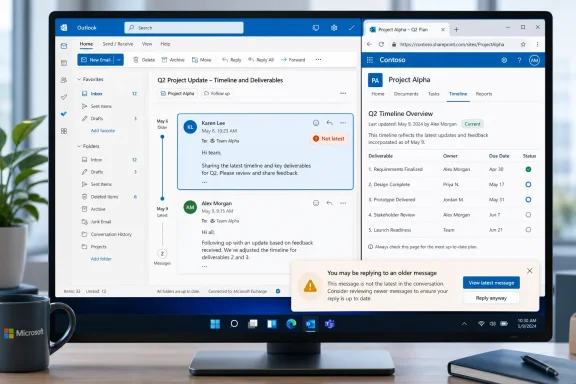
The new alert is simple enough. If a user opens an email conversation, selects reply on a message that is not the latest item in that thread, and begins responding, Outlook will display a notification indicating that the user may not be replying to the most recent message. Microsoft’s Roadmap entry frames this as a confidence feature: users can be more certain they are responding to the right message.
That framing is correct, but incomplete. This is not just a quality-of-life tweak for distracted office workers. It is a small repair to the trust contract between Outlook and the people who use it all day, especially now that Microsoft is pushing the new Outlook for Windows as the default future of mail on Windows.
Email conversations look linear until they are not. A busy thread can contain overlapping replies, forwarded fragments, mobile responses, automatic signatures, delayed delivery, and messages that arrive while someone is already composing a response. The interface calls it a “conversation,” but the user often experiences it as a stack of partially synchronized claims.
The failure mode Microsoft is targeting is painfully familiar. You open a thread, answer the visible message, hit send, and only later notice that someone else had already resolved the issue, changed the ask, escalated the request, or contradicted the premise. In a low-stakes thread, that produces mild embarrassment. In a support case, legal review, sales negotiation, incident response, or executive escalation, it can produce real operational damage.
Classic Outlook users have long recognized variants of this warning behavior, and Microsoft Q&A threads show users asking how to enable the “not responding to the most recent message” alert in the new Outlook. That matters because the Roadmap item is not merely inventing a novel feature. It is closing a perceived parity gap between the old Outlook muscle memory and Microsoft’s newer, web-powered client.
The phrasing in the Roadmap entry is careful: “Outlook for Windows and web.” The hashtag attached to the entry points specifically at new Outlook for Windows, but the platform listed is Web. That is a tell. New Outlook for Windows and Outlook on the web share far more architecture than classic Outlook ever did with the browser version, which means features like this are increasingly born as service-side experiences rather than old-school desktop behaviors.
The new Outlook debate often gets trapped in abstractions: native versus web, modern versus legacy, Copilot-ready versus feature-complete. But the practical resistance from users usually forms around smaller moments. Does the app open the message I clicked? Does it preserve the behavior my workflow depends on? Does it warn me before I make an avoidable mistake?
That is why this Roadmap item lands with more weight than its modest description suggests. Microsoft can publish long explanations of the new Outlook’s architecture, but users judge a mail client in seconds. If the app prevents an outdated reply at the exact moment the mistake is about to happen, it earns a little trust.
The opposite is also true. When the new Outlook lacks familiar protections, users do not interpret that as a missing checkbox buried in a migration matrix. They interpret it as Microsoft replacing a mature work tool with something less aware of real office life. For an application that is supposed to sit at the center of professional communication, that perception is dangerous.
That problem is amplified by modern work patterns. People reply from phones between meetings, from web clients in borrowed browsers, from desktop Outlook during focused work, and from shared mailboxes or delegated accounts in team environments. The thread is no longer a neat chain; it is a collision of timelines.
Outlook’s warning is an admission that the client cannot simply assume the user understands the chronology of the thread. The interface has to intervene when the action and the state of the conversation diverge. This is exactly the kind of contextual guardrail that email clients should have been prioritizing for years.
There is a subtle design challenge here. If the alert is too quiet, users will miss it and the feature becomes cosmetic. If it is too aggressive, it becomes another workplace pop-up to dismiss reflexively. Microsoft’s success will depend less on the existence of the warning than on whether it appears at the right time, with language that is clear enough to interrupt without sounding accusatory.
A stale reply can revive a decision that was already closed. It can send outdated instructions to a customer. It can confuse a help desk queue. It can make a manager appear to approve a plan that has already changed. These are not spectacular cybersecurity failures, but they are the kind of everyday process failures that create audit noise and human cleanup work.
The feature also intersects with the broader shift to new Outlook deployment planning. Microsoft’s own materials have made clear that the new Outlook is the replacement for Mail and Calendar, while classic Outlook remains part of the enterprise landscape for organizations that still need its deeper feature set. Every Roadmap item that closes a behavioral gap gives IT another data point when deciding who can move, who must wait, and which groups need training.
Still, admins should not overread the Roadmap entry. It lists worldwide standard multi-tenant cloud availability and General Availability in August 2026, but it does not describe admin controls, tenant-level policy switches, mobile support, shared mailbox behavior, or whether the notification can be customized. Those details matter in regulated environments where warnings can become part of workflow expectations.
The entry’s release ring is General Availability, not Targeted Release, and the cloud instance is Worldwide standard multi-tenant. That suggests Microsoft intends the feature for the broad commercial Microsoft 365 population rather than a narrow preview audience. But the client mix still matters. Outlook on the web can receive service-side changes quickly, while new Outlook for Windows may depend on app updates, account type, and feature flag timing.
The platform labeling is also worth watching. The Roadmap lists “Web,” while the description says “Outlook for Windows and web” and tags new Outlook for Windows. That mismatch is not necessarily alarming; Microsoft’s Roadmap taxonomy often compresses experiences that share web foundations. But it is exactly the kind of ambiguity admins should track before promising end users a specific behavior.
For WindowsForum readers, the practical advice is simple: treat August 2026 as the start of availability, not the end of deployment. If this feature matters to a workflow, test it in the actual client and tenant configuration your users rely on.
The downside is that users compare the new client not against an abstract web ideal, but against decades of classic Outlook behavior. That comparison is unforgiving. Classic Outlook accumulated a huge amount of institutional knowledge in the form of prompts, warnings, rules, offline behaviors, message handling quirks, and enterprise controls. Some of those were inelegant, but many existed because real users had already made real mistakes.
The stale-reply notification is a good example of the kind of feature Microsoft must prioritize if it wants the new Outlook to feel less like a replacement imposed from above and more like a tool maturing under pressure. Not every missing feature is equally important. But features that prevent users from sending the wrong message at the wrong time punch above their weight.
This is also where Microsoft’s Copilot-era messaging meets a more grounded reality. The company can layer AI summaries, drafting help, and meeting intelligence onto Outlook, but the baseline mail client still has to protect users from obvious context errors. A smart assistant is less impressive if the compose window lets a user answer yesterday’s version of the conversation without a nudge.
The simplest implementation would compare the message being replied to with the latest message in the conversation as Outlook understands it. That would catch the common case where a newer reply has arrived in the same thread. But enterprise users will care about the messy cases: shared mailboxes where multiple agents respond, distribution lists where users see different subsets of replies, and conversations split by external systems that rewrite headers.
There is also the question of timing. If a new message arrives while a user is already composing, does the warning appear immediately, only when the user hits send, or both? A warning at compose time helps avoid wasted work. A warning at send time catches late-arriving replies. The best version would probably do both without nagging the user into ignoring it.
Microsoft’s wording says Outlook “will now display a notification” when the message being replied to is not the latest. That leaves room for implementation details, and those details will determine whether the feature becomes beloved or merely present.
That is why a stale-reply warning matters more in Outlook than it would in a casual chat app. Email crosses tenants, companies, legal domains, and time zones. It includes people who are not in your collaboration platform. It gets archived, searched, exported, audited, forwarded, and quoted months later.
In that environment, the user interface has an ethical job: it should make the current state of a conversation visible before the user acts. Microsoft is not solving email overload with Roadmap ID 567316. It is solving one sharp corner of overload, and that is often how mature productivity software improves.
The feature also recognizes a human truth. People do not always reply from the top of a thread because they are careless. They do it because Outlook showed them a message, search landed them in the middle, a notification opened a particular item, or they resumed a draft created before the latest reply arrived. Good software distinguishes between negligence and predictable workflow drift.
The new alert is simple enough. If a user opens an email conversation, selects reply on a message that is not the latest item in that thread, and begins responding, Outlook will display a notification indicating that the user may not be replying to the most recent message. Microsoft’s Roadmap entry frames this as a confidence feature: users can be more certain they are responding to the right message.
That framing is correct, but incomplete. This is not just a quality-of-life tweak for distracted office workers. It is a small repair to the trust contract between Outlook and the people who use it all day, especially now that Microsoft is pushing the new Outlook for Windows as the default future of mail on Windows.
 Microsoft Is Fixing the Moment Email Quietly Betrays You
Email conversations look linear until they are not. A busy thread can contain overlapping replies, forwarded fragments, mobile responses, automatic signatures, delayed delivery, and messages that arrive while someone is already composing a response. The interface calls it a “conversation,” but the user often experiences it as a stack of partially synchronized claims.The failure mode Microsoft is targeting is painfully familiar. You open a thread, answer the visible message, hit send, and only later notice that someone else had already resolved the issue, changed the ask, escalated the request, or contradicted the premise. In a low-stakes thread, that produces mild embarrassment. In a support case, legal review, sales negotiation, incident response, or executive escalation, it can produce real operational damage.
Classic Outlook users have long recognized variants of this warning behavior, and Microsoft Q&A threads show users asking how to enable the “not responding to the most recent message” alert in the new Outlook. That matters because the Roadmap item is not merely inventing a novel feature. It is closing a perceived parity gap between the old Outlook muscle memory and Microsoft’s newer, web-powered client.
The phrasing in the Roadmap entry is careful: “Outlook for Windows and web.” The hashtag attached to the entry points specifically at new Outlook for Windows, but the platform listed is Web. That is a tell. New Outlook for Windows and Outlook on the web share far more architecture than classic Outlook ever did with the browser version, which means features like this are increasingly born as service-side experiences rather than old-school desktop behaviors.
The New Outlook Needs Small Trust Wins More Than Big Brand Claims
Microsoft has spent the past several years trying to normalize the new Outlook for Windows as the replacement path for Windows Mail, Calendar, and eventually many everyday uses of classic Outlook. Microsoft’s support documentation says support for Windows Mail, Calendar, and People ended on December 31, 2024, and identifies the new Outlook for Windows as the supported replacement. That transition has not been frictionless.The new Outlook debate often gets trapped in abstractions: native versus web, modern versus legacy, Copilot-ready versus feature-complete. But the practical resistance from users usually forms around smaller moments. Does the app open the message I clicked? Does it preserve the behavior my workflow depends on? Does it warn me before I make an avoidable mistake?
That is why this Roadmap item lands with more weight than its modest description suggests. Microsoft can publish long explanations of the new Outlook’s architecture, but users judge a mail client in seconds. If the app prevents an outdated reply at the exact moment the mistake is about to happen, it earns a little trust.
The opposite is also true. When the new Outlook lacks familiar protections, users do not interpret that as a missing checkbox buried in a migration matrix. They interpret it as Microsoft replacing a mature work tool with something less aware of real office life. For an application that is supposed to sit at the center of professional communication, that perception is dangerous.
Conversation View Became the Default Battlefield
Threaded email was supposed to solve inbox overload by grouping related messages together. Instead, it moved the problem from the inbox list into the conversation itself. A thread can now hide the most important distinction in the whole exchange: which message is the current state of reality.That problem is amplified by modern work patterns. People reply from phones between meetings, from web clients in borrowed browsers, from desktop Outlook during focused work, and from shared mailboxes or delegated accounts in team environments. The thread is no longer a neat chain; it is a collision of timelines.
Outlook’s warning is an admission that the client cannot simply assume the user understands the chronology of the thread. The interface has to intervene when the action and the state of the conversation diverge. This is exactly the kind of contextual guardrail that email clients should have been prioritizing for years.
There is a subtle design challenge here. If the alert is too quiet, users will miss it and the feature becomes cosmetic. If it is too aggressive, it becomes another workplace pop-up to dismiss reflexively. Microsoft’s success will depend less on the existence of the warning than on whether it appears at the right time, with language that is clear enough to interrupt without sounding accusatory.
For IT Admins, This Is a Governance Feature Wearing a Usability Hat
Administrators may be tempted to file this under user-interface polish. They should resist that instinct. In organizations where email remains the system of record for approvals, commitments, exceptions, and customer communication, replying to the wrong point in a thread is not just a personal productivity issue.A stale reply can revive a decision that was already closed. It can send outdated instructions to a customer. It can confuse a help desk queue. It can make a manager appear to approve a plan that has already changed. These are not spectacular cybersecurity failures, but they are the kind of everyday process failures that create audit noise and human cleanup work.
The feature also intersects with the broader shift to new Outlook deployment planning. Microsoft’s own materials have made clear that the new Outlook is the replacement for Mail and Calendar, while classic Outlook remains part of the enterprise landscape for organizations that still need its deeper feature set. Every Roadmap item that closes a behavioral gap gives IT another data point when deciding who can move, who must wait, and which groups need training.
Still, admins should not overread the Roadmap entry. It lists worldwide standard multi-tenant cloud availability and General Availability in August 2026, but it does not describe admin controls, tenant-level policy switches, mobile support, shared mailbox behavior, or whether the notification can be customized. Those details matter in regulated environments where warnings can become part of workflow expectations.
The August 2026 Date Is a Promise With Microsoft 365 Caveats
The Roadmap says General Availability is planned for August 2026. In Microsoft 365 terms, that is not the same as every user seeing the feature at 9 a.m. local time on August 1. Roadmap dates are planning signals, and cloud features often roll out gradually across tenants, rings, regions, and client builds.The entry’s release ring is General Availability, not Targeted Release, and the cloud instance is Worldwide standard multi-tenant. That suggests Microsoft intends the feature for the broad commercial Microsoft 365 population rather than a narrow preview audience. But the client mix still matters. Outlook on the web can receive service-side changes quickly, while new Outlook for Windows may depend on app updates, account type, and feature flag timing.
The platform labeling is also worth watching. The Roadmap lists “Web,” while the description says “Outlook for Windows and web” and tags new Outlook for Windows. That mismatch is not necessarily alarming; Microsoft’s Roadmap taxonomy often compresses experiences that share web foundations. But it is exactly the kind of ambiguity admins should track before promising end users a specific behavior.
For WindowsForum readers, the practical advice is simple: treat August 2026 as the start of availability, not the end of deployment. If this feature matters to a workflow, test it in the actual client and tenant configuration your users rely on.
A Small Warning Says Something Larger About Microsoft’s Outlook Strategy
Microsoft’s Outlook strategy is converging around a cloud-connected experience that can ship features across web and Windows with less duplication. The upside is speed. A feature like this can appear in Outlook on the web and new Outlook for Windows without waiting for a traditional desktop release cycle.The downside is that users compare the new client not against an abstract web ideal, but against decades of classic Outlook behavior. That comparison is unforgiving. Classic Outlook accumulated a huge amount of institutional knowledge in the form of prompts, warnings, rules, offline behaviors, message handling quirks, and enterprise controls. Some of those were inelegant, but many existed because real users had already made real mistakes.
The stale-reply notification is a good example of the kind of feature Microsoft must prioritize if it wants the new Outlook to feel less like a replacement imposed from above and more like a tool maturing under pressure. Not every missing feature is equally important. But features that prevent users from sending the wrong message at the wrong time punch above their weight.
This is also where Microsoft’s Copilot-era messaging meets a more grounded reality. The company can layer AI summaries, drafting help, and meeting intelligence onto Outlook, but the baseline mail client still has to protect users from obvious context errors. A smart assistant is less impressive if the compose window lets a user answer yesterday’s version of the conversation without a nudge.
The Real Test Is Whether the Alert Understands Messy Threads
The Roadmap description does not say how Outlook determines the “most recent” message. That sounds obvious until you think about how many edge cases email produces. Conversation threading can be affected by subject changes, message IDs, mailbox sync timing, collapsed views, deleted items, delegated access, and server-side conversation indexes.The simplest implementation would compare the message being replied to with the latest message in the conversation as Outlook understands it. That would catch the common case where a newer reply has arrived in the same thread. But enterprise users will care about the messy cases: shared mailboxes where multiple agents respond, distribution lists where users see different subsets of replies, and conversations split by external systems that rewrite headers.
There is also the question of timing. If a new message arrives while a user is already composing, does the warning appear immediately, only when the user hits send, or both? A warning at compose time helps avoid wasted work. A warning at send time catches late-arriving replies. The best version would probably do both without nagging the user into ignoring it.
Microsoft’s wording says Outlook “will now display a notification” when the message being replied to is not the latest. That leaves room for implementation details, and those details will determine whether the feature becomes beloved or merely present.
Users Asked for This Because Email Still Runs the Office
It is fashionable to declare email obsolete every few years. Teams, Slack, ticketing systems, CRM platforms, project boards, and AI work hubs have all taken pieces of the communication stack. Yet email remains the place where organizations make commitments across boundaries.That is why a stale-reply warning matters more in Outlook than it would in a casual chat app. Email crosses tenants, companies, legal domains, and time zones. It includes people who are not in your collaboration platform. It gets archived, searched, exported, audited, forwarded, and quoted months later.
In that environment, the user interface has an ethical job: it should make the current state of a conversation visible before the user acts. Microsoft is not solving email overload with Roadmap ID 567316. It is solving one sharp corner of overload, and that is often how mature productivity software improves.
The feature also recognizes a human truth. People do not always reply from the top of a thread because they are careless. They do it because Outlook showed them a message, search landed them in the middle, a notification opened a particular item, or they resumed a draft created before the latest reply arrived. Good software distinguishes between negligence and predictable workflow drift.
The Alert Microsoft Is Shipping Is the One Outlook Could Not Afford to Keep Missing
This Roadmap item is not flashy, but it gives Windows and Microsoft 365 users several concrete things to watch as the August 2026 rollout approaches.- Microsoft plans to warn Outlook for Windows and Outlook on the web users when they reply to a message that is not the newest item in the conversation.
- The feature is listed as Roadmap ID 567316, created and last updated on July 6, 2026, with General Availability planned for August 2026.
- The rollout is aimed at worldwide standard multi-tenant Microsoft 365 cloud environments, not a specialized sovereign cloud in the current Roadmap entry.
- The feature matters most in busy threads where a newer reply may have changed the decision, answered the question, or invalidated the response being drafted.
- Administrators should test the behavior in new Outlook for Windows and Outlook on the web before treating it as a guaranteed control for shared mailboxes, delegated workflows, or regulated communications.
- The notification is another sign that Microsoft is still filling practical gaps as it pushes users toward the new Outlook experience.
References
- Primary source: Microsoft 365 Roadmap
Published: 2026-07-06T23:00:50.6928566Z
Loading…
www.microsoft.com - Official source: learn.microsoft.com
Loading…
learn.microsoft.com - Official source: support.microsoft.com
Loading…
support.microsoft.com - Official source: techcommunity.microsoft.com
Loading…
techcommunity.microsoft.com - Official source: answers.microsoft.com
Loading…
answers.microsoft.com - Related coverage: windowslatest.com
Loading…
www.windowslatest.com
- Related coverage: windowscentral.com
Loading…
www.windowscentral.com - Related coverage: techradar.com
End of an era: Microsoft is planning to phase out Windows 11’s Mail and Calendar apps by the end of this year | TechRadar
Microsoft’s Mail and Calendar apps to be phased out in favor of Outlookwww.techradar.com - Related coverage: techriver.com
Loading…
www.techriver.com - Related coverage: pentagonsolutions.com
Excitech DOCS User Guide
</rdf:Alt> </dc:description> <dc:creator> <rdf:Seq> <rdf:li>Johnathan Ward;Julian Jones;[email protected]www.pentagonsolutions.com