

Microsoft Design published “When outputs are the experience” on June 29, 2026, explaining how the latest Microsoft 365 Copilot redesign shifts attention away from traditional interface chrome and toward AI-generated outputs that adapt to each user’s work, context, and intent. That is a neat design manifesto, but it is also a warning shot for everyone who manages Windows and Microsoft 365 environments. Microsoft is no longer arguing that Copilot is a feature inside Office; it is arguing that Copilot is becoming the place where work takes shape. If that thesis holds, the next great Windows UX debate will not be about Start menus, ribbons, or rounded corners, but about whether generated work can be trusted as an interface in its own right.
For decades, Microsoft’s software story was also a story about visible controls. Windows had the desktop, Office had the ribbon, Explorer had folders, Outlook had panes, and administrators had consoles. Even when those surfaces frustrated users, they made a promise: if you could find the command, you could usually predict what would happen next.
The Copilot redesign described by Microsoft Design makes a different bet. It treats the interface as a quieter frame around the output, not the main event. The prompt box, motion, typography, generated artifacts, and contextual cards are presented as parts of a single system whose purpose is to make the answer feel composed rather than dumped onto the screen.
That sounds aesthetic, but it is more consequential than a visual refresh. A traditional interface asks the user to navigate toward a result. A generative interface asks the system to infer the result, assemble it, and present it in a form that seems ready for use. In that world, the “button” is less important than the behavior that follows.
This is why Microsoft’s “output is the new UX” line matters. It is not just a designer’s slogan. It is a product strategy that redefines where user experience lives. If the answer, deck, table, summary, image, or plan is the thing the user primarily interacts with, then quality, provenance, formatting, and timing become interface elements.
That should sound familiar to anyone who has watched Windows evolve from a file launcher into an increasingly cloud-connected work surface. Microsoft has been trying for years to collapse the distance between operating system, productivity suite, search, and services. Copilot gives the company a vocabulary for doing it again, but this time the glue is not a shell or a suite. It is generated output.
But a system that knows your name also knows a lot more than that. Microsoft 365 Copilot’s usefulness depends on access to organizational context: documents, meetings, chats, mail, calendars, permissions, and relationships between people and files. The more adaptive the experience becomes, the more the interface depends on invisible judgments about what matters.
This is the power shift. In the old Office model, the user chose a template, opened a document, inserted a chart, changed formatting, and sent the result. In the Copilot model, the system may decide which sources to summarize, which layout to use, which claims to foreground, and which next action to suggest. The user still approves, edits, and directs, but the starting point is increasingly generated.
That change can feel liberating. Anyone who has stared at a blank PowerPoint slide or tried to compress a week of meetings into a coherent update understands the appeal. A well-designed output can remove drudgery and give shape to messy work.
It can also feel disorienting. If the generated artifact looks polished, users may stop interrogating how it was made. A rough draft invites skepticism; a beautifully laid-out report invites circulation. Microsoft’s design challenge, then, is not merely making Copilot attractive. It is making Copilot legible enough that polish does not masquerade as truth.
There is nothing wrong with calm software. In enterprise environments, clutter is not a virtue. Users already live inside notification storms, stacked panes, ribbon sprawl, and browser tabs. A quieter Copilot could reduce cognitive load and make Microsoft 365 feel less like a warehouse of features.
The problem is that calmness can hide complexity. When an interface becomes minimal, the decisions it conceals become more important. What did Copilot read? What did it ignore? Which tenant data was available? Did sensitivity labels constrain the answer? Did a connector supply stale information? Did the model infer a relationship that the user would not have made?
Those are not academic questions for administrators. They are the difference between a useful assistant and a compliance incident. If Copilot generates a polished briefing from accessible but inappropriate sources, the user may experience it as convenience while IT experiences it as data governance failure.
Microsoft knows this, which is why enterprise Copilot has been sold with repeated emphasis on permissions, grounding, and organizational boundaries. But design changes the risk profile. The more Copilot’s outputs feel finished, the more governance has to happen before the output appears, not after a user copies it into an email.
Copilot does not merely rearrange geography. It changes the user’s posture. Instead of hunting for the right command, the user asks for an outcome. That has enormous implications for training, support, and troubleshooting.
In the old model, help desk tickets often began with a reproducible path: click this, open that, error appears. In the Copilot model, the ticket may begin with something more slippery: “Copilot gave me the wrong summary,” “Copilot missed the latest file,” or “Copilot created a deck that looked right but used old numbers.” The interface is no longer just a set of controls. It is a probabilistic system producing variable work.
This does not make Copilot unmanageable, but it does mean organizations need a new kind of literacy. Users must learn how to ask, verify, constrain, and revise. Administrators must learn how to inspect access, manage connectors, monitor adoption, and explain why two people may receive different outputs for similar prompts.
The irony is that Microsoft’s redesign aims to make Copilot feel simpler at the exact moment the underlying system becomes harder to reason about. That is the paradox of modern AI UX: the user surface gets cleaner because the machinery beneath it gets more complicated.
For AI tools, trust is not built by cheerful wording or a friendly icon. It is built by consistent boundaries. A trustworthy assistant says when it does not know, exposes enough of its sources to be checked, avoids overconfident synthesis, and does not shove itself into every workflow just because a product manager found unused screen real estate.
Microsoft’s design language suggests awareness of that risk. The article talks about honesty, restraint, progressive disclosure, and outputs that are useful to the task in front of the user. Those are good principles. They are also easy to praise in a design essay and much harder to enforce across Word, Excel, PowerPoint, Outlook, Teams, Edge, Windows, SharePoint, and third-party extensions.
The challenge is scale. Microsoft is not designing one chatbot. It is designing a behavioral layer across a productivity empire. Copilot must behave consistently enough to feel reliable, but flexibly enough to adapt across writing, analysis, meetings, spreadsheets, code snippets, presentations, and business process automation.
That is a brutal design problem. It is also a support problem. When the output becomes the experience, every bad output becomes a UX failure, even if the model, the permissions graph, the prompt, the source content, and the user expectation all contributed to the result.
The Microsoft Design piece points to a deeper trajectory. The destination is not a button. The destination is a computing environment where generated outputs appear wherever work is being done, and where the operating system becomes one surface among many for invoking, receiving, and acting on those outputs.
That matters because Windows has always been the place where user agency and administrator control collide. Consumers want convenience. Enterprises want policy. Power users want transparency. Security teams want auditability. Microsoft wants engagement. Copilot intensifies all of those tensions.
A minimal, adaptive Copilot may look harmless compared with a big intrusive sidebar. But the quieter it becomes, the more important it is to know when it is active, what it can see, and where its outputs can travel. A subdued interface is not automatically a less invasive interface.
For WindowsForum readers, this is the practical takeaway: do not judge Microsoft’s AI direction only by the presence or absence of obvious UI chrome. The real change is whether Windows and Microsoft 365 increasingly treat generated artifacts as first-class work surfaces. Once that happens, policy must follow the output, not just the app.
Those questions are not hostile to AI. They are the ordinary questions of governance translated into a generative system. The more Copilot creates polished work products, the more organizations will need controls that map to outputs rather than prompts alone.
Consider a generated executive summary. It may draw from Teams meetings, SharePoint documents, email threads, and spreadsheets. Each source may be individually accessible to the user. The combined summary, however, may create a new artifact with a different sensitivity profile. That is not a theoretical edge case; it is the natural consequence of synthesis.
The same applies to PowerPoint decks, Excel analysis, and Word drafts. A chart generated from approved data may still frame a conclusion incorrectly. A meeting recap may omit dissent. A project plan may expose dependencies that were previously scattered across low-visibility documents. AI does not merely retrieve information; it reorganizes it.
This is why output-centered UX forces a rethink of information protection. Labels, retention, audit logs, data loss prevention, and eDiscovery cannot be treated as back-office plumbing. They become part of the user experience because they shape what Copilot can safely produce.
Microsoft’s advantage is distribution. It owns the workplace surfaces where millions of users already spend their day. Word, Excel, PowerPoint, Outlook, Teams, SharePoint, OneDrive, Edge, and Windows form a habitat that competitors can integrate with but not fully control.
The design essay is therefore partly a moat-building exercise. Microsoft is saying that Copilot’s value is not just the model. It is the orchestration of model behavior, enterprise context, interface restraint, motion, typography, and generated artifacts inside the tools people already use.
That is a plausible argument. Models are becoming more interchangeable at the user level, especially when enterprises can route tasks across different systems. If Microsoft wants Copilot to remain sticky, it has to make the experience feel uniquely integrated with the work graph.
But integration cuts both ways. The more Copilot feels woven into Microsoft 365, the harder it becomes for customers to separate utility from lock-in. If the best outputs depend on Microsoft’s data graph, Microsoft’s app surfaces, and Microsoft’s design system, then adopting Copilot is not simply buying an assistant. It is deepening dependence on the Microsoft stack.
Software personalization, however, is not a sitcom ritual. It is a computational act. Copilot adapts because signals exist: files opened, meetings attended, people contacted, organizational roles, prior prompts, app context, and perhaps longer-term memory as Microsoft continues to evolve the product. Each signal can improve relevance, but each also raises questions about explainability and control.
Users may love a system that “just knows” what they need. Administrators may be less thrilled if they cannot explain why it knew, where the information came from, or how to make it forget. Security teams will want to know whether personalization respects boundaries when users change roles, projects, teams, or devices.
There is also a social risk. Personalized outputs can narrow a user’s view of work. If Copilot learns a manager’s preferred style, it may keep producing the kind of summary that manager likes, even when the situation demands a different framing. If it learns an organization’s communication habits, it may reinforce bureaucratic blandness rather than improve clarity.
The best version of personalization is not invisible magic. It is adjustable context. Users should be able to see, constrain, and correct what the system is using. Otherwise, “made just for you” becomes another way of saying “shaped by signals you cannot inspect.”
This is where output-centered UX still feels immature across the industry. AI products are often good at producing a revised answer but poor at explaining why the first answer was flawed. They can regenerate, but regeneration is not accountability. A different answer is not necessarily a better answer.
Microsoft’s focus on motion and editorial structure is valuable, but the next frontier is provenance as design. Source visibility cannot be a compliance afterthought hidden behind a tiny reference panel. It has to be woven into the artifact in a way that does not destroy readability.
Imagine a Copilot-generated project brief where claims carry confidence cues, source clusters, freshness indicators, and permission-aware explanations. That sounds less elegant than a clean page, but elegance without traceability is not enough for serious work. The output has to be beautiful and interrogable.
This is especially important in Excel. A generated formula, analysis, or chart can be persuasive because spreadsheets already carry an aura of precision. If Copilot makes spreadsheet work easier, it also needs to make assumptions easier to audit. Otherwise, the organization simply automates the creation of confident-looking errors.
AI products are expensive to build, operate, and sell. Microsoft has every reason to drive usage, surface Copilot across more apps, and prove return on investment to customers. The company has already spent years putting Microsoft 365 services into more corners of Windows and Office, sometimes elegantly and sometimes with the subtlety of a billboard.
The redesigned Copilot may be calm today, but the pressure to make it more present will not vanish. Suggested prompts, proactive summaries, cross-app nudges, agent recommendations, and upgrade prompts can all be justified as helpful. At sufficient volume, they become noise.
This is where Microsoft’s stated design philosophy should be judged by future behavior. If Copilot really is built around restraint, users should feel that it recedes when not needed. If it becomes another engagement surface chasing attention, the hospitality metaphor will curdle into upsell theater.
Enterprise customers will have more leverage here than consumers. Large organizations can demand admin controls, deployment options, and clearer policy boundaries. Personal Windows users may have less room to negotiate, which is why Microsoft’s consumer Copilot choices will remain contentious even if the enterprise story is more disciplined.
Copilot appears to be following that path, but with a difference. Previous integrations mostly changed where users clicked and where data synced. Copilot changes what gets produced. It participates in the work itself.
That makes the stakes higher. A browser default can be annoying. A cloud sync default can create migration headaches. A generative default can shape decisions, documents, and organizational memory. It can save hours, but it can also normalize a layer of machine mediation between people and their own work.
This does not mean Microsoft should slow down to the pace of old software. The productivity gains are real enough that organizations will continue experimenting, licensing, and deploying. But it does mean customers should resist treating AI UX as a purely cosmetic matter.
A redesigned Copilot is not merely a prettier Copilot. It is a claim about the future of work: that the most important interface is the result assembled on your behalf. Once you accept that, your evaluation criteria have to change.
That means the questions worth asking are concrete:
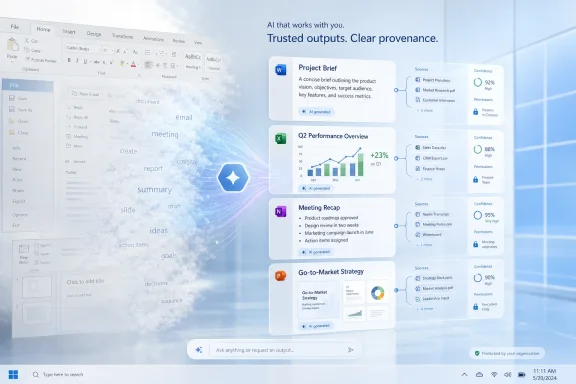 Microsoft Is Moving the Interface Out of the Way
For decades, Microsoft’s software story was also a story about visible controls. Windows had the desktop, Office had the ribbon, Explorer had folders, Outlook had panes, and administrators had consoles. Even when those surfaces frustrated users, they made a promise: if you could find the command, you could usually predict what would happen next.The Copilot redesign described by Microsoft Design makes a different bet. It treats the interface as a quieter frame around the output, not the main event. The prompt box, motion, typography, generated artifacts, and contextual cards are presented as parts of a single system whose purpose is to make the answer feel composed rather than dumped onto the screen.
That sounds aesthetic, but it is more consequential than a visual refresh. A traditional interface asks the user to navigate toward a result. A generative interface asks the system to infer the result, assemble it, and present it in a form that seems ready for use. In that world, the “button” is less important than the behavior that follows.
This is why Microsoft’s “output is the new UX” line matters. It is not just a designer’s slogan. It is a product strategy that redefines where user experience lives. If the answer, deck, table, summary, image, or plan is the thing the user primarily interacts with, then quality, provenance, formatting, and timing become interface elements.
That should sound familiar to anyone who has watched Windows evolve from a file launcher into an increasingly cloud-connected work surface. Microsoft has been trying for years to collapse the distance between operating system, productivity suite, search, and services. Copilot gives the company a vocabulary for doing it again, but this time the glue is not a shell or a suite. It is generated output.
The Redesign Is Really a Power Shift
Microsoft frames the Copilot redesign in warm language: hospitality, personalization, calm, and restraint. The article compares the desired feeling to Cheers, the sitcom bar where everybody knows your name. That metaphor is revealing because it turns software into a place that recognizes you, anticipates you, and responds before you spell everything out.But a system that knows your name also knows a lot more than that. Microsoft 365 Copilot’s usefulness depends on access to organizational context: documents, meetings, chats, mail, calendars, permissions, and relationships between people and files. The more adaptive the experience becomes, the more the interface depends on invisible judgments about what matters.
This is the power shift. In the old Office model, the user chose a template, opened a document, inserted a chart, changed formatting, and sent the result. In the Copilot model, the system may decide which sources to summarize, which layout to use, which claims to foreground, and which next action to suggest. The user still approves, edits, and directs, but the starting point is increasingly generated.
That change can feel liberating. Anyone who has stared at a blank PowerPoint slide or tried to compress a week of meetings into a coherent update understands the appeal. A well-designed output can remove drudgery and give shape to messy work.
It can also feel disorienting. If the generated artifact looks polished, users may stop interrogating how it was made. A rough draft invites skepticism; a beautifully laid-out report invites circulation. Microsoft’s design challenge, then, is not merely making Copilot attractive. It is making Copilot legible enough that polish does not masquerade as truth.
Calm Software Can Still Make Loud Decisions
The Microsoft Design article repeatedly returns to calmness: a pared-back shell, fewer competing visuals, motion that guides attention, and outputs that settle into place. This is consistent with a broader trend in AI product design. The less confident vendors are that users understand what is happening under the hood, the more they tend to make the surface feel reassuring.There is nothing wrong with calm software. In enterprise environments, clutter is not a virtue. Users already live inside notification storms, stacked panes, ribbon sprawl, and browser tabs. A quieter Copilot could reduce cognitive load and make Microsoft 365 feel less like a warehouse of features.
The problem is that calmness can hide complexity. When an interface becomes minimal, the decisions it conceals become more important. What did Copilot read? What did it ignore? Which tenant data was available? Did sensitivity labels constrain the answer? Did a connector supply stale information? Did the model infer a relationship that the user would not have made?
Those are not academic questions for administrators. They are the difference between a useful assistant and a compliance incident. If Copilot generates a polished briefing from accessible but inappropriate sources, the user may experience it as convenience while IT experiences it as data governance failure.
Microsoft knows this, which is why enterprise Copilot has been sold with repeated emphasis on permissions, grounding, and organizational boundaries. But design changes the risk profile. The more Copilot’s outputs feel finished, the more governance has to happen before the output appears, not after a user copies it into an email.
The Ribbon Era Trained Users to Hunt; The Copilot Era Trains Them to Expect
The Office ribbon was controversial because it reorganized command discovery. It took functions that lived in menus and surfaced them through visible tabs, groups, and icons. Users complained, adapted, and eventually internalized the new geography of work.Copilot does not merely rearrange geography. It changes the user’s posture. Instead of hunting for the right command, the user asks for an outcome. That has enormous implications for training, support, and troubleshooting.
In the old model, help desk tickets often began with a reproducible path: click this, open that, error appears. In the Copilot model, the ticket may begin with something more slippery: “Copilot gave me the wrong summary,” “Copilot missed the latest file,” or “Copilot created a deck that looked right but used old numbers.” The interface is no longer just a set of controls. It is a probabilistic system producing variable work.
This does not make Copilot unmanageable, but it does mean organizations need a new kind of literacy. Users must learn how to ask, verify, constrain, and revise. Administrators must learn how to inspect access, manage connectors, monitor adoption, and explain why two people may receive different outputs for similar prompts.
The irony is that Microsoft’s redesign aims to make Copilot feel simpler at the exact moment the underlying system becomes harder to reason about. That is the paradox of modern AI UX: the user surface gets cleaner because the machinery beneath it gets more complicated.
Outputs Are Where Trust Will Be Won or Lost
Microsoft’s article is at its strongest when it admits that behavior is part of design. The company says personality is not just tone; it is how Copilot performs when it is uncertain, when it should stop, and when the work should take focus. That is the right framing.For AI tools, trust is not built by cheerful wording or a friendly icon. It is built by consistent boundaries. A trustworthy assistant says when it does not know, exposes enough of its sources to be checked, avoids overconfident synthesis, and does not shove itself into every workflow just because a product manager found unused screen real estate.
Microsoft’s design language suggests awareness of that risk. The article talks about honesty, restraint, progressive disclosure, and outputs that are useful to the task in front of the user. Those are good principles. They are also easy to praise in a design essay and much harder to enforce across Word, Excel, PowerPoint, Outlook, Teams, Edge, Windows, SharePoint, and third-party extensions.
The challenge is scale. Microsoft is not designing one chatbot. It is designing a behavioral layer across a productivity empire. Copilot must behave consistently enough to feel reliable, but flexibly enough to adapt across writing, analysis, meetings, spreadsheets, code snippets, presentations, and business process automation.
That is a brutal design problem. It is also a support problem. When the output becomes the experience, every bad output becomes a UX failure, even if the model, the permissions graph, the prompt, the source content, and the user expectation all contributed to the result.
The Windows Angle Is Bigger Than a Copilot Button
Windows users have already seen Microsoft’s AI ambitions arrive through visible hooks: Copilot keys, taskbar entry points, Recall controversy, search integrations, app-level assistants, and web-connected experiences. Those debates often focus on placement. Should Copilot be pinned? Should it open as an app? Should it sit in Edge? Should personal users be able to opt out?The Microsoft Design piece points to a deeper trajectory. The destination is not a button. The destination is a computing environment where generated outputs appear wherever work is being done, and where the operating system becomes one surface among many for invoking, receiving, and acting on those outputs.
That matters because Windows has always been the place where user agency and administrator control collide. Consumers want convenience. Enterprises want policy. Power users want transparency. Security teams want auditability. Microsoft wants engagement. Copilot intensifies all of those tensions.
A minimal, adaptive Copilot may look harmless compared with a big intrusive sidebar. But the quieter it becomes, the more important it is to know when it is active, what it can see, and where its outputs can travel. A subdued interface is not automatically a less invasive interface.
For WindowsForum readers, this is the practical takeaway: do not judge Microsoft’s AI direction only by the presence or absence of obvious UI chrome. The real change is whether Windows and Microsoft 365 increasingly treat generated artifacts as first-class work surfaces. Once that happens, policy must follow the output, not just the app.
Enterprise IT Will Care Less About the Plate Than the Kitchen
Microsoft’s restaurant metaphor is clever: the interface is the plate, the output is the meal, and Copilot is the chef. But enterprise IT will immediately ask about the kitchen. Where did the ingredients come from? Who approved the recipe? Was the kitchen allowed to use that data? Was the meal served to the right person? Can anyone reconstruct what happened later?Those questions are not hostile to AI. They are the ordinary questions of governance translated into a generative system. The more Copilot creates polished work products, the more organizations will need controls that map to outputs rather than prompts alone.
Consider a generated executive summary. It may draw from Teams meetings, SharePoint documents, email threads, and spreadsheets. Each source may be individually accessible to the user. The combined summary, however, may create a new artifact with a different sensitivity profile. That is not a theoretical edge case; it is the natural consequence of synthesis.
The same applies to PowerPoint decks, Excel analysis, and Word drafts. A chart generated from approved data may still frame a conclusion incorrectly. A meeting recap may omit dissent. A project plan may expose dependencies that were previously scattered across low-visibility documents. AI does not merely retrieve information; it reorganizes it.
This is why output-centered UX forces a rethink of information protection. Labels, retention, audit logs, data loss prevention, and eDiscovery cannot be treated as back-office plumbing. They become part of the user experience because they shape what Copilot can safely produce.
Microsoft’s Design Language Is Also a Competitive Argument
The Copilot redesign is not happening in a vacuum. Every major productivity vendor is trying to make AI feel native rather than bolted on. Google has Gemini in Workspace, OpenAI has ChatGPT’s expanding work surfaces, Anthropic has Claude’s enterprise push, and smaller vendors are building specialized AI tools around documents, meetings, and code.Microsoft’s advantage is distribution. It owns the workplace surfaces where millions of users already spend their day. Word, Excel, PowerPoint, Outlook, Teams, SharePoint, OneDrive, Edge, and Windows form a habitat that competitors can integrate with but not fully control.
The design essay is therefore partly a moat-building exercise. Microsoft is saying that Copilot’s value is not just the model. It is the orchestration of model behavior, enterprise context, interface restraint, motion, typography, and generated artifacts inside the tools people already use.
That is a plausible argument. Models are becoming more interchangeable at the user level, especially when enterprises can route tasks across different systems. If Microsoft wants Copilot to remain sticky, it has to make the experience feel uniquely integrated with the work graph.
But integration cuts both ways. The more Copilot feels woven into Microsoft 365, the harder it becomes for customers to separate utility from lock-in. If the best outputs depend on Microsoft’s data graph, Microsoft’s app surfaces, and Microsoft’s design system, then adopting Copilot is not simply buying an assistant. It is deepening dependence on the Microsoft stack.
Personalization Is Useful Until It Becomes Uninspectable
The article’s Cheers metaphor is designed to make personalization feel human. Norm’s stool is ready. The room knows his rhythm. The service anticipates without demanding.Software personalization, however, is not a sitcom ritual. It is a computational act. Copilot adapts because signals exist: files opened, meetings attended, people contacted, organizational roles, prior prompts, app context, and perhaps longer-term memory as Microsoft continues to evolve the product. Each signal can improve relevance, but each also raises questions about explainability and control.
Users may love a system that “just knows” what they need. Administrators may be less thrilled if they cannot explain why it knew, where the information came from, or how to make it forget. Security teams will want to know whether personalization respects boundaries when users change roles, projects, teams, or devices.
There is also a social risk. Personalized outputs can narrow a user’s view of work. If Copilot learns a manager’s preferred style, it may keep producing the kind of summary that manager likes, even when the situation demands a different framing. If it learns an organization’s communication habits, it may reinforce bureaucratic blandness rather than improve clarity.
The best version of personalization is not invisible magic. It is adjustable context. Users should be able to see, constrain, and correct what the system is using. Otherwise, “made just for you” becomes another way of saying “shaped by signals you cannot inspect.”
The Output Layer Needs an Undo Button for Reality
Traditional software has undo because users make mistakes. Generative software needs something broader: a way to unwind bad assumptions. If Copilot summarizes the wrong document, invents a plausible transition, omits a critical caveat, or formats uncertainty as fact, the user needs more than Ctrl+Z. They need to understand the failure mode.This is where output-centered UX still feels immature across the industry. AI products are often good at producing a revised answer but poor at explaining why the first answer was flawed. They can regenerate, but regeneration is not accountability. A different answer is not necessarily a better answer.
Microsoft’s focus on motion and editorial structure is valuable, but the next frontier is provenance as design. Source visibility cannot be a compliance afterthought hidden behind a tiny reference panel. It has to be woven into the artifact in a way that does not destroy readability.
Imagine a Copilot-generated project brief where claims carry confidence cues, source clusters, freshness indicators, and permission-aware explanations. That sounds less elegant than a clean page, but elegance without traceability is not enough for serious work. The output has to be beautiful and interrogable.
This is especially important in Excel. A generated formula, analysis, or chart can be persuasive because spreadsheets already carry an aura of precision. If Copilot makes spreadsheet work easier, it also needs to make assumptions easier to audit. Otherwise, the organization simply automates the creation of confident-looking errors.
Design Restraint Will Be Tested by Microsoft’s Business Incentives
Microsoft says Copilot should show up at the right moment and stop when it should. That is the correct design instinct. It is also the instinct most likely to collide with growth targets.AI products are expensive to build, operate, and sell. Microsoft has every reason to drive usage, surface Copilot across more apps, and prove return on investment to customers. The company has already spent years putting Microsoft 365 services into more corners of Windows and Office, sometimes elegantly and sometimes with the subtlety of a billboard.
The redesigned Copilot may be calm today, but the pressure to make it more present will not vanish. Suggested prompts, proactive summaries, cross-app nudges, agent recommendations, and upgrade prompts can all be justified as helpful. At sufficient volume, they become noise.
This is where Microsoft’s stated design philosophy should be judged by future behavior. If Copilot really is built around restraint, users should feel that it recedes when not needed. If it becomes another engagement surface chasing attention, the hospitality metaphor will curdle into upsell theater.
Enterprise customers will have more leverage here than consumers. Large organizations can demand admin controls, deployment options, and clearer policy boundaries. Personal Windows users may have less room to negotiate, which is why Microsoft’s consumer Copilot choices will remain contentious even if the enterprise story is more disciplined.
The Familiar Microsoft Pattern Is Repeating, But the Stakes Are Higher
Microsoft has a habit of turning big platform shifts into integrated defaults. Internet Explorer, OneDrive, Teams, Edge, and Microsoft accounts all tell versions of the same story: what begins as a product becomes a pathway, then a default, then part of the operating environment.Copilot appears to be following that path, but with a difference. Previous integrations mostly changed where users clicked and where data synced. Copilot changes what gets produced. It participates in the work itself.
That makes the stakes higher. A browser default can be annoying. A cloud sync default can create migration headaches. A generative default can shape decisions, documents, and organizational memory. It can save hours, but it can also normalize a layer of machine mediation between people and their own work.
This does not mean Microsoft should slow down to the pace of old software. The productivity gains are real enough that organizations will continue experimenting, licensing, and deploying. But it does mean customers should resist treating AI UX as a purely cosmetic matter.
A redesigned Copilot is not merely a prettier Copilot. It is a claim about the future of work: that the most important interface is the result assembled on your behalf. Once you accept that, your evaluation criteria have to change.
The Practical Reading for WindowsForum Readers
The Copilot design essay is aspirational, but it gives administrators and power users a useful map of where Microsoft is heading. Read it less as a tour of a new interface and more as a statement of product philosophy. Microsoft wants Copilot to feel less like a tool you summon and more like an adaptive layer inside the work itself.That means the questions worth asking are concrete:
- Organizations should evaluate Copilot outputs as governed artifacts, not just transient chat responses.
- Administrators should review whether permissions, labels, connectors, and retention policies still make sense when information is synthesized across sources.
- Users should be trained to verify generated work, especially when outputs arrive in polished formats such as decks, summaries, charts, and reports.
- Microsoft’s claims about calmness and restraint should be measured against how often Copilot interrupts, nudges, or inserts itself into established workflows.
- The most important UX improvements will be the ones that make sources, uncertainty, and assumptions easier to inspect without making the product unusable.
References
- Primary source: microsoft.design
Published: 2026-06-29T13:42:10.551881
When outputs are the experience - Microsoft Design
Inside our latest Copilot redesign, where the experience adapts to how people use it.microsoft.design
- Official source: microsoft.com
Introducing a new design for Microsoft 365 Copilot | Microsoft 365 Blog
Copilot’s redesigned experience delivers faster performance, adaptive tools, and clearer AI-powered workflows to help you easily move from intention to outcome.www.microsoft.com - Official source: news.microsoft.com
Presentamos un nuevo diseño para Microsoft 365 Copilot - Source LATAM
 news.microsoft.com
- Related coverage: techmymoney.com
Microsoft 365 Copilot Redesign Turns Prompt Into Workspace
Microsoft 365 Copilot redesign turns the prompt line into a task-aware workspace with faster responses and a cleaner UI. techmymoney.com
- Related coverage: windowscentral.com
Microsoft is slowly turning Edge into another Copilot app — tests redesigned UI that takes inspiration from Copilot | Windows Central
The latest Edge preview builds now feature an updated UI that borrows the design language that first debuted in Microsoft's Copilot app.www.windowscentral.com - Official source: techcommunity.microsoft.com
What’s New in Microsoft 365 Copilot | May 2026 | Microsoft Community Hub
Welcome to the May 2026 edition of What's New in Microsoft 365 Copilot! Every month, we highlight new features and enhancements to keep Microsoft 365 admins... techcommunity.microsoft.com
- Official source: devblogs.microsoft.com
Going beyond text in Microsoft 365 Copilot - Introducing SharePoint Copilot Apps - Microsoft 365 Developer Blog
Microsoft 365 Copilot is brilliant with words - but work isn't only words. Introducing SharePoint Copilot Apps: bring rich, interactive UX components straight into the Copilot canvas, built with any JavaScript stack your team already knows. Reuse your existing SPFx investments across...devblogs.microsoft.com - Related coverage: siliconreport.com
Microsoft Redesigns Copilot for Microsoft 365 With Black-and-White, Text-First UI — Silicon Report
The update replaces Copilot's busier Microsoft 365 layout with a monochrome, text-led interface as Microsoft pushes a more consistent design across the ...www.siliconreport.com - Official source: learn.microsoft.com
Release Notes for Microsoft 365 Copilot | Microsoft Learn
Lists the features that reach General Availability in each release of Microsoft 365 Copilot.learn.microsoft.com - Related coverage: helpnetsecurity.com
Microsoft 365 Copilot redesign brings context and actions into one workspace - Help Net Security
Microsoft 365 Copilot redesign introduces a unified interface, contextual actions, and in-app assistance across apps.www.helpnetsecurity.com - Related coverage: techradar.com
Microsoft makes Copilot Cowork open to everyone, and wants to help you tackle even the trickiest work tasks | TechRadar
Copilot Cowork gets an upgrade as it opens to all userswww.techradar.com - Related coverage: tomshardware.com
Microsoft will force install the Copilot AI app for users with desktop versions of 365 apps like Word and Excel — coming October, with no way to opt out for personal users | Tom's Hardware
More bloatware added to Windows, courtesy of Microsoft 365.www.tomshardware.com - Related coverage: arturmarkus.com
Microsoft 365 Copilot Rolls Out 27 New Features in January 2026, Adds GPT-5.2 Model Selector with 3 Reasoning Modes
PDF documentwww.arturmarkus.com
