Jebidia

New Member
Joined
Nov 15, 2016
Messages
21
I see a RAID 5 option in the disk manager in my Windows 10 pro 64bit os but it's greyed out , but I also see if could do a Parity RAID in storage space which it will allow me to do. So I'm curious why RAID 5 is greyed out and is there an advantage to getting RAID 5 to work vs Parity, which I know has horrific write speeds...I don't need a lecture on why I'm choosing RAID 5, just looking for someone with insight to my question.
Thanks!
 

Solution
I'm not sure if Windows 10 will run on a software RAID 5, that maybe why it's greyed out. You also need to convert the disks to dynamic.

Thinking about it a little more... You probably can do the software raid 5, but you may need to boot into a Windows Install or recovery media to convert them to dynamic.


*Some more Google-Foo* Windows can't boot from a dynamic disk, so in short Windows OS can't be on a software RAID 5.

Jebidia

New Member
Joined
Nov 15, 2016
Messages
21
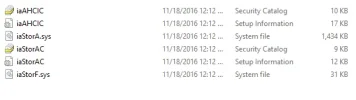
That file for my mobo contains the attached...not even sure how to install that:
 

Attachments

  • Capture.webp
    Capture.webp
    11.7 KB · Views: 351

Neemobeer

Windows Forum Team
Staff member
Joined
Jul 4, 2015
Messages
8,998
Those are storage controller drivers, they're probably already installed. They would be listed in Device Manager under "Storage Controllers"
 

Jebidia

New Member
Joined
Nov 15, 2016
Messages
21
Just FYI, I thought I'd try the REFS files system on the parity RAID as I read some said there was a performance bump. Spent about a 1/2 hour and every single time it said a program was accessing the drive and it couldn't complete the action, but with NTFS it went through fine...I rebooted a few times...who know, but I'm leaving it as is and I do appreciate your time.
 

Back
Top