

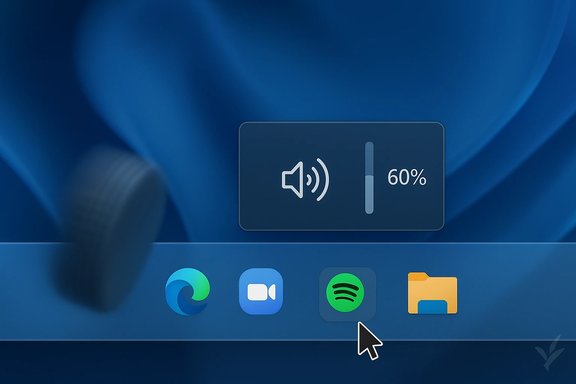
Microsoft shipped a small, convenient behavior in Windows 11 but left out the final mile of usefulness — and a fast-moving community mod has now delivered the missing piece: per‑app taskbar volume control that works by simply hovering and scrolling over individual taskbar icons.
Background / Overview
Windows has long supported per‑application volume control through the Volume Mixer and, more recently, through the Sound settings and various Quick Settings flyouts. Those built‑in tools let you change an app’s audio level, but they require opening a dialog, hunting for the right slider, or switching focus away from what you’re doing. Windows 11 also added the convenience of adjusting the master system volume by hovering over the volume icon and using the mouse wheel — a small quality‑of‑life improvement many users enjoy.What Microsoft did not provide, however, was the ability to adjust an individual application’s volume directly from the taskbar without opening extra UI: a single, low‑friction gesture to change the volume for a meeting app, music player, or browser tab while keeping the attention on the screen. That gap is precisely what the community mod marketplace Windhawk — and a popular mod by developer m417z — set out to fix, adding per‑app volume adjustments by scrolling over the corresponding taskbar button.
This is important because small, fast controls are how users preserve flow. In meetings, streaming sessions, and mixed‑audio workflows, toggling or nudging a single app’s level quickly is often more useful than touching the overall system volume. The community’s implementation brings that micro‑interaction to life, and it exposes broader questions about where Microsoft’s UX stops and community innovation begins.
What the community built: Windhawk’s Taskbar Volume Control Per‑App
Windhawk is a modular customization platform for Windows that installs small, process‑specific “mods” which can tweak shell behavior without directly patching system binaries. One of the platform’s strengths is a curated library of community‑maintained mods that target Explorer and other shell components; many of those mods come from the same developer and maintain a steady usage base.The specific mod that closed the Windows 11 gap is named Taskbar Volume Control Per‑App. In short, the mod lets you:
- Hover over a taskbar button (an app icon) and scroll the mouse wheel to change that app’s volume.
- See a small tooltip showing the current percentage, or a “No audio session” message when there’s no audio session for that app.
- Use Ctrl+click on the taskbar button to toggle mute for that app.
- Coexist with an existing “Taskbar Volume Control” mod (which controls master volume by scrolling over the taskbar) through simple configuration: either restrict one mod to a region (tray vs. icon area) or require a modifier key for one mod.
Why this matters: it’s not a gimmick. The community release shows how quickly a targeted, well‑scoped feature can reach users and address a concrete pain point that hundreds of thousands of people will notice immediately in daily use.
Why Microsoft’s implementation felt half‑baked
Calling the original Windows behavior “half‑baked” is less about technical incompetence and more about UX scope and prioritization. Microsoft added per‑app volume controls to Windows over time, but those controls still sit behind dialogs or nested UI flows. The practical consequences:- Changing a single app’s volume typically involves multiple clicks or a keyboard shortcut, which interrupts focus.
- The system’s volume UI centers on the master control, whereas everyday scenarios often need a quick tweak for an individual app (a browser tab, Teams, Spotify).
- Windows provided the primitives (audio session APIs, per‑app sliders, even the volume tooltip), but did not deliver the one‑gesture control that feels natural on the taskbar itself.
How the mod works (high level) and why it’s safe‑ish — but not risk‑free
The mod uses a well‑understood pattern for Windows shell customization:- It registers a hook into the shell process (explorer.exe) to capture mouse wheel and click events over taskbar elements.
- It queries the system audio sessions (the same API the Volume Mixer uses) to locate the audio session associated with the process whose taskbar button you’re hovering.
- It adjusts the session volume through the Windows Core Audio APIs and shows a succinct floating tooltip for feedback.
- Stability risk: Explorer is the primary shell process. Any bug in a module loaded into explorer.exe can crash or destabilize the taskbar and desktop. Well‑tested mods minimize this risk, but it’s not zero.
- Update fragility: Windows feature updates or shell changes can break mods that rely on specific UI internals or window layout assumptions. Mod authors frequently release quick compatibility updates, but there can be a lag.
- Security and trust: running third‑party code inside Explorer requires trust in the mod author and the distribution channel. Windhawk is open‑source and widely used, which helps, but corporate policies may forbid such installs on managed devices.
- Policy and compliance: organizations with strict endpoint controls or notarization rules will typically prohibit Explorer‑injected modules. The mod is best suited for personal, enthusiast, or controlled power‑user environments.
Adoption, iteration, and community responsiveness
One of the clearest signals that a feature “should have been there” is the speed of adoption and the intensity of feedback. The Windhawk ecosystem shows active usage across many mods that adjust taskbar behavior, and the per‑app volume mod quickly received iterative updates after initial reports of incompatibilities or UI placement issues.Community posts and discussion threads show typical real‑world friction: compatibility with other taskbar mods (vertical taskbar, taskbar themes), tooltip clipping on custom taskbar heights, and choosing sensible default step sizes for volume changes. The developer responded with compatible updates and configuration guidance — a hallmark of active maintainer support.
This live feedback loop is a strength of community solutions: rapid fixes, tuneable settings, and public issue trackers. But it’s also a reminder that the solution is a social product as much as a technical one — users must be comfortable applying updates, reading changelogs, and reporting issues.
Practical benefits for everyday users
- Flow preservation: tweak an app’s volume during a meeting or call quickly, without switching windows or opening the volume mixer.
- Reduced interruptions: mute or nudge a notification‑heavy app down without touching the system master volume.
- Convenience for mixed‑audio workflows: streamers, podcasters, and multitaskers can balance music, chat, and system sounds with a single gesture.
- Highly configurable: the mod’s settings let you tune step sizes, behavior, and interaction modes so changes feel natural and avoid overcorrection.
Risks, caveats, and enterprise restrictions
- Not for unmanaged corporate devices: loading modules into explorer.exe is typically against corporate security policies and could trip endpoint detection tools or EDR agents.
- Backup and rollback: always create a restore point or be able to uninstall third‑party mods before trying them on mission‑critical systems.
- Compatibility fragility: a Windows feature update could disable or break the mod temporarily; expect to check for updates after major OS changes.
- Accessibility testing: users relying on assistive tech should validate behavior; injected UI tooltips and mouse‑hover interactions may not map cleanly to keyboard or screen‑reader workflows.
- Trust in distribution: obtain Windhawk and mods from their official pages or reputable hosters; do not side‑load unverified packages.
Alternatives and why they matter
If you prefer not to run Explorer‑injected mods, there are established alternatives that offer per‑app controls, each with trade‑offs:- EarTrumpet: A popular, long‑running third‑party app that exposes per‑app sliders directly in the system tray, with quick access and low risk. It’s a click, not a hover‑and‑scroll gesture, but it’s well‑maintained and widely used.
- Built‑in Volume Mixer / Sound Settings: Works without third‑party software but requires more clicks and UI navigation.
- Hardware controls or headset dongles: When immediate per‑app control is not possible, physical volume keys or programmable audio hardware remain reliable fallbacks.
What this means for Microsoft and the future of Windows UX
This episode is a textbook example of how a thriving user community can quickly fill polish gaps in a major OS:- Signals to Microsoft: Small, high‑utility gestures matter. Features that reduce cognitive load and preserve flow earn strong user affection.
- Product implications: Microsoft could adopt the pattern natively — adding an official per‑app scroll control on taskbar icons would be a straightforward UX add and would remove the stability and trust issues associated with third‑party injection.
- Ecosystem nourishment: Having a healthy mod ecosystem is positive for Windows — it extends the platform’s longevity and surfaces real user needs that product telemetry and roadmaps sometimes miss.
How to evaluate whether you should try the mod
- Confirm your risk tolerance. If you run sensitive work workloads, avoid Explorer mods on production devices.
- Back up system state. Create a System Restore point or full image before installing mods that affect explorer.exe.
- Install from official sources. Use the Windhawk site and the mod’s official page to avoid tampered packages.
- Test in a disposable environment. Try the mod on a secondary PC, virtual machine, or a spare profile to validate behavior with your configuration.
- Monitor after updates. After a Windows feature update, check mod compatibility and apply updates proactively.
Closing analysis: what’s notable, and what to watch next
The story is notable for what it reveals about modern software platforms and user expectations. Microsoft shipped an OS with powerful internals and thoughtful pieces, but small usability gaps remain — often the kind of things only heavy users notice and appreciate. The Windhawk mod fills one such gap elegantly.Notable strengths:
- Rapid community response: a focused, well‑implemented mod reached users quickly.
- Low friction for the desired interaction: hover‑and‑scroll is a minimal, discoverable gesture for many users.
- Active maintenance and configuration options: the mod’s early updates address real compatibility concerns, showing good maintainer hygiene.
- Stability and security trade‑offs of injecting code into the shell.
- Fragility across major Windows updates or shell redesigns.
- Corporate and compliance constraints preventing broad rollout in managed environments.
- Microsoft’s reaction: whether the company integrates a similar built‑in affordance or adapts the Quick Settings UI to provide the same one‑gesture power without third‑party code.
- Mod maintenance over time: continued compatibility fixes and community trust signals will determine long‑term viability.
- Broader ecosystem trends: whether community solutions prompt Microsoft to accelerate polish work on other small UX gaps across Windows 11.
This community solution is an elegant, pragmatic patch to a small but meaningful deficit in Windows 11’s taskbar UX. It’s a demonstration of user demand, an example of responsible modding done well, and a useful nudge to platform owners: sometimes the tiniest gestures are the most valuable.
Source: MSN https://www.msn.com/en-gb/money/tec...baked-and-the-community-fixed-it/ar-AA1Umhz4]
