

Photo editing doesn't have to mean Photoshop subscriptions, cloud lock-ins, or bloated installers — PhotoDemon proves you can get pro-grade tools in a tiny, portable package that many Windows users still overlook.
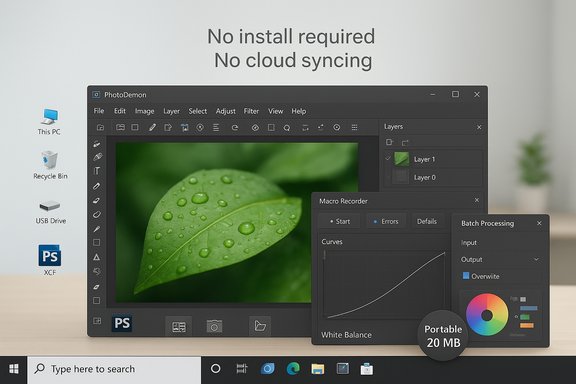
PhotoDemon is a free, open-source, portable photo editor for Microsoft Windows that has been quietly maturing into a surprisingly complete Photoshop alternative. The project is led and maintained from a public repository and packaged for end users as a single ZIP you extract and run — no installer, no admin privileges, and no hidden telemetry. The official download page lists the stable 2025.4 build as a 20.4 MB ZIP, underscoring the project's emphasis on compactness and portability. That small size belies a broad feature set: PhotoDemon ships with more than 200 tools, layered editing, PSD/XCF compatibility, RAW support, content-aware fill, batch processing, a macro recorder, and color-management capabilities aimed at photographers who need accurate results without a subscription. These claims are documented both on the project's homepage and in its GitHub repository, which also makes the source code and release artifacts available for inspection.
Conclusion
PhotoDemon is not a marketing megastar, but it is a carefully built, user-focused open-source photo editor that solves real problems for Windows users. Its compact size, wide file-format support, macro-driven batch capabilities, and color-management features make it an outstanding free alternative for many everyday and semi-professional workflows. Try it with a representative sample of your files — verify interchange on mission-critical PSDs — and you may find you no longer need a subscription for most of the photo editing you do.
Source: MakeUseOf I tried the open-source Photoshop clone everyone keeps ignoring
 Background / Overview
PhotoDemon is a free, open-source, portable photo editor for Microsoft Windows that has been quietly maturing into a surprisingly complete Photoshop alternative. The project is led and maintained from a public repository and packaged for end users as a single ZIP you extract and run — no installer, no admin privileges, and no hidden telemetry. The official download page lists the stable 2025.4 build as a 20.4 MB ZIP, underscoring the project's emphasis on compactness and portability. That small size belies a broad feature set: PhotoDemon ships with more than 200 tools, layered editing, PSD/XCF compatibility, RAW support, content-aware fill, batch processing, a macro recorder, and color-management capabilities aimed at photographers who need accurate results without a subscription. These claims are documented both on the project's homepage and in its GitHub repository, which also makes the source code and release artifacts available for inspection. Why PhotoDemon matters now
For many hobbyists and occasional editors, the Adobe model is simply overkill. The pain points are clear: recurring monthly fees, cloud-first workflows, and heavyweight installs. PhotoDemon addresses that gap by offering:- A true portable app that runs from a USB stick or cloud storage without changing the system registry.
- A small download footprint (around 20 MB) that still includes advanced editing tools.
- Open-source licensing (BSD) so organizations and individuals can audit, fork, or contribute to the code.
What PhotoDemon can do — feature breakdown
Layers, masks, and common photo tools
PhotoDemon provides a traditional layered workflow with editable text layers, blend modes, masks, and non-destructive-ish operations. It includes the usual slate of photographic adjustments — levels, curves, white balance, shadow/highlight recovery — and retouching tools such as clone and pattern brushes. The developer explicitly advertises advanced on-canvas tools that mimic the day-to-day needs of photographers.PSD, XCF, and RAW compatibility
One of PhotoDemon’s most important practical strengths is file compatibility. It imports and exports Adobe Photoshop PSD files, GIMP XCF files, Corel PSP, and many camera RAW formats, which makes it practical to slot into existing workflows. Support for PSD means you can often open layered files created elsewhere; however, it's important to be pragmatic — extremely complex PSD files with proprietary or plugin-driven effects may not translate perfectly. Test critical files before committing to a replacement workflow.Content-aware tools and advanced filters
PhotoDemon includes content-aware fill and resize tools, perspective correction, unsharp masking, denoising filters, and a range of creative effects. These features are not cosmetic add-ons — they are functional tools photographers expect for everyday retouching and compositing work. The app also supports real-time effect previews and saved presets across tools, improving experimentation speed.Macro recorder and batch processing
For batch edits and repetitive workflows, PhotoDemon includes a macro recorder and a built-in batch processor. You can record a sequence of operations and apply it to entire folders, which is invaluable for event photographers or anyone who needs repeatable, deterministic edits across large numbers of images. This capability elevates PhotoDemon from a simple retoucher to a practical productivity tool.Color management and ICC profile support
The program supports embedded ICC color profiles and per-display profile management. That support matters for color-critical workflows such as print prep and professional retouching because it preserves color fidelity across devices — an often overlooked feature in free tools.Performance and resource behavior
PhotoDemon’s architecture reflects its portability goals: the stable download is a ~20 MB ZIP, and the application runs as a single executable with supporting libraries. Because it’s a 32-bit portable app, there are practical memory and file-size limitations to be aware of: as a 32-bit program it may be unable to open or save images larger than roughly 2 GB in certain contexts. That limitation is a technical trade-off of the portability approach and 32-bit build target. To manage system memory when working with many high-resolution images, PhotoDemon provides an option to suspend inactive images to disk. That behavior lets you keep more files open without exhausting RAM, but it does mean disk I/O performance and the speed of your storage will influence multi-image workflows. Real-world performance is typically strong on modern Windows machines, and the app is noticeably lighter than heavyweight alternatives.Usability: interface, learning curve, and tool discoverability
PhotoDemon’s designers emphasize usability. The UI organizes tools logically, offers real-time previews, and provides configurable hotkeys and icon themes. For users who have tried GIMP or other open-source editors and found the interfaces intimidating, PhotoDemon aims to be more approachable while still exposing advanced functionality. The help documentation and in-app search make it easier to find tools quickly. That said, users migrating from Photoshop should expect some workflow differences; PhotoDemon is not a pixel-for-pixel mimic of Adobe’s keyboard shortcuts and tool behaviors. There will be a short adjustment period, but many users report it’s shorter and less painful than switching to more idiosyncratic open-source editors.Practical file-format coverage and interop
A major blocker for switching editors is format support. PhotoDemon intentionally focuses on broad compatibility:- PSD (layers, many blend modes) — import/export supported.
- XCF (GIMP) — import supported, with decent layer coverage.
- RAW camera formats — handled via LibRaw; broad coverage of camera models.
- HEIF/HEIC, JPEG-XL, AVIF — support exists or can be added via optional libraries.
Security, privacy, and open-source guarantees
PhotoDemon is published under a permissive BSD-style license, and the source code is available on GitHub. This transparency reduces the black-box risk associated with proprietary editors and cloud-heavy services. The portable model also avoids background services and telemetry by design: there’s no built-in account system or cloud synchronization to worry about. From a security standpoint, portability helps and harms: running a single EXE without installing means fewer system-level changes, but it also places the onus on the user to verify downloads. Use checksums provided with the official ZIP release and prefer the official download page or GitHub releases to avoid tampered builds. The project publishes checksums for its releases, which is a good practice for integrity verification.Where PhotoDemon shines (strengths)
- Portability: Entire app runs from extracted ZIP; ideal for USB drives and travel.
- Compact footprint: A full-featured editor in ~20 MB makes it easy to distribute and run on constrained systems.
- Broad format support: PSD, XCF, RAW, HEIF/HEIC, JPEG‑XL, AVIF (via optional libs) — covers most modern needs.
- Productivity tools: Macro recording and batch processing for repeatable workflows.
- Color management: ICC profile handling for color-critical work.
- Open source: Auditability and community contributions reduce vendor lock-in risk.
Limitations and risks (what to watch for)
- Not a native Photoshop drop-in — While PSD support is strong, proprietary or plugin-dependent Photoshop features may not survive translation. Test key PSDs before committing.
- 32-bit build constraints — The portable build targets 32-bit Windows for compatibility, which limits addressable memory and imposes practical file-size constraints (roughly ~2 GB ceiling in certain scenarios). Large panoramic images or huge layered documents may hit limits.
- Windows-only official support — PhotoDemon is designed for Microsoft Windows; running it on macOS or Linux requires compatibility layers like Wine and is not officially supported.
- Community and ecosystem size — Compared with Photoshop, Affinity, or even GIMP, PhotoDemon has a smaller userbase and fewer third-party plugins or tutorials. That can slow adoption in organizations that rely on broad community tooling. Still, the core documentation and GitHub issues provide helpful guidance.
- No built-in cloud AI features — If your workflow relies on integrated cloud AI assistants or generative features provided by large vendors, PhotoDemon is intentionally minimal and local-first. That is a design choice that preserves privacy but may feel feature-sparse for those who want one-click generative tools.
Practical migration checklist: trying PhotoDemon in a production-lite workflow
- Download the official stable ZIP and verify its checksum. The PhotoDemon download page publishes checksums for each release.
- Extract the ZIP to a test folder (or USB drive) and launch PhotoDemon.exe — no installation required.
- Open representative PSD and RAW files you actually use. Pay particular attention to layered PSDs with adjustment layers, smart objects, or plugin-dependent effects. Export a few test JPGs or TIFFs to verify visual parity.
- Record a macro for a common batch job (e.g., resize → auto-level → sharpen) and apply it to a small folder to validate the batch processor’s behavior.
- If you need niche formats (AVIF, JPEG-XL), test them and follow PhotoDemon’s prompts to fetch optional libraries when requested.
- If you operate in color-critical environments, test ICC profile handling across your workflow (camera → PhotoDemon → export → print or soft-proof) to confirm color fidelity.
Comparison: PhotoDemon vs. common alternatives
- PhotoDemon vs. Photoshop: Photoshop remains unmatched for enterprise features, advanced compositing, and industry-standard pipelines. PhotoDemon is not a drop-in replacement for those workflows, but for many photographers and hobbyists it covers the core needs without subscription fees.
- PhotoDemon vs. GIMP: GIMP is mature and extensible, but some users find its UI and workflow less approachable. PhotoDemon’s UX appears to be designed to reduce friction, with a lighter footprint and real-time previews — making it friendlier for a fast adoption curve. GIMP still has strengths in scripting and plugin availability.
- PhotoDemon vs. Affinity Photo: Affinity provides a paid, polished, native 64-bit application with excellent PSD interchange and professional feature sets, including dedicated support channels. PhotoDemon is free and portable but trades off some of that polish and the 64-bit memory advantages. For budget-conscious power users, PhotoDemon is compelling; for studio professionals with mission-critical needs, Affinity or Adobe may still be preferable.
Community, development cadence, and trust signals
PhotoDemon’s GitHub shows active development, regularly published builds, and a changelog that reflects incremental feature work and bug fixes. The project also publishes documentation and a help site to guide new users. The presence of nightly builds, clear release notes, and downloadable checksums are strong signals of a trustworthy, well-maintained open-source project. Independent coverage and user write-ups have highlighted PhotoDemon’s lightweight design and unexpectedly broad feature set, which helps validate that the project is more than a hobby — it’s a production-minded editor for many workflows.Final assessment and recommendation
PhotoDemon is an excellent example of pragmatic open-source software: small, fast, portable, and focused on the real needs of photographers. It is not pitched at replacing every feature of Photoshop or capturing every professional use case, but it does successfully bring many core tools — layers, PSD support, RAW handling, content-aware fill, macro/batch automation, and color management — into a single portable executable you can run anywhere. Recommended use cases:- Casual and enthusiast photographers who need powerful editing without subscription fees.
- Journalists and students who need a portable editor that runs from USB drives.
- Power users who want a trusted, local-first tool for batch processing and quick fixes.
- Production studios that rely on advanced Photoshop-only features, plugin ecosystems, or 64-bit, memory-heavy workflows where the 32-bit limits would bite.
- Projects requiring certified, vendor-backed enterprise support or guaranteed pixel-for-pixel interchange in complex layered PSDs.
Conclusion
PhotoDemon is not a marketing megastar, but it is a carefully built, user-focused open-source photo editor that solves real problems for Windows users. Its compact size, wide file-format support, macro-driven batch capabilities, and color-management features make it an outstanding free alternative for many everyday and semi-professional workflows. Try it with a representative sample of your files — verify interchange on mission-critical PSDs — and you may find you no longer need a subscription for most of the photo editing you do.
Source: MakeUseOf I tried the open-source Photoshop clone everyone keeps ignoring
