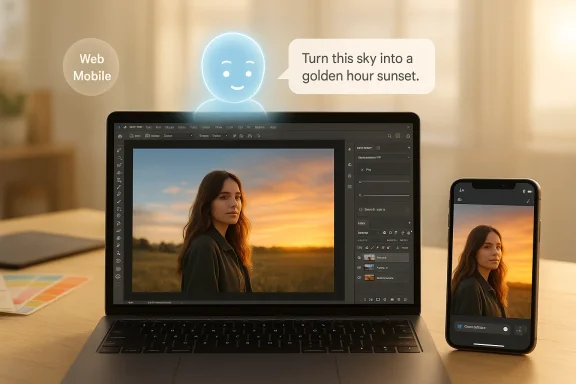
Adobe has rolled Photoshop’s conversational future out of the lab and into your browser and phone: the company launched an AI-powered Photoshop AI Assistant in public beta for web and mobile on March 10, 2026, letting users describe edits in plain English (or by voice) and have Photoshop execute them automatically or walk them through the steps.
Photoshop’s history is a steady march from manual, menu-driven tools toward automation and context-aware editing. Features such as Content‑Aware Fill and smarter selection tools first introduced many years ago began the long shift away from purely manual retouching, and that evolution set the stage for today’s conversational layer. Those earlier, productivity-focused breakthroughs were impmccessible; the new AI Assistant is the next logical step in that trajectory.
At Adobe MAX 2025 the firm unveiled conversational AI assistants across Creative Cloud—Photoshop’s assistant was announced there and launched into private testing later that year. Adobe has been explicit that this assistant is part of a broader canvas of AI features, including the Firefly family of generative models and integrations with partner models. The March 2026 public beta marks the first time most users can try the assistant directly in Photoshop on the web and on mobile.
This is not theoretical: Microsoft’s product roadmaps and Copilot extensibility signals from late 2025 show planned integrations (Enterprise asset connector, Experience Manager access), and Adobe has publicly referenced third‑party chat platforms — specifically mentioning Microsoft 365 Copilot — as places it intends to bring assistant experiences. Administrators and IT teams should take note: the integration layer introduces both convenience and governance responsibilities.
Adobe has built important guardrails — Content Credentials, licensed training data for Firefly, user opt‑outs for training, and enterprise connector controls — but technical mitigation is only part of the solution. Platform adoption of provenance metadata, stronger enterprise contracting around AI processing, and more visible user controls will be required to keep the technology beneficial without eroding trust.
Source: The Tech Buzz https://www.techbuzz.ai/articles/adobe-s-photoshop-ai-assistant-goes-public-on-web-and-mobile/
 Background
Photoshop’s history is a steady march from manual, menu-driven tools toward automation and context-aware editing. Features such as Content‑Aware Fill and smarter selection tools first introduced many years ago began the long shift away from purely manual retouching, and that evolution set the stage for today’s conversational layer. Those earlier, productivity-focused breakthroughs were impmccessible; the new AI Assistant is the next logical step in that trajectory.At Adobe MAX 2025 the firm unveiled conversational AI assistants across Creative Cloud—Photoshop’s assistant was announced there and launched into private testing later that year. Adobe has been explicit that this assistant is part of a broader canvas of AI features, including the Firefly family of generative models and integrations with partner models. The March 2026 public beta marks the first time most users can try the assistant directly in Photoshop on the web and on mobile.
What the Photoshop AI Assistant is — and how it works
Conversational editing and AI Markup
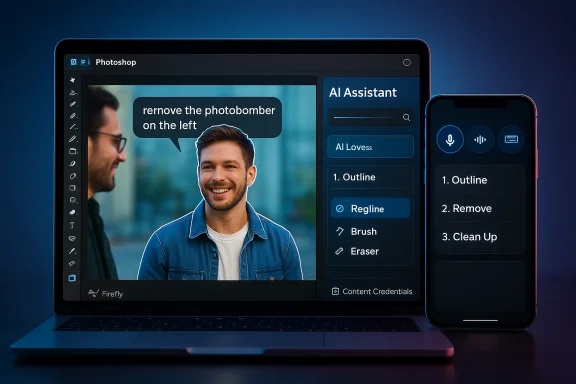
- Natural‑language editing: Tell the assistant “remove the photobomber on the left,” “make the lighting warmer like golden hour,” or “replace the sky with a dawn scene,” and it will interpret intent and apply the appropriate tools (selections, content-aware fills, lighting adjustments, generative fills, etc.). You can choose immediate application or a guided, step‑by‑step walkthrough.
- AI Markup (public beta): In the web experience you can draw on the image where you want changes and attach a text instruction — a hybrid gesture + prompt flow that gives precise spatial control to the assistant. This bridges the gap between freeform prompts and pixel‑accurate edits.
- Voice editing on mobile: The mobile app supports voice commands so you can narrate edits while you work on the go — an accessibility and ergonomics gain for phone‑based creators.
Where the assistant sits in the workflow
The assistant is designed to augment, not replace, traditional Photoshop controls: you can toggle between conversational commands and the familiar sliders, layers, and brushes at any time. It also aims to preserve professional workflows by making the AI a helper that can perform repetitive or tedious tasks while leaving creative decisions to the user. Adobe positions the assistant as both a productivity booster for pros and an on‑ramp for newcomers who don’t yet know Photoshop’s toolset.Availability, limits and immediate terms
- Public beta launch: Adobe published the public‑beta announcement on March 10, 2026 — Photoshop AI Assistant is now discoverable in Photoshop for web and mobile (iOS and Android).
- Free vs paid usage: The company is offering a starter allotment (20 free “generations” for the free Photoshop web/mobile tier) and has temporarily enabled unlimited generations for paid users through a promotional window; Adobe and media coverage specified unlimited access for paid users through early April (Adobe’s announcement and follow‑ups from outlets confirm these early access limits). Users should check their accounts and Adobe messages for the precise window and any plan‑specific rules.
- Private testing timeline: Adobe first revealed its conversational assistants and agentic capabilities at Adobe MAX (Oct 28, 2025) and moved Photoshop’s assistant into private testing via a waitlist late in 2025; the March 2026 release is the broad public beta step after months of limited testing.
What’s new technically (models, partners, and provenance)
Multiple model support and partner models
Adobe’s strategy is to make Photoshop a hub for multiple image models. Firefly is the company’s in‑house, commercially safe generative model family, but Adobe has broadened access to partner models — giving creators options when they need different aesthetics or behaviors. Reports and Adobe’s own messaging cite partnerships that bring in models from other providers, creating a multi‑model editing environment inside Photoshop and Firefly.Content provenance: Content Credentials and C2PA
To address provenance and authenticity concerns, Adobe has integrated Content Credentials — the C2PA‑aligned provenance metadata system — into Firefly and other Adobe workflows. When generative AI is used (and in many cases by default), Adobe attaches tamper‑evident metadata that records whether an asset was generated or edited with AI and which tools or models were used. That metadata is intended to travel with assets and provide a “nutrition label” of sorts for creators, publishers, and viewers. Adobe has promoted Content Credentials as a transparency mechanism and has been working with industry partners and standards groups to expand adoption.The Microsoft Copilot connection — distribution at scale
Adobe is not just building a smarter Photoshop; it’s embedding Creative Cloud capabilities into broader productivity contexts. Adobe and Microsoft’s multi‑year partnership has expanded to include agentic capabilities and connectors that let Microsoft Copilot access Adobe assets and services. Roadmap entries and Adobe’s messaging show Copilot connectors for items like Adobe Experience Manager and earlier work on an Adobe Express extension for Microsoft Copilot — a clear distribution play that brings Adobe editing primitives into Microsoft 365 workflows. For enterprises, that means Copilot users may soon invoke Acrobat or Express features (and by extension, creative assets) without leaving their email, chat, or document context.This is not theoretical: Microsoft’s product roadmaps and Copilot extensibility signals from late 2025 show planned integrations (Enterprise asset connector, Experience Manager access), and Adobe has publicly referenced third‑party chat platforms — specifically mentioning Microsoft 365 Copilot — as places it intends to bring assistant experiences. Administrators and IT teams should take note: the integration layer introduces both convenience and governance responsibilities.
Strengths — why this matters
- Lower friction, faster outcomes: Natural language plus markup and voice means users can get high‑quality results without learning every tool. That reduces ramp time for beginners and speeds iterative work for pros. Adobe’s own examples (remove objects, fix lighting, replace backgrounds) demonstrate time savings on otherwise fiddly tasks.
- Multimodel openness: By allowing partner models inside Photoshop/Firefly, Adobe is offering creative choice — different models produce different visual idioms, and a marketplace‑like approach can produce better, more varied results for creators. This also keeps Adobe competitive with AI‑first tools that already embraced multiple model backends.
- Provenance baked in: Content Credentials provide a technical path toward traceable editing history and disclosure that, if broadly adopted, could become an industry standard for labeling AI‑created or AI‑edited content. For newsrooms, brands, and platforms, this is a practical tool for transparency.
- Enterprise reach via Copilot: Embedding creative tools into Microsoft Copilot is a distribution lever that could bring Adobe’s creative features to more knowledge workers inside larger organizations — enabling marketing, sales, and product teams to iterate faster without jumping between apps. That’s a big strategic win if it’s executed with proper governance.
Risks, blind spots, and unanswered questions
1) Training data and copyright friction
Adobe emphasizes that Firefly models were trained on licensed content (Adobe Stock contributors who opt in) and public domain/publicly licensed content. That design choice addresses some copyright and provenance concerns, but it does not eliminate them. Across the industry, questions persist about how models handle copyrighted input in real‑world mixed datasets, partner model training sources, and downstream attribution. Users should treat model outputs with the same scrutiny they would any tool that can recompose or re‑interpret creative work.2) Privacy and data handling
Generative features have historically required server‑side processing — user images are routed to processing engines and returned. Community and Adobe statements indicate that processing happens on Adobe’s servers for many AI features, and Adobe’s policies say user images are not used to train models unless the user opts into telemetry/training settings. However, enterprises and privacy‑sensitive users must validate retention policies, regional hosting, and contractual guarantees before sending proprietary assets into a cloud editor. Short answer: expect uploads to Adobe servers for AI processing; read the privacy controls and opt‑outs.3) Hallucinations, aesthetics, and editorial control
No model is perfect. The assistant can misinterpret ambiguity in prompts, produce stylistically inconsistent results, or make changes that break compositional intent (incorrect shadows, perspective errors, or compositing artifacts). While the assistant can be instructed to “walk you through” an edit instead of applying it automatically, users need to maintain final editorial oversight. For professional deliverables, automated edits still require a human pass.4) Misinformation and deepfake risks
Easier editing raises the bar for convincing manipulations. While Content Credentials help, they are only effective when platforms, publishers, and viewers check them. A metadata tag is not a universal defense — adversaries can strip metadata, re‑encode assets, or host content in ways that obscure provenance. The speed and ubiquity of conversational editing warrant renewed attention from platforms and policymakers.5) Governance — enterprise exposure from Copilot connectors
Bringing Adobe into Copilot makes it easier to create and repurpose creative assets inside enterprise workflows — but it also creates new surface area for data leakage, IP misuse, and policy drift. Organizations will need to update DLP rules, training, and access controls so that creative assets (brand libraries, embargoed images, or consumer data) are not inadvertently sent to third‑party models or misused. Microsoft’s roadmap signals extensibility, but extensibility without governance is a risk vector.How Adobe is trying to mitigate problems — and where gaps remain
- Provenance tooling: Content Credentials/C2PA is a strong technical step toward transparency. Adobe automatically attaches credentials for Firefly‑generated assets and supports provenance chains when content is edited in Adobe workflows. That gives a traceable lineage that can help platforms and creators enforce policies or flag AI usage. But adoption beyond Adobe and platform enforcement remain open issues.
- Training opt‑outs and data handling: Adobe states it trains Firefly on licensed and public‑domain content and gives users settings around telemetry and model training opt‑ins. In practice, organizations should request contractual assurances (data residency, retention limits, and non‑training clauses) for enterprise usage. Community reports and Adobe’s own support threads indicate the company processes images on its servers for AI features, which makes contractual and policy controls critical.
- Model choice & partner models transparency: Adobe positions Photoshop as a multi‑model hub. While that’s powerful, it creates a responsibility to label which model produced an output, what license the model uses, and any usage restrictions (for example, if a partner model has different commercial terms). Content Credentials can help here, but users should verify model provenance when mixing outputs.
Practical advice for creators, teams, and IT
For individual creators (photographers, designers, hobbyists)
- Treat the assistant as a shortcut, not a finalizer. Use it to speed routine work, but always check layers, masks, and edges before exporting.
- Monitor provenance metadata. When distributing work that used generative features, examine the Content Credentials and decide whether to publish the metadata (it’s usually embedded by default in Adobe workflows).
- Review privacy settings. If you’re using sensitive or client imagery, check Photoshop preferences and any account-level privacy/training opt‑outs. If you need guaranteed non‑retention or non‑training, escalate to your Adobe account rep.
For teams and studios
- Define a governance checklist. Include rules for what assets may be edited via cloud AI, when to apply Content Credentials, and who may use partner models.
- Update contracts and release forms. If you accept client assets, clarify whether those images may be used in cloud processing (and whether they may be used for model training).
- Embed manual QA into pipelines. Don’t allow auto‑applied edits to flow into production without a human review step.
For enterprise IT and security teams
- Treat Copilot connectors and Adobe integrations like any other SaaS integration. Review OAuth scopes, connector permissions, and logs. Confirm the Copilot‑Adobe connector’s access model before deployment.
- Negotiate data residency and non‑training clauses. If you’re uploading IP or proprietary assets, require contractual guarantees about retention, model training, and access control.
- Roll out DLP and monitoring rules. Prevent sensitive assets from being posted to public models and create alerts for high‑risk operations.
The bigger picture: creative tools meet conversational agents
Adobe’s Photoshop AI Assistant is the clearest sign yet that mainstream image editing is moving from menu trees to conversation and gesture. That is powerful: it lowers the barrier to entry, speeds workflows, and shifts the locus of creative labor toward higher‑level decisions. At the same time, it accelerates thorny policy conversations about provenance, copyright, privacy, and platform responsibility.Adobe has built important guardrails — Content Credentials, licensed training data for Firefly, user opt‑outs for training, and enterprise connector controls — but technical mitigation is only part of the solution. Platform adoption of provenance metadata, stronger enterprise contracting around AI processing, and more visible user controls will be required to keep the technology beneficial without eroding trust.
Verdict: who benefits now — and what to watch next
- Beginners and non‑designers will benefit immediately: the assistant turns complex edits into conversational commands, making Photoshop approachable for marketing teams, social creators, and one‑person shops.
- Professional studios will gain time savings on repetitive tasks, but must add QA steps for quality and legal clarity for IP and client content.
- Enterprises stand to gain distribution and convenience through Copilot connectors, but those benefits come with governance and data protection responsibilities that require planning.
- Platform adoption of Content Credentials and whether major social and publishing platforms enforce provenance tags.
- The precise contractual and technical guarantees Adobe offers enterprise customers around data retention and non‑training.
- How partner models are surfaced (licensing, attributions, and commercial use limits) inside the Photoshop/Firefly environment.
- How Microsoft rolls Creative Cloud functionality into Copilot at scale — particularly any admin controls for enterprises that want to limit asset exposure.
Final take
Adobe’s public beta of the Photoshop AI Assistant marks a pivotal shift: the dominant professional image editor is now a conversational, multimodel workspace as well as a manual toolset. That change unlocks productivity and inclusion, and—if paired with robust provenance, privacy controls, and enterprise governance—can raise the baseline of creative work across industries. But adoption must be deliberate: creators and organizations should treat the assistant as a powerful accelerator, not a shortcut around due diligence. In the months ahead, how Adobe, Microsoft, platform partners, and regulators handle provenance, training data, and enterprise controls will determine whether conversational creative AI becomes a generative boon or a source of new friction.Source: The Tech Buzz https://www.techbuzz.ai/articles/adobe-s-photoshop-ai-assistant-goes-public-on-web-and-mobile/