

Verdict: deploy Microsoft 365 Copilot scheduled prompts to declarative agents now only for a controlled pilot of repetitive analyst-style workflows, not as a tenant-wide default. Microsoft’s June 17–July 1, 2026 release-note window says users can schedule recurring prompts to declarative agents such as Analyst and Idea Coach, while Microsoft Learn says admins can inventory scheduled prompts with PowerShell in the Microsoft 365 environment. That is enough to start testing, but not enough to treat the feature as a fully governed automation layer without policy, ownership, and deletion procedures.
The practical answer for admins is straightforward: validate licensing, confirm the Microsoft Copilot with Graph-grounded chat experience is available, pick a small user cohort, test scheduling against one or two declarative agents, inventory the prompts created, and decide whether your governance model can tolerate recurring AI work that may continue beyond the moment a policy is changed. The feature’s promise is less about a shiny new Copilot button and more about turning repeated follow-up prompts into scheduled work. That is useful, but it also moves Copilot from “user asks, AI answers” toward “user schedules, AI keeps acting.”
The June 17–July 1 release-note change is narrow, but important: Microsoft says Microsoft 365 Copilot users can schedule repeated prompts to declarative agents, with Analyst and Idea Coach named as examples. In plain English, the user no longer has to remember to ask the same agent for the same recurring insight every morning, every week, or at whatever cadence the scheduling interface exposes in that tenant.
Microsoft frames the change as a way to reduce manual effort and improve workflow continuity. That positioning matters because it reveals the target use case. This is not primarily a one-off creativity feature; it is aimed at people who already ask Copilot agents for repeated summaries, analysis, ideation, or monitoring-style output.
For WindowsForum readers who have followed Microsoft’s broader AI workflow push, this is the next step in a predictable sequence. Earlier coverage here has already tracked scheduled Copilot prompts as a Teams and Microsoft 365 automation story, and this release-note update sharpens the scope around declarative agents rather than generic chat alone. The interesting question is no longer whether Microsoft can expose a scheduler. It is whether enterprises should standardize recurring prompts as an accepted work pattern.
The answer depends on the work. If a team already has a human analyst manually prompting Analyst every Monday for the same project digest, scheduled prompts may be an obvious quality-of-life improvement. If a regulated department cannot yet say who owns, reviews, inventories, or deletes scheduled AI tasks, this is a governance gap waiting to become an audit headache.
A normal Copilot prompt is an interaction. A scheduled prompt is a commitment. Once a user makes the prompt recurring, Copilot becomes part of the cadence of the job rather than a tool invoked in the moment.
That distinction matters for admins because recurring prompts can become invisible process infrastructure. A sales operations analyst may schedule weekly opportunity analysis. A product manager may schedule recurring customer-feedback synthesis. A security-conscious organization may want to know whether those prompts are touching sensitive files, whether they produce output that becomes business record material, and whether the person who created them still owns that workflow six months later.
Microsoft Learn confirms that admins can inventory scheduled prompts with PowerShell using the Microsoft 365 environment, and that is the operational feature that should get more attention than the scheduler itself. If you cannot see what users have scheduled, you do not really have an AI workflow program. You have distributed automation by enthusiasm.
The second gate is rollout timing. Microsoft’s June 17–July 1 window is a staged release-note window, which means organizations may not see identical behavior in every tenant or surface at the same moment. That is not a bug by itself; it is how Microsoft 365 changes often land. But it does mean admins should avoid writing support guidance that assumes every user sees the same button on the same day.
The third gate is workflow fit. Scheduled prompts make the most sense when the question is recurring, the data source is relatively stable, the expected output is reviewable, and the result is useful even if it arrives without a live human initiating the session. They make less sense for ambiguous, high-risk, or one-off decisions where the value comes from the user thinking through the prompt in real time.
For a pilot, the best candidates are boring on purpose. Weekly project summaries, recurring meeting-prep briefs, periodic market or account analysis, and repeat ideation tasks are better starting points than anything involving disciplinary action, legal judgment, medical decision-making, or security incident response.
Start by confirming that the intended pilot users have Microsoft 365 Copilot licensing and access to the Microsoft Copilot with Graph-grounded chat app. Then verify that scheduled prompts are visible in the Microsoft 365 Copilot app for those users and that declarative agents such as Analyst or Idea Coach appear as schedulable options where the release has reached your tenant.
Next, have pilot users create a small number of recurring prompts with clear business ownership. The prompt should say what it is doing, what source context it expects, and what the user intends to do with the output. A vague scheduled prompt is worse than a vague manual prompt because it can keep producing vague output on schedule.
Then inventory what was created using the PowerShell inventory approach documented by Microsoft Learn for the Microsoft 365 environment. This step is not bureaucracy; it is the proof that admins can see the automation users are creating. If your team cannot produce an inventory during the pilot, you are not ready for broad rollout.
Finally, review whether prompt output is actually useful. Scheduled AI is seductive because it feels like automation. But if the result still requires the same amount of correction, context-setting, or verification every cycle, the organization may simply have moved work from prompting to cleanup.
Analyst and Idea Coach are good examples because they represent different kinds of recurring work. Analyst implies synthesis, interpretation, and possibly structured reasoning over business context. Idea Coach implies creative iteration and brainstorming. Both can save time, but both can also generate artifacts that users may over-trust if the organization does not train them to review outputs critically.
This is where many AI rollouts go soft. The user-facing pitch says Copilot reduces manual effort. The admin-facing reality is that reduced manual effort does not remove accountability. It changes where accountability must sit.
A scheduled prompt should have an owner, a purpose, a review expectation, and a retirement path. If the creator leaves the role, if the underlying workflow changes, or if the prompt no longer produces useful output, someone must know it exists and have a way to remove or replace it.
This is especially relevant because scheduled prompts intersect with multiple surfaces. Microsoft Learn describes scheduled prompts across Teams, Office.com chat, and Outlook for the broader scheduled prompts experience, while the release-note change focuses on recurring prompts to declarative agents in the Microsoft 365 Copilot app. The safest language for internal communications is therefore conditional: “If you see the schedule option for a supported agent, use it only for approved pilot workflows.”
That may sound cautious, but it prevents the classic Microsoft 365 support spiral. One user sees a feature, another does not, a manager assumes IT is blocking it, and the help desk spends two weeks chasing a rollout variance rather than a configuration issue.
WindowsForum’s earlier reporting on scheduled Copilot prompts and Microsoft AI Workflows has already highlighted the staged, admin-control-heavy nature of this feature family. This latest release-note entry does not erase those concerns; it makes them more concrete because recurring prompts can now be pointed at agents designed to do more specialized work.
That is exactly the kind of detail that gets missed in a feature announcement and then burns admins later. If your organization experimented with scheduled prompts during preview, you may have two operational realities: newer scheduled prompts visible through the Microsoft 365 Copilot scheduled prompts experience, and older preview-era prompts living in Power Automate until expiration.
This is not just housekeeping. It affects inventory, support, and user expectations. A user may ask why a scheduled prompt is still running, while the admin looks in the newer management surface and does not see it. The answer may be that it is a legacy preview prompt managed elsewhere.
Before broad rollout, admins should explicitly ask whether any teams participated in preview behavior or built workaround workflows in Power Automate to simulate recurring Copilot prompts. Those workflows may not be wrong, but they need to be classified. Otherwise, the organization risks standardizing a new scheduling model while old automation continues out of sight.
A disablement control tells you whether you can hide or block a capability. It does not tell you whether the capability is valuable enough to enable for a specific group. Nor does it give you a workflow taxonomy, a prompt naming convention, an ownership model, or a review process.
This is the familiar trap of modern Microsoft 365 governance. Admin centers expose controls, roadmaps expose features, and the organization is left to define the actual operating model. Scheduled prompts to declarative agents sit directly in that gap.
The right policy conversation should be about acceptable recurring AI work. Which departments may create scheduled prompts? Which data domains are allowed? Which agents are approved? How often should scheduled prompts be reviewed? What happens when a user changes roles? These questions are less glamorous than the feature demo, but they determine whether the rollout becomes useful infrastructure or another shadow automation layer.
A good scheduled prompt is explicit about cadence, context, and output shape. It should not merely say “summarize what happened.” It should define the project, the relevant time period, the desired format, and the action the user plans to take after reviewing the answer.
The recurring nature also changes the burden of review. A manual prompt carries a moment of intent: the user is there, thinking about the task. A scheduled prompt can produce output when the user is distracted, busy, or tempted to forward it without inspection. That makes review discipline more important, not less.
Power users should also assume that admins may inventory scheduled prompts. That is not surveillance theater; it is governance for automation running inside the tenant. If the prompt would look embarrassing, confusing, or unjustifiable in an inventory report, it probably should not be scheduled.
The wrong first use cases are the ones where a scheduled answer can be mistaken for an approved answer. Anything involving compliance determinations, employment actions, legal conclusions, customer commitments, financial approvals, or security incident triage should wait until the organization has stronger controls and a clearer review trail.
This is not anti-Copilot conservatism. It is basic automation hygiene. Microsoft is making it easier to put AI work on a clock, and work on a clock has a way of becoming part of the business process whether IT intended that or not.
For enthusiasts and smaller teams, the calculus may be simpler. If the tenant is lightly governed and the users are technically competent, scheduled prompts can be a useful personal productivity upgrade. Even there, the best habit is to periodically review what is scheduled and delete anything that no longer serves a real workflow.
Inventory should answer basic operational questions. Who created scheduled prompts? Which prompts exist? Which agents are being used? Which workflows are becoming recurring AI tasks? The exact fields available depend on Microsoft’s documented inventory approach, but the governance goal is consistent: make scheduled AI visible enough to manage.
The inventory process should also be tested before the executive demo, not after. If leadership sees a slick recurring Analyst workflow and immediately asks for broader rollout, IT needs to know whether it can report on and govern the resulting prompt estate. Otherwise, the pilot becomes production by applause.
This is where Windows admins have an advantage. The culture of endpoint and Microsoft 365 administration already understands staged deployment, auditability, least privilege, and rollback planning. Scheduled prompts should be treated with the same muscle memory, even though the object being managed is a user-created AI instruction rather than a device setting or app package.
During that pilot, admins should document the user path, the supported agents visible in the tenant, the schedule options users actually see, and any differences across app surfaces. Because the rollout window is staged, this tenant-specific documentation matters more than a generic announcement screenshot.
The pilot should also include a stop condition. If scheduled prompts create confusion, duplicate existing reporting, produce low-quality output, or cannot be inventoried reliably, pause expansion. A feature can be generally available and still not be operationally ready for your organization.
For larger enterprises, the next layer is policy classification. Scheduled prompts can be allowed for personal productivity, approved team workflows, or managed business processes, with different review expectations for each. That may sound heavy, but it is easier than trying to untangle hundreds of recurring prompts after users have normalized them.
But every recurring automation creates administrative debt. Someone must know it exists. Someone must decide whether it is still needed. Someone must understand what happens when the creator leaves, the agent changes, the underlying data shifts, or the policy environment tightens.
That debt is manageable if the organization treats scheduled prompts as a governed feature from the beginning. It becomes painful if admins dismiss them as “just prompts” until they discover that prompts have become recurring business routines.
The deeper point is that Copilot is moving from assistive chat toward ambient work orchestration. Scheduled prompts to declarative agents are a modest example, but the direction is clear. Microsoft wants Copilot to do useful work before the user remembers to ask.
The practical answer for admins is straightforward: validate licensing, confirm the Microsoft Copilot with Graph-grounded chat experience is available, pick a small user cohort, test scheduling against one or two declarative agents, inventory the prompts created, and decide whether your governance model can tolerate recurring AI work that may continue beyond the moment a policy is changed. The feature’s promise is less about a shiny new Copilot button and more about turning repeated follow-up prompts into scheduled work. That is useful, but it also moves Copilot from “user asks, AI answers” toward “user schedules, AI keeps acting.”
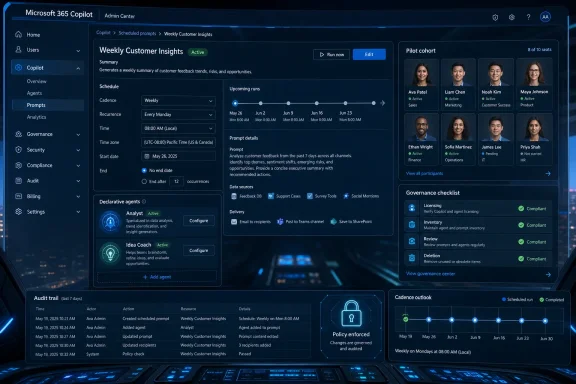 Microsoft Has Turned Copilot Follow-Up Into Scheduled Work
The June 17–July 1 release-note change is narrow, but important: Microsoft says Microsoft 365 Copilot users can schedule repeated prompts to declarative agents, with Analyst and Idea Coach named as examples. In plain English, the user no longer has to remember to ask the same agent for the same recurring insight every morning, every week, or at whatever cadence the scheduling interface exposes in that tenant.Microsoft frames the change as a way to reduce manual effort and improve workflow continuity. That positioning matters because it reveals the target use case. This is not primarily a one-off creativity feature; it is aimed at people who already ask Copilot agents for repeated summaries, analysis, ideation, or monitoring-style output.
For WindowsForum readers who have followed Microsoft’s broader AI workflow push, this is the next step in a predictable sequence. Earlier coverage here has already tracked scheduled Copilot prompts as a Teams and Microsoft 365 automation story, and this release-note update sharpens the scope around declarative agents rather than generic chat alone. The interesting question is no longer whether Microsoft can expose a scheduler. It is whether enterprises should standardize recurring prompts as an accepted work pattern.
The answer depends on the work. If a team already has a human analyst manually prompting Analyst every Monday for the same project digest, scheduled prompts may be an obvious quality-of-life improvement. If a regulated department cannot yet say who owns, reviews, inventories, or deletes scheduled AI tasks, this is a governance gap waiting to become an audit headache.
The Change Is Small in the UI and Larger in the Operating Model
Microsoft’s release notes describe the user motion simply: open the Microsoft 365 Copilot app, select an agent such as Analyst or Idea Coach, choose the schedule option, and set a recurring prompt frequency. That sounds almost mundane. It is also the kind of mundane UX change that quietly alters how work gets delegated.A normal Copilot prompt is an interaction. A scheduled prompt is a commitment. Once a user makes the prompt recurring, Copilot becomes part of the cadence of the job rather than a tool invoked in the moment.
That distinction matters for admins because recurring prompts can become invisible process infrastructure. A sales operations analyst may schedule weekly opportunity analysis. A product manager may schedule recurring customer-feedback synthesis. A security-conscious organization may want to know whether those prompts are touching sensitive files, whether they produce output that becomes business record material, and whether the person who created them still owns that workflow six months later.
Microsoft Learn confirms that admins can inventory scheduled prompts with PowerShell using the Microsoft 365 environment, and that is the operational feature that should get more attention than the scheduler itself. If you cannot see what users have scheduled, you do not really have an AI workflow program. You have distributed automation by enthusiasm.
The Deployment Path Starts With Eligibility, Not Excitement
The first gate is licensing and surface availability. Microsoft’s documentation ties scheduled prompts to a user’s Microsoft 365 Copilot license and the Microsoft Copilot with Graph-grounded chat app. If those pieces are not present for the user, the decision framework stops before policy debate begins.The second gate is rollout timing. Microsoft’s June 17–July 1 window is a staged release-note window, which means organizations may not see identical behavior in every tenant or surface at the same moment. That is not a bug by itself; it is how Microsoft 365 changes often land. But it does mean admins should avoid writing support guidance that assumes every user sees the same button on the same day.
The third gate is workflow fit. Scheduled prompts make the most sense when the question is recurring, the data source is relatively stable, the expected output is reviewable, and the result is useful even if it arrives without a live human initiating the session. They make less sense for ambiguous, high-risk, or one-off decisions where the value comes from the user thinking through the prompt in real time.
For a pilot, the best candidates are boring on purpose. Weekly project summaries, recurring meeting-prep briefs, periodic market or account analysis, and repeat ideation tasks are better starting points than anything involving disciplinary action, legal judgment, medical decision-making, or security incident response.
The Admin Procedure Is a Pilot Runbook, Not a Checkbox
Admins should treat scheduled prompts to declarative agents as a feature rollout with four phases: confirm, constrain, observe, and decide. The Microsoft 365 admin instinct is often to ask, “Where is the toggle?” But the better first question is, “Which recurring user tasks are safe and valuable enough to automate?”Start by confirming that the intended pilot users have Microsoft 365 Copilot licensing and access to the Microsoft Copilot with Graph-grounded chat app. Then verify that scheduled prompts are visible in the Microsoft 365 Copilot app for those users and that declarative agents such as Analyst or Idea Coach appear as schedulable options where the release has reached your tenant.
Next, have pilot users create a small number of recurring prompts with clear business ownership. The prompt should say what it is doing, what source context it expects, and what the user intends to do with the output. A vague scheduled prompt is worse than a vague manual prompt because it can keep producing vague output on schedule.
Then inventory what was created using the PowerShell inventory approach documented by Microsoft Learn for the Microsoft 365 environment. This step is not bureaucracy; it is the proof that admins can see the automation users are creating. If your team cannot produce an inventory during the pilot, you are not ready for broad rollout.
Finally, review whether prompt output is actually useful. Scheduled AI is seductive because it feels like automation. But if the result still requires the same amount of correction, context-setting, or verification every cycle, the organization may simply have moved work from prompting to cleanup.
Declarative Agents Change the Risk Profile
The release-note detail that matters most is the phrase declarative agents. Scheduling a repeated prompt to a general chat assistant is one thing. Scheduling a recurring interaction with an agent designed around a purpose, knowledge scope, or task pattern is more operationally meaningful.Analyst and Idea Coach are good examples because they represent different kinds of recurring work. Analyst implies synthesis, interpretation, and possibly structured reasoning over business context. Idea Coach implies creative iteration and brainstorming. Both can save time, but both can also generate artifacts that users may over-trust if the organization does not train them to review outputs critically.
This is where many AI rollouts go soft. The user-facing pitch says Copilot reduces manual effort. The admin-facing reality is that reduced manual effort does not remove accountability. It changes where accountability must sit.
A scheduled prompt should have an owner, a purpose, a review expectation, and a retirement path. If the creator leaves the role, if the underlying workflow changes, or if the prompt no longer produces useful output, someone must know it exists and have a way to remove or replace it.
The Staged Rollout Is a Governance Clue
The June 17–July 1 window should be read as more than a date range. It is a reminder that Microsoft 365 Copilot features often arrive progressively, and tenant experience may vary during the rollout. For help desks and endpoint administrators, that means screenshots, training snippets, and internal docs can age quickly.This is especially relevant because scheduled prompts intersect with multiple surfaces. Microsoft Learn describes scheduled prompts across Teams, Office.com chat, and Outlook for the broader scheduled prompts experience, while the release-note change focuses on recurring prompts to declarative agents in the Microsoft 365 Copilot app. The safest language for internal communications is therefore conditional: “If you see the schedule option for a supported agent, use it only for approved pilot workflows.”
That may sound cautious, but it prevents the classic Microsoft 365 support spiral. One user sees a feature, another does not, a manager assumes IT is blocking it, and the help desk spends two weeks chasing a rollout variance rather than a configuration issue.
WindowsForum’s earlier reporting on scheduled Copilot prompts and Microsoft AI Workflows has already highlighted the staged, admin-control-heavy nature of this feature family. This latest release-note entry does not erase those concerns; it makes them more concrete because recurring prompts can now be pointed at agents designed to do more specialized work.
The Migration Story Is Where Existing Workflows Need Attention
Microsoft’s documentation includes an important compatibility note: the scheduled prompts feature no longer relies on Power Automate flows, and prompts scheduled during the public preview continue to run in Power Automate until they expire. Microsoft also says those legacy prompts do not appear in the Microsoft 365 Copilot scheduled prompts page and must be viewed or managed in Power Automate.That is exactly the kind of detail that gets missed in a feature announcement and then burns admins later. If your organization experimented with scheduled prompts during preview, you may have two operational realities: newer scheduled prompts visible through the Microsoft 365 Copilot scheduled prompts experience, and older preview-era prompts living in Power Automate until expiration.
This is not just housekeeping. It affects inventory, support, and user expectations. A user may ask why a scheduled prompt is still running, while the admin looks in the newer management surface and does not see it. The answer may be that it is a legacy preview prompt managed elsewhere.
Before broad rollout, admins should explicitly ask whether any teams participated in preview behavior or built workaround workflows in Power Automate to simulate recurring Copilot prompts. Those workflows may not be wrong, but they need to be classified. Otherwise, the organization risks standardizing a new scheduling model while old automation continues out of sight.
Policy Controls Are Necessary but Not Sufficient
Existing coverage has understandably focused on admin controls, Cloud Policy disablement, optional connected experiences, Microsoft 365 environment provisioning, DLP, and persistence behavior after disablement. Those are important basics. But they do not answer the deployment question by themselves.A disablement control tells you whether you can hide or block a capability. It does not tell you whether the capability is valuable enough to enable for a specific group. Nor does it give you a workflow taxonomy, a prompt naming convention, an ownership model, or a review process.
This is the familiar trap of modern Microsoft 365 governance. Admin centers expose controls, roadmaps expose features, and the organization is left to define the actual operating model. Scheduled prompts to declarative agents sit directly in that gap.
The right policy conversation should be about acceptable recurring AI work. Which departments may create scheduled prompts? Which data domains are allowed? Which agents are approved? How often should scheduled prompts be reviewed? What happens when a user changes roles? These questions are less glamorous than the feature demo, but they determine whether the rollout becomes useful infrastructure or another shadow automation layer.
Power Users Should Treat Scheduling as Automation, Not a Reminder
For power users, the feature will feel natural. If you already ask Copilot for the same weekly analysis, why not schedule it? The answer is that you probably should, but only after making the prompt specific enough to survive repetition.A good scheduled prompt is explicit about cadence, context, and output shape. It should not merely say “summarize what happened.” It should define the project, the relevant time period, the desired format, and the action the user plans to take after reviewing the answer.
The recurring nature also changes the burden of review. A manual prompt carries a moment of intent: the user is there, thinking about the task. A scheduled prompt can produce output when the user is distracted, busy, or tempted to forward it without inspection. That makes review discipline more important, not less.
Power users should also assume that admins may inventory scheduled prompts. That is not surveillance theater; it is governance for automation running inside the tenant. If the prompt would look embarrassing, confusing, or unjustifiable in an inventory report, it probably should not be scheduled.
The Best First Use Cases Are Repetitive, Reviewable, and Low-Regret
The sweet spot is repetitive analyst-style work where the human still makes the decision. Think recurring summaries, draft briefs, trend checks, backlog reviews, ideation warmups, or weekly status synthesis. These tasks are annoying enough to automate but not so risky that automation output becomes an unchecked system of record.The wrong first use cases are the ones where a scheduled answer can be mistaken for an approved answer. Anything involving compliance determinations, employment actions, legal conclusions, customer commitments, financial approvals, or security incident triage should wait until the organization has stronger controls and a clearer review trail.
This is not anti-Copilot conservatism. It is basic automation hygiene. Microsoft is making it easier to put AI work on a clock, and work on a clock has a way of becoming part of the business process whether IT intended that or not.
For enthusiasts and smaller teams, the calculus may be simpler. If the tenant is lightly governed and the users are technically competent, scheduled prompts can be a useful personal productivity upgrade. Even there, the best habit is to periodically review what is scheduled and delete anything that no longer serves a real workflow.
The Inventory Requirement Is the Line Between Pilot and Production
Microsoft Learn’s PowerShell inventory guidance is the quiet center of the admin story. A tenant that can inventory scheduled prompts can pilot with eyes open. A tenant that cannot inventory them is relying on user memory and good intentions.Inventory should answer basic operational questions. Who created scheduled prompts? Which prompts exist? Which agents are being used? Which workflows are becoming recurring AI tasks? The exact fields available depend on Microsoft’s documented inventory approach, but the governance goal is consistent: make scheduled AI visible enough to manage.
The inventory process should also be tested before the executive demo, not after. If leadership sees a slick recurring Analyst workflow and immediately asks for broader rollout, IT needs to know whether it can report on and govern the resulting prompt estate. Otherwise, the pilot becomes production by applause.
This is where Windows admins have an advantage. The culture of endpoint and Microsoft 365 administration already understands staged deployment, auditability, least privilege, and rollback planning. Scheduled prompts should be treated with the same muscle memory, even though the object being managed is a user-created AI instruction rather than a device setting or app package.
A Sensible Rollout Looks More Like Change Management Than Enablement
The best rollout plan is deliberately unglamorous. Pick one department with repetitive knowledge work, identify two or three recurring prompts, write down the expected benefit, and run the pilot long enough to see whether the output remains useful after the novelty fades.During that pilot, admins should document the user path, the supported agents visible in the tenant, the schedule options users actually see, and any differences across app surfaces. Because the rollout window is staged, this tenant-specific documentation matters more than a generic announcement screenshot.
The pilot should also include a stop condition. If scheduled prompts create confusion, duplicate existing reporting, produce low-quality output, or cannot be inventoried reliably, pause expansion. A feature can be generally available and still not be operationally ready for your organization.
For larger enterprises, the next layer is policy classification. Scheduled prompts can be allowed for personal productivity, approved team workflows, or managed business processes, with different review expectations for each. That may sound heavy, but it is easier than trying to untangle hundreds of recurring prompts after users have normalized them.
Microsoft’s Productivity Pitch Is Real, but So Is the Administrative Debt
Microsoft is not wrong when it says scheduled prompts can reduce manual effort and improve continuity. Many knowledge workers waste time remembering to ask for the same digest, extract the same trends, or prepare the same brainstorming material. Automating that rhythm can be genuinely useful.But every recurring automation creates administrative debt. Someone must know it exists. Someone must decide whether it is still needed. Someone must understand what happens when the creator leaves, the agent changes, the underlying data shifts, or the policy environment tightens.
That debt is manageable if the organization treats scheduled prompts as a governed feature from the beginning. It becomes painful if admins dismiss them as “just prompts” until they discover that prompts have become recurring business routines.
The deeper point is that Copilot is moving from assistive chat toward ambient work orchestration. Scheduled prompts to declarative agents are a modest example, but the direction is clear. Microsoft wants Copilot to do useful work before the user remembers to ask.
The Decision Matrix Belongs in the Rollout Meeting
The deployment decision should be based on workflow maturity, governance readiness, and user discipline rather than AI enthusiasm. If those conditions are met, scheduled prompts deserve a pilot now. If they are not, the feature should wait behind inventory and policy preparation.- Deploy now to a limited pilot if users already repeat the same Analyst or Idea Coach prompts on a predictable cadence.
- Wait before broad rollout if your tenant cannot yet inventory scheduled prompts using Microsoft’s documented PowerShell approach.
- Treat preview-era scheduled prompts separately because Microsoft says legacy prompts may continue through Power Automate until they expire.
- Write internal guidance that accounts for staged rollout differences between tenants and surfaces during the June 17–July 1 release window.
- Require every scheduled prompt in a pilot to have a named owner, a business purpose, and a review expectation.
- Avoid high-risk workflows until your organization has deletion, audit, and lifecycle controls that match the sensitivity of the work.
References
- Primary source: learn.microsoft.com
Manage Scheduled Prompts for Microsoft 365 Copilot | Microsoft Learn
Learn how to manage scheduled prompts in Microsoft 365 Copilot. Configure admin controls, maintain compliance, and automate workflows effectively.learn.microsoft.com - Primary source: WindowsForum
Scheduled Copilot Prompts in Microsoft 365: Proactive Automation for Teams | Windows Forum
Microsoft appears to have completed the global rollout of Scheduled Copilot prompts to Microsoft 365 Copilot users in Teams and related surfaces — but the...windowsforum.com
