

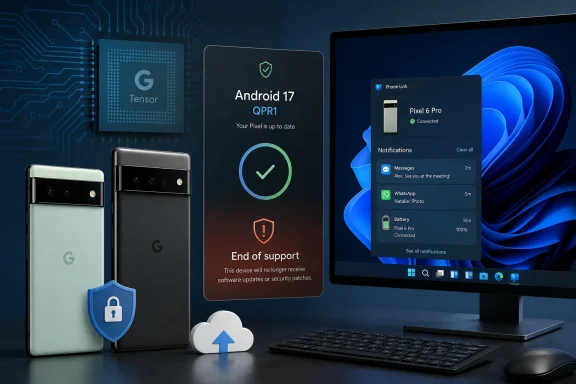
Google’s first Tensor-powered flagships are approaching the end of their official software journey: the Pixel 6 and Pixel 6 Pro will not receive the Android 17 QPR2 Beta, and Google has indicated that the Android 17 QPR1 beta series is their last update track. For owners, this is not merely the loss of an optional preview build. It signals the final stage of support for two phones that helped redefine Google’s modern hardware strategy, from on-device AI features to the distinctive Pixel camera experience.
The timing matters. Android 17 QPR2 Beta 1 began rolling out on July 20, 2026, while Google’s QPR2 device materials list the Pixel 6a but omit both the Pixel 6 and Pixel 6 Pro. That contrast confirms that the original 2021 flagships, rather than the entire Pixel 6 generation, are the devices exiting the active update pipeline.
For Windows users who rely on a Pixel phone as part of a broader Microsoft ecosystem—whether through Phone Link, Google Drive, cross-device authentication, Bluetooth accessories, or cloud productivity apps—the practical takeaway is clear: the Pixel 6 and 6 Pro should now be treated as aging but still capable hardware with a shrinking security runway.
Google’s language around the Android 17 QPR2 Beta is more definitive than the usual unsupported-device omission. The company has stated that Pixel 6 and Pixel 6 Pro users will not receive that over-the-air release because the devices are reaching end of life, with the Android 17 QPR1 beta series representing the final series for both models.
That distinction deserves careful reading. It does not mean that every Pixel 6 or Pixel 6 Pro has suddenly stopped working, lost access to the Play Store, or become obsolete overnight. It means that Google’s regular operating-system, feature, and security-update commitment is drawing to a close.
The two phones remain functional Android devices. They will continue to run installed apps, make calls, use cameras, connect to Windows PCs, synchronize data, and receive many app-level improvements through Google Play. However, the platform underneath those apps will no longer receive the same predictable flow of patches and refinements once the final Android 17 QPR1 build has been delivered.
Android 17 QPR2 Beta 1 is explicitly a new testing branch intended for supported Pixel devices and the Android Emulator. Google describes QPR releases as quarterly updates that are delivered to the Android Open Source Project and to supported Pixel phones as part of Feature Drops.
For the Pixel 6 and Pixel 6 Pro, the absence from this branch matters more than the missed beta itself:
At launch, the Pixel 6 brought a bold visual redesign, a large camera bar, upgraded computational photography, and an aggressive price that made it one of the most competitive Android flagships of its generation. The Pixel 6 Pro added a larger high-resolution LTPO display, a telephoto camera, and more premium hardware to better compete with top-tier Samsung and Apple devices.
That ambition gave the Pixel 6 series a distinct identity. Instead of competing solely on benchmark scores, Google positioned Tensor as a practical engine for software experiences that could make a phone more personal and useful.
The strategy also had rough edges. Pixel 6 owners have long reported concerns ranging from modem behavior and heat to fingerprint-scanner reliability and battery consistency. Not every problem affected every device, and many updates improved day-to-day behavior, but the generation became a reminder that vertically integrated silicon brings both opportunity and responsibility.
Google deserves credit for continuing to evolve the software on these devices beyond the original expectations for Android upgrades. The phones have traveled from Android 12 through Android 17, an unusually long major-version run for a handset launched in 2021. Google’s Android 17 beta documentation confirms that both Pixel 6 models remained eligible well into the Android 17 development cycle.
The Pixel 6 and Pixel 6 Pro helped normalize the expectation that a premium Android phone should survive multiple major platform generations. Their lifecycle also illustrates how quickly expectations have shifted: newer Pixel devices now carry longer support commitments, making the original Tensor generation look like both a milestone and a bridge to a more ambitious era.
For buyers, that is progress. For current owners, it also makes the end of support more visible. A phone that still feels modern in many daily tasks is now reaching the point where security and feature longevity—not raw performance—become the deciding factors.
That gap becomes more important for users who store sensitive work information, authenticate with the phone, manage financial accounts, or use the handset as a security key.
But the risk trend moves in the wrong direction once patches stop. The longer a device remains unsupported, the more public vulnerabilities may accumulate without an official route to remediation.
This is especially relevant for devices that are:
Google’s Android 17 QPR1 beta release documentation lists QPR updates as part of the company’s quarterly platform-release model, with builds supplied to Pixel devices and the Android Open Source Project. The currently published QPR1 beta materials still include the Pixel 6 and Pixel 6 Pro, while QPR2 eligibility has moved past them.
The sensible approach is straightforward:
That said, owners should distinguish between a phased rollout and the end of regular support. The former is normal deployment behavior; the latter is the policy change now facing the Pixel 6 and Pixel 6 Pro.
The Pixel 6a, released later than the original Pixel 6 pair, is still represented in Google’s Android 17 QPR2 materials and OTA listings. The Pixel 6a’s continued inclusion is clear evidence that its lifecycle remains separate from the Pixel 6 and Pixel 6 Pro.
This distinction matters for families, IT administrators, and second-hand buyers. A listing that simply says “Pixel 6” can conceal a significant difference in remaining support:
That includes:
Useful repurposing options include:
The upgrade is not only about getting a faster camera or a newer AI feature. It is about maintaining a support commitment that aligns with the importance of the data stored on the device.
A newer Pixel may be the natural route for owners who value clean Android software and first-party features. However, the larger lesson is to evaluate support duration as a first-class hardware specification, alongside camera quality, display size, storage, and battery capacity.
It may be used to approve account sign-ins, receive verification codes, maintain Microsoft Authenticator or Google Authenticator tokens, manage shared files, connect to a PC through Phone Link, and access OneDrive, Outlook, Teams, Google Workspace, or remote-desktop tools.
But Phone Link is not a security patch mechanism. It can improve convenience, yet it does not change the underlying Android version, firmware level, or security-support status of the Pixel 6.
That makes a clean separation of roles useful. An aging phone can still be an excellent companion device for lightweight messaging and media. It is less ideal as the main authentication anchor for a work PC, password vault, financial accounts, and sensitive cloud storage.
That shift benefits consumers, but it also exposes the uneven lifecycle of older flagships. A phone can remain physically excellent—fast enough, attractive, capable in the camera department, and comfortable to use—while its software support becomes the limiting factor.
Google’s decision is understandable within the original product lifecycle. The Pixel 6 models launched in October 2021, and they have received an unusually substantial run of Android releases for devices of that age.
Still, the conclusion is mixed.
Their impending end of official support after the Android 17 QPR1 cycle is a practical reminder that even excellent phones have a finite security life. Owners do not need to discard a working Pixel 6 immediately, but they should stop treating it as a device with an open-ended future.
Install the final stable update, back up everything important, reassess the phone’s role in personal and Windows-connected workflows, and plan the next move before unsupported software becomes a security compromise rather than a manageable inconvenience.
The timing matters. Android 17 QPR2 Beta 1 began rolling out on July 20, 2026, while Google’s QPR2 device materials list the Pixel 6a but omit both the Pixel 6 and Pixel 6 Pro. That contrast confirms that the original 2021 flagships, rather than the entire Pixel 6 generation, are the devices exiting the active update pipeline.
For Windows users who rely on a Pixel phone as part of a broader Microsoft ecosystem—whether through Phone Link, Google Drive, cross-device authentication, Bluetooth accessories, or cloud productivity apps—the practical takeaway is clear: the Pixel 6 and 6 Pro should now be treated as aging but still capable hardware with a shrinking security runway.
 Overview: What Google Has Confirmed
Google’s language around the Android 17 QPR2 Beta is more definitive than the usual unsupported-device omission. The company has stated that Pixel 6 and Pixel 6 Pro users will not receive that over-the-air release because the devices are reaching end of life, with the Android 17 QPR1 beta series representing the final series for both models.That distinction deserves careful reading. It does not mean that every Pixel 6 or Pixel 6 Pro has suddenly stopped working, lost access to the Play Store, or become obsolete overnight. It means that Google’s regular operating-system, feature, and security-update commitment is drawing to a close.
The two phones remain functional Android devices. They will continue to run installed apps, make calls, use cameras, connect to Windows PCs, synchronize data, and receive many app-level improvements through Google Play. However, the platform underneath those apps will no longer receive the same predictable flow of patches and refinements once the final Android 17 QPR1 build has been delivered.
The important difference between QPR1 and QPR2
Quarterly Platform Releases, or QPRs, are Google’s cadence for delivering meaningful Android refinements between major platform releases. These builds can combine bug fixes, system improvements, Feature Drop capabilities, security work, and developer-facing updates.Android 17 QPR2 Beta 1 is explicitly a new testing branch intended for supported Pixel devices and the Android Emulator. Google describes QPR releases as quarterly updates that are delivered to the Android Open Source Project and to supported Pixel phones as part of Feature Drops.
For the Pixel 6 and Pixel 6 Pro, the absence from this branch matters more than the missed beta itself:
- They will not participate in testing or receiving Android 17 QPR2.
- They are unlikely to receive the eventual public QPR2 release.
- They should not be expected to receive future quarterly Android platform releases.
- The final QPR1 release becomes the critical update owners should install promptly.
- Routine security maintenance after that point is no longer assured.
Why the Pixel 6 and Pixel 6 Pro Matter
The Pixel 6 family arrived in October 2021 and marked a major reset for Google’s smartphone ambitions. Both devices were among the first to use the company’s own Google Tensor system-on-chip, a strategic move away from a complete reliance on Qualcomm hardware.At launch, the Pixel 6 brought a bold visual redesign, a large camera bar, upgraded computational photography, and an aggressive price that made it one of the most competitive Android flagships of its generation. The Pixel 6 Pro added a larger high-resolution LTPO display, a telephoto camera, and more premium hardware to better compete with top-tier Samsung and Apple devices.
Tensor’s beginning—and its lessons
The original Tensor chip was central to Google’s vision. It was designed around the idea that a phone should do more locally: speech processing, photo enhancement, live translation, transcription, call assistance, and contextual machine-learning tasks.That ambition gave the Pixel 6 series a distinct identity. Instead of competing solely on benchmark scores, Google positioned Tensor as a practical engine for software experiences that could make a phone more personal and useful.
The strategy also had rough edges. Pixel 6 owners have long reported concerns ranging from modem behavior and heat to fingerprint-scanner reliability and battery consistency. Not every problem affected every device, and many updates improved day-to-day behavior, but the generation became a reminder that vertically integrated silicon brings both opportunity and responsibility.
Google deserves credit for continuing to evolve the software on these devices beyond the original expectations for Android upgrades. The phones have traveled from Android 12 through Android 17, an unusually long major-version run for a handset launched in 2021. Google’s Android 17 beta documentation confirms that both Pixel 6 models remained eligible well into the Android 17 development cycle.
A long software life by historical Android standards
Five years of software life is no longer extraordinary at the high end of the smartphone market, but it remains meaningful. Older Android support policies were often far shorter, particularly when manufacturers depended on chipset vendors, carriers, and fragmented internal software teams.The Pixel 6 and Pixel 6 Pro helped normalize the expectation that a premium Android phone should survive multiple major platform generations. Their lifecycle also illustrates how quickly expectations have shifted: newer Pixel devices now carry longer support commitments, making the original Tensor generation look like both a milestone and a bridge to a more ambitious era.
For buyers, that is progress. For current owners, it also makes the end of support more visible. A phone that still feels modern in many daily tasks is now reaching the point where security and feature longevity—not raw performance—become the deciding factors.
What “End of Life” Actually Means for Pixel Owners
The phrase end of life can sound more final than the practical reality. A Pixel 6 does not become unsafe in a single moment, nor does it cease to function after the last official update. Yet the loss of guaranteed patches changes the risk calculation over time.What will continue to work
After official support ends, most core functions should continue normally:- Phone calls, texting, mobile data, Wi-Fi, and Bluetooth
- Google Play Store downloads and app updates
- Google Photos backup and cloud services
- Google Wallet, subject to individual bank and app requirements
- Windows integration through Phone Link
- USB file transfer and device charging
- Google Messages for web and cross-device messaging
- Browser-based productivity tools
- Existing camera capabilities and local photo editing
- Smart-home controls, media streaming, and wearables
What changes after the final supported build
The more serious changes happen gradually:- Security vulnerabilities may remain unpatched.
- Newly discovered modem, Bluetooth, Wi-Fi, or kernel flaws may not receive fixes.
- Major Android features introduced in later releases will not arrive.
- Some apps may eventually raise their minimum Android version.
- Banking, identity, corporate-management, and enterprise apps may apply stricter device requirements.
- Hardware-specific bugs will have a lower chance of receiving official fixes.
- Future cloud features may work less completely on older platform versions.
That gap becomes more important for users who store sensitive work information, authenticate with the phone, manage financial accounts, or use the handset as a security key.
Security risk is cumulative, not immediate
Owners should avoid panic. A supported phone is not perfectly secure, and an unsupported phone is not instantly compromised. Security is a matter of exposure, behavior, software condition, and time.But the risk trend moves in the wrong direction once patches stop. The longer a device remains unsupported, the more public vulnerabilities may accumulate without an official route to remediation.
This is especially relevant for devices that are:
- Used for work email or enterprise collaboration
- Registered with mobile-device-management systems
- Used for password managers and two-factor authentication
- Frequently connected to public Wi-Fi
- Used for financial transactions
- Loaded with sideloaded apps or unverified APK files
- Shared among family members with varying security habits
Android 17 QPR1 Is Now the Update to Watch
The important release for Pixel 6 and Pixel 6 Pro owners is not Android 17 QPR2 Beta 1. It is the final stable Android 17 QPR1 update that should conclude their supported lifecycle.Google’s Android 17 QPR1 beta release documentation lists QPR updates as part of the company’s quarterly platform-release model, with builds supplied to Pixel devices and the Android Open Source Project. The currently published QPR1 beta materials still include the Pixel 6 and Pixel 6 Pro, while QPR2 eligibility has moved past them.
Beta software is not the recommended exit path
Owners enrolled in the Android Beta Program should be particularly careful. A beta build is development software, and opting out at the wrong time can sometimes create a downgrade path that requires a data wipe.The sensible approach is straightforward:
- Back up the phone immediately.
- Stay alert for the final stable Android 17 QPR1 release.
- Install the stable update once it arrives.
- Confirm the Android version and security update status in Settings.
- Avoid assuming that every later beta enrollment or opt-out action is harmless.
- Do not flash factory images or OTA files unless there is a clear technical reason and a verified backup.
Update availability can still be phased
Even the last official update may not appear on every Pixel simultaneously. Google commonly deploys Pixel software in stages, with carrier and regional differences affecting timing. A short delay does not necessarily mean that a device has been skipped.That said, owners should distinguish between a phased rollout and the end of regular support. The former is normal deployment behavior; the latter is the policy change now facing the Pixel 6 and Pixel 6 Pro.
The Pixel 6a Remains on a Different Track
One easy mistake is to assume that all Pixel 6-branded devices have reached end of support together. That is not the case.The Pixel 6a, released later than the original Pixel 6 pair, is still represented in Google’s Android 17 QPR2 materials and OTA listings. The Pixel 6a’s continued inclusion is clear evidence that its lifecycle remains separate from the Pixel 6 and Pixel 6 Pro.
This distinction matters for families, IT administrators, and second-hand buyers. A listing that simply says “Pixel 6” can conceal a significant difference in remaining support:
- Pixel 6: Reaching end of official support after Android 17 QPR1.
- Pixel 6 Pro: Reaching end of official support after Android 17 QPR1.
- Pixel 6a: Continues on the Android 17 QPR2 support path for now.
What Pixel 6 Owners Should Do Next
The best next step depends on how the phone is used. There is no universal answer, but there is a sensible hierarchy of decisions.Keep it as a primary phone—temporarily and carefully
Keeping the Pixel 6 or 6 Pro as a primary device can be reasonable in the short term if the final update is installed, the phone remains reliable, and the owner follows good mobile-security habits.That includes:
- Applying the final available system update promptly
- Keeping apps updated through Google Play
- Installing Google Play system updates when offered
- Using a strong screen lock and biometric authentication
- Maintaining a secure backup
- Avoiding untrusted APK downloads
- Reviewing app permissions periodically
- Using a reputable password manager
- Enabling multi-factor authentication for critical accounts
- Replacing degraded batteries or damaged screens through reputable repair channels
Repurpose it as a secondary device
For many people, the Pixel 6 series still has substantial residual value after primary-phone retirement.Useful repurposing options include:
- A dedicated Google Photos backup and viewing device
- A high-quality Wi-Fi camera for casual photography
- A bedside media player or alarm device
- A smart-home dashboard
- A vehicle navigation and media device
- A travel phone with limited accounts and minimal sensitive data
- A child’s supervised Wi-Fi device
- A Windows Phone Link companion used primarily for messaging and notifications
- A test device for Android apps, web apps, or cross-platform workflows
Consider upgrading sooner for business or financial use
Users who depend on mobile banking, workplace security policies, passwordless sign-in, corporate email, or sensitive document access should plan a more direct replacement.The upgrade is not only about getting a faster camera or a newer AI feature. It is about maintaining a support commitment that aligns with the importance of the data stored on the device.
A newer Pixel may be the natural route for owners who value clean Android software and first-party features. However, the larger lesson is to evaluate support duration as a first-class hardware specification, alongside camera quality, display size, storage, and battery capacity.
The Windows Ecosystem Angle: Why Support Matters Beyond Android
For Windows enthusiasts, Android support affects more than the phone itself. A mobile device often functions as a companion security endpoint for a Windows PC.It may be used to approve account sign-ins, receive verification codes, maintain Microsoft Authenticator or Google Authenticator tokens, manage shared files, connect to a PC through Phone Link, and access OneDrive, Outlook, Teams, Google Workspace, or remote-desktop tools.
Phone Link does not solve the update problem
Microsoft’s Phone Link can make an Android phone feel closely connected to Windows. Notifications, messages, recent photos, calls, and app experiences can move fluidly between the phone and the desktop.But Phone Link is not a security patch mechanism. It can improve convenience, yet it does not change the underlying Android version, firmware level, or security-support status of the Pixel 6.
That makes a clean separation of roles useful. An aging phone can still be an excellent companion device for lightweight messaging and media. It is less ideal as the main authentication anchor for a work PC, password vault, financial accounts, and sensitive cloud storage.
Cross-platform workflows can outlive the handset
The positive news is that Windows-centric workflows do not need to end with a Pixel 6 replacement. Most data and services can move cleanly to another Android handset:- Microsoft account credentials and OneDrive files
- Outlook mail and calendar
- Edge browser sync
- Phone Link pairing
- Google account data and Chrome sync
- Password-manager vaults
- Photos stored in cloud services
- Two-factor-authentication migration codes
- Messaging backups where supported
The Bigger Industry Lesson
The Pixel 6 and Pixel 6 Pro are leaving support at an interesting moment for Android. The smartphone market increasingly treats long software support as a competitive feature rather than a niche promise.That shift benefits consumers, but it also exposes the uneven lifecycle of older flagships. A phone can remain physically excellent—fast enough, attractive, capable in the camera department, and comfortable to use—while its software support becomes the limiting factor.
Google’s decision is understandable within the original product lifecycle. The Pixel 6 models launched in October 2021, and they have received an unusually substantial run of Android releases for devices of that age.
Still, the conclusion is mixed.
The strengths of Google’s approach
Google has delivered several real positives:- The Pixel 6 pair received Android 17, well beyond what many 2021 Android flagships could claim.
- The devices remained part of Google’s Android beta program deep into the platform’s lifecycle.
- Owners received years of camera, AI, accessibility, and usability refinements.
- The end-of-life status is tied to a clear boundary: the transition beyond Android 17 QPR1.
- The Pixel 6a’s separate support status demonstrates that Google’s policies account for the actual product timeline rather than treating a branding family as one unit.
The risks and shortcomings
There are equally important caveats:- The final-update message surfaced through beta eligibility rather than an especially prominent consumer-facing lifecycle notice.
- QPR terminology is not intuitive for mainstream owners.
- A device can appear current because it runs Android 17 while still approaching the end of security support.
- Customers who purchased late in the product cycle may feel the remaining lifespan is shorter than the hardware warrants.
- The Pixel 6 generation’s history of connectivity and power-management complaints makes the loss of future corrective updates more consequential for affected users.
A Respectful End for Google’s First Tensor Flagships
The Pixel 6 and Pixel 6 Pro will be remembered as pivotal devices. They were imperfect, occasionally frustrating, and sometimes too ambitious for their first-generation hardware platform. But they also set the direction for Google’s modern phone strategy: custom silicon, AI-led features, long-running software refinement, and a more distinctive hardware identity.Their impending end of official support after the Android 17 QPR1 cycle is a practical reminder that even excellent phones have a finite security life. Owners do not need to discard a working Pixel 6 immediately, but they should stop treating it as a device with an open-ended future.
Install the final stable update, back up everything important, reassess the phone’s role in personal and Windows-connected workflows, and plan the next move before unsupported software becomes a security compromise rather than a manageable inconvenience.
References
- Primary source: nokiapoweruser.com
Published: 2026-07-21T14:02:47+00:00
Google Confirms Pixel 6 & 6 Pro End-of-Life: Android 17 Final Update - NPowerUser
Google officially confirms the Pixel 6 and 6 Pro have reached end-of-life. Here is when the final Android 17 update arrives and what owners need to do next. - Read in Android News on NPowerUser nokiapoweruser.com
- Independent coverage: Techgenyz
Published: 2026-07-21T11:13:26+00:00
Google Pixel 6 and Pixel 6 Pro To Officially Hit End of Support After Android 17 QPR1 - Techgenyz
With the launch of the Android 17 QPR2 Beta today, Google confirmed that Pixel 6 and Pixel 6 Pro will reach End of Life before its scheduled December releasetechgenyz.com - Official source: 9to5google.com
Pixel 6 and 6 Pro will not get Android 17 QPR2
With the start of the Android 17 QPR2 Beta today, Google confirmed that the Pixel 6 and 6 Pro will reach End of Life...9to5google.com - Referenced source: developer.android.com
- Official source: support.google.com

Find when your Pixel device became available - Pixel Phone Help
The table below shows when your Pixel device was available to purchase on the Google Store in the US.
support.google.com
- Related coverage: techradar.com
