

Google Pixel phones are still missing several polish and power-user features common on Samsung Galaxy devices, iPhones, OnePlus phones, and other Android skins, including deeper wallpaper rotation, richer lock-screen customization, more mature multitasking, stronger desktop-mode tools, broader device controls, and more flexible launcher options. Google is narrowing the gap with Android 17 and recent Pixel Drops, but the Pixel’s identity is still shaped as much by restraint as by innovation. The result is a phone line that often feels smarter than its rivals, yet oddly late to features the rest of the market has already normalized.
For years, Google could explain away Pixel omissions with a simple bargain: you bought the phone for the cleanest Android build, the best computational photography, fast updates, and a handful of genuinely useful Google-first features. The missing extras were the price of avoiding the Samsung-style kitchen sink.
That argument is harder to make in 2026. The premium phone market has matured around the idea that polish is not bloat. Apple’s lock screen is configurable without feeling chaotic. Samsung’s One UI has become dense but increasingly coherent. Foldables have trained users to expect real multitasking. Even smaller Android brands have learned that convenience features can become loyalty features.
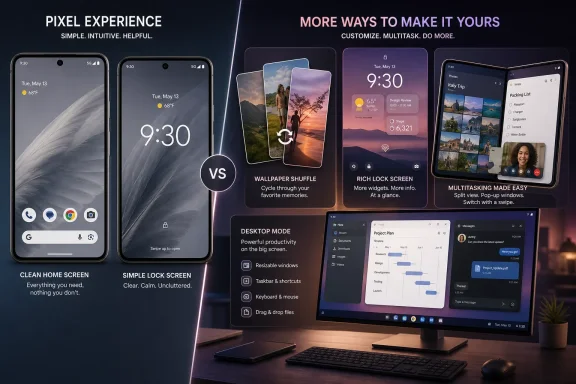
That is why a seemingly minor feature like wallpaper shuffle matters. It is not that Pixel users have been deprived of civilization because their lock screen could not rotate through a favorite folder of photos with the grace of an iPhone or Galaxy. It is that the delay exposes a pattern: Pixel often excels at grand demonstrations of Google intelligence while arriving late to the little affordances people touch dozens of times a day.
The Pixel experience is still one of Android’s best. But “best” now has to mean more than fast updates, good photos, and an uncluttered settings menu.
On paper, this is not a platform-defining change. In practice, it is exactly the kind of feature that makes a phone feel personal. Apple made lock-screen photo rotation part of the iPhone’s modern customization story. Samsung has long allowed users to cycle through lock-screen images. Users who switch between ecosystems notice when a Pixel makes them choose one static photo or live inside Google’s own wallpaper collections.
The absurdity is not that Google lacked the engineering capacity to do this. It is that Pixel, the phone line meant to showcase Android at its most thoughtful, has sometimes treated personalization like a controlled experiment rather than an emotional part of ownership.
That restraint made sense in the early Material You era, when Google wanted the wallpaper to drive system color and visual identity. But personalization has moved on. Users do not just want the phone to sample colors from a background; they want the background itself to behave like a living part of the device.
Samsung’s launcher is not perfect, but it offers more ways to reshape the home screen without abandoning the default experience. OnePlus and other Android vendors have also given users more practical control over icon sizing, folders, gestures, and layout density. Pixel users can install a third-party launcher, of course, but that answer has grown less satisfying as gesture navigation and system animations have become more tightly coupled to the default launcher.
This is where Google’s minimalism starts to look less like taste and more like paternalism. A premium phone should not make basic home-screen flexibility feel like a philosophical concession. If Google wants Pixel to be the reference Android device, it needs to distinguish between clutter and choice.
There are signs Google understands the tension. Rumors and leaks around Android 17 have pointed to additional customization work, including more control over the persistent search bar. But Pixel users have heard versions of this before. The question is whether Google will let the launcher become meaningfully user-shaped or merely adjustable around the edges.
The lock screen is no longer just a clock and notification tray. It is a glanceable dashboard, a photo frame, a wallet entry point, a smart-home remote, and a personal aesthetic statement. Apple understood this when it turned lock-screen customization into a mainstream iOS feature. Samsung understood it by letting power users go deeper than most people ever will.
Google has the ingredients for something stronger. At a Glance remains one of the most useful ambient information surfaces on any phone. Pixel’s weather, calendar, travel, package, commute, and contextual prompts can be excellent when they work. But Google has never fully opened that surface into a user-tunable dashboard.
The missing feature is not merely “more clock fonts.” It is control. Users should be able to decide which contextual modules appear, where they appear, and how aggressively they interrupt the visual design of the lock screen. Google’s intelligence would be more trusted if users had more authority over its presentation.
But Samsung did not build its foldable software reputation on one multitasking feature. It built it on years of iteration: multi-window, pop-up view, taskbars, edge panels, app pairs, drag-and-drop patterns, and a general willingness to let the user make a mess if that mess gets work done. Google has been more careful, and sometimes that care has looked like hesitation.
For slab phones, the difference may not matter every day. For foldables and tablets, it matters immediately. A large screen that behaves like a big phone is a missed opportunity. A large screen that lets a user arrange work, messaging, video, notes, and browsing fluidly becomes a different class of device.
Pixel’s challenge is that it now sells foldables and tablets into a market where Samsung has already trained buyers what flexible Android multitasking can look like. Google does not need to copy every One UI trick, but it does need to make Pixel multitasking feel intentional rather than belated.
But Samsung DeX remains the obvious comparison because it is not just a demo. It is a recognizable mode with a clear purpose: connect the phone to a monitor, keyboard, and mouse, and get a desktop-like environment that can handle real work in a pinch. It has limitations, but it has a decade of institutional memory behind it.
Pixel does not yet have that kind of identity on an external display. It has potential. It has pieces. It has the advantage of Google being able to improve Android’s core windowing model instead of layering everything through an OEM skin. But potential is not a feature users can rely on during a hotel-room emergency when their laptop dies.
If Google wants Pixel to compete with premium Galaxy phones among IT pros and productivity-minded users, desktop mode cannot remain a hidden curiosity. It needs predictable window management, strong peripheral support, sensible scaling, enterprise-friendly controls, and a name users can remember.
That category is where Pixel has sometimes struggled. App cloning, deeper quick-settings control, better charging customization, more advanced battery health tools, richer audio routing, stronger per-app volume behavior, and broader automation hooks may not all belong in Google’s default interface. But many users expect at least some of them on a high-end Android phone.
Samsung solves this partly through settings depth and partly through Good Lock. Apple solves it through a controlled but expanding set of system-level conveniences. Google tends to solve it only when a feature fits the Pixel thesis of ambient intelligence, safety, camera quality, or clean design.
That leaves a gap for practical utility. The Pixel often feels like it is designed for the user Google imagines: busy, mainstream, privacy-aware, photography-focused, and happy to let Google anticipate needs. Enthusiasts and administrators are often a different species. They want switches, logs, policies, defaults, and escape hatches.
But AI cannot cover for missing basics forever. A phone that can summarize a call but cannot match a rival’s lock-screen flexibility creates a strange kind of imbalance. It feels futuristic in one moment and stubbornly undercooked in the next.
This is especially risky because AI features are unevenly valued. Some users love them. Some distrust them. Some use them occasionally and forget they exist. But nearly everyone touches the launcher, lock screen, wallpaper, notifications, quick settings, multitasking, charging behavior, and app management every day.
Google has sometimes behaved as though Pixel’s intelligence is the premium layer. Increasingly, the premium layer is the whole experience. AI is part of that, but so is whether the phone lets you arrange your digital life the way you want.
That is exactly why the missing features stand out. Users are not asking Google to become Samsung. They are asking Google to stop treating obvious quality-of-life features as if they threaten the purity of Android.
The best version of Pixel would not be a Galaxy clone. It would be a cleaner, more coherent Android phone that still respects power users enough to expose deeper controls. It would keep the default experience simple while allowing enthusiasts to opt into complexity.
Google already does this in some places. Developer options exist. Pixel camera controls have expanded. Privacy settings have become more granular. The company clearly understands layered complexity when it wants to. The frustration is that it applies that philosophy inconsistently.
A Galaxy Z Fold owner will likely mention multitasking, app pairs, pop-up windows, S Pen support, DeX, and Good Lock-style customization. An iPhone switcher may point to lock-screen photo shuffle, widget polish, ecosystem handoff, or more predictable accessory behavior. A OnePlus or Xiaomi user may miss charging controls, app cloning, aggressive layout customization, or gaming tools.
That variety is the point. Pixel now competes not only with other phones, but with habits formed elsewhere. Every switcher brings a list of conveniences they assumed were universal until Pixel quietly says no.
The danger for Google is not that any one missing feature breaks the Pixel proposition. It is that enough of them make the phone feel curated in ways that benefit Google’s design preferences more than the user’s daily rhythm.
Pixel’s next big leap may not come from a camera trick or an AI demo, but from Google finally accepting that refinement is a feature category of its own. The phones already have intelligence, speed, and taste; what they still need is the confidence to let users personalize, multitask, and control the device with the same fluency rivals have spent years normalizing. If Android 17’s wallpaper shuffle is a sign of that shift, it is a small one — but small features are often where a platform reveals whether it is listening.
 Pixel’s Problem Is No Longer Intelligence — It Is Completeness
For years, Google could explain away Pixel omissions with a simple bargain: you bought the phone for the cleanest Android build, the best computational photography, fast updates, and a handful of genuinely useful Google-first features. The missing extras were the price of avoiding the Samsung-style kitchen sink.That argument is harder to make in 2026. The premium phone market has matured around the idea that polish is not bloat. Apple’s lock screen is configurable without feeling chaotic. Samsung’s One UI has become dense but increasingly coherent. Foldables have trained users to expect real multitasking. Even smaller Android brands have learned that convenience features can become loyalty features.
That is why a seemingly minor feature like wallpaper shuffle matters. It is not that Pixel users have been deprived of civilization because their lock screen could not rotate through a favorite folder of photos with the grace of an iPhone or Galaxy. It is that the delay exposes a pattern: Pixel often excels at grand demonstrations of Google intelligence while arriving late to the little affordances people touch dozens of times a day.
The Pixel experience is still one of Android’s best. But “best” now has to mean more than fast updates, good photos, and an uncluttered settings menu.
Wallpaper Shuffle Is the Small Feature That Gives Away the Larger Story
The latest Android 17 findings suggest Google is preparing a proper photo-shuffle wallpaper option for Pixel phones. That would finally move the Pixel beyond its limited daily wallpaper behavior, which has long been more of a curated collection rotator than a user-controlled personal photo shuffle.On paper, this is not a platform-defining change. In practice, it is exactly the kind of feature that makes a phone feel personal. Apple made lock-screen photo rotation part of the iPhone’s modern customization story. Samsung has long allowed users to cycle through lock-screen images. Users who switch between ecosystems notice when a Pixel makes them choose one static photo or live inside Google’s own wallpaper collections.
The absurdity is not that Google lacked the engineering capacity to do this. It is that Pixel, the phone line meant to showcase Android at its most thoughtful, has sometimes treated personalization like a controlled experiment rather than an emotional part of ownership.
That restraint made sense in the early Material You era, when Google wanted the wallpaper to drive system color and visual identity. But personalization has moved on. Users do not just want the phone to sample colors from a background; they want the background itself to behave like a living part of the device.
The Launcher Still Feels Like Google’s Lawn, Not Yours
The Pixel Launcher remains one of the cleanest home-screen experiences in Android, and that cleanliness is part of the appeal. But it also remains one of the least flexible launchers on a premium Android phone. The fixed Google search bar, limited grid control, conservative icon handling, and sparse gesture options have become recurring complaints precisely because the rest of Android has moved toward letting users decide how much structure they want.Samsung’s launcher is not perfect, but it offers more ways to reshape the home screen without abandoning the default experience. OnePlus and other Android vendors have also given users more practical control over icon sizing, folders, gestures, and layout density. Pixel users can install a third-party launcher, of course, but that answer has grown less satisfying as gesture navigation and system animations have become more tightly coupled to the default launcher.
This is where Google’s minimalism starts to look less like taste and more like paternalism. A premium phone should not make basic home-screen flexibility feel like a philosophical concession. If Google wants Pixel to be the reference Android device, it needs to distinguish between clutter and choice.
There are signs Google understands the tension. Rumors and leaks around Android 17 have pointed to additional customization work, including more control over the persistent search bar. But Pixel users have heard versions of this before. The question is whether Google will let the launcher become meaningfully user-shaped or merely adjustable around the edges.
Lock-Screen Customization Is Better, But Still Not Ambitious Enough
Google has improved Pixel lock-screen customization over the last few Android releases, adding more clock styles, wallpaper effects, shortcuts, and visual refinements. Yet compared with the iPhone’s lock-screen overhaul and Samsung’s deeper Good Lock universe, Pixel still feels cautious.The lock screen is no longer just a clock and notification tray. It is a glanceable dashboard, a photo frame, a wallet entry point, a smart-home remote, and a personal aesthetic statement. Apple understood this when it turned lock-screen customization into a mainstream iOS feature. Samsung understood it by letting power users go deeper than most people ever will.
Google has the ingredients for something stronger. At a Glance remains one of the most useful ambient information surfaces on any phone. Pixel’s weather, calendar, travel, package, commute, and contextual prompts can be excellent when they work. But Google has never fully opened that surface into a user-tunable dashboard.
The missing feature is not merely “more clock fonts.” It is control. Users should be able to decide which contextual modules appear, where they appear, and how aggressively they interrupt the visual design of the lock screen. Google’s intelligence would be more trusted if users had more authority over its presentation.
Pixel Multitasking Is Finally Growing Up, But Samsung Still Owns the Power-User Mindshare
Android 17’s expansion of bubbles and floating app behavior is a meaningful step for Pixel phones, foldables, and tablets. It addresses one of the most obvious gaps between Pixel foldables and Samsung’s Galaxy Z Fold line: the ability to keep more than one task alive without constantly switching contexts.But Samsung did not build its foldable software reputation on one multitasking feature. It built it on years of iteration: multi-window, pop-up view, taskbars, edge panels, app pairs, drag-and-drop patterns, and a general willingness to let the user make a mess if that mess gets work done. Google has been more careful, and sometimes that care has looked like hesitation.
For slab phones, the difference may not matter every day. For foldables and tablets, it matters immediately. A large screen that behaves like a big phone is a missed opportunity. A large screen that lets a user arrange work, messaging, video, notes, and browsing fluidly becomes a different class of device.
Pixel’s challenge is that it now sells foldables and tablets into a market where Samsung has already trained buyers what flexible Android multitasking can look like. Google does not need to copy every One UI trick, but it does need to make Pixel multitasking feel intentional rather than belated.
Desktop Mode Is the Next Place Pixel Cannot Afford to Dabbling
Desktop mode is another area where Pixel has shown progress but not yet conviction. Recent Pixel builds have made external-display support more interesting, and Google’s collaboration with Samsung suggests the company knows Android needs a better large-screen and desktop-adjacent story.But Samsung DeX remains the obvious comparison because it is not just a demo. It is a recognizable mode with a clear purpose: connect the phone to a monitor, keyboard, and mouse, and get a desktop-like environment that can handle real work in a pinch. It has limitations, but it has a decade of institutional memory behind it.
Pixel does not yet have that kind of identity on an external display. It has potential. It has pieces. It has the advantage of Google being able to improve Android’s core windowing model instead of layering everything through an OEM skin. But potential is not a feature users can rely on during a hotel-room emergency when their laptop dies.
If Google wants Pixel to compete with premium Galaxy phones among IT pros and productivity-minded users, desktop mode cannot remain a hidden curiosity. It needs predictable window management, strong peripheral support, sensible scaling, enterprise-friendly controls, and a name users can remember.
The Missing Features Are Often About Trust, Not Novelty
Some Pixel omissions are not flashy enough to headline a keynote, but they matter because they reduce friction. Auto-confirm PIN unlock is a good example. It eventually arrived, but its absence was baffling because users coming from other Android phones had been trained to expect it. The feature did not make a phone smarter; it made it less annoying.That category is where Pixel has sometimes struggled. App cloning, deeper quick-settings control, better charging customization, more advanced battery health tools, richer audio routing, stronger per-app volume behavior, and broader automation hooks may not all belong in Google’s default interface. But many users expect at least some of them on a high-end Android phone.
Samsung solves this partly through settings depth and partly through Good Lock. Apple solves it through a controlled but expanding set of system-level conveniences. Google tends to solve it only when a feature fits the Pixel thesis of ambient intelligence, safety, camera quality, or clean design.
That leaves a gap for practical utility. The Pixel often feels like it is designed for the user Google imagines: busy, mainstream, privacy-aware, photography-focused, and happy to let Google anticipate needs. Enthusiasts and administrators are often a different species. They want switches, logs, policies, defaults, and escape hatches.
Google’s AI Lead Does Not Excuse the Boring Gaps
Pixel’s strongest modern argument is increasingly built around AI. Call screening, transcription, Recorder, photo editing, contextual assistance, and Gemini-powered features give Google real differentiation. No other Android vendor can quite match the feeling of Google services, Android, and Pixel hardware moving in the same direction.But AI cannot cover for missing basics forever. A phone that can summarize a call but cannot match a rival’s lock-screen flexibility creates a strange kind of imbalance. It feels futuristic in one moment and stubbornly undercooked in the next.
This is especially risky because AI features are unevenly valued. Some users love them. Some distrust them. Some use them occasionally and forget they exist. But nearly everyone touches the launcher, lock screen, wallpaper, notifications, quick settings, multitasking, charging behavior, and app management every day.
Google has sometimes behaved as though Pixel’s intelligence is the premium layer. Increasingly, the premium layer is the whole experience. AI is part of that, but so is whether the phone lets you arrange your digital life the way you want.
The Pixel Advantage Is Real, Which Makes the Gaps More Frustrating
None of this means Pixel is behind as a whole. In several areas, it remains ahead. The camera pipeline is still a defining strength. Pixel’s spam protection and call features are genuinely useful. The update cadence remains a major selling point. The software design is cleaner than most Android skins. The integration with Google’s services can be excellent when it avoids becoming intrusive.That is exactly why the missing features stand out. Users are not asking Google to become Samsung. They are asking Google to stop treating obvious quality-of-life features as if they threaten the purity of Android.
The best version of Pixel would not be a Galaxy clone. It would be a cleaner, more coherent Android phone that still respects power users enough to expose deeper controls. It would keep the default experience simple while allowing enthusiasts to opt into complexity.
Google already does this in some places. Developer options exist. Pixel camera controls have expanded. Privacy settings have become more granular. The company clearly understands layered complexity when it wants to. The frustration is that it applies that philosophy inconsistently.
The Poll Will Probably Tell Google What Its Own Switchers Already Know
The open-ended nature of the 9to5Google poll is useful because a normal multiple-choice poll would flatten the issue. Pixel’s missing-feature problem is not one missing toggle. It is a collection of small absences that vary depending on where a user came from.A Galaxy Z Fold owner will likely mention multitasking, app pairs, pop-up windows, S Pen support, DeX, and Good Lock-style customization. An iPhone switcher may point to lock-screen photo shuffle, widget polish, ecosystem handoff, or more predictable accessory behavior. A OnePlus or Xiaomi user may miss charging controls, app cloning, aggressive layout customization, or gaming tools.
That variety is the point. Pixel now competes not only with other phones, but with habits formed elsewhere. Every switcher brings a list of conveniences they assumed were universal until Pixel quietly says no.
The danger for Google is not that any one missing feature breaks the Pixel proposition. It is that enough of them make the phone feel curated in ways that benefit Google’s design preferences more than the user’s daily rhythm.
The Features Pixel Still Needs to Stop Feeling Selectively Premium
Pixel does not need to win every feature checklist, but it does need to close the gaps that make users feel like they are giving something up to get Google’s best software. The next phase of Pixel maturity should be less about surprise magic and more about dependable completeness.- Pixel needs a full photo-shuffle wallpaper system that works with user-selected albums, lock-screen preferences, and sensible refresh controls.
- Pixel needs deeper launcher flexibility, including more control over the search bar, grid density, icon behavior, folders, and home-screen gestures.
- Pixel needs lock-screen customization that treats At a Glance as a user-configurable dashboard rather than a mostly Google-directed surface.
- Pixel foldables and tablets need multitasking that feels as mature and deliberate as Samsung’s large-screen software, not merely adequate.
- Pixel needs a real desktop-mode identity with dependable external-display behavior, windowing, keyboard and mouse support, and enterprise relevance.
- Pixel should expose more practical power-user controls for charging, app duplication, audio behavior, quick settings, and automation without making the default experience messy.
Pixel’s next big leap may not come from a camera trick or an AI demo, but from Google finally accepting that refinement is a feature category of its own. The phones already have intelligence, speed, and taste; what they still need is the confidence to let users personalize, multitask, and control the device with the same fluency rivals have spent years normalizing. If Android 17’s wallpaper shuffle is a sign of that shift, it is a small one — but small features are often where a platform reveals whether it is listening.
References
- Primary source: 9to5Google
Published: 2026-06-30T01:10:18.223190
What missing features do you want on Google Pixel? [Poll]
While the Google Pixel experience is easily one of the best you’ll find today, it’s no secret that other platforms...9to5google.com - Related coverage: gadgets360.de
Android 17 QPR1 Beta 5 Hints at iOS-Like Photo Shuffle Wallpaper Feature for Google Pixel Phones । Android 17 QPR1 Beta 5 für Pixel: Bugfixes und verstecktes Photo-Shuffle-Feature
Google hat Android 17 QPR1 Beta 5 für Pixel-Smartphones ausgerollt. Das Update behebt Fehler in Kamera-App, Game Dashboard, Always-On Display und Download Manager. Ein APK-Teardown hat außerdem eine neue Funktion namens Photo Shuffle entdeckt — ähnlich wie...www.gadgets360.de - Related coverage: phonearena.com
Google testing iPhone feature to add to Pixel smartphones - PhoneArena
Google might soon expand on a current Pixel capability matching the iOS version of it.www.phonearena.com - Related coverage: easternherald.com
Android 17 Beta Borrows Apple's Photo Shuffle, Teases Gemini Intelligence
Google's Android 17 QPR1 Beta 5 reveals a Photo Shuffle wallpaper feature mirroring Apple's iOS and briefly flashes Gemini Intelligence branding on the Pixel 10 Pro Fold.easternherald.com - Related coverage: techspot.com
Android 17 arrives on Pixel with floating apps, foldable features, and new AI tools | TechSpot
That context matters for understanding what this update actually is. Android, at least in its pure form, is no longer what most users interact with. On Pixel...www.techspot.com - Related coverage: androidcentral.com
Android 17 is making Pixel widgets vanish, but Google already has a fix in the works | Android Central
Some Android 17 users are reporting missing home screen widgets after updating.www.androidcentral.com
- Related coverage: androidauthority.com
Google is working to bring a beloved iPhone wallpaper feature to Pixels
A new Photo Shuffle feature spotted in Android 17 QPR1 beta could bring effortless, iPhone-like wallpaper cycling to your Google Pixel.www.androidauthority.com - Related coverage: tomsguide.com
Android 17 officially rolls out to Pixel devices with new features — screen reactions, bubbles, gaming mode, and more | Tom's Guide
Google's massive June 2026 software drop delivers Android 17's productivity and security overhauls to Pixel devices, alongside new Wear OS 7 features.www.tomsguide.com - Related coverage: techradar.com
I finally tried the Pixel’s new desktop mode, and it’s the coolest hidden feature you aren't using | TechRadar
Can a Pixel 10 Pro XL really replace your laptopwww.techradar.com - Related coverage: t3.com
This Google Pixel update will be as neat as it is surprising – we didn't see that coming | T3
Google could give Pixel owners the option to remove a key featurewww.t3.com
