

On July 9, 2026, a GlobeNewswire item carried by The Manila Times said eSoftware Associates is pushing Copilot and AI agents into custom Power Apps, arguing that enterprise AI only becomes useful when it works inside governed business systems rather than beside them. The practical message is sharper than the marketing: Microsoft’s agent story is no longer about whether a chatbot can answer questions, but whether it can safely touch the records, workflows, and permissions that define real work. That makes Power Apps, Dataverse, Power Automate, SharePoint, Microsoft 365, and Azure less a low-code toolkit than a new control plane for enterprise automation. It also makes bad permissions, messy data models, and weak audit trails the failure points that matter most.
The most important sentence in the eSoftware Associates announcement is not the one about Copilot. It is the one about where Copilot lives. ESW, described in the release as a U.S.-based Microsoft partner working in custom Power Apps and Microsoft 365 since 2006, is making the case that AI belongs inside the applications teams already open every morning.
That sounds obvious until you look at how many corporate AI pilots still behave like visitors. A standalone chatbot sits in a browser tab, waits for a prompt, and depends on a worker to translate its answer back into a CRM, ticketing queue, HR workflow, SharePoint library, or case-management system. It may be impressive, but it is not yet operational. It is advice, not execution.
Power Apps changes the geometry. A model-driven or canvas app already knows the record being edited, the security role of the user, the state of the process, and the next allowable action. Add Dataverse for relational data, Power Automate for workflow, and an embedded agent that can operate inside those boundaries, and AI stops being a detached assistant. It becomes another participant in the business process.
That is why Russell Kommer, founder and CEO of eSoftware Associates, framed the issue as groundwork rather than licensing. “Fix your permissions and data model before you buy a single extra license, and that groundwork is what makes Copilot deliver,” Kommer said in the release. His second line was even more damning for the chatbot era: “An agent built into the app people already open every morning gets used, while a separate chatbot gets one visit and is then ignored.”
The distinction matters because Microsoft’s own Power Platform messaging has been moving in the same direction. In an April 15, 2026 Power Platform blog post, Microsoft described updates that bring Copilot, app skills, and agents directly into business applications, with Microsoft 365 Copilot generally available in model-driven apps and in public preview for canvas apps. Microsoft’s argument was that the app contains the business rules, permissions, and process knowledge needed to make AI useful.
That is the through-line between Microsoft’s platform push and ESW’s services pitch. Microsoft is supplying the rails. Partners like eSoftware Associates are telling customers that the train will derail if the underlying data estate is still a junk drawer.
A chatbot is a universal front door. That makes it convenient, but it also makes it vague. The user must explain the context, ask the right question, interpret the answer, and often copy the result into another system. In low-risk knowledge work, that can save minutes. In regulated, operational, or customer-facing work, it creates a gap between suggestion and accountability.
An embedded agent starts from a narrower but more valuable place. It can see the current record, use the app’s data model, respect the app’s role-based permissions, trigger the defined workflow, update the correct field, and leave an audit trail. The value comes not from sounding intelligent, but from being constrained enough to do something repeatable.
That is why the Manila Times/GlobeNewswire piece leans so hard on custom builds. Power Apps supports custom business systems such as CRMs, ticketing, and case management. Dataverse handles the relational data. Power Automate handles the workflow. In that architecture, the agent is not an oracle bolted onto the side; it is a supervised actor inside the operating system of the business.
A simple comparison shows why the distinction is not just semantic.
The table also exposes the uncomfortable truth for IT leaders. The more useful the agent becomes, the more dangerous a weak governance model becomes. A chatbot that summarizes the wrong thing wastes time. An agent that updates the wrong record or exposes the wrong case file can create a compliance incident.
This is the essential trade-off of agentic AI. Moving from answers to actions increases return on investment, but it also raises the standard of control. The business cannot simply ask, “Can the model do this?” It has to ask, “Can this system prove who asked, what data was used, what action was taken, under whose authority, and why that action was allowed?”
The ESW release makes the same point in plainer, more operational language: Copilot reads whatever a user can already open. If the employee has access to a file, site, mailbox item, chat, or record through existing permissions, Copilot can potentially make that information easier to find, summarize, and reuse. That is not a new permission grant. It is an acceleration of whatever permission reality already exists.
For many organizations, that is exactly the problem. Years of SharePoint sprawl, inherited permissions, overshared Teams folders, broad Microsoft 365 groups, abandoned sites, orphaned workflows, and informal “temporary” access exceptions have left users with more visibility than anyone consciously intended. Before Copilot, that overexposure could remain latent because finding the wrong file required luck, persistence, or institutional memory. With Copilot, discoverability becomes a feature.
That is why the release warns that Microsoft 365 Copilot deployments could stall in pilot on data and permissions before reaching a company-wide rollout. It is also why it says Copilot can surface sensitive records to people who were never meant to see them. Again, the point is not that Copilot violates permissions. The point is that Copilot makes bad permissions matter faster.
This is a familiar pattern in Windows and Microsoft 365 administration. A new capability exposes the accumulated debt of old decisions. Search exposed messy file shares. Teams exposed poor group governance. Cloud sync exposed sloppy device and identity policies. Copilot exposes access hygiene.
The lesson for admins is that Copilot readiness cannot be treated as a license assignment exercise. An AI readiness assessment, according to the source material, checks licensing, data classification, permissions, and governance. That order matters less than the completeness. Licensing tells you who can use the tool. Permissions and classification tell you what the tool can safely reveal. Governance tells you whether the organization can keep that safe state over time.
That is why custom apps matter. A CRM, ticketing system, case-management portal, or HR onboarding flow built on Power Apps is not just a front end. It is a bundle of assumptions about who is allowed to see what, which actions require review, which fields are authoritative, which process transitions are valid, and which exceptions are allowed. If an agent is embedded there, it can inherit not only the data but the logic.
The source material gives a practical example: a Power Apps front end combined with Power Automate and an embedded agent can run onboarding from start to finish, collecting forms, routing approvals, provisioning access, and tracking each task. That is a very different scenario from asking a chatbot to “help with onboarding.” The former is a process; the latter is a conversation.
Onboarding is also a useful stress test because it crosses domains. HR data, identity provisioning, manager approvals, equipment requests, compliance acknowledgments, security groups, and facilities workflows can all be involved. An agent that touches that chain must be able to operate within role boundaries and leave a record of what happened. Otherwise, the company has not automated onboarding; it has hidden a set of privileged actions behind a natural-language interface.
This is where Dataverse and Power Automate become more important than the model. Dataverse gives the app a structured, relational data layer rather than a pile of documents. Power Automate defines repeatable workflows instead of relying on an agent to improvise. The embedded agent can then operate inside a system that has shape.
That shape is what separates an AI demo from an application. Demos thrive on flexibility. Production systems survive on constraint. Enterprises do not need agents that can do anything; they need agents that can do the right thing, in the right context, for the right user, with evidence.
The agent feed concept is important because it gives human oversight a home. If an agent is acting in the background, users need to see what it is doing, where it needs approval, and how its work connects to the records they own. A separate monitoring portal would turn supervision into another administrative chore. Putting the feed inside the app keeps oversight near the workflow.
The design logic is simple. Low-risk actions can proceed quietly. Higher-impact actions should surface for approval. The business user should see enough context to make a decision without hunting across systems. The agent should not be a black box; it should be a visible participant whose activity can be reviewed, corrected, and audited.
This is especially relevant for compliance-sensitive businesses. The Manila Times/GlobeNewswire piece says Copilot and AI agents can be deployed securely in such environments when they run on a governed foundation. That foundation includes role-based access, data classification, and Microsoft 365 compliance controls. But compliance teams will also care about operational evidence: what changed, who approved it, and whether the control worked.
There is a deeper architectural shift here. For decades, enterprise software automation meant deterministic workflows: if this condition is met, take that action. Agentic systems add probabilistic reasoning, document interpretation, natural language, and tool use. That does not eliminate workflow governance; it makes governance more necessary. The agent feed is one way to put probabilistic work back into a controlled human process.
But the useful part of the release is the implied critique of how companies buy AI. Too many organizations start with licenses, pilots, and executive enthusiasm, then discover that the hard work is old-fashioned information architecture. They have not mapped sensitive data. They have not cleaned up permissions. They have not decided which agent actions require approval. They have not defined measurable value. They have not built an audit model that will satisfy internal risk teams.
Kommer’s line about fixing permissions and the data model before buying another license is blunt because it attacks the procurement reflex. Buying Copilot is easy compared with deciding who should see payroll planning documents, which SharePoint sites should be indexed, whether archived project files should remain broadly accessible, and whether legacy groups still match the organization chart. The AI budget is visible. The governance work is tedious. The tedious work determines whether the AI budget pays off.
That is why agentic AI projects often fail before production for reasons that look managerial rather than technical. The source material points to cost, unclear value, and weak risk controls. Those are not model-quality problems. They are operating-model problems.
The companies that move fastest will not necessarily be the ones with the most aggressive AI mandates. They will be the ones with clean role design, accurate data classification, disciplined app ownership, and a practical view of what agents should and should not do. In Power Platform terms, that means knowing which apps are business-critical, which Dataverse tables hold sensitive records, which flows can change state, and which actions need human review.
In the earlier Copilot phase, AI largely appeared as a helper: summarize this meeting, draft this email, explain this document, create this slide, analyze this spreadsheet. Those use cases are valuable because they reduce individual friction. But they do not necessarily change the system of record. They make a worker faster.
The agent phase is different. An agent can read a Dataverse record, trigger a Power Automate workflow, update a field, draft a next step, or help manage a case. That brings AI into the transactional layer. The prize is bigger: fewer handoffs, less manual entry, faster approvals, better process visibility. The risk is also bigger: a flawed permission model or missing audit trail can turn a productivity project into a governance failure.
Microsoft’s Power Platform strategy is therefore not just about low-code development. It is about converting existing business apps into controlled AI workspaces. The company wants apps to expose their capabilities to Copilot and custom agents, while also letting Copilot and agents work inside the app. That two-way relationship is the core of the new architecture.
For WindowsForum readers, the enterprise endpoint angle is straightforward. Windows remains the user surface for many of these workflows, but the control plane increasingly sits in Microsoft 365, Entra identity, SharePoint, Dataverse, Power Apps, Power Automate, and Purview-style governance. The endpoint matters, but the permissions graph matters more. A well-managed PC will not save a badly governed tenant from overexposed data.
April 15, 2026 — Microsoft’s Power Platform blog described updates bringing AI, Copilot, and agents directly into Power Apps, including Microsoft 365 Copilot in model-driven apps and preview support for canvas apps.
May 4, 2026 — Microsoft’s Power Platform blog said the agent feed with Power Apps MCP Server would be generally available, giving users a way to supervise agent activity inside business apps.
July 2026 — Microsoft’s Power Platform blog said app-based form and grid experiences in Copilot Chat would be generally available, with support for custom UX entering preview.
July 9, 2026 — The Manila Times carried the GlobeNewswire item on eSoftware Associates’ view that Copilot and AI agents do real work when embedded inside custom Power Apps rather than left as standalone chatbots.
That is why admins should treat Copilot and embedded agents as an exposure test. Before expanding access, assume the tool will make every permitted thing easier to find. Then ask whether those permissions still reflect business intent.
This is not just a SharePoint cleanup project, though SharePoint usually deserves attention. It is a cross-system review of Microsoft 365 groups, Teams, OneDrive sharing, Dataverse roles, Power Platform environments, connectors, Power Automate flows, sensitivity labels, retention needs, and app ownership. The readiness assessment described in the source material—licensing, data classification, permissions, and governance—is a minimum bar.
The application layer matters too. If a custom Power App is going to host an agent, admins and makers need to define the agent’s action boundary. Can it draft only? Can it update fields? Can it trigger a workflow? Can it provision access? Can it send communications externally? Which of those actions require approval? What gets logged? Who reviews failures?
The more consequential the workflow, the more explicit the control should be. A ticketing agent that suggests a category is different from an HR onboarding agent that provisions access. A case-management agent that summarizes activity is different from one that advances case status. A sales agent that drafts a follow-up is different from one that changes customer records.
Custom Power Apps already sit close to the work. They are used for internal CRMs, ticketing, case management, onboarding, approvals, portals, and line-of-business processes that never quite fit inside off-the-shelf SaaS. If those apps become agent-aware, companies can extract value from processes that are too specific, too departmental, or too messy for a generic AI assistant.
But the app has to be worth automating. If the process is broken, embedding an agent accelerates brokenness. If the data model is inconsistent, the agent will inherit inconsistency. If permissions are loose, Copilot’s ability to retrieve and summarize becomes a liability. If workflows lack auditability, production use will stall in compliance review.
This is why the release’s emphasis on permissions and data model is more than partner advice. It is the operational thesis for the next phase of Microsoft AI adoption. The agent is only as production-ready as the system it enters.
There is also a cultural implication. Business users may adopt embedded agents more readily because they do not have to learn a new destination. But IT and security teams may demand more discipline from business app makers in return. The era of departmental low-code experimentation is colliding with the era of AI-driven action. That collision will require more mature environment strategy, solution lifecycle management, and role design.
The winners will be organizations that can let makers build quickly without letting every app become a shadow automation risk. Power Platform governance has long been a balancing act between empowerment and control. Agents make that balance non-negotiable.
That has consequences for staffing. The ideal Copilot rollout team is not just an AI champion and a licensing administrator. It needs Microsoft 365 admins, SharePoint owners, Power Platform architects, security and compliance stakeholders, business process owners, and people who understand the messy reality of the workflows being automated.
It also changes what “AI success” should mean. A successful pilot is not a group of happy users saying Copilot saved them time. A successful pilot is one where the organization can identify the business process improved, the data accessed, the permissions respected, the actions taken, and the controls that would let the pilot scale without a security panic.
That is a higher bar, but it is also a healthier one. The last wave of enterprise AI adoption produced too many disconnected experiments: a chatbot here, a summary feature there, a handful of prompt libraries, a dashboard of anecdotal productivity claims. The Power Apps agent model pushes toward systems of record, measurable workflows, and repeatable controls.
In other words, the conversation is moving from “Who has access to AI?” to “Which business process is ready for AI to act inside it?” That is the right question.
The most concrete conclusions are the least glamorous:
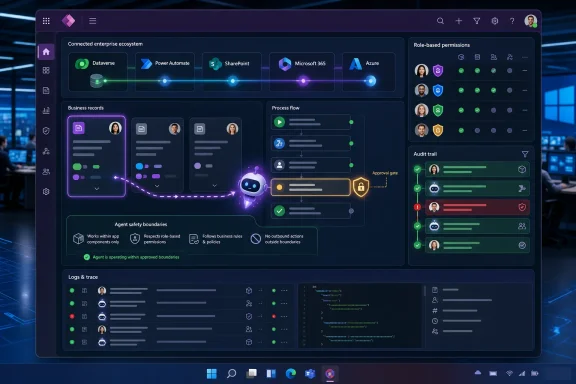 Microsoft’s Agent Pitch Has Moved From Conversation to Execution
The most important sentence in the eSoftware Associates announcement is not the one about Copilot. It is the one about where Copilot lives. ESW, described in the release as a U.S.-based Microsoft partner working in custom Power Apps and Microsoft 365 since 2006, is making the case that AI belongs inside the applications teams already open every morning.That sounds obvious until you look at how many corporate AI pilots still behave like visitors. A standalone chatbot sits in a browser tab, waits for a prompt, and depends on a worker to translate its answer back into a CRM, ticketing queue, HR workflow, SharePoint library, or case-management system. It may be impressive, but it is not yet operational. It is advice, not execution.
Power Apps changes the geometry. A model-driven or canvas app already knows the record being edited, the security role of the user, the state of the process, and the next allowable action. Add Dataverse for relational data, Power Automate for workflow, and an embedded agent that can operate inside those boundaries, and AI stops being a detached assistant. It becomes another participant in the business process.
That is why Russell Kommer, founder and CEO of eSoftware Associates, framed the issue as groundwork rather than licensing. “Fix your permissions and data model before you buy a single extra license, and that groundwork is what makes Copilot deliver,” Kommer said in the release. His second line was even more damning for the chatbot era: “An agent built into the app people already open every morning gets used, while a separate chatbot gets one visit and is then ignored.”
The distinction matters because Microsoft’s own Power Platform messaging has been moving in the same direction. In an April 15, 2026 Power Platform blog post, Microsoft described updates that bring Copilot, app skills, and agents directly into business applications, with Microsoft 365 Copilot generally available in model-driven apps and in public preview for canvas apps. Microsoft’s argument was that the app contains the business rules, permissions, and process knowledge needed to make AI useful.
That is the through-line between Microsoft’s platform push and ESW’s services pitch. Microsoft is supplying the rails. Partners like eSoftware Associates are telling customers that the train will derail if the underlying data estate is still a junk drawer.
The Chatbot Is the Wrong Unit of Enterprise AI
Enterprise software has spent the last two years learning an old lesson in a new accent: users do not want another destination. They want the system they already use to become less painful. That is why the agent built into a Power App is more strategically important than a general-purpose chatbot sitting outside the workflow.A chatbot is a universal front door. That makes it convenient, but it also makes it vague. The user must explain the context, ask the right question, interpret the answer, and often copy the result into another system. In low-risk knowledge work, that can save minutes. In regulated, operational, or customer-facing work, it creates a gap between suggestion and accountability.
An embedded agent starts from a narrower but more valuable place. It can see the current record, use the app’s data model, respect the app’s role-based permissions, trigger the defined workflow, update the correct field, and leave an audit trail. The value comes not from sounding intelligent, but from being constrained enough to do something repeatable.
That is why the Manila Times/GlobeNewswire piece leans so hard on custom builds. Power Apps supports custom business systems such as CRMs, ticketing, and case management. Dataverse handles the relational data. Power Automate handles the workflow. In that architecture, the agent is not an oracle bolted onto the side; it is a supervised actor inside the operating system of the business.
A simple comparison shows why the distinction is not just semantic.
| Approach | Where it lives | What it can usually do | Main risk | What makes it production-ready |
|---|---|---|---|---|
| Standalone chatbot | Separate chat surface | Answer, summarize, draft | Low adoption and weak process context | Clear use case and safe data boundaries |
| Embedded Power Apps agent | Inside the business app | Read records, suggest next steps, trigger workflows, update fields | Overexposed data or unsafe actions | Role-based permissions and app governance |
| Governed production agent | Inside a controlled workflow | Act within defined rules and leave evidence | Compliance failure if actions are not auditable | Data classification, approvals, and audit trail |
This is the essential trade-off of agentic AI. Moving from answers to actions increases return on investment, but it also raises the standard of control. The business cannot simply ask, “Can the model do this?” It has to ask, “Can this system prove who asked, what data was used, what action was taken, under whose authority, and why that action was allowed?”
Copilot Only Looks Safe If Your Permissions Are Already Safe
Microsoft’s official architecture documentation for Microsoft 365 Copilot is clear on the baseline claim: data access is scoped to the signed-in user’s permissions, and Copilot does not access data the user lacks permission to access. That is reassuring, but it is not the same as saying a tenant is ready. Copilot inherits the security posture it finds.The ESW release makes the same point in plainer, more operational language: Copilot reads whatever a user can already open. If the employee has access to a file, site, mailbox item, chat, or record through existing permissions, Copilot can potentially make that information easier to find, summarize, and reuse. That is not a new permission grant. It is an acceleration of whatever permission reality already exists.
For many organizations, that is exactly the problem. Years of SharePoint sprawl, inherited permissions, overshared Teams folders, broad Microsoft 365 groups, abandoned sites, orphaned workflows, and informal “temporary” access exceptions have left users with more visibility than anyone consciously intended. Before Copilot, that overexposure could remain latent because finding the wrong file required luck, persistence, or institutional memory. With Copilot, discoverability becomes a feature.
That is why the release warns that Microsoft 365 Copilot deployments could stall in pilot on data and permissions before reaching a company-wide rollout. It is also why it says Copilot can surface sensitive records to people who were never meant to see them. Again, the point is not that Copilot violates permissions. The point is that Copilot makes bad permissions matter faster.
This is a familiar pattern in Windows and Microsoft 365 administration. A new capability exposes the accumulated debt of old decisions. Search exposed messy file shares. Teams exposed poor group governance. Cloud sync exposed sloppy device and identity policies. Copilot exposes access hygiene.
The lesson for admins is that Copilot readiness cannot be treated as a license assignment exercise. An AI readiness assessment, according to the source material, checks licensing, data classification, permissions, and governance. That order matters less than the completeness. Licensing tells you who can use the tool. Permissions and classification tell you what the tool can safely reveal. Governance tells you whether the organization can keep that safe state over time.
Power Apps Turns AI Risk Into an Application Design Problem
The interesting thing about Power Apps is that it gives IT a place to be concrete. “AI governance” is often discussed in policy language so abstract that it becomes a committee artifact. Power Apps forces governance into design: which tables, which roles, which screens, which flows, which approvals, which logs.That is why custom apps matter. A CRM, ticketing system, case-management portal, or HR onboarding flow built on Power Apps is not just a front end. It is a bundle of assumptions about who is allowed to see what, which actions require review, which fields are authoritative, which process transitions are valid, and which exceptions are allowed. If an agent is embedded there, it can inherit not only the data but the logic.
The source material gives a practical example: a Power Apps front end combined with Power Automate and an embedded agent can run onboarding from start to finish, collecting forms, routing approvals, provisioning access, and tracking each task. That is a very different scenario from asking a chatbot to “help with onboarding.” The former is a process; the latter is a conversation.
Onboarding is also a useful stress test because it crosses domains. HR data, identity provisioning, manager approvals, equipment requests, compliance acknowledgments, security groups, and facilities workflows can all be involved. An agent that touches that chain must be able to operate within role boundaries and leave a record of what happened. Otherwise, the company has not automated onboarding; it has hidden a set of privileged actions behind a natural-language interface.
This is where Dataverse and Power Automate become more important than the model. Dataverse gives the app a structured, relational data layer rather than a pile of documents. Power Automate defines repeatable workflows instead of relying on an agent to improvise. The embedded agent can then operate inside a system that has shape.
That shape is what separates an AI demo from an application. Demos thrive on flexibility. Production systems survive on constraint. Enterprises do not need agents that can do anything; they need agents that can do the right thing, in the right context, for the right user, with evidence.
The Agent Feed Is Microsoft’s Quiet Admission That Autonomy Needs Supervision
Microsoft’s April 2026 Power Platform blog also highlighted an agent feed in model-driven apps, generally available on May 4, 2026, designed to let users supervise agent activity inside business applications. That detail deserves more attention than it will probably get. It is Microsoft acknowledging that the future is not “fully autonomous agents everywhere.” It is supervised execution.The agent feed concept is important because it gives human oversight a home. If an agent is acting in the background, users need to see what it is doing, where it needs approval, and how its work connects to the records they own. A separate monitoring portal would turn supervision into another administrative chore. Putting the feed inside the app keeps oversight near the workflow.
The design logic is simple. Low-risk actions can proceed quietly. Higher-impact actions should surface for approval. The business user should see enough context to make a decision without hunting across systems. The agent should not be a black box; it should be a visible participant whose activity can be reviewed, corrected, and audited.
This is especially relevant for compliance-sensitive businesses. The Manila Times/GlobeNewswire piece says Copilot and AI agents can be deployed securely in such environments when they run on a governed foundation. That foundation includes role-based access, data classification, and Microsoft 365 compliance controls. But compliance teams will also care about operational evidence: what changed, who approved it, and whether the control worked.
There is a deeper architectural shift here. For decades, enterprise software automation meant deterministic workflows: if this condition is met, take that action. Agentic systems add probabilistic reasoning, document interpretation, natural language, and tool use. That does not eliminate workflow governance; it makes governance more necessary. The agent feed is one way to put probabilistic work back into a controlled human process.
ESW’s Services Pitch Is Really a Warning About AI Procurement
It would be easy to read the GlobeNewswire item as partner marketing and stop there. ESW describes itself as 100% U.S.-based Microsoft consultants building secure Power Apps, SharePoint, Dataverse, and Microsoft 365 systems since 2006, with company data claiming more than 200 migrations completed with zero data loss. It also lists work across Power Apps, SharePoint, Dataverse, SPFx, Copilot and AI Agents, and Azure. Sarah Evans, Head of PR at Zen Media, is listed as the contact.But the useful part of the release is the implied critique of how companies buy AI. Too many organizations start with licenses, pilots, and executive enthusiasm, then discover that the hard work is old-fashioned information architecture. They have not mapped sensitive data. They have not cleaned up permissions. They have not decided which agent actions require approval. They have not defined measurable value. They have not built an audit model that will satisfy internal risk teams.
Kommer’s line about fixing permissions and the data model before buying another license is blunt because it attacks the procurement reflex. Buying Copilot is easy compared with deciding who should see payroll planning documents, which SharePoint sites should be indexed, whether archived project files should remain broadly accessible, and whether legacy groups still match the organization chart. The AI budget is visible. The governance work is tedious. The tedious work determines whether the AI budget pays off.
That is why agentic AI projects often fail before production for reasons that look managerial rather than technical. The source material points to cost, unclear value, and weak risk controls. Those are not model-quality problems. They are operating-model problems.
The companies that move fastest will not necessarily be the ones with the most aggressive AI mandates. They will be the ones with clean role design, accurate data classification, disciplined app ownership, and a practical view of what agents should and should not do. In Power Platform terms, that means knowing which apps are business-critical, which Dataverse tables hold sensitive records, which flows can change state, and which actions need human review.
The 2026 Shift Is From AI Adoption to AI Production
The release states that the move from assistant to agent has become the clearest change in how enterprise software gets built in 2026. That is a defensible claim, but it needs interpretation. The shift is not simply that AI can now act. It is that business applications are being redesigned around AI participation.In the earlier Copilot phase, AI largely appeared as a helper: summarize this meeting, draft this email, explain this document, create this slide, analyze this spreadsheet. Those use cases are valuable because they reduce individual friction. But they do not necessarily change the system of record. They make a worker faster.
The agent phase is different. An agent can read a Dataverse record, trigger a Power Automate workflow, update a field, draft a next step, or help manage a case. That brings AI into the transactional layer. The prize is bigger: fewer handoffs, less manual entry, faster approvals, better process visibility. The risk is also bigger: a flawed permission model or missing audit trail can turn a productivity project into a governance failure.
Microsoft’s Power Platform strategy is therefore not just about low-code development. It is about converting existing business apps into controlled AI workspaces. The company wants apps to expose their capabilities to Copilot and custom agents, while also letting Copilot and agents work inside the app. That two-way relationship is the core of the new architecture.
For WindowsForum readers, the enterprise endpoint angle is straightforward. Windows remains the user surface for many of these workflows, but the control plane increasingly sits in Microsoft 365, Entra identity, SharePoint, Dataverse, Power Apps, Power Automate, and Purview-style governance. The endpoint matters, but the permissions graph matters more. A well-managed PC will not save a badly governed tenant from overexposed data.
Timeline
2006 — eSoftware Associates says it began its custom Power Apps and Microsoft 365 work, with Russell Kommer leading the firm since its founding.April 15, 2026 — Microsoft’s Power Platform blog described updates bringing AI, Copilot, and agents directly into Power Apps, including Microsoft 365 Copilot in model-driven apps and preview support for canvas apps.
May 4, 2026 — Microsoft’s Power Platform blog said the agent feed with Power Apps MCP Server would be generally available, giving users a way to supervise agent activity inside business apps.
July 2026 — Microsoft’s Power Platform blog said app-based form and grid experiences in Copilot Chat would be generally available, with support for custom UX entering preview.
July 9, 2026 — The Manila Times carried the GlobeNewswire item on eSoftware Associates’ view that Copilot and AI agents do real work when embedded inside custom Power Apps rather than left as standalone chatbots.
Where Admins Should Start Before the Pilot Becomes Political
The worst Copilot rollout is not the one that fails immediately. It is the one that succeeds just enough to alarm the security team. Early users report productivity gains, executives ask for expansion, and then someone discovers that the pilot surfaced a sensitive document through permissions nobody had reviewed in years.That is why admins should treat Copilot and embedded agents as an exposure test. Before expanding access, assume the tool will make every permitted thing easier to find. Then ask whether those permissions still reflect business intent.
This is not just a SharePoint cleanup project, though SharePoint usually deserves attention. It is a cross-system review of Microsoft 365 groups, Teams, OneDrive sharing, Dataverse roles, Power Platform environments, connectors, Power Automate flows, sensitivity labels, retention needs, and app ownership. The readiness assessment described in the source material—licensing, data classification, permissions, and governance—is a minimum bar.
The application layer matters too. If a custom Power App is going to host an agent, admins and makers need to define the agent’s action boundary. Can it draft only? Can it update fields? Can it trigger a workflow? Can it provision access? Can it send communications externally? Which of those actions require approval? What gets logged? Who reviews failures?
The more consequential the workflow, the more explicit the control should be. A ticketing agent that suggests a category is different from an HR onboarding agent that provisions access. A case-management agent that summarizes activity is different from one that advances case status. A sales agent that drafts a follow-up is different from one that changes customer records.
Action checklist for admins
- Run an AI readiness assessment before assigning broad Copilot access, covering licensing, data classification, permissions, and governance.
- Review Microsoft 365 and SharePoint permissions with the assumption that Copilot can surface anything the signed-in user can already open.
- Clean up Dataverse security roles, app ownership, and environment boundaries before embedding agents into Power Apps.
- Define which agent actions are draft-only, which can update records, and which require human approval.
- Require audit trails for production agents, especially in HR, finance, legal, healthcare, customer support, and regulated workflows.
- Treat custom Power Apps agents as application changes, not just AI features, and route them through the same risk, testing, and change-management process.
The Real ROI Comes From Boring Controls
The hard sell for AI has often been magical: less work, faster output, smarter teams. The more credible sell is now bureaucratic: better data models, cleaner permissions, stronger governance, and auditable workflows. That sounds less exciting, but it is where the money is.Custom Power Apps already sit close to the work. They are used for internal CRMs, ticketing, case management, onboarding, approvals, portals, and line-of-business processes that never quite fit inside off-the-shelf SaaS. If those apps become agent-aware, companies can extract value from processes that are too specific, too departmental, or too messy for a generic AI assistant.
But the app has to be worth automating. If the process is broken, embedding an agent accelerates brokenness. If the data model is inconsistent, the agent will inherit inconsistency. If permissions are loose, Copilot’s ability to retrieve and summarize becomes a liability. If workflows lack auditability, production use will stall in compliance review.
This is why the release’s emphasis on permissions and data model is more than partner advice. It is the operational thesis for the next phase of Microsoft AI adoption. The agent is only as production-ready as the system it enters.
There is also a cultural implication. Business users may adopt embedded agents more readily because they do not have to learn a new destination. But IT and security teams may demand more discipline from business app makers in return. The era of departmental low-code experimentation is colliding with the era of AI-driven action. That collision will require more mature environment strategy, solution lifecycle management, and role design.
The winners will be organizations that can let makers build quickly without letting every app become a shadow automation risk. Power Platform governance has long been a balancing act between empowerment and control. Agents make that balance non-negotiable.
What This Changes Inside Microsoft Shops
For Microsoft-heavy organizations, the ESW release should be read as a map of where budget and attention are likely to move. Copilot licenses may remain the headline expense, but the implementation work will increasingly sit in Power Platform consulting, governance remediation, data classification, SharePoint cleanup, Dataverse design, and custom app modernization.That has consequences for staffing. The ideal Copilot rollout team is not just an AI champion and a licensing administrator. It needs Microsoft 365 admins, SharePoint owners, Power Platform architects, security and compliance stakeholders, business process owners, and people who understand the messy reality of the workflows being automated.
It also changes what “AI success” should mean. A successful pilot is not a group of happy users saying Copilot saved them time. A successful pilot is one where the organization can identify the business process improved, the data accessed, the permissions respected, the actions taken, and the controls that would let the pilot scale without a security panic.
That is a higher bar, but it is also a healthier one. The last wave of enterprise AI adoption produced too many disconnected experiments: a chatbot here, a summary feature there, a handful of prompt libraries, a dashboard of anecdotal productivity claims. The Power Apps agent model pushes toward systems of record, measurable workflows, and repeatable controls.
In other words, the conversation is moving from “Who has access to AI?” to “Which business process is ready for AI to act inside it?” That is the right question.
The Practical Read for Windows and Microsoft 365 Pros
The lesson for WindowsForum’s audience is not that every organization needs a custom agent tomorrow. It is that Copilot’s risk and value both depend on the Microsoft estate admins already manage. Identity, permissions, labels, groups, apps, workflows, and audit logs are now AI infrastructure.The most concrete conclusions are the least glamorous:
- Copilot does not fix a bad permission model; it makes the consequences easier to discover.
- Embedded agents are more useful than standalone chatbots because they live where the data, rules, and workflow already exist.
- Power Apps, Dataverse, and Power Automate give Microsoft shops a practical way to turn AI into controlled business execution.
- Custom agents need role-based permissions and audit trails before they belong in production.
- AI readiness is not a one-time gate; it is an ongoing governance discipline.
- The organizations that scale agentic AI will be the ones that clean up the boring foundations before the exciting demo.
References
- Primary source: The Manila Times
Published: 2026-07-09T11:24:11.532587
Copilot and AI Agents Do Real Work Inside Custom Power Apps | The Manila Times
Custom Power Apps builds put Copilot and AI agents to work inside the systems teams already use, not in a standalone chatbot. Copilot delivers real work only after a company fixes its data and permissions, because it can reach whatever the signed-in user can open. Role-based permissions and an... www.manilatimes.net
- Official source: learn.microsoft.com
Add Microsoft 365 Copilot for app users in model-driven apps - Power Apps | Microsoft Learn
Learn how to enable Microsoft 365 Copilot in model-driven apps to provide AI-powered insights and enhance productivity for your app users.learn.microsoft.com - Official source: microsoft.com
Build better apps, faster: Copilot in Power Apps is now generally available - Microsoft Power Platform Blog
Create apps from your data in minutes, with no code required We are excited announce that Copilot for Power Apps is now Generally Available for app makers. Since its initial release earlier this year, more than 126,000 organizations have already started using Copilot across the Power Platform.www.microsoft.com - Official source: cdn-dynmedia-1.microsoft.com
- Official source: download.microsoft.com
- Related coverage: globenewswire.com
Field and Operations Teams Run Daily Work on Custom Power
eSoftware Associates helps field and operations teams replace paper work orders and inventory counts with offline-first custom Power Apps....www.globenewswire.com
- Related coverage: cdn.asp.events
Patterns
Smart city and abstract dot point connect with gradient line and aesthetic Intricate wave line design , big data connection technology concept .cdn.asp.events
- Related coverage: ml-eu.globenewswire.com