

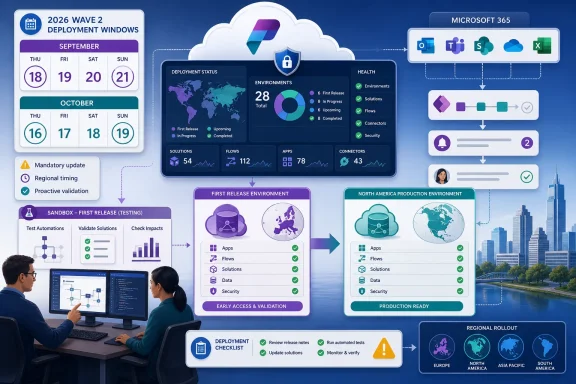
Microsoft Power Platform 2026 Wave 2 does not go live everywhere on September 18. That date begins the September 18–21 First Release deployment weekend; North American Dataverse environments follow on October 16–19, giving many IT teams a valuable window to test Microsoft 365-connected automations in a representative sandbox before the mandatory regional update.
The practical recommendation is straightforward: test now if your organization depends on business-critical flows, has a First Release environment, or maintains automations with broad Microsoft 365 dependencies. Teams with low-impact workflows and no First Release footprint can wait for the September 16 release plans, but they should still complete targeted validation before their region’s deployment weekend.
Microsoft plans to publish the English-language Dynamics 365 and Power Platform 2026 Wave 2 release plans on September 16, 2026. Those plans will cover capabilities scheduled to release from October 2026 through March 2027.
Two days later, Dataverse environments in the First Release region are scheduled to receive the Wave 2 general-availability deployment during the September 18–21 weekend. As detailed in Microsoft Learn’s Power Platform deployment schedule, that is the first regional window rather than a single worldwide activation date.
North American Dataverse environments are scheduled for October 16–19. Other regions have their own deployment weekends, so administrators must identify the region assigned to each environment rather than applying one corporate deadline to the entire tenant estate.
Microsoft also warns that the precise completion time for an individual environment cannot be predetermined. A weekend window is therefore not an appointment: administrators should not assume that every environment will change at the beginning of Friday evening or at the same hour as another environment in the same region.
That uncertainty matters for testing and support coverage. A team that waits until the regional weekend to begin validation may not know exactly when the updated behavior has reached its environment, while business users could begin encountering changes before the test team has completed its checks.
The schedule also corrects an easy misunderstanding around the term general availability. A capability can be generally available as part of the release cycle without every Dataverse environment receiving the associated platform update simultaneously. The regional deployment schedule controls when the mandatory update reaches each environment.
A tenant should move into the first testing group if Microsoft 365-connected flows perform approvals, notifications, document handling, records processing, or other tasks that users treat as operationally dependable. The issue is not that Microsoft has announced a specific breaking change—the detailed Wave 2 plan is not scheduled to appear until September 16—but that a mandatory platform wave is approaching and the time available after publication will be short for First Release environments.
First Release customers face the tightest schedule. Their deployment weekend starts only two days after the English release plans are due to publish. Waiting for September 16 to create a sandbox, identify owners, select test cases, and establish expected results would leave little meaningful preparation time.
Organizations with North American environments have more room. The October 16–19 window creates roughly a month between publication of the plans and the start of that region’s scheduled deployment. That is enough time for a controlled review, but only if administrators begin inventory and ownership work before the release documentation arrives.
Immediate testing is warranted when any of the following conditions applies:
Administrators can still identify environments, flow owners, critical processes, expected outputs, and regional deployment dates now. That work remains useful regardless of which individual Wave 2 features ultimately apply.
Start by creating or refreshing a non-production environment that represents the relevant production configuration closely enough to exercise real scenarios. Microsoft recommends validating early-access functionality in a non-production environment, which avoids turning production users into the first test group.
The validation sequence should be compact enough to repeat but specific enough to reveal changed behavior:
The first pass should cover automations where a wrong result is worse than an obvious failure. A stopped notification is visible; an automation that silently routes incomplete information or updates the wrong destination can operate incorrectly for longer before anyone notices.
IT teams should also test the human side of the workflow. If a user-facing change alters how a person completes an approval or responds to an automated request, the underlying flow might remain technically healthy while the business process still breaks.
That classification should become the test queue.
Features enabled automatically for users deserve the earliest review because their impact may appear without a separate local activation decision. Test teams should look for changed screens, prompts, defaults, or interaction paths that could affect how users initiate or complete an automated process.
Automatically enabled admin or maker changes come next. These may affect how Power Platform specialists build, manage, or monitor solutions even when ordinary users do not immediately see a new interface.
Features requiring configuration are usually easier to govern because administrators or makers control whether and how they are introduced. They still require assessment, but they should not displace automatically enabled changes from the front of the test plan unless the organization already intends to deploy them immediately.
This is where the September 16 publication becomes the critical planning milestone. Administrators should not wait until then to start from an empty spreadsheet. They should arrive with an existing inventory and use the release plan to map announced capabilities against known dependencies.
WindowsForum’s earlier coverage of Power Platform release waves has tracked Microsoft’s growing emphasis on AI-assisted applications, automation, and centralized governance. The operational lesson remains consistent across those releases: new headline features attract attention, but automatically enabled changes and their effect on established processes often determine how difficult the rollout becomes for IT.
That does not eliminate local control over readiness. Teams still control whether they maintain representative non-production environments, how they rank critical flows, who owns validation, and whether users have a fallback when an automation behaves unexpectedly.
The biggest avoidable risk is confusing a later regional deployment with permission to ignore the release until October. North American organizations have a longer interval than First Release customers, but that time should be used to observe early results, refine tests, and address affected automations—not merely to delay opening the release plan.
Multi-region organizations need particular care. An early environment can function as a practical warning system, but only when it resembles the later production environment closely enough for the comparison to mean something. A simple demonstration environment with different solutions, permissions, data patterns, and connections may produce reassuring results that do not transfer to production.
Administrators should also avoid promising an exact production validation hour during the October 16–19 North American weekend. Microsoft says an environment’s completion time cannot be predetermined, so support plans should cover the window and include a way to confirm when each environment has actually completed its update.
The evidence available before September 16 remains intentionally limited: Microsoft has supplied the release-plan date, coverage period, mandatory-update policy, enablement classifications, and regional deployment schedule, but not yet the complete Wave 2 feature catalog. That is enough to build the test framework, not enough to declare particular flows compatible.
By September 16, Power Platform administrators should already know which Microsoft 365-connected automations they will test first. First Release tenants then face the September 18–21 deployment weekend, while North American environments have until October 16–19 to turn early findings into production readiness—the quiet window exists, but only for teams that use it before the mandatory rollout arrives.
The practical recommendation is straightforward: test now if your organization depends on business-critical flows, has a First Release environment, or maintains automations with broad Microsoft 365 dependencies. Teams with low-impact workflows and no First Release footprint can wait for the September 16 release plans, but they should still complete targeted validation before their region’s deployment weekend.
 September 18 Starts the Rollout, Not a Global Cutover
Microsoft plans to publish the English-language Dynamics 365 and Power Platform 2026 Wave 2 release plans on September 16, 2026. Those plans will cover capabilities scheduled to release from October 2026 through March 2027.Two days later, Dataverse environments in the First Release region are scheduled to receive the Wave 2 general-availability deployment during the September 18–21 weekend. As detailed in Microsoft Learn’s Power Platform deployment schedule, that is the first regional window rather than a single worldwide activation date.
North American Dataverse environments are scheduled for October 16–19. Other regions have their own deployment weekends, so administrators must identify the region assigned to each environment rather than applying one corporate deadline to the entire tenant estate.
Microsoft also warns that the precise completion time for an individual environment cannot be predetermined. A weekend window is therefore not an appointment: administrators should not assume that every environment will change at the beginning of Friday evening or at the same hour as another environment in the same region.
That uncertainty matters for testing and support coverage. A team that waits until the regional weekend to begin validation may not know exactly when the updated behavior has reached its environment, while business users could begin encountering changes before the test team has completed its checks.
The schedule also corrects an easy misunderstanding around the term general availability. A capability can be generally available as part of the release cycle without every Dataverse environment receiving the associated platform update simultaneously. The regional deployment schedule controls when the mandatory update reaches each environment.
The Tenants That Should Enter Testing First
The strongest candidates for immediate sandbox validation are not necessarily the tenants with the largest number of flows. Priority should follow business impact, dependency breadth, and the organization’s ability to detect subtle behavioral changes.A tenant should move into the first testing group if Microsoft 365-connected flows perform approvals, notifications, document handling, records processing, or other tasks that users treat as operationally dependable. The issue is not that Microsoft has announced a specific breaking change—the detailed Wave 2 plan is not scheduled to appear until September 16—but that a mandatory platform wave is approaching and the time available after publication will be short for First Release environments.
First Release customers face the tightest schedule. Their deployment weekend starts only two days after the English release plans are due to publish. Waiting for September 16 to create a sandbox, identify owners, select test cases, and establish expected results would leave little meaningful preparation time.
Organizations with North American environments have more room. The October 16–19 window creates roughly a month between publication of the plans and the start of that region’s scheduled deployment. That is enough time for a controlled review, but only if administrators begin inventory and ownership work before the release documentation arrives.
Immediate testing is warranted when any of the following conditions applies:
- A flow supports a process whose failure would stop or materially delay normal business operations.
- An automation connects Power Platform processes with multiple Microsoft 365 workloads or crosses administrative boundaries.
- A flow has no active owner who can quickly diagnose unexpected behavior.
- Users depend on an automation but do not have a documented manual fallback.
- The organization operates environments in both First Release and later deployment regions.
- Existing test coverage confirms only that a flow runs, without checking its outputs, routing, permissions, or user-facing results.
Administrators can still identify environments, flow owners, critical processes, expected outputs, and regional deployment dates now. That work remains useful regardless of which individual Wave 2 features ultimately apply.
Test the Automation Chain, Not Just the Green Check Mark
A successful run history does not prove that an automation still produces the correct business result. Wave validation should examine the complete path from trigger to user-visible outcome.Start by creating or refreshing a non-production environment that represents the relevant production configuration closely enough to exercise real scenarios. Microsoft recommends validating early-access functionality in a non-production environment, which avoids turning production users into the first test group.
The validation sequence should be compact enough to repeat but specific enough to reveal changed behavior:
- Record the region and scheduled Wave 2 deployment weekend for every Dataverse environment in scope.
- Rank Microsoft 365-connected flows by business impact, number of dependencies, user reach, and availability of a manual fallback.
- Assign a named owner to each high-priority automation and document the expected trigger, processing result, and final user-visible outcome.
- Reproduce representative production scenarios in the non-production environment, including ordinary cases and known exception paths.
- Confirm that each trigger fires under the intended condition rather than merely running the flow manually.
- Verify that the automation writes, routes, updates, or communicates the expected information to the correct destination.
- Check whether approvals, permissions, identities, or administrative configuration affect the result.
- Capture a baseline before the update and compare it with results after Wave 2 behavior is available in the test environment.
- Record failures and ambiguous results with enough detail to distinguish a platform regression from an existing flow-design problem.
- Retest the highest-impact scenarios shortly after the production environment completes its regional deployment.
The first pass should cover automations where a wrong result is worse than an obvious failure. A stopped notification is visible; an automation that silently routes incomplete information or updates the wrong destination can operate incorrectly for longer before anyone notices.
IT teams should also test the human side of the workflow. If a user-facing change alters how a person completes an approval or responds to an automated request, the underlying flow might remain technically healthy while the business process still breaks.
Microsoft’s Enablement Labels Set the Test Order
The 2026 Wave 2 plans will classify planned features by how they enter an environment. Microsoft uses categories that distinguish changes enabled automatically for users, changes enabled automatically for administrators or makers, and capabilities that require administrator or maker configuration.That classification should become the test queue.
Features enabled automatically for users deserve the earliest review because their impact may appear without a separate local activation decision. Test teams should look for changed screens, prompts, defaults, or interaction paths that could affect how users initiate or complete an automated process.
Automatically enabled admin or maker changes come next. These may affect how Power Platform specialists build, manage, or monitor solutions even when ordinary users do not immediately see a new interface.
Features requiring configuration are usually easier to govern because administrators or makers control whether and how they are introduced. They still require assessment, but they should not displace automatically enabled changes from the front of the test plan unless the organization already intends to deploy them immediately.
This is where the September 16 publication becomes the critical planning milestone. Administrators should not wait until then to start from an empty spreadsheet. They should arrive with an existing inventory and use the release plan to map announced capabilities against known dependencies.
WindowsForum’s earlier coverage of Power Platform release waves has tracked Microsoft’s growing emphasis on AI-assisted applications, automation, and centralized governance. The operational lesson remains consistent across those releases: new headline features attract attention, but automatically enabled changes and their effect on established processes often determine how difficult the rollout becomes for IT.
Mandatory Does Not Mean Unmanageable
Microsoft states that release-wave updates are mandatory and cannot be postponed. Administrators therefore cannot treat the regional date as an optional maintenance event that can be deferred until a quieter quarter.That does not eliminate local control over readiness. Teams still control whether they maintain representative non-production environments, how they rank critical flows, who owns validation, and whether users have a fallback when an automation behaves unexpectedly.
The biggest avoidable risk is confusing a later regional deployment with permission to ignore the release until October. North American organizations have a longer interval than First Release customers, but that time should be used to observe early results, refine tests, and address affected automations—not merely to delay opening the release plan.
Multi-region organizations need particular care. An early environment can function as a practical warning system, but only when it resembles the later production environment closely enough for the comparison to mean something. A simple demonstration environment with different solutions, permissions, data patterns, and connections may produce reassuring results that do not transfer to production.
Administrators should also avoid promising an exact production validation hour during the October 16–19 North American weekend. Microsoft says an environment’s completion time cannot be predetermined, so support plans should cover the window and include a way to confirm when each environment has actually completed its update.
The evidence available before September 16 remains intentionally limited: Microsoft has supplied the release-plan date, coverage period, mandatory-update policy, enablement classifications, and regional deployment schedule, but not yet the complete Wave 2 feature catalog. That is enough to build the test framework, not enough to declare particular flows compatible.
By September 16, Power Platform administrators should already know which Microsoft 365-connected automations they will test first. First Release tenants then face the September 18–21 deployment weekend, while North American environments have until October 16–19 to turn early findings into production readiness—the quiet window exists, but only for teams that use it before the mandatory rollout arrives.
References
- Primary source: learn.microsoft.com
Release plans for Dynamics 365 and Power Platform - Dynamics 365 | Microsoft Learn
Find out what's new in Dynamics 365 (including Sales, Customer Service, Customer Insights, Finance, Supply Chain Management, Human Resources, Business Central, and Commerce apps) and Power Platform (including Power BI, Power Apps, and Power Automate).learn.microsoft.com - Independent coverage: releaseplans.microsoft.com
Microsoft Release Planner · Microsoft Release Planner
Find out what's new in Dynamics 365 (including Sales, Service, Marketing, Finance, Supply Chain Management, Human Resources, Business Central, and Commerce apps) and Power Platform (including Power BI, Power Apps, Power Automate, and Power Virtual Agents)releaseplans.microsoft.com - Independent coverage: microsoft.com
2025 release wave 2 plans for Microsoft Dynamics 365, Microsoft Power Platform, and Role-based Microsoft Copilot offerings - Microsoft Dynamics 365 Blog
The 2025 release wave 2 for Microsoft Dynamics 365, Microsoft Power Platform, and Copilot offerings introduces new AI capabilities. Learn more.www.microsoft.com - Primary source: WindowsForum
Microsoft 2025 Release Wave 1: AI-Driven Enhancements for Dynamics 365 & Power Platform | Windows Forum
Microsoft's 2025 Release Wave 1 introduces a comprehensive suite of enhancements across Dynamics 365 and the Power Platform, emphasizing AI integration...windowsforum.com