

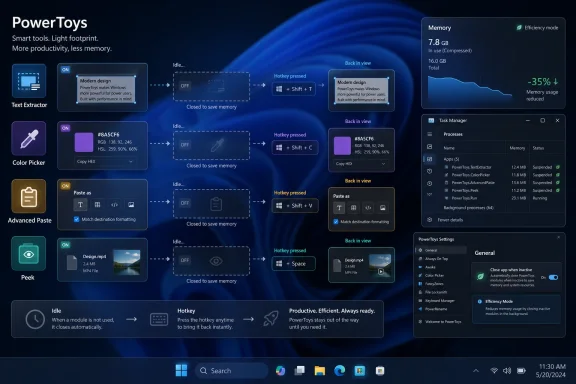
Microsoft PowerToys is preparing an optional memory-saving mode for Windows 11 that closes supported idle utility processes and relaunches them only when users invoke them, according to a community pull request opened on April 30, 2026. The first targets are Text Extractor, Color Picker, Advanced Paste, and Peek. The change is not yet shipping in a public PowerToys build, but it points to a larger truth about modern Windows: background convenience now has to justify its memory bill.
PowerToys has always lived in the space between “small helper app” and “shadow operating system.” It is not part of Windows, but for many enthusiasts and administrators it feels like the missing control panel Microsoft never quite shipped. That makes this proposed low-memory behavior more than a tidy optimization. It is a confession that even beloved utilities can become part of the background sprawl they were meant to tame.
The case for keeping PowerToys utilities warm is easy to understand. Color Picker should appear the moment a designer hits its shortcut. Text Extractor should feel like part of the desktop, not like a program being started from cold storage. Peek, Advanced Paste, and the rest of the suite work best when they disappear into muscle memory.
That responsiveness has a cost. Several PowerToys modules rely on helper or UI processes that remain alive even when the visible tool is not being used. The payoff is speed; the penalty is persistent RAM usage for utilities that might be invoked a few times a day.
Windows Latest highlighted a developer screenshot in which
The proposed fix is deliberately modest. It does not rewrite PowerToys as a leaner monolith, nor does it promise that every utility will suddenly become featherweight. Instead, it gives supported modules a new behavior: close when not in use, then relaunch when the user hits the usual shortcut.
That is the correct kind of compromise for PowerToys. The suite exists for people who care enough to tune their desktops. Those users can understand a trade-off between memory and launch latency, and many of them will gladly accept a slightly slower first activation if it means fewer idle processes sitting in Task Manager.
In that environment, every new toggle can become technical debt. A crude implementation would add a bespoke setting to each module, gradually turning the settings schema into an archaeological dig of one-off fixes. The proposed approach centralizes the low-memory policy while letting each supported utility decide whether it can safely participate.
The first supported modules are telling. Text Extractor, Color Picker, Advanced Paste, and Peek are all tools that users often summon briefly, complete a task, and then forget about. They are not long-running automation engines. They are more like desktop instruments: useful, precise, and idle most of the time.
The PR keeps the current behavior as the default. That is important. PowerToys users who prize instant launch will not wake up to a suite that suddenly feels sluggish. The change is opt-in, and the default remains the warm-process model that made these tools feel native in the first place.
That restraint is also a sign that Microsoft’s PowerToys maintainers understand the product’s audience. Power users tolerate knobs. What they dislike is having a workflow changed under them in the name of a generalized optimization. By making memory saving a choice, PowerToys avoids turning a good idea into another Windows surprise.
“Low memory mode” sounds like the system is detecting pressure and entering an adaptive state. It implies a broad performance policy, perhaps even something coordinated with Windows memory management. “Close app when inactive” is plainer and more honest. It says exactly what will happen: the utility process exits, and it may take longer to reopen.
That distinction matters because Windows already suffers from too many vaguely reassuring modes. Efficiency Mode, Battery Saver, Memory Saver, Game Mode, and assorted vendor utilities all promise optimization without always making the mechanism clear. PowerToys is better when it behaves like a toolbench, not a magic wand.
The UI direction reportedly follows that same logic. The new settings block appears in General settings with a leaf-like icon reminiscent of Windows 11’s Efficiency Mode imagery. Users can enable the behavior across all supported utilities or toggle it per module. The individual module pages also expose the setting, with language warning that the app may open slower.
That is exactly the right kind of affordance. A user who thinks “PowerToys is using too much RAM” can find a broad switch. A user who only cares about Color Picker can tune that one utility. The performance trade-off is visible at the point of decision instead of buried in release notes.
It also avoids the trap of making memory optimization sound morally superior. Keeping a tool warm is not wasteful if responsiveness is the user’s priority. Closing it after use is not a downgrade if the user is running on constrained hardware. Good settings acknowledge that different machines and workflows deserve different defaults.
But that argument becomes less convincing on the machines many people actually use. Windows 11 laptops with 8GB of RAM still exist, including premium models that ask buyers to accept tight memory ceilings in exchange for thin designs, battery life claims, or lower entry prices. Once the browser, Teams, OneDrive, antivirus, GPU reservations, shell components, and manufacturer utilities have taken their share, the margin for “just a helper process” shrinks quickly.
This is where PowerToys becomes an unusually good symbol. It is not bloatware in the usual sense. Nobody is forced to install it. It is useful, open source, and maintained by people who clearly care about Windows productivity. If even PowerToys has to revisit its idle footprint, the broader Windows software ecosystem should pay attention.
The pressure is especially visible because Microsoft has spent the last two years selling a more ambitious vision of Windows PCs. Copilot+ PCs, local AI features, recall-like indexing concepts, OCR, image tooling, and semantic search all imply more resident services and more background computation. The marketing story says the PC is becoming more capable. The resource story says capability is rarely free.
That does not mean every background process is bad. It does mean the old desktop bargain is breaking down. A utility can no longer assume that being useful once an hour entitles it to memory every second of the day.
That makes resource usage more sensitive, not less. A user will forgive a heavyweight creative suite for consuming memory while open. They are less forgiving when a helper utility quietly sits in the background and grows beyond its apparent importance. The annoyance is not only technical; it is psychological. It feels like the machine is being borrowed without permission.
An opt-in idle-close mode restores some of that permission structure. It says: if you want these tools instantly ready, keep them warm. If you would rather claw back memory, PowerToys will step aside until called. That is the kind of contract Windows users have been asking more software to honor.
It also aligns PowerToys with the way many administrators think. Sysadmins do not only care about whether a process is malicious or broken. They care about fleet-wide accumulation. A single helper process is a shrug; dozens of helper processes across hundreds or thousands of endpoints become a capacity and support concern.
PowerToys is not typically deployed like a mandatory line-of-business agent, but its design choices still matter. It is a Microsoft-branded example of how desktop utilities can be courteous residents. If that expectation spreads, Windows gets healthier.
For some tools, that delay may be negligible. For others, especially UI-heavy modules or features that depend on OCR and clipboard state, it could be noticeable. The worst version of this feature would save memory at idle but make the first interaction feel unreliable, causing users to hit the hotkey twice or wonder whether PowerToys is running.
That is why this feature has to be measured by feel as much as by Task Manager screenshots. A 200MB saving looks excellent in isolation. It looks less excellent if Color Picker misses the moment when a user is trying to grab a transient UI color from an application state that disappears. Performance is not just resource consumption; it is timing.
Still, PowerToys is picking the right initial candidates. The supported utilities are not constant companions in the same way as FancyZones or Keyboard Manager. A window manager that participates in every drag-and-snap interaction should not be casually shut down. A utility that opens, performs a task, and exits is a much better fit for an exit-after-use policy.
The key is that PowerToys must treat this as a per-utility capability, not a universal ideology. Some modules should stay hot. Some can sleep. Some may need more engineering before they can participate safely. The shared settings map is useful precisely because it does not pretend every utility has the same lifecycle.
That process can look messy from the outside. A collaborator questioned whether the work had been discussed with core contributors and whether the scope was broader than needed to address the original Color Picker complaint. The contributor clarified that the motivation was broader idle memory usage and opened a separate issue to track the larger scope. Another collaborator pushed on naming and string verbosity.
This is what healthy open-source product development often looks like. The code is only half the work. The other half is deciding whether the feature belongs in the product, what it should be called, how much surface area it should expose, and whether the maintenance cost is worth the user benefit.
The validation notes are encouraging but not final. The contributor reported successful ARM64 builds for the runner and settings UI, unit tests passing for the relevant settings view model area, and local manual testing showing that supported processes close while idle and relaunch from hotkeys. That is meaningful progress, but it is not the same as a merged PR or a release commitment.
Windows users should therefore treat this as a likely direction, not a shipping guarantee. The feature is open, visible, and technically plausible. It is also still subject to maintainer review, further changes, and the ordinary friction of getting a cross-module behavior into a mature utility suite.
That shift has been underway for years. FancyZones turned window management into a serious power-user feature. PowerToys Run and Command Palette pushed launcher behavior beyond the Start menu. Text Extractor made OCR feel like a desktop primitive. Advanced Paste moved clipboard handling into a richer transformation layer. Peek gives Windows users a preview behavior long associated with other platforms.
Each addition is defensible. Together, they create a suite whose idle behavior matters. A user who enables only one or two modules may never care. A user who turns on half the toolbox can end up with a meaningful collection of resident processes.
This is the classic productivity-tool paradox. The tools that save the most time are the ones users want always available. But “always available” is often implemented as “always running,” and over time that model collides with memory pressure, battery life, and user suspicion.
The next phase of PowerToys should be lifecycle-aware. Utilities should be explicit about whether they need to run continuously, whether they can be demand-started, and what the user gives up by choosing one model over the other. The proposed close-when-inactive mode is a step toward that more mature architecture.
Modern Windows users are surrounded by agents. Cloud sync agents, RGB controllers, launchers, meeting tools, updaters, password managers, GPU overlays, peripheral suites, note apps, screenshot tools, and AI assistants all argue that they are more useful when resident. Many of them are right, individually. Collectively, they make a clean desktop feel like a crowded airport lounge.
The industry often talks about performance as if it is a silicon problem. Buy more RAM. Buy a faster SSD. Buy an NPU. Buy the next generation. But software restraint is performance too. A utility that exits cleanly when idle is not merely saving memory; it is declining to impose itself on the machine until needed.
This is particularly important for Windows because the platform serves both extremes. It runs on high-end workstations with obscene memory budgets and on compact laptops where 8GB is still sold as acceptable. A humane Windows application should scale its assumptions across that range.
PowerToys is well positioned to model that behavior because its users understand trade-offs. If Microsoft can make close-when-inactive feel reliable, other desktop developers should copy the pattern: default to convenience where appropriate, but expose honest controls for users who want a quieter system.
But utility memory is exactly the kind of problem worth fixing because it accumulates in the margins. The desktop experience is shaped by dozens of small resident decisions. When enough of them go the wrong way, users experience the system as sluggish, cluttered, or inexplicably heavy.
The proposed PowerToys behavior attacks one class of waste without pretending to solve them all. It also gives users a visible lever. That matters because one of the recurring frustrations with Windows performance is the sense that the system is doing things in the background without meaningful consent.
The feature also arrives at a useful moment for Microsoft’s credibility with enthusiasts. The company is asking users to accept more AI-driven features, more background intelligence, and more integration between cloud and local workflows. Showing that even a favored power-user suite can learn to close idle helpers is a small but valuable counterweight.
If Microsoft wants users to trust more ambitious background features, it should first prove that its tools can be disciplined with simpler ones.
That distinction will vary by workflow. A designer who samples colors constantly may keep Color Picker warm. A writer who uses Text Extractor once a week may close it after use. A sysadmin using Peek to inspect files occasionally may prefer the memory savings. A developer relying on Advanced Paste throughout the day may decide launch speed is worth the resident process.
The important thing is that PowerToys is moving toward a model where those choices are explicit. That is more mature than pretending one default serves everyone. It also reflects the reality that Windows power users are not a single audience; they are a federation of tinkerers, administrators, developers, designers, and productivity obsessives with very different tolerances.
The success of this feature will depend on whether Microsoft can keep the UI understandable while the implementation remains flexible. “Close app when inactive” is good because it is plain. The danger would be turning it into a sprawling optimization dashboard with too many caveats and too little confidence.
PowerToys should resist that urge. Give users a clear switch, a clear warning, and predictable behavior. Then let the machine get out of the way.
PowerToys has always lived in the space between “small helper app” and “shadow operating system.” It is not part of Windows, but for many enthusiasts and administrators it feels like the missing control panel Microsoft never quite shipped. That makes this proposed low-memory behavior more than a tidy optimization. It is a confession that even beloved utilities can become part of the background sprawl they were meant to tame.
 PowerToys Discovers That Instant Gratification Has a Working Set
The case for keeping PowerToys utilities warm is easy to understand. Color Picker should appear the moment a designer hits its shortcut. Text Extractor should feel like part of the desktop, not like a program being started from cold storage. Peek, Advanced Paste, and the rest of the suite work best when they disappear into muscle memory.That responsiveness has a cost. Several PowerToys modules rely on helper or UI processes that remain alive even when the visible tool is not being used. The payoff is speed; the penalty is persistent RAM usage for utilities that might be invoked a few times a day.
Windows Latest highlighted a developer screenshot in which
PowerToys.ColorPickerUI was consuming more than 200MB while idle. That number should not be treated as a universal benchmark, because memory usage varies by build, settings, hardware, and runtime state. But it is the kind of number that changes the conversation. A background color picker that behaves like a small Electron app, even if it is not one, is no longer invisible.The proposed fix is deliberately modest. It does not rewrite PowerToys as a leaner monolith, nor does it promise that every utility will suddenly become featherweight. Instead, it gives supported modules a new behavior: close when not in use, then relaunch when the user hits the usual shortcut.
That is the correct kind of compromise for PowerToys. The suite exists for people who care enough to tune their desktops. Those users can understand a trade-off between memory and launch latency, and many of them will gladly accept a slightly slower first activation if it means fewer idle processes sitting in Task Manager.
The Feature Is Small Because the Design Problem Is Not
The pull request describes a sharedlow_memory_modules settings map and helper APIs that allow individual utilities to opt into this idle-close behavior. That matters because PowerToys is no longer a handful of toys held together by enthusiasm. It is a sprawling open-source Windows companion with more than 30 utilities, a settings surface, localization requirements, tests, build pipelines, and enterprise-adjacent configuration hooks.In that environment, every new toggle can become technical debt. A crude implementation would add a bespoke setting to each module, gradually turning the settings schema into an archaeological dig of one-off fixes. The proposed approach centralizes the low-memory policy while letting each supported utility decide whether it can safely participate.
The first supported modules are telling. Text Extractor, Color Picker, Advanced Paste, and Peek are all tools that users often summon briefly, complete a task, and then forget about. They are not long-running automation engines. They are more like desktop instruments: useful, precise, and idle most of the time.
The PR keeps the current behavior as the default. That is important. PowerToys users who prize instant launch will not wake up to a suite that suddenly feels sluggish. The change is opt-in, and the default remains the warm-process model that made these tools feel native in the first place.
That restraint is also a sign that Microsoft’s PowerToys maintainers understand the product’s audience. Power users tolerate knobs. What they dislike is having a workflow changed under them in the name of a generalized optimization. By making memory saving a choice, PowerToys avoids turning a good idea into another Windows surprise.
“Low Memory Mode” Was the Wrong Name for the Right Feature
The naming debate around the feature is more interesting than it first appears. The contributor initially framed the work as “low memory mode,” while Microsoft collaborators suggested language closer to “Close app when inactive.” That is not just UX polish. It is product philosophy.“Low memory mode” sounds like the system is detecting pressure and entering an adaptive state. It implies a broad performance policy, perhaps even something coordinated with Windows memory management. “Close app when inactive” is plainer and more honest. It says exactly what will happen: the utility process exits, and it may take longer to reopen.
That distinction matters because Windows already suffers from too many vaguely reassuring modes. Efficiency Mode, Battery Saver, Memory Saver, Game Mode, and assorted vendor utilities all promise optimization without always making the mechanism clear. PowerToys is better when it behaves like a toolbench, not a magic wand.
The UI direction reportedly follows that same logic. The new settings block appears in General settings with a leaf-like icon reminiscent of Windows 11’s Efficiency Mode imagery. Users can enable the behavior across all supported utilities or toggle it per module. The individual module pages also expose the setting, with language warning that the app may open slower.
That is exactly the right kind of affordance. A user who thinks “PowerToys is using too much RAM” can find a broad switch. A user who only cares about Color Picker can tune that one utility. The performance trade-off is visible at the point of decision instead of buried in release notes.
It also avoids the trap of making memory optimization sound morally superior. Keeping a tool warm is not wasteful if responsiveness is the user’s priority. Closing it after use is not a downgrade if the user is running on constrained hardware. Good settings acknowledge that different machines and workflows deserve different defaults.
The 8GB Laptop Makes Every Background Process Political
It is tempting to dismiss a few hundred megabytes as trivia in 2026. Enthusiast desktops often ship with 32GB or 64GB of RAM, and Windows is designed to use available memory aggressively for caching. Empty RAM is not inherently virtuous, and a well-managed system should not behave like it is starving itself just to make Task Manager look tidy.But that argument becomes less convincing on the machines many people actually use. Windows 11 laptops with 8GB of RAM still exist, including premium models that ask buyers to accept tight memory ceilings in exchange for thin designs, battery life claims, or lower entry prices. Once the browser, Teams, OneDrive, antivirus, GPU reservations, shell components, and manufacturer utilities have taken their share, the margin for “just a helper process” shrinks quickly.
This is where PowerToys becomes an unusually good symbol. It is not bloatware in the usual sense. Nobody is forced to install it. It is useful, open source, and maintained by people who clearly care about Windows productivity. If even PowerToys has to revisit its idle footprint, the broader Windows software ecosystem should pay attention.
The pressure is especially visible because Microsoft has spent the last two years selling a more ambitious vision of Windows PCs. Copilot+ PCs, local AI features, recall-like indexing concepts, OCR, image tooling, and semantic search all imply more resident services and more background computation. The marketing story says the PC is becoming more capable. The resource story says capability is rarely free.
That does not mean every background process is bad. It does mean the old desktop bargain is breaking down. A utility can no longer assume that being useful once an hour entitles it to memory every second of the day.
This Is Also a Trust Repair
PowerToys occupies a privileged emotional space for Windows enthusiasts because it feels like Microsoft listening to the users who still care about the desktop as a craft environment. FancyZones, PowerToys Run, Color Picker, File Locksmith, Text Extractor, and Advanced Paste are not consumer engagement funnels. They are practical tools for people who do real work on Windows.That makes resource usage more sensitive, not less. A user will forgive a heavyweight creative suite for consuming memory while open. They are less forgiving when a helper utility quietly sits in the background and grows beyond its apparent importance. The annoyance is not only technical; it is psychological. It feels like the machine is being borrowed without permission.
An opt-in idle-close mode restores some of that permission structure. It says: if you want these tools instantly ready, keep them warm. If you would rather claw back memory, PowerToys will step aside until called. That is the kind of contract Windows users have been asking more software to honor.
It also aligns PowerToys with the way many administrators think. Sysadmins do not only care about whether a process is malicious or broken. They care about fleet-wide accumulation. A single helper process is a shrug; dozens of helper processes across hundreds or thousands of endpoints become a capacity and support concern.
PowerToys is not typically deployed like a mandatory line-of-business agent, but its design choices still matter. It is a Microsoft-branded example of how desktop utilities can be courteous residents. If that expectation spreads, Windows gets healthier.
The Cold-Start Trade-Off Is Real, but It Is the Right Trade
The obvious downside is latency. A closed utility must be relaunched before it can perform its task. Depending on the module, hardware, storage speed, .NET or WinUI startup behavior, and whatever else the system is doing, the first activation may feel slower than the current warm-process path.For some tools, that delay may be negligible. For others, especially UI-heavy modules or features that depend on OCR and clipboard state, it could be noticeable. The worst version of this feature would save memory at idle but make the first interaction feel unreliable, causing users to hit the hotkey twice or wonder whether PowerToys is running.
That is why this feature has to be measured by feel as much as by Task Manager screenshots. A 200MB saving looks excellent in isolation. It looks less excellent if Color Picker misses the moment when a user is trying to grab a transient UI color from an application state that disappears. Performance is not just resource consumption; it is timing.
Still, PowerToys is picking the right initial candidates. The supported utilities are not constant companions in the same way as FancyZones or Keyboard Manager. A window manager that participates in every drag-and-snap interaction should not be casually shut down. A utility that opens, performs a task, and exits is a much better fit for an exit-after-use policy.
The key is that PowerToys must treat this as a per-utility capability, not a universal ideology. Some modules should stay hot. Some can sleep. Some may need more engineering before they can participate safely. The shared settings map is useful precisely because it does not pretend every utility has the same lifecycle.
Community Code Is Doing Product Management in Public
The pull request is also a reminder of why PowerToys remains one of Microsoft’s more interesting open-source projects. This is not a feature that arrived fully formed from a corporate roadmap slide. It came through a community contribution, review comments, scope questions, naming debate, and validation work.That process can look messy from the outside. A collaborator questioned whether the work had been discussed with core contributors and whether the scope was broader than needed to address the original Color Picker complaint. The contributor clarified that the motivation was broader idle memory usage and opened a separate issue to track the larger scope. Another collaborator pushed on naming and string verbosity.
This is what healthy open-source product development often looks like. The code is only half the work. The other half is deciding whether the feature belongs in the product, what it should be called, how much surface area it should expose, and whether the maintenance cost is worth the user benefit.
The validation notes are encouraging but not final. The contributor reported successful ARM64 builds for the runner and settings UI, unit tests passing for the relevant settings view model area, and local manual testing showing that supported processes close while idle and relaunch from hotkeys. That is meaningful progress, but it is not the same as a merged PR or a release commitment.
Windows users should therefore treat this as a likely direction, not a shipping guarantee. The feature is open, visible, and technically plausible. It is also still subject to maintainer review, further changes, and the ordinary friction of getting a cross-module behavior into a mature utility suite.
PowerToys Is Becoming Too Useful to Stay Lightweight by Accident
The memory debate is happening because PowerToys has succeeded. A tiny utility pack can afford to be casual about process models. A major productivity suite cannot. The more PowerToys absorbs desktop workflows, the more it has to behave like platform infrastructure.That shift has been underway for years. FancyZones turned window management into a serious power-user feature. PowerToys Run and Command Palette pushed launcher behavior beyond the Start menu. Text Extractor made OCR feel like a desktop primitive. Advanced Paste moved clipboard handling into a richer transformation layer. Peek gives Windows users a preview behavior long associated with other platforms.
Each addition is defensible. Together, they create a suite whose idle behavior matters. A user who enables only one or two modules may never care. A user who turns on half the toolbox can end up with a meaningful collection of resident processes.
This is the classic productivity-tool paradox. The tools that save the most time are the ones users want always available. But “always available” is often implemented as “always running,” and over time that model collides with memory pressure, battery life, and user suspicion.
The next phase of PowerToys should be lifecycle-aware. Utilities should be explicit about whether they need to run continuously, whether they can be demand-started, and what the user gives up by choosing one model over the other. The proposed close-when-inactive mode is a step toward that more mature architecture.
Windows Needs More Software That Knows When to Leave
There is a broader Windows lesson here. The operating system has become better at memory compression, standby caching, process prioritization, and background throttling. But those mechanisms cannot fully compensate for an application culture in which every tool wants a permanent seat at the table.Modern Windows users are surrounded by agents. Cloud sync agents, RGB controllers, launchers, meeting tools, updaters, password managers, GPU overlays, peripheral suites, note apps, screenshot tools, and AI assistants all argue that they are more useful when resident. Many of them are right, individually. Collectively, they make a clean desktop feel like a crowded airport lounge.
The industry often talks about performance as if it is a silicon problem. Buy more RAM. Buy a faster SSD. Buy an NPU. Buy the next generation. But software restraint is performance too. A utility that exits cleanly when idle is not merely saving memory; it is declining to impose itself on the machine until needed.
This is particularly important for Windows because the platform serves both extremes. It runs on high-end workstations with obscene memory budgets and on compact laptops where 8GB is still sold as acceptable. A humane Windows application should scale its assumptions across that range.
PowerToys is well positioned to model that behavior because its users understand trade-offs. If Microsoft can make close-when-inactive feel reliable, other desktop developers should copy the pattern: default to convenience where appropriate, but expose honest controls for users who want a quieter system.
The Practical Win Is Narrow, but the Signal Is Loud
For most users, this feature will not transform Windows 11. It will not make an underpowered laptop feel like a workstation, and it will not solve the larger problem of browser tabs, collaboration apps, and vendor services consuming the bulk of memory. Anyone expecting a miracle will be disappointed.But utility memory is exactly the kind of problem worth fixing because it accumulates in the margins. The desktop experience is shaped by dozens of small resident decisions. When enough of them go the wrong way, users experience the system as sluggish, cluttered, or inexplicably heavy.
The proposed PowerToys behavior attacks one class of waste without pretending to solve them all. It also gives users a visible lever. That matters because one of the recurring frustrations with Windows performance is the sense that the system is doing things in the background without meaningful consent.
The feature also arrives at a useful moment for Microsoft’s credibility with enthusiasts. The company is asking users to accept more AI-driven features, more background intelligence, and more integration between cloud and local workflows. Showing that even a favored power-user suite can learn to close idle helpers is a small but valuable counterweight.
If Microsoft wants users to trust more ambitious background features, it should first prove that its tools can be disciplined with simpler ones.
The Power User’s Memory Bargain Gets Written Down
This is the part PowerToys users should remember when the feature eventually lands, assuming it survives review and ships in a public build. The setting is not about chasing the lowest possible idle RAM number for screenshots. It is about choosing which utilities deserve instant readiness and which can afford to wake up on demand.That distinction will vary by workflow. A designer who samples colors constantly may keep Color Picker warm. A writer who uses Text Extractor once a week may close it after use. A sysadmin using Peek to inspect files occasionally may prefer the memory savings. A developer relying on Advanced Paste throughout the day may decide launch speed is worth the resident process.
The important thing is that PowerToys is moving toward a model where those choices are explicit. That is more mature than pretending one default serves everyone. It also reflects the reality that Windows power users are not a single audience; they are a federation of tinkerers, administrators, developers, designers, and productivity obsessives with very different tolerances.
The success of this feature will depend on whether Microsoft can keep the UI understandable while the implementation remains flexible. “Close app when inactive” is good because it is plain. The danger would be turning it into a sprawling optimization dashboard with too many caveats and too little confidence.
PowerToys should resist that urge. Give users a clear switch, a clear warning, and predictable behavior. Then let the machine get out of the way.
Four Utilities, One Lesson for the Windows Desktop
The immediate news is specific: four PowerToys utilities are in line for opt-in idle closing, the feature remains under review, and the current warm-process behavior is expected to stay the default. The larger lesson is that desktop convenience is no longer exempt from resource accountability.- Text Extractor, Color Picker, Advanced Paste, and Peek are the first proposed PowerToys utilities to support closing their helper processes when inactive.
- The feature is still in development and should not be assumed available until it appears in a released PowerToys build.
- Users who enable the setting should expect lower idle memory usage at the cost of a potentially slower first launch for each affected utility.
- The current instant-launch behavior is expected to remain the default, which protects existing workflows from surprise latency.
- The naming shift from “low memory mode” to “Close app when inactive” is a useful move toward clearer Windows settings language.
- The real value is not one reclaimed memory figure, but a healthier model for background utilities on constrained Windows 11 machines.
References
- Primary source: Windows Latest
Published: Fri, 22 May 2026 11:02:41 GMT
Microsoft's PowerToys is getting a low memory mode that kills idle utilities hogging Windows 11 RAM
PowerToys is getting a new "low memory mode" to stop background utilities like Color Picker from hoarding hundreds of megabytes of RAM. www.windowslatest.com
- Official source: github.com
GitHub - microsoft/PowerToys: Microsoft PowerToys is a collection of utilities that supercharge productivity and customization on Windows · GitHub
Microsoft PowerToys is a collection of utilities that supercharge productivity and customization on Windows - microsoft/PowerToys github.com
- Related coverage: golem.de
- Related coverage: windowscentral.com
Microsoft PowerToys update to v0.97.2 fixes stability issues | Windows Central
Microsoft has released a new update for PowerToys that addresses bugs, crashes, and other stability issues.www.windowscentral.com - Related coverage: cultura-informatica.com
PowerToys prepara un modo de memoria baja para Windows 11 | Cultura Informática
PowerToys propone un modo de memoria baja que cierra procesos inactivos en Windows 11 para liberar RAM y mejorar el rendimiento del sistema | Cultura Informática cultura-informatica.com
- Related coverage: pcworld.com
Windows PowerToys update brings 3 big changes and improvements | PCWorld
The Command Palette, Keyboard Manager, and CursorWrap features just got even better.www.pcworld.com
- Related coverage: windowsreport.com
- Related coverage: nsaneforums.com
Microsoft PowerToys could soon indirectly make your Windows 11 PC faster with a new feature - Software News - Nsane Forums
A new PowerToys feature may soon help improve Windows 11 performance by reducing background resource usage. Recently we covered Windows 11's newest update, which although seemingly slightly flawed, is promising some worthy performance improvements in certain areas. This is certainly good... nsaneforums.com
- Related coverage: ms-aktuell.de
Microsoft PowerToys Low Memory Mode: Neue Funktion für Windows 11 - Münster Aktuell
Microsoft PowerToys Low Memory Mode: Eine neue Funktion soll Windows 11 schneller machen, indem nicht genutzte Tools im Hintergrund beendet werden.ms-aktuell.de - Official source: learn.microsoft.com
Home · microsoft/PowerToys Wiki · GitHub
Microsoft PowerToys is a collection of utilities that supercharge productivity and customization on Windows - Home · microsoft/PowerToys Wiki
learn.microsoft.com
- Related coverage: nwsgenealogy.org
- Related coverage: doccompiler.ai
