Prisma AIRS 2.0 signals a pivotal shift in how enterprises must think about agentic AI: not as a feature to bolt on, but as a distinct class of identity, data flow and runtime behavior that demands lifecycle security from design through live execution.
Autonomous AI agents are moving from experiments into production across industries — writing code, orchestrating systems, and making decisions in real time. These agents live at the intersection of users, applications and infrastructure: they act like users, connect like applications and adapt like models. That hybrid nature has created three acute security problems: reasoning that can be manipulated, workforce visibility that dissolves into shadow automation, and explosive permission creep that hands agents excessive access. Palo Alto Networks’ Prisma AIRS 2.0 positions itself as a comprehensive platform to remediate these risks with three integrated pillars: agent visibility and posture, runtime enforcement, and model-level inspection plus continuous red‑teaming. The vendor announced PrismA AIRS 2.0 as an upgrade that merges capabilities from the Protect AI acquisition into Palo Alto’s product set, marketing the result as an end‑to‑end AI security platform that discovers agents, hardens models, and enforces controls inline when agents act. Independent business press coverage confirms the launch and the strategic positioning of Prisma AIRS 2.0 within a broader product refresh that includes Cortex‑level agentic tooling.
Security is still the accelerator here: when adopted thoughtfully, runtime enforcement combined with posture and model controls lets organizations deploy bravely. When rushed or misconfigured, agentic automation can amplify mistakes and create highly visible incidents. The prudent path is clear: treat agents as first‑class identities, require lifecycle governance, enforce runtime checks for high‑risk actions, and validate vendor claims in your environment with measurable KPIs.
Prisma AIRS 2.0 offers the control plane to do that — but every enterprise must pair the product with hard process, rigorous pilot testing and cross‑team accountability to make the promise real.
Securing the autonomous workforce is now an operational imperative; the tools have matured to act as guardrails, but safe adoption will be earned through disciplined governance and careful engineering.
Source: Palo Alto Networks Securing the Autonomous Workforce with Prisma AIRS - Palo Alto Networks Blog
 Background / Overview
Autonomous AI agents are moving from experiments into production across industries — writing code, orchestrating systems, and making decisions in real time. These agents live at the intersection of users, applications and infrastructure: they act like users, connect like applications and adapt like models. That hybrid nature has created three acute security problems: reasoning that can be manipulated, workforce visibility that dissolves into shadow automation, and explosive permission creep that hands agents excessive access. Palo Alto Networks’ Prisma AIRS 2.0 positions itself as a comprehensive platform to remediate these risks with three integrated pillars: agent visibility and posture, runtime enforcement, and model-level inspection plus continuous red‑teaming. The vendor announced PrismA AIRS 2.0 as an upgrade that merges capabilities from the Protect AI acquisition into Palo Alto’s product set, marketing the result as an end‑to‑end AI security platform that discovers agents, hardens models, and enforces controls inline when agents act. Independent business press coverage confirms the launch and the strategic positioning of Prisma AIRS 2.0 within a broader product refresh that includes Cortex‑level agentic tooling. Why agentic AI changes the security calculus
Three structural threats at scale
- Manipulation of reasoning: Agents don’t just run code; they reason. Attackers weaponize prompt injection and context poisoning to change an agent’s intent mid‑flow. That means threats can be embedded in otherwise normal data channels and executed by logic that traditional static scanners never inspect.
- The invisible workforce (visibility gap): Agents can reuse credentials, persist conversational state, call tools and move data across SaaS boundaries. Traditional logging and account models are oriented to human users and services — agents blur those boundaries and often don’t appear in inspector logs unless treated as first‑class identities.
- Privilege without boundaries: To make agents “just work,” developers frequently grant broad inherited rights. Over time that becomes privilege sprawl: database keys, admin tokens, and connector access accumulate in agent footprints. A compromised agent then becomes an insider threat.
What Prisma AIRS 2.0 brings to the table
Core capabilities (headline summary)
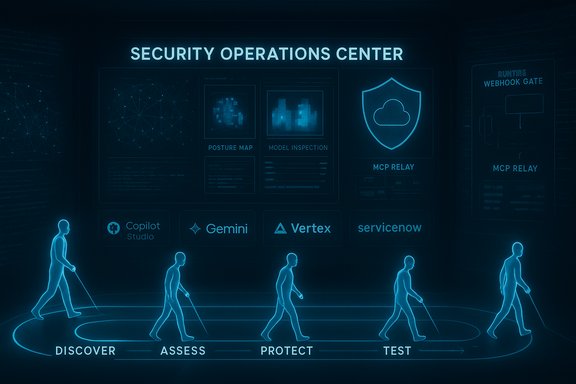
- AI Agent Security: continuous discovery and posture mapping for agents, including sanctioned and unsanctioned “shadow AI.” It inventories agents, their descriptions and instructions, model selections, connectors and permissions.
- Runtime Enforcement: inline, synchronous decisioning for agent tool calls using platform webhooks and a managed MCP server/relay to redact secrets, validate permissions and block or modify unsafe actions before execution. The Copilot Studio webhook integration is an example of this inline model.
- AI Model Security: deep model inspection to detect architectural backdoors, data poisoning and malicious code within model components — extending protection to open‑source models deployed by enterprises.
- Autonomous Red Teaming: continuous, agentic testing that simulates hundreds of adversarial attacks to surface design and runtime vulnerabilities before production incidents occur.
- Ecosystem breadth: Native integrations (or stated support) with leading agent platforms and model endpoints — examples include Microsoft Copilot Studio, ServiceNow, Salesforce and support for Google Gemini / Vertex model families — enabling enterprise organizations to apply consistent enforcement across heterogeneous agent runtimes.
How the platform tackles the three core challenges
1) From black box to managed asset — visibility and posture
Visibility begins with discovery: Prisma AIRS automatically inventories agents running in supported platforms and captures their full configuration — the agent’s instructions, the LLMs it uses, the tools and connectors it is authorized to call, and the specific data sources it touches. This turns agents from invisible processes into governable identities with metadata for risk scoring and lifecycle controls. For organizations adopting Google’s Gemini Enterprise or Vertex ecosystems, Prisma AIRS documents model support and mapping to help align enforcement with the model in play. Why that matters: without an inventory you cannot apply least privilege, track token scopes, or build useful SOC playbooks. Prisma AIRS’ posture mapping is the foundation for automatic pruning of over‑privileged agents and for enforcing token expiration or scope tightening before agents reach production.2) Turn visibility into real control — posture + runtime
Detecting bad configuration is necessary but not sufficient. Agents change behavior in flight — which means enforcement must also happen at execution time. The pragmatic pattern Palo Alto and other vendors are following is twofold:- Pre‑execution posture checks that block obvious misconfigurations and excessive connector permissions.
- Synchronous runtime webhooks that receive a proposed tool invocation, evaluate it against policy and context, then return an allow/deny/modify decision before the action occurs. The Microsoft Copilot Studio integration uses POST /analyze-tool-execution as the runtime gate, and Prisma AIRS uses similar checkpoints (MCP Relay / Managed MCP Server) to mediate agent calls across platforms.
3) Protect reasoning, not just code — model and memory controls
Because attackers aim to subvert agent reasoning, Prisma AIRS’ defenses extend to model integrity and conversational memory. Model scanning attempts to find injected architectures or poisoned weights, while runtime filters redact sensitive tokens and check for suspicious prompt patterns that match prompt‑injection heuristics. Automated red‑team tests stress these paths continuously to surface edge cases.Technical specifics and verifications
- The Copilot Studio integration uses Microsoft’s Security Webhooks API and calls the POST /analyze-tool-execution endpoint to mediate tool invocations synchronously. Customers register an application in Microsoft Entra and can use Federated Identity Credentials for secretless authentication. This workflow is documented in vendor‑facing materials and confirmed in the integration announcement. Enterprises must validate schema compatibility, latency SLAs and fail‑open vs fail‑closed behavior in production.
- Prisma AIRS 2.0 claims model support for a wide set of cloud LLMs, and Palo Alto’s runtime support matrix includes multiple Google Gemini model identifiers (for example gemini‑1.0‑pro, gemini‑1.0‑ultra, gemini‑1.5‑pro) in its list of AI Models on Public Clouds support. That indicates Prisma AIRS can interpose on model calls and apply runtime checks for Gemini/Vertex customers. Enterprises should still validate exact model IDs and endpoint behaviors during pilot testing.
- The vendor press release and independent reporting quote business metrics and product positioning (for example the claim that “78% of organizations are transforming with AI but only 6% have guardrails” and the integration of Protect AI technology). These are vendor claims used to frame market urgency; they are documented in the press materials and covered by mainstream outlets, but buyers should treat such market percentages as directional rather than universally authoritative and request proof‑of‑value in their own environments.
Operational realities: what to test and what to harden
Deploying runtime enforcement into an agent execution path is powerful — and operationally sensitive. Key considerations for IT and security teams:- Latency and scale: Synchronous webhooks add round‑trip time to every tool invocation. Measure invocation frequency, instrument caching strategies where safe, and determine acceptable SLAs. Configure multi‑region redundancy for external webhook endpoints.
- Failure modes: Define fail‑closed (safer, but potentially disruptive) vs fail‑open (higher availability) behaviors, and document the business tradeoffs. Implement quick rollback and quarantine actions when agents are blocked mid‑execution to avoid partial side effects.
- Telemetry and privacy: Decide what prompt context, chat history and planner context you will send to third‑party security vendors. Apply data minimization, encryption at rest and in transit, and retention policies compatible with regulatory obligations. Contractual protections and DPA language are essential when externalizing conversational telemetry.
- Authentication posture: Use identity‑first patterns (service principals, Entra Agent ID equivalents, Federated Identity Credentials) and avoid static credentials embedded in agents. Treat agents as service accounts with lifecycle controls, expiration and rotation.
- Integration with SOC tooling: Forward webhook verdicts and agent telemetry to SIEM/XDR (Microsoft Sentinel, Azure Monitor, or third‑party stacks). Correlate webhook decisions with x‑ms‑correlation‑id traces for forensic reconstruction.
Deployment roadmap — practical checklist
- Inventory all agentic endpoints and connectors; map owners, data access tiers and business purpose. Treat this as the canonical register.
- Pilot posture controls on a small set of high‑risk agents (email automation, tenant‑wide orchestrators). Tighten token scopes and validate least‑privilege mappings.
- Enable runtime webhook protection first for the pilot set; measure latency and tune exception handling. Decide fail‑closed vs fail‑open for each agent class.
- Integrate webhook logs and agent telemetry into SOC workflows; build automated playbooks for quarantine, token revocation and manual escalation.
- Run continuous red‑teaming and automated adversarial testing; use results to refine policy rules, sanitizer lists and grounding checks.
- Expand coverage across platforms (Copilot Studio, Gemini Enterprise, ServiceNow, Salesforce) after validating platform coverage and enforcement depth in each tenancy. Confirm whether integration is discovery‑only or includes inline blocking before relying on it as the primary control.
Strengths — where Prisma AIRS 2.0 is convincing
- Lifecycle approach: Combining posture mapping, runtime enforcement and model inspection addresses attack surfaces at design and execution time rather than relying on after‑the‑fact detection. This layered strategy aligns with least‑privilege and defense‑in‑depth principles.
- Platform integrations: Native (or announced) integrations with major agent platforms reduce the friction of bringing runtime checks into the execution path. The Microsoft Copilot Studio webhook example demonstrates how vendors can insert inline decisioning into SaaS agent runtimes.
- Continuous validation: Autonomous red‑teaming that runs hundreds of specialized attacks gives security teams actionable, ongoing evidence that policies are working — a step beyond periodic, manual penetration tests.
- Model‑aware controls: Supporting cloud model families and runtime redaction for commonly used LLMs (including Gemini model IDs in Palo Alto documentation) is important for enterprises that bring their own models or use managed services.
Risks, unknowns and caveats
- Vendor‑sourced efficacy metrics: Claims about detection rates, false positive reduction and market percentages (for example the “78%/6%” framing) are useful for market context but should be validated in your environment with proof‑of‑value pilots and measurable KPIs. Treat vendor numbers as starting hypotheses.
- Centralized chokepoints and availability risk: Making a third‑party webhook a synchronous gate creates a mission‑critical dependency. DDoS, supply‑chain attacks or outages of the vendor endpoint can impact agent availability. Harden endpoints, enable rate‑limiting and design failover modes.
- Telemetry leakage and compliance exposure: Shipping chat histories and planner contexts to an external security service raises data residency and privacy issues. Apply data minimization, contractual guarantees and, where necessary, tenant‑local managed servers for verdicting. The managed MCP Server pattern helps here but must be audited.
- Performance and UX impact: Inline checks can increase latency and disrupt user workflows if false positives are frequent. Expect initial tuning cycles and invest in caching safe verdicts with strict expiry semantics.
- Coverage gaps and integration depth: Early integrations may provide discovery‑only telemetry rather than inline blocking. Confirm the enforcement depth with each platform and tenant before relying on Prisma AIRS as the sole runtime gate.
- Potential vendor lock‑in: Deep platform integrations and proprietary MCP relay patterns can increase switching costs. Maintain exportable logs, documented policies and exportable policy artifacts to avoid being trapped by one vendor’s enforcement fabric.
Recommendations for Windows, Microsoft‑centric, and enterprise environments
- Treat agents as directory objects early. Assign Entra Agent IDs or equivalent service principals and enforce lifecycle automation (provision → rotate → revoke). Map every agent to an owner and a business justification.
- Start with high‑risk agents (email automation, tenant admin orchestrators) when enabling runtime webhooks. Use Federated Identity Credentials (FIC) for secretless authentication to reduce long‑lived credential sprawl.
- Instrument the webhook flow into your SIEM/XDR right away. Ensure correlation IDs and step‑level traces map back to the originating agent, user and tool call for effective IR and audit.
- Maintain a human‑in‑the‑loop safety belt for destructive or high‑impact automations. Progressive escalation templates (read → suggest → act) reduce the chance of mass‑impact errors.
- Demand proof‑of‑value from vendors: latency metrics under your expected load, sample false positive/false negative rates on representative corpora, and legal/contractual commitments on telemetry handling and retention. Validate claims in production‑like pilots.
Final analysis — balanced verdict
Prisma AIRS 2.0 articulates a sensible, engineering‑first response to the distinct risks of autonomous agents: inventory and posture are necessary, model inspection is required, and runtime mediation is essential when agents can decide and act autonomously. The platform’s combination of discovery, synchronous enforcement (webhooks/MCP relay), model checks and continuous red‑teaming represents a pragmatic architecture for enterprises accelerating into agentic AI. Independent reporting confirms the product launch and market positioning, and vendor docs show concrete technical support for major model families and execution patterns. That said, the value of these capabilities is conditional. Success depends on careful operational design: latency SLAs, hardened webhook endpoints, privacy‑aware telemetry policies, least‑privilege identity models and a staged rollout that balances safety and productivity. Organizations should expect an iterative lifecycle: pilot, tune, instrument, automate and scale — not a single switch that instantly secures every agentic workflow.Security is still the accelerator here: when adopted thoughtfully, runtime enforcement combined with posture and model controls lets organizations deploy bravely. When rushed or misconfigured, agentic automation can amplify mistakes and create highly visible incidents. The prudent path is clear: treat agents as first‑class identities, require lifecycle governance, enforce runtime checks for high‑risk actions, and validate vendor claims in your environment with measurable KPIs.
Prisma AIRS 2.0 offers the control plane to do that — but every enterprise must pair the product with hard process, rigorous pilot testing and cross‑team accountability to make the promise real.
Securing the autonomous workforce is now an operational imperative; the tools have matured to act as guardrails, but safe adoption will be earned through disciplined governance and careful engineering.
Source: Palo Alto Networks Securing the Autonomous Workforce with Prisma AIRS - Palo Alto Networks Blog