

Microsoft’s reported “K2” effort is not Windows 12 in disguise, and that may be the most important thing about it. The pitch, as reported by Windows Central and echoed by OC3D, is that Microsoft has begun treating Windows 11 less like a delivery vehicle for new features and more like a product whose fundamentals need repair. If that sounds obvious, it is also an indictment: the world’s dominant desktop operating system has reached the point where “make it faster, more reliable, and less annoying” counts as a strategic reset.
For years, Windows 11 has suffered from a credibility problem that no amount of rounded corners, AI branding, or Settings app reshuffling could solve. Users did not merely complain that Windows was missing a feature here or there; they complained that the operating system felt less respectful of their time than the one it replaced.
That distinction matters. A missing taskbar option is irritating. A slow File Explorer, inconsistent UI, update anxiety, ad-like intrusions, and a sense that Copilot was being stapled onto every surface combine into something more corrosive: distrust.
Project K2, reportedly started in the second half of 2025, appears to be Microsoft’s internal answer to that distrust. It is not a single release, not a boxed-product milestone, and not a clean marketing reset. It is better understood as a quality program — a cultural course correction aimed at changing what Microsoft allows into Windows before millions of users are forced to live with it.
That is why the name matters less than the shift in incentives. Windows does not need another grand unveiling. It needs a long period in which “boring” engineering work outranks novelty.
For much of Windows 11’s life, Microsoft seemed obsessed with agility. Features appeared, disappeared, A/B tested themselves into confusion, and often arrived with the texture of an unfinished argument. The Insider Program became both a proving ground and a fog machine: useful for telemetry, but not always reassuring for users trying to understand what Windows was becoming.
K2 reportedly reverses that priority. New features are said to face higher quality thresholds before reaching public preview builds, with more validation across real-world hardware. That sounds procedural, but process is product when the product is an operating system.
Windows is not a note-taking app that can break a workflow and apologize next Tuesday. It is the substrate beneath CAD suites, games, medical offices, school districts, factories, point-of-sale systems, and the family PC that only gets attention when something goes wrong. If Microsoft wants users to trust Windows again, it has to stop treating instability as a tolerable side effect of velocity.
Bringing it back is not just feature restoration. It is a concession that simplification is not the same thing as improvement. Power users do not object to modern design because they worship legacy UI; they object when “modern” means fewer options, slower controls, and no clear benefit.
Still, Microsoft should be careful not to mistake symbolic wins for structural repair. A top-aligned taskbar will make some users happy. It will not, by itself, make Windows feel coherent. The bigger test is whether Microsoft can stop removing mature functionality before its replacement is genuinely ready.
That lesson should apply far beyond the taskbar. Windows 11 has too often asked users to accept a prettier surface wrapped around a less capable implementation. K2 succeeds only if Microsoft relearns that parity is the floor, not the roadmap.
Microsoft reportedly knows this. K2 is said to target File Explorer, Windows Search, system UI responsiveness, gaming performance, resource usage, and memory footprint. Those are not glamorous areas, but they are exactly where Windows earns or loses goodwill every day.
File Explorer is the obvious battlefield. It is one of the most-used parts of Windows and one of the most embarrassing when it stutters, hangs, or takes too long to populate a folder. If Microsoft can make Explorer feel instant again — not “better in benchmark slides,” but actually immediate under ordinary workloads — users will notice.
Gaming performance is another reputational risk. Windows remains the default PC gaming platform, but the rise of SteamOS on handhelds has exposed an uncomfortable truth: Windows is not always the leanest or most console-like environment for games, especially on constrained hardware. Microsoft does not need Windows to become SteamOS. It does need Windows to stop feeling like a tax on devices where every watt, background service, and memory allocation matters.
A stronger WinUI 3 push is Microsoft’s attempt to reduce that fragmentation without merely painting over it. The promise is that more Windows surfaces can become native, faster, more reliable, and less memory-hungry than web-based or transitional interfaces. If Microsoft can deliver a new system compositor and lower-latency UI paths, the improvement could be felt in the places users touch constantly: Start, context menus, shell surfaces, dialogs, settings, and system controls.
The risk is that Microsoft has made this kind of promise before. Windows has spent more than a decade migrating away from old control surfaces without ever fully arriving at a new, unified destination. The result is a house where some rooms have been renovated three times and others still have wallpaper from 1998.
K2’s UI work will be judged not by whether Microsoft can produce beautiful mockups, but by whether the operating system feels less like an archaeological dig. Users should not need to care which framework a dialog uses. They should only feel that it opens quickly, behaves predictably, respects system settings, and does not strand them between old and new worlds.
That is why reports of a faster, more customizable Start menu matter. A claimed responsiveness improvement of up to 60 percent would be meaningful if it appears in ordinary use, especially on midrange and older PCs. So would the ability to hide sections, resize the menu, and reduce the sense that Microsoft knows better than the user what belongs there.
The reported removal or reduction of ad-like recommendations would be even more important. Windows users have grown weary of the OS behaving like a billboard for subscriptions, apps, browser defaults, cloud storage, or AI experiences. Microsoft may argue that some of these prompts are helpful discovery mechanisms. Users often experience them as rent-seeking.
This is where K2 becomes a test of restraint. A faster Start menu with cleaner customization is good engineering. A Start menu that stops treating attention as inventory would be good judgment.
K2 reportedly includes work to make updates require fewer reboots and give users more control over timing. That is exactly the right direction. The best update experience is not one with a friendlier notification; it is one that becomes less disruptive by design.
For enterprise IT, this matters even more. Sysadmins can handle patch cadence, maintenance windows, deployment rings, and rollback planning. What they cannot easily tolerate is unpredictability masquerading as progress. A Windows feature update that changes user behavior, breaks a driver, or introduces help desk noise creates real operational cost.
Microsoft’s challenge is to keep security velocity without turning every endpoint into a rolling experiment. That means better pre-release validation, clearer release notes, fewer surprise feature drops, and fewer reboots that arrive at exactly the wrong time. In other words, Windows Update needs to become boring again — and boring would be a triumph.
That is the context in which K2’s reported “less AI where it does not help” posture should be read. The issue was never whether AI could belong in Windows. It was whether Windows had earned the right to ask for that attention while basic experiences still felt slow, inconsistent, or pushy.
A useful Copilot integration might help a user find a buried setting, summarize a local document with permission, automate a repetitive task, or explain a confusing error. An unwanted Copilot button, promotional prompt, or half-integrated sidebar does the opposite: it tells users Microsoft’s roadmap is not aligned with their needs.
K2 does not require Microsoft to abandon AI. It requires Microsoft to subordinate AI to craft. If an AI feature makes Windows faster, clearer, or more capable, it will survive on merit. If it exists mainly to satisfy a corporate platform narrative, users will smell it immediately.
That is dangerous for Microsoft because it reframes the question. Users do not ask whether SteamOS supports every enterprise app, legacy peripheral, or obscure workflow. They ask why a gaming handheld feels smoother, simpler, or more battery-conscious when it is not carrying the full Windows stack.
Windows still has enormous advantages: compatibility, anti-cheat support in many titles, driver breadth, Game Pass integration, productivity software, and decades of developer assumptions. But advantages can become excuses. If Windows performs worse on the same class of hardware, users will not care that the OS is more general-purpose; they will care that their game runs slower or their device feels clumsier.
K2’s reported focus on lower resource usage is therefore not just about old laptops. It is about the future of Windows form factors. Handheld PCs, AI PCs, thin laptops, and hybrid work machines all punish waste. Microsoft can no longer assume hardware improvements will hide software indulgence.
That is where Microsoft has the most to gain. Businesses do not need Windows to be exciting. They need it to be stable, governable, secure, and supportable. Every change that reduces help desk tickets, update failures, driver drama, and user confusion translates into money.
K2’s reported emphasis on reliability, app compatibility, driver quality, and update predictability fits that audience. But Microsoft must be careful: enterprise trust is slower to rebuild than consumer excitement. A few good Insider builds will not erase years of cautious deployment policies.
The Windows 10 end-of-support transition also looms over this effort. Many organizations have already moved to Windows 11, but plenty have done so reluctantly or unevenly. If K2 makes Windows 11 genuinely better by late 2026 and into 2027, Microsoft may blunt some of the resentment that has accompanied the migration. If it does not, the company will have pushed customers off a beloved old platform onto one they still do not fully trust.
Windows 11 is not Vista. It is more stable, more secure, and more successful in raw deployment terms than Vista ever was. But it has a similar reputational shape: a product whose ambitions were often overshadowed by friction.
K2 looks like Microsoft trying to perform a Windows 7-style correction without releasing a Windows 7-style new OS. That is both sensible and difficult. The Windows-as-a-service model means Microsoft can improve Windows 11 continuously, but it also means there is no clean psychological break. Users may not notice a “fixed” Windows arriving because it will arrive in pieces.
That makes consistency crucial. Microsoft needs month after month of visible, practical improvements that point in the same direction. Faster Explorer one month, fewer update interruptions another, better Start customization, lower memory use, cleaner UI, fewer ads, more reliable drivers — eventually, the narrative changes because the lived experience changes.
That skepticism is earned. Windows has repeatedly been asked to serve corporate ambitions that were not always aligned with user needs: browser wars, app store pushes, cloud account nudges, subscription upsells, telemetry expansion, MSN content surfaces, and now AI platform positioning. The OS became a distribution channel for everything Microsoft wanted to promote.
K2 can improve code quality, but the deeper problem is product discipline. Someone inside Microsoft has to say no when a team wants another prompt, another recommendation tile, another default change, another “helpful” integration that happens to benefit Microsoft’s ecosystem. Without that restraint, performance gains will be consumed by new layers of monetization and engagement design.
This is the uncomfortable truth: Windows users do not merely want a faster operating system. They want an operating system that behaves like it is on their side. Speed helps create that feeling, but respect sustains it.
K2 reportedly leans more heavily on real-world validation and feedback loops. That is welcome, but Microsoft must also make the Insider experience clearer. Users need to know what channel they are in, what risk they are accepting, what changed in a build, and whether their feedback went anywhere.
Too often, Windows testing has felt opaque from the outside. Features roll out to subsets of users, disappear behind server-side switches, and reappear months later with little explanation. That may be efficient for telemetry-driven development, but it weakens community trust.
If K2 is partly cultural, Microsoft should treat Insiders less like instrumentation endpoints and more like collaborators. That does not mean design by comment section. It means transparency, responsiveness, and humility when feedback exposes a bad assumption.
That is not a lack of ambition. It is the correct ambition for a mature operating system.
Microsoft does not need to make Windows feel futuristic at every turn. It needs to make Windows feel dependable. The future can arrive through apps, hardware, cloud services, and optional AI layers. The OS itself should be the stable ground beneath them.
There is a reason users still speak fondly of Windows releases that felt settled. Windows XP after its service packs, Windows 7 in its prime, and Windows 10 after its rougher early period all benefited from a sense that the operating system had stopped fighting the user. K2’s promise is to bring Windows 11 closer to that state without waiting for a new brand name to launder the past.
The least encouraging thing is that all of this remains a promise until it survives contact with Microsoft’s internal incentives. Windows is still a strategic surface for the company’s AI ambitions, subscription business, browser competition, developer platform, gaming strategy, and cloud identity model. Those forces will not disappear because one quality initiative has a mountain-themed codename.
So K2 should be judged harshly and practically. Do ordinary PCs feel faster? Do older machines feel less abandoned? Do handhelds stop fighting the desktop metaphor? Do business users see fewer update incidents? Do power users regain meaningful control? Does Microsoft remove irritants instead of merely hiding them behind new settings?
If the answer is yes, K2 may become the most important Windows project in years precisely because it is not Windows 12. It would prove that Microsoft can still repair the living platform instead of asking users to wait for the next one. Windows does not need a dramatic rebirth so much as a sustained act of maintenance, humility, and restraint — and if Microsoft can keep that discipline through 2026 and beyond, Windows 11 may yet become the operating system it should have been all along.
Source: OC3D How Microsoft's "K2" project aims to fix Windows - OC3D
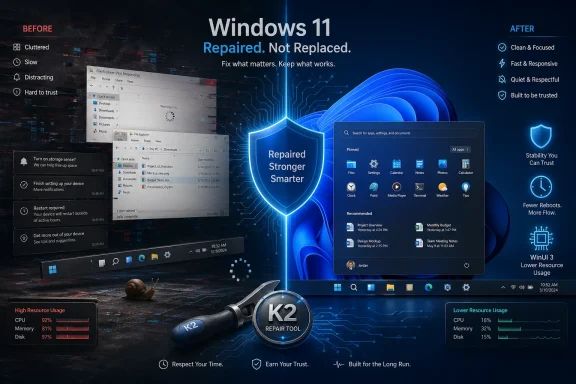 Microsoft Has Finally Found the Problem Sitting in Plain Sight
For years, Windows 11 has suffered from a credibility problem that no amount of rounded corners, AI branding, or Settings app reshuffling could solve. Users did not merely complain that Windows was missing a feature here or there; they complained that the operating system felt less respectful of their time than the one it replaced.That distinction matters. A missing taskbar option is irritating. A slow File Explorer, inconsistent UI, update anxiety, ad-like intrusions, and a sense that Copilot was being stapled onto every surface combine into something more corrosive: distrust.
Project K2, reportedly started in the second half of 2025, appears to be Microsoft’s internal answer to that distrust. It is not a single release, not a boxed-product milestone, and not a clean marketing reset. It is better understood as a quality program — a cultural course correction aimed at changing what Microsoft allows into Windows before millions of users are forced to live with it.
That is why the name matters less than the shift in incentives. Windows does not need another grand unveiling. It needs a long period in which “boring” engineering work outranks novelty.
The Real Feature Is a Higher Bar
The most consequential K2 claim is not the movable taskbar, faster Start menu, or File Explorer tuning. It is the reported change in how Microsoft decides whether a feature is ready to leave the building.For much of Windows 11’s life, Microsoft seemed obsessed with agility. Features appeared, disappeared, A/B tested themselves into confusion, and often arrived with the texture of an unfinished argument. The Insider Program became both a proving ground and a fog machine: useful for telemetry, but not always reassuring for users trying to understand what Windows was becoming.
K2 reportedly reverses that priority. New features are said to face higher quality thresholds before reaching public preview builds, with more validation across real-world hardware. That sounds procedural, but process is product when the product is an operating system.
Windows is not a note-taking app that can break a workflow and apologize next Tuesday. It is the substrate beneath CAD suites, games, medical offices, school districts, factories, point-of-sale systems, and the family PC that only gets attention when something goes wrong. If Microsoft wants users to trust Windows again, it has to stop treating instability as a tolerable side effect of velocity.
The Taskbar Is a Symbol, Not the Strategy
The movable taskbar is likely to get the loudest applause because it is visible, familiar, and overdue. Windows 10 let users place the taskbar on different edges of the screen; Windows 11 took that away in the name of modernization. For a company that repeatedly tells customers Windows is about choice, that omission always felt strangely doctrinaire.Bringing it back is not just feature restoration. It is a concession that simplification is not the same thing as improvement. Power users do not object to modern design because they worship legacy UI; they object when “modern” means fewer options, slower controls, and no clear benefit.
Still, Microsoft should be careful not to mistake symbolic wins for structural repair. A top-aligned taskbar will make some users happy. It will not, by itself, make Windows feel coherent. The bigger test is whether Microsoft can stop removing mature functionality before its replacement is genuinely ready.
That lesson should apply far beyond the taskbar. Windows 11 has too often asked users to accept a prettier surface wrapped around a less capable implementation. K2 succeeds only if Microsoft relearns that parity is the floor, not the roadmap.
Performance Is the Trust Layer
The most damaging Windows 11 complaint has always been performance because performance is where users experience honesty. Marketing can tell people an OS is modern, intelligent, and secure; the Start menu either opens quickly or it does not.Microsoft reportedly knows this. K2 is said to target File Explorer, Windows Search, system UI responsiveness, gaming performance, resource usage, and memory footprint. Those are not glamorous areas, but they are exactly where Windows earns or loses goodwill every day.
File Explorer is the obvious battlefield. It is one of the most-used parts of Windows and one of the most embarrassing when it stutters, hangs, or takes too long to populate a folder. If Microsoft can make Explorer feel instant again — not “better in benchmark slides,” but actually immediate under ordinary workloads — users will notice.
Gaming performance is another reputational risk. Windows remains the default PC gaming platform, but the rise of SteamOS on handhelds has exposed an uncomfortable truth: Windows is not always the leanest or most console-like environment for games, especially on constrained hardware. Microsoft does not need Windows to become SteamOS. It does need Windows to stop feeling like a tax on devices where every watt, background service, and memory allocation matters.
WinUI 3 Is Where the Bet Gets Technical
One of the more interesting K2 threads is Microsoft’s reported emphasis on WinUI 3. That sounds like framework plumbing, and in one sense it is. But Windows’ UI story has been a multi-year tale of overlapping eras: Win32, UWP, XAML Islands, WebView surfaces, React Native pieces, legacy Control Panel fragments, and modern Settings pages that sometimes feel like they were designed by different companies.A stronger WinUI 3 push is Microsoft’s attempt to reduce that fragmentation without merely painting over it. The promise is that more Windows surfaces can become native, faster, more reliable, and less memory-hungry than web-based or transitional interfaces. If Microsoft can deliver a new system compositor and lower-latency UI paths, the improvement could be felt in the places users touch constantly: Start, context menus, shell surfaces, dialogs, settings, and system controls.
The risk is that Microsoft has made this kind of promise before. Windows has spent more than a decade migrating away from old control surfaces without ever fully arriving at a new, unified destination. The result is a house where some rooms have been renovated three times and others still have wallpaper from 1998.
K2’s UI work will be judged not by whether Microsoft can produce beautiful mockups, but by whether the operating system feels less like an archaeological dig. Users should not need to care which framework a dialog uses. They should only feel that it opens quickly, behaves predictably, respects system settings, and does not strand them between old and new worlds.
The Start Menu Became a Referendum on Intent
Few Windows components carry as much emotional weight as the Start menu. It is both launcher and symbol, the thing users touch when they want the machine to do something. When it feels slow, cluttered, or promotional, users interpret that as Microsoft inserting itself between them and their work.That is why reports of a faster, more customizable Start menu matter. A claimed responsiveness improvement of up to 60 percent would be meaningful if it appears in ordinary use, especially on midrange and older PCs. So would the ability to hide sections, resize the menu, and reduce the sense that Microsoft knows better than the user what belongs there.
The reported removal or reduction of ad-like recommendations would be even more important. Windows users have grown weary of the OS behaving like a billboard for subscriptions, apps, browser defaults, cloud storage, or AI experiences. Microsoft may argue that some of these prompts are helpful discovery mechanisms. Users often experience them as rent-seeking.
This is where K2 becomes a test of restraint. A faster Start menu with cleaner customization is good engineering. A Start menu that stops treating attention as inventory would be good judgment.
Windows Update Needs to Become Boring Again
Windows Update has an impossible job: patch an enormous hardware and software ecosystem quickly enough to keep users safe, but quietly enough that the OS does not feel like a hostile landlord. Microsoft has improved this system over the years, but the reputation remains poor because negative update experiences are memorable and often costly.K2 reportedly includes work to make updates require fewer reboots and give users more control over timing. That is exactly the right direction. The best update experience is not one with a friendlier notification; it is one that becomes less disruptive by design.
For enterprise IT, this matters even more. Sysadmins can handle patch cadence, maintenance windows, deployment rings, and rollback planning. What they cannot easily tolerate is unpredictability masquerading as progress. A Windows feature update that changes user behavior, breaks a driver, or introduces help desk noise creates real operational cost.
Microsoft’s challenge is to keep security velocity without turning every endpoint into a rolling experiment. That means better pre-release validation, clearer release notes, fewer surprise feature drops, and fewer reboots that arrive at exactly the wrong time. In other words, Windows Update needs to become boring again — and boring would be a triumph.
AI Is Not the Villain, but It Became the Distraction
The backlash against Windows 11 is often described as an anti-AI backlash, but that is too simple. Users are not opposed to useful automation. They are opposed to feeling that Microsoft is prioritizing Copilot placement over the quality of the operating system underneath it.That is the context in which K2’s reported “less AI where it does not help” posture should be read. The issue was never whether AI could belong in Windows. It was whether Windows had earned the right to ask for that attention while basic experiences still felt slow, inconsistent, or pushy.
A useful Copilot integration might help a user find a buried setting, summarize a local document with permission, automate a repetitive task, or explain a confusing error. An unwanted Copilot button, promotional prompt, or half-integrated sidebar does the opposite: it tells users Microsoft’s roadmap is not aligned with their needs.
K2 does not require Microsoft to abandon AI. It requires Microsoft to subordinate AI to craft. If an AI feature makes Windows faster, clearer, or more capable, it will survive on merit. If it exists mainly to satisfy a corporate platform narrative, users will smell it immediately.
SteamOS Exposed the Cost of Windows’ Weight
The SteamOS comparison stings because it comes from outside Microsoft’s traditional competitive frame. Linux on the desktop has been “almost ready” for decades in the popular imagination, but SteamOS is not trying to beat Windows at being Windows. It is trying to be an appliance-like gaming environment that gets out of the way.That is dangerous for Microsoft because it reframes the question. Users do not ask whether SteamOS supports every enterprise app, legacy peripheral, or obscure workflow. They ask why a gaming handheld feels smoother, simpler, or more battery-conscious when it is not carrying the full Windows stack.
Windows still has enormous advantages: compatibility, anti-cheat support in many titles, driver breadth, Game Pass integration, productivity software, and decades of developer assumptions. But advantages can become excuses. If Windows performs worse on the same class of hardware, users will not care that the OS is more general-purpose; they will care that their game runs slower or their device feels clumsier.
K2’s reported focus on lower resource usage is therefore not just about old laptops. It is about the future of Windows form factors. Handheld PCs, AI PCs, thin laptops, and hybrid work machines all punish waste. Microsoft can no longer assume hardware improvements will hide software indulgence.
The Enterprise Angle Is Quietly More Important Than the Enthusiast Angle
Enthusiasts will judge K2 by the taskbar, Start menu, Explorer, gaming, and bloat. Enterprise IT will judge it by a different standard: fewer surprises.That is where Microsoft has the most to gain. Businesses do not need Windows to be exciting. They need it to be stable, governable, secure, and supportable. Every change that reduces help desk tickets, update failures, driver drama, and user confusion translates into money.
K2’s reported emphasis on reliability, app compatibility, driver quality, and update predictability fits that audience. But Microsoft must be careful: enterprise trust is slower to rebuild than consumer excitement. A few good Insider builds will not erase years of cautious deployment policies.
The Windows 10 end-of-support transition also looms over this effort. Many organizations have already moved to Windows 11, but plenty have done so reluctantly or unevenly. If K2 makes Windows 11 genuinely better by late 2026 and into 2027, Microsoft may blunt some of the resentment that has accompanied the migration. If it does not, the company will have pushed customers off a beloved old platform onto one they still do not fully trust.
K2 Sounds Like Windows 7’s Lesson, Relearned the Hard Way
The historical analogy writes itself. Windows Vista was ambitious, heavy, and widely disliked; Windows 7 refined the model, improved performance, restored confidence, and became one of Microsoft’s most beloved releases. The lesson was not that users hate change. It was that users forgive change when the result feels better.Windows 11 is not Vista. It is more stable, more secure, and more successful in raw deployment terms than Vista ever was. But it has a similar reputational shape: a product whose ambitions were often overshadowed by friction.
K2 looks like Microsoft trying to perform a Windows 7-style correction without releasing a Windows 7-style new OS. That is both sensible and difficult. The Windows-as-a-service model means Microsoft can improve Windows 11 continuously, but it also means there is no clean psychological break. Users may not notice a “fixed” Windows arriving because it will arrive in pieces.
That makes consistency crucial. Microsoft needs month after month of visible, practical improvements that point in the same direction. Faster Explorer one month, fewer update interruptions another, better Start customization, lower memory use, cleaner UI, fewer ads, more reliable drivers — eventually, the narrative changes because the lived experience changes.
The Hardest Part Is Saying No
The optimistic read of K2 is that Microsoft has finally understood the assignment. The skeptical read is that Microsoft has understood it many times before and then forgotten it when the next strategic priority arrived.That skepticism is earned. Windows has repeatedly been asked to serve corporate ambitions that were not always aligned with user needs: browser wars, app store pushes, cloud account nudges, subscription upsells, telemetry expansion, MSN content surfaces, and now AI platform positioning. The OS became a distribution channel for everything Microsoft wanted to promote.
K2 can improve code quality, but the deeper problem is product discipline. Someone inside Microsoft has to say no when a team wants another prompt, another recommendation tile, another default change, another “helpful” integration that happens to benefit Microsoft’s ecosystem. Without that restraint, performance gains will be consumed by new layers of monetization and engagement design.
This is the uncomfortable truth: Windows users do not merely want a faster operating system. They want an operating system that behaves like it is on their side. Speed helps create that feeling, but respect sustains it.
The Insider Program Has to Become a Trust Engine
Microsoft’s Insider Program should be one of Windows’ greatest advantages. Few software platforms have access to such a broad testing population across such varied hardware. In theory, that should make Windows more reliable, not more chaotic.K2 reportedly leans more heavily on real-world validation and feedback loops. That is welcome, but Microsoft must also make the Insider experience clearer. Users need to know what channel they are in, what risk they are accepting, what changed in a build, and whether their feedback went anywhere.
Too often, Windows testing has felt opaque from the outside. Features roll out to subsets of users, disappear behind server-side switches, and reappear months later with little explanation. That may be efficient for telemetry-driven development, but it weakens community trust.
If K2 is partly cultural, Microsoft should treat Insiders less like instrumentation endpoints and more like collaborators. That does not mean design by comment section. It means transparency, responsiveness, and humility when feedback exposes a bad assumption.
The Best Version of K2 Is Boring, Fast, and Invisible
The temptation in tech coverage is to look for the big thing: the new UI, the AI agent, the next major version number, the keynote moment. K2 is interesting precisely because its best outcomes would be mundane. File Explorer opens faster. Search finds things. Updates restart less often. The Start menu stops wasting space. The taskbar goes where users want it. Games run as well as they should. Windows uses less memory. Fewer things break.That is not a lack of ambition. It is the correct ambition for a mature operating system.
Microsoft does not need to make Windows feel futuristic at every turn. It needs to make Windows feel dependable. The future can arrive through apps, hardware, cloud services, and optional AI layers. The OS itself should be the stable ground beneath them.
There is a reason users still speak fondly of Windows releases that felt settled. Windows XP after its service packs, Windows 7 in its prime, and Windows 10 after its rougher early period all benefited from a sense that the operating system had stopped fighting the user. K2’s promise is to bring Windows 11 closer to that state without waiting for a new brand name to launder the past.
Microsoft Has Opened the Door; Now It Has to Walk Through It
The most encouraging thing about K2 is that it appears to define Windows’ problems in user terms rather than purely platform terms. Performance, reliability, craft, control, lower resource usage, less disruptive updating, and more careful AI integration are the right categories. They match what people actually complain about.The least encouraging thing is that all of this remains a promise until it survives contact with Microsoft’s internal incentives. Windows is still a strategic surface for the company’s AI ambitions, subscription business, browser competition, developer platform, gaming strategy, and cloud identity model. Those forces will not disappear because one quality initiative has a mountain-themed codename.
So K2 should be judged harshly and practically. Do ordinary PCs feel faster? Do older machines feel less abandoned? Do handhelds stop fighting the desktop metaphor? Do business users see fewer update incidents? Do power users regain meaningful control? Does Microsoft remove irritants instead of merely hiding them behind new settings?
If the answer is yes, K2 may become the most important Windows project in years precisely because it is not Windows 12. It would prove that Microsoft can still repair the living platform instead of asking users to wait for the next one. Windows does not need a dramatic rebirth so much as a sustained act of maintenance, humility, and restraint — and if Microsoft can keep that discipline through 2026 and beyond, Windows 11 may yet become the operating system it should have been all along.
Source: OC3D How Microsoft's "K2" project aims to fix Windows - OC3D
