

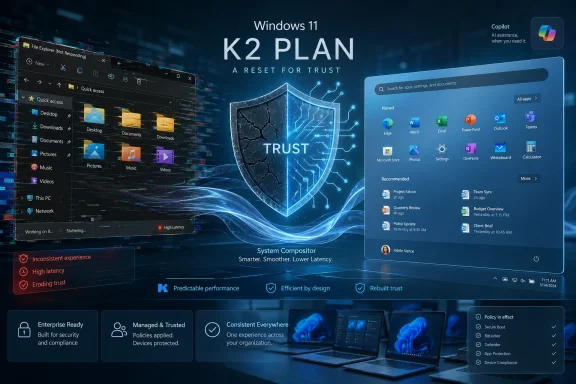
Microsoft’s reported K2 Plan for Windows 11 reads like an admission that the company’s flagship operating system has drifted too far from the basics: speed, consistency, reliability, and user trust. After years of visible AI promotion, design fragmentation, File Explorer complaints, and lingering performance rough edges, Microsoft now appears to be preparing a deeper architectural reset rather than another layer of polish. The stakes are unusually high because Windows 11 is no longer competing only with older Windows installs; it is competing with a more aggressive Apple, cheaper Macs, Chromebooks, Linux curiosity, and user fatigue inside Microsoft’s own ecosystem.
Windows has survived many self-inflicted wounds because its ecosystem is enormous, its backward compatibility is unmatched, and its place in business computing remains deeply entrenched. That resilience, however, can also become a trap. Microsoft can delay painful architectural decisions for years because users, developers, hardware makers, and IT departments often have no practical choice but to stay.
The problem with Windows 11 is not that it failed in one dramatic way. It is that it accumulated hundreds of small frustrations that made the system feel less finished than its visual design implied. A centered Start menu, rounded corners, and modern icons could not hide old Control Panel remnants, inconsistent context menus, sluggish shell components, and the sense that Microsoft was spending more energy selling Copilot than fixing Explorer.
This is why the reported K2 Plan matters. It is not being framed as a conventional feature update or a seasonal refresh. It appears to be a broader internal push around performance, reliability, and craft, with Microsoft acknowledging that the daily experience of using Windows must improve before users will accept more ambitious AI-driven changes.
The historical pattern is familiar. Windows 8 overreached with a tablet-first interface, Windows 8.1 softened the impact, and Windows 10 restored confidence by returning to a more practical desktop-first model. Windows 11 now faces a similar credibility test, though the problem this time is less about one controversial interface and more about the cumulative erosion of polish.
Windows 11’s biggest challenge is that many of its annoyances happen in core surfaces. The Start menu, taskbar, context menus, Settings, and File Explorer are not optional apps. They are the front door to the operating system, and when they feel inconsistent, the whole platform feels unstable.
The reported K2 work appears to focus on issues that enthusiasts have complained about for years:
The reported move toward a WinUI 3 Start menu is therefore more than a design choice. WinUI 3 is Microsoft’s modern native UI framework for Windows desktop experiences, and using it more consistently could help reduce the sense that Windows 11 is stitched together from unrelated parts. The challenge is that Microsoft has previously struggled to modernize without introducing new delays or regressions.
If Microsoft allows users to resize sections, hide unwanted areas, and reduce clutter, it would signal a return to a more Windows-like philosophy:
Windows 11’s Explorer modernization has been uneven. Microsoft added tabs, redesigned command bars, and improved some visual elements, but performance complaints never really disappeared. Dark mode glitches, white flashes, delayed folder rendering, and search sluggishness became part of the Windows 11 reputation.
A serious Explorer repair effort must address several layers at once:
This kind of work rarely produces a flashy demo. It produces the quieter benefit of Windows feeling less heavy. For an operating system used across everything from budget laptops to multi-monitor workstations, that matters enormously.
A compositor-focused effort could improve:
Users reacted poorly to the sense that Copilot was being pushed into every available corner while long-standing Windows problems remained unresolved. When the operating system flashes in dark mode or Explorer search lags, a new AI button can feel less like innovation and more like misdirection. Microsoft seems to have recognized that optics problem.
A more mature Windows AI strategy should follow several principles:
For years, Windows laptops dominated the entry and midrange because Macs were simply too expensive for many students, families, and small businesses. A cheaper Mac makes the question more dangerous for Microsoft: if Windows feels messy and macOS feels consistent, why not switch? That question used to be blocked by price more often than preference.
The market pressure is especially sharp in these segments:
Businesses have tolerated Windows 11’s quirks partly because Windows remains the center of their application estate. Line-of-business apps, device management, identity integration, endpoint security, and compliance workflows all reinforce the platform. But frustration grows when employees perceive company-issued Windows laptops as slower, noisier, or less polished than personal Macs.
A serious enterprise-focused K2 outcome should include:
Microsoft cannot simply rewrite Windows like a startup building a clean operating system. A change that improves modern UI performance may break a shell extension, accessibility workflow, management script, niche driver, or industrial application. This is the central tension behind K2.
A practical modernization sequence usually looks like this:
The Insider community has always been a double-edged instrument. Enthusiasts provide fast feedback and uncover edge cases, but they also amplify frustration when Microsoft ignores obvious complaints. If K2 is real and sustained, the Insider Program must become less of a marketing funnel and more of a serious engineering signal.
A stronger Insider model should emphasize:
Key signals to monitor include:
If Microsoft executes K2 with discipline, Windows 11 could still mature into the system it was supposed to be: modern, fast, familiar, flexible, and ready for AI without being consumed by it. If Microsoft loses focus, the damage will not be immediate collapse but gradual erosion, with more users treating macOS, ChromeOS, and Linux as credible escape routes. The climb up K2 is difficult, but the harder part for Microsoft may be proving that it understands why users wanted the mountain moved in the first place.
Source: Root-Nation.com https://root-nation.com/en/articles-en/windows-en/en-windows-11-k2-all-about/
 Background
Windows has survived many self-inflicted wounds because its ecosystem is enormous, its backward compatibility is unmatched, and its place in business computing remains deeply entrenched. That resilience, however, can also become a trap. Microsoft can delay painful architectural decisions for years because users, developers, hardware makers, and IT departments often have no practical choice but to stay.The problem with Windows 11 is not that it failed in one dramatic way. It is that it accumulated hundreds of small frustrations that made the system feel less finished than its visual design implied. A centered Start menu, rounded corners, and modern icons could not hide old Control Panel remnants, inconsistent context menus, sluggish shell components, and the sense that Microsoft was spending more energy selling Copilot than fixing Explorer.
This is why the reported K2 Plan matters. It is not being framed as a conventional feature update or a seasonal refresh. It appears to be a broader internal push around performance, reliability, and craft, with Microsoft acknowledging that the daily experience of using Windows must improve before users will accept more ambitious AI-driven changes.
The historical pattern is familiar. Windows 8 overreached with a tablet-first interface, Windows 8.1 softened the impact, and Windows 10 restored confidence by returning to a more practical desktop-first model. Windows 11 now faces a similar credibility test, though the problem this time is less about one controversial interface and more about the cumulative erosion of polish.
The K2 Plan Is About Trust, Not Just Speed
Microsoft can ship benchmarks, animations, and new settings pages, but the real target of K2 is trust. Users need to believe that clicking Start will be instant, opening File Explorer will not flash or stall, and changing a setting will not send them through three generations of Windows design language. That trust is emotional as much as technical.Windows 11’s biggest challenge is that many of its annoyances happen in core surfaces. The Start menu, taskbar, context menus, Settings, and File Explorer are not optional apps. They are the front door to the operating system, and when they feel inconsistent, the whole platform feels unstable.
Why “Craft” Suddenly Matters
Microsoft’s renewed use of language around craft is important because it suggests the company understands that users are not only measuring raw performance. They are measuring hesitation, friction, visual mismatch, and the time lost to small interruptions. A fast system can still feel bad if its core interactions are unpredictable.The reported K2 work appears to focus on issues that enthusiasts have complained about for years:
- Slow shell surfaces that feel heavier than their Windows 10 equivalents.
- Inconsistent UI frameworks across inbox apps and system panels.
- File Explorer delays during navigation, search, and dark mode rendering.
- Context menu friction caused by redesigned layers over older functionality.
- Memory and latency overhead in areas users touch constantly.
- AI entry points that arrived before the fundamentals felt repaired.
WinUI 3 Start Menu: A Small Surface With Big Symbolism
The Start menu is a deceptively small piece of Windows. It is not a productivity suite, a browser engine, or a kernel subsystem, but it carries enormous symbolic weight. If Start feels slow, Windows feels slow.The reported move toward a WinUI 3 Start menu is therefore more than a design choice. WinUI 3 is Microsoft’s modern native UI framework for Windows desktop experiences, and using it more consistently could help reduce the sense that Windows 11 is stitched together from unrelated parts. The challenge is that Microsoft has previously struggled to modernize without introducing new delays or regressions.
Customization as an Apology
One of the most promising reported changes is not just speed but renewed customization. Windows 11 removed or reduced several forms of user control at launch, especially around the taskbar and Start layout. That may have simplified design, but it also made longtime Windows users feel as if the OS was taking options away.If Microsoft allows users to resize sections, hide unwanted areas, and reduce clutter, it would signal a return to a more Windows-like philosophy:
- Let users remove what they do not use.
- Make recommendations optional rather than unavoidable.
- Keep pinned apps fast and predictable.
- Avoid turning Start into an advertising surface.
- Respect business environments that need clean, managed layouts.
File Explorer Remains the Pain Point Microsoft Cannot Ignore
For many Windows users, File Explorer is the operating system. It is where work begins, files move, archives open, drives appear, network shares are browsed, and cloud folders collide with local storage. When Explorer feels slow or visually unstable, the frustration lands immediately.Windows 11’s Explorer modernization has been uneven. Microsoft added tabs, redesigned command bars, and improved some visual elements, but performance complaints never really disappeared. Dark mode glitches, white flashes, delayed folder rendering, and search sluggishness became part of the Windows 11 reputation.
Why Explorer Is So Hard to Fix
Explorer is difficult because it sits at the intersection of old shell architecture, extensions, cloud integration, third-party tools, and decades of user habits. It must work with local disks, network shares, OneDrive, removable storage, compressed folders, legacy control surfaces, and enterprise policies. That makes it one of the least forgiving parts of Windows to rewrite aggressively.A serious Explorer repair effort must address several layers at once:
- Launch time, especially on lower-end and older supported PCs.
- Navigation speed across large folders and complex directory trees.
- Search responsiveness, including instant filename search expectations.
- Visual consistency, particularly in dark mode and dialogs.
- Shell extension stability, where third-party add-ons can degrade reliability.
- Enterprise predictability, including network shares and redirected folders.
The System Compositor Could Be the Hidden Centerpiece
The reported work on the system compositor may be the least glamorous part of K2, but it could be one of the most important. The compositor influences how windows, animations, surfaces, and visual transitions appear on screen. When it misbehaves, users experience flicker, jank, latency, or inconsistent responsiveness.This kind of work rarely produces a flashy demo. It produces the quieter benefit of Windows feeling less heavy. For an operating system used across everything from budget laptops to multi-monitor workstations, that matters enormously.
Latency Is a User Experience Problem
Users do not think in milliseconds, but they feel them. A menu that appears slightly late, an animation that stutters, or a window that redraws awkwardly creates the perception that the machine is struggling. That perception can persist even when CPU and GPU usage look normal.A compositor-focused effort could improve:
- Window switching under load.
- Animation smoothness across mixed-refresh displays.
- Reduced flicker in shell surfaces and legacy-modern transitions.
- Lower memory usage for desktop composition.
- Better responsiveness on integrated graphics and battery-powered devices.
Copilot Is Being Repositioned, Not Removed
Microsoft’s apparent retreat from aggressive Copilot branding should not be mistaken for a retreat from AI. The company is not abandoning AI in Windows; it is adjusting how visible, insistent, and branded those features feel. That distinction matters.Users reacted poorly to the sense that Copilot was being pushed into every available corner while long-standing Windows problems remained unresolved. When the operating system flashes in dark mode or Explorer search lags, a new AI button can feel less like innovation and more like misdirection. Microsoft seems to have recognized that optics problem.
AI Must Become Contextual, Quiet, and Optional
The future of AI in Windows likely depends on whether Microsoft can make it feel useful without making it feel imposed. A writing tool in Notepad, image assistance in Photos, or contextual help in Settings can be valuable if it appears at the right time. It becomes irritating when it looks like branding first and functionality second.A more mature Windows AI strategy should follow several principles:
- AI features should solve specific tasks, not occupy permanent attention.
- Branding should be secondary to usefulness and clarity.
- Enterprise controls must be obvious and enforceable.
- Privacy expectations must be explained in plain language.
- Local processing should be used where practical, especially on Copilot+ PCs.
- Users must be able to hide or disable entry points without registry gymnastics.
Apple’s MacBook Neo Changes the Competitive Math
The timing of K2 is not happening in a vacuum. Apple’s low-cost MacBook Neo has reportedly pushed the Mac into price territory that Windows PC makers once controlled more comfortably. Even if the device has compromises, its existence changes the psychological comparison.For years, Windows laptops dominated the entry and midrange because Macs were simply too expensive for many students, families, and small businesses. A cheaper Mac makes the question more dangerous for Microsoft: if Windows feels messy and macOS feels consistent, why not switch? That question used to be blocked by price more often than preference.
The Budget Laptop Fight Is Now About Experience
Windows OEMs can still compete aggressively on variety, gaming, repairability, ports, display sizes, and price bands. But Apple’s advantage is vertical integration: hardware, silicon, operating system, battery life, and retail messaging all come from one company. Microsoft must rely on partners while also making Windows feel excellent across uneven hardware.The market pressure is especially sharp in these segments:
- Students who want battery life, simplicity, and long software support.
- Casual home users who mostly browse, stream, write, and manage photos.
- Small businesses that do not need legacy Windows-only software.
- Creators on a budget who value consistent trackpads, displays, and sleep behavior.
- Parents buying first laptops who may already manage iPhones and iPads.
Enterprise Customers Will Judge K2 Differently
Consumers complain loudly, but enterprise customers shape Microsoft’s revenue reality. Large organizations care about user experience, but they also prioritize manageability, compatibility, security, lifecycle predictability, and support. For them, K2 will matter only if it improves Windows without creating migration chaos.Businesses have tolerated Windows 11’s quirks partly because Windows remains the center of their application estate. Line-of-business apps, device management, identity integration, endpoint security, and compliance workflows all reinforce the platform. But frustration grows when employees perceive company-issued Windows laptops as slower, noisier, or less polished than personal Macs.
What IT Departments Need From K2
Enterprise IT teams will not be impressed by vague promises. They need measurable improvements and administrative control. A faster Start menu is welcome, but a stable update cadence and fewer shell regressions are more important.A serious enterprise-focused K2 outcome should include:
- Reduced explorer.exe crashes and fewer shell restarts.
- Predictable policy controls for preinstalled apps and AI features.
- Better driver reliability across docks, cameras, printers, and Bluetooth devices.
- Clear Insider-to-production pathways for testing upcoming changes.
- Improved update quality with fewer emergency workarounds.
- Consistent performance on managed, security-hardened devices.
Legacy Compatibility Is Both Microsoft’s Superpower and Burden
Windows remains dominant partly because it runs an astonishing range of old software and hardware. That compatibility is a strategic moat, but it is also the reason deep modernization takes so long. Every old dependency has a constituency somewhere.Microsoft cannot simply rewrite Windows like a startup building a clean operating system. A change that improves modern UI performance may break a shell extension, accessibility workflow, management script, niche driver, or industrial application. This is the central tension behind K2.
The Refactoring Problem
The most difficult part of Windows modernization is not designing a nicer interface. It is replacing or reworking deep components while preserving expected behavior. That requires staged rollouts, compatibility layers, telemetry, Insider feedback, OEM testing, and rollback paths.A practical modernization sequence usually looks like this:
- Identify the highest-friction user surfaces through telemetry and feedback.
- Replace or optimize components in controlled Insider builds before broad release.
- Measure regressions across hardware, drivers, and enterprise policies.
- Expand rollout gradually while preserving fallback paths where needed.
- Remove legacy dependencies only when compatibility risk is acceptably low.
Windows Insiders Are Becoming More Important Again
Microsoft’s adjustments to the Windows Insider Program suggest that K2 will rely heavily on earlier and clearer testing channels. That is necessary because the problems K2 targets are often experiential. Microsoft cannot fully validate them in a lab.The Insider community has always been a double-edged instrument. Enthusiasts provide fast feedback and uncover edge cases, but they also amplify frustration when Microsoft ignores obvious complaints. If K2 is real and sustained, the Insider Program must become less of a marketing funnel and more of a serious engineering signal.
Feedback Must Change Outcomes
The biggest question is not whether Microsoft collects feedback. It is whether feedback changes decisions before release. Windows users have repeatedly complained about missing taskbar options, intrusive recommendations, and inconsistent shell behavior. The credibility gap comes from seeing those complaints acknowledged slowly or incompletely.A stronger Insider model should emphasize:
- Clearer channel definitions so testers understand risk levels.
- More transparent known-issue tracking for core shell regressions.
- Faster fixes for high-volume usability complaints.
- Better separation between experiments and near-shipping features.
- Public explanations when Microsoft rejects popular requests.
Strengths and Opportunities
K2 gives Microsoft a rare opportunity to reset the conversation around Windows 11 before frustration becomes permanent platform drift. The company still has unmatched ecosystem scale, deep enterprise relationships, and a hardware partner network that Apple cannot replicate. If Microsoft focuses on fundamentals first, Windows 11 can become noticeably better without needing a new brand name.- A faster Start menu would improve one of the most visible daily interactions.
- File Explorer performance work could remove a long-running source of user irritation.
- Compositor improvements may make Windows feel smoother across hardware tiers.
- Reduced Copilot branding can lower the sense of AI being forced into workflows.
- Better Insider channels can improve pre-release validation and user confidence.
- Enterprise policy improvements can make Windows 11 easier to manage at scale.
- A renewed focus on craft can help Microsoft compete on experience, not just compatibility.
Risks and Concerns
The risks are substantial because Microsoft has made “we are listening” promises before. The company often responds to criticism, improves course for a while, and then resumes pushing monetization surfaces, bundled services, or strategic initiatives that users did not ask for. K2 will be judged by shipped behavior, not internal ambition.- AI priorities could overtake fundamentals if Copilot-related goals return to the foreground.
- Legacy compatibility constraints may limit how much Microsoft can truly modernize.
- Performance gains may be uneven across budget PCs, older hardware, and enterprise images.
- WinUI 3 adoption could introduce new inconsistencies if not implemented carefully.
- Explorer changes could disrupt shell extensions and business workflows.
- Insider feedback may still fail to block unpopular decisions before release.
- Apple’s low-cost Mac pressure may accelerate faster than Windows improvements arrive.
Looking Ahead
The next year will reveal whether K2 is a serious engineering reset or simply a new label for incremental cleanup. Watch for changes that affect the daily shell experience rather than flashy feature announcements. The strongest evidence will be fewer delays, fewer visual glitches, fewer unwanted prompts, and fewer reasons for users to describe Windows 11 as unfinished.Key signals to monitor include:
- Start menu responsiveness in Insider builds compared with current production releases.
- File Explorer launch, navigation, and search performance on ordinary laptops.
- Visible reductions in Copilot branding without hidden increases in AI intrusiveness.
- Reliability data around drivers, sleep, docking, Bluetooth, and printers.
- Enterprise controls for app removal, AI features, recommendations, and default experiences.
If Microsoft executes K2 with discipline, Windows 11 could still mature into the system it was supposed to be: modern, fast, familiar, flexible, and ready for AI without being consumed by it. If Microsoft loses focus, the damage will not be immediate collapse but gradual erosion, with more users treating macOS, ChromeOS, and Linux as credible escape routes. The climb up K2 is difficult, but the harder part for Microsoft may be proving that it understands why users wanted the mountain moved in the first place.
Source: Root-Nation.com https://root-nation.com/en/articles-en/windows-en/en-windows-11-k2-all-about/
