

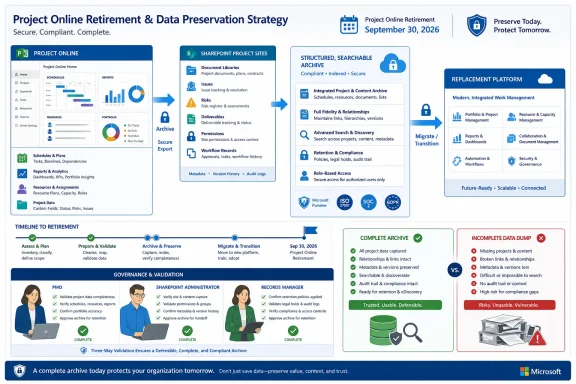
Microsoft’s lifecycle notice says Project Online and its associated data will no longer be accessible after retirement. Microsoft’s export guidance documents substantial coverage for Project Online artifacts, but it separately identifies project-site content stored in SharePoint, including contributions from people who may never have been registered as PWA users.
That distinction should shape every retirement plan now. The objective is not simply to download data before access disappears; it is to preserve enough structure, content, ownership, and business context for the archive or replacement platform to remain usable afterward.
Build the Inventory Before Running the Export
The first task is tenant discovery, not file collection. Microsoft advises SharePoint administrators to enumerate PWA-enabled sites with the SharePoint Online Management Shell, then work with PWA administrators to interpret what each site contains and which business rules apply.
A SharePoint administrator can connect to the tenant’s SharePoint Online administration endpoint and enumerate PWA sites with:
Connect-SPOService -URL <AdminSiteURL>

Get-SPOSite | ?{$_.PWAEnabled -eq "Enabled"} | ft -a Url,Owner
This produces a starting list of PWA site URLs and owners. It does not, by itself, explain whether a site is active, which business unit owns its records, which project sites sit beneath it, or whether its documents and lists remain authoritative.
A practical tenant-wide runbook should proceed in this order:
- Enumerate every site where
PWAEnabledis set toEnabled, recording the URL and listed owner. - Assign a PWA administrator or PMO owner to each returned site so that SharePoint discovery is matched with project-management context.
- Identify the projects, resources, portfolio artifacts, reports, and user content that require export from each PWA environment.
- Inventory the associated SharePoint project-site content separately, including documents, issues, risks, and deliverables.
- Record permissions, ownership, workflows, and downstream dependencies that determine how the exported material is used.
- Map each artifact category to a destination, retention outcome, or deliberate disposal decision.
- Validate the resulting archive outside the live PWA environment before September 30, 2026.
The fourth and fifth steps are where a technically successful export can become an operational failure. A collection of .mpp, XML, JSON, and reporting files may be complete according to the script output while still lacking the supporting decision record held in SharePoint.
The PowerShell Export Captures PWA Artifacts, Not the Whole Workspace
Microsoft’s ExportProjectUserContent workflow can export a broad set of Project Online material. Depending on the selected options and the user’s involvement, the output can include draft and published project files, XML and JSON data, reporting datasets, portfolio artifacts, status reports, resource plans, and user-view settings.
Typical execution requires the PWA site URL, a user login name or Resource ID, and an output directory:
.\ExportProjectUserContent.ps1 `
  -Url <PwaSiteURL> `
  -LoginName <UsersLoginName> `
  -OutputDirectory <LocationToStoreOutput>
The existence of a user-oriented export workflow creates an immediate scaling problem for large tenants. A PMO should not assume that successfully exporting several prominent project managers proves that the tenant has been preserved. The relevant population may also include former employees, contractors, resource managers, portfolio administrators, project contributors, and service accounts associated with different PWA sites.
The export plan therefore needs a reconciliation process. For every PWA site, administrators should be able to show which users and resources were considered, which export options were run, where the output was stored, and whether the resulting files were reviewed.
That review cannot stop at counting files. Administrators should confirm that expected projects appear in draft, published, and reporting forms where applicable; that portfolio and status-report material is present when required; and that user-view settings or resource-plan information has not been omitted merely because it appeared less important than the schedules.
Microsoft’s workflow is valuable, but its name is revealing: ExportProjectUserContent is designed around user content. A retirement archive is a broader governance exercise spanning the tenant, its PWA environments, linked SharePoint sites, and records whose ownership may not line up neatly with one active user account.
SharePoint Holds the Evidence Behind the Schedule
A schedule can show that a milestone slipped. The linked SharePoint site may hold the issue entry explaining why, the risk record showing when the threat was identified, the deliverable used for acceptance, and the document containing the decision that changed the baseline.
Those records are not interchangeable with a Project Online reporting dataset. They carry narrative and evidentiary value that structured project fields often cannot reproduce.
Microsoft specifically separates project-site SharePoint content into categories such as issues, risks, documents, and deliverables. It also notes that contributors to this content may not be PWA users, which means a user list derived only from Project Web App can miss people whose names, documents, comments, or decisions remain embedded in the project site.
The SharePoint review should consequently inventory more than visible document libraries. For each project site, the PMO and SharePoint team should record:
- The libraries and lists that contain project records.
- The issues, risks, documents, and deliverables associated with the project.
- The owners and contributors needed to interpret those records.
- The permissions that explain who could read, edit, approve, or administer the content.
- The workflows or business processes attached to lists, libraries, approvals, or project stages.
- The links from reports, dashboards, schedules, emails, and other systems that point back to the site.
- The intended destination and retention treatment for each content category.
Permissions deserve particular attention because preservation is not simply a matter of copying bytes. If an archive removes all evidence of who could approve a deliverable or alter a risk record, investigators and future project teams may be unable to distinguish an authoritative record from an informal working copy.
Links create a similar problem. A report or exported schedule may still contain references to Project Online or SharePoint locations that will no longer be accessible. The file opens, but the path that made it useful has disappeared. That is an archive integrity failure even when no export command reported an error.
Retention and Legal Review Must Precede Shutdown
Project Online retirement should not become an excuse to apply one blanket retention decision to every project. Active work, completed projects, abandoned proposals, regulated records, contractual deliverables, and duplicate working documents may require different treatment under an organization’s own policies.
The PMO, SharePoint administrators, records managers, legal teams, and security staff should agree on those rules before content is moved or discarded. If material is subject to a legal hold or another preservation obligation, the migration team needs to identify that constraint before restructuring folders, changing permissions, or removing the live workspace.
The key validation question is not “Did the export finish?” It is “Can an authorized person reconstruct and use the project record without Project Online?”
Testing should use representative projects with different characteristics rather than one convenient example. Reviewers should attempt to open exported schedules, locate supporting documents, follow the relationship between risks and decisions, identify deliverable ownership, and determine which version represents the approved record.
The archive should also be tested using accounts and systems that do not depend on the retiring PWA environment. If successful interpretation still requires opening a live Project Online page, resolving an inaccessible SharePoint link, or consulting an administrator’s memory, the preservation work is incomplete.
Map Artifacts to Destinations Before Choosing the Migration Tool
A replacement platform should not be selected only by asking whether it can import an .mpp file. Project Online combines scheduling, resource information, portfolio analysis, reporting, status collection, user settings, and SharePoint-based collaboration. A destination may handle some of those functions well while requiring separate systems or redesigned processes for the rest.
The migration inventory should map each source category to an explicit outcome. Draft and published schedules may go to a scheduling platform, reporting datasets to an analytics environment, documents to a governed content repository, and issues or risks to structured lists in a replacement work-management system.
Portfolio artifacts, status reports, resource plans, and user-view settings require their own decisions. Some may need functional migration; others may belong in a read-only archive. The important point is to make that distinction deliberately rather than allowing unsupported artifacts to disappear because the chosen replacement had no matching import field.
Business rules must travel with the data in some documented form. A field called “approved,” for example, has little value if the archive does not explain who could approve it, which workflow produced that state, or whether the record was superseded elsewhere.
This is why Microsoft directs SharePoint administrators to coordinate with PWA administrators. SharePoint can reveal where content is stored, but the PMO must explain what the content means, which copy is authoritative, and how it participated in the project lifecycle.
A Successful Export Can Still Be an Unusable Archive
The final retirement checkpoint should reconcile four inventories: PWA sites, exported users and resources, SharePoint project-site content, and destination mappings. Any project appearing in one inventory but not the others deserves investigation.
Administrators should also retain execution logs, review results, ownership decisions, and validation records alongside the exported material. Without that context, future custodians may inherit folders full of technically valid files with no reliable way to determine completeness.
September 30, 2026 is therefore not merely a deadline for running Microsoft’s PowerShell script. It is the last date by which organizations must have proved that schedules, portfolio records, linked SharePoint content, permissions, business rules, and downstream dependencies can survive without Project Online. The PMOs that test for usability rather than file count will be the ones left with an archive instead of a data dump.