

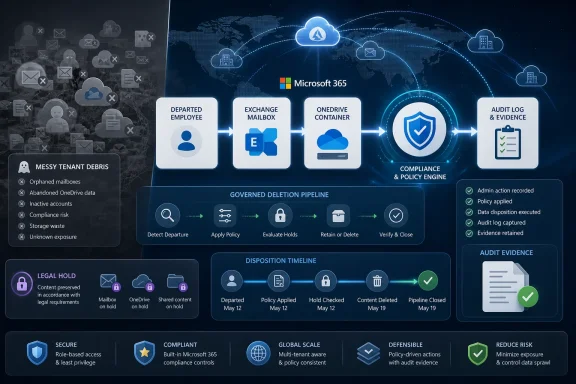
Microsoft added Microsoft 365 Roadmap ID 566527 on June 25, 2026, promising a September 2026 general availability release for a Purview Data Lifecycle Management feature that can delete inactive OneDrives and mailboxes for departed employees at scale in worldwide multi-tenant clouds. The feature sounds narrow, but it lands in one of Microsoft 365 administration’s messiest intersections: offboarding, retention, legal hold, storage cost, and audit defensibility. Microsoft is not merely adding another cleanup button. It is trying to turn a historically manual end-of-employment ritual into a governed deletion pipeline.
The pitch is simple enough: administrators will be able to delete both the content and the containers associated with departed users without hand-curating every abandoned mailbox and OneDrive. The more important claim is buried underneath that convenience. Microsoft is saying that compliance is no longer just about preserving data; it is also about proving you can get rid of it when the business, the law, or your own retention schedule says it should disappear.
For years, Microsoft 365 offboarding has been a compromise dressed up as a workflow. HR says a person has left. Identity teams disable the account. Exchange administrators decide whether to convert a mailbox, preserve it, hide it, delegate it, or delete it. SharePoint and OneDrive administrators then wrestle with files, ownership, manager access, retention windows, and the uneasy feeling that somewhere in the tenant there is still a personal site nobody remembers.
Purview’s new roadmap item attacks that last part directly. “Departed employees” are not a workload in the traditional Microsoft 365 sense, but they are one of the most persistent data-governance categories in real organizations. A former employee’s mailbox can be evidence, institutional memory, a privacy liability, or simply stale sludge in the tenant. Their OneDrive can be the only copy of a critical spreadsheet or a forgotten cache of sensitive customer records.
The industry used to treat this as an operational problem. The modern compliance posture treats it as a lifecycle problem. Data is born, used, shared, retained, archived, searched, and eventually deleted. The harder part is that in Microsoft 365, data is also wrapped in workload-specific containers: Exchange mailboxes, OneDrive sites, SharePoint locations, Teams artifacts, group mailboxes, and more. Deleting items without understanding their containers is incomplete. Deleting containers without respecting retention is dangerous.
That is why the phrase “content and containers” matters. Microsoft is not just promising to purge a file or message after a timer runs out. It is promising a more complete cleanup path for the abandoned structures that remain after employees leave. If this works as advertised, it moves offboarding from a loose sequence of admin tasks into the same governance plane as retention policies and lifecycle controls.
That clutter is not merely ugly. It is expensive, risky, and legally awkward. Stale data broadens eDiscovery scope, increases the amount of material that must be searched in an investigation, and creates more places where sensitive information can be exposed by misconfiguration or over-permissioning. “Keep everything forever” has always sounded safe to non-specialists, but it is often the opposite of safe. The longer data lives beyond its business purpose, the more it becomes a liability waiting for an incident.
Microsoft’s own Purview positioning has increasingly emphasized both halves of governance: retain what you need and delete what you do not. The first half is easier to sell because nobody gets blamed for keeping too much during an audit. The second half is where mature organizations separate policy from superstition. Deletion is not negligence when it follows an approved schedule; it is the expected outcome of a functioning compliance program.
The hard part has been making that outcome repeatable. Manual cleanup may work for a 50-person company with low turnover and a diligent admin. It fails at scale, especially in regulated enterprises, universities, healthcare networks, government contractors, and large distributed companies where departures are constant. The larger the tenant, the more likely it is that “we’ll clean that up later” becomes a permanent retention strategy by accident.
That centralization is sensible in theory. Microsoft 365 is no longer a set of neatly separated applications. A departing employee’s work may span Outlook, Teams chats, OneDrive documents, SharePoint libraries, Loop components, group-connected resources, and Copilot-indexed content. A governance system that only understands one workload at a time is increasingly mismatched with how users actually work.
But centralization also raises the stakes. Purview has to be comprehensible, auditable, and predictable. Admins do not merely need a feature that deletes old containers; they need to understand when it will delete them, why it considers them eligible, what policy wins when rules collide, and how to prove the outcome after the fact. A cleanup system that behaves like a black box will not reassure the people who have to explain it to counsel, auditors, or a regulator.
This is where Microsoft’s September 2026 general availability target matters. Roadmap entries are not documentation, and they rarely answer the questions administrators care about most. Microsoft still needs to describe prerequisites, licensing, policy scope, reporting, error handling, holds, exclusions, restoration windows, and the exact interaction with existing inactive mailbox and OneDrive retention behavior. Until those details arrive, this is an important signal rather than a fully knowable implementation.
That model solves one problem and creates another. It allows organizations to preserve former employees’ mail for legal, regulatory, or business reasons. But once the retention purpose expires, those inactive mailboxes must still be disposed of properly. In practice, the cleanup side has often been less elegant than the preservation side.
Mailbox retention also carries traps that only experienced admins learn to fear. Identity changes before deletion can complicate later management. Policies scoped one way may behave differently from policies scoped another way. A mailbox under litigation hold, eDiscovery hold, or retention policy is not just a mailbox; it is a governed object whose deletion must respect a chain of controls.
That is why “delete inactive mailboxes at scale” is not a trivial promise. The valuable feature is not mass deletion in the abstract. Anyone with sufficient privileges and a reckless script can delete things quickly. The valuable feature is mass deletion that is policy-aware, auditable, and integrated with the compliance system that originally retained the data.
Microsoft 365 already has concepts around OneDrive retention after account deletion, manager access, and eventual cleanup. But real offboarding rarely maps cleanly to defaults. Managers ask for extensions. Legal wants preservation. Security wants sensitive files removed. Business units want “just in case” access. Storage administrators want abandoned sites gone. Records teams want deletion to happen when the schedule says it should happen, not when a ticket happens to get closed.
That tension is exactly where a Purview-based lifecycle feature could help. If a departed user’s OneDrive can be governed by policy and then deleted along with its container when eligible, the organization gets a cleaner outcome than a pile of ad hoc ownership transfers and forgotten exceptions. It also reduces the temptation to copy everything into another SharePoint site “for safekeeping,” which often just moves the governance problem somewhere harder to identify.
The container point is especially important for OneDrive. Deleting files is not the same as retiring the site. A dead personal site can remain a permissions and discovery problem even after its obvious contents age out. A lifecycle system that can remove both the data and the shell around it is closer to what administrators actually mean when they say they want former-user cleanup.
This is the difference between lifecycle management and janitorial cleanup. A janitorial cleanup says, “These objects are old, so remove them.” Lifecycle management says, “These objects have satisfied the retention obligations that apply to them, no stronger hold supersedes deletion, and the organization can defend the action.” The first is convenient. The second is compliant.
Admins should expect this feature to reward tenants that have already invested in retention architecture. That means clearly defined policies, tested scopes, documented exceptions, and a mature process for legal holds. It also means knowing which workloads are covered by which retention rules and where departing-user data fits into the broader records schedule.
Organizations that have treated Purview as a box to check may find the new capability less magical. Deleting inactive OneDrives and mailboxes at scale is only useful if the system can distinguish abandoned data from data that must remain preserved. Microsoft can provide the machinery, but it cannot decide an organization’s regulatory posture, contractual obligations, litigation risk, or internal records taxonomy.
Departed-user data is a perfect example of invisible cost. Nobody wants to own the decision to delete it, so it accumulates. Each object is individually defensible. Together they become a tenant-wide sediment layer. Eventually, IT is asked why search results are noisy, why storage is growing, why an investigation took so long, or why a privacy request found material that should have aged out years ago.
Microsoft’s broader Purview direction suggests that the company understands this problem as more than storage hygiene. Stale content also affects security and AI. Content that remains discoverable can be surfaced, overshared, indexed, or included in workflows long after its useful life ends. As Microsoft pushes Copilot deeper into enterprise data, the quality and governance of that underlying data estate become harder to ignore.
That does not mean this feature is secretly a Copilot feature. It does mean that deletion has become more strategically important in a world where enterprise search and AI assistants can make old content newly visible. A forgotten OneDrive is less forgotten when intelligent tools can find and summarize it.
There is also the question of reversibility. Deletion in compliance systems is supposed to be final once all protections have expired, but real-world operations still need staging, review, and error recovery. Microsoft will need to be precise about whether this feature offers preview-only reports, soft-delete phases, grace periods, or integration with existing recycle-bin behavior. The more automated the feature becomes, the more important it is for administrators to see what will happen before it happens.
The permissions model will matter as well. A global admin should not be the only practical operator for lifecycle deletion at scale. Mature organizations separate duties among compliance officers, records managers, Exchange admins, SharePoint admins, security teams, and legal staff. If the feature requires overly broad privileges, it will undercut its own compliance story.
Reporting may be the make-or-break element. Auditors do not want screenshots of a portal. They want evidence that policy executed, exceptions were respected, and deletion occurred according to schedule. If Microsoft gives admins exportable, queryable, durable records of what was deleted and why, this feature could become a serious compliance tool. If it merely hides complexity behind a portal status, it will be harder to trust.
This distinction matters because departing-employee data is subject to competing obligations. Labor disputes, industry rules, privacy laws, contractual commitments, tax requirements, internal investigations, and litigation holds can all affect what should happen to a mailbox or OneDrive. A feature that deletes at scale must operate inside that conflict, not pretend the conflict does not exist.
There is also a cultural challenge. Many businesses still equate deletion with risk and retention with safety. Security and privacy teams increasingly argue the opposite: over-retention is its own risk. Microsoft’s roadmap item implicitly sides with the latter view, but admins may need to educate leadership before automated deletion feels politically acceptable.
The best implementations will not begin with the September 2026 release switch. They will begin with policy cleanup now. Organizations should identify categories of departed users, map retention requirements, decide who approves exceptions, and test current inactive mailbox and OneDrive handling. The new feature can automate execution, but it cannot retroactively rationalize years of inconsistent decisions.
The timing is still useful. A September target gives enterprises a window to prepare governance foundations before the feature appears. That preparation does not require waiting for Microsoft. In fact, waiting is the wrong instinct if the tenant already contains years of departed-user debris.
A sensible preparation plan starts with inventory. How many inactive mailboxes exist? How many deleted-user OneDrives remain? Which ones are under hold? Which retention policies apply? Which business units have informal exceptions? Which offboarding steps are automated through identity governance or HR systems, and which still depend on tickets and memory?
The next step is policy alignment. If the organization cannot explain how long it retains former-employee email and OneDrive data, no Microsoft feature should be allowed to delete it automatically. If the organization can explain that policy, the new Purview capability becomes a way to enforce it consistently.
Good lifecycle tooling reduces that dependency. It does not eliminate expertise, but it converts expertise into policy, workflow, and evidence. That is the promise of Purview when it is at its best: fewer one-off rescue missions, more predictable governance.
The new roadmap item is therefore less interesting as a cleanup feature than as a statement about where Microsoft thinks Microsoft 365 administration is going. The tenant is too large, too interconnected, and too regulated to rely on manual cleanup forever. Departed-user data is one of the clearest places where old habits no longer scale.
If Microsoft delivers the feature with strong reporting, careful policy evaluation, and workload-specific transparency, it could remove a painful class of routine administration. If it ships as a thin portal wrapper around deletion jobs, it will still be useful, but not transformative. The difference will be whether admins can defend the outcome, not merely trigger it.
The pitch is simple enough: administrators will be able to delete both the content and the containers associated with departed users without hand-curating every abandoned mailbox and OneDrive. The more important claim is buried underneath that convenience. Microsoft is saying that compliance is no longer just about preserving data; it is also about proving you can get rid of it when the business, the law, or your own retention schedule says it should disappear.
 Microsoft Turns Offboarding Into a Compliance Primitive
For years, Microsoft 365 offboarding has been a compromise dressed up as a workflow. HR says a person has left. Identity teams disable the account. Exchange administrators decide whether to convert a mailbox, preserve it, hide it, delegate it, or delete it. SharePoint and OneDrive administrators then wrestle with files, ownership, manager access, retention windows, and the uneasy feeling that somewhere in the tenant there is still a personal site nobody remembers.Purview’s new roadmap item attacks that last part directly. “Departed employees” are not a workload in the traditional Microsoft 365 sense, but they are one of the most persistent data-governance categories in real organizations. A former employee’s mailbox can be evidence, institutional memory, a privacy liability, or simply stale sludge in the tenant. Their OneDrive can be the only copy of a critical spreadsheet or a forgotten cache of sensitive customer records.
The industry used to treat this as an operational problem. The modern compliance posture treats it as a lifecycle problem. Data is born, used, shared, retained, archived, searched, and eventually deleted. The harder part is that in Microsoft 365, data is also wrapped in workload-specific containers: Exchange mailboxes, OneDrive sites, SharePoint locations, Teams artifacts, group mailboxes, and more. Deleting items without understanding their containers is incomplete. Deleting containers without respecting retention is dangerous.
That is why the phrase “content and containers” matters. Microsoft is not just promising to purge a file or message after a timer runs out. It is promising a more complete cleanup path for the abandoned structures that remain after employees leave. If this works as advertised, it moves offboarding from a loose sequence of admin tasks into the same governance plane as retention policies and lifecycle controls.
The Ghosts in the Tenant Were Never Free
The most obvious beneficiary is the administrator who has inherited a tenant with years of turnover and no one true offboarding standard. Every Microsoft 365 admin has seen some version of this archaeology: shared mailboxes named after people who left before the current IT team joined, inactive mailboxes that cannot be confidently removed, OneDrives held indefinitely because a manager once asked for more time, and accounts that remain licensed because nobody wants to break access to something important.That clutter is not merely ugly. It is expensive, risky, and legally awkward. Stale data broadens eDiscovery scope, increases the amount of material that must be searched in an investigation, and creates more places where sensitive information can be exposed by misconfiguration or over-permissioning. “Keep everything forever” has always sounded safe to non-specialists, but it is often the opposite of safe. The longer data lives beyond its business purpose, the more it becomes a liability waiting for an incident.
Microsoft’s own Purview positioning has increasingly emphasized both halves of governance: retain what you need and delete what you do not. The first half is easier to sell because nobody gets blamed for keeping too much during an audit. The second half is where mature organizations separate policy from superstition. Deletion is not negligence when it follows an approved schedule; it is the expected outcome of a functioning compliance program.
The hard part has been making that outcome repeatable. Manual cleanup may work for a 50-person company with low turnover and a diligent admin. It fails at scale, especially in regulated enterprises, universities, healthcare networks, government contractors, and large distributed companies where departures are constant. The larger the tenant, the more likely it is that “we’ll clean that up later” becomes a permanent retention strategy by accident.
Purview Is Becoming the Place Microsoft Hides the Hard Decisions
The roadmap entry also fits a broader Microsoft pattern. Over the last several years, Microsoft has pushed more governance and compliance decisions into Purview, while older workload-specific controls have either been deemphasized, wrapped, or replaced. The company’s message is that retention and deletion should be managed centrally, not as a patchwork of Exchange settings, SharePoint scripts, OneDrive defaults, and tribal knowledge.That centralization is sensible in theory. Microsoft 365 is no longer a set of neatly separated applications. A departing employee’s work may span Outlook, Teams chats, OneDrive documents, SharePoint libraries, Loop components, group-connected resources, and Copilot-indexed content. A governance system that only understands one workload at a time is increasingly mismatched with how users actually work.
But centralization also raises the stakes. Purview has to be comprehensible, auditable, and predictable. Admins do not merely need a feature that deletes old containers; they need to understand when it will delete them, why it considers them eligible, what policy wins when rules collide, and how to prove the outcome after the fact. A cleanup system that behaves like a black box will not reassure the people who have to explain it to counsel, auditors, or a regulator.
This is where Microsoft’s September 2026 general availability target matters. Roadmap entries are not documentation, and they rarely answer the questions administrators care about most. Microsoft still needs to describe prerequisites, licensing, policy scope, reporting, error handling, holds, exclusions, restoration windows, and the exact interaction with existing inactive mailbox and OneDrive retention behavior. Until those details arrive, this is an important signal rather than a fully knowable implementation.
Mailboxes Are the Compliance Problem Everyone Understands
Exchange inactive mailboxes are the older and more familiar half of this story. Microsoft 365 already supports retaining mailbox content after an employee leaves, typically by applying retention or hold settings and then deleting the associated user account. The mailbox becomes inactive, preserving content without requiring the same day-to-day user object model.That model solves one problem and creates another. It allows organizations to preserve former employees’ mail for legal, regulatory, or business reasons. But once the retention purpose expires, those inactive mailboxes must still be disposed of properly. In practice, the cleanup side has often been less elegant than the preservation side.
Mailbox retention also carries traps that only experienced admins learn to fear. Identity changes before deletion can complicate later management. Policies scoped one way may behave differently from policies scoped another way. A mailbox under litigation hold, eDiscovery hold, or retention policy is not just a mailbox; it is a governed object whose deletion must respect a chain of controls.
That is why “delete inactive mailboxes at scale” is not a trivial promise. The valuable feature is not mass deletion in the abstract. Anyone with sufficient privileges and a reckless script can delete things quickly. The valuable feature is mass deletion that is policy-aware, auditable, and integrated with the compliance system that originally retained the data.
OneDrive Is the Offboarding Problem Everyone Underestimates
OneDrive is messier because it looks personal while often containing corporate records. A user’s OneDrive can include draft contracts, exported reports, customer lists, budget models, Teams-shared files, meeting notes, and files that other users continue to depend on through links. It is technically a personal site, but in many organizations it functions as a shadow document management system.Microsoft 365 already has concepts around OneDrive retention after account deletion, manager access, and eventual cleanup. But real offboarding rarely maps cleanly to defaults. Managers ask for extensions. Legal wants preservation. Security wants sensitive files removed. Business units want “just in case” access. Storage administrators want abandoned sites gone. Records teams want deletion to happen when the schedule says it should happen, not when a ticket happens to get closed.
That tension is exactly where a Purview-based lifecycle feature could help. If a departed user’s OneDrive can be governed by policy and then deleted along with its container when eligible, the organization gets a cleaner outcome than a pile of ad hoc ownership transfers and forgotten exceptions. It also reduces the temptation to copy everything into another SharePoint site “for safekeeping,” which often just moves the governance problem somewhere harder to identify.
The container point is especially important for OneDrive. Deleting files is not the same as retiring the site. A dead personal site can remain a permissions and discovery problem even after its obvious contents age out. A lifecycle system that can remove both the data and the shell around it is closer to what administrators actually mean when they say they want former-user cleanup.
Automation Will Not Save a Bad Retention Schedule
The seductive part of this roadmap item is “without any manual effort.” That phrase should excite overworked admins, but it should also make compliance teams sit up straighter. Automation is only as safe as the policy behind it. If your retention schedule is sloppy, overbroad, contradictory, or politically negotiated into nonsense, automated deletion will faithfully execute the mess.This is the difference between lifecycle management and janitorial cleanup. A janitorial cleanup says, “These objects are old, so remove them.” Lifecycle management says, “These objects have satisfied the retention obligations that apply to them, no stronger hold supersedes deletion, and the organization can defend the action.” The first is convenient. The second is compliant.
Admins should expect this feature to reward tenants that have already invested in retention architecture. That means clearly defined policies, tested scopes, documented exceptions, and a mature process for legal holds. It also means knowing which workloads are covered by which retention rules and where departing-user data fits into the broader records schedule.
Organizations that have treated Purview as a box to check may find the new capability less magical. Deleting inactive OneDrives and mailboxes at scale is only useful if the system can distinguish abandoned data from data that must remain preserved. Microsoft can provide the machinery, but it cannot decide an organization’s regulatory posture, contractual obligations, litigation risk, or internal records taxonomy.
The Feature Arrives as Microsoft 365 Gets More Expensive to Hoard
There is a practical storage story here too. Microsoft 365 has steadily become less forgiving of unlimited sprawl, particularly as OneDrive, SharePoint, Teams, and now AI-assisted search make stale content more visible and more consequential. Even when storage is not the headline line item, governance debt has a way of turning into cost: extra licenses, third-party backup expansion, eDiscovery processing, migration complexity, and administrative labor.Departed-user data is a perfect example of invisible cost. Nobody wants to own the decision to delete it, so it accumulates. Each object is individually defensible. Together they become a tenant-wide sediment layer. Eventually, IT is asked why search results are noisy, why storage is growing, why an investigation took so long, or why a privacy request found material that should have aged out years ago.
Microsoft’s broader Purview direction suggests that the company understands this problem as more than storage hygiene. Stale content also affects security and AI. Content that remains discoverable can be surfaced, overshared, indexed, or included in workflows long after its useful life ends. As Microsoft pushes Copilot deeper into enterprise data, the quality and governance of that underlying data estate become harder to ignore.
That does not mean this feature is secretly a Copilot feature. It does mean that deletion has become more strategically important in a world where enterprise search and AI assistants can make old content newly visible. A forgotten OneDrive is less forgotten when intelligent tools can find and summarize it.
Administrators Will Ask for Guardrails Before They Ask for Speed
The most important missing details are not about the button. They are about the guardrails around the button. Compliance administrators will want policy simulation, eligibility reports, approval workflows, exception handling, and strong audit trails. Exchange administrators will want clarity on inactive mailbox deletion behavior. SharePoint administrators will want to know how OneDrive containers are identified, queued, locked, removed, and reported.There is also the question of reversibility. Deletion in compliance systems is supposed to be final once all protections have expired, but real-world operations still need staging, review, and error recovery. Microsoft will need to be precise about whether this feature offers preview-only reports, soft-delete phases, grace periods, or integration with existing recycle-bin behavior. The more automated the feature becomes, the more important it is for administrators to see what will happen before it happens.
The permissions model will matter as well. A global admin should not be the only practical operator for lifecycle deletion at scale. Mature organizations separate duties among compliance officers, records managers, Exchange admins, SharePoint admins, security teams, and legal staff. If the feature requires overly broad privileges, it will undercut its own compliance story.
Reporting may be the make-or-break element. Auditors do not want screenshots of a portal. They want evidence that policy executed, exceptions were respected, and deletion occurred according to schedule. If Microsoft gives admins exportable, queryable, durable records of what was deleted and why, this feature could become a serious compliance tool. If it merely hides complexity behind a portal status, it will be harder to trust.
The Risk Is Accidental Confidence
The biggest danger is not that administrators will refuse to use the feature. It is that organizations will over-trust it because it carries the Purview name. Microsoft’s compliance branding can create the impression that turning on a feature equals satisfying a regulation. It does not. Purview is a control plane, not a legal opinion.This distinction matters because departing-employee data is subject to competing obligations. Labor disputes, industry rules, privacy laws, contractual commitments, tax requirements, internal investigations, and litigation holds can all affect what should happen to a mailbox or OneDrive. A feature that deletes at scale must operate inside that conflict, not pretend the conflict does not exist.
There is also a cultural challenge. Many businesses still equate deletion with risk and retention with safety. Security and privacy teams increasingly argue the opposite: over-retention is its own risk. Microsoft’s roadmap item implicitly sides with the latter view, but admins may need to educate leadership before automated deletion feels politically acceptable.
The best implementations will not begin with the September 2026 release switch. They will begin with policy cleanup now. Organizations should identify categories of departed users, map retention requirements, decide who approves exceptions, and test current inactive mailbox and OneDrive handling. The new feature can automate execution, but it cannot retroactively rationalize years of inconsistent decisions.
The September Roadmap Date Is a Starting Gun, Not a Finish Line
Because this is currently an in-development roadmap item, administrators should treat the September 2026 date as planning guidance rather than a deployment promise carved in stone. Microsoft 365 roadmap dates move, scopes change, and the most important details often arrive in Message Center posts or documentation updates closer to rollout. The feature is listed for General Availability in the worldwide standard multi-tenant cloud, which leaves separate questions for sovereign clouds, specialized environments, and tenants with stricter regulatory boundaries.The timing is still useful. A September target gives enterprises a window to prepare governance foundations before the feature appears. That preparation does not require waiting for Microsoft. In fact, waiting is the wrong instinct if the tenant already contains years of departed-user debris.
A sensible preparation plan starts with inventory. How many inactive mailboxes exist? How many deleted-user OneDrives remain? Which ones are under hold? Which retention policies apply? Which business units have informal exceptions? Which offboarding steps are automated through identity governance or HR systems, and which still depend on tickets and memory?
The next step is policy alignment. If the organization cannot explain how long it retains former-employee email and OneDrive data, no Microsoft feature should be allowed to delete it automatically. If the organization can explain that policy, the new Purview capability becomes a way to enforce it consistently.
The Real Win Is Fewer Hero Admins
Microsoft 365 administration still relies too heavily on heroics. A senior admin remembers the PowerShell incantation. A compliance lead knows which mailbox cannot be touched. A SharePoint specialist recognizes the OneDrive edge case. A security engineer remembers why a user who left three years ago still appears in discovery results.Good lifecycle tooling reduces that dependency. It does not eliminate expertise, but it converts expertise into policy, workflow, and evidence. That is the promise of Purview when it is at its best: fewer one-off rescue missions, more predictable governance.
The new roadmap item is therefore less interesting as a cleanup feature than as a statement about where Microsoft thinks Microsoft 365 administration is going. The tenant is too large, too interconnected, and too regulated to rely on manual cleanup forever. Departed-user data is one of the clearest places where old habits no longer scale.
If Microsoft delivers the feature with strong reporting, careful policy evaluation, and workload-specific transparency, it could remove a painful class of routine administration. If it ships as a thin portal wrapper around deletion jobs, it will still be useful, but not transformative. The difference will be whether admins can defend the outcome, not merely trigger it.
The Admin Homework Before Purview Starts Deleting the Deadwood
The roadmap entry gives IT teams a rare luxury: enough notice to make the feature valuable before it arrives. The tenants that benefit most will be the ones that treat September 2026 not as the beginning of planning, but as the beginning of execution.- Organizations should inventory inactive mailboxes and deleted-user OneDrives before enabling any large-scale deletion workflow.
- Retention schedules should explicitly define how former-employee email and OneDrive data are preserved, reviewed, and eventually removed.
- Legal hold, eDiscovery hold, and regulatory retention processes should be tested against departed-user scenarios rather than only active-user scenarios.
- Administrators should insist on preview reports and audit evidence before allowing automated deletion to run broadly.
- Offboarding workflows should stop relying on license retention, shared mailbox conversion, or manager access as substitutes for governed lifecycle policy.
- Security teams should treat stale departed-user data as an exposure surface, not merely an archival inconvenience.
References
- Primary source: Microsoft 365 Roadmap
Published: 2026-06-25T23:15:45.5477468Z
Microsoft 365 Roadmap | Microsoft 365
The Microsoft 365 Roadmap lists updates that are currently planned for applicable subscribers. Check here for more information on the status of new features and updates.www.microsoft.com
- Official source: learn.microsoft.com
Get started with data lifecycle management | Microsoft Learn
Prescriptive steps for admins, licensing requirements, and common scenarios that manage the lifecycle of your organization's data.learn.microsoft.com - Related coverage: synergy-technical.com
Purview Data Lifecycle Management | Manage the Lifecycle of Your Data | Microsoft Purview Data Lifecycle Management Consulting | Implement Microsoft Purview Data Lifecycle Management
Get expert guidance to deploy Purview Data Lifecycle Management by assessing your environment, aligning retention policies, and ensuring compliance.www.synergy-technical.com - Official source: enablement.microsoft.com
Microsoft Purview – Microsoft Adoption
Microsoft Purview unifies data security, governance, and compliance solutions for the era of AI.enablement.microsoft.com - Official source: support.microsoft.com
Simplified file transfer for departing employees | Microsoft Support
Announces OneDrive improvements for transferring files from departing employees, including enhanced notifications, bulk move with preserved sharing, and new filters to streamline file handover and reduce data loss risk.support.microsoft.com - Official source: cdn-dynmedia-1.microsoft.com
- Related coverage: syskit.com
- Related coverage: sharepointeurope.com
