

Microsoft has launched a Copilot Prompt Gallery for Data Security Posture Management in the Microsoft Purview compliance portal, a web-based Worldwide Standard Multi-Tenant feature listed under roadmap ID 492618, created May 9, 2025, last updated June 25, 2026, with general availability dated August 2025. The awkward roadmap chronology — preview listed after general availability — is almost less interesting than the product direction it reveals. Microsoft is turning Purview’s data-security console into a guided AI investigation surface, where the hard part is no longer finding the right screen but asking the right question. That is useful, but it also shifts a surprising amount of operational discipline onto the wording, scope, and governance of prompts.
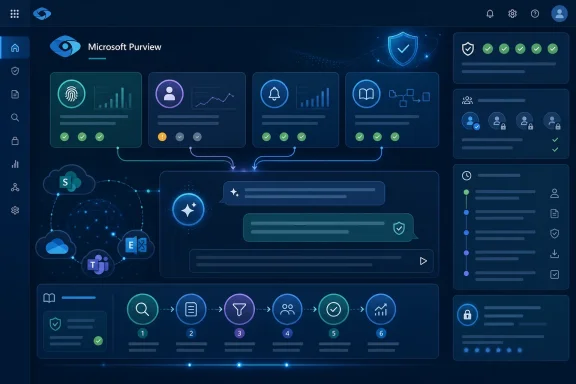
The Copilot Prompt Gallery inside Purview DSPM is not just another convenience panel for people who dislike blank chat boxes. It is Microsoft’s attempt to standardize how administrators and security teams interrogate sensitive-data exposure, risky users, suspicious behavior, alerts, policies, and the broader sprawl of files and interactions that now define a Microsoft 365 tenant.
That matters because DSPM is inherently messy. A tenant’s risk picture is stitched together from SharePoint, OneDrive, Teams, Exchange, labels, classifiers, DLP events, Insider Risk Management signals, and increasingly Copilot interactions themselves. The promise of Security Copilot in this context is that an analyst can ask for the shape of the problem in natural language rather than manually pivoting through multiple Purview blades.
But the gallery is also a subtle admission. Generative AI does not automatically make security work easier if every administrator has to become a prompt engineer first. By curating prompts and promptbooks, Microsoft is saying the interface of the future still needs guardrails, defaults, examples, and repeatable workflows.
The result is a feature that sounds small but fits a much larger Microsoft strategy. Copilot is being embedded not only where employees write documents and summarize meetings, but also where IT decides whether that same AI-assisted workplace is leaking sensitive data.
A prompt gallery solves a very practical problem: it gives administrators a menu of known-good starting points. Instead of asking a vague question like “Is our data safe?”, an analyst can begin with a prompt aimed at sensitive data movement, user activity, unusual behavior, or policy gaps. That is not glamorous, but operational security is rarely glamorous.
Promptbooks go a step further by chaining multiple prompts into an investigation sequence. Microsoft’s own documentation describes risky-user and sensitive-data-protection promptbooks as six-step flows, turning the Copilot experience into something closer to a playbook than a chatbot. In a SOC or compliance team, that distinction matters.
A playbook can be trained, repeated, reviewed, and improved. A one-off prompt typed by a harried administrator at 4:45 p.m. on a Friday is harder to audit as a process, even if the resulting answer is technically correct.
Security Copilot gives Microsoft a way to make that posture visible in a more conversational form. The Prompt Gallery is the thin edge of that wedge. It turns Purview’s underlying telemetry into questions an administrator might plausibly ask during an investigation.
The built-in categories tell the story. Alerts and policies are the formal control plane. Data at risk is the inventory problem. Potentially risky users and suspicious activity are the behavioral layer. Sensitive data is the crown-jewel layer that gives the whole exercise its urgency.
The important point is that Microsoft is not positioning this as a general-purpose assistant dropped into a compliance portal. It is curating the prompts around the workflows Purview already wants customers to perform: find risk, investigate it, apply controls, and iterate.
The more reliable signal is the June 25, 2026 update timestamp. Microsoft is still actively maintaining the entry, which means this is not an abandoned roadmap stub. It sits within a broader stream of Purview and Security Copilot work aimed at making AI security governance feel native to Microsoft 365 administration rather than bolted on afterward.
For customers, the practical takeaway is simple: treat the feature as available in the relevant cloud instance, but verify tenant visibility, licensing, permissions, and portal experience before building internal procedures around it. Microsoft’s cloud rollouts rarely land identically for every tenant on the same day, and Purview features often depend on configuration work that has nothing to do with the roadmap toggle.
The more interesting issue is not whether the gallery appears in the left nav this week. It is whether organizations are ready to turn AI-assisted investigation into a governed process rather than another ad hoc admin habit.
That is not necessarily bad. Most organizations would benefit from more consistent first-line investigation patterns. If a junior analyst can start with a vetted promptbook that asks about sensitive data activities, exfiltration paths, anomalies, alerts, and prevention options, the organization gets a more disciplined investigation than it would from improvised portal clicking.
But curated prompts also create a danger of false completeness. If the gallery does not include a prompt for a particular risk pattern, some users may assume the risk is less important. If a prompt returns a clean-looking summary, some teams may stop before validating the underlying evidence.
The gallery should therefore be treated as a starting point, not an authority. It can accelerate the first 20 minutes of an investigation, but it cannot replace the security team’s responsibility to define what “risky” means in its own business context.
That is a feature, not a flaw, but it may feel uncomfortable. DSPM is most valuable when it makes oversharing visible and actionable. Security Copilot can summarize and sequence that work, but it does not magically clean up access models, decide classification policy, or resolve political fights over who owns a repository.
This is where administrators should resist the temptation to read “Copilot” as “automation.” The current value is guided investigation and faster comprehension. Remediation still needs approval chains, risk appetite, testing, exception handling, and change management.
In other words, the Prompt Gallery can help teams ask better questions. It does not absolve them from building better answers.
That is why promptbooks matter. A six-prompt sequence for investigating a risky user is not as magical as a chatbot that claims to infer everything from a sentence. It is more useful because it decomposes the investigation into steps that map to how security teams already work.
The same logic applies to sensitive data protection. Asking where a particular label, classifier, or sensitive information type appears is only the beginning. The useful workflow continues into activity review, external transfer analysis, top-user identification, alert correlation, and suggested prevention controls.
That progression is what turns Copilot from a novelty into an assistant. It also makes the output easier to challenge, because each step has a purpose and a scope.
That changes the skills profile for administrators. The best operators will not be the ones who merely know how to type prompts. They will be the ones who understand the underlying systems well enough to spot when an AI-generated summary is incomplete, overconfident, or scoped too narrowly.
This is especially important in compliance. A bad security summary can waste time; a bad compliance conclusion can create legal and regulatory exposure. If a Copilot answer says no risky activity was found, the next question should be what data sources, time window, permissions, and policies shaped that answer.
The Prompt Gallery can make those interactions more consistent, but it cannot make them risk-free. Administrators should treat Copilot outputs as investigative leads, not final determinations.
Purview is Microsoft’s preferred answer. It is where sensitivity labels, DLP, Insider Risk Management, audit, eDiscovery, and AI governance increasingly converge. DSPM gives that convergence a posture-management vocabulary, while Security Copilot gives it a conversational interface.
The Prompt Gallery fits neatly into that positioning. It says: do not just deploy AI and hope; use AI to inspect the conditions under which AI operates. That is a compelling loop, especially for organizations trying to justify Copilot adoption to skeptical security teams.
The risk is that this loop becomes too Microsoft-centric for some environments. Many enterprises have data across SaaS platforms, unmanaged endpoints, third-party AI tools, and legacy repositories. Purview’s view is powerful inside the Microsoft estate, but it is not a complete map of every place sensitive data can travel.
Microsoft’s security stack has also become increasingly layered. E5 licensing, add-ons, consumption models, and embedded Copilot experiences can make planning more complicated than the feature description suggests. IT leaders should verify the commercial model before promising that every compliance analyst will suddenly have AI-guided investigations.
Permissions are just as important. A prompt that investigates sensitive user activity is only appropriate in the hands of people with a legitimate role. If organizations make Copilot-powered investigation too broadly available, they risk creating a new internal visibility problem while trying to solve an old data exposure problem.
The right deployment model is probably conservative at first. Start with a small group of Purview and security administrators, define approved use cases, review outputs, and expand only after the team understands both the benefits and the failure modes.
A promptbook can surface that a user handled sensitive files, shared externally, uploaded to cloud services, or triggered alerts. The hard part is deciding whether that pattern reflects normal business activity, negligence, compromised credentials, malicious intent, or a broken policy design. AI can summarize context, but judgment remains a human job.
This is especially true for insider risk. User activity data can be sensitive in its own right, and investigations can affect employment, legal exposure, and workplace trust. Organizations need clear procedures for who can run these prompts, when they can run them, and how results are documented.
Security teams should also test prompt behavior before relying on it. Run known scenarios, compare Copilot summaries with raw Purview evidence, and look for blind spots. The point is not to distrust the system reflexively, but to calibrate trust before a real incident forces the issue.
Custom prompts still have a place. Every organization has unique data types, business processes, and threat models. But custom prompts should eventually become shared promptbooks or documented procedures, not tribal knowledge passed around in chat.
This is where administrators can turn Microsoft’s feature into an internal governance practice. Track which prompts produce useful answers. Retire prompts that create noise. Add required inputs for time windows and user identifiers. Standardize the expected output format for escalation.
The goal is not to make everyone write perfect prose. It is to make AI-assisted security work repeatable enough that the organization can improve it over time.
Microsoft is already moving in that direction across its security products. The company’s larger pitch is that AI can help defenders process more signals, move faster, and reduce repetitive work. In Purview, that pitch becomes especially potent because the signals are not just malware alerts or device events; they are the organization’s own sensitive information flows.
That makes the stakes higher. An overzealous remediation could disrupt legitimate collaboration. An under-scoped investigation could miss a leak. A poorly governed AI assistant could expose sensitive context to administrators who should not see it.
The Prompt Gallery is therefore best understood as an early control surface for AI-mediated compliance operations. It is not the destination; it is the training wheels.
 Microsoft Turns Prompting Into a Compliance Workflow
The Copilot Prompt Gallery inside Purview DSPM is not just another convenience panel for people who dislike blank chat boxes. It is Microsoft’s attempt to standardize how administrators and security teams interrogate sensitive-data exposure, risky users, suspicious behavior, alerts, policies, and the broader sprawl of files and interactions that now define a Microsoft 365 tenant.That matters because DSPM is inherently messy. A tenant’s risk picture is stitched together from SharePoint, OneDrive, Teams, Exchange, labels, classifiers, DLP events, Insider Risk Management signals, and increasingly Copilot interactions themselves. The promise of Security Copilot in this context is that an analyst can ask for the shape of the problem in natural language rather than manually pivoting through multiple Purview blades.
But the gallery is also a subtle admission. Generative AI does not automatically make security work easier if every administrator has to become a prompt engineer first. By curating prompts and promptbooks, Microsoft is saying the interface of the future still needs guardrails, defaults, examples, and repeatable workflows.
The result is a feature that sounds small but fits a much larger Microsoft strategy. Copilot is being embedded not only where employees write documents and summarize meetings, but also where IT decides whether that same AI-assisted workplace is leaking sensitive data.
The Blank Chat Box Was the Wrong Starting Point
The early romance of enterprise AI was the universal prompt: type anything, get an answer, move faster. In security and compliance, that model runs into a wall almost immediately. The value of a response depends on whether the question names the right user, scopes the right time period, invokes the right data source, and asks for evidence in a form that can support action.A prompt gallery solves a very practical problem: it gives administrators a menu of known-good starting points. Instead of asking a vague question like “Is our data safe?”, an analyst can begin with a prompt aimed at sensitive data movement, user activity, unusual behavior, or policy gaps. That is not glamorous, but operational security is rarely glamorous.
Promptbooks go a step further by chaining multiple prompts into an investigation sequence. Microsoft’s own documentation describes risky-user and sensitive-data-protection promptbooks as six-step flows, turning the Copilot experience into something closer to a playbook than a chatbot. In a SOC or compliance team, that distinction matters.
A playbook can be trained, repeated, reviewed, and improved. A one-off prompt typed by a harried administrator at 4:45 p.m. on a Friday is harder to audit as a process, even if the resulting answer is technically correct.
Purview’s AI Ambition Is Bigger Than Search
Purview has long been Microsoft’s answer to the unglamorous but unavoidable problem of knowing where sensitive data lives and what people are doing with it. DSPM sharpens that idea around posture: not just classifying data after the fact, but continuously identifying exposure, oversharing, suspicious movement, and policy weakness.Security Copilot gives Microsoft a way to make that posture visible in a more conversational form. The Prompt Gallery is the thin edge of that wedge. It turns Purview’s underlying telemetry into questions an administrator might plausibly ask during an investigation.
The built-in categories tell the story. Alerts and policies are the formal control plane. Data at risk is the inventory problem. Potentially risky users and suspicious activity are the behavioral layer. Sensitive data is the crown-jewel layer that gives the whole exercise its urgency.
The important point is that Microsoft is not positioning this as a general-purpose assistant dropped into a compliance portal. It is curating the prompts around the workflows Purview already wants customers to perform: find risk, investigate it, apply controls, and iterate.
The Roadmap Dates Tell Their Own Microsoft Story
The roadmap entry says the feature is launched, with general availability in August 2025 and preview availability in October 2025. That ordering is odd, and it may reflect a roadmap metadata quirk, a phased documentation update, or a distinction between preview and GA rings that is not obvious from the public listing. Either way, it is a reminder that Microsoft 365 roadmap entries are directional signals, not engineering depositions.The more reliable signal is the June 25, 2026 update timestamp. Microsoft is still actively maintaining the entry, which means this is not an abandoned roadmap stub. It sits within a broader stream of Purview and Security Copilot work aimed at making AI security governance feel native to Microsoft 365 administration rather than bolted on afterward.
For customers, the practical takeaway is simple: treat the feature as available in the relevant cloud instance, but verify tenant visibility, licensing, permissions, and portal experience before building internal procedures around it. Microsoft’s cloud rollouts rarely land identically for every tenant on the same day, and Purview features often depend on configuration work that has nothing to do with the roadmap toggle.
The more interesting issue is not whether the gallery appears in the left nav this week. It is whether organizations are ready to turn AI-assisted investigation into a governed process rather than another ad hoc admin habit.
Curated Prompts Are Governance by Another Name
A prompt gallery can look like a productivity feature, but in compliance software it is also a governance artifact. The prompts Microsoft chooses to surface influence what administrators investigate, how they describe risk, and which remediation paths feel natural. Interface design becomes policy design by proxy.That is not necessarily bad. Most organizations would benefit from more consistent first-line investigation patterns. If a junior analyst can start with a vetted promptbook that asks about sensitive data activities, exfiltration paths, anomalies, alerts, and prevention options, the organization gets a more disciplined investigation than it would from improvised portal clicking.
But curated prompts also create a danger of false completeness. If the gallery does not include a prompt for a particular risk pattern, some users may assume the risk is less important. If a prompt returns a clean-looking summary, some teams may stop before validating the underlying evidence.
The gallery should therefore be treated as a starting point, not an authority. It can accelerate the first 20 minutes of an investigation, but it cannot replace the security team’s responsibility to define what “risky” means in its own business context.
The Real Dependency Is Still Data Hygiene
Microsoft’s AI security story often runs into the same hard truth: Copilot can only reason over the controls, labels, permissions, and signals that exist. If SharePoint permissions are a decade-old archaeological dig, sensitivity labels are inconsistently applied, and DLP policies are in “we’ll get to it next quarter” mode, a prompt gallery will expose the mess faster than it fixes it.That is a feature, not a flaw, but it may feel uncomfortable. DSPM is most valuable when it makes oversharing visible and actionable. Security Copilot can summarize and sequence that work, but it does not magically clean up access models, decide classification policy, or resolve political fights over who owns a repository.
This is where administrators should resist the temptation to read “Copilot” as “automation.” The current value is guided investigation and faster comprehension. Remediation still needs approval chains, risk appetite, testing, exception handling, and change management.
In other words, the Prompt Gallery can help teams ask better questions. It does not absolve them from building better answers.
Security Copilot Becomes More Useful When It Becomes Less Open-Ended
There is a paradox at the center of Microsoft’s security AI push. The most powerful marketing image is open-ended natural language: ask anything, find anything, solve anything. The most useful enterprise implementation is often the opposite: constrain the interaction until it becomes repeatable.That is why promptbooks matter. A six-prompt sequence for investigating a risky user is not as magical as a chatbot that claims to infer everything from a sentence. It is more useful because it decomposes the investigation into steps that map to how security teams already work.
The same logic applies to sensitive data protection. Asking where a particular label, classifier, or sensitive information type appears is only the beginning. The useful workflow continues into activity review, external transfer analysis, top-user identification, alert correlation, and suggested prevention controls.
That progression is what turns Copilot from a novelty into an assistant. It also makes the output easier to challenge, because each step has a purpose and a scope.
The Admin Experience Is Becoming a Conversation With Consequences
For WindowsForum readers who live in the Microsoft ecosystem, the Purview Prompt Gallery is another example of a broader shift in administration. The GUI is not going away, PowerShell is not going away, and KQL is not going away. But natural-language operations are becoming a first-class layer over the stack.That changes the skills profile for administrators. The best operators will not be the ones who merely know how to type prompts. They will be the ones who understand the underlying systems well enough to spot when an AI-generated summary is incomplete, overconfident, or scoped too narrowly.
This is especially important in compliance. A bad security summary can waste time; a bad compliance conclusion can create legal and regulatory exposure. If a Copilot answer says no risky activity was found, the next question should be what data sources, time window, permissions, and policies shaped that answer.
The Prompt Gallery can make those interactions more consistent, but it cannot make them risk-free. Administrators should treat Copilot outputs as investigative leads, not final determinations.
Microsoft Is Making Purview the Control Plane for AI Anxiety
The timing of this feature is not accidental. As Microsoft 365 Copilot, Copilot Chat, Security Copilot, Copilot Studio, and agentic workflows spread through enterprise tenants, customers are asking a blunt question: what happens when AI can find, summarize, and act on data that humans forgot they had exposed?Purview is Microsoft’s preferred answer. It is where sensitivity labels, DLP, Insider Risk Management, audit, eDiscovery, and AI governance increasingly converge. DSPM gives that convergence a posture-management vocabulary, while Security Copilot gives it a conversational interface.
The Prompt Gallery fits neatly into that positioning. It says: do not just deploy AI and hope; use AI to inspect the conditions under which AI operates. That is a compelling loop, especially for organizations trying to justify Copilot adoption to skeptical security teams.
The risk is that this loop becomes too Microsoft-centric for some environments. Many enterprises have data across SaaS platforms, unmanaged endpoints, third-party AI tools, and legacy repositories. Purview’s view is powerful inside the Microsoft estate, but it is not a complete map of every place sensitive data can travel.
Licensing and Permissions Will Decide Who Actually Benefits
Features like this often look universally helpful in roadmap language and become more selective in practice. Security Copilot access, Purview capabilities, role assignments, DSPM configuration, and tenant readiness all determine whether the Prompt Gallery is an everyday tool or an interesting screenshot.Microsoft’s security stack has also become increasingly layered. E5 licensing, add-ons, consumption models, and embedded Copilot experiences can make planning more complicated than the feature description suggests. IT leaders should verify the commercial model before promising that every compliance analyst will suddenly have AI-guided investigations.
Permissions are just as important. A prompt that investigates sensitive user activity is only appropriate in the hands of people with a legitimate role. If organizations make Copilot-powered investigation too broadly available, they risk creating a new internal visibility problem while trying to solve an old data exposure problem.
The right deployment model is probably conservative at first. Start with a small group of Purview and security administrators, define approved use cases, review outputs, and expand only after the team understands both the benefits and the failure modes.
The Gallery Makes the Human Review More Important, Not Less
There is a seductive interpretation of the Prompt Gallery: Microsoft has packaged the right questions, so the analyst just has to click. That is the wrong lesson. The better lesson is that Microsoft has packaged the first questions, so analysts can spend more time on interpretation and action.A promptbook can surface that a user handled sensitive files, shared externally, uploaded to cloud services, or triggered alerts. The hard part is deciding whether that pattern reflects normal business activity, negligence, compromised credentials, malicious intent, or a broken policy design. AI can summarize context, but judgment remains a human job.
This is especially true for insider risk. User activity data can be sensitive in its own right, and investigations can affect employment, legal exposure, and workplace trust. Organizations need clear procedures for who can run these prompts, when they can run them, and how results are documented.
Security teams should also test prompt behavior before relying on it. Run known scenarios, compare Copilot summaries with raw Purview evidence, and look for blind spots. The point is not to distrust the system reflexively, but to calibrate trust before a real incident forces the issue.
The Most Useful Prompt Is the One Your Team Can Defend Later
One underrated benefit of curated prompts is defensibility. If an investigation follows a standard promptbook, the team can explain its process more clearly after the fact. That matters when an incident review, audit, or executive briefing asks why certain conclusions were reached.Custom prompts still have a place. Every organization has unique data types, business processes, and threat models. But custom prompts should eventually become shared promptbooks or documented procedures, not tribal knowledge passed around in chat.
This is where administrators can turn Microsoft’s feature into an internal governance practice. Track which prompts produce useful answers. Retire prompts that create noise. Add required inputs for time windows and user identifiers. Standardize the expected output format for escalation.
The goal is not to make everyone write perfect prose. It is to make AI-assisted security work repeatable enough that the organization can improve it over time.
A Small Gallery Points to a Larger Control Surface
The DSPM Copilot Prompt Gallery is a narrow feature in one Microsoft portal, but it points toward a future in which administrative consoles become collections of guided AI actions. Today, the prompt investigates risk. Tomorrow, it may draft the DLP policy, propose access changes, prepare user notifications, and queue remediation steps for approval.Microsoft is already moving in that direction across its security products. The company’s larger pitch is that AI can help defenders process more signals, move faster, and reduce repetitive work. In Purview, that pitch becomes especially potent because the signals are not just malware alerts or device events; they are the organization’s own sensitive information flows.
That makes the stakes higher. An overzealous remediation could disrupt legitimate collaboration. An under-scoped investigation could miss a leak. A poorly governed AI assistant could expose sensitive context to administrators who should not see it.
The Prompt Gallery is therefore best understood as an early control surface for AI-mediated compliance operations. It is not the destination; it is the training wheels.
The Practical Test for Purview Teams Starts Now
The launch gives Microsoft 365 administrators a useful new tool, but the value will depend on how deliberately it is introduced. A prompt gallery can reduce friction, but only a prepared team can turn that convenience into better security outcomes.- Organizations should confirm that DSPM, Security Copilot, required Purview roles, and relevant data sources are configured before treating the gallery as operationally available.
- Administrators should use Microsoft’s built-in prompts and promptbooks as baseline workflows, then adapt them to internal data classifications, business units, and escalation paths.
- Security teams should validate Copilot responses against raw Purview evidence during pilot use, especially for sensitive investigations involving user behavior or possible exfiltration.
- Compliance leaders should define who may run risky-user and sensitive-data prompts, because AI-assisted visibility into employee activity is itself a governed capability.
- IT teams should document high-value custom prompts and convert repeatable investigation patterns into approved internal promptbooks.
- Executives should view the feature as an accelerator for data-security work, not as a substitute for permissions cleanup, labeling discipline, DLP tuning, and incident response planning.
References
- Primary source: Microsoft 365 Roadmap
Published: 2026-06-25T23:15:45.5477468Z
Microsoft 365 Roadmap | Microsoft 365
The Microsoft 365 Roadmap lists updates that are currently planned for applicable subscribers. Check here for more information on the status of new features and updates.www.microsoft.com
- Official source: learn.microsoft.com
Use Microsoft Security Copilot with Data Security Posture Management - (classic) | Microsoft Learn
Learn how to use Microsoft Security Copilot with Data Security Posture Management (classic).learn.microsoft.com - Official source: techcommunity.microsoft.com
Microsoft Purview – Data Security Posture Management (DSPM) for AI | Microsoft Community Hub
Introduction to DSPM for AI In an age where Artificial Intelligence (AI) is rapidly transforming industries, ensuring the security and compliance of AI... techcommunity.microsoft.com
- Official source: adoption.microsoft.com
Microsoft Security Copilot – Microsoft Adoption
 adoption.microsoft.com
- Official source: cdn-dynmedia-1.microsoft.com
- Official source: download.microsoft.com
Security Copilot – Purchase guidance
</rdf:Alt> </dc:description> <dc:creator> <rdf:Seq> <rdf:li>Joey Caparasdownload.microsoft.com
- Official source: cdn-dynmedia-1htbprolmicrosofthtbprolcom-s.evpn.library.nenu.edu.cn
