

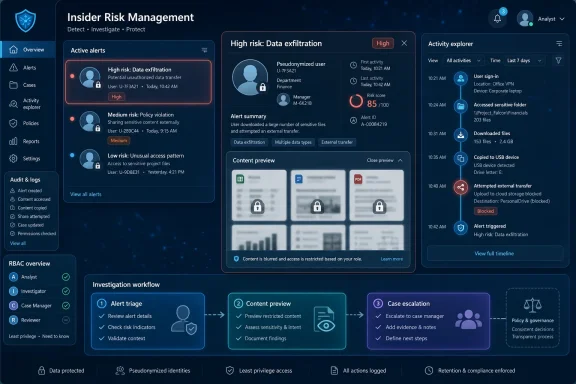
Microsoft began rolling out Roadmap ID 557189 on July 7, 2026, adding content preview inside Microsoft Purview Insider Risk Management alerts so authorized investigators can inspect relevant files from Activity explorer before creating a formal case. The change sounds small because it is expressed as a workflow convenience. In practice, it moves one of the most sensitive moments in an insider-risk investigation—the first look at what a user touched—earlier in the process. That is why this feature matters: Microsoft is trying to make Purview faster without pretending that looking at employee content is an ordinary security-console action.
The new capability, listed in the Microsoft 365 Roadmap as rolling out to general availability in July 2026, lets users with appropriate permissions preview relevant files directly within an Insider Risk Management alert. Microsoft says the preview happens from Activity explorer, the investigation surface inside Purview that shows the timeline and details of potentially risky activity. The feature was available in preview beginning in April 2026 and is now listed for worldwide standard tenants, GCC, GCC High, and DoD clouds.
That detail matters because Microsoft is not limiting this to a niche commercial preview. By bringing it to government clouds as well as standard multi-tenant Microsoft 365, the company is treating pre-case content preview as a mainstream compliance workflow. For regulated organizations that already use Purview as the compliance front door, this is a notable expansion of what can happen before an alert becomes a case.
Microsoft’s own Learn documentation describes the feature as Content preview in Activity explorer. According to Microsoft, investigators can use it to validate whether an activity contains sensitive data, represents a false positive, or warrants escalation into a full investigation. In other words, the preview is not designed as a replacement for cases; it is designed to reduce the number of cases that never should have existed.
The distinction is important. Insider Risk Management has always sat in an uncomfortable space between security operations, HR sensitivity, legal defensibility, and employee privacy. A faster triage tool is valuable only if it does not quietly become a broader license to browse employee files under the banner of risk reduction.
The new preview capability shifts some of that judgment into the alert stage. Instead of creating a case simply to find out whether the suspicious file is a trade-secret spreadsheet or a harmless lunch menu, an investigator can preview supported content from the alert’s Activity explorer view. That should reduce unnecessary case creation and speed up the dismissal of false positives.
Microsoft’s documentation is explicit that the feature is intended for supported activities involving access to or transmission of content. The examples Microsoft gives include SharePoint file access and downloads, OneDrive for Business file access and downloads, and Exchange events such as sent email hygiene events and data loss prevention rule matches. That scope tells us what Microsoft is optimizing for: the moment when the signal says “this content movement may matter,” but the investigator still needs to know whether the content itself is meaningful.
The operational gain is obvious. In a busy compliance queue, not every alert deserves the paperwork, access expansion, and retention implications of a case. A preview pane can turn a 20-minute escalation into a two-minute triage decision. But it also means organizations need to treat alert access with more seriousness than they may have in the past.
The preview feature tests that scaffolding. If an analyst can see content before a case exists, then the organization must be very clear about who qualifies as an analyst, who qualifies as an investigator, and which role is allowed to view what. Microsoft’s permissions documentation separates Insider Risk Management Admins, Analysts, Investigators, Auditors, and Approvers, with different rights for alert review, case investigation, Content explorer access, forensic evidence capture, and audit-log review.
That separation is not bureaucracy for its own sake. It is the difference between a compliance program that can withstand legal scrutiny and one that depends on everyone “being careful.” Least privilege becomes more important when the UI removes a step.
The same is true for administrative units and scoped permissions. Microsoft’s documentation notes that organizations can scope insider-risk access by region or department, such as limiting certain administrators to users in Germany. That matters in multinational companies where works councils, privacy regulators, and local labor laws may treat employee monitoring very differently from one jurisdiction to another.
That convergence is logical. Data theft, risky sharing, and policy violations do not care whether the organization chart puts them under security, compliance, legal, or HR. A user downloading a batch of sensitive SharePoint files before resigning is a security event, a compliance concern, and potentially an employment matter at the same time.
But convergence also raises the stakes. Security operations centers are built for speed, volume, and decisive containment. Compliance investigations are built for context, proportionality, and defensibility. Insider risk sits awkwardly between those cultures, and Microsoft is effectively asking customers to let the same ecosystem serve both.
The preview-in-alerts feature is a perfect example of that tension. From a SOC perspective, it is overdue common sense: why open a case when the alert itself can show whether the file is sensitive? From a privacy and compliance perspective, the question is more delicate: if content can be previewed before a case, what now counts as the formal start of an investigation?
The feature is useful when the content itself is the evidence. If a user accessed or downloaded a sensitive file from SharePoint or OneDrive, the investigator may need to see whether that file contains customer records, source code, financial forecasts, or something mundane. If an Exchange event involves DLP, the message content may determine whether the alert is serious or a false positive.
By contrast, when a user changes permissions, deletes a file, copies something to USB, or triggers a browser-related signal, the activity may matter even if the preview pane cannot reconstruct a meaningful content view. Those events often require a broader case narrative: device context, user intent, timing, policy history, and correlation with other signals.
That boundary should comfort some administrators. Microsoft is not simply handing investigators a universal content viewer from every alert. But it should also remind teams that preview is a triage shortcut, not a substitute for investigation discipline.
Content preview attacks the false-positive problem directly. If an alert says a file was downloaded, the investigator often needs to know whether the file is actually sensitive. Metadata alone can mislead; filenames are inconsistent, labels are imperfect, and users often store harmless and highly sensitive material in the same locations.
Purview already benefits from Microsoft 365’s proximity to the data plane. It can correlate signals from SharePoint, OneDrive, Exchange, endpoint activity, DLP, and other Microsoft services. The new preview capability makes that proximity visible at the point of decision, turning the alert from a pointer into a more complete evidence package.
That may make Insider Risk Management more usable for organizations that previously struggled with alert queues. A triage analyst who can quickly dismiss benign content movement is less likely to escalate everything “just in case.” A compliance manager who can show that previews were limited, audited, and permissioned may have a stronger argument that the program is proportionate.
The danger is that speed becomes its own justification. The goal should not be to preview more employee content because the tool makes it easy. The goal should be to preview less content overall by making each preview more targeted and more useful.
Many Microsoft 365 tenants accumulate role assignments over time. A user gets added to a compliance role during an incident, a consultant receives temporary access that lingers, a global admin performs Purview tasks because nobody has carved out the right delegated model. That pattern is risky in any security tool, but it is especially risky in insider-risk workflows because the content may include employee communications, unreleased product plans, financial data, legal material, or HR records.
Microsoft recommends least privilege across Purview roles, and this feature makes that advice less optional. The people who configure policies do not necessarily need to preview content. The people who audit the program do not necessarily need to investigate alerts. The people who triage alerts may not need the same powers as investigators who handle confirmed cases.
There is also a training problem. A preview pane can make a sensitive action feel casual. Organizations should define when preview is appropriate, what reviewers should record, how false positives should be dismissed, and when an alert must become a case. If those norms are left implicit, the audit log will show what happened, but it may not show why.
For public-sector and defense organizations, the ability to preview content before case creation may reduce workload in high-volume environments. It can help distinguish between routine data movement and activity that merits deeper review. In agencies and contractors where sensitive files are common, that distinction can save time.
But it also creates policy questions that should be answered before deployment. Does previewing content count as investigative access under internal rules? Does it trigger notification, logging review, or supervisory approval? Are union, classified, export-controlled, or law-enforcement-sensitive materials handled differently?
Microsoft can provide role controls and logs. It cannot write the governance policy for every tenant. That is the customer’s job, and this feature makes delay harder to defend.
Pseudonymization helps reduce casual exposure of user identity, but insider-risk investigations eventually involve people. Role-based access control limits who can see what, but only if the roles are curated. Audit logs preserve accountability, but only if somebody reviews them and knows what inappropriate access would look like.
That is why the preview capability should be paired with a governance refresh. Organizations should document the difference between alert triage and case investigation. They should decide whether preview access belongs to analysts, investigators, or a smaller subset of reviewers. They should test whether scoped administrative units behave as expected in regions with stricter privacy obligations.
The strongest version of this feature is not “more people can see content earlier.” It is fewer cases are created, fewer employees are unnecessarily investigated, and the right reviewers can make better decisions with less exposure. That is the privacy argument Microsoft needs customers to operationalize.
The preparation work is straightforward but not trivial. Security, compliance, legal, and HR stakeholders should agree on how preview will be used. Administrators should verify role-group membership, especially for Insider Risk Management Analysts and Investigators. Audit teams should know how to review preview-related activity.
This is also a good moment to review insider-risk policies themselves. If policies are too broad, preview will merely make noisy alerts easier to inspect. If policies are well tuned, preview can become a genuinely useful triage accelerator.
The organizations that benefit most will be the ones that treat this as a workflow redesign. The ones that struggle will be the ones that treat it as another Microsoft 365 feature that “just showed up.”
 Microsoft Moves the First Look Upstream
The new capability, listed in the Microsoft 365 Roadmap as rolling out to general availability in July 2026, lets users with appropriate permissions preview relevant files directly within an Insider Risk Management alert. Microsoft says the preview happens from Activity explorer, the investigation surface inside Purview that shows the timeline and details of potentially risky activity. The feature was available in preview beginning in April 2026 and is now listed for worldwide standard tenants, GCC, GCC High, and DoD clouds.That detail matters because Microsoft is not limiting this to a niche commercial preview. By bringing it to government clouds as well as standard multi-tenant Microsoft 365, the company is treating pre-case content preview as a mainstream compliance workflow. For regulated organizations that already use Purview as the compliance front door, this is a notable expansion of what can happen before an alert becomes a case.
Microsoft’s own Learn documentation describes the feature as Content preview in Activity explorer. According to Microsoft, investigators can use it to validate whether an activity contains sensitive data, represents a false positive, or warrants escalation into a full investigation. In other words, the preview is not designed as a replacement for cases; it is designed to reduce the number of cases that never should have existed.
The distinction is important. Insider Risk Management has always sat in an uncomfortable space between security operations, HR sensitivity, legal defensibility, and employee privacy. A faster triage tool is valuable only if it does not quietly become a broader license to browse employee files under the banner of risk reduction.
The Case Was the Gate, and Now the Alert Becomes One Too
Before this change, the more formal case workflow acted as a practical boundary. If an alert looked serious enough, an analyst could confirm it and create an insider risk case, where investigators could use tools such as Content explorer to review the underlying files and messages. That created friction, but friction can be useful when the workflow involves personal or sensitive business content.The new preview capability shifts some of that judgment into the alert stage. Instead of creating a case simply to find out whether the suspicious file is a trade-secret spreadsheet or a harmless lunch menu, an investigator can preview supported content from the alert’s Activity explorer view. That should reduce unnecessary case creation and speed up the dismissal of false positives.
Microsoft’s documentation is explicit that the feature is intended for supported activities involving access to or transmission of content. The examples Microsoft gives include SharePoint file access and downloads, OneDrive for Business file access and downloads, and Exchange events such as sent email hygiene events and data loss prevention rule matches. That scope tells us what Microsoft is optimizing for: the moment when the signal says “this content movement may matter,” but the investigator still needs to know whether the content itself is meaningful.
The operational gain is obvious. In a busy compliance queue, not every alert deserves the paperwork, access expansion, and retention implications of a case. A preview pane can turn a 20-minute escalation into a two-minute triage decision. But it also means organizations need to treat alert access with more seriousness than they may have in the past.
A Faster Triage Loop Is Also a Bigger Governance Bet
Microsoft’s pitch for Purview Insider Risk Management remains anchored in “privacy by design.” The company emphasizes that users are pseudonymized by default, that role-based access controls are in place, and that audit logs help protect user-level privacy. Those are not decorative claims. They are the governance scaffolding that makes an insider-risk product usable in large organizations without turning every investigation into an internal surveillance scandal.The preview feature tests that scaffolding. If an analyst can see content before a case exists, then the organization must be very clear about who qualifies as an analyst, who qualifies as an investigator, and which role is allowed to view what. Microsoft’s permissions documentation separates Insider Risk Management Admins, Analysts, Investigators, Auditors, and Approvers, with different rights for alert review, case investigation, Content explorer access, forensic evidence capture, and audit-log review.
That separation is not bureaucracy for its own sake. It is the difference between a compliance program that can withstand legal scrutiny and one that depends on everyone “being careful.” Least privilege becomes more important when the UI removes a step.
The same is true for administrative units and scoped permissions. Microsoft’s documentation notes that organizations can scope insider-risk access by region or department, such as limiting certain administrators to users in Germany. That matters in multinational companies where works councils, privacy regulators, and local labor laws may treat employee monitoring very differently from one jurisdiction to another.
Microsoft Is Collapsing the Distance Between Security and Compliance
This feature also fits a broader Microsoft pattern in 2026: Purview is becoming less of a back-office compliance archive and more of an active investigation environment. Microsoft’s security blog has described a faster, more intelligent insider-risk investigation experience, including document preview panes, richer context, and Security Copilot-assisted summaries for eligible customers. Separately, Microsoft has been moving insider-risk visibility closer to Microsoft Defender XDR, where security teams already work incidents and alerts.That convergence is logical. Data theft, risky sharing, and policy violations do not care whether the organization chart puts them under security, compliance, legal, or HR. A user downloading a batch of sensitive SharePoint files before resigning is a security event, a compliance concern, and potentially an employment matter at the same time.
But convergence also raises the stakes. Security operations centers are built for speed, volume, and decisive containment. Compliance investigations are built for context, proportionality, and defensibility. Insider risk sits awkwardly between those cultures, and Microsoft is effectively asking customers to let the same ecosystem serve both.
The preview-in-alerts feature is a perfect example of that tension. From a SOC perspective, it is overdue common sense: why open a case when the alert itself can show whether the file is sensitive? From a privacy and compliance perspective, the question is more delicate: if content can be previewed before a case, what now counts as the formal start of an investigation?
The Supported Scenarios Reveal Microsoft’s Caution
Microsoft has not made every risky activity previewable, and that restraint is revealing. According to Microsoft Learn, content preview is not supported for state changes, permission changes, deletions, signal-only events, many endpoint activities, browser or removable media events, metadata-only events, or renamed files. That is not just a technical limitation list; it is an implicit definition of where preview adds value.The feature is useful when the content itself is the evidence. If a user accessed or downloaded a sensitive file from SharePoint or OneDrive, the investigator may need to see whether that file contains customer records, source code, financial forecasts, or something mundane. If an Exchange event involves DLP, the message content may determine whether the alert is serious or a false positive.
By contrast, when a user changes permissions, deletes a file, copies something to USB, or triggers a browser-related signal, the activity may matter even if the preview pane cannot reconstruct a meaningful content view. Those events often require a broader case narrative: device context, user intent, timing, policy history, and correlation with other signals.
That boundary should comfort some administrators. Microsoft is not simply handing investigators a universal content viewer from every alert. But it should also remind teams that preview is a triage shortcut, not a substitute for investigation discipline.
False Positives Are the Enemy Microsoft Is Really Chasing
Every insider-risk program lives or dies by signal quality. Too few alerts and the system misses important behavior. Too many alerts and reviewers become numb, employees lose trust, and the program starts looking like expensive theater.Content preview attacks the false-positive problem directly. If an alert says a file was downloaded, the investigator often needs to know whether the file is actually sensitive. Metadata alone can mislead; filenames are inconsistent, labels are imperfect, and users often store harmless and highly sensitive material in the same locations.
Purview already benefits from Microsoft 365’s proximity to the data plane. It can correlate signals from SharePoint, OneDrive, Exchange, endpoint activity, DLP, and other Microsoft services. The new preview capability makes that proximity visible at the point of decision, turning the alert from a pointer into a more complete evidence package.
That may make Insider Risk Management more usable for organizations that previously struggled with alert queues. A triage analyst who can quickly dismiss benign content movement is less likely to escalate everything “just in case.” A compliance manager who can show that previews were limited, audited, and permissioned may have a stronger argument that the program is proportionate.
The danger is that speed becomes its own justification. The goal should not be to preview more employee content because the tool makes it easy. The goal should be to preview less content overall by making each preview more targeted and more useful.
The Feature Will Expose Weak Role Design
For WindowsForum readers running Microsoft 365 environments, the most practical consequence is not the button itself. It is the permission review that should happen before the button becomes normal.Many Microsoft 365 tenants accumulate role assignments over time. A user gets added to a compliance role during an incident, a consultant receives temporary access that lingers, a global admin performs Purview tasks because nobody has carved out the right delegated model. That pattern is risky in any security tool, but it is especially risky in insider-risk workflows because the content may include employee communications, unreleased product plans, financial data, legal material, or HR records.
Microsoft recommends least privilege across Purview roles, and this feature makes that advice less optional. The people who configure policies do not necessarily need to preview content. The people who audit the program do not necessarily need to investigate alerts. The people who triage alerts may not need the same powers as investigators who handle confirmed cases.
There is also a training problem. A preview pane can make a sensitive action feel casual. Organizations should define when preview is appropriate, what reviewers should record, how false positives should be dismissed, and when an alert must become a case. If those norms are left implicit, the audit log will show what happened, but it may not show why.
Government Cloud Availability Raises the Bar
The roadmap entry lists the rollout across Worldwide, GCC, GCC High, and DoD. That breadth is important because government and defense-adjacent tenants often have stricter expectations for chain of custody, access control, and procedural documentation. A feature that lands in those clouds cannot be treated merely as a convenience for commercial E5 customers.For public-sector and defense organizations, the ability to preview content before case creation may reduce workload in high-volume environments. It can help distinguish between routine data movement and activity that merits deeper review. In agencies and contractors where sensitive files are common, that distinction can save time.
But it also creates policy questions that should be answered before deployment. Does previewing content count as investigative access under internal rules? Does it trigger notification, logging review, or supervisory approval? Are union, classified, export-controlled, or law-enforcement-sensitive materials handled differently?
Microsoft can provide role controls and logs. It cannot write the governance policy for every tenant. That is the customer’s job, and this feature makes delay harder to defend.
Privacy by Design Is a Promise Customers Must Finish
Microsoft’s statement that Insider Risk Management is built with privacy by design is accurate as a product claim, but incomplete as an operational guarantee. Pseudonymization, RBAC, and audit logs are necessary controls. They are not a complete privacy program.Pseudonymization helps reduce casual exposure of user identity, but insider-risk investigations eventually involve people. Role-based access control limits who can see what, but only if the roles are curated. Audit logs preserve accountability, but only if somebody reviews them and knows what inappropriate access would look like.
That is why the preview capability should be paired with a governance refresh. Organizations should document the difference between alert triage and case investigation. They should decide whether preview access belongs to analysts, investigators, or a smaller subset of reviewers. They should test whether scoped administrative units behave as expected in regions with stricter privacy obligations.
The strongest version of this feature is not “more people can see content earlier.” It is fewer cases are created, fewer employees are unnecessarily investigated, and the right reviewers can make better decisions with less exposure. That is the privacy argument Microsoft needs customers to operationalize.
The July Rollout Turns a Preview Pane Into a Policy Test
For IT administrators, the rollout is less about learning a new screen than revisiting assumptions around Purview access. The feature is arriving as a general-availability item in July 2026 after an April preview, and the Microsoft 365 Roadmap shows it as rolling out. That means tenants should expect it to appear according to Microsoft’s normal staged deployment rhythm rather than as a single universal switch-flip.The preparation work is straightforward but not trivial. Security, compliance, legal, and HR stakeholders should agree on how preview will be used. Administrators should verify role-group membership, especially for Insider Risk Management Analysts and Investigators. Audit teams should know how to review preview-related activity.
This is also a good moment to review insider-risk policies themselves. If policies are too broad, preview will merely make noisy alerts easier to inspect. If policies are well tuned, preview can become a genuinely useful triage accelerator.
The organizations that benefit most will be the ones that treat this as a workflow redesign. The ones that struggle will be the ones that treat it as another Microsoft 365 feature that “just showed up.”
The Practical Read for Purview Tenants
The July 2026 rollout gives administrators a narrow but useful window to turn a product change into a governance improvement. The feature is not dangerous by default, but it is sensitive by nature. Treat it like an expansion of investigative capability, not a cosmetic UI enhancement.- Organizations should review Insider Risk Management role groups before relying on alert-level content preview in production.
- Investigators should use preview to validate risk and reduce false positives, not as a general-purpose content browsing tool.
- Compliance teams should decide whether previewing content before case creation changes internal investigation procedures.
- Tenants using administrative units should confirm that regional or departmental scoping works as intended for insider-risk reviewers.
- Audit owners should periodically review who previewed content, from which alerts, and whether those previews led to dismissal, escalation, or case creation.
- Security and compliance leaders should update training so analysts understand that a faster workflow still requires documented judgment.
References
- Primary source: Microsoft 365 Roadmap
Published: 2026-07-07T23:01:01.6729014Z
Microsoft 365 Roadmap | Microsoft 365
The Microsoft 365 Roadmap lists updates that are currently planned for applicable subscribers. Check here for more information on the status of new features and updates.www.microsoft.com
- Official source: learn.microsoft.com
Investigate Microsoft Purview Insider Risk Management activities | Microsoft Learn
Learn how to investigate and triage Insider Risk Management alerts in Microsoft Purview. Review risk factors, explore activities, and create cases.learn.microsoft.com - Related coverage: hazetec.com
Introducing a unified alert experience for Microsoft Purview Insider Risk Management
Microsoft is launching a unified alert experience for Purview Insider Risk Management in public preview by July 2026. The update integrates classic and agent …www.hazetec.com
- Related coverage: redmondmag.com
Microsoft Unifies Insider Risk Alerts Across Purview Insider Risk Management -- Redmondmag.com
New alert experience is designed to streamline investigations by bringing insider risk signals into a centralized security workflow.redmondmag.com - Official source: techcommunity.microsoft.com
Introducing a faster, more intelligent, end-to-end insider risk investigation experience | Microsoft Community Hub
Modern insider risk investigations succeed or fail based on how quickly teams can move from signal to clarity. That’s why the latest Microsoft Purview... techcommunity.microsoft.com
- Official source: download.microsoft.com
- Official source: cdn-dynmedia-1.microsoft.com
