

Microsoft is adding Microsoft Planner content to Purview Data Lifecycle Management, with Roadmap ID 486828 showing retention policies for Planner tasks in Microsoft 365 Group-backed plans in development for worldwide multi-tenant customers, previewed in April 2026 and generally available in July 2026. That sounds like a narrow compliance checkbox until you remember how much operational knowledge lives inside task boards. Planner has become one of those deceptively lightweight Microsoft 365 surfaces where decisions, deadlines, ownership, comments, and attachments accumulate without the governance muscle that email and SharePoint have had for years. The change is not glamorous, but it is Microsoft acknowledging that modern work records no longer sit politely in mailboxes and document libraries.
For years, Planner has occupied an odd place in the Microsoft 365 stack. It is important enough to be embedded in Teams, tied to Microsoft 365 Groups, and used for real project coordination, but light enough that many organizations have treated it as a convenience layer rather than a governed repository. That distinction has always been more cultural than technical.
A Planner task can contain the kind of information compliance officers care about: who was assigned to do something, when it was due, what comments were made, what files were attached, and whether the work was completed. In a regulated organization, that is not just “productivity metadata.” It can be evidence of a process, a decision trail, or a missed obligation.
Microsoft’s roadmap item brings Planner into the retention-policy conversation more explicitly. Compliance admins will be able to create retention policies for content located in Planner, including tasks for plans associated with a Microsoft 365 Group. That is the key phrase, because it tells us both the scope and the limit of the first implementation.
This is not Microsoft saying every Planner object everywhere is now equally governed. It is Microsoft extending Purview’s lifecycle controls into the group-backed Planner world where much of the mainstream enterprise use already happens. For admins, that makes Planner less of an exception and more of a workload that must be modeled alongside Teams, SharePoint, Exchange, OneDrive, and Microsoft 365 Groups.
That gap has widened as Microsoft 365 has become less about individual apps and more about interconnected work surfaces. A task might start in Planner, surface in Teams, link to a SharePoint file, involve a Microsoft 365 Group, and be discussed in chat. Users experience this as convenience. Administrators experience it as a retention map that keeps acquiring new edges.
The old model of compliance assumed that important records lived in obvious repositories. Email was discoverable, files were stored in controlled libraries, and formal records management could be wrapped around declared locations. Modern work broke that assumption by spreading business context across lightweight collaborative objects.
Planner is exactly the kind of workload that exposes the weakness of repository-first thinking. It is structured enough to matter, informal enough to proliferate, and connected enough that deleting it without policy can produce blind spots. Adding retention does not solve all of that, but it reduces one obvious asymmetry.
That design has practical advantages. If a department, project team, or committee already maps to a Microsoft 365 Group, retention can follow the container rather than chasing every artifact individually. That is easier to administer, easier to audit, and easier to explain to risk teams.
It also means organizations need to understand their Group hygiene before they celebrate. If Groups are sprawling, poorly named, ownerless, duplicated, or casually created for one-off purposes, retention policies aimed at Planner content inherit that mess. Governance features do not magically repair bad information architecture; they often make it more visible.
For sysadmins, the message is blunt: Planner retention is not just a Purview setting. It is another reason to clean up Group lifecycle management, ownership, naming conventions, expiration policies, and provisioning controls. A retention policy can preserve or delete content according to rules, but it cannot tell you whether your collaboration estate makes sense.
A retention policy is about keeping content for a defined period, deleting it after a defined period, or doing both in sequence. It is not a general-purpose restore button for every user mistake, nor is it a substitute for a backup product. It is a policy engine for lifecycle obligations.
That distinction matters because task systems feel operational. If a user accidentally deletes a plan or task, the helpdesk instinct is to ask how to recover it. If a compliance officer asks whether task data must be retained for seven years, the governance instinct is to ask where policy applies. Those are related concerns, but they lead to different controls.
Microsoft 365 has been steadily improving backup, archive, retention, and recovery stories in parallel, but admins should resist the urge to treat Planner retention as a universal safety net. Its first value is defensibility: proving that certain Planner content is retained or disposed of according to organizational policy. Recovery may be part of the surrounding service behavior, but it is not the headline here.
That conspicuousness matters during audits and legal discovery. It is hard to maintain a straight face while saying a project’s documents and emails are controlled, but its task history sits outside the same lifecycle framework. The more Planner is used to coordinate approvals, remediation work, onboarding, incident follow-up, or policy exceptions, the weaker that position becomes.
The feature also helps Microsoft defend Purview as the place where Microsoft 365 compliance should converge. Purview has sometimes felt like a collection of portals, renamed products, overlapping capabilities, and licensing gates. But the basic pitch remains compelling: one governance plane for data scattered across Microsoft 365.
Planner support strengthens that pitch because it reaches into a workload that many users do not think of as a compliance repository. That is precisely where lifecycle management needs to go next. The risk is not only in the obvious file share; it is in the informal tool where work actually gets coordinated.
That invisibility is both a strength and a communication challenge. Users may not understand why a task they thought was gone is still discoverable under retention, or why old Planner content disappears after a prescribed period. Admins will need to explain that business content in Microsoft 365 belongs to the organization’s lifecycle rules, even when the interface feels casual.
The deeper cultural shift is that informal does not mean unmanaged. A Planner board might look like a lightweight Kanban board, but if it contains business commitments, it belongs in the organization’s data governance model. That is a hard message for users who still treat collaboration apps as disposable scratchpads.
IT should not overcorrect by frightening users away from Planner. The better response is to publish clear guidance: what kinds of work belong in Planner, what kinds of information should not be placed in task comments, how attachments are handled, and how long task data may be retained. Governance works best when it shapes behavior before an investigation forces everyone to care.
Microsoft’s existing Planner compliance documentation has historically drawn distinctions among group-backed plans, personal or roster plans, Loop-related plans, and premium plan experiences. If those distinctions remain relevant when retention policies arrive, admins will need to avoid assuming that “Planner” means all Planner content. A retention setting that applies to group-backed plans may not satisfy a policy requirement for every task experience users can access.
That is where early testing matters. Before broad rollout, organizations should create a controlled set of plans, tasks, comments, attachments, completed tasks, deleted tasks, and group lifecycle events. Then they should observe how retention policies behave across the entire path from creation to deletion.
The worst rollout pattern would be turning on a tenant-wide policy based on the name of the workload and discovering later that the edge cases matter. Planner is simple at the surface, but Microsoft 365 containers are not. Preview exists for a reason, and compliance teams should use it like a lab rather than a press release.
This does not mean Copilot turns every task into a record. It does mean organizations need to know which repositories feed business context and how long that context should exist. Keeping everything forever is a lazy answer; deleting everything quickly is often a dangerous one.
Retention policy support gives admins another lever for balancing those pressures. Old tasks might be useful for continuity, audits, incident reconstruction, or training new employees. They might also contain stale, sensitive, or misleading information that should not linger indefinitely.
The AI era makes stale content more dangerous because it can be rediscovered at scale. A forgotten task comment that once had little visibility may become more findable through search, semantic indexing, or assistant-style interfaces. Data lifecycle management is therefore not just about storage hygiene; it is about controlling the informational diet of the modern workplace.
This matters for Planner because the product is often used by smaller teams and departments that may not have dedicated compliance engineering support. A midsize organization may rely on Planner heavily without having a mature Purview program. For those tenants, the announcement may be less “finally” and more “now we need to understand what we already created.”
Larger enterprises will have a different challenge. They may already have broad retention policies for Exchange, Teams, SharePoint, OneDrive, and Groups, but Planner introduces another workload-specific validation step. Compliance admins will need to check whether existing policy architecture extends naturally or whether Planner requires explicit targeting.
The best organizations will treat this as a governance design exercise rather than a toggle hunt. They will ask which Planner content is business-critical, which groups are in scope, how deletion should work, who can approve changes, and how policy results will be monitored. The mediocre ones will wait until a discovery request asks for task history and then discover the roadmap item too late.
Planner retention support is a small patch on that large architectural reality. It does not eliminate sprawl, and it does not make Microsoft 365 governance simple. But it does show Microsoft continuing to move compliance controls closer to where work happens.
That is the right direction. Governance that applies only to yesterday’s repositories is theater. If real work happens in tasks, chats, boards, components, and AI-assisted summaries, then lifecycle policy has to follow those objects or risk irrelevance.
The uncomfortable truth is that every new governed workload also increases the burden on IT. Admins must learn another set of behaviors, exceptions, reports, and failure modes. Microsoft can reduce that burden with better documentation and sane defaults, but it cannot erase the complexity of the platform it has built.
That inventory should start with Microsoft 365 Groups. Which Groups have plans? Which plans are active? Which owners are still present? Which boards are tied to Teams used for projects, incidents, customers, audits, or governance committees? Those questions are dull, but they are the difference between policy and hope.
The next step is policy mapping. Organizations should compare Planner content against existing retention schedules and decide whether task records follow the same period as the related Group, Team, SharePoint site, or business process. There may not be one answer across the tenant.
Finally, admins should prepare communications. Users do not need a legal seminar, but they do need to know that Planner content may be retained or deleted according to organizational rules. A short guidance page can prevent a lot of confusion later.
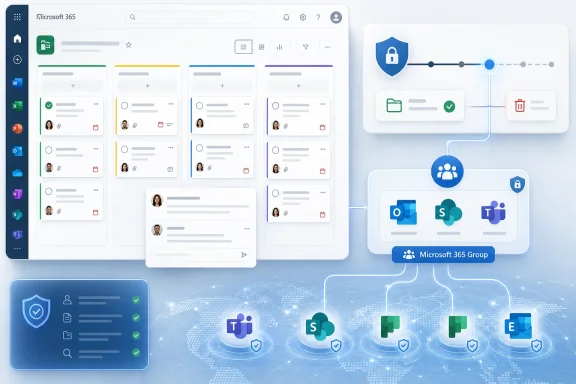 Planner Stops Being a Compliance Side Channel
For years, Planner has occupied an odd place in the Microsoft 365 stack. It is important enough to be embedded in Teams, tied to Microsoft 365 Groups, and used for real project coordination, but light enough that many organizations have treated it as a convenience layer rather than a governed repository. That distinction has always been more cultural than technical.A Planner task can contain the kind of information compliance officers care about: who was assigned to do something, when it was due, what comments were made, what files were attached, and whether the work was completed. In a regulated organization, that is not just “productivity metadata.” It can be evidence of a process, a decision trail, or a missed obligation.
Microsoft’s roadmap item brings Planner into the retention-policy conversation more explicitly. Compliance admins will be able to create retention policies for content located in Planner, including tasks for plans associated with a Microsoft 365 Group. That is the key phrase, because it tells us both the scope and the limit of the first implementation.
This is not Microsoft saying every Planner object everywhere is now equally governed. It is Microsoft extending Purview’s lifecycle controls into the group-backed Planner world where much of the mainstream enterprise use already happens. For admins, that makes Planner less of an exception and more of a workload that must be modeled alongside Teams, SharePoint, Exchange, OneDrive, and Microsoft 365 Groups.
The Roadmap Date Matters Less Than the Governance Direction
The feature is listed as in development, with preview and general availability in the 2026 release window for worldwide standard multi-tenant customers. The user-facing detail is simple: Purview Data Lifecycle Management gains retention policy support for Planner content. The strategic detail is more interesting: Microsoft is continuing to close the gap between collaboration sprawl and compliance tooling.That gap has widened as Microsoft 365 has become less about individual apps and more about interconnected work surfaces. A task might start in Planner, surface in Teams, link to a SharePoint file, involve a Microsoft 365 Group, and be discussed in chat. Users experience this as convenience. Administrators experience it as a retention map that keeps acquiring new edges.
The old model of compliance assumed that important records lived in obvious repositories. Email was discoverable, files were stored in controlled libraries, and formal records management could be wrapped around declared locations. Modern work broke that assumption by spreading business context across lightweight collaborative objects.
Planner is exactly the kind of workload that exposes the weakness of repository-first thinking. It is structured enough to matter, informal enough to proliferate, and connected enough that deleting it without policy can produce blind spots. Adding retention does not solve all of that, but it reduces one obvious asymmetry.
Microsoft 365 Groups Remain the Governance Anchor
The roadmap language focuses on tasks for plans associated with a Microsoft 365 Group, and that is not accidental. Groups are one of Microsoft’s central governance anchors: they bind together membership, mailbox, SharePoint site, Planner plan, Teams team, and other resources. When Microsoft wants to apply policy across collaborative work, Groups are often the container that makes the policy targetable.That design has practical advantages. If a department, project team, or committee already maps to a Microsoft 365 Group, retention can follow the container rather than chasing every artifact individually. That is easier to administer, easier to audit, and easier to explain to risk teams.
It also means organizations need to understand their Group hygiene before they celebrate. If Groups are sprawling, poorly named, ownerless, duplicated, or casually created for one-off purposes, retention policies aimed at Planner content inherit that mess. Governance features do not magically repair bad information architecture; they often make it more visible.
For sysadmins, the message is blunt: Planner retention is not just a Purview setting. It is another reason to clean up Group lifecycle management, ownership, naming conventions, expiration policies, and provisioning controls. A retention policy can preserve or delete content according to rules, but it cannot tell you whether your collaboration estate makes sense.
Retention Is Not Backup, and Planner Will Not Change That
One recurring problem in Microsoft 365 administration is the tendency to blur retention, backup, legal hold, eDiscovery, and records management into one mental bucket labeled “compliance.” They overlap, but they do not do the same job. Planner retention support will almost certainly be misunderstood unless administrators explain the difference early.A retention policy is about keeping content for a defined period, deleting it after a defined period, or doing both in sequence. It is not a general-purpose restore button for every user mistake, nor is it a substitute for a backup product. It is a policy engine for lifecycle obligations.
That distinction matters because task systems feel operational. If a user accidentally deletes a plan or task, the helpdesk instinct is to ask how to recover it. If a compliance officer asks whether task data must be retained for seven years, the governance instinct is to ask where policy applies. Those are related concerns, but they lead to different controls.
Microsoft 365 has been steadily improving backup, archive, retention, and recovery stories in parallel, but admins should resist the urge to treat Planner retention as a universal safety net. Its first value is defensibility: proving that certain Planner content is retained or disposed of according to organizational policy. Recovery may be part of the surrounding service behavior, but it is not the headline here.
The Real Customer Is the Compliance Admin Who Keeps Finding New Workloads
The most obvious beneficiary is the compliance admin who has had to explain why certain Microsoft 365 workloads are governed and others are not. If Teams conversations can be retained, SharePoint files can be retained, Exchange mail can be retained, and Group-connected content can be managed, Planner has looked increasingly conspicuous as task boards became more widely used.That conspicuousness matters during audits and legal discovery. It is hard to maintain a straight face while saying a project’s documents and emails are controlled, but its task history sits outside the same lifecycle framework. The more Planner is used to coordinate approvals, remediation work, onboarding, incident follow-up, or policy exceptions, the weaker that position becomes.
The feature also helps Microsoft defend Purview as the place where Microsoft 365 compliance should converge. Purview has sometimes felt like a collection of portals, renamed products, overlapping capabilities, and licensing gates. But the basic pitch remains compelling: one governance plane for data scattered across Microsoft 365.
Planner support strengthens that pitch because it reaches into a workload that many users do not think of as a compliance repository. That is precisely where lifecycle management needs to go next. The risk is not only in the obvious file share; it is in the informal tool where work actually gets coordinated.
Users May Not Notice, Which Is Part of the Point
The ideal retention policy is boring for the end user. It should not require every project manager to become a records manager, and it should not force teams to stop using Planner because compliance controls are bolted on awkwardly. If Microsoft implements this well, most users will continue creating, assigning, commenting on, and completing tasks without seeing much difference.That invisibility is both a strength and a communication challenge. Users may not understand why a task they thought was gone is still discoverable under retention, or why old Planner content disappears after a prescribed period. Admins will need to explain that business content in Microsoft 365 belongs to the organization’s lifecycle rules, even when the interface feels casual.
The deeper cultural shift is that informal does not mean unmanaged. A Planner board might look like a lightweight Kanban board, but if it contains business commitments, it belongs in the organization’s data governance model. That is a hard message for users who still treat collaboration apps as disposable scratchpads.
IT should not overcorrect by frightening users away from Planner. The better response is to publish clear guidance: what kinds of work belong in Planner, what kinds of information should not be placed in task comments, how attachments are handled, and how long task data may be retained. Governance works best when it shapes behavior before an investigation forces everyone to care.
The Limits of the First Release Will Decide the Helpdesk Pain
Microsoft’s roadmap entry is concise, and concise roadmap entries often hide the details administrators actually need. The phrase “such as tasks for plans associated with a Microsoft 365 Group” leaves open several practical questions: what exact task properties are covered, how comments are treated, how attachments are governed when they live in SharePoint, and how unsupported Planner scenarios appear in policy reporting.Microsoft’s existing Planner compliance documentation has historically drawn distinctions among group-backed plans, personal or roster plans, Loop-related plans, and premium plan experiences. If those distinctions remain relevant when retention policies arrive, admins will need to avoid assuming that “Planner” means all Planner content. A retention setting that applies to group-backed plans may not satisfy a policy requirement for every task experience users can access.
That is where early testing matters. Before broad rollout, organizations should create a controlled set of plans, tasks, comments, attachments, completed tasks, deleted tasks, and group lifecycle events. Then they should observe how retention policies behave across the entire path from creation to deletion.
The worst rollout pattern would be turning on a tenant-wide policy based on the name of the workload and discovering later that the edge cases matter. Planner is simple at the surface, but Microsoft 365 containers are not. Preview exists for a reason, and compliance teams should use it like a lab rather than a press release.
Copilot Makes Task Retention More Than Housekeeping
There is also an AI governance angle, even if Microsoft’s roadmap entry does not frame it that way. Microsoft 365 Copilot and related AI features increase the value of well-governed enterprise content because they can surface, summarize, or reason over information users previously ignored. If Planner tasks contain operational knowledge, then lifecycle rules around Planner become part of the organization’s AI risk posture.This does not mean Copilot turns every task into a record. It does mean organizations need to know which repositories feed business context and how long that context should exist. Keeping everything forever is a lazy answer; deleting everything quickly is often a dangerous one.
Retention policy support gives admins another lever for balancing those pressures. Old tasks might be useful for continuity, audits, incident reconstruction, or training new employees. They might also contain stale, sensitive, or misleading information that should not linger indefinitely.
The AI era makes stale content more dangerous because it can be rediscovered at scale. A forgotten task comment that once had little visibility may become more findable through search, semantic indexing, or assistant-style interfaces. Data lifecycle management is therefore not just about storage hygiene; it is about controlling the informational diet of the modern workplace.
Licensing and Roles Will Shape the Real Adoption Curve
As with almost every Purview capability, the practical adoption story will depend on licensing, admin roles, and the exact policy controls exposed in the portal and PowerShell. Microsoft’s compliance stack is powerful, but it is also famous for sending admins into a licensing maze. A feature can be technically available and still be operationally out of reach for organizations that lack the right SKU or role assignments.This matters for Planner because the product is often used by smaller teams and departments that may not have dedicated compliance engineering support. A midsize organization may rely on Planner heavily without having a mature Purview program. For those tenants, the announcement may be less “finally” and more “now we need to understand what we already created.”
Larger enterprises will have a different challenge. They may already have broad retention policies for Exchange, Teams, SharePoint, OneDrive, and Groups, but Planner introduces another workload-specific validation step. Compliance admins will need to check whether existing policy architecture extends naturally or whether Planner requires explicit targeting.
The best organizations will treat this as a governance design exercise rather than a toggle hunt. They will ask which Planner content is business-critical, which groups are in scope, how deletion should work, who can approve changes, and how policy results will be monitored. The mediocre ones will wait until a discovery request asks for task history and then discover the roadmap item too late.
Microsoft Is Slowly Closing the Collaboration Gap It Created
There is a broader critique here: Microsoft created a fantastically productive but sprawling collaboration environment, and Purview is still catching up with the consequences. Teams, Planner, Loop, SharePoint, OneDrive, Viva, Groups, and Copilot form an ecosystem in which work artifacts are distributed by design. Users love that until administrators need to explain where the record lives.Planner retention support is a small patch on that large architectural reality. It does not eliminate sprawl, and it does not make Microsoft 365 governance simple. But it does show Microsoft continuing to move compliance controls closer to where work happens.
That is the right direction. Governance that applies only to yesterday’s repositories is theater. If real work happens in tasks, chats, boards, components, and AI-assisted summaries, then lifecycle policy has to follow those objects or risk irrelevance.
The uncomfortable truth is that every new governed workload also increases the burden on IT. Admins must learn another set of behaviors, exceptions, reports, and failure modes. Microsoft can reduce that burden with better documentation and sane defaults, but it cannot erase the complexity of the platform it has built.
The Planner Board Is Becoming Part of the Record
The practical lesson for WindowsForum readers is not to wait for July 2026 and then ask whether anything changed. The smarter move is to inventory Planner usage now, especially in departments with regulatory, contractual, financial, HR, security, or operational obligations. If Planner is being used for meaningful work, it belongs in the retention discussion.That inventory should start with Microsoft 365 Groups. Which Groups have plans? Which plans are active? Which owners are still present? Which boards are tied to Teams used for projects, incidents, customers, audits, or governance committees? Those questions are dull, but they are the difference between policy and hope.
The next step is policy mapping. Organizations should compare Planner content against existing retention schedules and decide whether task records follow the same period as the related Group, Team, SharePoint site, or business process. There may not be one answer across the tenant.
Finally, admins should prepare communications. Users do not need a legal seminar, but they do need to know that Planner content may be retained or deleted according to organizational rules. A short guidance page can prevent a lot of confusion later.
The July 2026 Toggle Comes With Homework
Microsoft’s roadmap item is narrow enough to summarize quickly, but its operational implications are concrete. The feature gives compliance teams a new control point, and it gives IT another reason to clean up the collaboration estate before the estate becomes evidence.- Microsoft is bringing Purview Data Lifecycle Management retention policies to Planner content, beginning with tasks in plans associated with Microsoft 365 Groups.
- The roadmap places the feature in development for worldwide standard multi-tenant customers, with general availability listed for July 2026.
- Organizations should not assume every Planner scenario is covered until Microsoft documents the final supported plan types, task properties, comments, attachments, and policy behavior.
- Group hygiene will directly affect how useful Planner retention becomes, because group-backed plans are the stated center of the initial scope.
- Retention should be treated as lifecycle governance, not as a replacement for backup, user recovery, or a complete records-management strategy.
- Admins should use preview time to test policy behavior with real Planner patterns before applying broad production rules.
References
- Primary source: Microsoft 365 Roadmap
Published: 2026-06-22T23:00:47.0315291Z
Microsoft 365 Roadmap | Microsoft 365
The Microsoft 365 Roadmap lists updates that are currently planned for applicable subscribers. Check here for more information on the status of new features and updates.www.microsoft.com
- Official source: learn.microsoft.com
Microsoft Planner support in Microsoft Purview - Microsoft Planner | Microsoft Learn
This article shares information about how IT Admins and Compliance officers can use Microsoft Purview with Plannerlearn.microsoft.com - Official source: support.microsoft.com
Frequently asked questions about Microsoft Planner | Microsoft Support
Get answers to the top questions about using Microsoft Planner.support.microsoft.com - Official source: cdn-dynmedia-1.microsoft.com
- Related coverage: sharepointeurope.com
- Related coverage: valto.co.uk
- Related coverage: syskit.com
- Official source: techcommunity.microsoft.com
- Related coverage: jacksonvillearma.com
john collins microsoft 365 copilot critical information governance considerations
PDF documentjacksonvillearma.com
