You can use a
12V 5A power supply
electrically (more amps available is OK),
as long as it is the
correct voltage (12V DC), correct polarity (usually center‑positive), and correct barrel size for the adapter. Using the wrong polarity/voltage can damage the UGREEN adapter.
Now to your main questions (chipset + DVD drive support):
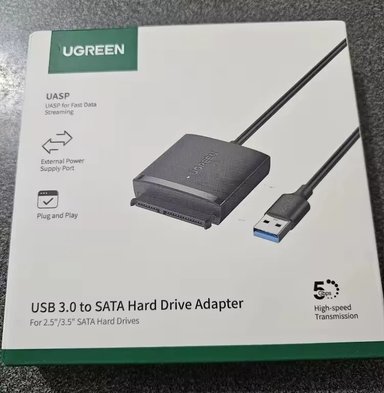
1) Does the UGREEN CM257 / 60561 use ASM1153 / ASM225CM?
UGREEN usually
does not print the bridge-chip model (ASM1153/ASM225CM/JMS578, etc. on the box/manual, and different production batches can use different chips. From what you’ve shown on the box (“
For 2.5”/3.5” SATA Hard Drives”), UGREEN markets it as an HDD/SSD adapter, not an optical-drive adapter.
The only reliable ways to know the exact chip in your unit:
- Check the USB descriptor in Windows (often shows the vendor like “ASMT” or “JMicron”).
- Open the adapter and read the chip marking (if possible).
How to check in Windows 10 (no disassembly)
Use a USB descriptor tool such as
UsbTreeView (common freeware) and look at the device details when the adapter is plugged in. If it shows something like
ASMT or
JMicron, that tells you the bridge vendor. (Sometimes the exact chip name appears too.
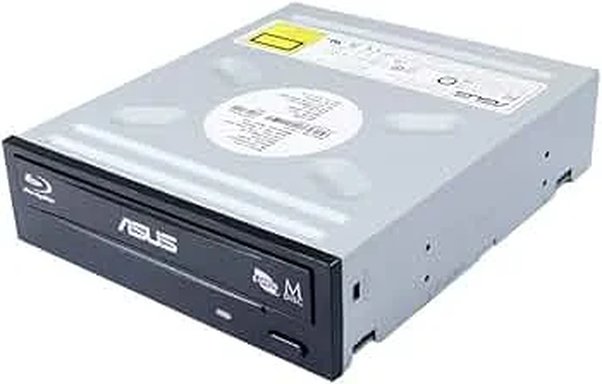
2) Will it support an ASUS 5.25" SATA DVD drive (read/write discs)?
What the bridge chip could support (in theory)
Many USB–SATA bridge chips
can support ATAPI/ODD (optical drives) at the chipset level:
- ASMedia’s ASM1153E family lists ATA/ATAPI Packet Command Set support.
- JMicron’s JMS578 explicitly says it supports HDD/SSD/ODD (optical disc drive) and ATAPI packet commands.
So if your UGREEN adapter used a bridge/firmware that fully exposes ATAPI, it
might work.
But the specific UGREEN CM257/60561 is often sold as NOT compatible with optical drives
Multiple listings for
UGREEN 60561/CM257 explicitly warn it
does NOT support optical drives (Blu‑ray/DVD/CD devices). For example, an EPCOM listing says it is
NOT compatible with Blu‑ray/DVD/CD devices. A marketplace listing for the same model repeats
“Do NOT support BLU-RAY DVD, CD-ROM, DVD-ROM, …”. Because of those explicit “not supported” warnings, I cannot honestly tell you “yes, it will read/write discs.” The safest expectation is:
Most likely: it will NOT work properly with your 5.25" SATA optical drive (especially writing).
3) Powering the 5.25" drive
A 5.25" SATA DVD drive needs
both 12V and 5V through the SATA power pins. Many 3.5" HDD adapters generate 5V internally from the 12V brick, but not all of them do it reliably enough for optical drives under load. One reseller page describing this model claims it outputs
12V (for 3.5") and
5V (for 2.5"), which suggests internal conversion exists, but it still doesn’t guarantee ODD write support.
4) The practical test (best way to confirm on your PC)
If you want to test without buying anything else:
- Connect the 12V supply to the UGREEN adapter.
- Plug the SATA connector into the ASUS DVD drive.
- Connect USB to the Windows 10 PC.
- Check:
- Device Manager → “DVD/CD-ROM drives”
- This PC → does an optical drive appear?
- Try read first (insert a data DVD).
- Then try write using ImgBurn or Windows built-in burning.
If it does
not show up as a DVD/CD drive, or shows but fails to read/write reliably, the adapter likely doesn’t pass ATAPI correctly (or doesn’t provide stable 5V/12V for ODD load).
5) Recommendation (if you need this to work reliably)
Buy a
USB-to-SATA / enclosure explicitly stating “supports SATA optical drives / ATAPI / ODD” (and ideally 12V + 5V power designed for ODD), or a dedicated
USB external DVD writer enclosure.
Quick question (important)
What exact ASUS model is the 5.25" drive (DVD-RW only, or Blu‑ray)?
If it’s
Blu‑ray, the chance of “not supported” is even higher, matching the warnings on listings for 60561.