

QuickBooks Error 3371 Status Code 11118 is a Windows-side QuickBooks Desktop launch failure in which the application cannot load or validate its license data, most often because the local entitlement file is damaged, missing, blocked, or dependent system components are broken. It is annoying precisely because it appears before the company file opens, making a licensing problem look like a data disaster. The good news is that the accounting file is usually not the thing in trouble. The bad news is that this error exposes how brittle desktop software can feel when activation, Windows components, antivirus tools, and small-business urgency collide.
The first job in diagnosing Error 3371 Status Code 11118 is to separate fear from fact. QuickBooks Desktop users often see the message after a normal shutdown, a Windows update, a machine migration, a hard-drive clone, or an interrupted install. The timing makes it feel random, but the underlying failure is usually very specific: QuickBooks cannot initialize the licensing properties it expects to read at startup.
That distinction matters. A corrupted company file usually produces a different class of symptoms: file-open errors, data verification problems, multi-user access failures, or rebuild prompts. Error 3371 generally arrives earlier in the boot sequence, before QuickBooks has even reached the point where it can do meaningful work with your company file.
Think of the company file as the ledger and the entitlement data as the keycard. If the keycard is unreadable, QuickBooks refuses to enter the building. That does not mean the ledger has been shredded.
The catch is that users do not experience it that way. They experience a locked door at the exact moment payroll, invoicing, tax prep, or month-end reporting needs to happen. For a small office without a dedicated admin, “license data failed” and “my accounting system is down” are functionally the same emergency.
When that file is healthy, nobody thinks about it. QuickBooks opens, validates itself silently, and moves on. When the file is damaged or unreadable, the entire desktop application can fail before the user reaches the familiar home screen.
This is why the common fix looks strangely primitive: close QuickBooks, navigate to the entitlement folder, delete the ECML file, and reopen the application. QuickBooks then rebuilds the entitlement data and asks the user to revalidate or reactivate as needed. For many users, that single reset is enough.
On current Windows installations, the usual path is:
Some older installations or older QuickBooks Desktop versions may use a different entitlement-client version folder. That is one reason forum advice often differs slightly: the principle is the same, but the exact folder can vary by version and installation history.
This is also where bad troubleshooting advice can make things worse. Users should not go on a deletion spree through
Tool Hub is not magic, but it does reflect the reality of the problem. Error 3371 is not always one bad file. It can also be caused by broken Windows components, damaged QuickBooks program files, or installation debris left behind after an update or failed reinstall.
The Installation Issues section of Tool Hub can run diagnostic repairs for components QuickBooks depends on, including Microsoft .NET Framework, MSXML, and Visual C++ runtime pieces. Those dependencies are invisible until they break. Then a business application looks broken even though the actual failure is deeper in the Windows stack.
That is a recurring theme in desktop accounting software. The user thinks they run “QuickBooks.” In practice, they run QuickBooks plus activation services plus Windows APIs plus Microsoft runtime libraries plus PDF drivers plus database services plus antivirus permissions. Error 3371 is what happens when the licensing part of that chain snaps.
This is especially painful for businesses running older QuickBooks Desktop releases. Legacy versions may have been stable in a frozen environment, but Windows is not a frozen environment. A patch cycle, antivirus engine update, or system migration can turn “it worked yesterday” into a launch failure today.
The correct lesson is not “never update Windows.” That is a dangerous bargain, especially on systems that handle payroll data, bank feeds, customer records, and tax documents. The better lesson is that QuickBooks Desktop should be treated like a line-of-business application with maintenance windows, known-good backups, installation media, license details, and a rollback plan.
Consumer-style updating works until it does not. Accounting systems deserve more discipline.
That can happen after a definition update, a new behavioral rule, a ransomware-protection feature, or a controlled-folder-access policy. From the antivirus vendor’s point of view, blocking unexpected changes under application data paths may be reasonable. From QuickBooks’ point of view, it may look like the entitlement data has vanished or become unreadable.
The right fix is not to run a business PC permanently unprotected. The right fix is to verify whether security software is interfering, then add appropriate QuickBooks and Intuit folders, executables, and services to trusted or allow-listed locations according to the vendor’s documentation.
There is a narrow but important difference between a temporary test and a permanent workaround. Temporarily disabling antivirus to confirm a theory can be useful. Leaving it disabled because QuickBooks opened once is how a nuisance becomes a security incident.
But clean reinstall should not be the first move. It costs time, it can introduce version mismatches, and it may fail if the underlying Windows component problem remains. Worse, rushed reinstalls can leave users without the right license information, product numbers, installer files, patch level, or backup plan.
A clean reinstall makes sense after simpler steps fail: rebuilding the entitlement file, using Tool Hub’s 3371 fix, repairing installation components, checking Windows updates, and ruling out security software interference. It also makes sense after machine migration or disk cloning, where licensing data may no longer match what QuickBooks expects from the system.
Before reinstalling, users should confirm they have a current company-file backup, their license and product details, administrator access to Windows, and the correct installer for their supported QuickBooks Desktop version. Reinstalling a line-of-business app from a random download site is not troubleshooting. It is risk multiplication.
That matters because older desktop versions become harder to operate safely over time. Even if an old release still opens, it may sit outside current support windows, lack compatibility testing with newer Windows builds, or rely on runtime assumptions that modern systems no longer preserve.
For small businesses, this creates an uncomfortable choice. The desktop product may be familiar, local, and integrated into existing workflows. The cloud product may be more actively developed, but migration is not just a button press for every company. Reports, payroll workflows, third-party integrations, user permissions, and accountant access all complicate the decision.
Error 3371 does not, by itself, mean a business must abandon QuickBooks Desktop. But repeated licensing failures on aging software should trigger a sober review. If accounting uptime matters, unsupported software is not a personality trait. It is an operational risk.
Next, use QuickBooks Tool Hub’s 3371 Error Fix if it is available. This is the least error-prone path for most users because it automates the entitlement reset Intuit expects. If that does not work, manually deleting or renaming
After QuickBooks relaunches, expect it to rebuild the file and potentially request activation again. That is normal. What users should not do is repeatedly delete files every morning as a lifestyle. If the error returns after every reboot, the ECML file is probably not the root cause; it is the symptom being recreated by another conflict.
At that point, move outward: repair Windows components, run Tool Hub installation diagnostics, update Windows, review antivirus logs, and consider a clean reinstall only after the basic causes have been exhausted.
A proper support posture starts with inventory. Know the QuickBooks version, release level, license details, company-file location, backup schedule, Windows version, antivirus product, and whether the installation is single-user, multi-user, hosted, or running through remote access. When something breaks, that information saves time.
The next step is change control. If Windows updates, antivirus policy changes, disk cloning, or workstation replacements are happening, QuickBooks should be part of the checklist. Launch it after maintenance. Confirm activation. Open a test company or the real file under supervision. Do not wait for the bookkeeper to discover the issue at 8:59 a.m. on payroll day.
Finally, admins should document the entitlement reset path but not rely on it as the only answer. A recurring 3371 event may point to profile corruption, permissions issues, endpoint security interference, damaged runtimes, or unsupported application age. The fix that gets a user through Monday morning is not always the fix that protects next quarter’s close.
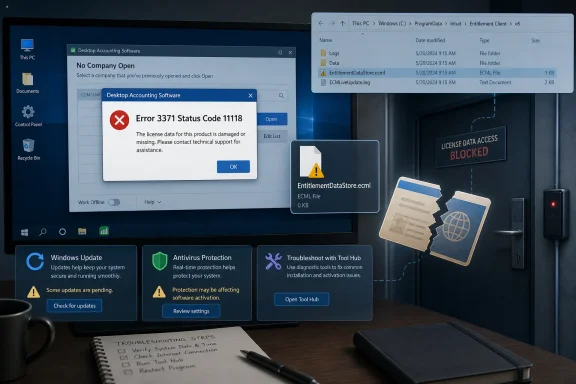 QuickBooks Has Not Lost Your Books — It Has Lost Its Passport
The first job in diagnosing Error 3371 Status Code 11118 is to separate fear from fact. QuickBooks Desktop users often see the message after a normal shutdown, a Windows update, a machine migration, a hard-drive clone, or an interrupted install. The timing makes it feel random, but the underlying failure is usually very specific: QuickBooks cannot initialize the licensing properties it expects to read at startup.That distinction matters. A corrupted company file usually produces a different class of symptoms: file-open errors, data verification problems, multi-user access failures, or rebuild prompts. Error 3371 generally arrives earlier in the boot sequence, before QuickBooks has even reached the point where it can do meaningful work with your company file.
Think of the company file as the ledger and the entitlement data as the keycard. If the keycard is unreadable, QuickBooks refuses to enter the building. That does not mean the ledger has been shredded.
The catch is that users do not experience it that way. They experience a locked door at the exact moment payroll, invoicing, tax prep, or month-end reporting needs to happen. For a small office without a dedicated admin, “license data failed” and “my accounting system is down” are functionally the same emergency.
The Tiny ECML File That Can Stop an Accounting Department
At the center of many 3371 cases is a file calledEntitlementDataStore.ecml. It lives under Intuit’s entitlement client data inside Windows’ ProgramData directory, a location hidden from many users by default. The file stores activation and license-related information that QuickBooks reads when it starts.When that file is healthy, nobody thinks about it. QuickBooks opens, validates itself silently, and moves on. When the file is damaged or unreadable, the entire desktop application can fail before the user reaches the familiar home screen.
This is why the common fix looks strangely primitive: close QuickBooks, navigate to the entitlement folder, delete the ECML file, and reopen the application. QuickBooks then rebuilds the entitlement data and asks the user to revalidate or reactivate as needed. For many users, that single reset is enough.
On current Windows installations, the usual path is:
C:\ProgramData\Intuit\Entitlement Client\v8Some older installations or older QuickBooks Desktop versions may use a different entitlement-client version folder. That is one reason forum advice often differs slightly: the principle is the same, but the exact folder can vary by version and installation history.
This is also where bad troubleshooting advice can make things worse. Users should not go on a deletion spree through
ProgramData, registry keys, or QuickBooks folders because one support article mentioned a license file. The target is narrow. The repair is surgical.The Official Repair Path Starts with the Tool Hub, Not Folk Magic
Intuit’s more modern guidance pushes users toward QuickBooks Tool Hub, particularly its 3371 Error Fix and installation repair tools. That is a better starting point for many nontechnical users because it packages several repairs into a guided interface instead of asking someone under pressure to browse hidden folders.Tool Hub is not magic, but it does reflect the reality of the problem. Error 3371 is not always one bad file. It can also be caused by broken Windows components, damaged QuickBooks program files, or installation debris left behind after an update or failed reinstall.
The Installation Issues section of Tool Hub can run diagnostic repairs for components QuickBooks depends on, including Microsoft .NET Framework, MSXML, and Visual C++ runtime pieces. Those dependencies are invisible until they break. Then a business application looks broken even though the actual failure is deeper in the Windows stack.
That is a recurring theme in desktop accounting software. The user thinks they run “QuickBooks.” In practice, they run QuickBooks plus activation services plus Windows APIs plus Microsoft runtime libraries plus PDF drivers plus database services plus antivirus permissions. Error 3371 is what happens when the licensing part of that chain snaps.
Windows Updates Are Often Blamed Because They Are Often Nearby
Users frequently report Error 3371 after Windows updates. That does not prove every update caused the error, but it is not an irrational suspicion. Updates can reboot machines during background activity, change system libraries, tighten permissions, alter security behavior, or expose older application assumptions that had been quietly working for years.This is especially painful for businesses running older QuickBooks Desktop releases. Legacy versions may have been stable in a frozen environment, but Windows is not a frozen environment. A patch cycle, antivirus engine update, or system migration can turn “it worked yesterday” into a launch failure today.
The correct lesson is not “never update Windows.” That is a dangerous bargain, especially on systems that handle payroll data, bank feeds, customer records, and tax documents. The better lesson is that QuickBooks Desktop should be treated like a line-of-business application with maintenance windows, known-good backups, installation media, license details, and a rollback plan.
Consumer-style updating works until it does not. Accounting systems deserve more discipline.
Antivirus Is Not the Villain, but It Can Be the Interrupter
Security software is another common suspect in 3371 cases, and here again the story is less dramatic than users assume. Antivirus tools do not need to delete QuickBooks to break it. They only need to quarantine, block, or slow access to a licensing-related file at the wrong moment.That can happen after a definition update, a new behavioral rule, a ransomware-protection feature, or a controlled-folder-access policy. From the antivirus vendor’s point of view, blocking unexpected changes under application data paths may be reasonable. From QuickBooks’ point of view, it may look like the entitlement data has vanished or become unreadable.
The right fix is not to run a business PC permanently unprotected. The right fix is to verify whether security software is interfering, then add appropriate QuickBooks and Intuit folders, executables, and services to trusted or allow-listed locations according to the vendor’s documentation.
There is a narrow but important difference between a temporary test and a permanent workaround. Temporarily disabling antivirus to confirm a theory can be useful. Leaving it disabled because QuickBooks opened once is how a nuisance becomes a security incident.
Clean Reinstall Is the Last Resort, Not the First Reflex
The phrase “clean install” appears often in QuickBooks troubleshooting, and for good reason. If the application’s program files, registry entries, entitlement state, and Windows components are tangled badly enough, a controlled uninstall and reinstall can restore order.But clean reinstall should not be the first move. It costs time, it can introduce version mismatches, and it may fail if the underlying Windows component problem remains. Worse, rushed reinstalls can leave users without the right license information, product numbers, installer files, patch level, or backup plan.
A clean reinstall makes sense after simpler steps fail: rebuilding the entitlement file, using Tool Hub’s 3371 fix, repairing installation components, checking Windows updates, and ruling out security software interference. It also makes sense after machine migration or disk cloning, where licensing data may no longer match what QuickBooks expects from the system.
Before reinstalling, users should confirm they have a current company-file backup, their license and product details, administrator access to Windows, and the correct installer for their supported QuickBooks Desktop version. Reinstalling a line-of-business app from a random download site is not troubleshooting. It is risk multiplication.
The Version Problem Hiding Behind the Error Message
Error 3371 is a technical launch failure, but it also lives inside a larger product reality: QuickBooks Desktop is not the center of Intuit’s future in the way it once was. Intuit continues to support desktop products for specific customers and editions, but the company’s strategic gravity has long since shifted toward QuickBooks Online and subscription-managed services.That matters because older desktop versions become harder to operate safely over time. Even if an old release still opens, it may sit outside current support windows, lack compatibility testing with newer Windows builds, or rely on runtime assumptions that modern systems no longer preserve.
For small businesses, this creates an uncomfortable choice. The desktop product may be familiar, local, and integrated into existing workflows. The cloud product may be more actively developed, but migration is not just a button press for every company. Reports, payroll workflows, third-party integrations, user permissions, and accountant access all complicate the decision.
Error 3371 does not, by itself, mean a business must abandon QuickBooks Desktop. But repeated licensing failures on aging software should trigger a sober review. If accounting uptime matters, unsupported software is not a personality trait. It is an operational risk.
The Quick Fix Still Deserves a Careful Sequence
For users facing the error today, the practical sequence should be calm and conservative. Start by closing QuickBooks completely, including background processes if necessary. Rebooting the PC is not glamorous, but it clears stuck file locks and half-finished startup states.Next, use QuickBooks Tool Hub’s 3371 Error Fix if it is available. This is the least error-prone path for most users because it automates the entitlement reset Intuit expects. If that does not work, manually deleting or renaming
EntitlementDataStore.ecml from the entitlement client folder is the classic next step.After QuickBooks relaunches, expect it to rebuild the file and potentially request activation again. That is normal. What users should not do is repeatedly delete files every morning as a lifestyle. If the error returns after every reboot, the ECML file is probably not the root cause; it is the symptom being recreated by another conflict.
At that point, move outward: repair Windows components, run Tool Hub installation diagnostics, update Windows, review antivirus logs, and consider a clean reinstall only after the basic causes have been exhausted.
Admins Should Treat 3371 as a Signal, Not a One-Off Annoyance
For IT pros supporting QuickBooks Desktop, Error 3371 is a reminder that accounting software deserves the same operational hygiene as any other business-critical system. It may sit on a receptionist’s PC or a shared office workstation, but the dependency chain is closer to a small application stack than a simple desktop shortcut.A proper support posture starts with inventory. Know the QuickBooks version, release level, license details, company-file location, backup schedule, Windows version, antivirus product, and whether the installation is single-user, multi-user, hosted, or running through remote access. When something breaks, that information saves time.
The next step is change control. If Windows updates, antivirus policy changes, disk cloning, or workstation replacements are happening, QuickBooks should be part of the checklist. Launch it after maintenance. Confirm activation. Open a test company or the real file under supervision. Do not wait for the bookkeeper to discover the issue at 8:59 a.m. on payroll day.
Finally, admins should document the entitlement reset path but not rely on it as the only answer. A recurring 3371 event may point to profile corruption, permissions issues, endpoint security interference, damaged runtimes, or unsupported application age. The fix that gets a user through Monday morning is not always the fix that protects next quarter’s close.
The Real Takeaway Is Smaller Than the Panic and Bigger Than the File
The useful way to read Error 3371 Status Code 11118 is as a licensing-startup failure with several likely causes, not as a single mysterious QuickBooks curse. Most users can recover without touching their accounting data, but repeated failures deserve deeper attention.- QuickBooks Error 3371 Status Code 11118 usually means QuickBooks Desktop cannot load license data during startup.
- The company file is usually not damaged simply because this message appears.
- Rebuilding
EntitlementDataStore.ecmlfixes many cases because QuickBooks can create a fresh entitlement file. - QuickBooks Tool Hub is the safer first repair path for users who do not want to work directly inside hidden Windows folders.
- Antivirus tools, Windows updates, damaged Microsoft components, and aging QuickBooks versions can all make the same licensing error reappear.
- A clean reinstall should be reserved for cases where entitlement repair, Tool Hub diagnostics, Windows maintenance, and security-software checks do not resolve the failure.
References
- Primary source: vocal.media
Published: 2026-06-22T10:22:06.807453
QuickBooks Error 3371 Status Code 11118 Stops QuickBooks from Launching? Try This Complete Fix | Education
Discover reliable troubleshooting steps to eliminate QuickBooks Error 3371 Status Code 11118 and get QuickBooks running smoothly again in minutes. vocal.media
- Related coverage: quickbooks.intuit.com
Error 3371 status code 11118
I have purchased a new computer and attempting to load QB. received above error code.quickbooks.intuit.com - Related coverage: dancingnumbers.com
Fix QuickBooks Error 3371: Status Codes 11118, -1, 11104
Fix QuickBooks Error 3371 with 10 proven methods, including Tool Hub, reinstall, file repair, and Windows update steps.www.dancingnumbers.com - Related coverage: hackmd.io
QuickBooks Error 3371 Status Code 11118: Causes, Fixes, and Complete Troubleshooting Guide (2026) - HackMD
This error usually appears when QuickBooks cannot load the license data needed to run the software. As a result, users cannot start QuickBooks or access their company files. hackmd.io
- Related coverage: accountingscart.com
Fix QuickBooks Error 3371 | Accountings Cart
Fix QuickBooks Error 3371: Could not initialize license properties. Step-by-step guide to delete EntitlementDataStore.ecml and resolve it.www.accountingscart.com
- Related coverage: ebetterbooks.com
7 Steps To Fix QuickBooks Error 3371 Status Code 11118
Fix QuickBooks Error 3371 Status Code 11118, which prevents the software from loading license data. Learn how to resolve missing or damaged files (entitlementDataStore.ECML) with our simple troubleshooting steps.ebetterbooks.com
- Related coverage: hostdocket.com
How to Fix QuickBooks Error 3371 Status Code 11118 (Updated Guide)
In this article we have explained what is QuickBooks Error 3371 Status Code 11118 and what are the causes and solution of this error.www.hostdocket.com - Related coverage: datarepairsupport.com
- Related coverage: ccsfl.com

Error 3371, Status Code -11118] QuickBooks could not load the license data | Certified Computer Solutions
QuickBooks could not load the license data
www.ccsfl.com
- Related coverage: askforaccounting.com
How to Fix QuickBooks Error 3371 Could Not Initialize License Properties
In this article read causes and how to troubleshoot QuickBooks error 3371 could not initialize license properties status code 11118, 11104 and -1 www.askforaccounting.com
- Related coverage: forms.cacnews.org
QuickFixHelp QuickBooks Error Support Number Instantly Resolve Any QuickBooks Issue
PDF documentforms.cacnews.org
- Related coverage: feministfutures.socialsciences.ucsb.edu
- Related coverage: tallapoosaga.gov
City of Tallapoosa, Georgia - USA - The Dogwood City
Tallapoosa is a small town with southern charm. A quaint setting that is picturesque with Historic Homes, Museums, Parks, Economic Development and Industrial Opportunities. www.tallapoosaga.gov
- Related coverage: seboopersi.wordpress.com
Error Codes 6150 And 1006 In Quickbooks
</rdf:Alt> </dc:description> <dc:title> <rdf:Alt> <rdf:li xml:lang="x-default">Error Codes 6150 And 1006 In Quickbooksseboopersi.wordpress.com
