

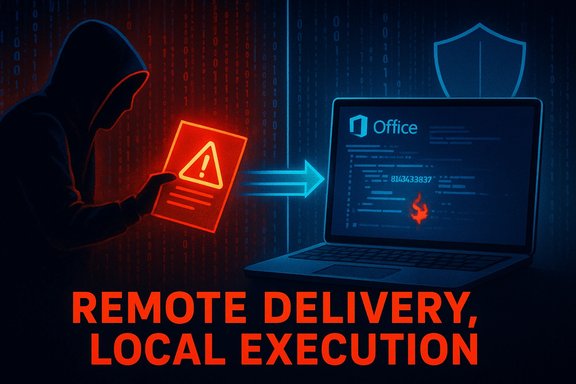
Note: quick TL;DR up front — yes, the CVE title uses the phrase “Remote Code Execution” to describe the attacker’s location (the attacker can be remote). The CVSS Attack Vector = Local (AV:L) is not contradictory: it describes how the vulnerable code is actually triggered (by local processing on the victim’s machine, usually after the victim opens or previews a malicious file). In short: the attacker can deliver the payload from “remote,” but the exploit runs locally when the target application processes that payload.
Full explanation, technical background, defender guidance, and practical mitigations
TL;DR (one-paragraph answer)
- “Remote” in the CVE title indicates where the attacker can be located (off-site, across the Internet) and that the attack can be initiated by an external actor (for example, by sending a malicious document). CVSS’s Attack Vector = Local (AV:L) says the vulnerable code that gets exploited is executed by a local component on the target host (for example the local Office process parsing the file). Many Office-document exploits are therefore AV:L + UI:R (user must open or preview the file) but still described as “remote code execution” because the attacker can be remote and cause code to run on the victim’s machine.
- Arbitrary Code Execution (ACE): a general phrase meaning an attacker can make arbitrary code run on a target system. ACE does not say whether the attacker must be local or remote.
- Remote Code Execution (RCE): a subset of ACE where the attacker can trigger code execution without preexisting local access (i.e., across a network or via a remote delivery channel). RCE is generally more severe operationally because it enables attackers who are off-site to compromise machines.
- CVSS Attack Vector (AV): this metric (AV:N, AV:A, AV:L, AV
 ) describes the context needed to reach and trigger the vulnerable component. AV:L (Local) means the vulnerable component is only reachable via local read/write/execute capabilities — e.g., the component requires a file to be opened locally or a user to run something locally to reach the vulnerable code path.
- Common Office exploit scenario:
- Attacker crafts a malicious Office document (or a malicious file that Office will parse).
- Attacker delivers the file remotely (email attachment, web download, file share, etc..
- The victim opens (or previews) the file on their local machine; Office’s local code path parses the file and hits the bug.
- Local code execution occurs in the Office process and the exploit achieves arbitrary code execution on the local machine.
- In CVSS terms: the vulnerable code is not in a network service; it is invoked by a local application when it parses a file, so AV:L is correct. In plain-English security communications Microsoft often uses “Remote Code Execution” in the CVE title to indicate that a remote actor can cause code to execute on the victim’s host by delivering a crafted file — hence the apparent mismatch.
- Titles are meant to be short and signaling: “Remote Code Execution” emphasizes the practical risk that an external attacker can cause arbitrary code to run on a target (even if exploitation needs a user to open a file). Microsoft’s advisories explicitly clarify that the “Remote” refers to attacker location and that the exploit itself may require local execution and user interaction — that is, RCE-as-a-consequence of a remotely delivered payload but AV:L in CVSS terms.
- CVSS AV asks: “Does the vulnerable code run in a component bound to the network stack (Network) or does it require local processing?” If the vulnerable component is the document parser inside an Office app that only runs when the user opens the file, the attack path is considered Local, even if the file was received over the network. The CVSS guidance specifically calls out this situation: if one component receives malicious data over a network and then passes it to a separate local component that contains the vulnerability, scoring should be AV:L.
- Even when the CVSS Attack Vector is Local (AV:L), such vulnerabilities can be highly dangerous in practice:
- Office is ubiquitous and users routinely open attachments, so the “user interaction” requirement is not a high barrier for many attackers (phishing/social engineering can do the rest).
- Successful exploitation still results in arbitrary code running on the endpoint. That leads to credential theft, lateral movement, ransomware, persistence, etc.
- CVSS AV:L usually reduces the base score compared to AV:N, but operational risk depends on exposure (how many users could be tricked; whether the environment strips dangerous attachments or blocks previews; whether endpoints are protected).
- Prioritization guidance:
- Treat Office ACE/“RCE via file” vulnerabilities as high-priority for patching in environments with many users, weak email filtering, or where endpoints lack modern EDR/app control.
- For internet-exposed services that are directly exploitable without user interaction, the CVSS vector would normally be AV:N (higher network severity) and should receive the fastest attention. But don’t deprioritize AV:L Office bugs — they remain a major vector in real incidents.
- Common delivery channels:
- Phishing email attachments (Word, Excel, Visio, RTF, OLE-embedded payloads).
- Web downloads (malicious file hosted on a site or distributed through file storage links).
- File shares or removable media.
- Preview panes / preview handlers: Outlook’s preview or file manager preview can sometimes trigger the vulnerable parser without an explicit “open” step — Microsoft advisories often call out whether the preview pane is an attack vector.
- Common exploit chain elements after local code execution:
- Office process spawns a child process (cmd.exe, PowerShell, rundll32, mshta, wscript, etc. to run payloads.
- In-memory shellcode execution or code injection into other processes.
- Credential harvesting (LSASS dump, Mimikatz-like techniques).
- C2 (command-and-control) connections, data exfiltration, ransomware deployment.
- Watch for Office processes (winword.exe, excel.exe, powerpnt.exe, visio.exe, etc. that spawn unusual child processes:
- Process create events where parent is an Office binary and child is cmd.exe, powershell.exe, mshta.exe, wscript.exe, regsvr32.exe, rundll32.exe.
- Office process making network connections immediately after opening a file (anomalous outbound connections).
- Useful detection primitives (implementable in EDR/Windows Event logs/Sysmon):
- Sysmon Event ID 1 (ProcessCreate): track parent->child relationships and alert when Office spawns execution hosts.
- Sysmon Event ID 11 / 12 (FileCreate / FileCreateStreamHash): detect when Office writes an executable to disk.
- Network monitoring: detect Office processes initiating outbound connections to suspicious IPs/domains.
- Example KQL (Microsoft Defender / MDE) — hunt for Office spawning PowerShell:
- DeviceProcessEvents
| where InitiatingProcessFileName in ("WINWORD.EXE","EXCEL.EXE","POWERPNT.EXE","VISIO.EXE")
| where FileName in ("powershell.exe","pwsh.exe","cmd.exe","mshta.exe","wscript.exe","cscript.exe","rundll32.exe")
| project Timestamp, DeviceName, InitiatingProcessFileName, FileName, ProcessCommandLine - Example Sysmon-style condition (logic):
- If ProcessCreate.ParentImage IN {winword.exe, excel.exe, powerpnt.exe, visio.exe} AND ProcessCreate.Image IN {cmd.exe, powershell.exe, mshta.exe, cscript.exe, wscript.exe} THEN alert.
Immediate actions (apply ASAP)
- Patch: install the security update Microsoft issued for the specific CVE on all affected Office installations (Windows and Mac where applicable). This is the single most important step.
- Email filtering: ensure inbound mail is filtered/blocked for high-risk attachment types; enable sandboxing for attachments where available so attachments are opened in a safe environment first.
- Outlook/Exchange protections:
- Disable automatic download/preview of attachments if possible.
- Configure Exchange/Email gateway to block or detonate untrusted Office files.
- Apply endpoint mitigations:
- Block Office from launching unsigned child executables using AppLocker/WDAC (allowlist only required behaviors).
- Harden macro settings: set macros to block by default and only allow macros from trusted and signed sources.
- Enable Microsoft Defender for Office 365 protections (if available) and Defender for Endpoint features.
- User awareness: remind users to be wary of unsolicited attachments, never enable macros for untrusted documents, and report suspicious emails.
- Office Protected View: enable “Open files from the Internet in Protected View” for all Office apps and ensure Protected View is not bypassed.
- Disable legacy and risky features you do not need:
- DDE, OLE automation entry points, or other legacy integration features that Office supports (if your apps don’t need them).
- Application control: implement application allowlisting (AppLocker or Windows Defender Application Control) for high-value endpoints.
- EDR + detection rules: deploy endpoint detection and response (EDR) and tune detections that alert on Office spawning command interpreters or writing executables.
- Network egress controls: restrict outbound connections from user endpoints to reduce the chance of C2 or data exfiltration.
- Principle of least privilege: ensure users do not run with unnecessary admin privileges; many Office-based exploits are less damaging if the user account is low-privilege.
- Centralized patching program: enforce timely patching of Office across your environment with a prioritized deployment plan (critical business units first).
- Threat modeling for document workflows: identify business processes that rely on documents from external sources and apply extra controls around those flows.
- Remove legacy file types: disallow or tightly control use of older, risky formats (e.g., Word 97-2003 .doc, RTF, etc. if modern alternatives exist.
- User interaction (UI:R): if the exploit requires that the user open a file, social engineering effectiveness and email hygiene determine real-world exploitability.
- Privileges required (PR:N vs PR:L vs PR:H): if the exploited code runs with user privileges and the user is a limited user, the attacker’s capabilities may be restricted. If the user is an admin, impact is much higher.
- Presence of mitigations: ASLR/DEP, Office Protected View, modern EDR, and Windows Exploit Protection (stack cookies, control-flow guard) can raise the bar for reliable exploitation.
- Q: Is this vulnerability “really” remote if CVSS says AV:L?
- A: Yes — “remote” in the title refers to the attacker being off-site and being able to send a crafted file; AV:L means the vulnerable code runs locally when the victim opens/processes the file.
- Q: Should I treat AV:L Office vulnerabilities as lower priority?
- A: No. Treat them as high priority for patching and mitigation, especially if your organization receives lots of external documents or relies on email with high user interaction.
- Q: Can the preview pane in Outlook trigger these issues?
- A: It depends on the advisory. Microsoft advisories commonly state whether the preview pane is an attack vector. If the preview pane processes the vulnerable component, it can be an attack vector even without an explicit “open”.
- Day 0: Inventory — identify all Office versions and build numbers across endpoints (Windows and Mac).
- Day 1: Deploy blocking rules at email gateway for high-risk attachments; inform SOC of upcoming detection rules.
- Day 2–3: Test vendor patches on a small pilot group (across OS versions).
- Day 3–6: Roll out patches broadly (critical systems first), apply AppLocker/WDAC policies to block Office from launching unsupported hosts.
- Day 7: Verify patch status, validate detection alerts, and run phishing simulation focused on attachment opening behavior; remediate any systems that failed patching.
- CVE titles and headlines are written for fast recognition and triage — saying “Remote Code Execution” signals a high-consequence outcome (code runs on a victim’s host) and that the attacker can be off-site.
- CVSS metrics are standardized scoring guidance used to compute severity numerically and must reflect precise technical attack properties (network-bound vs local renderer, etc.. Both are useful; they simply answer slightly different questions.
- The CVE title’s “Remote Code Execution” warns that a remote attacker can cause code to run on a target (usually by sending a malicious file). CVSS AV:L correctly describes the technical attack vector: the vulnerable code runs locally in the target application when it processes the file. Defenders should act as if the vulnerability is high-risk: patch fast, harden Office configuration, block or detonate suspicious attachments, and add detections for Office spawning command/interpretation hosts.
- Draft a prioritized, one-page mitigation checklist tailored to your environment (email-gateway, Exchange Online, M365, Windows-only, mixed macOS).
- Produce a set of ready-to-deploy detection rules for Sysmon (XML), MDE/KQL queries, and Sigma rules for common SIEMs that will surface Office-associated exploitation behavior.
- Walk through how to check whether your Outlook/Exchange preview pane could trigger the vulnerable code and suggest specific configuration lines to lock it down.
Source: MSRC Security Update Guide - Microsoft Security Response Center
