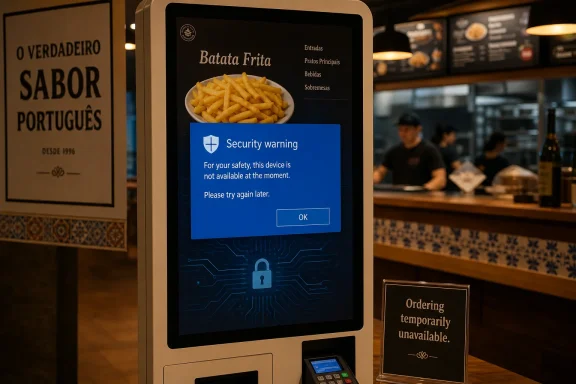
A Portuguese restaurant kiosk was photographed showing a Windows security warning for
The Register’s sighting is almost too perfect: a restaurant self-service terminal, a point-of-sale kiosk application, and a Windows dialog wedged between the customer and lunch. The visible executable name,
That ordinariness is the point. Public kiosks do not usually fail because a single cosmic ray flips a bit in a touchscreen. They fail because they are general-purpose computers dressed up as appliances, and every layer beneath the app still has opinions: update policy, certificate trust, shell behavior, network availability, power state, driver recovery, and user interaction model.
A restaurant kiosk is a hostile environment in the physical sense, but it is also hostile in the product-design sense. Customers are impatient, staff are busy, terminals are often remotely managed, and the device has to be simultaneously open enough to take orders and locked down enough to stop the public from escaping into Windows. That tension is where the best kiosk deployments are made — and where the lazier ones come apart.
In this case, Windows did exactly what it is designed to do when it cannot establish a publisher identity. The problem is that Windows doing the “right” thing at the wrong layer can still be operationally wrong. A trust prompt that makes sense on a developer’s workstation is a service outage when it appears above a menu.
A kiosk has no such social layer. The person in front of it is not an employee, not a trained operator, and not part of the trust relationship between vendor and customer. They see a Windows prompt, a file name, and a choice that should never have been theirs.
Microsoft’s own guidance around application control makes the security case plainly enough: signing allows Windows and administrators to verify that code has not been modified since signing and to associate that code with an accountable publisher identity. That identity is not decorative. It is what lets a policy say “this vendor’s kiosk app may run” rather than “anything with a familiar-looking file name may run.”
For administrators, the practical value is even more direct. A signed executable can be inventoried, allowed, blocked, replaced, and audited with far more confidence than an unsigned one. In Windows environments using App Control for Business, WDAC-style policies, Defender reputation checks, or basic certificate trust, unsigned code turns every update into an exception-handling exercise.
The real surprise is not that Windows objected. The surprise is that software presented as part of a commercial point-of-sale kiosk stack could plausibly reach a public terminal in a state where Windows had to ask the customer whether to trust it. In 2026, code signing for customer-facing retail infrastructure should be table stakes, not an optional polish pass.
The Windows warning in this incident is especially awkward because it offers the wrong affordance to the wrong person. A customer at a food kiosk cannot meaningfully validate a publisher, inspect a certificate chain, or decide whether
This is where kiosk computing differs from ordinary desktop computing. Desktop Windows assumes a user who can respond to prompts, recover from interruptions, and make choices about software. Kiosk Windows must assume the opposite: the user should never see the operating system, never touch the shell, and never become part of the maintenance workflow.
That requires engineering discipline across the whole stack. The executable must be signed. The signing certificate must chain to a trusted authority or to a properly deployed enterprise trust store. The app must be launched in a controlled shell or assigned-access configuration. Update delivery must preserve signing and reputation. Monitoring must detect app launch failure before the first customer does.
The lesson is harsh but useful: a kiosk is not a PC with a full-screen app. It is an appliance built out of PC components, and appliances do not ask passersby to adjudicate software provenance before serving lunch.
In fact, WPF’s presence may be the least surprising thing about the whole episode. Many point-of-sale and kiosk systems are not redesigned every few years to satisfy developer conference fashion. They accrete. A vendor builds a Windows client, adds modules, ports a screen, integrates a peripheral SDK, and eventually the system becomes infrastructure. If it works, nobody wants to touch the parts that might break orders, tills, or tax reporting.
That is precisely why security and deployment hygiene matter so much. Mature Windows frameworks can be perfectly serviceable for locked-down environments, but the operational wrapper around them has to be modern. A WPF app can be signed. A WPF app can be deployed through a managed channel. A WPF app can run under Shell Launcher, assigned access alternatives, or a carefully controlled custom shell. The framework does not excuse the prompt.
The deeper issue is that many businesses still treat kiosk software as an application purchase rather than a lifecycle commitment. They ask whether the ordering flow works, whether the printer prints, whether the card reader settles, and whether the menu can be updated centrally. They do not always ask how the executable is signed, what happens when the certificate expires, how trust is pinned, or what Windows policy will do when the app is updated at 3 a.m.
WPF, in other words, is not the indigestion. It is the visible breadcrumb leading back to a familiar Windows estate: a specialized app, probably running on commodity hardware, integrated with peripherals, and expected to behave like an appliance even though it is sitting atop a full desktop operating system.
Those features are valuable, but they are not magic. They control the user environment; they do not retroactively make an untrusted binary trusted. If the app cannot launch cleanly because Windows, policy, SmartScreen, or the certificate store objects to it, the kiosk stack has already failed below the user-experience layer.
This distinction matters because many kiosk projects are scoped around lockdown rather than reliability. Teams focus on stopping customers from reaching the Start menu, opening Task Manager, invoking browser shortcuts, or finding a way to the desktop. Those are real requirements. But a kiosk that is perfectly locked down and cannot start its app is still a brick.
A resilient Windows kiosk needs two separate disciplines. The first is confinement: limiting what the public can do, what the app can access, and how the shell behaves. The second is continuity: ensuring the intended app starts, restarts, updates, rolls back, logs errors, and remains trusted after each change. The Portuguese kiosk incident is a continuity failure wearing a security prompt costume.
For IT departments, the takeaway is uncomfortable. You can deploy a Windows kiosk with all the right lockdown buzzwords and still be undone by a vendor update that arrives unsigned, mis-signed, newly signed with an untrusted certificate, or marked in a way that triggers reputation checks. Lockdown without supply-chain discipline is theater.
Neither model should survive contact with production. Retail technology has a habit of pushing enterprise-grade complexity into low-margin, high-turnover environments. The restaurant manager may know how to reboot the kiosk, but not how to diagnose certificate trust. The cashier may know which terminal is “the bad one,” but not whether the app package was replaced overnight. The vendor help desk may know the script, but not the exact Windows build, lockdown policy, or local trust store on the affected unit.
The result is a cascade of small costs. A customer moves to another kiosk. A staff member loses time. A line grows. A manager reboots a box that might simply relaunch the same warning. The vendor opens a ticket. The restaurant learns that a “software issue” is not meaningfully separate from a revenue issue.
This is why public-screen failures attract attention beyond their technical significance. A Windows warning on a restaurant kiosk is not a catastrophic outage, but it is publicly legible. Everyone understands that the machine has been asked to do one job and has instead shown the wrong screen.
For WindowsForum readers, there is also a familiar sting. Windows remains excellent at running the strange, peripheral-heavy, locally integrated business applications that keep the real world moving. That is why it is so common in kiosks and point-of-sale estates. But that strength comes with a burden: if you deploy full Windows, you inherit full Windows behavior unless you deliberately design it away.
That uncertainty matters. A missing or unverifiable signature can have several causes. The executable may never have been signed. It may have been signed with a certificate that Windows does not trust. The certificate may have expired without timestamping preserving validity. The file may have been altered after signing. The kiosk may be running an old Windows image with stale roots or unusual policy. A download or deployment process may have attached metadata that triggered a warning.
But the customer-facing result is the same: Windows lacked enough trust context to proceed silently. In a private office, that would be a support annoyance. In a public restaurant, it is a failure of the trust boundary.
Vendors selling kiosk and POS software should assume that customers increasingly care about this boundary. Retail systems process payments, handle loyalty data, integrate with ordering platforms, and often sit on networks that touch back-office infrastructure. Even when the kiosk app itself is not the payment processor, it is part of the operational chain customers and regulators expect to be controlled.
That raises the bar for what “secure” should mean. It cannot just mean a login prompt for managers or encrypted communication to a back-end service. It has to include signed binaries, auditable updates, documented certificate handling, least-privilege runtime accounts, controlled device policy, and a tested recovery path when the app does not launch.
The cheapest kiosk software is not cheap if every update carries the risk of turning the ordering lane into a Windows support desk.
That strategy is understandable. Kiosks are capital equipment. They are bought in batches, mounted in furniture, wired into payment and network infrastructure, and certified against peripherals. A restaurant chain does not replace them because Microsoft wants a cleaner support matrix. It replaces them when the business case wins.
But aging Windows fleets accumulate risk. Support timelines tighten. Security baselines shift. Certificate and signing expectations evolve. Management tooling changes. Vendors prioritize newer builds. An app that launched quietly on an old image may suddenly hit a warning after an update, a rebuild, a policy change, or a certificate rotation.
Windows 10’s end-of-support pressure has also made kiosk estates more visible to IT leadership. Many organizations that postponed endpoint modernization are now discovering that their “PC fleet” includes devices nobody thinks of as PCs: menu boards, check-in terminals, badge printers, warehouse stations, payment-adjacent workstations, and unattended lobby screens. They may run Windows, but they are owned operationally by facilities, retail ops, or local branches rather than central IT.
That organizational split is dangerous. The team that buys the kiosk may not own Windows patching. The team that owns Windows patching may not own the application. The vendor that owns the application may not control the certificate trust store. The integrator that imaged the device may no longer be under contract. When the warning appears, everyone owns a slice of the problem and nobody owns the customer’s blocked order.
The Portuguese kiosk is therefore not just a bork. It is a reminder that Windows endpoint governance has to include the machines pretending not to be endpoints.
The vendor should sign the application and any companion binaries with a certificate that chains to a trust root appropriate for the deployment. The deployment process should preserve signatures and verify them before rollout. The customer or integrator should define application control policy around publisher identity, file attributes, and expected paths rather than informal “it runs on the golden image” assumptions.
The kiosk should be configured so the public never sees Windows dialogs, but that should be the second line of defense, not the first. Suppressing prompts while leaving the underlying trust failure unresolved merely converts a visible outage into a silent one. A better system fails closed, alerts operators, rolls back to the last trusted build if possible, and keeps enough telemetry for support to identify whether the issue is signing, policy, network, or application crash.
Certificate lifecycle management deserves special attention. Code-signing certificates expire. Vendors rotate identities. Build systems change. Timestamping can preserve trust for code signed while a certificate was valid, but only if it was implemented properly. If a kiosk estate depends on a signed app launching without intervention, certificate renewal is not a procurement chore; it is uptime engineering.
There is also a procurement lesson. Buyers of kiosk and POS systems should ask vendors how code is signed, how updates are validated, how rollback works, whether the app supports Windows kiosk deployment patterns, and what happens when Windows blocks execution. Those questions are not esoteric. They are the difference between an appliance and a desktop with a touchscreen.
That is the paradox at the center of kiosk computing. The better Windows becomes at surfacing trust problems, the more obvious it becomes when kiosk deployments rely on avoiding those questions rather than answering them. Security prompts are supposed to interrupt risky behavior. On a public kiosk, they reveal that risk assessment was pushed too far downstream.
For administrators, the answer is not to disable every warning. That may make the lunch queue move, but it also teaches the platform to ignore one of the few signals that something has gone wrong in the software supply chain. The better answer is to make the expected application unquestionably trusted and to make unexpected application states invisible to customers but visible to operators.
This distinction matters in a world where restaurant technology is no longer just a cash register with a nicer screen. Kiosks connect to loyalty programs, inventory systems, payment flows, kitchen displays, delivery aggregators, analytics platforms, and remote management services. A trust failure in that chain should not be waved away as cosmetic.
The warning is embarrassing because it is public. But it is useful because it is specific. Windows is not saying “the kiosk is sad.” It is saying the publisher cannot be verified. That is a concrete failure that can be investigated, fixed, and prevented.
A few points should survive the joke:
WinRestKioskWPF.exe on July 1, 2026, after Windows could not verify the application’s publisher because the executable apparently lacked a trusted digital signature. That is a small, funny failure in the grand tradition of public-screen “borks,” but it is also a clean illustration of a larger Windows truth. Kiosks are supposed to make PCs disappear into the furniture. The moment Windows asks a hungry customer to make a trust decision, the whole illusion collapses.
 The Kiosk Failed Because the PC Was Still There
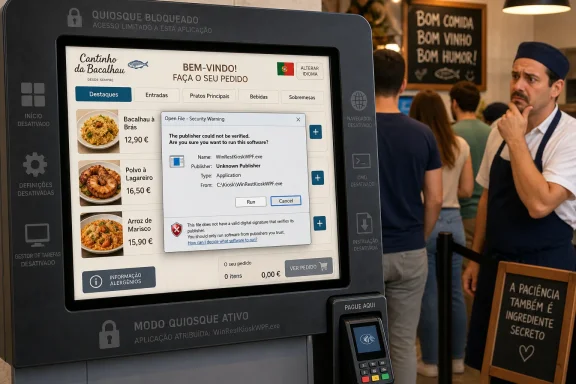
The Register’s sighting is almost too perfect: a restaurant self-service terminal, a point-of-sale kiosk application, and a Windows dialog wedged between the customer and lunch. The visible executable name, WinRestKioskWPF.exe, points toward a WinRest kiosk component, reportedly part of a Portuguese restaurant software suite. The failure shown is not exotic malware detection or a blue screen; it is the mundane “publisher could not be verified” class of warning that Windows has displayed in one form or another for years.That ordinariness is the point. Public kiosks do not usually fail because a single cosmic ray flips a bit in a touchscreen. They fail because they are general-purpose computers dressed up as appliances, and every layer beneath the app still has opinions: update policy, certificate trust, shell behavior, network availability, power state, driver recovery, and user interaction model.
A restaurant kiosk is a hostile environment in the physical sense, but it is also hostile in the product-design sense. Customers are impatient, staff are busy, terminals are often remotely managed, and the device has to be simultaneously open enough to take orders and locked down enough to stop the public from escaping into Windows. That tension is where the best kiosk deployments are made — and where the lazier ones come apart.
In this case, Windows did exactly what it is designed to do when it cannot establish a publisher identity. The problem is that Windows doing the “right” thing at the wrong layer can still be operationally wrong. A trust prompt that makes sense on a developer’s workstation is a service outage when it appears above a menu.
Code Signing Is Not Bureaucracy When the Screen Faces the Public
It is tempting to laugh at the unsigned executable and move on. Plenty of internal tools, regional business apps, and legacy line-of-business binaries still live without modern signing hygiene. In back offices, those sins often survive because the people using the software know whom to call, what to click, and which warning has always appeared since the last vendor update.A kiosk has no such social layer. The person in front of it is not an employee, not a trained operator, and not part of the trust relationship between vendor and customer. They see a Windows prompt, a file name, and a choice that should never have been theirs.
Microsoft’s own guidance around application control makes the security case plainly enough: signing allows Windows and administrators to verify that code has not been modified since signing and to associate that code with an accountable publisher identity. That identity is not decorative. It is what lets a policy say “this vendor’s kiosk app may run” rather than “anything with a familiar-looking file name may run.”
For administrators, the practical value is even more direct. A signed executable can be inventoried, allowed, blocked, replaced, and audited with far more confidence than an unsigned one. In Windows environments using App Control for Business, WDAC-style policies, Defender reputation checks, or basic certificate trust, unsigned code turns every update into an exception-handling exercise.
The real surprise is not that Windows objected. The surprise is that software presented as part of a commercial point-of-sale kiosk stack could plausibly reach a public terminal in a state where Windows had to ask the customer whether to trust it. In 2026, code signing for customer-facing retail infrastructure should be table stakes, not an optional polish pass.
Windows Security Prompts Are User Interface Debt
Security prompts are often described as protective barriers, but they are also user interface debt. Every prompt that asks a human to make a nuanced trust decision is a tiny admission that the system could not resolve the matter earlier. On a personal PC, that may be acceptable. On a kiosk, it is a design failure.The Windows warning in this incident is especially awkward because it offers the wrong affordance to the wrong person. A customer at a food kiosk cannot meaningfully validate a publisher, inspect a certificate chain, or decide whether
WinRestKioskWPF.exe belongs to the restaurant’s approved build. If the touchscreen permits input to the dialog, the customer might press Run; if it does not, the kiosk is simply dead. Neither outcome is good governance.This is where kiosk computing differs from ordinary desktop computing. Desktop Windows assumes a user who can respond to prompts, recover from interruptions, and make choices about software. Kiosk Windows must assume the opposite: the user should never see the operating system, never touch the shell, and never become part of the maintenance workflow.
That requires engineering discipline across the whole stack. The executable must be signed. The signing certificate must chain to a trusted authority or to a properly deployed enterprise trust store. The app must be launched in a controlled shell or assigned-access configuration. Update delivery must preserve signing and reputation. Monitoring must detect app launch failure before the first customer does.
The lesson is harsh but useful: a kiosk is not a PC with a full-screen app. It is an appliance built out of PC components, and appliances do not ask passersby to adjudicate software provenance before serving lunch.
WPF Is Not the Villain, But It Tells a Story
TheWPF suffix in the executable name naturally invites speculation. Windows Presentation Foundation is a mature Windows desktop UI framework, originally introduced as part of the .NET-era push to modernize Windows application interfaces. It is not cross-platform in the way a web app or Avalonia app might be, and it is not the fashionable choice for greenfield consumer interfaces. But for a Windows-only kiosk tied to local peripherals, payment terminals, receipt printers, and restaurant back-office systems, WPF is hardly absurd.In fact, WPF’s presence may be the least surprising thing about the whole episode. Many point-of-sale and kiosk systems are not redesigned every few years to satisfy developer conference fashion. They accrete. A vendor builds a Windows client, adds modules, ports a screen, integrates a peripheral SDK, and eventually the system becomes infrastructure. If it works, nobody wants to touch the parts that might break orders, tills, or tax reporting.
That is precisely why security and deployment hygiene matter so much. Mature Windows frameworks can be perfectly serviceable for locked-down environments, but the operational wrapper around them has to be modern. A WPF app can be signed. A WPF app can be deployed through a managed channel. A WPF app can run under Shell Launcher, assigned access alternatives, or a carefully controlled custom shell. The framework does not excuse the prompt.
The deeper issue is that many businesses still treat kiosk software as an application purchase rather than a lifecycle commitment. They ask whether the ordering flow works, whether the printer prints, whether the card reader settles, and whether the menu can be updated centrally. They do not always ask how the executable is signed, what happens when the certificate expires, how trust is pinned, or what Windows policy will do when the app is updated at 3 a.m.
WPF, in other words, is not the indigestion. It is the visible breadcrumb leading back to a familiar Windows estate: a specialized app, probably running on commodity hardware, integrated with peripherals, and expected to behave like an appliance even though it is sitting atop a full desktop operating system.
Microsoft Built Kiosk Features, But They Do Not Save Bad Packaging
Windows has kiosk tooling for a reason. Assigned Access can restrict a user to a single app experience, and Microsoft documents separate approaches for single-app kiosks, multi-app kiosk configurations, and shell replacement scenarios. For organizations that need a desktop application rather than a UWP or Edge-based experience, Shell Launcher can replace Explorer with a specified executable so the device behaves less like a normal PC.Those features are valuable, but they are not magic. They control the user environment; they do not retroactively make an untrusted binary trusted. If the app cannot launch cleanly because Windows, policy, SmartScreen, or the certificate store objects to it, the kiosk stack has already failed below the user-experience layer.
This distinction matters because many kiosk projects are scoped around lockdown rather than reliability. Teams focus on stopping customers from reaching the Start menu, opening Task Manager, invoking browser shortcuts, or finding a way to the desktop. Those are real requirements. But a kiosk that is perfectly locked down and cannot start its app is still a brick.
A resilient Windows kiosk needs two separate disciplines. The first is confinement: limiting what the public can do, what the app can access, and how the shell behaves. The second is continuity: ensuring the intended app starts, restarts, updates, rolls back, logs errors, and remains trusted after each change. The Portuguese kiosk incident is a continuity failure wearing a security prompt costume.
For IT departments, the takeaway is uncomfortable. You can deploy a Windows kiosk with all the right lockdown buzzwords and still be undone by a vendor update that arrives unsigned, mis-signed, newly signed with an untrusted certificate, or marked in a way that triggers reputation checks. Lockdown without supply-chain discipline is theater.
The Restaurant Customer Became the Change-Control Board
The funniest part of the screenshot is also the most damning: the customer is effectively invited into the deployment pipeline. If the dialog allows “Run,” then the person trying to order food becomes the last mile of application approval. If the dialog blocks input or the kiosk shell suppresses interaction incorrectly, the customer becomes the incident reporter.Neither model should survive contact with production. Retail technology has a habit of pushing enterprise-grade complexity into low-margin, high-turnover environments. The restaurant manager may know how to reboot the kiosk, but not how to diagnose certificate trust. The cashier may know which terminal is “the bad one,” but not whether the app package was replaced overnight. The vendor help desk may know the script, but not the exact Windows build, lockdown policy, or local trust store on the affected unit.
The result is a cascade of small costs. A customer moves to another kiosk. A staff member loses time. A line grows. A manager reboots a box that might simply relaunch the same warning. The vendor opens a ticket. The restaurant learns that a “software issue” is not meaningfully separate from a revenue issue.
This is why public-screen failures attract attention beyond their technical significance. A Windows warning on a restaurant kiosk is not a catastrophic outage, but it is publicly legible. Everyone understands that the machine has been asked to do one job and has instead shown the wrong screen.
For WindowsForum readers, there is also a familiar sting. Windows remains excellent at running the strange, peripheral-heavy, locally integrated business applications that keep the real world moving. That is why it is so common in kiosks and point-of-sale estates. But that strength comes with a burden: if you deploy full Windows, you inherit full Windows behavior unless you deliberately design it away.
The Vendor Promise Collides With the Trust Boundary
The Register noted that WinRest’s website describes its tools as “ultra-secure and affordable.” Marketing language always sounds different when a Windows trust prompt is on the screen. To be fair, one photographed kiosk does not prove the entire product line is insecure, nor does it tell us whether the issue came from the vendor, an integrator, a local configuration, an expired certificate, a botched update, or a one-off maintenance state.That uncertainty matters. A missing or unverifiable signature can have several causes. The executable may never have been signed. It may have been signed with a certificate that Windows does not trust. The certificate may have expired without timestamping preserving validity. The file may have been altered after signing. The kiosk may be running an old Windows image with stale roots or unusual policy. A download or deployment process may have attached metadata that triggered a warning.
But the customer-facing result is the same: Windows lacked enough trust context to proceed silently. In a private office, that would be a support annoyance. In a public restaurant, it is a failure of the trust boundary.
Vendors selling kiosk and POS software should assume that customers increasingly care about this boundary. Retail systems process payments, handle loyalty data, integrate with ordering platforms, and often sit on networks that touch back-office infrastructure. Even when the kiosk app itself is not the payment processor, it is part of the operational chain customers and regulators expect to be controlled.
That raises the bar for what “secure” should mean. It cannot just mean a login prompt for managers or encrypted communication to a back-end service. It has to include signed binaries, auditable updates, documented certificate handling, least-privilege runtime accounts, controlled device policy, and a tested recovery path when the app does not launch.
The cheapest kiosk software is not cheap if every update carries the risk of turning the ordering lane into a Windows support desk.
Windows 10’s Long Goodbye Makes These Incidents More Likely
The screenshot reportedly shows Windows 10, though The Register allowed that it might be Windows 8.x. Either way, the age of the platform is part of the story. Windows 10 has been the default home for enormous fleets of commercial devices, and many businesses have treated it as the stable base on which to sweat hardware until the screen, printer, or motherboard finally gives up.That strategy is understandable. Kiosks are capital equipment. They are bought in batches, mounted in furniture, wired into payment and network infrastructure, and certified against peripherals. A restaurant chain does not replace them because Microsoft wants a cleaner support matrix. It replaces them when the business case wins.
But aging Windows fleets accumulate risk. Support timelines tighten. Security baselines shift. Certificate and signing expectations evolve. Management tooling changes. Vendors prioritize newer builds. An app that launched quietly on an old image may suddenly hit a warning after an update, a rebuild, a policy change, or a certificate rotation.
Windows 10’s end-of-support pressure has also made kiosk estates more visible to IT leadership. Many organizations that postponed endpoint modernization are now discovering that their “PC fleet” includes devices nobody thinks of as PCs: menu boards, check-in terminals, badge printers, warehouse stations, payment-adjacent workstations, and unattended lobby screens. They may run Windows, but they are owned operationally by facilities, retail ops, or local branches rather than central IT.
That organizational split is dangerous. The team that buys the kiosk may not own Windows patching. The team that owns Windows patching may not own the application. The vendor that owns the application may not control the certificate trust store. The integrator that imaged the device may no longer be under contract. When the warning appears, everyone owns a slice of the problem and nobody owns the customer’s blocked order.
The Portuguese kiosk is therefore not just a bork. It is a reminder that Windows endpoint governance has to include the machines pretending not to be endpoints.
The Fix Is Boring, Which Is Why It Gets Skipped
There is no need to invent a grand new architecture to prevent this class of failure. The remedies are known, documented, and mostly unglamorous. That is precisely why they are so often deferred until a public screen embarrasses somebody.The vendor should sign the application and any companion binaries with a certificate that chains to a trust root appropriate for the deployment. The deployment process should preserve signatures and verify them before rollout. The customer or integrator should define application control policy around publisher identity, file attributes, and expected paths rather than informal “it runs on the golden image” assumptions.
The kiosk should be configured so the public never sees Windows dialogs, but that should be the second line of defense, not the first. Suppressing prompts while leaving the underlying trust failure unresolved merely converts a visible outage into a silent one. A better system fails closed, alerts operators, rolls back to the last trusted build if possible, and keeps enough telemetry for support to identify whether the issue is signing, policy, network, or application crash.
Certificate lifecycle management deserves special attention. Code-signing certificates expire. Vendors rotate identities. Build systems change. Timestamping can preserve trust for code signed while a certificate was valid, but only if it was implemented properly. If a kiosk estate depends on a signed app launching without intervention, certificate renewal is not a procurement chore; it is uptime engineering.
There is also a procurement lesson. Buyers of kiosk and POS systems should ask vendors how code is signed, how updates are validated, how rollback works, whether the app supports Windows kiosk deployment patterns, and what happens when Windows blocks execution. Those questions are not esoteric. They are the difference between an appliance and a desktop with a touchscreen.
The Security Warning Did Its Job, and That Is the Problem
It is easy to frame Windows as the villain here, because Windows is the thing visibly refusing to play along. But the operating system’s behavior is defensible. If an executable cannot be tied to a verified publisher, Windows should not silently bless it merely because the surrounding hardware has a menu on it.That is the paradox at the center of kiosk computing. The better Windows becomes at surfacing trust problems, the more obvious it becomes when kiosk deployments rely on avoiding those questions rather than answering them. Security prompts are supposed to interrupt risky behavior. On a public kiosk, they reveal that risk assessment was pushed too far downstream.
For administrators, the answer is not to disable every warning. That may make the lunch queue move, but it also teaches the platform to ignore one of the few signals that something has gone wrong in the software supply chain. The better answer is to make the expected application unquestionably trusted and to make unexpected application states invisible to customers but visible to operators.
This distinction matters in a world where restaurant technology is no longer just a cash register with a nicer screen. Kiosks connect to loyalty programs, inventory systems, payment flows, kitchen displays, delivery aggregators, analytics platforms, and remote management services. A trust failure in that chain should not be waved away as cosmetic.
The warning is embarrassing because it is public. But it is useful because it is specific. Windows is not saying “the kiosk is sad.” It is saying the publisher cannot be verified. That is a concrete failure that can be investigated, fixed, and prevented.
A Small Lunch-Rush Bork With Enterprise-Grade Lessons
The lesson from a Portuguese restaurant screen is not that Windows is unsuitable for kiosks or that WPF is a relic unfit for public use. The lesson is that the moment a Windows device becomes public infrastructure, ordinary endpoint shortcuts become customer-visible failures.A few points should survive the joke:
- A public kiosk should never ask a customer to approve, dismiss, or interpret a Windows security dialog.
- A commercial kiosk executable should be signed, timestamped, and distributed through a process that verifies trust before deployment.
- Windows lockdown features reduce user escape routes, but they do not replace application trust, update validation, or certificate lifecycle management.
- Aging Windows kiosk fleets need the same inventory, patching, and ownership discipline as laptops and desktops.
- Procurement teams should treat code-signing, rollback, monitoring, and kiosk-mode support as operational requirements, not vendor trivia.
References
- Primary source: The Register
Published: Wed, 01 Jul 2026 08:30:00 GMT
Portuguese restaurant kiosk software gives Windows indigestion
Can't verify the publisher's identity? Maybe stick a fried egg on it?www.theregister.com - Related coverage: techbloat.com
How to Allow App From Unknown Publisher to Run in Windows 10
×AIDiscover the way to a Faster PC - Chipps AI AssistantNew Update: Boost Your Device Performance Today with Chipps.Fix My... www.techbloat.com
- Official source: learn.microsoft.com
How to sign an app package using SignTool - Win32 apps | Microsoft Learn
Learn how to use SignTool to sign your Windows app packages so they can be deployed.learn.microsoft.com - Related coverage: stackoverflow.com
digital certificate - Windows report "Unknown publisher" of signed application - Stack Overflow
Windows 10 started reporting my application as "Unknown publisher" when I try to run it after a download. 
However, after accepting the installation, it recognizes my company as a publisher:
Thestackoverflow.com
- Related coverage: isunshare.com
How to Unblock a Publisher in Windows 10 – Easy Fixes
Learn how to unblock a publisher in Windows 10. Fix the This publisher has been blocked error using file properties, CMD, certificates, or SmartScreen.www.isunshare.com - Related coverage: passcue.com
Disable "publisher could not be verified" or "unknown publisher" in Windows 10
Many users have asked how to remove thewww.passcue.com
- Related coverage: howtogeek.com
How to Unblock a File from Windows' "Publisher Could Not Be Verified" Warning
The Security Warning dialog box in Windows displays when you run or open a file that Microsoft doesn't recognize as a trusted file. www.howtogeek.com
- Related coverage: sslinsights.com
Unknown Publisher Security Warning in Windows 10: How to Fix It?
Fix the "Unknown Publisher" security warning that appears when installing applications in Windows 10 with these steps.sslinsights.com - Related coverage: positioniseverything.net
Solved: Windows has Blocked this Software (Unknown Publisher
Fix Windows has blocked this software (Unknown Publisher) safely: unblock Mark of the Web, adjust Windows Security, and troubleshoot SmartScreen blocks www.positioniseverything.net