

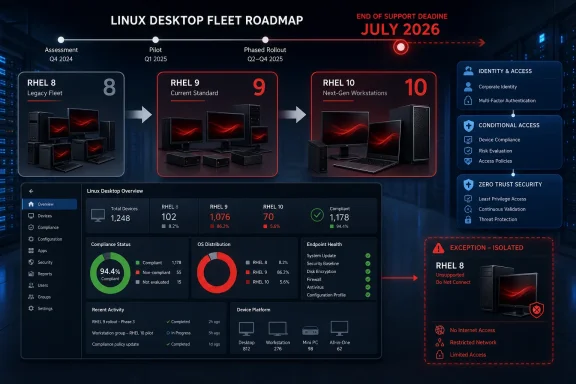
Linux endpoint teams should move most Intune-managed RHEL 8 desktops to RHEL 9, reserve RHEL 10 for hardware and workloads already certified for it, and complete enrollment, compliance, identity, and Conditional Access validation before Microsoft ends Intune support for RHEL 8 in July 2026. The deadline is not merely an operating-system maintenance event. It is the point at which organizations can continue running a Red Hat-supported platform while losing Microsoft support for the management and access-control workflow layered on top of it.
Microsoft’s What’s new in Intune documentation identifies RHEL 9 LTS and RHEL 10 LTS as supported targets and states that RHEL 8 LTS support ends in July 2026. That establishes the practical answer: RHEL 9 by default, RHEL 10 by qualification, and a documented exception only when neither migration path is ready.
RHEL 9 is generally the lower-risk destination for established fleets because it is more likely to align with existing hardware, applications, drivers, and operational tooling. RHEL 10 is appropriate where new hardware, a clean-build workload, or a fully tested dependency set supports the newer release. Any RHEL 8 system that remains after the cutoff should have a named owner, limited access, compensating controls, and a funded exit date.
The first action is to identify every Intune-managed endpoint still running RHEL 8. Administrators should use the organization’s available Intune reporting and export capabilities to build an inventory of managed Linux devices and distinguish RHEL 8 systems from endpoints already running supported releases.
This is a suggested inventory workflow, not a claim that every Intune tenant exposes the same columns, filters, or navigation path. The exact administrative interface can change, and organizations may also depend on Microsoft Graph, exported reports, configuration-management tools, or internal asset systems.
Reconcile the resulting list with:
Each RHEL 8 endpoint or endpoint class should have:
The inventory should also classify systems by access dependency. A locally used development workstation may not present the same immediate operational risk as an endpoint whose user depends throughout the working day on device compliance and device-based Conditional Access.
Red Hat lifecycle coverage concerns the operating system. Microsoft’s July 2026 cutoff concerns RHEL 8 as a supported Intune platform. Extended Red Hat coverage can therefore reduce operating-system lifecycle risk without extending Microsoft’s support for Intune on that release.
This distinction should appear explicitly in architecture records, risk acceptances, migration reports, and executive summaries. A statement that a device is “still supported” is incomplete unless it identifies the product, vendor, version, and support relationship being discussed.
A RHEL 8 endpoint may not stop functioning at the moment the Intune support window closes. The supplied facts do not establish exactly how existing devices, device records, client software, compliance evaluations, or access decisions will behave after the cutoff. Teams should not predict a specific failure sequence.
The supported conclusion is narrower and still operationally important: after July 2026, an organization continuing to use Intune on RHEL 8 will be relying on a platform Microsoft no longer lists as supported. Future client changes, enrollment needs, identity changes, compliance behavior, or Conditional Access dependencies could then become operational risks without a supported RHEL 8 path from Microsoft.
That is not the same as saying those failures are guaranteed. It means the organization should not build its access architecture around unverified post-cutoff behavior.
WindowsForum’s reporting on Windows 10 lifecycle confusion has emphasized the same narrow lesson: a later date for one edition or dependency does not extend every product and service attached to the endpoint.
This matrix keeps the program focused on three outcomes. RHEL 9 is the fleet default when its certification position is strongest. RHEL 10 is selected when the endpoint is genuinely ready for it. An exception is a controlled temporary state, not a third permanent platform strategy.
That does not make RHEL 9 automatic or risk-free. Teams must still validate:
Standardizing most of the fleet also reduces operational branching. Packaging, recovery instructions, service-desk procedures, compliance troubleshooting, endpoint documentation, and user communications all become more difficult when teams maintain multiple destination releases without a specific business need.
The objective is not to prevent RHEL 10 deployments. It is to avoid making RHEL 10 the default merely because it is newer.
The clearest candidates are:
The reverse is also possible. An older endpoint may depend on proprietary drivers or specialist equipment that makes RHEL 10 qualification expensive or impractical. In that case, RHEL 9 may resolve the Intune support issue with less disruption.
Successful installation is not sufficient qualification. A device can boot, connect to the network, and launch its primary application while still failing the management, identity, compliance, or access requirements that make it usable in the organization.
Approval for RHEL 10 should therefore identify the exact tested endpoint class, including its hardware, applications, drivers, security agents, identity workflow, Intune enrollment, compliance-policy assignment, and protected-resource access.
An in-place transition can preserve local configuration and reduce user-state restoration. It can also carry forward:
The pilot must reproduce the deployment method planned for production. If most RHEL 8 endpoints will receive an in-place transition to RHEL 9, the pilot must test that path. If replacement systems will receive clean RHEL 10 builds, those images require separate enrollment, compliance, and access validation.
No universal operating-system command sequence is appropriate for every RHEL 8 endpoint. Repository configuration, installed products, encryption, storage layout, third-party packages, and vendor requirements can all affect the correct transition procedure. The migration program should use Red Hat and relevant application-vendor guidance for the actual operating-system work.
The supplied facts do not establish every screen, status display, troubleshooting view, or remediation feature that might appear after enrollment. Those details should not be made acceptance criteria unless the organization verifies them against current Microsoft documentation and its own tenant.
The migration test should instead focus on observable administrative and access outcomes:
Microsoft’s documentation states that Ubuntu on WSL2 is not a supported Linux enrollment scenario. A WSL2 test environment therefore cannot substitute for testing the organization’s RHEL endpoint design on supported physical or virtual RHEL systems.
The negative test is one of the most important items. Proving that a user can sign in does not prove that device-based enforcement is operating. A pilot account may be excluded, a resource may sit outside the intended policy, or a stale device record may produce misleading results. The negative test demonstrates that the control fails safely as well as succeeds correctly.
Include at least one difficult endpoint class early in the pilot. Testing only the newest and simplest hardware postpones discovery of the real blockers until rollout.
RHEL 9 and RHEL 10 may require separate pilots because they serve different purposes:
User experience should also be captured. Enrollment delays, repeated authentication, unclear support handoffs, or inconsistent results can create substantial service-desk demand even when the endpoint eventually reaches a compliant state. Record these observations as operational findings without presenting them as predicted Intune behavior after the cutoff.
Each exception should include:
Extended RHEL 8 coverage can be part of this temporary strategy, but it cannot be described as restoring Microsoft support for Intune. The two support relationships remain separate.
The organization must also decide whether normal access should continue from exception devices. Depending on the workload and risk tolerance, the defensible response may be restricted access, a different controlled access path, endpoint replacement, workload relocation, or retirement.
The verified Microsoft notice does not define every future post-cutoff failure mode, so the exception should not be justified by claims that a particular failure will or will not occur. It should be justified by the established fact that RHEL 8 will no longer be a supported Intune target.
The complete workflow requires several owners:
A stronger report shows:
Do not close a migration ticket because the operating system booted or because an enrollment attempt appeared to complete. Close it only when the acceptance record proves the correct RHEL version, Intune device record, compliance-policy assignment, compliant state, protected-resource access, and negative Conditional Access test.
Inventory every RHEL 8 endpoint, assign its RHEL 9, RHEL 10, or exception path, collect the required evidence, and complete the approved transition before Microsoft’s Intune support ends in July 2026.
Microsoft’s What’s new in Intune documentation identifies RHEL 9 LTS and RHEL 10 LTS as supported targets and states that RHEL 8 LTS support ends in July 2026. That establishes the practical answer: RHEL 9 by default, RHEL 10 by qualification, and a documented exception only when neither migration path is ready.
RHEL 9 is generally the lower-risk destination for established fleets because it is more likely to align with existing hardware, applications, drivers, and operational tooling. RHEL 10 is appropriate where new hardware, a clean-build workload, or a fully tested dependency set supports the newer release. Any RHEL 8 system that remains after the cutoff should have a named owner, limited access, compensating controls, and a funded exit date.
 Start With an Endpoint Inventory, Not an Upgrade Command
The first action is to identify every Intune-managed endpoint still running RHEL 8. Administrators should use the organization’s available Intune reporting and export capabilities to build an inventory of managed Linux devices and distinguish RHEL 8 systems from endpoints already running supported releases.This is a suggested inventory workflow, not a claim that every Intune tenant exposes the same columns, filters, or navigation path. The exact administrative interface can change, and organizations may also depend on Microsoft Graph, exported reports, configuration-management tools, or internal asset systems.
Reconcile the resulting list with:
- Configuration-management and asset databases
- Procurement and hardware records
- Endpoint security consoles
- Linux subscription and support records
- Identity and access-management records
- Application-owner inventories
- Service-desk and endpoint-recovery records
Each RHEL 8 endpoint or endpoint class should have:
- A business and technical owner
- A documented business function
- Its hardware model and peripheral dependencies
- Its required applications and vendor certifications
- Kernel-facing drivers and security agents
- Its identity and authentication path
- Its compliance-policy requirements
- The protected resources it must access
- A proposed destination release
- A proposed deployment method
- A migration date or approved exception date
The inventory should also classify systems by access dependency. A locally used development workstation may not present the same immediate operational risk as an endpoint whose user depends throughout the working day on device compliance and device-based Conditional Access.
The Two Support Boundaries Must Be Separated
Red Hat and Microsoft control different parts of the endpoint’s support position.Red Hat lifecycle coverage concerns the operating system. Microsoft’s July 2026 cutoff concerns RHEL 8 as a supported Intune platform. Extended Red Hat coverage can therefore reduce operating-system lifecycle risk without extending Microsoft’s support for Intune on that release.
This distinction should appear explicitly in architecture records, risk acceptances, migration reports, and executive summaries. A statement that a device is “still supported” is incomplete unless it identifies the product, vendor, version, and support relationship being discussed.
A RHEL 8 endpoint may not stop functioning at the moment the Intune support window closes. The supplied facts do not establish exactly how existing devices, device records, client software, compliance evaluations, or access decisions will behave after the cutoff. Teams should not predict a specific failure sequence.
The supported conclusion is narrower and still operationally important: after July 2026, an organization continuing to use Intune on RHEL 8 will be relying on a platform Microsoft no longer lists as supported. Future client changes, enrollment needs, identity changes, compliance behavior, or Conditional Access dependencies could then become operational risks without a supported RHEL 8 path from Microsoft.
That is not the same as saying those failures are guaranteed. It means the organization should not build its access architecture around unverified post-cutoff behavior.
WindowsForum’s reporting on Windows 10 lifecycle confusion has emphasized the same narrow lesson: a later date for one edition or dependency does not extend every product and service attached to the endpoint.
Use This Decision Matrix
The destination release should be selected from evidence about the complete endpoint, not from a general preference for the newest or most familiar version.| Endpoint condition | Decision | Required evidence | Operational treatment |
|---|---|---|---|
| Current hardware, applications, drivers, security tools, and identity components have their strongest certification or validation on RHEL 9 | Move to RHEL 9 | Application-owner approval, hardware and peripheral validation, driver support, security-agent support, and successful Intune acceptance testing | Treat RHEL 9 as the standard fleet path |
| New hardware or a clean-build workload is certified for RHEL 10, and all required dependencies have passed validation | Deploy RHEL 10 | Hardware certification, application and driver validation, security-tool support, identity testing, and successful Intune acceptance testing | Use RHEL 10 for the qualified endpoint class rather than imposing it across the fleet |
| Neither RHEL 9 nor RHEL 10 is ready before the July 2026 cutoff | Create a temporary RHEL 8 exception | Named business owner, documented blocker, Red Hat support position, acknowledgment of the Intune support boundary, and a funded remediation plan | Limit access, apply compensating controls, monitor the device, and assign a fixed exit date |
| Existing endpoint is near replacement and would require substantial work to upgrade | Evaluate hardware replacement | Replacement timing, workload certification, data-migration plan, and validated destination image | Prefer a qualified clean build when it removes both platform and hardware blockers |
| Endpoint is inconsistently configured or carries unsupported packages and undocumented customizations | Evaluate a clean build | User-data plan, application packaging, recovery plan, and clean-image acceptance results | Avoid carrying unmanaged configuration into the supported destination |
| Specialist hardware or a proprietary application blocks both supported releases | Escalate as a business-risk decision | Vendor response, replacement alternatives, access requirements, compensating controls, cost, and exit date | Do not describe the device as fully remediated merely because Red Hat coverage remains available |
RHEL 9 Is the Practical Fleet Default
For most established RHEL 8 desktop fleets, RHEL 9 should be the standard destination. Microsoft lists it as a supported RHEL target, and it is likely to require less simultaneous change than a direct transition to RHEL 10.That does not make RHEL 9 automatic or risk-free. Teams must still validate:
- Business applications
- Proprietary packages
- Endpoint security agents
- Identity integrations
- Smart-card components
- Graphics and display stacks
- Kernel-facing software
- Specialist peripherals
- Local repositories and packaging
- Backup, recovery, and encryption procedures
Standardizing most of the fleet also reduces operational branching. Packaging, recovery instructions, service-desk procedures, compliance troubleshooting, endpoint documentation, and user communications all become more difficult when teams maintain multiple destination releases without a specific business need.
The objective is not to prevent RHEL 10 deployments. It is to avoid making RHEL 10 the default merely because it is newer.
RHEL 10 Requires Positive Qualification
RHEL 10 is also a supported Intune target and should be used deliberately where the surrounding endpoint is ready.The clearest candidates are:
- New hardware deployments
- Scheduled workstation replacements
- Clean-build workloads
- Endpoint classes whose applications are certified for RHEL 10
- Systems whose required drivers and security tools have passed testing
- Modern workloads that do not depend on legacy peripherals or narrow vendor matrices
The reverse is also possible. An older endpoint may depend on proprietary drivers or specialist equipment that makes RHEL 10 qualification expensive or impractical. In that case, RHEL 9 may resolve the Intune support issue with less disruption.
Successful installation is not sufficient qualification. A device can boot, connect to the network, and launch its primary application while still failing the management, identity, compliance, or access requirements that make it usable in the organization.
Approval for RHEL 10 should therefore identify the exact tested endpoint class, including its hardware, applications, drivers, security agents, identity workflow, Intune enrollment, compliance-policy assignment, and protected-resource access.
Choose the Release and Deployment Method Separately
Selecting RHEL 9 does not automatically require an in-place upgrade, and selecting RHEL 10 does not automatically require replacement hardware. Destination release and deployment method are separate decisions.An in-place transition can preserve local configuration and reduce user-state restoration. It can also carry forward:
- Obsolete packages
- Old repositories
- Unsupported third-party components
- Undocumented exceptions
- Inconsistent configuration
- Years of local administrative changes
The pilot must reproduce the deployment method planned for production. If most RHEL 8 endpoints will receive an in-place transition to RHEL 9, the pilot must test that path. If replacement systems will receive clean RHEL 10 builds, those images require separate enrollment, compliance, and access validation.
No universal operating-system command sequence is appropriate for every RHEL 8 endpoint. Repository configuration, installed products, encryption, storage layout, third-party packages, and vendor requirements can all affect the correct transition procedure. The migration program should use Red Hat and relevant application-vendor guidance for the actual operating-system work.
Validate Intune as an End-to-End Workflow
Microsoft’s Linux enrollment guidance establishes the basic enrollment relationship: the required software is installed, the user opens the Microsoft Intune app, signs in with a work or school account, proceeds through enrollment, and waits for enrollment to complete.The supplied facts do not establish every screen, status display, troubleshooting view, or remediation feature that might appear after enrollment. Those details should not be made acceptance criteria unless the organization verifies them against current Microsoft documentation and its own tenant.
The migration test should instead focus on observable administrative and access outcomes:
- The intended RHEL image or upgraded system starts in a supported configuration.
- The user completes the organization’s approved Intune enrollment process.
- The expected device record is created or updated.
- The recorded operating-system version is correct.
- The intended Linux compliance policy is assigned.
- The endpoint reaches the required compliance state.
- A production-representative protected resource can be accessed under the intended device-based Conditional Access policy.
- A controlled negative test proves that access is denied or handled as designed when the required device condition is absent.
Microsoft’s documentation states that Ubuntu on WSL2 is not a supported Linux enrollment scenario. A WSL2 test environment therefore cannot substitute for testing the organization’s RHEL endpoint design on supported physical or virtual RHEL systems.
Acceptance Checklist and Required Evidence
Every pilot endpoint class should pass the following checklist before broad deployment. The program should retain the evidence artifacts rather than relying on a meeting note that says the test “worked.”Device and operating-system evidence
- [ ] An Intune device record exists for the test endpoint.
- [ ] The device record is associated with the intended test device and user context.
- [ ] The recorded operating-system information shows the correct RHEL version.
- [ ] The endpoint’s hardware model and deployment method are documented.
- [ ] Required applications, drivers, peripherals, identity components, and security agents have passed their assigned tests.
Compliance evidence
- [ ] The intended Linux compliance policy is assigned to the test endpoint.
- [ ] The endpoint reaches the expected compliant state.
- [ ] The test was conducted with production-representative targeting rather than an unrestricted laboratory account.
- [ ] Any temporary pilot exclusions are documented and removed before final acceptance.
Conditional Access evidence
- [ ] The tester successfully accesses a representative resource protected by device-based Conditional Access.
- [ ] The test confirms that the relevant policy was applied rather than bypassed.
- [ ] A documented negative test demonstrates the expected result when compliance is absent, unresolved, or otherwise does not meet the required condition.
- [ ] Identity and application owners approve the result for their part of the workflow.
Operational evidence
- [ ] The support team has a recovery or rollback procedure.
- [ ] Monitoring and security workflows recognize the migrated endpoint as expected.
- [ ] Duplicate or stale device records created during testing have been addressed.
- [ ] User communications and service-desk instructions match the approved deployment.
- [ ] The endpoint class has a named deployment owner and rollout window.
The negative test is one of the most important items. Proving that a user can sign in does not prove that device-based enforcement is operating. A pilot account may be excluded, a resource may sit outside the intended policy, or a stale device record may produce misleading results. The negative test demonstrates that the control fails safely as well as succeeds correctly.
Pilot Production Conditions, Not a Simplified Lab
A credible pilot includes representative hardware, users, applications, drivers, identity conditions, compliance policies, and access targets. A spare workstation tested with a lightly governed account cannot prove that a specialist engineering system will work under production Conditional Access rules.Include at least one difficult endpoint class early in the pilot. Testing only the newest and simplest hardware postpones discovery of the real blockers until rollout.
RHEL 9 and RHEL 10 may require separate pilots because they serve different purposes:
- The RHEL 9 pilot proves the standard path for the installed fleet.
- The RHEL 10 pilot proves selected clean-build workloads, replacement hardware, and the next endpoint standard.
- The exception process proves that systems unable to move are controlled, monitored, and scheduled for removal.
User experience should also be captured. Enrollment delays, repeated authentication, unclear support handoffs, or inconsistent results can create substantial service-desk demand even when the endpoint eventually reaches a compliant state. Record these observations as operational findings without presenting them as predicted Intune behavior after the cutoff.
Control Every RHEL 8 Exception
Some specialist endpoints may not be ready for RHEL 9 or RHEL 10 by July 2026. Those systems should enter a formal exception process before the deadline, not after a migration attempt fails.Each exception should include:
| Control field | Required content |
|---|---|
| Business owner | Person accountable for accepting the business impact and funding remediation |
| Technical owner | Team responsible for maintaining and monitoring the endpoint |
| Blocker | Specific application, driver, hardware, vendor, or scheduling issue preventing migration |
| Red Hat position | Applicable operating-system lifecycle and support arrangement |
| Microsoft position | Acknowledgment that RHEL 8 is outside Microsoft’s supported Intune targets after July 2026 |
| Access limitation | Resources the endpoint may access and any access that must be removed |
| Compensating controls | Segmentation, monitoring, application isolation, restricted accounts, or other approved controls |
| Validation scope | What remains tested and what can no longer be treated as vendor-supported |
| Exit plan | Migration, replacement, workload relocation, or retirement action |
| Exit date | Fixed review and removal date rather than an indefinite “temporary” status |
The organization must also decide whether normal access should continue from exception devices. Depending on the workload and risk tolerance, the defensible response may be restricted access, a different controlled access path, endpoint replacement, workload relocation, or retirement.
The verified Microsoft notice does not define every future post-cutoff failure mode, so the exception should not be justified by claims that a particular failure will or will not occur. It should be justified by the established fact that RHEL 8 will no longer be a supported Intune target.
Assign Ownership Across Linux, Intune, and Identity Teams
This migration can easily fall between organizational boundaries. Linux operations may treat Intune as a Microsoft responsibility, while endpoint administrators may treat the operating-system transition as a Linux-only project.The complete workflow requires several owners:
- Linux engineering: Platform readiness, packages, drivers, repositories, deployment method, recovery, and operating-system transition
- Intune administration: Inventory data, enrollment design, device records, policy targeting, and compliance verification
- Identity administration: Microsoft Entra configuration, account targeting, Conditional Access, sign-in analysis, and negative testing
- Application owners: Workload certification and business-process validation
- Security operations: Security-agent support, monitoring, exception controls, and risk review
- Desktop engineering and procurement: Hardware replacement, standard images, peripherals, and deployment scheduling
- Service desk: User instructions, escalation paths, and recovery support
- Migration owner: Cross-team schedule, acceptance evidence, exception reporting, and final accountability
A stronger report shows:
- Endpoint classes approved for RHEL 9
- Endpoint classes approved for RHEL 10
- Systems awaiting application or driver certification
- Systems scheduled for hardware replacement
- Failed or incomplete acceptance criteria
- RHEL 8 exceptions and their exit dates
- Owners and deadlines for every unresolved blocker
Frequently Asked Questions
When does Microsoft end Intune support for RHEL 8?
Microsoft states that Intune support for RHEL 8 LTS ends in July 2026. The supplied facts do not establish a specific day in July, so migration planning should use July 2026 rather than an unsupported exact date.Should every RHEL 8 endpoint move to RHEL 10?
No. RHEL 9 should be the default when current hardware, applications, drivers, and security tooling have their strongest certification or validation there. RHEL 10 should be used when new hardware or a clean-build workload is certified and the complete Intune, compliance, identity, and access workflow has passed testing.Can an organization remain on RHEL 8 if Red Hat coverage is available?
Red Hat coverage may address the operating-system lifecycle, but it does not extend Microsoft’s support for RHEL 8 as an Intune target. Any system remaining after July 2026 should be treated as an Intune support exception with a named owner, limited access, compensating controls, and a fixed exit date.Will existing RHEL 8 devices remain enrolled after the cutoff?
The supplied facts do not establish that behavior. Organizations should not base their plans on an assumption that enrollment, device records, compliance evaluation, client behavior, or Conditional Access integration will continue unchanged.Does the cutoff mean every RHEL 8 device will immediately fail?
No immediate universal failure is established. The supported conclusion is that RHEL 8 will no longer be a Microsoft-supported Intune target after the cutoff. Continuing to depend on it creates operational and support risk even if some functions appear to continue.Is successful Intune enrollment enough to approve a migration?
No. Acceptance requires the correct device record and RHEL version, assignment of the intended compliance policy, the expected compliant state, successful access to a resource protected by device-based Conditional Access, and a documented negative test proving that enforcement behaves as designed.Can WSL2 be used to validate the RHEL endpoint design?
No. Microsoft states that Ubuntu on WSL2 is not a supported Linux enrollment scenario. Test the intended RHEL release and deployment method on representative supported physical or virtual endpoints.Is an in-place upgrade preferable to a clean build?
Not universally. An in-place transition may preserve configuration but can also carry obsolete packages and undocumented exceptions forward. A clean build provides a controlled baseline but requires data migration, application packaging, and user-state planning. Test the method intended for production.What should happen if a specialist system cannot migrate in time?
Create a formal exception before the cutoff. Identify the business and technical owners, document the blocker and separate vendor support positions, restrict access, apply compensating controls, fund the exit plan, and set a fixed exit date.Act Before the Support Boundary Arrives
The program now has three controlled paths: move the established fleet to RHEL 9 where certification is strongest, deploy RHEL 10 on qualified new hardware and clean-build workloads, and isolate any remaining RHEL 8 systems under time-limited exceptions.Do not close a migration ticket because the operating system booted or because an enrollment attempt appeared to complete. Close it only when the acceptance record proves the correct RHEL version, Intune device record, compliance-policy assignment, compliant state, protected-resource access, and negative Conditional Access test.
Inventory every RHEL 8 endpoint, assign its RHEL 9, RHEL 10, or exception path, collect the required evidence, and complete the approved transition before Microsoft’s Intune support ends in July 2026.
References
- Primary source: learn.microsoft.com
What's new in Microsoft Intune - Microsoft Intune | Microsoft Learn
Find out what's new in Microsoft Intune.learn.microsoft.com - Independent coverage: access.redhat.com
Secure Boot Certificate Changes in 2026: Guidance for RHEL Environments - Red Hat Customer Portal
This article clarifies the upcoming expiration of Microsoft's 2011 Secure Boot signing certificate, scheduled for June 27, 2026, and its implications for Red Hat Enterprise Linux (RHEL) systems. It explains that existing systems using the current shim and enrolled certificates will remain...access.redhat.com - Primary source: WindowsForum
Windows 10 IoT Enterprise LTSC 2021: Support Through 2032 Explained | Windows Forum
Windows 10 did not secretly keep the entire world on life support until 2032 — but one very specific, specialist edition of the operating system does have a...windowsforum.com
