

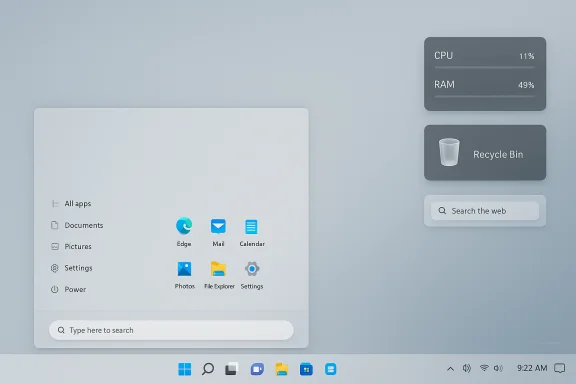
I spent a day and a half turning a stock Windows 11 desktop into a minimalist, functional work of art — and the experience shows why ricing Windows is no longer the niche hobby it once was, but a practical way to reclaim time, attention, and joy from an OS that increasingly prioritizes uniformity over personal expression.
Background
Ricing — the practice of heavily customizing a desktop’s appearance and behavior — has roots in Linux window-manager culture but has steadily migrated to Windows thanks to a flourishing ecosystem of tools, skins, and community knowledge. The MakeUseOf walkthrough that inspired this project describes a journey from “functional but boring” to a refined, minimal workspace built from Rainmeter skins, Windhawk mods, patched themes, and a handful of small utilities. That piece serves as a perfect microcase of the larger trend: Windows users want both polish and control, and the community now provides both.This article explains, step-by-step, how those changes work, what tools the community relies on, and — critically — the trade-offs you accept when you patch system files or run code injectors. It’s written for Windows enthusiasts who want a polished, modern setup that behaves smarter and looks unique, without sacrificing too much stability or security.
Overview: What the author built and why it matters
The MakeUseOf author aimed for a cleaner, distraction-free desktop while keeping Windows’ underlying functionality. The completed setup includes:- A cohesive icon pack replacing disparate system icons.
- A slim, floating-looking taskbar with grouped apps and custom folder shortcuts.
- A macOS-inspired Start menu variant using a DELTA theme pack and Windhawk mods.
- System monitors and quick-search bars via Rainmeter skins.
- Restored Windows 10 context menu behavior and rounded window edges.
- AutoHotkey v2 scripts for keyboard-driven app launching and workflow shortcuts.
The building blocks: tools and what they actually do
Rainmeter — the desktop canvas
Rainmeter is the de facto toolkit for adding live widgets and dashboards to Windows. It’s open-source, lightweight, and designed to display everything from CPU/RAM meters to fully interactive launchers and search bars. The author used Rainmeter skins such as Lines 2.0 (system monitors), Just A Bin (a hover-aware Recycle Bin), and CyberSearch (quick web searches), which together handled the visual dashboard and system overlays. Rainmeter’s official project page describes both the app’s flexibility and active community skin ecosystem. Why Rainmeter matters:- It runs on Windows 7 through Windows 11 and uses very little CPU when configured correctly.
- Skins are modular; you can mix-and-match small elements rather than install a monolithic suite.
- It’s ideal for low-level customization that doesn’t touch protected system files.
- There's a learning curve when creating or heavily modifying skins.
- Misconfigured scripts or visually heavy skins can increase startup time or memory usage.
Windhawk — modular mods for the taskbar and Start menu
Windhawk is a relatively new, community-driven mod framework that installs as a small engine and lets you enable granular "mods" (taskbar styler, Start menu styler, icon sizing, etc.. Instead of replacing an entire shell, Windhawk injects focused changes, so you can pick only the tweaks you need. The project is hosted on GitHub and has grown into a customization marketplace for light, reversible tweaks. Typical Windhawk advantages:- Modular changes are easier to uninstall than monolithic shells.
- Active community mod libraries provide presets you can import.
- It restores features many power users miss in Windows 11 (resizable/taskbar height, vertical placement, classic Start behaviors).
- Windhawk uses global injection/hooking techniques; that is by design but means it modifies runtime behavior of system processes. While well-designed, those methods are inherently more sensitive to Windows feature updates and to some anti-cheat or enterprise policies.
UltraUXThemePatcher — enabling third-party themes (and why to be careful)
To load the DELTA visual pack the author used, Windows’ theme system had to be patched. UltraUXThemePatcher is the most widely used tool for that job: it modifies protected system files so Windows accepts unsigned visual styles from third parties. The project maintains an official site with downloads and documentation. What UltraUXThemePatcher provides:- The ability to apply comprehensive visual transformations (window chrome, taskbar skinning, explorer styling).
- A route to use premium community themes that change icons, buttons, and system layouts in one package.
- UltraUXThemePatcher rewrites system DLLs — this is a deeper change than a simple app install. Community threads demonstrate both successful long-term use and occasional issues (broken UI elements, the need to reapply patches after Windows updates). Back up your system first.
- Some antivirus engines have flagged theme-patching binaries in the past (often heuristics). Always download from the official site and verify hashes where available.
Mica For Everyone and tacky-borders — modern window finishes
To get consistent Mica and rounded-corner behavior across Win32 apps, the article uses Mica For Everyone, an actively maintained project that asks the Windows compositor to apply Mica/Acrylic to window frames and titlebars. It works via documented Windows APIs (DwmSetWindowAttribute) and is available in the Microsoft Store and on GitHub. Why use it:- Makes legacy apps visually match Windows 11’s Fluent Design.
- Provides configuration for per-app rules and real-time changes.
- It’s an overlay that depends on Windows internals; while the project tries to use supported APIs, some features (like “extend frame into client area”) can behave inconsistently for apps that draw custom title bars. Expect to tweak rules for edge cases.
StartAllBack / Start11 / StartAllBack-style Start menus
If your goal is a more familiar Start menu and more taskbar control, tools like StartAllBack (and Stardock’s Start11/WindowBlinds family) are the mainstream paid options. StartAllBack focuses on restoring Windows 10/7-like Start and taskbar behaviors while offering modern polish; it’s actively developed and widely used. Documentation and reviews show how it restores functions like drag-and-drop, icon sizes, and ribbon-like Explorer views; community threads also document occasional breakage after Windows cumulative updates. Why users choose paid Start tools:- Polished, integrated experience with a small footprint.
- Easier one-click restore to default settings compared with manual patching.
- These apps run at a privileged level and can be affected by Windows updates, so keep a backup and expect occasional updates from the vendor.
AutoHotkey v2 — automation that ties it all together
AutoHotkey (AHK) is the scripting glue that makes custom launchers, hotkeys, and window-management macros possible. The author used AutoHotkey v2 scripts for an app launcher, quick folder access, volume control, and mouse-centering — small productivity wins that compound over months of daily use. AutoHotkey v2 is the actively developed branch with new syntax and improved features; documentation and community toolchains support v2 widely. Pros:- Extremely flexible; almost any workflow can be automated.
- Scripts are portable and easy to revise.
- Game anti-cheat systems and enterprise policies can flag input-simulation or injection-style scripts; avoid running macros on gaming or locked-down production systems without testing and appropriate privileges.
How the setup was assembled (high-level walkthrough)
- Prepare: create a system restore point and full image backup. This is non-negotiable for any modding that touches system components.
- Theme patching: apply UltraUXThemePatcher to allow third-party theming (only after backups).
- Install Windhawk and add specific mods (Start Menu Styler, Taskbar Styler, Taskbar Height & Icon Size).
- Apply the visual pack (the author used DELTA by niivu). Patch Windows theme files, then manually replace taskbar icons and pin custom folder shortcuts via Explorer shortcuts to explorer.exe with a folder target.
- Install Rainmeter and load skins for system monitoring and quick search (Lines 2.0, Just A Bin, CyberSearch). Tweak skin opacity and hover behaviors.
- Add Mica For Everyone and optional border/radius utilities (tacky-borders) to unify window chrome.
- Create AutoHotkey v2 scripts for automation and shortcut hotkeys.
- Fine-tune Windows features: disable web search in the Start/search bar, enable Storage Sense (if desired), and set clipboard history. The author also re-enabled the Windows 10 context menu using StartAllBack or a registry approach for convenience.
The payoff: visual coherence and functional gains
The author’s setup delivers a few clear, measurable improvements:- Faster access to high-use apps through a curated taskbar and hotkeys (AutoHotkey).
- At-a-glance system telemetry without intrusive panels (Rainmeter).
- Visual consistency across classic Win32 and modern UWP apps (Mica For Everyone, tacky-borders).
- A Start menu and taskbar that match the user’s mental model and workflow (Windhawk + StartAllBack).
Risks, fragility, and maintenance
Customization at this depth is not “install and forget.” Expect the following realities:- Compatibility churn: Windows feature updates sometimes change Explorer internals or security measures and can break mods that hook into system processes. Community forums recommend delaying major updates for 7–14 days to let maintainers adapt.
- System instability: Patching system DLLs (UltraUXThemePatcher) can produce strange edge cases in Explorer or cause certain apps to misrender. Keep a rollback plan and know how to restore the original theme files.
- Security and AV heuristics: Code-injection frameworks and unsigned tools sometimes trigger antivirus false positives. Don’t bypass AV protections blindly; instead, verify the official download sources and scan builds before installing.
- Anti-cheat and enterprise policies: If you play games that use strict anti-cheat or operate inside a corporate environment with strict endpoint policies, some runtime hooks or input-simulation scripts could be flagged. Avoid injecting mods on systems you rely on for competitive gaming or corporate work without testing.
- Theme provenance: Community theme packs (DELTA, custom icon sets) often originate on places like DeviantArt or personal repositories. These assets can be modified or repackaged by third parties; verify authorship and scan downloads. The author reports the DELTA pack was once premium and later available for free — a claim that should be verified against the original author’s distribution page before reuse. Flag such provenance claims as unverified until checked.
Practical safety checklist (before you rice Windows)
- Create a full disk image or system restore point.
- Install and update Windows only after you’ve confirmed community reports for your specific mods (search forums and GitHub issues).
- Use official distribution channels: GitHub releases, vendor websites, or Microsoft Store when possible.
- Install mods one at a time and reboot between installs to isolate causes of instability.
- If an app triggers AV warnings, verify the file’s checksum and the vendor site; false positives happen, but don’t ignore warnings without a careful check.
- Keep an uninstall plan: know how to revert UltraUXThemePatcher, remove Windhawk mods, or restore default themes if needed.
Cross-checks and independent verification
To ensure readers have accurate, current information, major claims in this article were verified against both project pages and community discussion:- Rainmeter’s official downloads and release notes confirm active development and a recent 4.x release series.
- Windhawk’s GitHub and community mod repositories show the project’s modular architecture and the specific “Start Menu Styler” and “Taskbar Styler” mods used by enthusiasts.
- Mica For Everyone’s GitHub and official site explain how it applies Mica/Acrylic effects (via supported DWM APIs) and list per-app configuration.
- UltraUXThemePatcher maintains an official download domain and documentation, but the project’s nature of patching system DLLs means it carries elevated risk compared with purely user-space apps. Community threads record both successful use and cases of breakage, underscoring the need for backups.
- AutoHotkey v2 is the documented, supported branch for modern scripts; community editors and documentation support v2 syntax and tooling.
When should you not rice?
- If your PC is a single-point-of-failure for business-critical work and you cannot accept any downtime or visual inconsistencies.
- If you rely on anti-cheat-sensitive gaming and you’re unsure whether the mods make system calls that could be interpreted as injection.
- If you’re uncomfortable with building a manual rollback plan or reading debug logs to troubleshoot a broken Explorer or theme mismatch.
Final verdict: balance creativity with caution
Ricing Windows 11, as the MakeUseOf author discovered, can transform a bland daily interface into something you actually enjoy using. It’s not purely cosmetic: the right mix of Rainmeter dashboards, Windhawk’s modular fixes, AutoHotkey automation, and selective theming can reduce friction and make the machine truly yours. But this freedom comes with responsibility. Patching system files or running injectors increases fragility and — in certain configurations — security risk.If you try it, start small: install Rainmeter and test a couple of skins, learn AutoHotkey basics, and evaluate Windhawk for a lighter mod approach. Move to theme patching (UltraUXThemePatcher) only after you’ve backed up your system and confirmed current community reports for compatibility with your Windows build. The payoff is real: a desktop that’s fast, personal, and a pleasure to use — but only if you treat the process like the careful, creative project it is.
In the end, the choice is similar to customizing a car or a living room: the more time you invest in thoughtful design, the more your tools reflect not just what you do, but how you want to feel while you do it.
Source: MakeUseOf I riced Windows 11 and now every other setup feels boring
