

Microsoft added Roadmap ID 567314 on July 8, 2026: Teams on Android and iOS is slated to open SharePoint page and news links from chats and channels inside the SharePoint app in Teams, when that app is available, instead of sending users to a mobile browser. Strategically, this is a small routing change with a larger operational meaning for Microsoft 365 admins, because it affects how mobile users reach intranet content, how help desks diagnose link-opening problems, and how organizations validate Teams, SharePoint, identity, and mobile app policies before rollout.
For years, one of the quiet frustrations of Microsoft 365 has been that its products are deeply integrated in architecture but unevenly integrated in daily use. Teams stores files in SharePoint, channels can surface SharePoint pages as tabs, and SharePoint remains the publishing system behind a great deal of corporate communication. Yet a simple tap on a SharePoint news post in a Teams mobile conversation could still push the user out to a mobile browser, breaking context at exactly the moment the platform was supposed to feel unified.
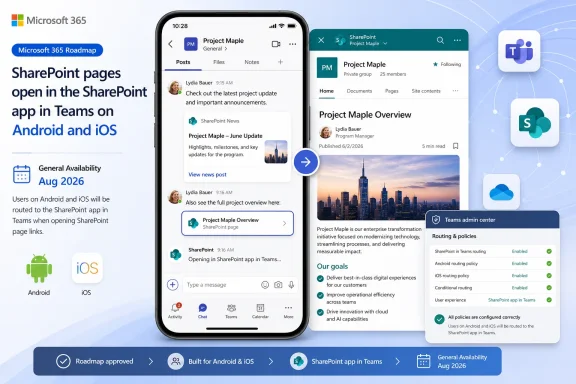
Roadmap ID 567314 is Microsoft’s answer to that discontinuity. According to Microsoft’s roadmap entry, when a user who has access to the SharePoint app in Teams clicks a SharePoint page or news link in Teams chat or channels, the link will open inside the SharePoint app in Teams, if that app is available, instead of opening in the mobile browser. The products listed are Microsoft Teams and SharePoint, the platforms are Android and iOS, and the release phase is General Availability.
That last detail matters. This is not described as an experiment for a small preview audience, nor as a desktop-only convenience. Microsoft lists the feature as in development, with General Availability planned for August 2026, and says it applies to Worldwide Standard Multi-Tenant, GCC, GCC High, and DoD cloud instances. In plain English: Microsoft is preparing this as a broad mobile behavior change for both commercial tenants and the U.S. government cloud stack.
The strongest framing is this: Teams is increasingly the mobile front door for Microsoft 365 work, while SharePoint remains the content and intranet layer behind much of that work. This roadmap item tightens that pairing for one specific flow: SharePoint pages and news links shared in Teams chats or channels on Android and iOS. It does not make every SharePoint link a Teams-native experience, and it does not turn Teams into SharePoint. It simply changes the preferred destination for a high-value class of mobile links when the SharePoint app in Teams is available.
A mobile browser may be Safari, Chrome, Edge, or a managed enterprise browser. It has its own profile state, cache, single sign-on behavior, app protection treatment, conditional access path, and user expectations. When Teams sends a SharePoint link to the browser, the user leaves the Teams context and enters whatever mobile web environment the device and tenant happen to provide.
Opening the same item inside the SharePoint app in Teams is different. It keeps the user in the Teams mobile app and routes the experience through an in-Teams Microsoft 365 surface. That can make the flow smoother, especially for mobile-first employees who live in chat and channel notifications. It can also change where support teams look when a user says a SharePoint news post “won’t open,” because the failure path may no longer involve the mobile browser at all.
This is not a claim that browser behavior is wrong or unsupported. It is a recognition that link destinations shape the user journey. If the user is already in Teams, and the content is a SharePoint page or news item shared in a Teams conversation, Microsoft’s planned behavior is to keep that experience in Teams when the SharePoint app path is available.
Roadmap ID 567314 narrows the “where does this link open?” question for one important class of mobile links. SharePoint pages and SharePoint news links clicked from Teams chat or channels should prefer the SharePoint app in Teams, provided the user has access and the app is available. The caveats are not footnotes; they are the administrative story.
SharePoint news is often how organizations publish executive updates, HR notices, policy changes, project announcements, security reminders, and internal campaign material. Those posts may technically live in SharePoint, but they often travel through Teams because that is where employees are already talking. A communications team publishes a news post, someone shares it into a channel, and the mobile user taps from a notification.
If that tap opens a browser, the experience can feel like web publishing stapled onto chat. If it opens inside the SharePoint app in Teams, the experience can feel more like the intranet is part of the Teams mobile workflow. That distinction matters for internal communications, especially in organizations where employees rarely browse the intranet directly but regularly respond to Teams notifications.
The feature is not a publishing revolution. It does not change SharePoint permissions, rewrite news templates, guarantee perfect rendering for every page, or ensure that every employee will read the CEO’s latest update. But it reduces one form of avoidable friction. For organizations that have invested in SharePoint news while relying on Teams as the distribution channel, that is not cosmetic.
There is also a practical training benefit. Many users do not think in Microsoft workload boundaries. They do not care whether a post is “really” SharePoint content, a Teams object, or a web page. They tapped a link in Teams and expect the result to make sense. Roadmap ID 567314 makes that expectation easier to satisfy for SharePoint pages and news on mobile, assuming the required app and access conditions are met.
Availability can mean several things in practice. The user must have access to the SharePoint app in Teams. The Teams mobile client must have received the relevant feature. The tenant must be in a cloud instance where the feature has reached rollout. The SharePoint content itself must be accessible to the user. The link must be the kind of SharePoint page or news link covered by the roadmap item. Teams app policies may also affect whether the SharePoint app is available to a user.
That is why this change is best understood as a routing preference, not a permissions bypass. If a user lacks access to the underlying SharePoint page or news post, opening inside Teams should not grant access. Teams may become the viewing surface, but SharePoint still owns the content and its permissions. Help desks should be ready for both categories of failure: “the app path is not available” and “the content is not available to this user.”
Admins should therefore avoid communicating the change as “SharePoint links will always open in Teams.” Microsoft’s description is narrower and more conditional: SharePoint page and news links clicked in Teams chat or channels by users with access to the SharePoint app in Teams will open in the SharePoint app in Teams, if available, instead of the mobile browser. That is a mouthful, but it is the difference between a successful rollout note and a support-ticket generator.
For GCC, GCC High, and DoD tenants, link-routing changes can intersect with mobile application management, tenant restrictions, identity policies, agency-specific usage rules, and established support procedures. Even when the technical behavior is simple, the validation burden is not. A browser handoff may be part of an established compliance pattern; an in-Teams SharePoint app path may be preferable, but it still needs to be tested and documented.
That is especially true for organizations that have standardized on managed browsers for Microsoft 365 access. If a tenant has trained users that web content opens in a particular managed browser, and Teams begins keeping certain SharePoint page and news links inside Teams, security teams will want to verify how app protection policies, sign-in prompts, copy/paste restrictions, and session controls behave in the new path. The roadmap item does not spell out those controls, so the right posture is preparation rather than assumption.
The upside is straightforward. Keeping SharePoint content inside Teams may reduce context switching and simplify the user journey in environments where users are already authenticated into Teams. It may also reduce support problems caused by browser profile confusion or users opening SharePoint links in unintended browser contexts. But the operational perimeter shifts. The Teams mobile app becomes an even more important container for content that previously might have been handled by the browser stack.
This is Microsoft 365’s modern bargain in miniature. Integration reduces friction for users, but it also makes app boundaries less obvious for administrators. The better the suite feels, the more carefully IT has to understand where one workload ends and another begins.
Verified roadmap facts:
Microsoft appears to want Teams mobile to behave less like a browser launcher for Microsoft 365 content and more like a contained work surface for collaboration and intranet consumption. That interpretation is based on the direction of this roadmap item, not on a quoted Microsoft strategy statement in the roadmap entry. The factual change is narrower: a specific class of SharePoint links on Teams mobile is being routed to the SharePoint app in Teams when available.
That distinction matters because admins should not overread the roadmap item. It does not say Microsoft is removing browser access to SharePoint. It does not say every SharePoint link will open in Teams. It does not say all Office files, PDFs, lists, pages, sites, or external links will follow the same behavior. It says SharePoint page and news links from Teams chats and channels on Android and iOS are getting a new preferred in-Teams destination when the SharePoint app is available.
The strategic direction is still notable, but it should be communicated as interpretation, not as a promise or threat. Microsoft is making one mobile workflow more integrated. Customers should validate that workflow rather than assume a sweeping platform change.
The SharePoint page and news change is narrower and cleaner than many file-opening scenarios. It does not claim to handle every file type. It does not promise to open Office documents in desktop apps. It does not apply to every Teams platform. It is Android and iOS, Teams chat and channels, SharePoint pages and news, the SharePoint app in Teams if available.
That narrowness is a strength. It gives admins a clear test matrix. Send a SharePoint news link in a channel on Android. Send the same link in a chat on iOS. Try a user with the SharePoint app in Teams available and a user without it. Try a user with access and a user without access. Confirm whether the fallback is intelligible.
The danger is assuming that because the feature is narrow, it is insignificant. Mobile link routing is one of those areas where small inconsistencies become large support burdens because users cannot easily describe what happened. They will say “Teams opened it wrong,” “SharePoint says I do not have access,” or “it worked on my iPhone but not on my coworker’s Android.” Admins who know the intended path before rollout will diagnose those reports faster.
SharePoint has always had a visibility problem. It is powerful, but users often experience it only as a place a link goes, a file lives, or a permissions error appears. Teams, by contrast, is where the notification arrives. Microsoft has spent years trying to collapse that gap, but the gap still appears whenever a SharePoint link behaves like an external web excursion.
By routing SharePoint page and news links into the SharePoint app in Teams, Microsoft gives intranet content a more native distribution channel. The news post does not feel like a separate website. It feels like something the user can consume inside the Teams mobile workflow. For employees who rarely open SharePoint directly, that may be the difference between SharePoint being “the intranet” in theory and being part of their daily mobile routine.
This is particularly relevant for frontline and field workforces. Many such employees do not sit at Windows desktops all day, and their relationship with Microsoft 365 may be almost entirely mobile. If corporate news, policy updates, shift-related announcements, or department pages are distributed through Teams, the mobile path is the product. A smoother SharePoint-in-Teams experience could make SharePoint publishing more valuable without requiring employees to learn a separate destination.
It also gives communications teams a more defensible answer to the classic complaint that SharePoint is too far from where people work. If a news link posted in Teams opens inside the Teams mobile experience, the distribution and consumption loop tightens. The content still lives in SharePoint, but the audience does not have to think about that boundary as often.
That is the direction Microsoft 365 often appears to favor: workloads remain distinct for administration and data architecture, while the user experience becomes more composable. Teams is the shell in this particular flow; SharePoint is the content service; the browser becomes optional when the supported in-Teams app path exists.
Some organizations restrict Teams apps. Some have custom app policies. Some users may not have the SharePoint app in Teams exposed. Some SharePoint pages may include web parts or embedded content that behave differently inside Teams than in a full mobile browser. Some conditional access or app protection expectations may have been written around browser-based SharePoint access. Some users may prefer the browser because they rely on browser-level features, saved profiles, or external sharing flows.
Microsoft’s roadmap description does not answer those edge cases. It gives the intended primary behavior. That is normal for a roadmap entry, but it means admins should resist the urge to over-document before testing.
The most likely source of confusion will be inconsistent behavior between link types. A SharePoint news link may open inside the SharePoint app in Teams. A Word document link may follow a different Microsoft 365 file-opening preference. A non-Office web link may follow another path. A PDF may behave differently depending on tenant policy, app state, and mobile platform. Users do not categorize links by Microsoft workload taxonomy; they just tap blue text.
That is where IT communication needs to be precise without becoming absurdly technical. A good user-facing note might say that Teams mobile is being updated so certain SharePoint pages and news posts shared in chats or channels can open directly inside Teams rather than switching to a browser. It should not promise that all SharePoint, OneDrive, Office, PDF, or external links will behave the same way.
The other risk is troubleshooting opacity. If the in-Teams SharePoint app renders a page poorly, the user may not know whether to report it as a Teams issue, a SharePoint issue, a mobile app issue, or a permissions issue. Internally, admins should treat this as a cross-workload feature. The support owner may be Teams, but the content owner may be SharePoint, and the policy owner may be endpoint management or identity.
Microsoft 365’s greatest strength is integration. Its greatest support weakness is also integration.
Modern productivity suites win or lose on the accumulation of these small moments. Does the link open where the user expects? Does the user remain signed in? Does the page render inside the app they are already using? Does the experience preserve enough context that the employee actually reads the announcement, completes the task, or returns to the conversation?
For Microsoft, the answer increasingly involves Teams. The company has every incentive to make Teams the place where work starts, continues, and loops back on itself. SharePoint content is too central to Microsoft 365 to remain a browser detour on mobile whenever Microsoft can provide a supported in-Teams route.
For customers, the answer is more nuanced. Many will welcome the reduced friction. Some will need to validate controls. A few may discover that their SharePoint pages were designed with browser assumptions that do not hold inside Teams mobile. Nearly all should treat the August 2026 General Availability target as a prompt to test, not merely a date to note.
 Microsoft Is Closing the Mobile Escape Hatch
For years, one of the quiet frustrations of Microsoft 365 has been that its products are deeply integrated in architecture but unevenly integrated in daily use. Teams stores files in SharePoint, channels can surface SharePoint pages as tabs, and SharePoint remains the publishing system behind a great deal of corporate communication. Yet a simple tap on a SharePoint news post in a Teams mobile conversation could still push the user out to a mobile browser, breaking context at exactly the moment the platform was supposed to feel unified.Roadmap ID 567314 is Microsoft’s answer to that discontinuity. According to Microsoft’s roadmap entry, when a user who has access to the SharePoint app in Teams clicks a SharePoint page or news link in Teams chat or channels, the link will open inside the SharePoint app in Teams, if that app is available, instead of opening in the mobile browser. The products listed are Microsoft Teams and SharePoint, the platforms are Android and iOS, and the release phase is General Availability.
That last detail matters. This is not described as an experiment for a small preview audience, nor as a desktop-only convenience. Microsoft lists the feature as in development, with General Availability planned for August 2026, and says it applies to Worldwide Standard Multi-Tenant, GCC, GCC High, and DoD cloud instances. In plain English: Microsoft is preparing this as a broad mobile behavior change for both commercial tenants and the U.S. government cloud stack.
The strongest framing is this: Teams is increasingly the mobile front door for Microsoft 365 work, while SharePoint remains the content and intranet layer behind much of that work. This roadmap item tightens that pairing for one specific flow: SharePoint pages and news links shared in Teams chats or channels on Android and iOS. It does not make every SharePoint link a Teams-native experience, and it does not turn Teams into SharePoint. It simply changes the preferred destination for a high-value class of mobile links when the SharePoint app in Teams is available.
The Browser Was Never Just a Browser
The temptation is to treat this as a minor default change. A link opens here instead of there; users tap, read, and move on. But in Microsoft 365, link routing is policy, identity, user experience, and support workflow disguised as plumbing.A mobile browser may be Safari, Chrome, Edge, or a managed enterprise browser. It has its own profile state, cache, single sign-on behavior, app protection treatment, conditional access path, and user expectations. When Teams sends a SharePoint link to the browser, the user leaves the Teams context and enters whatever mobile web environment the device and tenant happen to provide.
Opening the same item inside the SharePoint app in Teams is different. It keeps the user in the Teams mobile app and routes the experience through an in-Teams Microsoft 365 surface. That can make the flow smoother, especially for mobile-first employees who live in chat and channel notifications. It can also change where support teams look when a user says a SharePoint news post “won’t open,” because the failure path may no longer involve the mobile browser at all.
This is not a claim that browser behavior is wrong or unsupported. It is a recognition that link destinations shape the user journey. If the user is already in Teams, and the content is a SharePoint page or news item shared in a Teams conversation, Microsoft’s planned behavior is to keep that experience in Teams when the SharePoint app path is available.
Roadmap ID 567314 narrows the “where does this link open?” question for one important class of mobile links. SharePoint pages and SharePoint news links clicked from Teams chat or channels should prefer the SharePoint app in Teams, provided the user has access and the app is available. The caveats are not footnotes; they are the administrative story.
SharePoint News Is Becoming a More Native Teams Mobile Surface
The most strategically important word in the roadmap description is not “link.” It is “news.”SharePoint news is often how organizations publish executive updates, HR notices, policy changes, project announcements, security reminders, and internal campaign material. Those posts may technically live in SharePoint, but they often travel through Teams because that is where employees are already talking. A communications team publishes a news post, someone shares it into a channel, and the mobile user taps from a notification.
If that tap opens a browser, the experience can feel like web publishing stapled onto chat. If it opens inside the SharePoint app in Teams, the experience can feel more like the intranet is part of the Teams mobile workflow. That distinction matters for internal communications, especially in organizations where employees rarely browse the intranet directly but regularly respond to Teams notifications.
The feature is not a publishing revolution. It does not change SharePoint permissions, rewrite news templates, guarantee perfect rendering for every page, or ensure that every employee will read the CEO’s latest update. But it reduces one form of avoidable friction. For organizations that have invested in SharePoint news while relying on Teams as the distribution channel, that is not cosmetic.
There is also a practical training benefit. Many users do not think in Microsoft workload boundaries. They do not care whether a post is “really” SharePoint content, a Teams object, or a web page. They tapped a link in Teams and expect the result to make sense. Roadmap ID 567314 makes that expectation easier to satisfy for SharePoint pages and news on mobile, assuming the required app and access conditions are met.
The “If Available” Clause Is Where Admins Should Look First
Microsoft’s wording is careful: the link opens inside the SharePoint app in Teams “if available.” That phrase should stop every admin from assuming the August 2026 rollout will simply work for every user on day one.Availability can mean several things in practice. The user must have access to the SharePoint app in Teams. The Teams mobile client must have received the relevant feature. The tenant must be in a cloud instance where the feature has reached rollout. The SharePoint content itself must be accessible to the user. The link must be the kind of SharePoint page or news link covered by the roadmap item. Teams app policies may also affect whether the SharePoint app is available to a user.
That is why this change is best understood as a routing preference, not a permissions bypass. If a user lacks access to the underlying SharePoint page or news post, opening inside Teams should not grant access. Teams may become the viewing surface, but SharePoint still owns the content and its permissions. Help desks should be ready for both categories of failure: “the app path is not available” and “the content is not available to this user.”
Admins should therefore avoid communicating the change as “SharePoint links will always open in Teams.” Microsoft’s description is narrower and more conditional: SharePoint page and news links clicked in Teams chat or channels by users with access to the SharePoint app in Teams will open in the SharePoint app in Teams, if available, instead of the mobile browser. That is a mouthful, but it is the difference between a successful rollout note and a support-ticket generator.
| Scenario | Before the planned change | Planned behavior under Roadmap ID 567314 | Admin concern |
|---|---|---|---|
| Teams mobile on Android | SharePoint page or news links from chat or channels could open in the mobile browser | Opens inside the SharePoint app in Teams, if available | Confirm app availability, mobile client state, and user access |
| Teams mobile on iOS | SharePoint page or news links from chat or channels could open in the mobile browser | Opens inside the SharePoint app in Teams, if available | Test sign-in, rendering, app protection behavior, and managed-device behavior |
| SharePoint app in Teams unavailable | Browser behavior may continue | Browser fallback may still be used when the SharePoint app in Teams is not available | Update help-desk scripts to handle both paths |
| User lacks SharePoint content permission | Browser may show an access or sign-in issue | Teams-hosted experience should still respect SharePoint access | Do not treat Teams routing as a permissions fix |
| Different link type | Behavior depends on the link and app context | Roadmap item does not promise the same behavior for every file, PDF, list, or external link | Keep user messaging specific to SharePoint pages and news |
Concise Admin Test Procedure
Admins do not need to wait until a flood of tickets arrives to understand the behavior. Once the feature appears in a tenant or targeted test group, validate it with a small matrix before sending broad user guidance.- Confirm the Teams app policy path. In the Teams admin center, review the relevant app permission policies and app setup policies for the test users. Make sure the SharePoint app in Teams is allowed and, if your organization pins or controls apps through setup policies, confirm whether the app is visible or available to the intended population.
- Prepare two SharePoint test items. Use one SharePoint news post and one SharePoint page that the test user can access. Also prepare a second page or news post that a separate test user does not have permission to access, so the permission failure path can be verified.
- Validate from Teams mobile chat. On Android and iOS, send the SharePoint page link and the SharePoint news link in a Teams chat. Tap each link from the Teams mobile client and confirm whether it opens inside the SharePoint app in Teams when the app is available.
- Validate from Teams mobile channels. Repeat the same test from a channel post. Roadmap ID 567314 covers links clicked from Teams chat or channels, so both paths should be checked.
- Test app-unavailable behavior. Use a test account or policy assignment where the SharePoint app in Teams is not available. The expected fallback is that the link should not open in the SharePoint app in Teams; in practical terms, admins should expect browser-style behavior or another non-SharePoint-app path rather than assuming a hard failure. Document the actual result in your tenant.
- Test permission-denied behavior. Use a user who can open Teams but lacks access to the SharePoint content. The expected result is that Teams routing should not bypass SharePoint permissions. The user should encounter an access problem or request-access flow rather than seeing the content.
- Record the support script. Capture screenshots or short notes for the successful in-Teams path, the app-unavailable fallback path, and the permission-denied path. Help-desk agents should know which outcome points to Teams app policy, which points to SharePoint permissions, and which points to mobile client rollout or app state.
Government Cloud Inclusion Makes This More Than a Convenience Feature
The roadmap entry’s cloud list is important because it includes Worldwide Standard Multi-Tenant, GCC, GCC High, and DoD. That means Microsoft is not positioning this only as a convenience for commercial tenants with relatively simple mobile fleets. It is also putting the change on the path for regulated and government environments where Teams and SharePoint behavior is scrutinized more heavily.For GCC, GCC High, and DoD tenants, link-routing changes can intersect with mobile application management, tenant restrictions, identity policies, agency-specific usage rules, and established support procedures. Even when the technical behavior is simple, the validation burden is not. A browser handoff may be part of an established compliance pattern; an in-Teams SharePoint app path may be preferable, but it still needs to be tested and documented.
That is especially true for organizations that have standardized on managed browsers for Microsoft 365 access. If a tenant has trained users that web content opens in a particular managed browser, and Teams begins keeping certain SharePoint page and news links inside Teams, security teams will want to verify how app protection policies, sign-in prompts, copy/paste restrictions, and session controls behave in the new path. The roadmap item does not spell out those controls, so the right posture is preparation rather than assumption.
The upside is straightforward. Keeping SharePoint content inside Teams may reduce context switching and simplify the user journey in environments where users are already authenticated into Teams. It may also reduce support problems caused by browser profile confusion or users opening SharePoint links in unintended browser contexts. But the operational perimeter shifts. The Teams mobile app becomes an even more important container for content that previously might have been handled by the browser stack.
This is Microsoft 365’s modern bargain in miniature. Integration reduces friction for users, but it also makes app boundaries less obvious for administrators. The better the suite feels, the more carefully IT has to understand where one workload ends and another begins.
Verified Roadmap Facts vs. Strategic Interpretation
It is worth separating what Microsoft has stated from what the change appears to mean.Verified roadmap facts:
- Microsoft added Roadmap ID 567314 on July 8, 2026.
- The roadmap item applies to Microsoft Teams and SharePoint.
- The listed platforms are Android and iOS.
- The release phase is General Availability.
- The roadmap item is listed as in development.
- The planned General Availability timing is August 2026.
- The listed cloud instances are Worldwide Standard Multi-Tenant, GCC, GCC High, and DoD.
- The described behavior is that SharePoint page and news links clicked from Teams chat or channels will open in the SharePoint app in Teams, if available, rather than in the mobile browser.
Microsoft appears to want Teams mobile to behave less like a browser launcher for Microsoft 365 content and more like a contained work surface for collaboration and intranet consumption. That interpretation is based on the direction of this roadmap item, not on a quoted Microsoft strategy statement in the roadmap entry. The factual change is narrower: a specific class of SharePoint links on Teams mobile is being routed to the SharePoint app in Teams when available.
That distinction matters because admins should not overread the roadmap item. It does not say Microsoft is removing browser access to SharePoint. It does not say every SharePoint link will open in Teams. It does not say all Office files, PDFs, lists, pages, sites, or external links will follow the same behavior. It says SharePoint page and news links from Teams chats and channels on Android and iOS are getting a new preferred in-Teams destination when the SharePoint app is available.
The strategic direction is still notable, but it should be communicated as interpretation, not as a promise or threat. Microsoft is making one mobile workflow more integrated. Customers should validate that workflow rather than assume a sweeping platform change.
The Desktop Story Is a Warning, Not a Template
One reason admins should pay attention now is that Microsoft 365 has already shown how complicated link-opening preferences can become across apps and devices. Different Microsoft 365 links can behave differently depending on file type, app availability, client platform, user preference, tenant configuration, account context, and rollout state. Users experience all of that as one simple question: “Why did this link open there?”The SharePoint page and news change is narrower and cleaner than many file-opening scenarios. It does not claim to handle every file type. It does not promise to open Office documents in desktop apps. It does not apply to every Teams platform. It is Android and iOS, Teams chat and channels, SharePoint pages and news, the SharePoint app in Teams if available.
That narrowness is a strength. It gives admins a clear test matrix. Send a SharePoint news link in a channel on Android. Send the same link in a chat on iOS. Try a user with the SharePoint app in Teams available and a user without it. Try a user with access and a user without access. Confirm whether the fallback is intelligible.
The danger is assuming that because the feature is narrow, it is insignificant. Mobile link routing is one of those areas where small inconsistencies become large support burdens because users cannot easily describe what happened. They will say “Teams opened it wrong,” “SharePoint says I do not have access,” or “it worked on my iPhone but not on my coworker’s Android.” Admins who know the intended path before rollout will diagnose those reports faster.
The Real Winner Is the Corporate Intranet
The obvious beneficiary is Teams mobile. The less obvious beneficiary is SharePoint as an intranet product.SharePoint has always had a visibility problem. It is powerful, but users often experience it only as a place a link goes, a file lives, or a permissions error appears. Teams, by contrast, is where the notification arrives. Microsoft has spent years trying to collapse that gap, but the gap still appears whenever a SharePoint link behaves like an external web excursion.
By routing SharePoint page and news links into the SharePoint app in Teams, Microsoft gives intranet content a more native distribution channel. The news post does not feel like a separate website. It feels like something the user can consume inside the Teams mobile workflow. For employees who rarely open SharePoint directly, that may be the difference between SharePoint being “the intranet” in theory and being part of their daily mobile routine.
This is particularly relevant for frontline and field workforces. Many such employees do not sit at Windows desktops all day, and their relationship with Microsoft 365 may be almost entirely mobile. If corporate news, policy updates, shift-related announcements, or department pages are distributed through Teams, the mobile path is the product. A smoother SharePoint-in-Teams experience could make SharePoint publishing more valuable without requiring employees to learn a separate destination.
It also gives communications teams a more defensible answer to the classic complaint that SharePoint is too far from where people work. If a news link posted in Teams opens inside the Teams mobile experience, the distribution and consumption loop tightens. The content still lives in SharePoint, but the audience does not have to think about that boundary as often.
That is the direction Microsoft 365 often appears to favor: workloads remain distinct for administration and data architecture, while the user experience becomes more composable. Teams is the shell in this particular flow; SharePoint is the content service; the browser becomes optional when the supported in-Teams app path exists.
Where This Could Go Wrong
The risk is not that the feature is conceptually bad. The risk is that Microsoft 365 tenants are full of exceptions.Some organizations restrict Teams apps. Some have custom app policies. Some users may not have the SharePoint app in Teams exposed. Some SharePoint pages may include web parts or embedded content that behave differently inside Teams than in a full mobile browser. Some conditional access or app protection expectations may have been written around browser-based SharePoint access. Some users may prefer the browser because they rely on browser-level features, saved profiles, or external sharing flows.
Microsoft’s roadmap description does not answer those edge cases. It gives the intended primary behavior. That is normal for a roadmap entry, but it means admins should resist the urge to over-document before testing.
The most likely source of confusion will be inconsistent behavior between link types. A SharePoint news link may open inside the SharePoint app in Teams. A Word document link may follow a different Microsoft 365 file-opening preference. A non-Office web link may follow another path. A PDF may behave differently depending on tenant policy, app state, and mobile platform. Users do not categorize links by Microsoft workload taxonomy; they just tap blue text.
That is where IT communication needs to be precise without becoming absurdly technical. A good user-facing note might say that Teams mobile is being updated so certain SharePoint pages and news posts shared in chats or channels can open directly inside Teams rather than switching to a browser. It should not promise that all SharePoint, OneDrive, Office, PDF, or external links will behave the same way.
The other risk is troubleshooting opacity. If the in-Teams SharePoint app renders a page poorly, the user may not know whether to report it as a Teams issue, a SharePoint issue, a mobile app issue, or a permissions issue. Internally, admins should treat this as a cross-workload feature. The support owner may be Teams, but the content owner may be SharePoint, and the policy owner may be endpoint management or identity.
Microsoft 365’s greatest strength is integration. Its greatest support weakness is also integration.
Action checklist for admins
- Identify whether the SharePoint app in Teams is available to the users and policies that will receive the change.
- Review Teams app permission policies and app setup policies for affected users, especially if your tenant restricts or curates Teams apps.
- Test SharePoint page and news links from both Teams chats and channels on Android and iOS before broad user messaging.
- Validate behavior for users with content access, users without content access, and users assigned to different Teams app policies.
- Confirm the fallback behavior when the SharePoint app in Teams is unavailable; do not assume the fallback until it is observed in your tenant.
- Check whether managed-device, app protection, conditional access, and browser-related policies assume SharePoint opens in a mobile browser.
- Update help-desk scripts to distinguish SharePoint page/news links from Office file links, PDFs, lists, and external web links.
- Prepare a short user-facing note that says “certain SharePoint pages and news posts” rather than “all SharePoint links.”
A Small Roadmap Entry With a Large Adoption Shadow
The notable thing about Roadmap ID 567314 is how unflashy it is. No Copilot branding is required. No sweeping redesign is promised. No admin console overhaul is described. It is a routing change, and that is precisely why it matters.Modern productivity suites win or lose on the accumulation of these small moments. Does the link open where the user expects? Does the user remain signed in? Does the page render inside the app they are already using? Does the experience preserve enough context that the employee actually reads the announcement, completes the task, or returns to the conversation?
For Microsoft, the answer increasingly involves Teams. The company has every incentive to make Teams the place where work starts, continues, and loops back on itself. SharePoint content is too central to Microsoft 365 to remain a browser detour on mobile whenever Microsoft can provide a supported in-Teams route.
For customers, the answer is more nuanced. Many will welcome the reduced friction. Some will need to validate controls. A few may discover that their SharePoint pages were designed with browser assumptions that do not hold inside Teams mobile. Nearly all should treat the August 2026 General Availability target as a prompt to test, not merely a date to note.
The Practical Read for WindowsForum Readers
For Windows and Microsoft 365 admins, the useful lesson is not “Microsoft changed a link default.” It is that Microsoft is continuing to reduce the distance between Teams and SharePoint on mobile, and that link behavior is now part of the managed user experience.- Roadmap ID 567314 was added on July 8, 2026.
- The roadmap item is currently listed as in development.
- General Availability is planned for August 2026.
- The affected platforms are Android and iOS, not Windows desktop.
- The covered link types are SharePoint pages and SharePoint news links clicked from Teams chat or channels.
- The planned destination is the SharePoint app in Teams, when available.
- The listed cloud environments are Worldwide Standard Multi-Tenant, GCC, GCC High, and DoD.
- The change should be treated as conditional routing, not a permissions change.
- Admins should validate Teams app policy, SharePoint content permissions, mobile client behavior, and fallback behavior before announcing the change broadly.
References
- Primary source: Microsoft 365 Roadmap
Published: 2026-07-08T23:10:57.8991775Z
Loading…
www.microsoft.com - Official source: learn.microsoft.com
Loading…
learn.microsoft.com - Official source: support.microsoft.com
Loading…
support.microsoft.com - Official source: answers.microsoft.com
Loading…
answers.microsoft.com - Related coverage: thegeekpage.com
Loading…
thegeekpage.com - Official source: techcommunity.microsoft.com
Loading…
techcommunity.microsoft.com
- Related coverage: sharepoint.stackexchange.com
Loading…
sharepoint.stackexchange.com - Related coverage: realitypathing.com
Loading…
realitypathing.com - Related coverage: stackoverflow.com
Loading…
stackoverflow.com - Related coverage: windowscentral.com
Microsoft Teams to suggest Edge as the default mobile browser | Windows Central
Microsoft is rolling out a new Teams setting to smartphones that asks users to choose a browser when opening links, but it's promoting Edge as the default.www.windowscentral.com - Related coverage: tomsguide.com
Microsoft won’t stop trying to make Edge happen — now it’s coming to Teams, but there is a quick fix | Tom's Guide
Microsoft just found another way to 'encourage' you to use Edge in Teams, but there's a quick fixwww.tomsguide.com - Official source: adoption.microsoft.com
Loading…
adoption.microsoft.com - Related coverage: petri.com
Loading…
petri.com - Official source: devblogs.microsoft.com
Loading…
devblogs.microsoft.com - Related coverage: neowin.net
Loading…
www.neowin.net - Related coverage: sharepointstuff.com
Loading…
sharepointstuff.com - Related coverage: supersimple365.com
Loading…
supersimple365.com - Related coverage: nubis365.com
</rdf:Alt> </dc:title> <dc:description> <rdf:Alt> <rdf:li xml:lang="x-default"/> </rdf:Alt> </dc:description> <dc:creator> <rdf:Seq> <rdf:li>Mike Wi
</rdf:Alt> </dc:description> <dc:creator> <rdf:Seq> <rdf:li>Mike Windsornubis365.com
- Official source: cdn-dynmedia-1.microsoft.com
- Related coverage: techriver.com